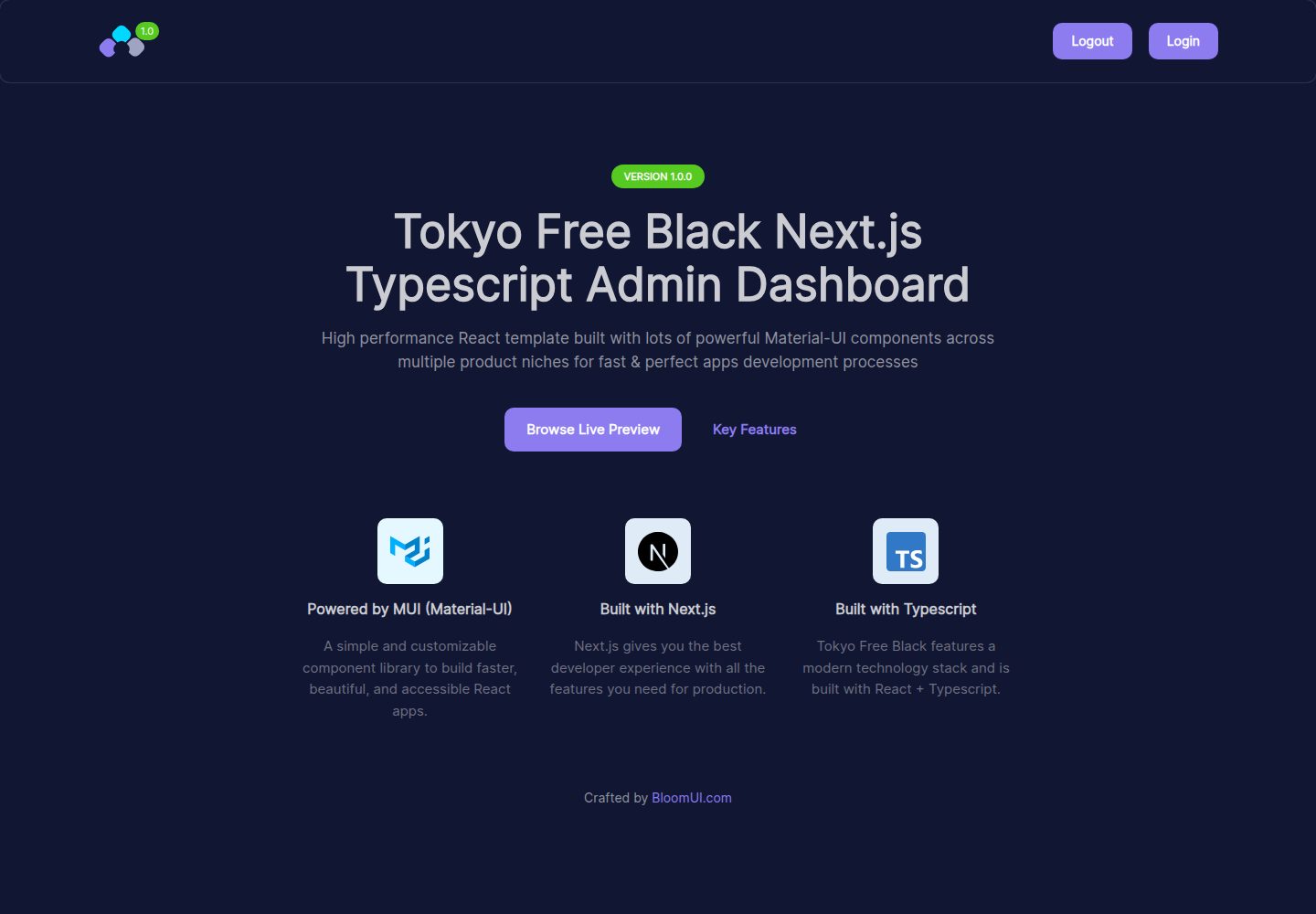
基于 Next.js、TypeScript 与 React 构建
Next.jsReact后台
nextjs-template-admin — Next.js 后台模板
作者 JPCenz
Tokyo Free Black 是一个基于 Next.js、TypeScript、React 与 Material-UI 的免费后台管理面板模板,采用深色配色方案,由 BloomUI 发布,提供免费 JavaScript 版本与付费 PRO 版本。
看看你的网站会是什么样
浏览真实页面截图,比较内容排版与手机效果。点击下方缩略图切换,放大查看整页细节。
全部页面与视图 2
截图用于了解视觉与布局,交互效果请以实际项目为准。
采集于 2026-10-13查看来源
值得关注的模板亮点
从已有项目资料中,快速了解它的特点。
在 Material-UI 之上定制多个组件
采用深色配色方案的后台管理面板设计
提供免费 JavaScript 版本
另有包含更多组件与功能的付费 PRO 版本
README 称依赖会持续更新至最新稳定版本并通过邮箱通知
模板详细介绍
该模板是 BloomUI 出品的 Tokyo Free Black Typescript Next.js Admin Dashboard,基于 Next.js、TypeScript 和 React 构建,并在 Material-UI 之上定制了多个组件。README 说明其采用深色配色方案,包含多套页面与流程,并称会持续将依赖更新至最新稳定版本,更新时通过下载时使用的邮箱通知用户。
README 未逐一列出具体页面、组件或功能清单,只建议通过在线预览了解模板提供的全部特性;也未提供依赖清单,因此无法核对具体框架版本号。模板提供免费 JavaScript 版本,另有功能更多的付费 PRO 版本,PRO 版本需从 bloomui.com 获取。
快速开始步骤为:确认安装最新稳定版 Node.js 与 NPM,克隆仓库,在项目目录执行 npm install 安装依赖,然后运行 yarn dev 启动开发服务器,浏览器会在 http://localhost:3000 打开实时预览。README 中克隆命令指向 bloomui/tokyo-free-black-nextjs-admin-dashboard 仓库,与本模板来源仓库地址不同。技术支持通过发送邮件至 [email protected] 提交工单。
Next.js后台
适合你的项目吗?
适用场景
- 搭建需要深色主题的后台管理界面
- 以 TypeScript 方式开发基于 Next.js 与 Material-UI 的管理端项目
- 作为后台面板的起始模板进行二次开发
- 偏好 JavaScript 时改用其免费 JavaScript 版本
适合人群
- 使用 Next.js、TypeScript 与 React 的开发者
- 需要 Material-UI 组件基础的后台项目
- 希望从现成深色主题管理模板起步的团队
上手与定制指南
结合仓库当前版本的说明,按下面的资料检查内容、配置与运行要求。
- 1
需先安装最新稳定版本的 Node.js 与 NPM
- 2
克隆仓库后在项目目录执行 npm install 安装依赖
- 3
安装完成后运行 yarn dev 启动开发服务器
- 4
开发服务器默认在 http://localhost:3000 打开预览
- 5
README 中的克隆命令指向 bloomui/tokyo-free-black-nextjs-admin-dashboard,与本模板来源仓库地址不同
授权与来源资料
使用条件与限制
免费使用 · 保留许可声明本次收录的是公开仓库中采用 MIT 许可的免费版本;免费范围为该版本代码,不代表外部服务或第三方素材免费。
使用时需要遵守
- 允许免费使用、修改、商用和分发该版本代码。
- 分发代码副本或实质性部分时,保留原作者版权声明和完整 MIT 许可声明。
- 代码按现状提供;担保与责任限制以原许可证及适用法律为准。
额外费用与待核对事项
- 项目资料提及可选付费版本或功能;本次仅收录公开免费代码,不包含付费升级。
- 演示图片、字体、图标及其他第三方素材需按各自许可核对,不能仅凭代码的 MIT 许可判断。
- 域名、托管、数据库、支付或 AI 等外部服务可能另外收费。
- 模板的付费 PRO 版本包含更多组件、功能与选项,需从 bloomui.com 下载获取;免费版本不包含这些 PRO 专属内容。
- 更新通知会发送到用户最初下载模板时使用的邮箱,因此使用该模板的更新提醒依赖提供邮箱。
- 技术支持需通过发送邮件至 [email protected] 提交工单获取。
查看原文依据
Permission is hereby granted, free of charge
许可证原文
<p>The premium version of this template comes with a lot more components, features and options making it a very powerful friend in your development endeavors. You can download a copy of it from <a href="https://bloomui.com">bloomui.com</a></p>
README 原文
We keep all dependencies updated to their latest stable versions. Each time we release an updated version you will be notified via the email you used to initially download the template.
README 原文
https://github.com/JPCenz/nextjs-template-admin/blob/main/LICENSEhttps://github.com/JPCenz/nextjs-template-admin/blob/main/README.mdYou can open a support ticket by sending an email here: <a href="mailto:[email protected]" title="Open Support Ticket">
README 原文
DeepSeek 根据仓库许可证和 README 整理 ·2026-10-13。结果仅覆盖已读取资料,依赖、图片、字体及后续条款变更以各自原文为准。
项目核对记录与介绍依据
模板资料
- 来源平台
- GitHub
- 资料与维护参考分
- 资料一般 · 72 / 100
- 技术栈
- Next.js · React
- 网站类型
- 后台
这个分数如何计算
本站按许可资料(最高30分)、演示链接(12分)、预览图(10分)、Star数(15分)、记录的维护时间(15分)、描述完整度(8分)、功能记录(5分)和分类资料(5分)计算。它不是代码、安全或性能测试,也不是 Google 评分;有链接不代表已实测可用。
这个项目需要核对什么
- 记录的仓库更新时间
- 2026-06-17
- 截图检查日期
- 2026-10-13
已收录演示链接。请用你的内容与屏幕尺寸检查;有演示不代表表单、认证或支付已经可用。
目录记录的主要技术栈是 Next.js。请通过依赖清单和锁文件核对实际版本与托管要求。这些说明基于收录资料,不代表代码审计或部署实测。
查看具体选型方法 →介绍的制作与核对状态
介绍由 AI 辅助整理目录与仓库资料。仓库作者不等于这篇介绍的审核者。
审核声明: codex-user-requested-batch-review-20261015 · 2026-10-15
查看当时使用的来源资料
SHA-256: b2e3d8f0e74402625352b4424e681e1bd8e3c44cee07b5a1b7cacd69672444b6
2026-10-13T17:22:58.991Z
来源文件 / 仓库<p align="center">
<a href="https://bloomui.com" title="BloomUI.com">
<img src="https://bloomui.s3.us-east-2.amazonaws.com/tokyo-logo.png" alt="Tokyo Free Black Typescript Next.js Admin Dashboard">
</a>
</p>
<h1 align="center">
<b>Tokyo Free Black Typescript Next.js Admin Dashboard</b>
<br>
<a href="https://twitter.com/intent/tweet?url=https://bloomui.com&text=I like this Next.js admin dashboard">
<img src="https://img.shields.io/twitter/url/http/shields.io.svg?style=social" />
</a>
</h1>
<div align="center">


<a href="https://bloomui.com/product/tokyo-free-black-nextjs-typescript-material-ui-admin-dashboard/"><img src="https://bloomui.s3.us-east-2.amazonaws.com/tokyo-free-black-nextjs-typescript-material-ui-admin-dashboard.jpg" /></a>
</div>
<a href="https://bloomui.com/product/tokyo-free-black-nextjs-typescript-material-ui-admin-dashboard/"><h3>Free Material-UI Next.js Typescript Dashboard Template with Dark Color Scheme</h3></a>
<p>
Tokyo Free Black Next.js Typescript Dashboard is built using the latest industry standards and features a clean and premium design style, making use of colors and accents to improve the user experience for all included flows and pages.
</p>
<p>
It is powered by Next.js, Typescript and React and contains multiple components customized on top of Material-UI – which is one of the best UI components frameworks available.</p>
<p>
We keep all dependencies updated to their latest stable versions. Each time we release an updated version you will be notified via the email you used to initially download the template.
</p>
<p>
To discover all the features that this free React admin template has to offer, we suggest visiting the live preview we’ve set up.
</p>
<p>There is also a free Javascript version available, if that is what you prefer working with.</p>
---
<h3>Updrade to PRO</h3>
<p>The premium version of this template comes with a lot more components, features and options making it a very powerful friend in your development endeavors. You can download a copy of it from <a href="https://bloomui.com">bloomui.com</a></p>
---
<h2>
Quick Start
</h2>
<ol>
<li>Make sure you have the latest stable versions for Node.js and NPM installed</li>
<li>Clone repository: <code>git clone https://github.com/bloomui/tokyo-free-black-nextjs-admin-dashboard.git</code></li>
<li>Install dependencies: Run <code>npm install</code> inside the project folder</li>
<li>Start dev server: After the install finishes, run <code>yarn dev</code>. A browser window will open on http://localhost:3000 where you''ll see the live preview</li>
</ol>
---
<h2>
Technical Support
</h2>
<p>
You can open a support ticket by sending an email here: <a href="mailto:[email protected]" title="Open Support Ticket">
[email protected]
</a>
</p>
看看同类模板
对比同技术栈与用途的模板,找到更适合的视觉与内容结构。

next-shadcn-dashboard-starter
Free, open source, AI-friendly admin dashboard template built with Next.js 16, shadcn/ui, Tailwind CSS, and Ty…
Next.js · 后台

Studio Admin · Radix UI
Modern Admin Dashboard Template built with Shadcn UI and Next.js 16
Next.js · 后台

free-nextjs-admin-dashboard
TailAdmin is a Next.js and Tailwind CSS free, open-source admin dashboard template. Provides developers with t…
Next.js · 后台

materio-mui-nextjs-admin-template-free
An enterprise-grade Next.js admin dashboard template. Made with developer experience first: Next.js v14 (App R…
Next.js · 后台
nextjs-postgres-nextauth-tailwindcss-template
Admin dashboard template.
Next.js · 后台

shadcn-dashboard-landing-template
Accelerate your development with a sleek, open-source admin dashboard and landing page built on Vite-React, Ne…
Next.js · 后台