Posts and case studies are written in MDX, separating content from interface
Next.jsReactBlog
how-i-build — Next.js Blog Template
By Julio0Cesar
A Next.js template for engineering notes sites: write posts and case studies in MDX, support bilingual routing, and read the changelog directly from your own GitHub Releases.
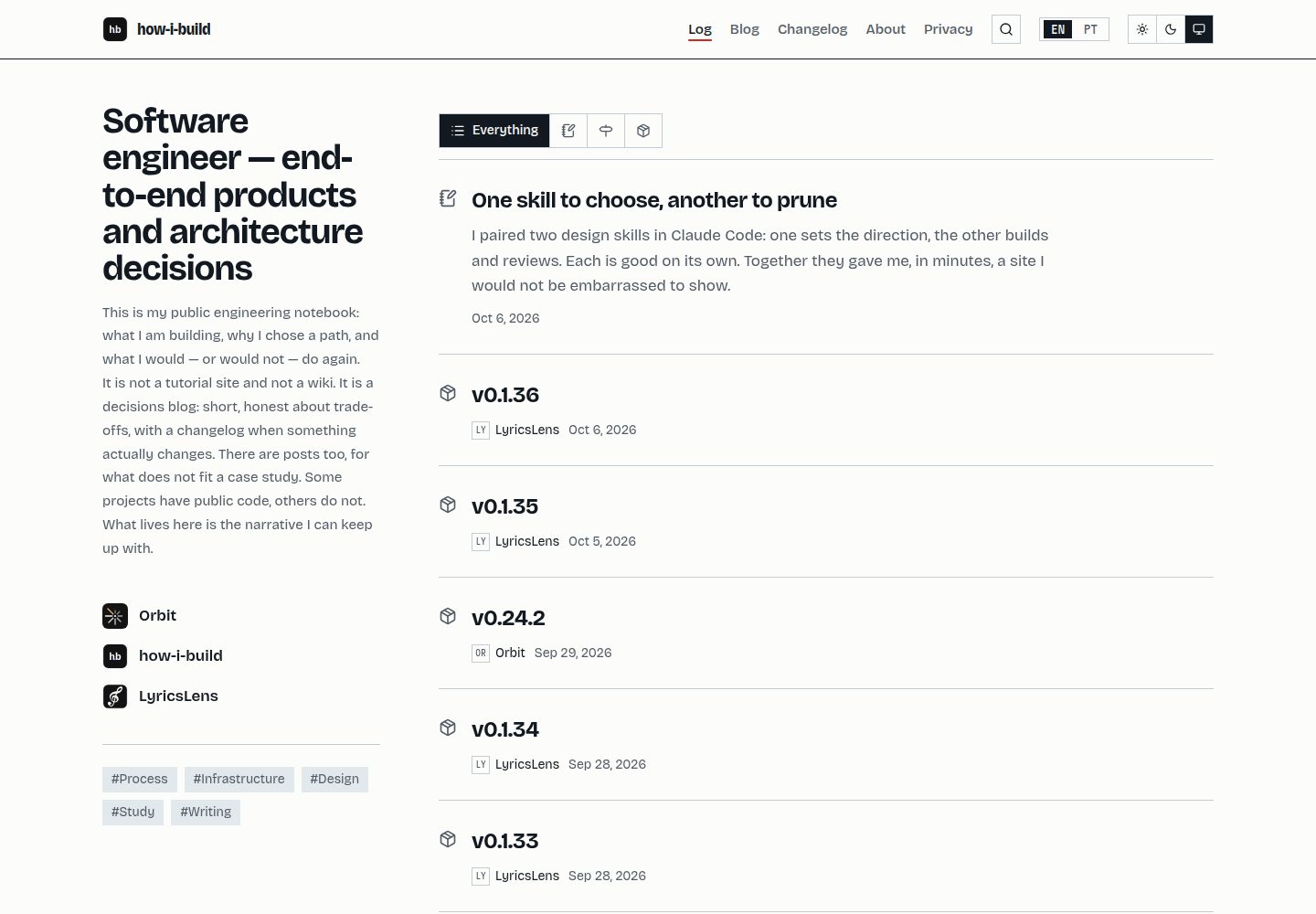
Explore the design
Compare the page layouts and mobile experience. Open any screenshot for a closer look.
Desktop homepage1 / 3
Desktop captureTop of page
Actual screenshot captured by the server browser.
All pages & views 3
Screenshots show visual appearance; interactive behavior may differ.
Recorded 2026-10-06View source
What stands out
A quick read of the recorded project description.
Bilingual routing: the default language has no prefix, /en redirects to the root path, and each language has an indexable address
The changelog reads directly from your own GitHub Releases, with release-please managing versions
Share preview images are generated by opengraph-image.tsx based on the site name and tagline, and post covers can override them
Dictionaries and content are checked for completeness: missing translation keys or case studies cause type checking or build failures
The template and site live in separate repositories; template updates flow into the site via git merge template/main
Template Details
how-i-build is a site template for engineering notes, with content organized as MDX and including posts and case studies. The site supports two languages, distinguished by /[locale] routes; the default language has no prefix, and /en redirects to the root path, giving every page a unique address in each language. The changelog is not maintained separately; it is read from your own GitHub Releases, with version releases driven by release-please.
Customization entry points are concentrated in a few places: site configuration in src/config/site.ts, written content in src/content/, interface copy in src/i18n/dictionaries.ts, colors and fonts in src/app/globals.css, and site icons in public/. Share link preview images are generated dynamically by opengraph-image.tsx based on the site name and tagline; if a post has a cover image, it overrides the generated result.
There are some clear usage constraints. Building requires network access because next/font/google downloads fonts during next build. Do not force the Bun runtime to execute next build, or it will crash during the exit phase after a successful build. typecheck first generates Next's route types, then runs tsc, and finally checks whether content for each language is complete; running tsc alone on a fresh clone will fail. Adding a language only requires one line in site.ts, but all translations for existing case studies must be completed, otherwise the project will not compile. The release workflow depends on two GitHub repository settings: workflow permissions must be set to read and write with permission to create and approve pull requests, and the merge method must use squash merge. The privacy page describes what the template itself stores (one language cookie, one theme localStorage entry); if analytics tools are added in a fork, that page will no longer match reality, and the template itself does not include a consent banner.
Next.jsReactBlog
Is it right for your project?
Use Cases
- Building a personal engineering notes site to publish technical short posts and project case studies
- A blog that needs Chinese and English content and wants each language to have its own independently shareable address
- Projects that want the changelog to stay in sync with GitHub Releases without manually maintaining change records
- A workflow that uses the template repository as upstream, writes continuously in a separate repository, and receives template updates
Suitable For
- Developers who are used to writing in MDX and are willing to customize by editing source code directly
- Individuals or small teams that need bilingual content and can ensure translation completeness
- Projects that use GitHub Releases as their version release channel
Getting started & customization
Use these recorded setup notes alongside the repository instructions for your chosen version.
- 1
Use Bun to install dependencies and run tasks, but builds are executed by Node; do not force the Bun runtime to run next build, or it will crash after a successful build.
- 2
The build process requires network access; next/font/google downloads fonts during the build.
- 3
In GitHub repository settings, enable read and write workflow permissions and allow creating and approving pull requests, and set the merge method to squash merge; otherwise the release workflow cannot run.
- 4
When replacing site icons, replace the SVG and regenerate the accompanying PNGs; the manifest and iOS depend on these PNGs.
- 5
Adding a language requires configuration in site.ts and completing translations for all existing case studies, otherwise the project will not compile.
License & source material
Usage conditions & limitations
Free to use · keep license noticeThis entry covers the free version in the public repository under the MIT license; the free scope is the code of that version and does not mean external services or third-party assets are free.
Must comply with when using
- You may use, modify, commercialize, and distribute the code of this version for free.
- When distributing copies or substantial portions of the code, retain the original author's copyright notice and the complete MIT license notice.
- The code is provided as is; warranties and limitations of liability are governed by the original license and applicable law.
Additional costs & items to verify
- Demo images, fonts, icons, and other third-party assets must be checked against their respective licenses; the code's MIT license alone is not sufficient to determine this.
- External services such as domains, hosting, databases, payments, or AI may incur separate charges.
- The build process must be online: next/font/google downloads fonts during next build, and a network interruption will cause the build to fail with a module-missing error unrelated to the network.
- Do not force the Bun runtime to execute the build: bun --bun next build or [run] bun = true in bunfig.toml will both crash during the exit phase after a successful build.
- typecheck first generates route types, then runs tsc, and finally verifies that content for each language is complete; running tsc alone on a fresh clone will fail.
- Adding a language requires one line in site.ts, but all translations for existing case studies must be completed, otherwise the project will not compile.
- The release workflow depends on GitHub repository settings: workflow permissions must be set to read and write, and GitHub Actions must be allowed to create and approve pull requests, otherwise the workflow will fail.
- The repository must set the merge method to squash merge, because release notes come from commit subjects, and merge commits would duplicate pull request titles.
- The privacy page only describes what the template itself stores (language cookie and theme localStorage); if analytics tools are added in a fork, that page will no longer be accurate, and the template itself does not include a consent banner.
View Original Text Basis
Permission is hereby granted, free of charge
Original License Text
**The build needs network access.** `next/font/google` downloads the fonts during `next build`, so a connectivity hiccup fails the build with module-not-found errors about generated CSS
Original README
**Do not force the Bun runtime.** Neither `bun --bun next build` nor `[run] bun = true` in `bunfig.toml`
Original README
**`typecheck` does three things**: generates Next's route types, runs `tsc`, then checks that every piece of content exists in every locale. Running `tsc` alone will fail on a clean clone
Original README
Adding a locale is one line in `site.ts`, and then every existing case must be translated before the project compiles again.
Original README
**Settings → Actions → General → Workflow permissions**: *Read and write*, and *Allow GitHub Actions to create and approve pull requests*.
Original README
**Settings → General → Pull Requests**: squash merge. Release notes come from commit subjects, and a merge commit adds the pull request title a second time.
Original README
https://github.com/Julio0Cesar/how-i-build/blob/main/LICENSEhttps://github.com/Julio0Cesar/how-i-build/blob/main/README.mdAdd analytics to a fork and that page becomes wrong — and you probably need a consent banner, which this template deliberately does not have.
Original README
Compiled by DeepSeek based on repository license and README ·2026-10-06. Results only cover the materials read; dependencies, images, fonts, and subsequent term changes are subject to their respective original texts.
Project checks & description sources
Template Information
- Source platforms
- GitHub
- Documentation and maintenance reference score
- More documented · 85 / 100
- Technologies
- Next.js · React
- Website type
- Blog
How this score is calculated
Our heuristic uses license records (up to 30), a demo link (12), a preview (10), stars (15), recorded maintenance (15), description completeness (8), feature records (5) and classification data (5). It is not a code, security or performance test, or a Google score. A link does not establish tested functionality.
What to verify for this project
- Repository update recorded
- 2026-10-06
- Screenshot last checked
- 2026-10-06
A demo link is listed. Check it with your own content and viewport sizes; its presence does not confirm that forms, authentication or payments work.
The catalog identifies Next.js as the primary stack. Check the actual dependency manifest and lockfile for versions and hosting requirements. These notes use recorded metadata, not a code audit or a deployment test.
Use a selection guide →How this description was prepared
AI-assisted description based on catalog records and repository material. Repository authors are not automatically the reviewers of this description.
Review declaration: [email protected] · 2026-10-07
Inspect the recorded source material
SHA-256: 60230c855e2aa0c4bbf12ac5ea6e21d20c4db303fa3f87a8fa781153de8ba5ed
2026-10-06T21:00:23.870Z
Source file / repository# how-i-build A template for an engineering notes site: short write-ups on what you build and the decisions behind them, in two languages, with the version and changelog read from your own GitHub releases. ## Stack | Layer | Choice | |---|---| | Framework | Next.js 16 (App Router) | | Runtime and package manager | Bun | | UI | React 19, Tailwind CSS 4, Bricolage Grotesque and Martian Mono | | i18n | `/[locale]` routing, default locale unprefixed | | Releases | release-please, GitHub Releases as the only changelog | | Hosting | Vercel | ## Commands ```bash bun install bun run dev bun run build bun run start bun run lint bun run typecheck ``` Bun is the package manager and task runner. Node runs the build — forcing the Bun runtime for `next build` crashes on teardown, so the scripts deliberately do not. ## URLs The default locale carries no prefix: ``` / English /pt Portuguese /en redirects to / ``` Each page therefore has exactly one address per language, which is what lets both be indexed and shared. ## Making it yours Three places, in the order you will need them: | What | Where | |---|---| | Repository, deployed URL, social links, locales | `src/config/site.ts` | | Your writing | `src/content/` — see [`docs/CONTENT.md`](docs/CONTENT.md) | | Interface strings | `src/i18n/dictionaries.ts` | | Colours and type | `src/app/globals.css` | | The mark | `public/icon.svg`, plus the PNGs beside it | The mark ships as `public/icon.svg` with its letters already converted to outlines: an icon that depends on an installed font disappears in any renderer that lacks it. Replacing it means replacing the SVG **and** regenerating the PNGs beside it, which the manifest and iOS need: ```bash for s in 192 512; do resvg --width $s --height $s public/icon.svg public/icon-$s.png; done resvg --width 512 --height 512 public/icon-maskable.svg public/icon-maskable-512.png resvg --width 180 --height 180 public/icon.svg public/apple-icon.png ``` Sharing a link uses a generated image, not a file: `src/app/[locale]/opengraph-image.tsx` draws it from the name and the tagline, so a fork gets its own without designing one. A post with a cover overrides it. Nothing in the template names *you*. The placeholders are in `src/config/site.ts` and in the sample project's repository URL, and `grep -ri "your-username" src/` finds both. English defines the key set in the dictionary, so a locale missing a key fails the type check rather than rendering a blank space. The same is true of content: a case study without a translation does not build. Adding a locale is one line in `site.ts`, and then every existing case must be translated before the project compiles again. That is deliberate — see [`docs/CONTENT.md`](docs/CONTENT.md#adding-a-locale). ## Repository settings Two things live in GitHub rather than in a file, and the release workflow does not work without them: - **Settings → Actions → General → Workflow permissions**: *Read and write*, and *Allow GitHub Actions to create and approve pull requests*. Without it the workflow fails with `GitHub Actions is not permitted to create or approve pull requests`, which reads like a broken workflow and is not one. - **Settings → General → Pull Requests**: squash merge. Release notes come from commit subjects, and a merge commit adds the pull request title a second time. ## Gotchas **Do not force the Bun runtime.** Neither `bun --bun next build` nor `[run] bun = true` in `bunfig.toml` — they are the same thing, and both segfault on teardown *after* the build has already succeeded, which looks like a build failure and is not. Bun is the package manager and task runner; Node runs the build. **The build needs network access.** `next/font/google` downloads the fonts during `next build`, so a connectivity hiccup fails the build with module-not-found errors about generated CSS — which does not look like a network problem at all. **`typecheck` does three things**: generates Next's route types, runs `tsc`, then checks that every piece of content exists in every locale. Running `tsc` alone will fail on a clean clone, because the route type globals do not exist yet. **Privacy.** The [privacy page](src/content/privacy.en.mdx) describes what *this* template stores: one cookie for the language, one `localStorage` entry for the theme, both written only when a reader chooses. Add analytics to a fork and that page becomes wrong — and you probably need a consent banner, which this template deliberately does not have. ## Branches `main` is the template, and the only branch. It carries no personal content. A site built from this template lives in its **own repository**, with this one added as a remote: ```bash git remote add template [email protected]:Julio0Cesar/how-i-build.git git fetch template git merge template/main ``` Updates flow template → site, never the other way. A template bug found while writing content is committed here and comes down through the merge. `main` owns shape: `src/app/`, `src/components/`, `src/lib/`, `src/i18n/`, `src/config/types.ts`. Your repository owns data: `src/content/`, the values in `src/config/site.ts`, `public/brand/`. A content branch inside the template was the earlier arrangement. It is gone because a pull request opened from a content branch defaults to targeting the template, which is how personal writing ends up in a template by accident. ## Documentation | | | |---|---| | [`docs/CONTENT.md`](docs/CONTENT.md) | writing case studies and pages | | [`docs/RELEASING.md`](docs/RELEASING.md) | how versions are cut | Scope and decisions live in the repository's issues rather than in a `specs/` folder — including the reasoning behind most of what is in here. ## License MIT — see [LICENSE](LICENSE).
Explore similar templates
Compare previews and descriptions within the same stack and category.

tailwind-nextjs-starter-blog
A Next.js and Tailwind CSS blog starter template using Contentlayer for Markdown/MDX, with built-in SEO, code highlighting, and tags. It targets personal technical blogs and migration from Jekyll/Hugo to React, and supports one-click Vercel deployment.
Next.js · Blog

Nextjs-tailwindcss-blog-template
A personal blog template built with Next.js and Tailwind CSS, using Velite to process Markdown content. It includes home, about, contact and article pages, with a demo site and a companion YouTube tutorial.
Next.js · Blog

Next-js-Blog-Boilerplate
A blog starter built on Next.js 12 and Tailwind CSS 3, integrating TypeScript, ESLint, Prettier, and PostCSS.
Next.js · Blog

nextjs-blog-theme
A Next.js 15 and Tailwind CSS 4.x blog starter by Netlify, designed by Bejamas, with MDX support, dark/light theme switching, and environment-variable configuration. It includes a visual setup wizard for deploying to Netlify and manages content via local .mdx files.
Next.js · Blog

blog
A personal blog forked from Timlrx's tailwind-nextjs-starter-blog, built with Next.js, React, and Tailwind CSS. Content is stored as Markdown/MDX under data/, with site, author, navigation, and project data in separate files.
Next.js · Blog

tailnext
Tailnext is a free, open-source template built on the Next.js 14 App Router and Tailwind CSS, created by the onWidget team.
Next.js · Blog