文章与案例研究使用 MDX 编写,内容与界面分离
Next.jsReact博客
how-i-build — Next.js 博客模板
作者 Julio0Cesar
一个用于工程笔记站点的 Next.js 模板:用 MDX 写文章与案例研究,支持双语路由,更新日志直接读取你自己的 GitHub Releases。
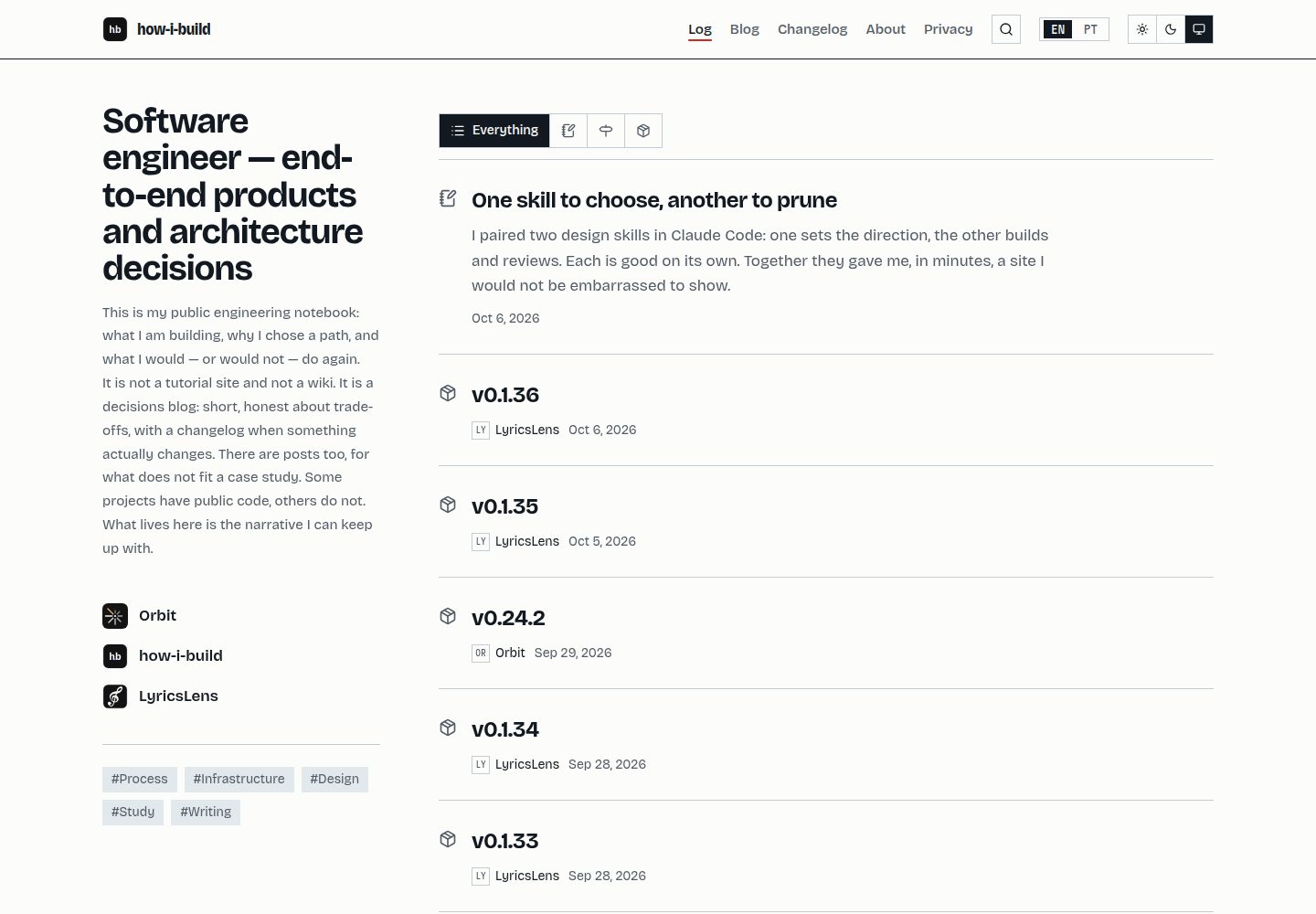
看看你的网站会是什么样
浏览真实页面截图,比较内容排版与手机效果。点击下方缩略图切换,放大查看整页细节。
全部页面与视图 3
截图用于了解视觉与布局,交互效果请以实际项目为准。
采集于 2026-10-06查看来源
值得关注的模板亮点
从已有项目资料中,快速了解它的特点。
双语路由:默认语言无前缀,/en 重定向到根路径,每种语言各有一个可索引地址
更新日志直接读取你自己的 GitHub Releases,配合 release-please 管理版本
分享预览图由 opengraph-image.tsx 根据站点名称与标语生成,文章封面可覆盖
字典与内容均做完整性检查:缺少翻译的键或案例会导致类型检查或构建失败
模板与站点分属不同仓库,模板更新通过 git merge template/main 流入站点
模板详细介绍
how-i-build 是一个面向工程笔记场景的站点模板,内容以 MDX 形式组织,包含文章与案例研究。站点支持两种语言,通过 /[locale] 路由区分,默认语言不带前缀,/en 会重定向到根路径,使每个页面在每种语言下都有唯一地址。更新日志不单独维护,而是从你自己的 GitHub Releases 读取,版本发布由 release-please 驱动。
模板的定制入口集中在几处:站点配置在 src/config/site.ts,写作内容在 src/content/,界面文案在 src/i18n/dictionaries.ts,颜色与字体在 src/app/globals.css,站点图标在 public/。分享链接的预览图由 opengraph-image.tsx 根据站点名称与标语动态生成,文章若有封面图则覆盖该生成结果。
使用上有一些明确限制。构建需要网络访问,因为 next/font/google 会在 next build 期间下载字体。不要强制使用 Bun 运行时执行 next build,否则会在构建成功后于退出阶段崩溃。typecheck 会先生成 Next 的路由类型、再运行 tsc,最后检查每种语言的内容是否齐全;单独运行 tsc 在全新克隆上会失败。新增语言只需在 site.ts 中加一行,但必须补齐所有已有案例的翻译,否则项目无法通过编译。发布工作流依赖 GitHub 仓库的两项设置:工作流权限需设为读写并允许创建和批准拉取请求,合并方式需使用 squash merge。隐私页面描述的是模板自身存储的内容(一个语言 cookie、一个主题 localStorage 条目),若在分支中加入分析工具,该页面会与实际不符,且模板本身不包含同意横幅。
Next.jsReact博客
适合你的项目吗?
适用场景
- 搭建个人工程笔记站点,发布技术短文与项目案例研究
- 需要中英双语内容、且希望每种语言都有独立可分享地址的博客
- 希望更新日志与 GitHub Releases 保持同步、不手动维护变更记录的项目
- 以模板仓库为上游、在独立仓库中持续写作并接收模板更新的工作流
适合人群
- 习惯用 MDX 写作、愿意直接改源码定制的开发者
- 需要双语内容且能保证翻译完整性的个人或小团队
- 使用 GitHub Releases 作为版本发布渠道的项目
上手与定制指南
结合仓库当前版本的说明,按下面的资料检查内容、配置与运行要求。
- 1
使用 Bun 安装依赖与运行任务,但构建由 Node 执行;不要强制 Bun 运行时跑 next build,否则会在构建成功后崩溃。
- 2
构建过程需要网络访问,next/font/google 会在构建期间下载字体。
- 3
在 GitHub 仓库设置中开启工作流读写权限并允许创建和批准拉取请求,同时将合并方式设为 squash merge,否则发布工作流无法运行。
- 4
替换站点图标时需同时替换 SVG 并重新生成配套 PNG,manifest 与 iOS 依赖这些 PNG。
- 5
新增语言需在 site.ts 中配置,并补齐所有已有案例的翻译,否则项目无法通过编译。
授权与来源资料
使用条件与限制
免费使用 · 保留许可声明本次收录的是公开仓库中采用 MIT 许可的免费版本;免费范围为该版本代码,不代表外部服务或第三方素材免费。
使用时需要遵守
- 允许免费使用、修改、商用和分发该版本代码。
- 分发代码副本或实质性部分时,保留原作者版权声明和完整 MIT 许可声明。
- 代码按现状提供;担保与责任限制以原许可证及适用法律为准。
额外费用与待核对事项
- 演示图片、字体、图标及其他第三方素材需按各自许可核对,不能仅凭代码的 MIT 许可判断。
- 域名、托管、数据库、支付或 AI 等外部服务可能另外收费。
- 构建过程必须联网:next/font/google 会在 next build 期间下载字体,网络中断会导致构建失败并报出与网络无关的模块缺失错误。
- 不得强制使用 Bun 运行时执行构建:bun --bun next build 或 bunfig.toml 中的 [run] bun = true 都会在构建成功后于退出阶段崩溃。
- typecheck 会先生成路由类型、再运行 tsc、最后校验各语言内容齐全;在全新克隆上单独运行 tsc 会失败。
- 新增语言需在 site.ts 中加一行,但必须补齐所有已有案例的翻译,否则项目无法通过编译。
- 发布工作流依赖 GitHub 仓库设置:需将工作流权限设为读写,并允许 GitHub Actions 创建和批准拉取请求,否则工作流会失败。
- 仓库需将合并方式设为 squash merge,因为发布说明来自提交主题,合并提交会重复加入拉取请求标题。
- 隐私页面仅描述模板自身存储(语言 cookie 与主题 localStorage);若在分支中加入分析工具,该页面将不再准确,且模板本身不包含同意横幅。
查看原文依据
Permission is hereby granted, free of charge
许可证原文
**The build needs network access.** `next/font/google` downloads the fonts during `next build`, so a connectivity hiccup fails the build with module-not-found errors about generated CSS
README 原文
**Do not force the Bun runtime.** Neither `bun --bun next build` nor `[run] bun = true` in `bunfig.toml`
README 原文
**`typecheck` does three things**: generates Next's route types, runs `tsc`, then checks that every piece of content exists in every locale. Running `tsc` alone will fail on a clean clone
README 原文
Adding a locale is one line in `site.ts`, and then every existing case must be translated before the project compiles again.
README 原文
**Settings → Actions → General → Workflow permissions**: *Read and write*, and *Allow GitHub Actions to create and approve pull requests*.
README 原文
**Settings → General → Pull Requests**: squash merge. Release notes come from commit subjects, and a merge commit adds the pull request title a second time.
README 原文
https://github.com/Julio0Cesar/how-i-build/blob/main/LICENSEhttps://github.com/Julio0Cesar/how-i-build/blob/main/README.mdAdd analytics to a fork and that page becomes wrong — and you probably need a consent banner, which this template deliberately does not have.
README 原文
DeepSeek 根据仓库许可证和 README 整理 ·2026-10-06。结果仅覆盖已读取资料,依赖、图片、字体及后续条款变更以各自原文为准。
项目核对记录与介绍依据
模板资料
- 来源平台
- GitHub
- 资料与维护参考分
- 资料较完整 · 85 / 100
- 技术栈
- Next.js · React
- 网站类型
- 博客
这个分数如何计算
本站按许可资料(最高30分)、演示链接(12分)、预览图(10分)、Star数(15分)、记录的维护时间(15分)、描述完整度(8分)、功能记录(5分)和分类资料(5分)计算。它不是代码、安全或性能测试,也不是 Google 评分;有链接不代表已实测可用。
这个项目需要核对什么
- 记录的仓库更新时间
- 2026-10-06
- 截图检查日期
- 2026-10-06
已收录演示链接。请用你的内容与屏幕尺寸检查;有演示不代表表单、认证或支付已经可用。
目录记录的主要技术栈是 Next.js。请通过依赖清单和锁文件核对实际版本与托管要求。这些说明基于收录资料,不代表代码审计或部署实测。
查看具体选型方法 →介绍的制作与核对状态
介绍由 AI 辅助整理目录与仓库资料。仓库作者不等于这篇介绍的审核者。
审核声明: [email protected] · 2026-10-07
查看当时使用的来源资料
SHA-256: 60230c855e2aa0c4bbf12ac5ea6e21d20c4db303fa3f87a8fa781153de8ba5ed
2026-10-06T21:00:23.870Z
来源文件 / 仓库# how-i-build A template for an engineering notes site: short write-ups on what you build and the decisions behind them, in two languages, with the version and changelog read from your own GitHub releases. ## Stack | Layer | Choice | |---|---| | Framework | Next.js 16 (App Router) | | Runtime and package manager | Bun | | UI | React 19, Tailwind CSS 4, Bricolage Grotesque and Martian Mono | | i18n | `/[locale]` routing, default locale unprefixed | | Releases | release-please, GitHub Releases as the only changelog | | Hosting | Vercel | ## Commands ```bash bun install bun run dev bun run build bun run start bun run lint bun run typecheck ``` Bun is the package manager and task runner. Node runs the build — forcing the Bun runtime for `next build` crashes on teardown, so the scripts deliberately do not. ## URLs The default locale carries no prefix: ``` / English /pt Portuguese /en redirects to / ``` Each page therefore has exactly one address per language, which is what lets both be indexed and shared. ## Making it yours Three places, in the order you will need them: | What | Where | |---|---| | Repository, deployed URL, social links, locales | `src/config/site.ts` | | Your writing | `src/content/` — see [`docs/CONTENT.md`](docs/CONTENT.md) | | Interface strings | `src/i18n/dictionaries.ts` | | Colours and type | `src/app/globals.css` | | The mark | `public/icon.svg`, plus the PNGs beside it | The mark ships as `public/icon.svg` with its letters already converted to outlines: an icon that depends on an installed font disappears in any renderer that lacks it. Replacing it means replacing the SVG **and** regenerating the PNGs beside it, which the manifest and iOS need: ```bash for s in 192 512; do resvg --width $s --height $s public/icon.svg public/icon-$s.png; done resvg --width 512 --height 512 public/icon-maskable.svg public/icon-maskable-512.png resvg --width 180 --height 180 public/icon.svg public/apple-icon.png ``` Sharing a link uses a generated image, not a file: `src/app/[locale]/opengraph-image.tsx` draws it from the name and the tagline, so a fork gets its own without designing one. A post with a cover overrides it. Nothing in the template names *you*. The placeholders are in `src/config/site.ts` and in the sample project's repository URL, and `grep -ri "your-username" src/` finds both. English defines the key set in the dictionary, so a locale missing a key fails the type check rather than rendering a blank space. The same is true of content: a case study without a translation does not build. Adding a locale is one line in `site.ts`, and then every existing case must be translated before the project compiles again. That is deliberate — see [`docs/CONTENT.md`](docs/CONTENT.md#adding-a-locale). ## Repository settings Two things live in GitHub rather than in a file, and the release workflow does not work without them: - **Settings → Actions → General → Workflow permissions**: *Read and write*, and *Allow GitHub Actions to create and approve pull requests*. Without it the workflow fails with `GitHub Actions is not permitted to create or approve pull requests`, which reads like a broken workflow and is not one. - **Settings → General → Pull Requests**: squash merge. Release notes come from commit subjects, and a merge commit adds the pull request title a second time. ## Gotchas **Do not force the Bun runtime.** Neither `bun --bun next build` nor `[run] bun = true` in `bunfig.toml` — they are the same thing, and both segfault on teardown *after* the build has already succeeded, which looks like a build failure and is not. Bun is the package manager and task runner; Node runs the build. **The build needs network access.** `next/font/google` downloads the fonts during `next build`, so a connectivity hiccup fails the build with module-not-found errors about generated CSS — which does not look like a network problem at all. **`typecheck` does three things**: generates Next's route types, runs `tsc`, then checks that every piece of content exists in every locale. Running `tsc` alone will fail on a clean clone, because the route type globals do not exist yet. **Privacy.** The [privacy page](src/content/privacy.en.mdx) describes what *this* template stores: one cookie for the language, one `localStorage` entry for the theme, both written only when a reader chooses. Add analytics to a fork and that page becomes wrong — and you probably need a consent banner, which this template deliberately does not have. ## Branches `main` is the template, and the only branch. It carries no personal content. A site built from this template lives in its **own repository**, with this one added as a remote: ```bash git remote add template [email protected]:Julio0Cesar/how-i-build.git git fetch template git merge template/main ``` Updates flow template → site, never the other way. A template bug found while writing content is committed here and comes down through the merge. `main` owns shape: `src/app/`, `src/components/`, `src/lib/`, `src/i18n/`, `src/config/types.ts`. Your repository owns data: `src/content/`, the values in `src/config/site.ts`, `public/brand/`. A content branch inside the template was the earlier arrangement. It is gone because a pull request opened from a content branch defaults to targeting the template, which is how personal writing ends up in a template by accident. ## Documentation | | | |---|---| | [`docs/CONTENT.md`](docs/CONTENT.md) | writing case studies and pages | | [`docs/RELEASING.md`](docs/RELEASING.md) | how versions are cut | Scope and decisions live in the repository's issues rather than in a `specs/` folder — including the reasoning behind most of what is in here. ## License MIT — see [LICENSE](LICENSE).
看看同类模板
对比同技术栈与用途的模板,找到更适合的视觉与内容结构。

tailwind-nextjs-starter-blog
tailwind-nextjs-starter-blog 是一个面向个人技术博客的 Next.js 与 Tailwind CSS 启动模板,其 v2 版本基于 App Router 与 React Server Comp…
Next.js · 博客

Nextjs-tailwindcss-blog-template
⭐Build SEO optimized personal blog website with Next.js, Tailwind CSS and Contentlayer. If you want to learn t…
Next.js · 博客

Next-js-Blog-Boilerplate
Next-js-Blog-Boilerplate 是一套面向个人与技术博客的启动代码,基于 Next.js 12 与 Tailwind CSS 3 构建,同时集成了 TypeScript、ESLint、Prettier …
Next.js · 博客

nextjs-blog-theme
nextjs-blog-theme 是 Netlify 团队维护的一个博客启动模板,基于 Next.js 15(Pages Router)和 Tailwind CSS 4.x 构建,设计由 Bejamas 机构完成。
Next.js · 博客

blog
🚀 My personal blog made with Tailwind CSS and NextJS. Template from Timlrx. Feel free to fork, follow and use…
Next.js · 博客

tailnext
Tailnext 是一个基于 Next.js 14 App Router 和 Tailwind CSS 的免费开源模板,由 onWidget 团队创建并维护。
Next.js · 博客