Typography-first reading experience: headings use Bricolage Grotesque, body text primarily uses system fonts with CJK fallbacks, and font resources are bundled locally
AstroReactBlog
astro-theme-aither — Astro Blog Template
By justinhuangai
Aither is an Astro multilingual blog theme centered on typographic reading, and it provides read-only JSON and Markdown protocol interfaces for AI agents.
Explore the design
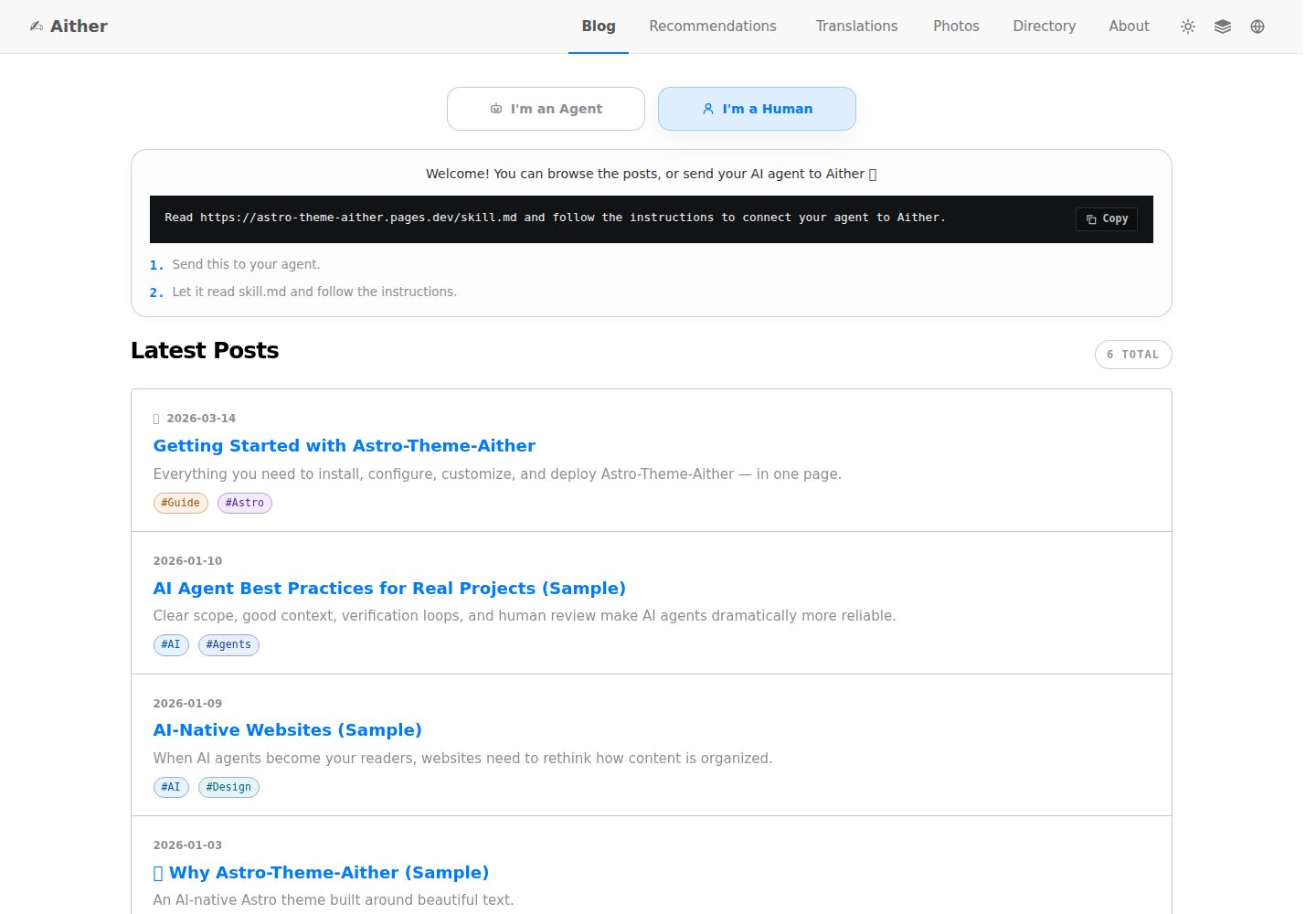
Compare the page layouts and mobile experience. Open any screenshot for a closer look.
Desktop homepage1 / 3
Desktop captureTop of page
Actual screenshot captured by the server browser.
All pages & views 3
Screenshots show visual appearance; interactive behavior may differ.
Recorded 2026-10-04View source
What stands out
A quick read of the recorded project description.
The homepage offers both a reader view and an agent view, and agents can directly retrieve Markdown content
Provides read-only machine interfaces such as protocol.json, skill.md, llms.txt, api/posts.json, and per-article Markdown
Supports 11 languages with 6 sample articles per language, totaling 66 localized samples, plus a coverage verification command
Includes 41 named color schemes and supports light, dark, and system-following modes
Markdown supports Expressive Code blocks, KaTeX math, Mermaid diagrams, and Markmap mind maps
Template Details
Aither is an Astro-based blog theme positioned as a multilingual publishing solution that optimizes typography for human readers and provides machine-readable interfaces for AI agents. It does not rely on remote font CDNs; headings use Bricolage Grotesque, while body text primarily uses system fonts with CJK fallbacks. The homepage offers both a reader view and an agent view: readers see a card-based article list, while agents can directly retrieve Markdown content. The theme includes 41 named color schemes and supports light, dark, and system-following modes.
At the machine-readable level, the repository provides protocol.json, skill.md, language-specific agent/home.json, llms.txt, llms-full.txt, api/posts.json, and a .md endpoint for each article, along with JSON Schema and /.well-known/ai-plugin.json. These interfaces currently support only discovery, crawling, indexing, summarization, monitoring, and citation; they do not provide write operations, comments, or authenticated agent actions.
Content-wise, it supports 11 languages, each with 6 sample articles, totaling 66 localized samples, and pnpm check:post-coverage verifies consistent article slug coverage across languages. Publishing-related features include dynamic OG images, RSS, sitemap, JSON-LD, canonical links, tags, pinning, pagination, table of contents, and optional Giscus, Crisp, and Google Analytics. Markdown writing supports Expressive Code blocks, KaTeX math, Mermaid diagrams, and Markmap mind maps. The routing system supports content sections beyond posts via Astro Content Collections and siteConfig.sections.
Usage limitations: the theme is distributed as a starter, not an installable Astro integration package, so upgrades require manual migration by branch or tag. Building requires Node.js 20.19.1+ or 22.12.0+, with 22 LTS recommended, and pnpm 10.32.1. If content includes Mermaid diagrams, Chromium must be installed in CI. Cloudflare Pages is only required when using the repository's included GitHub Actions deployment workflow.
AstroReactBlog
Is it right for your project?
Use Cases
- Building a multilingual personal blog or technical writing site centered on reading experience
- Publishing scenarios where site content should be discoverable, crawlable, and citable by AI agents in a structured way
- Content sites that need to provide both an HTML page and a Markdown endpoint for each article
- Projects using Astro that need publishing basics such as RSS, sitemap, JSON-LD, and dynamic OG images
- Writing scenarios that require code highlighting, math formulas, Mermaid diagrams, or mind maps in articles
Suitable For
- Bloggers who value typography and reading rhythm and do not pursue complex UI animations
- Site maintainers who need multilingual publishing while keeping content structure consistent across languages
- Developers who want to provide public read-only content interfaces for AI agents
- Developers using Astro and pnpm workflows who can accept starter-style upgrades
Getting started & customization
Use these recorded setup notes alongside the repository instructions for your chosen version.
- 1
Requires Node.js 20.19.1+ or 22.12.0+, with 22 LTS recommended, and pnpm 10.32.1
- 2
For first-time use, run corepack enable to enable the pinned pnpm version
- 3
Set the site URL in astro.config.mjs, and configure the name, description, social links, navigation, and footer in src/config/site.ts
- 4
Optional environment variables (GA, Giscus, Crisp) are filled in by copying .env.example to .env
- 5
If content includes Mermaid diagrams, Chromium must be installed in CI; when using the Cloudflare Pages deployment workflow, the corresponding configuration must be completed
License & source material
Usage conditions & limitations
Free to use · keep license noticeThis entry covers the free version in the public repository under the MIT license; the free scope is the code of this version and does not mean that external services or third-party assets are free.
Must comply with when using
- Free use, modification, commercial use, and distribution of this version's code are allowed.
- When distributing copies or substantial portions of the code, retain the original author's copyright notice and the full MIT license notice.
- The code is provided as is; warranties and limitations of liability are governed by the original license and applicable law.
Additional costs & items to verify
- Demo images, fonts, icons, and other third-party assets must be checked against their respective licenses and cannot be judged solely by the code's MIT license.
- External services such as domains, hosting, databases, payments, or AI may incur separate charges.
- The theme is distributed as a starter, not an installable Astro integration package, and cannot be installed or upgraded directly via a package manager.
- If the site shares git history with upstream, upgrades require manual migration version by version via git branches or cherry-pick.
- If the site was created from a GitHub Template, upgrades require manually porting the needed changes against upstream release tags.
- The build environment requires Node.js at minimum 20.19.1+ or 22.12.0+, with 22 LTS recommended.
- pnpm must be used, and the repository pins [email protected] via packageManager.
- If content includes Mermaid diagrams, Chromium must be installed before CI builds.
- Cloudflare Pages is only required when using the repository's included GitHub Actions deployment workflow.
- The machine interfaces currently support only discovery, crawling, indexing, and monitoring; they do not support publishing, comments, or authenticated write operations.
- The design is read-only, and there is currently no first-party write API, comments API, or authenticated agent action flow.
- When using the included Cloudflare Pages deployment workflow, a Cloudflare Pages project must be created and secrets such as CLOUDFLARE_API_TOKEN and CLOUDFLARE_ACCOUNT_ID must be configured.
- Google Analytics is an optional external service and requires providing PUBLIC_GA_ID yourself; leaving it empty disables it.
- Crisp live chat is an optional external service and requires providing PUBLIC_CRISP_WEBSITE_ID yourself; leaving it empty disables it.
- Giscus comments are an optional external service and require configuring the repository and category yourself; leaving all empty disables them.
View Original Text Basis
Permission is hereby granted, free of charge
Original License Text
Aither currently ships as a `starter-first` theme, not as an installable Astro integration package.
Original README
If your site still shares upstream git history, upgrade release-to-release with git branches or cherry-picks.
Original README
If your site was created from GitHub Template, compare upstream release tags side by side and port the changes you want.
Original README
- **Node.js** -- `22 LTS` recommended. Minimum supported versions are `20.19.1+` or `22.12.0+`
Original README
- **pnpm** -- This repo pins `[email protected]` via `packageManager`
Original README
- **Chromium for Mermaid in CI** -- If your content includes Mermaid diagrams, install it with `pnpm exec playwright install --with-deps chromium` in CI before building
Original README
- **Cloudflare Pages** -- Only required if you want to use the included GitHub Actions deployment workflow
Original README
- `Read-only` means discovery, retrieval, indexing, and monitoring are supported today; posting, commenting, and authenticated writes are not.
Original README
- **Read-only by design** -- Agents can discover, fetch, index, summarize, monitor, and cite content; there is currently no first-party write API, comments API, or authenticated agent action flow
Original README
- **Cloudflare Pages** -- Only required if you want to use the included GitHub Actions deployment workflow
Original README
# Google Analytics (leave empty to disable) PUBLIC_GA_ID=
Original README
# Crisp Chat (leave empty to disable) PUBLIC_CRISP_WEBSITE_ID=
Original README
https://github.com/justinhuangai/astro-theme-aither/blob/main/LICENSEhttps://github.com/justinhuangai/astro-theme-aither/blob/main/README.md# Giscus Comments (leave all empty to disable) PUBLIC_GISCUS_REPO=
Original README
Compiled by DeepSeek based on repository license and README ·2026-10-05. Results only cover the materials read; dependencies, images, fonts, and subsequent term changes are subject to their respective original texts.
Project checks & description sources
Template Information
- Source platforms
- GitHub
- Documentation and maintenance reference score
- More documented · 88 / 100
- Technologies
- Astro · React
- Website type
- Blog
How this score is calculated
Our heuristic uses license records (up to 30), a demo link (12), a preview (10), stars (15), recorded maintenance (15), description completeness (8), feature records (5) and classification data (5). It is not a code, security or performance test, or a Google score. A link does not establish tested functionality.
What to verify for this project
- Repository update recorded
- 2026-05-13
- Screenshot last checked
- 2026-10-05
A demo link is listed. Check it with your own content and viewport sizes; its presence does not confirm that forms, authentication or payments work.
The catalog identifies Astro as the primary stack. Check the actual dependency manifest and lockfile for versions and hosting requirements. These notes use recorded metadata, not a code audit or a deployment test.
Use a selection guide →How this description was prepared
AI-assisted description based on catalog records and repository material. Repository authors are not automatically the reviewers of this description.
Review declaration: [email protected] · 2026-10-05
Inspect the recorded source material
SHA-256: 275b0404729e0f84065cc6524bddf53ccf8d01bf6905b87ee43d53bea9389934
2026-10-05T00:30:24.510Z
Source file / repository# Aither
**English** | [简体中文](./README_ZH-CN.md) | [繁體中文](./README_ZH-TW.md) | [한국어](./README_KO-KR.md) | [Français](./README_FR-FR.md) | [Deutsch](./README_DE-DE.md) | [Italiano](./README_IT-IT.md) | [Español](./README_ES-ES.md) | [Русский](./README_RU-RU.md) | [Bahasa Indonesia](./README_ID-ID.md) | [Português (BR)](./README_PT-BR.md)
[](https://github.com/justinhuangai/astro-theme-aither/actions/workflows/deploy-cloudflare-pages.yml)
[](LICENSE)
[](https://astro.build)
[](https://tailwindcss.com)
[](https://github.com/justinhuangai/astro-theme-aither/stargazers)
[](https://github.com/justinhuangai/astro-theme-aither/commits/main)
**[Live Preview](https://astro-theme-aither.pages.dev)**
An AI-native Astro theme built around beautiful text. ✍️
Typography-first for human readers, machine-readable for AI agents.
Aither is a multilingual publishing theme that treats both surfaces as first-class product work: calm, readable pages for humans; explicit public protocol documents and Markdown endpoints for agents. It is not a generic blog starter with an AI badge added later.
## Reader / Agent Model
- `Reader` means a human reading the HTML site: homepage cards, post pages, the about page, comments, and theme controls.
- `Agent` means software consuming the public machine-readable surface: `protocol.json`, `skill.md`, locale-specific `agent/home.json`, `llms.txt`, `api/posts.json`, and per-post Markdown.
- `Read-only` means discovery, retrieval, indexing, and monitoring are supported today; posting, commenting, and authenticated writes are not.
```mermaid
flowchart LR
A["Aither"] --> B["Reader Surface<br/>HTML pages"]
A --> C["Agent Surface<br/>JSON / Markdown"]
B --> D["Canonical article URLs"]
C --> E["protocol.json -> skill.md -> agent/home.json"]
C --> F["llms.txt / api/posts.json / posts/{slug}.md"]
```
## Why Aither?
Most blog themes optimize for hero sections, motion, and UI chrome. Aither optimizes for reading rhythm, typographic restraint, and clean information density.
At the same time, it assumes your site may be read by software as often as by people. That is why the repo ships a real protocol surface: `protocol.json`, `skill.md`, localized machine docs, `llms.txt`, Markdown article bodies, JSON schemas, and a cross-locale posts API.
## What Ships Today
- **Typography-first reading experience** -- Bricolage Grotesque headings, system-first body text, CJK-aware fallbacks, and locally bundled font assets so the site feels intentional without relying on remote font CDNs
- **Dual home surfaces** -- The homepage has a reader view and an agent view; humans get cards, agents get direct Markdown access, and `/for-agents/` explains the protocol in plain language
- **41 curated themes** -- Light / Dark / System plus 41 named styles in `src/config/themes.ts`; you can keep the mode switch while hiding the larger theme picker if you want a quieter brand surface
- **AI-native protocol** -- `/protocol.json`, `/skill.md`, localized `/agent/home.json`, `/policy.md`, `/reading.md`, `/subscribe.md`, `/auth.md`, `/llms.txt`, `/llms-full.txt`, `/api/posts.json`, per-post `.md`, About Markdown, JSON schemas, and `/.well-known/ai-plugin.json`
- **Read-only by design** -- Agents can discover, fetch, index, summarize, monitor, and cite content; there is currently no first-party write API, comments API, or authenticated agent action flow
- **11-locale publishing** -- English, 简体中文, 繁體中文, 한국어, Français, Deutsch, Italiano, Español, Русский, Bahasa Indonesia, Português (BR), all with localized UI, hreflang, routes, and feeds
- **66 localized sample posts** -- 6 starter slugs mirrored across 11 locales (`11 x 6 = 66`), with coverage enforced by `pnpm check:post-coverage`
- **Publishing essentials** -- Dynamic OG images, RSS, sitemap, JSON-LD, canonical URLs, tags, pinned posts, pagination, TOC, and optional Giscus / Crisp / Google Analytics
- **Enhanced Markdown authoring** -- Expressive Code blocks with line numbers, KaTeX math, Mermaid diagrams, and Markmap mind maps integrated into the shared markdown pipeline
- **Extensible beyond posts** -- The route system already supports additional content sections through Astro Content Collections and `siteConfig.sections`, not just the default `posts` collection
- **Modern Astro stack** -- Astro 6, MDX, React 19 where useful, Tailwind CSS v4 tokens, and a validation pipeline that checks content parity, build output, and protocol artifacts before deploy
## Requirements
- **Node.js** -- `22 LTS` recommended. Minimum supported versions are `20.19.1+` or `22.12.0+`
- **pnpm** -- This repo pins `[email protected]` via `packageManager`
- **Corepack** -- Run `corepack enable` once so the pinned pnpm version is used automatically
- **Chromium for Mermaid in CI** -- If your content includes Mermaid diagrams, install it with `pnpm exec playwright install --with-deps chromium` in CI before building
- **Cloudflare Pages** -- Only required if you want to use the included GitHub Actions deployment workflow
## Quick Start
### Use as a GitHub template
1. Click **"Use this template"** on [GitHub](https://github.com/justinhuangai/astro-theme-aither)
2. Clone your new repo:
```bash
git clone https://github.com/YOUR_USERNAME/YOUR_REPO.git
cd YOUR_REPO
```
3. Enable Corepack and install dependencies:
```bash
corepack enable
pnpm install
```
4. Configure your site:
```bash
# astro.config.mjs -- set your site URL (only place you need to set it)
site: 'https://your-domain.com'
# src/config/site.ts -- set name, description, social links, nav, footer
# (url is automatically read from astro.config.mjs)
```
5. Set up environment variables (optional):
```bash
cp .env.example .env
# Edit .env with your values (GA, Giscus, Crisp)
```
6. Validate the starter before making larger changes:
```bash
pnpm validate
```
7. Start writing:
```bash
pnpm dev
```
8. Deploy when ready. If you want to use the included Cloudflare Pages workflow, finish the setup in [Deployment](#deployment) before pushing to `main`.
### Manual setup
```bash
git clone https://github.com/justinhuangai/astro-theme-aither.git my-blog
cd my-blog
corepack enable
pnpm install
pnpm validate
pnpm dev
```
Best practice: use the GitHub template flow for a new site. If you clone the upstream repo manually, verify everything works first, then create your own repository or import the project into a fresh repo. Avoid deleting `.git` before you have a working local copy.
## Upgrading Existing Sites
Aither currently ships as a `starter-first` theme, not as an installable Astro integration package.
- If your site still shares upstream git history, upgrade release-to-release with git branches or cherry-picks.
- If your site was created from GitHub Template, compare upstream release tags side by side and port the changes you want.
- In both cases, treat `src/content/`, `src/config/site.ts`, and your local environment configuration as site-owned files.
- Use `pnpm upgrade:diff -- --from <old-tag> --to <new-tag>` in a clean upstream clone when you want a categorized file diff before porting changes.
The full workflow lives in [UPGRADING.md](./UPGRADING.md).
## Content Model
Create MDX files in `src/content/posts/{locale}/`:
```markdown
---
title: Your Post Title
date: "2026-01-01T16:00:00+08:00"
description: Optional description for SEO
category: Technology
tags: [optional, tags]
pinned: false
image: ./optional-cover.jpg
---
Your content here.
```
| Field | Type | Required | Default | Description |
|---|---|---|---|---|
| `title` | string | Yes | -- | Post title |
| `date` | date | Yes | -- | Publish timestamp (ISO 8601 with timezone) |
| `description` | string | No | -- | Used in RSS feed and meta tags |
| `category` | string | No | `"General"` | Post category |
| `tags` | string[] | No | -- | Post tags |
| `pinned` | boolean | No | `false` | `true` features post at top of listing |
| `image` | image | No | -- | Cover image (relative path or import) |
Best practices:
- Use a full ISO 8601 timestamp with timezone when possible, for example `2026-03-19T16:27:43+08:00`
- Keep the same slug in every locale so `pnpm check:post-coverage` can verify parity against English
- Treat English as the baseline collection; add the same file name under each locale directory when localizing a post
- Use fenced `mermaid` blocks for diagrams, fenced `markmap` blocks for mind maps, and `$...$` / `$$...$$` for math
## Commands
| Command | Description |
|---|---|
| `pnpm dev` | Start local dev server |
| `pnpm check` | Run Astro type and content checks |
| `pnpm check:post-coverage` | Verify that every locale ships the same post slug coverage |
| `pnpm build` | Build static site to `dist/` |
| `pnpm smoke:markdown` | Verify built markdown samples render code blocks, math, Mermaid, and Markmap |
| `pnpm smoke:package` | Verify the `@aither/astro` package surface and export map |
| `pnpm smoke` | Build the site, then run markdown, package, and AI-native protocol smoke tests |
| `pnpm preview` | Preview production build locally |
| `pnpm validate` | Recommended pre-push check: run `check`, `check:post-coverage`, `build`, and both smoke suites together |
## AI-Native Protocol
There is a human-facing guide at `/for-agents/`, but the machine-facing contract is the real source of truth:
| Endpoint | Scope | Purpose |
|---|---|---|
| `/protocol.json` | Global | Lightweight manifest and schema links |
| `/skill.md` | Global | Canonical narrative entrypoint for agents |
| `/{locale}/agent/home.json` | Per locale | Current site state plus latest posts |
| `/{locale}/policy.md` | Per locale | Rules, discovery order, and safety boundaries |
| `/{locale}/reading.md` | Per locale | Recommended retrieval workflow |
| `/{locale}/subscribe.md` | Per locale | Monitoring and polling guidance |
| `/{locale}/auth.md` | Per locale | Reserved auth contract; current mode is still read-only |
| `/{locale}/llms.txt` | Per locale | Compact content index for LLM discovery |
| `/{locale}/llms-full.txt` | Per locale | Full inlined content for bulk LLM workflows |
| `/api/posts.json` | All locales | Structured metadata across every locale |
| `/{locale}/posts/{slug}.md` | Per locale | Canonical Markdown body for one article |
| `/{locale}/about.md` | Per locale | About page as Markdown |
| `/.well-known/ai-plugin.json` | Global | Lightweight machine discovery metadata |
| `/schemas/agent-protocol.schema.json` | Global | JSON Schema for `protocol.json` |
| `/schemas/agent-home.schema.json` | Global | JSON Schema for `agent/home.json` |
For the default locale, `en-US`, the locale prefix is omitted. For example, English article Markdown lives at `/posts/{slug}.md`, while Simplified Chinese lives at `/zh-CN/posts/{slug}.md`.
Best practices:
1. Start with `/protocol.json`, then read `/skill.md`, then fetch the locale-specific `agent/home.json`.
2. Use `/api/posts.json` for cross-locale discovery and individual `.md` endpoints for final article retrieval.
3. Cite the canonical HTML article URL back to humans, not the Markdown endpoint.
4. Re-fetch if freshness matters; the protocol is public and intentionally read-only.
5. Treat `pnpm smoke` as the minimum guardrail whenever you change `protocol.json`, `skill.md`, `agent/home.json`, or any agent-facing Markdown protocol doc.
## Configuration
The main files to know are:
- `astro.config.mjs` -- canonical production URL plus shared `@aither/astro` defaults for integrations, Vite, and locale routing
- `src/config/site.ts` -- site metadata, nav/footer, pagination, timezone, theme controls, social links, and optional extra content sections
- `src/config/themes.ts` -- the 41-theme catalog and localized theme labels
- `src/content.config.ts` -- Zod content schema and collection registration
- `src/i18n/index.ts` and `src/i18n/messages/*.ts` -- locale definitions, routing helpers, and translated UI copy
- `.env` -- optional Google Analytics, Crisp, and Giscus settings
### Site settings (`src/config/site.ts`)
```typescript
export const siteConfig = {
name: 'Aither',
title: 'An AI-native Astro theme built around beautiful text.',
description: '...',
author: {
name: 'Aither',
avatar: '', // Import from src/assets/ for optimization, or use URL string
},
// url is automatically read from astro.config.mjs — no need to set it here
social: [
{ title: 'GitHub', href: 'https://github.com/...', icon: 'github' },
{ title: 'Twitter', href: '', icon: 'x' },
],
blog: { paginationSize: 20, timeZone: 'Asia/Shanghai' },
analytics: { googleAnalyticsId: import.meta.env.PUBLIC_GA_ID || '' },
crisp: { websiteId: import.meta.env.PUBLIC_CRISP_WEBSITE_ID || '' },
ui: {
defaultMode: 'system',
defaultStyle: 'default',
enableModeSwitch: true,
showMoreThemesMenu: true,
},
sections: [
// Optional extra collections beyond posts
// { id: 'translations', labelKey: 'translations', contentLocale: 'zh-CN' },
],
giscus: {
repo: '...',
repoId: '...',
category: '...',
categoryId: '...',
themeLight: 'light',
themeDark: 'dark',
},
nav: [
{ labelKey: 'blog', href: '/' },
{ labelKey: 'about', href: '/about' },
],
footer: { copyrightYear: 'auto', sections: [/* ... */] },
};
```
Set `ui.showMoreThemesMenu` to `false` if you want to keep Light / Dark / System switching but hide the custom theme picker.
`giscus.themeLight` and `giscus.themeDark` follow the resolved color mode, so custom Aither theme styles can still keep comments in the correct light or dark surface.
### Extra content sections
The project is already wired for more than one collection. To add a new section:
```typescript
// src/config/site.ts
sections: [{ id: 'translations', labelKey: 'translations', contentLocale: 'zh-CN' }]
// src/content.config.ts
const translations = defineCollection({
loader: glob({ pattern: '**/*.mdx', base: './src/content/translations' }),
schema: contentSchema,
});
export const collections = { posts, translations };
```
Then create content under `src/content/translations/{locale}/`. If you set `contentLocale`, store the content only in that locale directory, for example `src/content/translations/zh-CN/`. List and detail routes are generated automatically at `/translations/`, `/{locale}/translations/`, and their nested slug pages.
Use `contentLocale` when a section should publish one canonical content language while still reusing the surrounding site shell in every locale. The built-in translations shelf uses this pattern so the interface stays localized but the translated article body remains Simplified Chinese everywhere.
### Astro config (`astro.config.mjs`)
```javascript
import { defineConfig } from 'astro/config';
import aither from '@aither/astro';
export default defineConfig({
site: 'https://your-domain.com',
integrations: [aither()],
});
```
### Environment variables (`.env`)
```bash
# Google Analytics (leave empty to disable)
PUBLIC_GA_ID=
# Crisp Chat (leave empty to disable)
PUBLIC_CRISP_WEBSITE_ID=
# Giscus Comments (leave all empty to disable)
PUBLIC_GISCUS_REPO=
PUBLIC_GISCUS_REPO_ID=
PUBLIC_GISCUS_CATEGORY=
PUBLIC_GISCUS_CATEGORY_ID=
```
### i18n
Language config is in `src/i18n/index.ts`, translations in `src/i18n/messages/*.ts`.
| Code | Language |
|---|---|
| `en-US` | English (default) |
| `zh-CN` | 简体中文 |
| `zh-TW` | 繁體中文 |
| `ko-KR` | 한국어 |
| `fr-FR` | Français |
| `de-DE` | Deutsch |
| `it-IT` | Italiano |
| `es-ES` | Español |
| `ru-RU` | Русский |
| `id-ID` | Bahasa Indonesia |
| `pt-BR` | Português (BR) |
The default locale (`en-US`) has no URL prefix. Other locales use their code as prefix (e.g. `/zh-CN/`, `/ko-KR/`).
Best practice: keep the English slug set as the canonical baseline and use `pnpm check:post-coverage` to catch missing localized articles before deploy.
## Project Structure
```
packages/
└── aither-astro/ # Emerging shared package layer for config + integration defaults
src/
├── config/
│ ├── site.ts # Site metadata, nav/footer, theme controls, optional sections
│ └── themes.ts # 41 curated themes + localized labels
├── content.config.ts # Content Collections schema (Zod)
├── content/
│ └── posts/{locale}/*.mdx # Multilingual post content
├── i18n/
│ ├── index.ts # Locale definitions and routing helpers
│ └── messages/*.ts # UI translations for all locales
├── components/
│ ├── pages/ # Page-level UI: home, post, about, for-agents
│ ├── AIAccessList.astro # Agent-facing Markdown post list
│ ├── Navbar.astro # Nav, locale switcher, theme controls
│ ├── ModeSwitcher.astro # Light/Dark/System + custom theme picker
│ ├── TableOfContents.astro # Heading-driven TOC
│ └── Giscus.astro # Optional comments
├── lib/
│ ├── agent-protocol.ts # Protocol manifest + agent docs generation
│ ├── markdown-endpoint.ts # Markdown response helpers
│ ├── og-image.ts # Dynamic OG image generation
│ ├── posts.ts # Locale-aware content fetching + sorting
│ ├── site-content.ts # Paths, pagination, RSS, llms.txt helpers
│ └── theme.ts # Theme preference state helpers
├── layouts/
│ └── Layout.astro # SEO, hreflang, JSON-LD, alternates, global shell
├── pages/
│ ├── index.astro # Home (default locale)
│ ├── about.astro # About page
│ ├── for-agents.astro # Human-facing protocol landing page
│ ├── page/[num].astro # Paginated home listing
│ ├── posts/
│ │ ├── [slug].astro # Post detail
│ │ └── [slug].md.ts # Per-post Markdown endpoint
│ ├── agent/home.json.ts # Aggregated machine-readable site state
│ ├── protocol.json.ts # Structured manifest
│ ├── skill.md.ts # Canonical narrative protocol document
│ ├── policy.md.ts # Agent rules and safety guidance
│ ├── reading.md.ts # Retrieval workflow guidance
│ ├── subscribe.md.ts # Monitoring guidance
│ ├── auth.md.ts # Reserved auth contract
│ ├── llms.txt.ts # Compact LLM index
│ ├── llms-full.txt.ts # Full inlined content for LLMs
│ ├── api/posts.json.ts # Cross-locale posts metadata
│ ├── schemas/*.json.ts # JSON Schemas for protocol endpoints
│ ├── [section]/... # Auto-generated extra collection routes
│ └── [locale]/... # Localized counterparts for all major routes
├── styles/
│ ├── fonts.css # Local Bricolage Grotesque font faces
│ └── global.css # Tailwind v4 tokens, typography, theme variables
public/
├── .well-known/ai-plugin.json # Public machine discovery metadata
├── favicon.svg
├── logo.svg / logo-dark.svg
└── og.png
scripts/
├── check-post-coverage.mjs # Enforce slug parity across locales
└── smoke-agent-protocol.mjs # Validate generated protocol artifacts
```
## Deployment
### Cloudflare Pages (default)
The included workflow (`.github/workflows/deploy-cloudflare-pages.yml`) is opinionated and validates the site before deploying to Cloudflare Pages.
1. Create a Cloudflare Pages project. The workflow uses your repository name by default, or `CLOUDFLARE_PAGES_PROJECT_NAME` if you want to override it
2. Add GitHub Secrets: `CLOUDFLARE_API_TOKEN` and `CLOUDFLARE_ACCOUNT_ID`
3. Update `site` in `astro.config.mjs` to your production URL
4. Run `pnpm validate`
5. Push to `main` and let GitHub Actions build and deploy
Best practice: keep the repository name aligned with your Pages project, or set the repository variable `CLOUDFLARE_PAGES_PROJECT_NAME` when you need a different target.
### Other platforms
The output is static HTML in `dist/`, so you can deploy it on any static host:
```bash
pnpm build
# Upload dist/ to Netlify, Vercel, GitHub Pages, or any static host
```
## Principles
1. **Typography is the interface** -- Good writing should not fight the theme.
2. **Humans and agents both matter** -- The public protocol is part of the product, not an afterthought.
3. **Multilingual parity is enforced** -- Locale coverage is checked, not assumed.
4. **Extension points stay close to content** -- Add sections through Content Collections and config, not through a separate app layer.
5. **Keep the stack calm** -- Static output, explicit docs, and clear contracts beat hidden magic.
## Acknowledgments
- Inspired by [yinwang.org](https://www.yinwang.org).
- Parts of the theme system are inspired by [Raphael Publish](https://github.com/liuxiaopai-ai/raphael-publish) and [EvoMap](https://evomap.ai).
## Contributing
Contributions are welcome. Please open an issue first to discuss what you'd like to change.
## License
[MIT](LICENSE)
Explore similar templates
Compare previews and descriptions within the same stack and category.

astrowind
AstroWind is a free, open-source Astro starter theme using Astro and Tailwind CSS, released under the MIT license.
Astro · Blog

astro-paper
AstroPaper is a minimal, responsive, accessible, and SEO-friendly Astro blog theme. Articles are stored as Markdown/MDX in src/content/posts/, with subdirectories affecting URLs.
Astro · Blog

fuwari
Fuwari is a static blog template built with Astro and Tailwind CSS for personal blogs. It manages posts as Markdown files in src/content/posts/, with frontmatter for title, date, description, cover, tags, categories, draft status, and language.
Astro · Blog

Firefly
Firefly is a clean personal blog theme forked from Astro and Fuwari, offering four background modes, single/double sidebar and list/grid layouts, Pagefind client-side full-text search, and a six-language UI.
Astro · Blog

astro-theme-cactus
Astro Cactus is an Astro-based blog and portfolio theme that uses Markdown/MDX content collections to manage posts, notes, and tags, with frontmatter type-checked by a schema.
Astro · Portfolio

astrofy
Astrofy is a free and open-source personal portfolio website template built with Astro and TailwindCSS, with built-in blog, CV timeline, project showcase, store, and RSS feed modules.
Astro · Portfolio