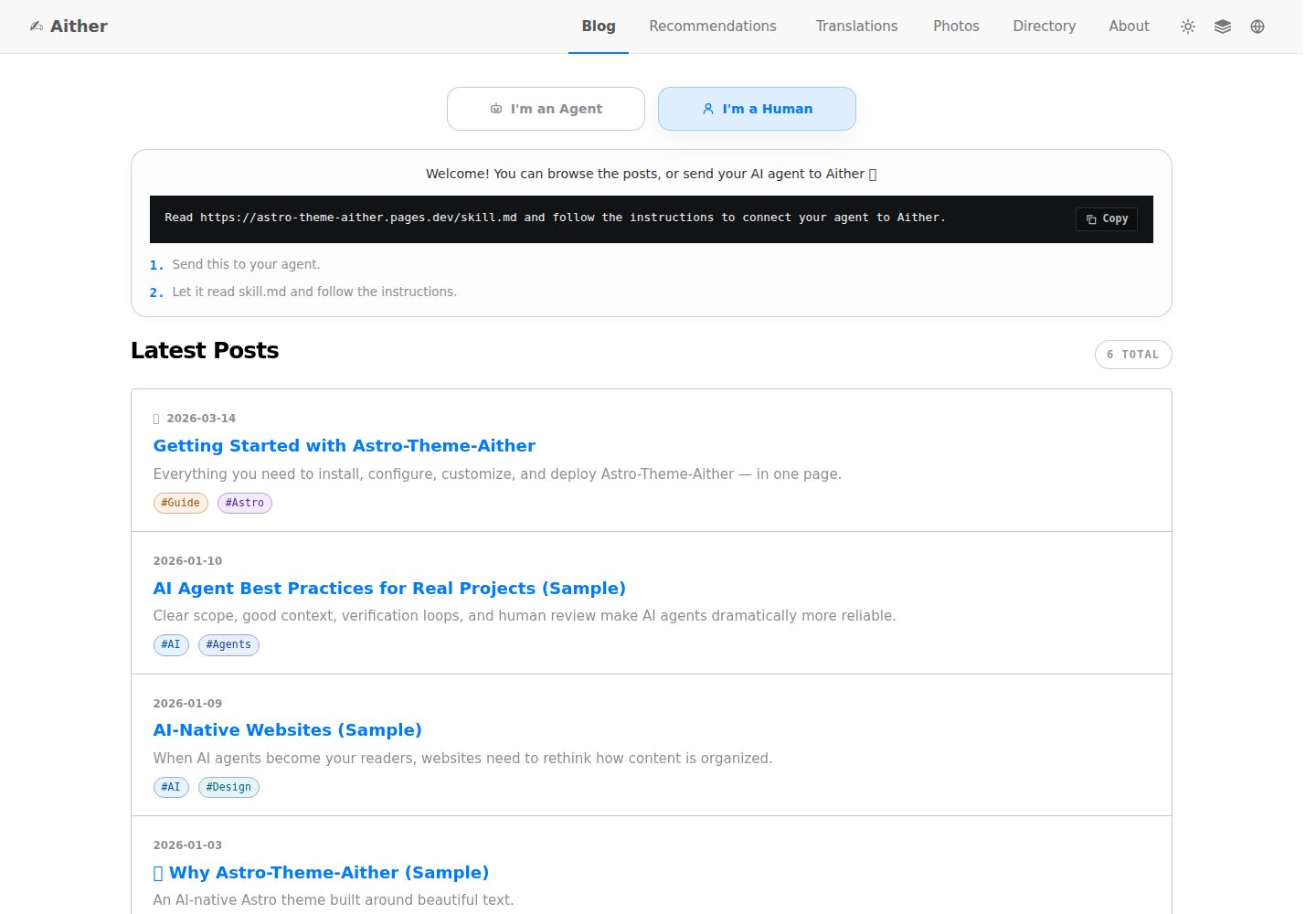
排版优先的阅读体验,标题使用 Bricolage Grotesque,正文以系统字体为主并包含 CJK 回退,字体资源本地打包
AstroReact博客
astro-theme-aither — Astro 博客模板
作者 justinhuangai
Aither 是一个以排版阅读为核心的 Astro 多语言博客主题,同时为 AI 代理提供只读的 JSON 与 Markdown 协议接口。
看看你的网站会是什么样
浏览真实页面截图,比较内容排版与手机效果。点击下方缩略图切换,放大查看整页细节。
全部页面与视图 3
截图用于了解视觉与布局,交互效果请以实际项目为准。
采集于 2026-10-04查看来源
值得关注的模板亮点
从已有项目资料中,快速了解它的特点。
首页同时提供读者视图与代理视图,代理可直接获取 Markdown 内容
提供 protocol.json、skill.md、llms.txt、api/posts.json 及每篇文章 Markdown 等只读机器接口
支持 11 种语言,每种语言 6 篇示例文章,共 66 篇本地化样例,并有覆盖校验命令
内置 41 套命名配色,支持浅色、深色与跟随系统模式
Markdown 支持 Expressive Code 代码块、KaTeX 数学公式、Mermaid 图表和 Markmap 思维导图
模板详细介绍
Aither 是一个基于 Astro 的博客主题,定位为“为人类读者优化排版,为 AI 代理提供机器可读接口”的多语言发布方案。它不依赖远程字体 CDN,标题使用 Bricolage Grotesque,正文以系统字体为主并包含 CJK 回退。首页同时提供读者视图与代理视图,读者看到卡片式文章列表,代理可直接获取 Markdown 内容。主题内置 41 套命名配色,支持浅色、深色与跟随系统模式。
在机器可读层面,仓库提供 protocol.json、skill.md、按语言区分的 agent/home.json、llms.txt、llms-full.txt、api/posts.json 以及每篇文章的 .md 端点,并附带 JSON Schema 与 /.well-known/ai-plugin.json。这些接口目前仅支持发现、抓取、索引、摘要、监控和引用,不提供写入、评论或需要认证的代理操作。
内容方面支持 11 种语言,每种语言包含 6 篇示例文章,共 66 篇本地化样例,并通过 pnpm check:post-coverage 校验各语言文章 slug 覆盖一致。发布相关功能包括动态 OG 图片、RSS、站点地图、JSON-LD、规范链接、标签、置顶、分页、目录,以及可选的 Giscus、Crisp 和 Google Analytics。Markdown 写作支持 Expressive Code 代码块、KaTeX 数学公式、Mermaid 图表和 Markmap 思维导图。路由系统通过 Astro Content Collections 和 siteConfig.sections 支持 posts 之外的内容分区。
使用限制:该主题以 starter 形式分发,不是可安装的 Astro 集成包,升级需要按分支或标签手动迁移。构建需要 Node.js 20.19.1+ 或 22.12.0+,推荐 22 LTS,并使用 pnpm 10.32.1。若内容包含 Mermaid 图表,CI 中需要安装 Chromium。Cloudflare Pages 仅在使用仓库自带的 GitHub Actions 部署工作流时需要。
AstroReact博客
适合你的项目吗?
适用场景
- 搭建以阅读体验为核心的多语言个人博客或技术写作站点
- 希望网站内容能被 AI 代理以结构化方式发现、抓取和引用的发布场景
- 需要为每篇文章同时提供 HTML 页面和 Markdown 端点的内容站点
- 使用 Astro 并需要 RSS、站点地图、JSON-LD、动态 OG 图片等发布基础功能的项目
- 在文章中需要代码高亮、数学公式、Mermaid 图表或思维导图的写作场景
适合人群
- 重视排版与阅读节奏、不追求复杂 UI 动效的博客作者
- 需要多语言发布并保持各语言内容结构一致的站点维护者
- 希望为 AI 代理提供公开只读内容接口的开发者
- 使用 Astro 和 pnpm 工作流、能接受 starter 式升级方式的开发者
上手与定制指南
结合仓库当前版本的说明,按下面的资料检查内容、配置与运行要求。
- 1
需要 Node.js 20.19.1+ 或 22.12.0+,推荐 22 LTS,并使用 pnpm 10.32.1
- 2
首次使用先运行 corepack enable 以启用固定版本的 pnpm
- 3
在 astro.config.mjs 中设置站点 URL,在 src/config/site.ts 中配置名称、描述、社交链接、导航和页脚
- 4
可选环境变量(GA、Giscus、Crisp)通过复制 .env.example 为 .env 后填写
- 5
若内容包含 Mermaid 图表,CI 中需安装 Chromium;使用 Cloudflare Pages 部署工作流时需完成对应配置
授权与来源资料
使用条件与限制
免费使用 · 保留许可声明本次收录的是公开仓库中采用 MIT 许可的免费版本;免费范围为该版本代码,不代表外部服务或第三方素材免费。
使用时需要遵守
- 允许免费使用、修改、商用和分发该版本代码。
- 分发代码副本或实质性部分时,保留原作者版权声明和完整 MIT 许可声明。
- 代码按现状提供;担保与责任限制以原许可证及适用法律为准。
额外费用与待核对事项
- 演示图片、字体、图标及其他第三方素材需按各自许可核对,不能仅凭代码的 MIT 许可判断。
- 域名、托管、数据库、支付或 AI 等外部服务可能另外收费。
- 该主题以 starter 形式分发,不是可安装的 Astro 集成包,无法通过包管理器直接安装升级。
- 若站点与上游共享 git 历史,升级需通过 git 分支或 cherry-pick 逐版本手动迁移。
- 若站点由 GitHub Template 创建,升级需对照上游发布标签手动移植所需改动。
- 构建环境要求 Node.js 最低 20.19.1+ 或 22.12.0+,推荐 22 LTS。
- 必须使用 pnpm,且仓库通过 packageManager 固定为 [email protected]。
- 若内容包含 Mermaid 图表,CI 构建前需安装 Chromium。
- 仅在使用仓库自带的 GitHub Actions 部署工作流时才需要 Cloudflare Pages。
- 机器接口目前仅支持发现、抓取、索引与监控,不支持发布、评论或需认证的写入操作。
- 设计上为只读,当前没有第一方写入 API、评论 API 或需认证的代理操作流程。
- 使用自带 Cloudflare Pages 部署工作流时,需创建 Cloudflare Pages 项目并配置 CLOUDFLARE_API_TOKEN 与 CLOUDFLARE_ACCOUNT_ID 等密钥。
- Google Analytics 为可选外部服务,需自行提供 PUBLIC_GA_ID,留空则禁用。
- Crisp 在线客服为可选外部服务,需自行提供 PUBLIC_CRISP_WEBSITE_ID,留空则禁用。
- Giscus 评论为可选外部服务,需自行提供仓库与分类等配置,全部留空则禁用。
查看原文依据
Permission is hereby granted, free of charge
许可证原文
Aither currently ships as a `starter-first` theme, not as an installable Astro integration package.
README 原文
If your site still shares upstream git history, upgrade release-to-release with git branches or cherry-picks.
README 原文
If your site was created from GitHub Template, compare upstream release tags side by side and port the changes you want.
README 原文
- **Node.js** -- `22 LTS` recommended. Minimum supported versions are `20.19.1+` or `22.12.0+`
README 原文
- **pnpm** -- This repo pins `[email protected]` via `packageManager`
README 原文
- **Chromium for Mermaid in CI** -- If your content includes Mermaid diagrams, install it with `pnpm exec playwright install --with-deps chromium` in CI before building
README 原文
- **Cloudflare Pages** -- Only required if you want to use the included GitHub Actions deployment workflow
README 原文
- `Read-only` means discovery, retrieval, indexing, and monitoring are supported today; posting, commenting, and authenticated writes are not.
README 原文
- **Read-only by design** -- Agents can discover, fetch, index, summarize, monitor, and cite content; there is currently no first-party write API, comments API, or authenticated agent action flow
README 原文
- **Cloudflare Pages** -- Only required if you want to use the included GitHub Actions deployment workflow
README 原文
# Google Analytics (leave empty to disable) PUBLIC_GA_ID=
README 原文
# Crisp Chat (leave empty to disable) PUBLIC_CRISP_WEBSITE_ID=
README 原文
https://github.com/justinhuangai/astro-theme-aither/blob/main/LICENSEhttps://github.com/justinhuangai/astro-theme-aither/blob/main/README.md# Giscus Comments (leave all empty to disable) PUBLIC_GISCUS_REPO=
README 原文
DeepSeek 根据仓库许可证和 README 整理 ·2026-10-05。结果仅覆盖已读取资料,依赖、图片、字体及后续条款变更以各自原文为准。
项目核对记录与介绍依据
模板资料
- 来源平台
- GitHub
- 资料与维护参考分
- 资料较完整 · 88 / 100
- 技术栈
- Astro · React
- 网站类型
- 博客
这个分数如何计算
本站按许可资料(最高30分)、演示链接(12分)、预览图(10分)、Star数(15分)、记录的维护时间(15分)、描述完整度(8分)、功能记录(5分)和分类资料(5分)计算。它不是代码、安全或性能测试,也不是 Google 评分;有链接不代表已实测可用。
这个项目需要核对什么
- 记录的仓库更新时间
- 2026-05-13
- 截图检查日期
- 2026-10-05
已收录演示链接。请用你的内容与屏幕尺寸检查;有演示不代表表单、认证或支付已经可用。
目录记录的主要技术栈是 Astro。请通过依赖清单和锁文件核对实际版本与托管要求。这些说明基于收录资料,不代表代码审计或部署实测。
查看具体选型方法 →介绍的制作与核对状态
介绍由 AI 辅助整理目录与仓库资料。仓库作者不等于这篇介绍的审核者。
审核声明: [email protected] · 2026-10-05
查看当时使用的来源资料
SHA-256: 275b0404729e0f84065cc6524bddf53ccf8d01bf6905b87ee43d53bea9389934
2026-10-05T00:30:24.510Z
来源文件 / 仓库# Aither
**English** | [简体中文](./README_ZH-CN.md) | [繁體中文](./README_ZH-TW.md) | [한국어](./README_KO-KR.md) | [Français](./README_FR-FR.md) | [Deutsch](./README_DE-DE.md) | [Italiano](./README_IT-IT.md) | [Español](./README_ES-ES.md) | [Русский](./README_RU-RU.md) | [Bahasa Indonesia](./README_ID-ID.md) | [Português (BR)](./README_PT-BR.md)
[](https://github.com/justinhuangai/astro-theme-aither/actions/workflows/deploy-cloudflare-pages.yml)
[](LICENSE)
[](https://astro.build)
[](https://tailwindcss.com)
[](https://github.com/justinhuangai/astro-theme-aither/stargazers)
[](https://github.com/justinhuangai/astro-theme-aither/commits/main)
**[Live Preview](https://astro-theme-aither.pages.dev)**
An AI-native Astro theme built around beautiful text. ✍️
Typography-first for human readers, machine-readable for AI agents.
Aither is a multilingual publishing theme that treats both surfaces as first-class product work: calm, readable pages for humans; explicit public protocol documents and Markdown endpoints for agents. It is not a generic blog starter with an AI badge added later.
## Reader / Agent Model
- `Reader` means a human reading the HTML site: homepage cards, post pages, the about page, comments, and theme controls.
- `Agent` means software consuming the public machine-readable surface: `protocol.json`, `skill.md`, locale-specific `agent/home.json`, `llms.txt`, `api/posts.json`, and per-post Markdown.
- `Read-only` means discovery, retrieval, indexing, and monitoring are supported today; posting, commenting, and authenticated writes are not.
```mermaid
flowchart LR
A["Aither"] --> B["Reader Surface<br/>HTML pages"]
A --> C["Agent Surface<br/>JSON / Markdown"]
B --> D["Canonical article URLs"]
C --> E["protocol.json -> skill.md -> agent/home.json"]
C --> F["llms.txt / api/posts.json / posts/{slug}.md"]
```
## Why Aither?
Most blog themes optimize for hero sections, motion, and UI chrome. Aither optimizes for reading rhythm, typographic restraint, and clean information density.
At the same time, it assumes your site may be read by software as often as by people. That is why the repo ships a real protocol surface: `protocol.json`, `skill.md`, localized machine docs, `llms.txt`, Markdown article bodies, JSON schemas, and a cross-locale posts API.
## What Ships Today
- **Typography-first reading experience** -- Bricolage Grotesque headings, system-first body text, CJK-aware fallbacks, and locally bundled font assets so the site feels intentional without relying on remote font CDNs
- **Dual home surfaces** -- The homepage has a reader view and an agent view; humans get cards, agents get direct Markdown access, and `/for-agents/` explains the protocol in plain language
- **41 curated themes** -- Light / Dark / System plus 41 named styles in `src/config/themes.ts`; you can keep the mode switch while hiding the larger theme picker if you want a quieter brand surface
- **AI-native protocol** -- `/protocol.json`, `/skill.md`, localized `/agent/home.json`, `/policy.md`, `/reading.md`, `/subscribe.md`, `/auth.md`, `/llms.txt`, `/llms-full.txt`, `/api/posts.json`, per-post `.md`, About Markdown, JSON schemas, and `/.well-known/ai-plugin.json`
- **Read-only by design** -- Agents can discover, fetch, index, summarize, monitor, and cite content; there is currently no first-party write API, comments API, or authenticated agent action flow
- **11-locale publishing** -- English, 简体中文, 繁體中文, 한국어, Français, Deutsch, Italiano, Español, Русский, Bahasa Indonesia, Português (BR), all with localized UI, hreflang, routes, and feeds
- **66 localized sample posts** -- 6 starter slugs mirrored across 11 locales (`11 x 6 = 66`), with coverage enforced by `pnpm check:post-coverage`
- **Publishing essentials** -- Dynamic OG images, RSS, sitemap, JSON-LD, canonical URLs, tags, pinned posts, pagination, TOC, and optional Giscus / Crisp / Google Analytics
- **Enhanced Markdown authoring** -- Expressive Code blocks with line numbers, KaTeX math, Mermaid diagrams, and Markmap mind maps integrated into the shared markdown pipeline
- **Extensible beyond posts** -- The route system already supports additional content sections through Astro Content Collections and `siteConfig.sections`, not just the default `posts` collection
- **Modern Astro stack** -- Astro 6, MDX, React 19 where useful, Tailwind CSS v4 tokens, and a validation pipeline that checks content parity, build output, and protocol artifacts before deploy
## Requirements
- **Node.js** -- `22 LTS` recommended. Minimum supported versions are `20.19.1+` or `22.12.0+`
- **pnpm** -- This repo pins `[email protected]` via `packageManager`
- **Corepack** -- Run `corepack enable` once so the pinned pnpm version is used automatically
- **Chromium for Mermaid in CI** -- If your content includes Mermaid diagrams, install it with `pnpm exec playwright install --with-deps chromium` in CI before building
- **Cloudflare Pages** -- Only required if you want to use the included GitHub Actions deployment workflow
## Quick Start
### Use as a GitHub template
1. Click **"Use this template"** on [GitHub](https://github.com/justinhuangai/astro-theme-aither)
2. Clone your new repo:
```bash
git clone https://github.com/YOUR_USERNAME/YOUR_REPO.git
cd YOUR_REPO
```
3. Enable Corepack and install dependencies:
```bash
corepack enable
pnpm install
```
4. Configure your site:
```bash
# astro.config.mjs -- set your site URL (only place you need to set it)
site: 'https://your-domain.com'
# src/config/site.ts -- set name, description, social links, nav, footer
# (url is automatically read from astro.config.mjs)
```
5. Set up environment variables (optional):
```bash
cp .env.example .env
# Edit .env with your values (GA, Giscus, Crisp)
```
6. Validate the starter before making larger changes:
```bash
pnpm validate
```
7. Start writing:
```bash
pnpm dev
```
8. Deploy when ready. If you want to use the included Cloudflare Pages workflow, finish the setup in [Deployment](#deployment) before pushing to `main`.
### Manual setup
```bash
git clone https://github.com/justinhuangai/astro-theme-aither.git my-blog
cd my-blog
corepack enable
pnpm install
pnpm validate
pnpm dev
```
Best practice: use the GitHub template flow for a new site. If you clone the upstream repo manually, verify everything works first, then create your own repository or import the project into a fresh repo. Avoid deleting `.git` before you have a working local copy.
## Upgrading Existing Sites
Aither currently ships as a `starter-first` theme, not as an installable Astro integration package.
- If your site still shares upstream git history, upgrade release-to-release with git branches or cherry-picks.
- If your site was created from GitHub Template, compare upstream release tags side by side and port the changes you want.
- In both cases, treat `src/content/`, `src/config/site.ts`, and your local environment configuration as site-owned files.
- Use `pnpm upgrade:diff -- --from <old-tag> --to <new-tag>` in a clean upstream clone when you want a categorized file diff before porting changes.
The full workflow lives in [UPGRADING.md](./UPGRADING.md).
## Content Model
Create MDX files in `src/content/posts/{locale}/`:
```markdown
---
title: Your Post Title
date: "2026-01-01T16:00:00+08:00"
description: Optional description for SEO
category: Technology
tags: [optional, tags]
pinned: false
image: ./optional-cover.jpg
---
Your content here.
```
| Field | Type | Required | Default | Description |
|---|---|---|---|---|
| `title` | string | Yes | -- | Post title |
| `date` | date | Yes | -- | Publish timestamp (ISO 8601 with timezone) |
| `description` | string | No | -- | Used in RSS feed and meta tags |
| `category` | string | No | `"General"` | Post category |
| `tags` | string[] | No | -- | Post tags |
| `pinned` | boolean | No | `false` | `true` features post at top of listing |
| `image` | image | No | -- | Cover image (relative path or import) |
Best practices:
- Use a full ISO 8601 timestamp with timezone when possible, for example `2026-03-19T16:27:43+08:00`
- Keep the same slug in every locale so `pnpm check:post-coverage` can verify parity against English
- Treat English as the baseline collection; add the same file name under each locale directory when localizing a post
- Use fenced `mermaid` blocks for diagrams, fenced `markmap` blocks for mind maps, and `$...$` / `$$...$$` for math
## Commands
| Command | Description |
|---|---|
| `pnpm dev` | Start local dev server |
| `pnpm check` | Run Astro type and content checks |
| `pnpm check:post-coverage` | Verify that every locale ships the same post slug coverage |
| `pnpm build` | Build static site to `dist/` |
| `pnpm smoke:markdown` | Verify built markdown samples render code blocks, math, Mermaid, and Markmap |
| `pnpm smoke:package` | Verify the `@aither/astro` package surface and export map |
| `pnpm smoke` | Build the site, then run markdown, package, and AI-native protocol smoke tests |
| `pnpm preview` | Preview production build locally |
| `pnpm validate` | Recommended pre-push check: run `check`, `check:post-coverage`, `build`, and both smoke suites together |
## AI-Native Protocol
There is a human-facing guide at `/for-agents/`, but the machine-facing contract is the real source of truth:
| Endpoint | Scope | Purpose |
|---|---|---|
| `/protocol.json` | Global | Lightweight manifest and schema links |
| `/skill.md` | Global | Canonical narrative entrypoint for agents |
| `/{locale}/agent/home.json` | Per locale | Current site state plus latest posts |
| `/{locale}/policy.md` | Per locale | Rules, discovery order, and safety boundaries |
| `/{locale}/reading.md` | Per locale | Recommended retrieval workflow |
| `/{locale}/subscribe.md` | Per locale | Monitoring and polling guidance |
| `/{locale}/auth.md` | Per locale | Reserved auth contract; current mode is still read-only |
| `/{locale}/llms.txt` | Per locale | Compact content index for LLM discovery |
| `/{locale}/llms-full.txt` | Per locale | Full inlined content for bulk LLM workflows |
| `/api/posts.json` | All locales | Structured metadata across every locale |
| `/{locale}/posts/{slug}.md` | Per locale | Canonical Markdown body for one article |
| `/{locale}/about.md` | Per locale | About page as Markdown |
| `/.well-known/ai-plugin.json` | Global | Lightweight machine discovery metadata |
| `/schemas/agent-protocol.schema.json` | Global | JSON Schema for `protocol.json` |
| `/schemas/agent-home.schema.json` | Global | JSON Schema for `agent/home.json` |
For the default locale, `en-US`, the locale prefix is omitted. For example, English article Markdown lives at `/posts/{slug}.md`, while Simplified Chinese lives at `/zh-CN/posts/{slug}.md`.
Best practices:
1. Start with `/protocol.json`, then read `/skill.md`, then fetch the locale-specific `agent/home.json`.
2. Use `/api/posts.json` for cross-locale discovery and individual `.md` endpoints for final article retrieval.
3. Cite the canonical HTML article URL back to humans, not the Markdown endpoint.
4. Re-fetch if freshness matters; the protocol is public and intentionally read-only.
5. Treat `pnpm smoke` as the minimum guardrail whenever you change `protocol.json`, `skill.md`, `agent/home.json`, or any agent-facing Markdown protocol doc.
## Configuration
The main files to know are:
- `astro.config.mjs` -- canonical production URL plus shared `@aither/astro` defaults for integrations, Vite, and locale routing
- `src/config/site.ts` -- site metadata, nav/footer, pagination, timezone, theme controls, social links, and optional extra content sections
- `src/config/themes.ts` -- the 41-theme catalog and localized theme labels
- `src/content.config.ts` -- Zod content schema and collection registration
- `src/i18n/index.ts` and `src/i18n/messages/*.ts` -- locale definitions, routing helpers, and translated UI copy
- `.env` -- optional Google Analytics, Crisp, and Giscus settings
### Site settings (`src/config/site.ts`)
```typescript
export const siteConfig = {
name: 'Aither',
title: 'An AI-native Astro theme built around beautiful text.',
description: '...',
author: {
name: 'Aither',
avatar: '', // Import from src/assets/ for optimization, or use URL string
},
// url is automatically read from astro.config.mjs — no need to set it here
social: [
{ title: 'GitHub', href: 'https://github.com/...', icon: 'github' },
{ title: 'Twitter', href: '', icon: 'x' },
],
blog: { paginationSize: 20, timeZone: 'Asia/Shanghai' },
analytics: { googleAnalyticsId: import.meta.env.PUBLIC_GA_ID || '' },
crisp: { websiteId: import.meta.env.PUBLIC_CRISP_WEBSITE_ID || '' },
ui: {
defaultMode: 'system',
defaultStyle: 'default',
enableModeSwitch: true,
showMoreThemesMenu: true,
},
sections: [
// Optional extra collections beyond posts
// { id: 'translations', labelKey: 'translations', contentLocale: 'zh-CN' },
],
giscus: {
repo: '...',
repoId: '...',
category: '...',
categoryId: '...',
themeLight: 'light',
themeDark: 'dark',
},
nav: [
{ labelKey: 'blog', href: '/' },
{ labelKey: 'about', href: '/about' },
],
footer: { copyrightYear: 'auto', sections: [/* ... */] },
};
```
Set `ui.showMoreThemesMenu` to `false` if you want to keep Light / Dark / System switching but hide the custom theme picker.
`giscus.themeLight` and `giscus.themeDark` follow the resolved color mode, so custom Aither theme styles can still keep comments in the correct light or dark surface.
### Extra content sections
The project is already wired for more than one collection. To add a new section:
```typescript
// src/config/site.ts
sections: [{ id: 'translations', labelKey: 'translations', contentLocale: 'zh-CN' }]
// src/content.config.ts
const translations = defineCollection({
loader: glob({ pattern: '**/*.mdx', base: './src/content/translations' }),
schema: contentSchema,
});
export const collections = { posts, translations };
```
Then create content under `src/content/translations/{locale}/`. If you set `contentLocale`, store the content only in that locale directory, for example `src/content/translations/zh-CN/`. List and detail routes are generated automatically at `/translations/`, `/{locale}/translations/`, and their nested slug pages.
Use `contentLocale` when a section should publish one canonical content language while still reusing the surrounding site shell in every locale. The built-in translations shelf uses this pattern so the interface stays localized but the translated article body remains Simplified Chinese everywhere.
### Astro config (`astro.config.mjs`)
```javascript
import { defineConfig } from 'astro/config';
import aither from '@aither/astro';
export default defineConfig({
site: 'https://your-domain.com',
integrations: [aither()],
});
```
### Environment variables (`.env`)
```bash
# Google Analytics (leave empty to disable)
PUBLIC_GA_ID=
# Crisp Chat (leave empty to disable)
PUBLIC_CRISP_WEBSITE_ID=
# Giscus Comments (leave all empty to disable)
PUBLIC_GISCUS_REPO=
PUBLIC_GISCUS_REPO_ID=
PUBLIC_GISCUS_CATEGORY=
PUBLIC_GISCUS_CATEGORY_ID=
```
### i18n
Language config is in `src/i18n/index.ts`, translations in `src/i18n/messages/*.ts`.
| Code | Language |
|---|---|
| `en-US` | English (default) |
| `zh-CN` | 简体中文 |
| `zh-TW` | 繁體中文 |
| `ko-KR` | 한국어 |
| `fr-FR` | Français |
| `de-DE` | Deutsch |
| `it-IT` | Italiano |
| `es-ES` | Español |
| `ru-RU` | Русский |
| `id-ID` | Bahasa Indonesia |
| `pt-BR` | Português (BR) |
The default locale (`en-US`) has no URL prefix. Other locales use their code as prefix (e.g. `/zh-CN/`, `/ko-KR/`).
Best practice: keep the English slug set as the canonical baseline and use `pnpm check:post-coverage` to catch missing localized articles before deploy.
## Project Structure
```
packages/
└── aither-astro/ # Emerging shared package layer for config + integration defaults
src/
├── config/
│ ├── site.ts # Site metadata, nav/footer, theme controls, optional sections
│ └── themes.ts # 41 curated themes + localized labels
├── content.config.ts # Content Collections schema (Zod)
├── content/
│ └── posts/{locale}/*.mdx # Multilingual post content
├── i18n/
│ ├── index.ts # Locale definitions and routing helpers
│ └── messages/*.ts # UI translations for all locales
├── components/
│ ├── pages/ # Page-level UI: home, post, about, for-agents
│ ├── AIAccessList.astro # Agent-facing Markdown post list
│ ├── Navbar.astro # Nav, locale switcher, theme controls
│ ├── ModeSwitcher.astro # Light/Dark/System + custom theme picker
│ ├── TableOfContents.astro # Heading-driven TOC
│ └── Giscus.astro # Optional comments
├── lib/
│ ├── agent-protocol.ts # Protocol manifest + agent docs generation
│ ├── markdown-endpoint.ts # Markdown response helpers
│ ├── og-image.ts # Dynamic OG image generation
│ ├── posts.ts # Locale-aware content fetching + sorting
│ ├── site-content.ts # Paths, pagination, RSS, llms.txt helpers
│ └── theme.ts # Theme preference state helpers
├── layouts/
│ └── Layout.astro # SEO, hreflang, JSON-LD, alternates, global shell
├── pages/
│ ├── index.astro # Home (default locale)
│ ├── about.astro # About page
│ ├── for-agents.astro # Human-facing protocol landing page
│ ├── page/[num].astro # Paginated home listing
│ ├── posts/
│ │ ├── [slug].astro # Post detail
│ │ └── [slug].md.ts # Per-post Markdown endpoint
│ ├── agent/home.json.ts # Aggregated machine-readable site state
│ ├── protocol.json.ts # Structured manifest
│ ├── skill.md.ts # Canonical narrative protocol document
│ ├── policy.md.ts # Agent rules and safety guidance
│ ├── reading.md.ts # Retrieval workflow guidance
│ ├── subscribe.md.ts # Monitoring guidance
│ ├── auth.md.ts # Reserved auth contract
│ ├── llms.txt.ts # Compact LLM index
│ ├── llms-full.txt.ts # Full inlined content for LLMs
│ ├── api/posts.json.ts # Cross-locale posts metadata
│ ├── schemas/*.json.ts # JSON Schemas for protocol endpoints
│ ├── [section]/... # Auto-generated extra collection routes
│ └── [locale]/... # Localized counterparts for all major routes
├── styles/
│ ├── fonts.css # Local Bricolage Grotesque font faces
│ └── global.css # Tailwind v4 tokens, typography, theme variables
public/
├── .well-known/ai-plugin.json # Public machine discovery metadata
├── favicon.svg
├── logo.svg / logo-dark.svg
└── og.png
scripts/
├── check-post-coverage.mjs # Enforce slug parity across locales
└── smoke-agent-protocol.mjs # Validate generated protocol artifacts
```
## Deployment
### Cloudflare Pages (default)
The included workflow (`.github/workflows/deploy-cloudflare-pages.yml`) is opinionated and validates the site before deploying to Cloudflare Pages.
1. Create a Cloudflare Pages project. The workflow uses your repository name by default, or `CLOUDFLARE_PAGES_PROJECT_NAME` if you want to override it
2. Add GitHub Secrets: `CLOUDFLARE_API_TOKEN` and `CLOUDFLARE_ACCOUNT_ID`
3. Update `site` in `astro.config.mjs` to your production URL
4. Run `pnpm validate`
5. Push to `main` and let GitHub Actions build and deploy
Best practice: keep the repository name aligned with your Pages project, or set the repository variable `CLOUDFLARE_PAGES_PROJECT_NAME` when you need a different target.
### Other platforms
The output is static HTML in `dist/`, so you can deploy it on any static host:
```bash
pnpm build
# Upload dist/ to Netlify, Vercel, GitHub Pages, or any static host
```
## Principles
1. **Typography is the interface** -- Good writing should not fight the theme.
2. **Humans and agents both matter** -- The public protocol is part of the product, not an afterthought.
3. **Multilingual parity is enforced** -- Locale coverage is checked, not assumed.
4. **Extension points stay close to content** -- Add sections through Content Collections and config, not through a separate app layer.
5. **Keep the stack calm** -- Static output, explicit docs, and clear contracts beat hidden magic.
## Acknowledgments
- Inspired by [yinwang.org](https://www.yinwang.org).
- Parts of the theme system are inspired by [Raphael Publish](https://github.com/liuxiaopai-ai/raphael-publish) and [EvoMap](https://evomap.ai).
## Contributing
Contributions are welcome. Please open an issue first to discuss what you'd like to change.
## License
[MIT](LICENSE)
看看同类模板
对比同技术栈与用途的模板,找到更适合的视觉与内容结构。

astrowind
⭕️ AstroWind: A free template using Astro v7 and Tailwind CSS v4. Astro starter theme.
Astro · 博客

astro-paper
A minimal, accessible and SEO-friendly Astro blog theme.
Astro · 博客

fuwari
✨A static blog template built with Astro.
Astro · 博客

Firefly
Firefly 是一款基于 Astro 的静态博客主题,由 CuteLeaf 在 saicaca 的 Fuwari 模板基础上二次开发,主打清新美观的视觉风格。
Astro · 博客

astro-theme-cactus
A simple Astro theme. Use it to create your blog or website.
Astro · 作品集

astrofy
Astrofy is a free and open-source template for your Personal Portfolio Website built with Astro and TailwindCS…
Astro · 作品集