Supports English and Russian by default; language definitions are centralized in src/config/locales.ts and can be extended to other languages
Next.jsAstroReactBlog
morethan-log-astro — Next.js Blog Template
By JustSereja
A multilingual blog template built with Astro, ported from the Next.js version of morethan-log. It includes dark mode, full-text search, categories, and RSS, with site information customized through configuration files.
Explore the design
Compare the page layouts and mobile experience. Open any screenshot for a closer look.
Desktop homepage1 / 3
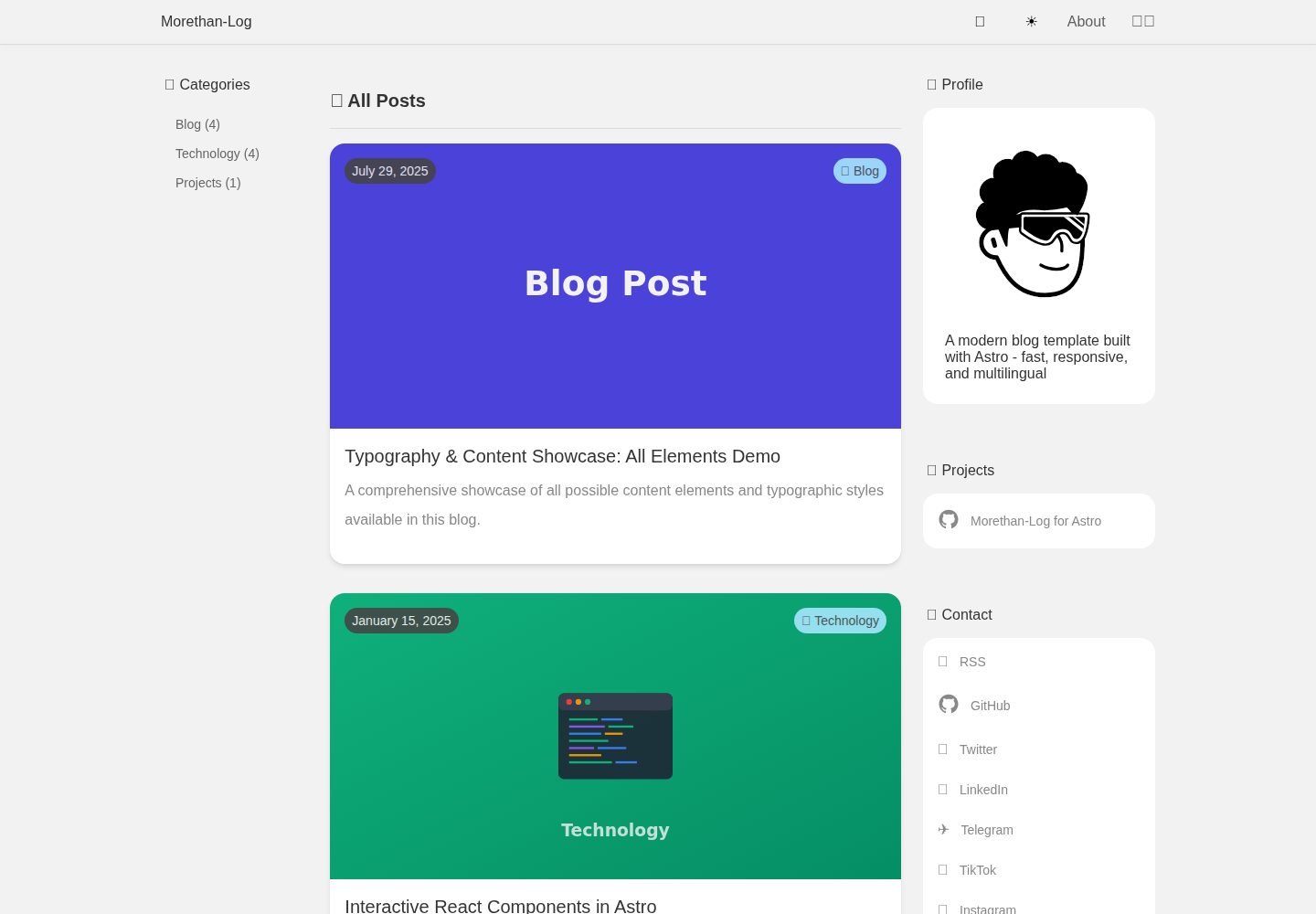
Desktop captureTop of page
Actual screenshot captured by the server browser.
All pages & views 3
Screenshots show visual appearance; interactive behavior may differ.
Recorded 2026-10-05View source
What stands out
A quick read of the recorded project description.
Posts are automatically recognized by language and category under src/content/posts/<language>/<category>/; files with the same name are automatically linked as translations
Supports Markdown and MDX; React interactive components under src/components/islands can be mounted in MDX
Includes dark mode, full-text search, category archives, multilingual RSS, and sitemap
Site information, navigation, categories, date formats, and similar settings are configured centrally through src/config/site.ts
Post frontmatter supports fields such as permalink, draft, aiGenerated, and cover image
Template Details
morethan-log-astro is a blog template built with Astro. The author ported it from the Next.js version of morethan-log, used it for their own site, and then open-sourced it. The template provides English and Russian by default. Content is organized under the directory structure src/content/posts/<language>/<category>/, and files with the same filename in different language directories are automatically linked as translations. Site title, description, author information, navigation, categories, date formats, and similar settings are configured centrally in src/config/site.ts and src/config/locales.ts; both files use typed definitions. Posts are written in Markdown or MDX and support frontmatter fields such as title, date, description, cover image, permalink, draft, and aiGenerated. React interactive components can be mounted in MDX. The template includes dark mode, full-text search, category archives, multilingual RSS and sitemap, and hreflang associations based on the file structure. The README does not describe production performance or performance metrics for the template; before actual deployment, you need to verify dependency versions and third-party asset licenses yourself.
Next.jsAstroBlog
Is it right for your project?
Use Cases
- Building a personal multilingual blog and organizing posts by language and category
- Migrating an existing Next.js morethan-log site to Astro
- Embedding React interactive components in Markdown posts for demos or explanations
- Providing separate RSS feeds and SEO metadata for different languages
Suitable For
- Developers familiar with Astro or willing to organize content according to the directory structure
- Individual authors who need an English-Russian bilingual blog and may extend it to other languages
- Blog projects that want to manage site information and navigation uniformly through configuration files
Getting started & customization
Use these recorded setup notes alongside the repository instructions for your chosen version.
- 1
Requires Node.js 18 or later and npm
- 2
It is recommended to create the project with npm create astro@latest -- --template JustSereja/morethan-log-astro, or generate a repository from the GitHub template and then run npm install
- 3
The development server runs at http://localhost:4321 by default; start it with npm run dev
- 4
Core site configuration is in src/config/site.ts, language metadata is in src/config/locales.ts, and UI translations are in src/i18n/ui.ts
- 5
When adding a language, you need to extend LOCALE_DEFINITIONS, add the corresponding language values in site.ts, and update the translations in i18n/ui.ts
License & source material
Usage conditions & limitations
Free to use · keep license noticeThis entry covers the free version in the public repository under the MIT license; the free scope is the code of that version and does not mean that external services or third-party assets are free.
Must comply with when using
- You may use, modify, commercialize, and distribute the code of this version for free.
- When distributing copies or substantial portions of the code, retain the original author's copyright notice and the complete MIT license notice.
- The code is provided as is; warranties and limitations of liability are governed by the original license and applicable law.
Additional costs & items to verify
- Demo images, fonts, icons, and other third-party assets must be checked against their respective licenses; the MIT license of the code alone is not sufficient to determine this.
- External services such as domains, hosting, databases, payments, or AI may incur separate charges.
- Using the template's built-in make update-template update command requires git and rsync to be installed on the system; Windows users need to use WSL or install them through a package manager, otherwise this update method cannot be used.
- The public/css/ directory is considered owned by the template and will be overwritten when the update sync runs; custom styles must be placed elsewhere or reapplied after syncing.
- The update command preserves only personal content such as src/content, src/config/site.ts, src/config/locales.ts, and public/img and favicon; other framework files will be overwritten by the upstream template.
View Original Text Basis
Permission is hereby granted, free of charge
Original License Text
Requirements: - `git` and `rsync` installed (macOS/Linux ship with both; on Windows, use WSL or install via package manager)
Original README
Anything under `public/css/` is considered template-owned; keep personal overrides elsewhere or reapply them after the sync
Original README
https://github.com/JustSereja/morethan-log-astro/blob/main/LICENSEhttps://github.com/JustSereja/morethan-log-astro/blob/main/README.mdLeaves your content (`src/content/**`), personal config (`src/config/site.ts`, `src/config/locales.ts`), and images (`public/img/**`, favicons) untouched
Original README
Compiled by DeepSeek based on repository license and README ·2026-10-05. Results only cover the materials read; dependencies, images, fonts, and subsequent term changes are subject to their respective original texts.
Project checks & description sources
Template Information
- Source platforms
- Astro Themes
- Documentation and maintenance reference score
- More documented · 92 / 100
- Technologies
- Next.js · Astro · React
- Website type
- Blog
How this score is calculated
Our heuristic uses license records (up to 30), a demo link (12), a preview (10), stars (15), recorded maintenance (15), description completeness (8), feature records (5) and classification data (5). It is not a code, security or performance test, or a Google score. A link does not establish tested functionality.
What to verify for this project
- Repository update recorded
- 2025-10-28
- Screenshot last checked
- 2026-10-05
A demo link is listed. Check it with your own content and viewport sizes; its presence does not confirm that forms, authentication or payments work.
The catalog identifies Next.js as the primary stack. Check the actual dependency manifest and lockfile for versions and hosting requirements. These notes use recorded metadata, not a code audit or a deployment test.
Use a selection guide →How this description was prepared
AI-assisted description based on catalog records and repository material. Repository authors are not automatically the reviewers of this description.
Review declaration: [email protected] · 2026-10-06
Inspect the recorded source material
SHA-256: 393dfdbd51f68ea61ae4cd275ad7621a960de65b0ea7a4acf5a0f9d1214cf873
2026-10-05T15:19:33.269Z
Source file / repository# Morethan-Log for Astro
A modern, customizable blog template built with Astro. Fast, responsive, and multilingual out of the box.
🌐 **[Live Demo](https://morethan-log-astro.sereja.com/)**

> **Inspiration:**
> I loved the original **[morethan-log](https://github.com/morethanmin/morethan-log)** Next.js template so much that I ported it to Astro for my own site, **[sereja.com](https://sereja.com/)** \- and open-sourced the result as **[morethan-log-astro](https://github.com/JustSereja/morethan-log-astro)** so fellow Astro fans can spin up a blazing-fast blog with the same clean design in seconds.
## 🚀 Features
- **🌍 Multilingual Support** - Built-in support for multiple languages (EN/RU by default)
- **📱 Responsive Design** - Looks great on all devices
- **🌙 Dark Mode** - Automatic theme switching based on system preferences
- **🔍 Search Functionality** - Built-in search for your content
- **📝 Markdown Support** - Write posts in Markdown with full syntax highlighting
- **🏷️ Categories** - Organize posts by categories
- **📊 SEO Optimized** - Meta tags, sitemap, multilingual RSS feeds included
- **⚙️ Highly Configurable** - Easy customization through single config file
- **💬 Social Links** - Add your social media profiles easily
## 📦 Quick Start
### Prerequisites
- Node.js 18+ and npm
### Installation
1. **Quick Start with npm create** (Recommended)
The easiest way to get started is using the Astro CLI:
```bash
npm create astro@latest -- --template JustSereja/morethan-log-astro
```
This command will:
- Prompt you for a project name
- Create a new directory with your blog
- Install all dependencies automatically
Then navigate to your project:
```bash
cd [your-project-name]
```
2. **Alternative: Use GitHub Template**
If you prefer to create a GitHub repository first:
[](https://github.com/JustSereja/morethan-log-astro/generate)
Then clone and set up:
```bash
git clone https://github.com/[your-username]/[your-repo-name].git
cd [your-repo-name]
npm install
```
### Running the Development Server
Start the development server:
```bash
npm run dev
```
Open your browser and visit `http://localhost:4321` to see your blog!
> `npm run dev` now handles all client-side bundles automatically—no extra watch commands needed. Edit files under `src/` and the Astro dev server takes care of the rest.
## ⚙️ Configuration
Your core site settings live in `src/config/site.ts`, while locale metadata (codes, labels, flags, language tags, defaults) is defined in `src/config/locales.ts`. Both files are fully typed so your editor can guide you.
### Locale definitions (`src/config/locales.ts`)
```typescript
const LOCALE_DEFINITIONS = [
{
code: 'en',
label: 'English',
nativeLabel: 'English',
langTag: 'en-US',
ogLocale: 'en_US',
flag: '🇬🇧',
dir: 'ltr',
isDefault: true,
},
{
code: 'ru',
label: 'Russian',
nativeLabel: 'Русский',
langTag: 'ru-RU',
ogLocale: 'ru_RU',
flag: '🇷🇺',
dir: 'ltr',
},
] as const;
```
- `code` drives URL prefixes, content folder names, and the language switcher.
- `langTag` becomes the `<html lang>` attribute and informs search engines.
- `ogLocale` customizes Open Graph metadata for each language.
- `flag`, `label`, and `nativeLabel` power the UI (change or remove them as you like).
- Mark exactly one locale with `isDefault: true`; everything else will derive from it.
When you add a new locale:
1. Extend `LOCALE_DEFINITIONS`.
2. Provide matching values in `src/config/site.ts` (titles, descriptions, author info, category labels, etc.).
3. Add or update translations in `src/i18n/ui.ts` to localize UI strings not pulled from config.
### Site settings (`src/config/site.ts`)
```typescript
import type { SiteConfig } from '@config';
const siteConfig: SiteConfig = {
siteUrl: 'https://morethan-log-astro.sereja.com',
title: {
en: 'Morethan-Log',
ru: 'Morethan-Log',
},
description: {
en: 'A modern blog template built with Astro',
ru: 'Современный шаблон блога на Astro',
},
author: {
name: {
en: 'Sereja',
ru: 'Серёжа',
},
email: '[email protected]',
avatar: '/img/avatar.svg',
bio: {
en: 'Full-stack developer passionate about the web.',
ru: 'Full-stack разработчик, увлеченный вебом.',
},
},
// ...see the file for the complete option list
};
export default siteConfig;
```
### Contact & Social Links
Add any contact or social profiles:
```typescript
contactLinks: [
{
id: 'github',
label: {
en: 'GitHub',
ru: 'GitHub',
},
url: {
en: 'https://github.com/yourusername',
ru: 'https://github.com/yourusername-ru',
},
icon: '🐙',
},
{
id: 'newsletter',
label: {
en: 'Newsletter',
ru: 'Рассылка',
},
url: 'https://example.com/newsletter',
},
];
```
### Categories
Configure blog categories:
```typescript
categories: {
blog: {
enabled: true,
path: "/blog",
icon: "💻",
label: {
en: 'Blog',
ru: 'Блог',
},
description: {
en: 'Personal thoughts, experiences, and insights',
ru: 'Личные мысли, опыт и идеи',
},
},
// Add more categories
}
```
- `path` controls the base segment used in URLs (e.g. `/insights`). Keep it to a single segment (with or without the leading slash) and the template will add language prefixes automatically.
### Navigation
Define the header menu in `src/config/site.ts`:
```typescript
navigation: [
{
id: 'about',
labelKey: 'ui.about', // Uses the translation helper
translationKey: 'about', // Targets the localized page whose filename (minus locale) is "about"
},
{
id: 'projects',
labelKey: 'ui.projects',
path: '/projects', // Direct path that will be localized automatically
},
{
id: 'github',
label: { en: 'GitHub', ru: 'GitHub' },
external: 'https://github.com/yourusername',
},
];
```
- Use `translationKey` to link to pages defined in `src/content/pages/**`; no frontmatter is needed—identifiers are derived from each file's path automatically, even when per-locale `permalink` values differ.
- Use `path` for simple internal links (without a language prefix); the layout will localize them.
- Use `external` for outbound URLs.
- `labelKey` pulls from `src/i18n/ui.ts`; you can also provide a per-locale `label` override.
### Features
Toggle features on/off:
```typescript
features: {
darkMode: true,
search: true,
rss: true,
// ... more features
}
```
### Date Formats
Control how dates render per language:
```typescript
dateFormats: {
en: {
locale: 'en-US',
options: { year: 'numeric', month: 'long', day: 'numeric' },
},
ru: {
locale: 'ru-RU',
options: { year: 'numeric', month: 'long', day: 'numeric' },
},
}
```
## 📝 Writing Posts
### Creating a New Post
1. Create a new `.md` file in the appropriate directory:
- Blog posts: `src/content/posts/en/blog/`
- Technology posts: `src/content/posts/en/technology/`
- Projects: `src/content/posts/en/projects/`
2. Add frontmatter using the typed schema:
```markdown
---
title: 'Your Post Title'
h1: 'Display Title'
description: 'A brief description of your post'
date: '2024-03-15'
announcement: 'Optional summary shown in lists'
image: '/img/posts/your-image.jpg'
permalink: 'my-custom-slug' # Optional: override the URL segment
aiGenerated: false # Optional: flag AI-assisted content
draft: false # Optional: keep the post out of production builds
---
Your post content here...
```
> The folder path `src/content/posts/<lang>/<category>/` defines the language and category automatically—no extra frontmatter needed.
#### Optional custom URLs
- **Posts:** Set `permalink` to override just the slug segment (e.g. `permalink: 'case-study-2024'`). Keep it to a single segment; the template combines it with the configured category path and language prefix.
- **Pages:** Add `permalink` to entries in `src/content/pages/**` when you want a top-level custom route (e.g. `permalink: 'about-me'`). Nested paths (`company/about`) are supported, and each language can provide its own value.
- **Categories:** Adjust `path` in `src/config/site.ts` to change the category segment (for example `path: '/case-studies'`). All posts in the category and the listing page will pick up the new URL.
The build still links translations by file structure, so `permalink` changes never break cross-language `hreflang` relationships.
#### Post frontmatter reference
| Field | Type | Description | Required | Default |
| --- | --- | --- | --- | --- |
| `title` | `string` | Primary title shown in listings and `<title>` tags | ✅ | — |
| `h1` | `string` | Overrides the in-article heading | ❌ | falls back to `title` |
| `description` | `string` | SEO/meta description for cards and listings | ❌ | — |
| `date` | `string` (ISO) | Publication date, used for sorting | ✅ | — |
| `announcement` | `string` | Short summary displayed on cards | ❌ | — |
| `image` | `string` | Featured image path or URL | ❌ | Category/ global fallback |
| `aiGenerated` | `boolean` | Marks content as AI-assisted to surface a banner | ❌ | `false` |
| `permalink` | `string` | Custom slug for the post URL (single segment) | ❌ | Derived from filename |
| `draft` | `boolean` | Exclude the entire translation set from production builds, feeds, search, and sitemaps | ❌ | `false` |
### Multi-language Posts
Create a matching file under `src/content/posts/ru/<category>/` with the **same file name**. The build system derives language, category, and cross-language links from the folder structure automatically.
```
src/content/posts/en/blog/my-post.md # English
src/content/posts/ru/blog/my-post.md # Russian
```
### MDX & Interactive Islands
- Posts and pages can be authored as `.mdx` files—the same frontmatter schema applies, so drafts, permalinks, and AI flags continue to work exactly like `.md`.
- React islands live in `src/components/islands/**`. Each island exports its component as the default export and can optionally provide metadata via an `island` named export.
- The registry automatically discovers every island folder. Import them directly from their folder (e.g. `import DemoCounter from '@components/islands/DemoCounter';`) or reuse them across multiple posts without touching a central index.
- When hydrating inside MDX, attach the usual directives (`<DemoCounter client:load initial={3} />`) and Astro will stream the static HTML before React takes over.
### Language Support
The template supports both multilingual and single-language content:
- **Multilingual posts:** keep the same file name across languages so the auto-generated cross-link stays in sync.
- **Single-language posts:** create a single entry; the language switcher gracefully falls back to the homepage of other locales.
This is perfect for:
- Language-specific announcements
- Regional content
- Technical documentation in one language
- Gradual content translation
### RSS Feeds
The template provides multilingual RSS feeds with full content support:
#### Feed Structure
- **Main Feed** (`/rss.xml`) - Contains posts in the default language (English)
- **English Feed** (`/en/rss.xml`) - English posts only
- **Russian Feed** (`/ru/rss.xml`) - Russian posts only
This approach ensures subscribers never receive content in languages they don't understand. The main feed (`/rss.xml`) serves the default language to maintain compatibility with RSS readers that expect a feed at this standard location.
#### Features
Each RSS feed includes:
- ✅ Full HTML content (not just descriptions)
- ✅ Properly converted image URLs (relative to absolute)
- ✅ Author information
- ✅ Post categories
- ✅ All required RSS 2.0 elements
#### Feed Discovery
RSS feeds are automatically linked in the `<head>` of each page:
- The main feed (`/rss.xml`) contains default language content
- Language-specific feeds are available at `/{lang}/rss.xml`
- Alternative language feeds include `hreflang` attributes
#### Customizing Default Language
To change which language appears in the main RSS feed, update `defaultLanguage` in `src/config/site.ts`:
```typescript
// src/config/site.ts
export default {
// ...
defaultLanguage: "ru", // Change to make Russian the main feed language
// ...
}
```
## 🎨 Customization
### Styling
- Main styles: `public/css/style.css`
- Modify CSS variables for colors and themes
- Dark mode styles are included
### Images
#### Placeholder Images
The template includes category-specific placeholder images for posts without featured images:
- **Blog posts**: `/public/img/posts/placeholder-blog.svg` (Purple gradient with document icon)
- **Technology posts**: `/public/img/posts/placeholder-technology.svg` (Green gradient with code terminal)
- **Projects posts**: `/public/img/posts/placeholder-projects.svg` (Orange gradient with gear icon)
- **Default**: `/public/img/posts/placeholder.svg` (Simple fallback)
Posts automatically use the appropriate placeholder based on their category.
#### RSS Channel Image
For RSS feeds, the template supports both SVG and PNG formats:
- Create your logo as `/public/img/rss-logo.png` (144x144px) for best compatibility
- Falls back to `/public/img/rss-logo.svg` if PNG doesn't exist
- PNG format is recommended as it's more universally supported by RSS readers
### Adding New Languages
1. Add language to `src/i18n/ui.ts`:
```typescript
export const languages = {
en: 'English',
ru: 'Русский',
es: 'Español' // New language
};
```
2. Add translations:
```typescript
export const ui = {
// ... existing languages
es: {
'name': SITE_CONFIG.author.name,
'ui.about': 'Acerca de',
// ... more translations
}
}
```
### Custom Pages
Create new pages in `src/pages/` using `.astro` or `.md` files.
### Language-Specific Contact Links and Author Names
The template now supports fully configurable contact/social links and author names for each language:
1. **Contact & Social Links**: Configure any set of links in `src/config/site.ts`. Each entry can localize its label and URL, and optionally define an icon (emoji) or raw SVG:
```javascript
contactLinks: [
{
id: "github",
label: {
en: "GitHub",
ru: "GitHub"
},
url: {
en: "https://github.com/EnglishUsername",
ru: "https://github.com/RussianUsername"
},
icon: "🐙"
},
{
id: "portfolio",
label: {
en: "Portfolio",
ru: "Портфолио"
},
url: "https://example.com",
iconSvg: "<svg ...>...</svg>"
}
// ...other links
]
```
2. **Language-Specific Author Names**: Set different author names for each language:
```javascript
author: {
name: {
en: "John Doe",
ru: "Иван Иванов"
},
// ... other author fields
}
```
## 🚀 Deployment
### Build for Production
```bash
npm run build
```
The build pipeline includes a post-build step that formats the output and copies `dist/404.html` to `dist/404/index.html`. This guarantees that providers expecting a directory-style 404 route (e.g. GitHub Pages, Netlify) correctly serve your not-found page whether the request is for `/404` or `/404.html`.
## 🔄 Updating the Template
Keeping your project in sync with the upstream template is easiest when you track the original repository and selectively pull in changes.
### Recommended: use the bundled Make target
From your project root, run:
```bash
make update-template
```
This command:
- Clones the latest `main` branch of the upstream template into `.template-update`
- Syncs framework, layout, scripts, styles, and assets into your project using `rsync`
- Leaves your content (`src/content/**`), personal config (`src/config/site.ts`, `src/config/locales.ts`), and images (`public/img/**`, favicons) untouched
- Cleans up the temporary clone when finished
- Anything under `public/css/` is considered template-owned; keep personal overrides elsewhere or reapply them after the sync
Requirements:
- `git` and `rsync` installed (macOS/Linux ship with both; on Windows, use WSL or install via package manager)
- Any local changes committed or stashed so you can review the diff the command produces
After it runs, review `git status`, resolve conflicts (if any), reinstall deps when `package.json` changes, and run `npx astro sync` followed by `npm run build` to double-check everything still compiles.
### Track template releases from your project
Run the following once inside your project folder:
```bash
git remote add upstream https://github.com/JustSereja/morethan-log-astro.git
git fetch upstream --tags
```
From now on, `git fetch upstream --tags` pulls the latest commits and release tags. You can inspect what changed with `git log upstream/main`.
### Merge everything (demo content included)
If you want the full template (including demo posts and placeholder config) in your project:
```bash
git checkout main
git pull
git merge upstream/main
```
Resolve any conflicts, test the build, then commit the merge.
### Update code without demo content or placeholder config
To grab only the template code while keeping your own content and configuration, restore just the framework directories from the template branch (or a specific release tag):
```bash
# Update TAG if you prefer a specific release, e.g. upstream/v2.0.0
TARGET_REF=upstream/main
git fetch upstream --tags
git checkout main
git pull
git restore --source "$TARGET_REF" \
astro.config.mjs \
package.json package-lock.json \
tsconfig.json \
public/css public/favicon.ico public/favicon.svg public/img \
scripts \
src/components src/i18n src/layouts src/lib src/pages src/scripts src/utils
# keep your live content and custom site settings
git checkout -- src/content src/config/site.ts src/config/locales.ts
npm install
npx astro sync
npm run build
```
This sequence:
- Brings in the latest template logic, layouts, scripts, and assets.
- Leaves `src/content/**` untouched, so your posts and pages stay intact.
- Restores your own `src/config/site.ts` and `src/config/locales.ts`, keeping personal branding, locale metadata, contact links, and other secrets.
Review `git status`, commit the updated files, and (optionally) create a tag for the new version of your site.
Explore similar templates
Compare previews and descriptions within the same stack and category.

tailwind-nextjs-starter-blog
A Next.js and Tailwind CSS blog starter template using Contentlayer for Markdown/MDX, with built-in SEO, code highlighting, and tags. It targets personal technical blogs and migration from Jekyll/Hugo to React, and supports one-click Vercel deployment.
Next.js · Blog

Nextjs-tailwindcss-blog-template
A personal blog template built with Next.js and Tailwind CSS, using Velite to process Markdown content. It includes home, about, contact and article pages, with a demo site and a companion YouTube tutorial.
Next.js · Blog

Next-js-Blog-Boilerplate
A blog starter built on Next.js 12 and Tailwind CSS 3, integrating TypeScript, ESLint, Prettier, and PostCSS.
Next.js · Blog

nextjs-blog-theme
A Next.js 15 and Tailwind CSS 4.x blog starter by Netlify, designed by Bejamas, with MDX support, dark/light theme switching, and environment-variable configuration. It includes a visual setup wizard for deploying to Netlify and manages content via local .mdx files.
Next.js · Blog

blog
A personal blog forked from Timlrx's tailwind-nextjs-starter-blog, built with Next.js, React, and Tailwind CSS. Content is stored as Markdown/MDX under data/, with site, author, navigation, and project data in separate files.
Next.js · Blog

tailnext
Tailnext is a free, open-source template built on the Next.js 14 App Router and Tailwind CSS, created by the onWidget team.
Next.js · Blog