默认支持英语和俄语,语言定义集中在 src/config/locales.ts,可扩展其他语言
Next.jsAstroReact博客
morethan-log-astro — Next.js 博客模板
作者 JustSereja
基于 Astro 的多语言博客模板,移植自 Next.js 版 morethan-log,内置暗色模式、全文搜索、分类与 RSS,通过配置文件定制站点信息。
看看你的网站会是什么样
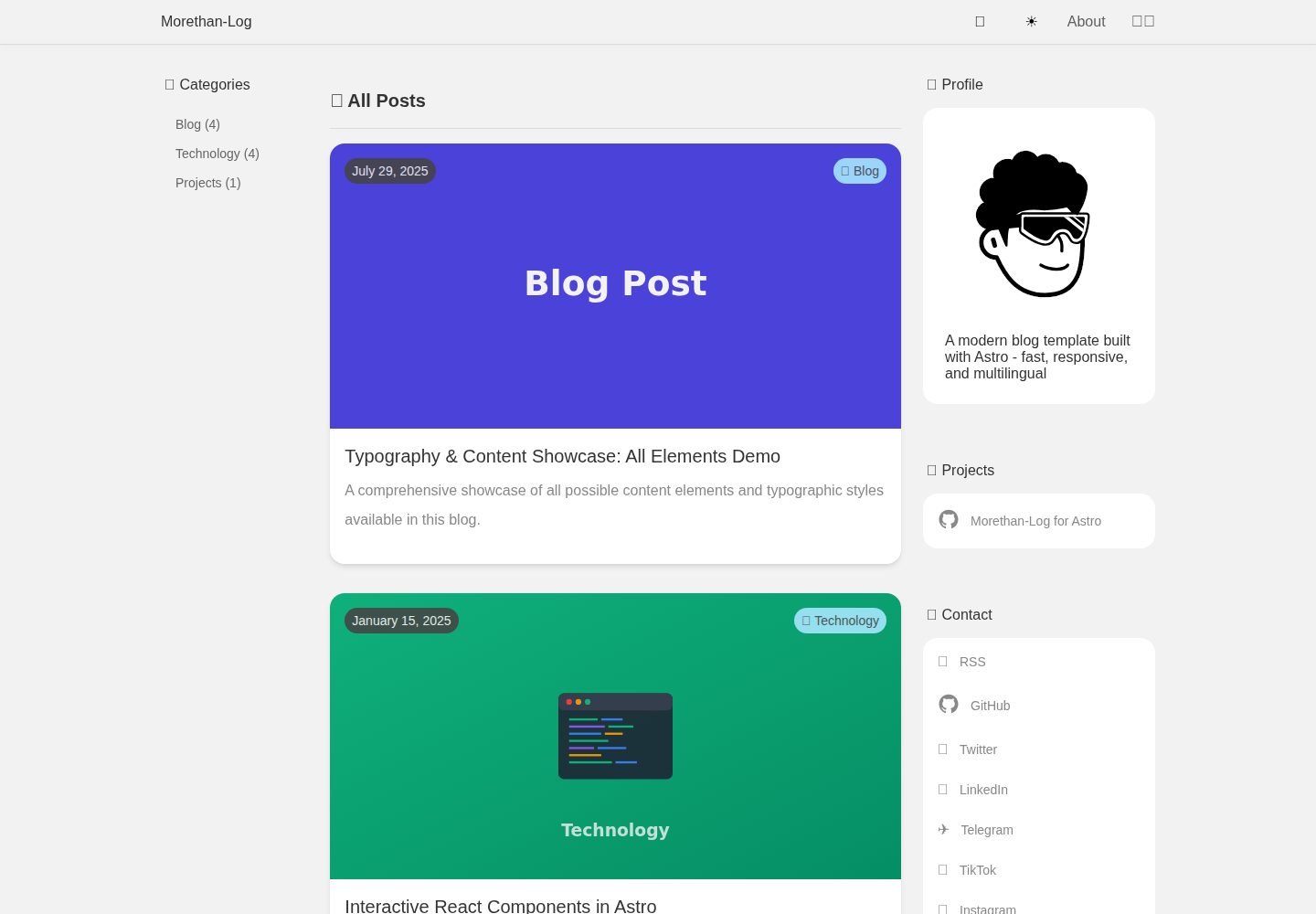
浏览真实页面截图,比较内容排版与手机效果。点击下方缩略图切换,放大查看整页细节。
全部页面与视图 3
截图用于了解视觉与布局,交互效果请以实际项目为准。
采集于 2026-10-05查看来源
值得关注的模板亮点
从已有项目资料中,快速了解它的特点。
文章按 src/content/posts/<语言>/<分类>/ 目录自动识别语言与分类,同名文件自动关联翻译
支持 Markdown 与 MDX,MDX 中可挂载 src/components/islands 下的 React 交互组件
内置暗色模式、全文搜索、分类归档、多语言 RSS 与 sitemap
站点信息、导航、分类、日期格式等通过 src/config/site.ts 集中配置
文章 frontmatter 支持 permalink、draft、aiGenerated、封面图等字段
模板详细介绍
morethan-log-astro 是一个用 Astro 构建的博客模板,作者将其从 Next.js 版 morethan-log 移植而来,并用于自己的站点后开源。模板默认提供英语和俄语两种语言,内容按 src/content/posts/<语言>/<分类>/ 的目录结构组织,同一文件名在不同语言目录下会被自动关联为翻译版本。站点标题、描述、作者信息、导航、分类、日期格式等集中在 src/config/site.ts 与 src/config/locales.ts 中配置,两个文件均为类型化定义。文章使用 Markdown 或 MDX 编写,支持标题、日期、描述、封面图、permalink、draft、aiGenerated 等 frontmatter 字段,并可在 MDX 中挂载 React 交互组件。模板内置暗色模式、全文搜索、分类归档、多语言 RSS 与 sitemap,以及基于文件结构的 hreflang 关联。README 未说明模板的生产环境表现或性能指标,实际部署前需自行核对依赖版本与第三方素材许可。
Next.jsAstro博客
适合你的项目吗?
适用场景
- 搭建个人多语言博客,按语言和分类组织文章
- 将已有的 Next.js 版 morethan-log 站点迁移到 Astro
- 在 Markdown 文章中嵌入 React 交互组件进行演示或说明
- 为不同语言分别提供 RSS 订阅与 SEO 元数据
适合人群
- 熟悉 Astro 或愿意按目录结构组织内容的开发者
- 需要英语、俄语双语博客并可能扩展其他语言的个人作者
- 希望用配置文件统一管理站点信息与导航的博客项目
上手与定制指南
结合仓库当前版本的说明,按下面的资料检查内容、配置与运行要求。
- 1
需要 Node.js 18 及以上版本和 npm
- 2
推荐使用 npm create astro@latest -- --template JustSereja/morethan-log-astro 创建项目,或通过 GitHub 模板生成仓库后执行 npm install
- 3
开发服务器默认运行在 http://localhost:4321,执行 npm run dev 启动
- 4
站点核心配置在 src/config/site.ts,语言元数据在 src/config/locales.ts,界面翻译在 src/i18n/ui.ts
- 5
新增语言时需同时扩展 LOCALE_DEFINITIONS、补充 site.ts 中对应语言的值,并更新 i18n/ui.ts 的翻译
授权与来源资料
使用条件与限制
免费使用 · 保留许可声明本次收录的是公开仓库中采用 MIT 许可的免费版本;免费范围为该版本代码,不代表外部服务或第三方素材免费。
使用时需要遵守
- 允许免费使用、修改、商用和分发该版本代码。
- 分发代码副本或实质性部分时,保留原作者版权声明和完整 MIT 许可声明。
- 代码按现状提供;担保与责任限制以原许可证及适用法律为准。
额外费用与待核对事项
- 演示图片、字体、图标及其他第三方素材需按各自许可核对,不能仅凭代码的 MIT 许可判断。
- 域名、托管、数据库、支付或 AI 等外部服务可能另外收费。
- 使用模板自带的 make update-template 更新命令需要系统已安装 git 与 rsync;Windows 用户需使用 WSL 或通过包管理器安装,否则无法使用该更新方式。
- public/css/ 目录被视为模板所有,运行更新同步时会被覆盖;自定义样式需放在其他位置或在同步后重新应用。
- 更新命令仅保留 src/content、src/config/site.ts、src/config/locales.ts 及 public/img 与 favicon 等个人内容,其余框架文件会被上游模板覆盖。
查看原文依据
Permission is hereby granted, free of charge
许可证原文
Requirements: - `git` and `rsync` installed (macOS/Linux ship with both; on Windows, use WSL or install via package manager)
README 原文
Anything under `public/css/` is considered template-owned; keep personal overrides elsewhere or reapply them after the sync
README 原文
https://github.com/JustSereja/morethan-log-astro/blob/main/LICENSEhttps://github.com/JustSereja/morethan-log-astro/blob/main/README.mdLeaves your content (`src/content/**`), personal config (`src/config/site.ts`, `src/config/locales.ts`), and images (`public/img/**`, favicons) untouched
README 原文
DeepSeek 根据仓库许可证和 README 整理 ·2026-10-05。结果仅覆盖已读取资料,依赖、图片、字体及后续条款变更以各自原文为准。
项目核对记录与介绍依据
模板资料
- 来源平台
- Astro Themes
- 资料与维护参考分
- 资料较完整 · 92 / 100
- 技术栈
- Next.js · Astro · React
- 网站类型
- 博客
这个分数如何计算
本站按许可资料(最高30分)、演示链接(12分)、预览图(10分)、Star数(15分)、记录的维护时间(15分)、描述完整度(8分)、功能记录(5分)和分类资料(5分)计算。它不是代码、安全或性能测试,也不是 Google 评分;有链接不代表已实测可用。
这个项目需要核对什么
- 记录的仓库更新时间
- 2025-10-28
- 截图检查日期
- 2026-10-05
已收录演示链接。请用你的内容与屏幕尺寸检查;有演示不代表表单、认证或支付已经可用。
目录记录的主要技术栈是 Next.js。请通过依赖清单和锁文件核对实际版本与托管要求。这些说明基于收录资料,不代表代码审计或部署实测。
查看具体选型方法 →介绍的制作与核对状态
介绍由 AI 辅助整理目录与仓库资料。仓库作者不等于这篇介绍的审核者。
审核声明: [email protected] · 2026-10-06
查看当时使用的来源资料
SHA-256: 393dfdbd51f68ea61ae4cd275ad7621a960de65b0ea7a4acf5a0f9d1214cf873
2026-10-05T15:19:33.269Z
来源文件 / 仓库# Morethan-Log for Astro
A modern, customizable blog template built with Astro. Fast, responsive, and multilingual out of the box.
🌐 **[Live Demo](https://morethan-log-astro.sereja.com/)**

> **Inspiration:**
> I loved the original **[morethan-log](https://github.com/morethanmin/morethan-log)** Next.js template so much that I ported it to Astro for my own site, **[sereja.com](https://sereja.com/)** \- and open-sourced the result as **[morethan-log-astro](https://github.com/JustSereja/morethan-log-astro)** so fellow Astro fans can spin up a blazing-fast blog with the same clean design in seconds.
## 🚀 Features
- **🌍 Multilingual Support** - Built-in support for multiple languages (EN/RU by default)
- **📱 Responsive Design** - Looks great on all devices
- **🌙 Dark Mode** - Automatic theme switching based on system preferences
- **🔍 Search Functionality** - Built-in search for your content
- **📝 Markdown Support** - Write posts in Markdown with full syntax highlighting
- **🏷️ Categories** - Organize posts by categories
- **📊 SEO Optimized** - Meta tags, sitemap, multilingual RSS feeds included
- **⚙️ Highly Configurable** - Easy customization through single config file
- **💬 Social Links** - Add your social media profiles easily
## 📦 Quick Start
### Prerequisites
- Node.js 18+ and npm
### Installation
1. **Quick Start with npm create** (Recommended)
The easiest way to get started is using the Astro CLI:
```bash
npm create astro@latest -- --template JustSereja/morethan-log-astro
```
This command will:
- Prompt you for a project name
- Create a new directory with your blog
- Install all dependencies automatically
Then navigate to your project:
```bash
cd [your-project-name]
```
2. **Alternative: Use GitHub Template**
If you prefer to create a GitHub repository first:
[](https://github.com/JustSereja/morethan-log-astro/generate)
Then clone and set up:
```bash
git clone https://github.com/[your-username]/[your-repo-name].git
cd [your-repo-name]
npm install
```
### Running the Development Server
Start the development server:
```bash
npm run dev
```
Open your browser and visit `http://localhost:4321` to see your blog!
> `npm run dev` now handles all client-side bundles automatically—no extra watch commands needed. Edit files under `src/` and the Astro dev server takes care of the rest.
## ⚙️ Configuration
Your core site settings live in `src/config/site.ts`, while locale metadata (codes, labels, flags, language tags, defaults) is defined in `src/config/locales.ts`. Both files are fully typed so your editor can guide you.
### Locale definitions (`src/config/locales.ts`)
```typescript
const LOCALE_DEFINITIONS = [
{
code: 'en',
label: 'English',
nativeLabel: 'English',
langTag: 'en-US',
ogLocale: 'en_US',
flag: '🇬🇧',
dir: 'ltr',
isDefault: true,
},
{
code: 'ru',
label: 'Russian',
nativeLabel: 'Русский',
langTag: 'ru-RU',
ogLocale: 'ru_RU',
flag: '🇷🇺',
dir: 'ltr',
},
] as const;
```
- `code` drives URL prefixes, content folder names, and the language switcher.
- `langTag` becomes the `<html lang>` attribute and informs search engines.
- `ogLocale` customizes Open Graph metadata for each language.
- `flag`, `label`, and `nativeLabel` power the UI (change or remove them as you like).
- Mark exactly one locale with `isDefault: true`; everything else will derive from it.
When you add a new locale:
1. Extend `LOCALE_DEFINITIONS`.
2. Provide matching values in `src/config/site.ts` (titles, descriptions, author info, category labels, etc.).
3. Add or update translations in `src/i18n/ui.ts` to localize UI strings not pulled from config.
### Site settings (`src/config/site.ts`)
```typescript
import type { SiteConfig } from '@config';
const siteConfig: SiteConfig = {
siteUrl: 'https://morethan-log-astro.sereja.com',
title: {
en: 'Morethan-Log',
ru: 'Morethan-Log',
},
description: {
en: 'A modern blog template built with Astro',
ru: 'Современный шаблон блога на Astro',
},
author: {
name: {
en: 'Sereja',
ru: 'Серёжа',
},
email: '[email protected]',
avatar: '/img/avatar.svg',
bio: {
en: 'Full-stack developer passionate about the web.',
ru: 'Full-stack разработчик, увлеченный вебом.',
},
},
// ...see the file for the complete option list
};
export default siteConfig;
```
### Contact & Social Links
Add any contact or social profiles:
```typescript
contactLinks: [
{
id: 'github',
label: {
en: 'GitHub',
ru: 'GitHub',
},
url: {
en: 'https://github.com/yourusername',
ru: 'https://github.com/yourusername-ru',
},
icon: '🐙',
},
{
id: 'newsletter',
label: {
en: 'Newsletter',
ru: 'Рассылка',
},
url: 'https://example.com/newsletter',
},
];
```
### Categories
Configure blog categories:
```typescript
categories: {
blog: {
enabled: true,
path: "/blog",
icon: "💻",
label: {
en: 'Blog',
ru: 'Блог',
},
description: {
en: 'Personal thoughts, experiences, and insights',
ru: 'Личные мысли, опыт и идеи',
},
},
// Add more categories
}
```
- `path` controls the base segment used in URLs (e.g. `/insights`). Keep it to a single segment (with or without the leading slash) and the template will add language prefixes automatically.
### Navigation
Define the header menu in `src/config/site.ts`:
```typescript
navigation: [
{
id: 'about',
labelKey: 'ui.about', // Uses the translation helper
translationKey: 'about', // Targets the localized page whose filename (minus locale) is "about"
},
{
id: 'projects',
labelKey: 'ui.projects',
path: '/projects', // Direct path that will be localized automatically
},
{
id: 'github',
label: { en: 'GitHub', ru: 'GitHub' },
external: 'https://github.com/yourusername',
},
];
```
- Use `translationKey` to link to pages defined in `src/content/pages/**`; no frontmatter is needed—identifiers are derived from each file's path automatically, even when per-locale `permalink` values differ.
- Use `path` for simple internal links (without a language prefix); the layout will localize them.
- Use `external` for outbound URLs.
- `labelKey` pulls from `src/i18n/ui.ts`; you can also provide a per-locale `label` override.
### Features
Toggle features on/off:
```typescript
features: {
darkMode: true,
search: true,
rss: true,
// ... more features
}
```
### Date Formats
Control how dates render per language:
```typescript
dateFormats: {
en: {
locale: 'en-US',
options: { year: 'numeric', month: 'long', day: 'numeric' },
},
ru: {
locale: 'ru-RU',
options: { year: 'numeric', month: 'long', day: 'numeric' },
},
}
```
## 📝 Writing Posts
### Creating a New Post
1. Create a new `.md` file in the appropriate directory:
- Blog posts: `src/content/posts/en/blog/`
- Technology posts: `src/content/posts/en/technology/`
- Projects: `src/content/posts/en/projects/`
2. Add frontmatter using the typed schema:
```markdown
---
title: 'Your Post Title'
h1: 'Display Title'
description: 'A brief description of your post'
date: '2024-03-15'
announcement: 'Optional summary shown in lists'
image: '/img/posts/your-image.jpg'
permalink: 'my-custom-slug' # Optional: override the URL segment
aiGenerated: false # Optional: flag AI-assisted content
draft: false # Optional: keep the post out of production builds
---
Your post content here...
```
> The folder path `src/content/posts/<lang>/<category>/` defines the language and category automatically—no extra frontmatter needed.
#### Optional custom URLs
- **Posts:** Set `permalink` to override just the slug segment (e.g. `permalink: 'case-study-2024'`). Keep it to a single segment; the template combines it with the configured category path and language prefix.
- **Pages:** Add `permalink` to entries in `src/content/pages/**` when you want a top-level custom route (e.g. `permalink: 'about-me'`). Nested paths (`company/about`) are supported, and each language can provide its own value.
- **Categories:** Adjust `path` in `src/config/site.ts` to change the category segment (for example `path: '/case-studies'`). All posts in the category and the listing page will pick up the new URL.
The build still links translations by file structure, so `permalink` changes never break cross-language `hreflang` relationships.
#### Post frontmatter reference
| Field | Type | Description | Required | Default |
| --- | --- | --- | --- | --- |
| `title` | `string` | Primary title shown in listings and `<title>` tags | ✅ | — |
| `h1` | `string` | Overrides the in-article heading | ❌ | falls back to `title` |
| `description` | `string` | SEO/meta description for cards and listings | ❌ | — |
| `date` | `string` (ISO) | Publication date, used for sorting | ✅ | — |
| `announcement` | `string` | Short summary displayed on cards | ❌ | — |
| `image` | `string` | Featured image path or URL | ❌ | Category/ global fallback |
| `aiGenerated` | `boolean` | Marks content as AI-assisted to surface a banner | ❌ | `false` |
| `permalink` | `string` | Custom slug for the post URL (single segment) | ❌ | Derived from filename |
| `draft` | `boolean` | Exclude the entire translation set from production builds, feeds, search, and sitemaps | ❌ | `false` |
### Multi-language Posts
Create a matching file under `src/content/posts/ru/<category>/` with the **same file name**. The build system derives language, category, and cross-language links from the folder structure automatically.
```
src/content/posts/en/blog/my-post.md # English
src/content/posts/ru/blog/my-post.md # Russian
```
### MDX & Interactive Islands
- Posts and pages can be authored as `.mdx` files—the same frontmatter schema applies, so drafts, permalinks, and AI flags continue to work exactly like `.md`.
- React islands live in `src/components/islands/**`. Each island exports its component as the default export and can optionally provide metadata via an `island` named export.
- The registry automatically discovers every island folder. Import them directly from their folder (e.g. `import DemoCounter from '@components/islands/DemoCounter';`) or reuse them across multiple posts without touching a central index.
- When hydrating inside MDX, attach the usual directives (`<DemoCounter client:load initial={3} />`) and Astro will stream the static HTML before React takes over.
### Language Support
The template supports both multilingual and single-language content:
- **Multilingual posts:** keep the same file name across languages so the auto-generated cross-link stays in sync.
- **Single-language posts:** create a single entry; the language switcher gracefully falls back to the homepage of other locales.
This is perfect for:
- Language-specific announcements
- Regional content
- Technical documentation in one language
- Gradual content translation
### RSS Feeds
The template provides multilingual RSS feeds with full content support:
#### Feed Structure
- **Main Feed** (`/rss.xml`) - Contains posts in the default language (English)
- **English Feed** (`/en/rss.xml`) - English posts only
- **Russian Feed** (`/ru/rss.xml`) - Russian posts only
This approach ensures subscribers never receive content in languages they don't understand. The main feed (`/rss.xml`) serves the default language to maintain compatibility with RSS readers that expect a feed at this standard location.
#### Features
Each RSS feed includes:
- ✅ Full HTML content (not just descriptions)
- ✅ Properly converted image URLs (relative to absolute)
- ✅ Author information
- ✅ Post categories
- ✅ All required RSS 2.0 elements
#### Feed Discovery
RSS feeds are automatically linked in the `<head>` of each page:
- The main feed (`/rss.xml`) contains default language content
- Language-specific feeds are available at `/{lang}/rss.xml`
- Alternative language feeds include `hreflang` attributes
#### Customizing Default Language
To change which language appears in the main RSS feed, update `defaultLanguage` in `src/config/site.ts`:
```typescript
// src/config/site.ts
export default {
// ...
defaultLanguage: "ru", // Change to make Russian the main feed language
// ...
}
```
## 🎨 Customization
### Styling
- Main styles: `public/css/style.css`
- Modify CSS variables for colors and themes
- Dark mode styles are included
### Images
#### Placeholder Images
The template includes category-specific placeholder images for posts without featured images:
- **Blog posts**: `/public/img/posts/placeholder-blog.svg` (Purple gradient with document icon)
- **Technology posts**: `/public/img/posts/placeholder-technology.svg` (Green gradient with code terminal)
- **Projects posts**: `/public/img/posts/placeholder-projects.svg` (Orange gradient with gear icon)
- **Default**: `/public/img/posts/placeholder.svg` (Simple fallback)
Posts automatically use the appropriate placeholder based on their category.
#### RSS Channel Image
For RSS feeds, the template supports both SVG and PNG formats:
- Create your logo as `/public/img/rss-logo.png` (144x144px) for best compatibility
- Falls back to `/public/img/rss-logo.svg` if PNG doesn't exist
- PNG format is recommended as it's more universally supported by RSS readers
### Adding New Languages
1. Add language to `src/i18n/ui.ts`:
```typescript
export const languages = {
en: 'English',
ru: 'Русский',
es: 'Español' // New language
};
```
2. Add translations:
```typescript
export const ui = {
// ... existing languages
es: {
'name': SITE_CONFIG.author.name,
'ui.about': 'Acerca de',
// ... more translations
}
}
```
### Custom Pages
Create new pages in `src/pages/` using `.astro` or `.md` files.
### Language-Specific Contact Links and Author Names
The template now supports fully configurable contact/social links and author names for each language:
1. **Contact & Social Links**: Configure any set of links in `src/config/site.ts`. Each entry can localize its label and URL, and optionally define an icon (emoji) or raw SVG:
```javascript
contactLinks: [
{
id: "github",
label: {
en: "GitHub",
ru: "GitHub"
},
url: {
en: "https://github.com/EnglishUsername",
ru: "https://github.com/RussianUsername"
},
icon: "🐙"
},
{
id: "portfolio",
label: {
en: "Portfolio",
ru: "Портфолио"
},
url: "https://example.com",
iconSvg: "<svg ...>...</svg>"
}
// ...other links
]
```
2. **Language-Specific Author Names**: Set different author names for each language:
```javascript
author: {
name: {
en: "John Doe",
ru: "Иван Иванов"
},
// ... other author fields
}
```
## 🚀 Deployment
### Build for Production
```bash
npm run build
```
The build pipeline includes a post-build step that formats the output and copies `dist/404.html` to `dist/404/index.html`. This guarantees that providers expecting a directory-style 404 route (e.g. GitHub Pages, Netlify) correctly serve your not-found page whether the request is for `/404` or `/404.html`.
## 🔄 Updating the Template
Keeping your project in sync with the upstream template is easiest when you track the original repository and selectively pull in changes.
### Recommended: use the bundled Make target
From your project root, run:
```bash
make update-template
```
This command:
- Clones the latest `main` branch of the upstream template into `.template-update`
- Syncs framework, layout, scripts, styles, and assets into your project using `rsync`
- Leaves your content (`src/content/**`), personal config (`src/config/site.ts`, `src/config/locales.ts`), and images (`public/img/**`, favicons) untouched
- Cleans up the temporary clone when finished
- Anything under `public/css/` is considered template-owned; keep personal overrides elsewhere or reapply them after the sync
Requirements:
- `git` and `rsync` installed (macOS/Linux ship with both; on Windows, use WSL or install via package manager)
- Any local changes committed or stashed so you can review the diff the command produces
After it runs, review `git status`, resolve conflicts (if any), reinstall deps when `package.json` changes, and run `npx astro sync` followed by `npm run build` to double-check everything still compiles.
### Track template releases from your project
Run the following once inside your project folder:
```bash
git remote add upstream https://github.com/JustSereja/morethan-log-astro.git
git fetch upstream --tags
```
From now on, `git fetch upstream --tags` pulls the latest commits and release tags. You can inspect what changed with `git log upstream/main`.
### Merge everything (demo content included)
If you want the full template (including demo posts and placeholder config) in your project:
```bash
git checkout main
git pull
git merge upstream/main
```
Resolve any conflicts, test the build, then commit the merge.
### Update code without demo content or placeholder config
To grab only the template code while keeping your own content and configuration, restore just the framework directories from the template branch (or a specific release tag):
```bash
# Update TAG if you prefer a specific release, e.g. upstream/v2.0.0
TARGET_REF=upstream/main
git fetch upstream --tags
git checkout main
git pull
git restore --source "$TARGET_REF" \
astro.config.mjs \
package.json package-lock.json \
tsconfig.json \
public/css public/favicon.ico public/favicon.svg public/img \
scripts \
src/components src/i18n src/layouts src/lib src/pages src/scripts src/utils
# keep your live content and custom site settings
git checkout -- src/content src/config/site.ts src/config/locales.ts
npm install
npx astro sync
npm run build
```
This sequence:
- Brings in the latest template logic, layouts, scripts, and assets.
- Leaves `src/content/**` untouched, so your posts and pages stay intact.
- Restores your own `src/config/site.ts` and `src/config/locales.ts`, keeping personal branding, locale metadata, contact links, and other secrets.
Review `git status`, commit the updated files, and (optionally) create a tag for the new version of your site.
看看同类模板
对比同技术栈与用途的模板,找到更适合的视觉与内容结构。

tailwind-nextjs-starter-blog
tailwind-nextjs-starter-blog 是一个面向个人技术博客的 Next.js 与 Tailwind CSS 启动模板,其 v2 版本基于 App Router 与 React Server Comp…
Next.js · 博客

Nextjs-tailwindcss-blog-template
⭐Build SEO optimized personal blog website with Next.js, Tailwind CSS and Contentlayer. If you want to learn t…
Next.js · 博客

Next-js-Blog-Boilerplate
Next-js-Blog-Boilerplate 是一套面向个人与技术博客的启动代码,基于 Next.js 12 与 Tailwind CSS 3 构建,同时集成了 TypeScript、ESLint、Prettier …
Next.js · 博客

nextjs-blog-theme
nextjs-blog-theme 是 Netlify 团队维护的一个博客启动模板,基于 Next.js 15(Pages Router)和 Tailwind CSS 4.x 构建,设计由 Bejamas 机构完成。
Next.js · 博客

blog
🚀 My personal blog made with Tailwind CSS and NextJS. Template from Timlrx. Feel free to fork, follow and use…
Next.js · 博客

tailnext
Tailnext 是一个基于 Next.js 14 App Router 和 Tailwind CSS 的免费开源模板,由 onWidget 团队创建并维护。
Next.js · 博客