Symfony 6.2 --webapp skeleton with webpack-encore-bundle for front-end build management
HTMLAdmin dashboardCorporate WebsiteStarter
symfony-mazer — HTML Admin dashboard Template
By jvl1v5
A Symfony 6.2 PHP project skeleton integrating webpack-encore and the Mazer 2.0.3 admin template, providing a Bootstrap 5 admin dashboard and a Twig layout foundation for login and error pages.
Explore the design
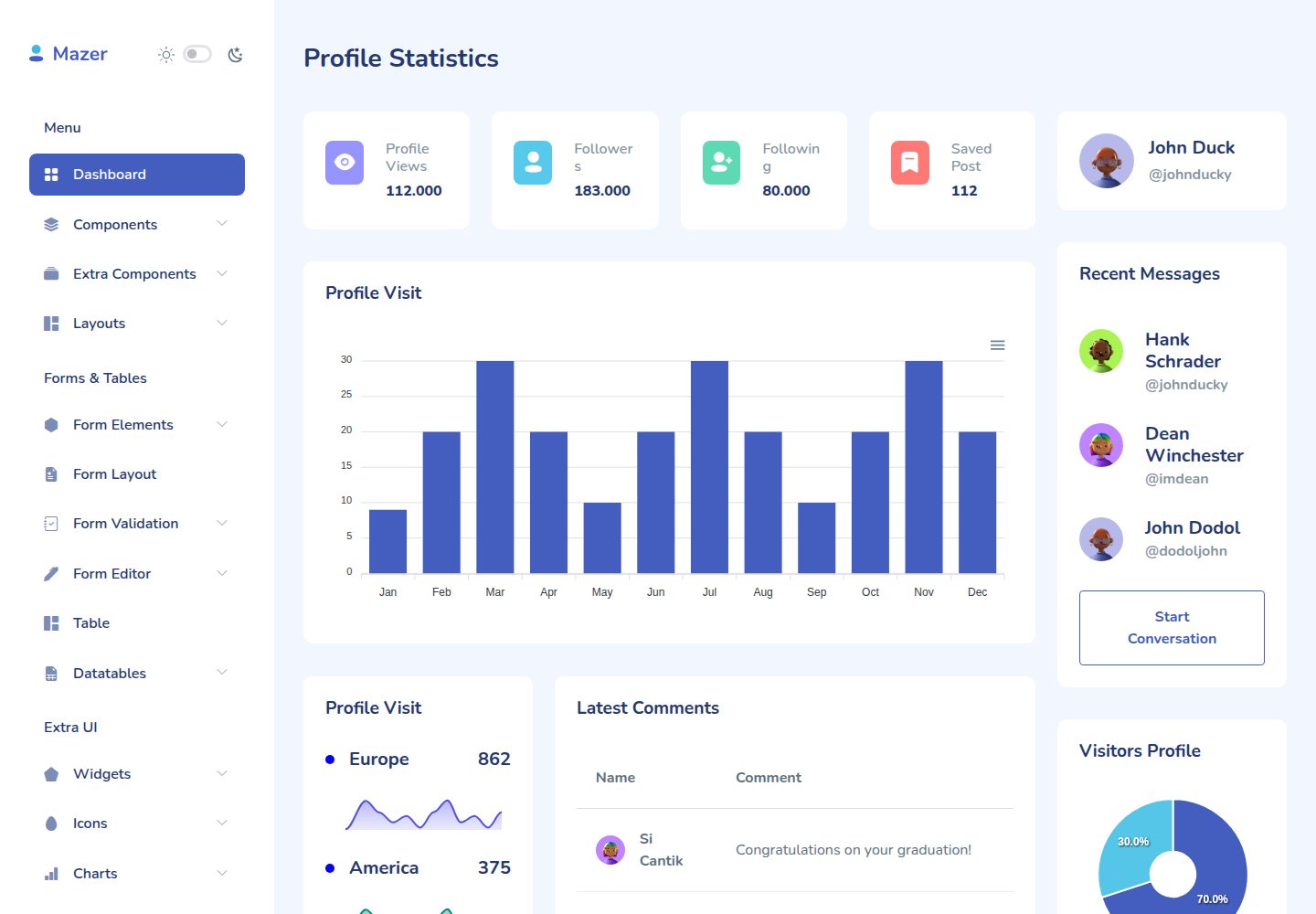
Compare the page layouts and mobile experience. Open any screenshot for a closer look.
Desktop homepage1 / 2
Desktop captureTop of page
Actual screenshot captured by the server browser.
All pages & views 2
Screenshots show visual appearance; interactive behavior may differ.
Recorded 2026-10-04View source
What stands out
A quick read of the recorded project description.
Built-in Mazer 2.0.3 admin template based on Bootstrap 5 and not dependent on jQuery
Provides an is_active Twig filter and function to dynamically mark navigation highlighting based on the current route
Supports loading different CSS/SCSS files separately for login/authentication pages, error pages, and similar cases
Complete Mazer source files are kept under ./_resource/mazer-src for reference
Template Details
This is a Symfony 6.2 --webapp project skeleton that uses symfony/webpack-encore-bundle to manage front-end assets and integrates the Mazer 2.0.3 admin template. Mazer is a Bootstrap 5 admin dashboard template that does not depend on jQuery. The repository keeps the complete Mazer source files under ./_resource/mazer-src, copies its assets to ./assets/mazer, and defines imports in ./assets/app.js and ./assets/styles/app.scss. The project includes a RootController with route attributes, and the sidebar navigation is located at ./src/templates/_sidebar.html.twig.
Navigation highlighting is implemented through a custom Twig extension: ./srv/Twig/TwigFilterExtension.php provides an is_active filter and function that dynamically add or remove the current and active classes based on the current route, with an optional lazyCheck parameter for complex routes.
For scenarios that require independent CSS, such as login/authentication pages and error pages, ./templates/base.html.twig selects different styles via the base-layout variable. Additional Mazer CSS/SCSS must be registered as an entrypoint in webpack.config.js and referenced in templates with encore_entry_link_tags. The README warns that combinations such as app.scss, app-dark.scss, and auth.scss may conflict, so you must ensure only the needed files are loaded.
Before use, PHP 8.1+, Composer, Node.js, and Yarn or npm are required, with Symfony CLI optional. The installation process is to clone the repository, run composer install, install JS dependencies, build front-end assets, then start via symfony serve and visit http://localhost:8000. The repository uses the MIT license, but third-party assets such as demo images, fonts, and icons require separate license verification.
HTMLAdmin panelCorporate websiteStarter
Is it right for your project?
Use Cases
- Quickly building a Symfony and Bootstrap 5-based admin dashboard interface
- Integrating the Mazer admin template into a Symfony project and customizing sidebar navigation
- Configuring a front-end asset structure with independent styles for login/authentication pages or error pages
- Using it as a starter project for a corporate website or admin system for further development
Suitable For
- PHP developers familiar with Symfony and Twig
- Projects that need a Bootstrap 5 admin template and do not want to introduce jQuery
- Symfony projects that want to manage front-end assets with webpack-encore
- Teams that need an MIT-licensed code base for further development
Getting started & customization
Use these recorded setup notes alongside the repository instructions for your chosen version.
- 1
Environment requirements: PHP 8.1 or higher, Composer, Node.js, and Yarn or npm; Symfony CLI is optional
- 2
Run composer install, yarn install (or npm install), and yarn build (or npm run build) in sequence
- 3
Start the development server with symfony serve; by default it is accessible at http://localhost:8000
- 4
To add new Mazer JS components, import them in ./assets/app.js and rebuild
- 5
Additional CSS/SCSS must be registered as an entrypoint in webpack.config.js and referenced in base.html.twig with encore_entry_link_tags; avoid style combination conflicts
License & source material
Usage conditions & limitations
Free to use · keep license noticeThis entry covers the free version in a public repository under the MIT license; the free scope applies to that version's code and does not mean external services or third-party assets are free.
Must comply with when using
- You may use, modify, commercially use, and distribute this version's code for free.
- When distributing copies or substantial portions of the code, retain the original author's copyright notice and the complete MIT license notice.
- The code is provided as is; warranties and liability limitations are governed by the original license and applicable law.
Additional costs & items to verify
- The complete Mazer 2.0.3 source files under ./_resource/mazer-src in the repository are for documentation reference only and should not be used directly as the project's own code or redistributed.
- Front-end assets come from the third-party Mazer template's assets directory; their assets (images, fonts, icons, etc.) require separate license verification, and the MIT code license does not automatically cover these resources.
- There are combination restrictions when using independent page styles: app.scss, app-dark.scss, and auth.scss, among others, cannot be mixed arbitrarily; you must ensure only the needed files are loaded, otherwise styles will conflict.
- New Mazer CSS/SCSS files must first be registered as an entrypoint in webpack.config.js and referenced in templates with encore_entry_link_tags; they cannot be imported directly.
- Demo images, fonts, icons, and other third-party assets must be verified under their respective licenses and cannot be judged solely by the code's MIT license.
- External services such as domains, hosting, databases, payments, or AI may incur additional charges.
View Original Text Basis
Permission is hereby granted, free of charge
Original License Text
Complete Mazer 2.0.3 source files are at `./_resource/mazer-src` for documentation purposes.
Original README
Content of Mazer assets source folder `mazer-src/assets` were copied to `./assets/mazer`.
Original README
You have to ensure that only `app.scss`and `auth.scss`are loaded and not `app-dark.scss`.
Original README
https://github.com/jvl1v5/symfony-mazer/blob/main/LICENSEhttps://github.com/jvl1v5/symfony-mazer/blob/main/README.mdadd them as entrypoints (`.addEntry`) to the `./webpack.config.js` file
Original README
Compiled by DeepSeek based on repository license and README ·2026-10-04. Results only cover the materials read; dependencies, images, fonts, and subsequent term changes are subject to their respective original texts.
Project checks & description sources
Template Information
- Source platforms
- GitHub
- Documentation and maintenance reference score
- Partly documented · 73 / 100
- Technologies
- HTML
- Website type
- Admin dashboard · Corporate Website · Starter
How this score is calculated
Our heuristic uses license records (up to 30), a demo link (12), a preview (10), stars (15), recorded maintenance (15), description completeness (8), feature records (5) and classification data (5). It is not a code, security or performance test, or a Google score. A link does not establish tested functionality.
What to verify for this project
- Repository update recorded
- 2022-12-30
- Screenshot last checked
- 2026-10-04
A demo link is listed. Check it with your own content and viewport sizes; its presence does not confirm that forms, authentication or payments work.
The catalog identifies HTML as the primary stack. Check the actual dependency manifest and lockfile for versions and hosting requirements. These notes use recorded metadata, not a code audit or a deployment test.
Use a selection guide →How this description was prepared
AI-assisted description based on catalog records and repository material. Repository authors are not automatically the reviewers of this description.
Review declaration: [email protected] · 2026-10-04
Inspect the recorded source material
SHA-256: e48d2963015c13c193c1f46c98c96ab7e243f35876846d009ff7fdeed49d0b3c
2026-10-04T02:36:05.664Z
Source file / repository
# symfony-mazer
[Symfony](https://symfony.com/) 6.2 PHP project (--webapp) boilerplate with `symfony/webpack-encore-bundle` and [Mazer Dashboard Template](https://github.com/zuramai/mazer) 2.0.3
Mazer is a Admin Dashboard Template that can help you develop faster. Made with Bootstrap 5. No jQuery dependency.
## Table of contents
- [Links](#links)
- [Requirements](#requirements)
- [Installation](#installation)
- [Documentation](#documentation)
## Links
- Mazer Demo: [zuramai.github.io/mazer/demo](https://zuramai.github.io/mazer/demo)
- Mazer Repository: [github.com/zuramai/mazer](https://github.com/zuramai/mazer)
- Symfony: [symfony.com](https://symfony.com)
- Twig BWExtension: [https://github.com/bocharsky-bw/ActiveMenuItemBundle/blob/master/src/Twig/BWExtension.php](https://github.com/bocharsky-bw/ActiveMenuItemBundle/blob/master/src/Twig/BWExtension.php)
## Requirements
- [PHP 8.1 or higher](https://www.php.net/manual/en/install.php)
- [Composer](https://getcomposer.org/download)
- [NodeJS](https://nodejs.org/en/download/) and [Yarn](https://classic.yarnpkg.com/en/) or [npm](https://docs.npmjs.com/downloading-and-installing-node-js-and-npm)
- Other Symfony requirements https://symfony.com/doc/current/setup.html#technical-requirements
- Optional: [Symfony CLI](https://symfony.com/download)
## Installation
- Download this repository or clone the repo
```
git clone https://github.com/jvl1v5/symfony-mazer.git
```
- Install PHP dependencies
```
composer install
```
- Install JS dependencies
```
yarn install
```
or
```
npm install
```
- Build packages
```
yarn build
```
or
```
npm run build
```
- Start Symfony (CLI) Dev Webserver
```
symfony serve
```
- Open `http://localhost:8000`
## Documentation
The Symfony project was build with Symfony CLI
```
symfony new symfony-mazer --webapp
```
Complete Mazer 2.0.3 source files are at `./_resource/mazer-src` for documentation purposes.
Content of Mazer assets source folder `mazer-src/assets` were copied to `./assets/mazer`.
Mazer imports are defined in `./assets/app.js` and `./assets/styles/app.scss`.
Add Mazer JS components needed to `./assets/app.js` and run `yarn build`.
### Twig Filter / Function for navigation
For dynamically adding / removing the `current` and `active` css classes in the navigation menu there is a Twig filter extension.
The file is `./srv/Twig/TwigFilterExtension.php` which ist based on https://github.com/bocharsky-bw/ActiveMenuItemBundle/blob/master/src/Twig/BWExtension.php.
There is a Twig filter `{{ 'route.name'|is_active }}` and a Twig function `{{ is_active('route.name') }}`.
The filter compares the given route name against the route of the current / active page.
The optional `lazyCheck` parameter of the Twig function `{{ is_active('route.name', true) }}` is only needed for complex routes which will be shown in an advanced boilerplate.
There is a `RootController` class with some controller methods and route attributes.
The navigation menu can be found in `./src/templates/_sidebar.html.twig`
### Separate CSS/SCSS files for layouts/pages
For some pages or base-layouts like error or login/auth pages Mazer defines different CSS files.
To get this working there is some logic in `./templates/base.html.twig`.
You have to define a `base-layout` variable in the twig templates above the `extend` command.
If you need further Mazer CSS/SCSS files (from the layouts/pages folders) which have to be referenced separately,
add them as entrypoints (`.addEntry`) to the `./webpack.config.js` file and use them in the `./templates/base.html.twig` file
with `encore_entry_link_tags`.
Please note that you only have to add CSS/SCSS files this way which can't be used with the other / default files.
E.g. if you use `./assets/mazer/scss/app.scss` and `./assets/mazer/scss/themes/dark/app-dark.scss` you can't use
`./assets/mazer/scss/pages/auth.scss` as well (some combinations break some stylings). You have to ensure that only `app.scss`and
`auth.scss`are loaded and not `app-dark.scss`. Take a look at `./templates/base.html.twig` and `./templates/bundles/TwigBundle/Exception/error404.html.twig`
to see how it works (with `error.scss` in this case) and extend the logic as needed. Explore similar templates
Compare previews and descriptions within the same stack and category.

gentelella
Gentelella v4 is a free, open-source admin dashboard template maintained by Colorlib, built with vanilla JavaScript, SCSS, and Vite 8 without Bootstrap or jQuery.
HTML · Admin dashboard

coreui-free-bootstrap-admin-template
A free Bootstrap admin template maintained by CoreUI, built on CoreUI's own UI component library. It provides compiled HTML pages and Pug template source code, covering dashboards, authentication, forms, components, icons, and error pages.
HTML · Admin dashboard

dashboards
A collection of responsive dashboard HTML templates open-sourced by Keen IO, built on CSS Grid, offering multiple prebuilt admin data interface layouts.
HTML · Admin dashboard

SB Admin 2
SB Admin 2 is a classic Bootstrap admin template from Start Bootstrap, offering dashboards, charts, tables, and common management pages.
HTML · Admin dashboard

Adminator-admin-dashboard
Adminator 4 is a vanilla HTML, CSS and JavaScript admin dashboard template with a CSS-variable token design system, built-in light and dark themes, no jQuery or Bootstrap dependency, and 18 pages covering dashboards, mail, calendar, charts, forms, tables and error pages.
HTML · Admin dashboard

SB Admin
SB Admin is a lightweight, open-source Bootstrap admin template from Start Bootstrap. It offers a sidebar-and-top-bar layout with data tables, forms, and stat cards, plus responsive design.
HTML · Admin dashboard