Symfony 6.2 --webapp 骨架,集成 webpack-encore-bundle 管理前端构建
HTML后台企业官网启动器
symfony-mazer — HTML 后台模板
作者 jvl1v5
基于 Symfony 6.2 的 PHP 项目骨架,集成 webpack-encore 与 Mazer 2.0.3 后台模板,提供 Bootstrap 5 管理后台与登录/错误页的 Twig 布局基础。
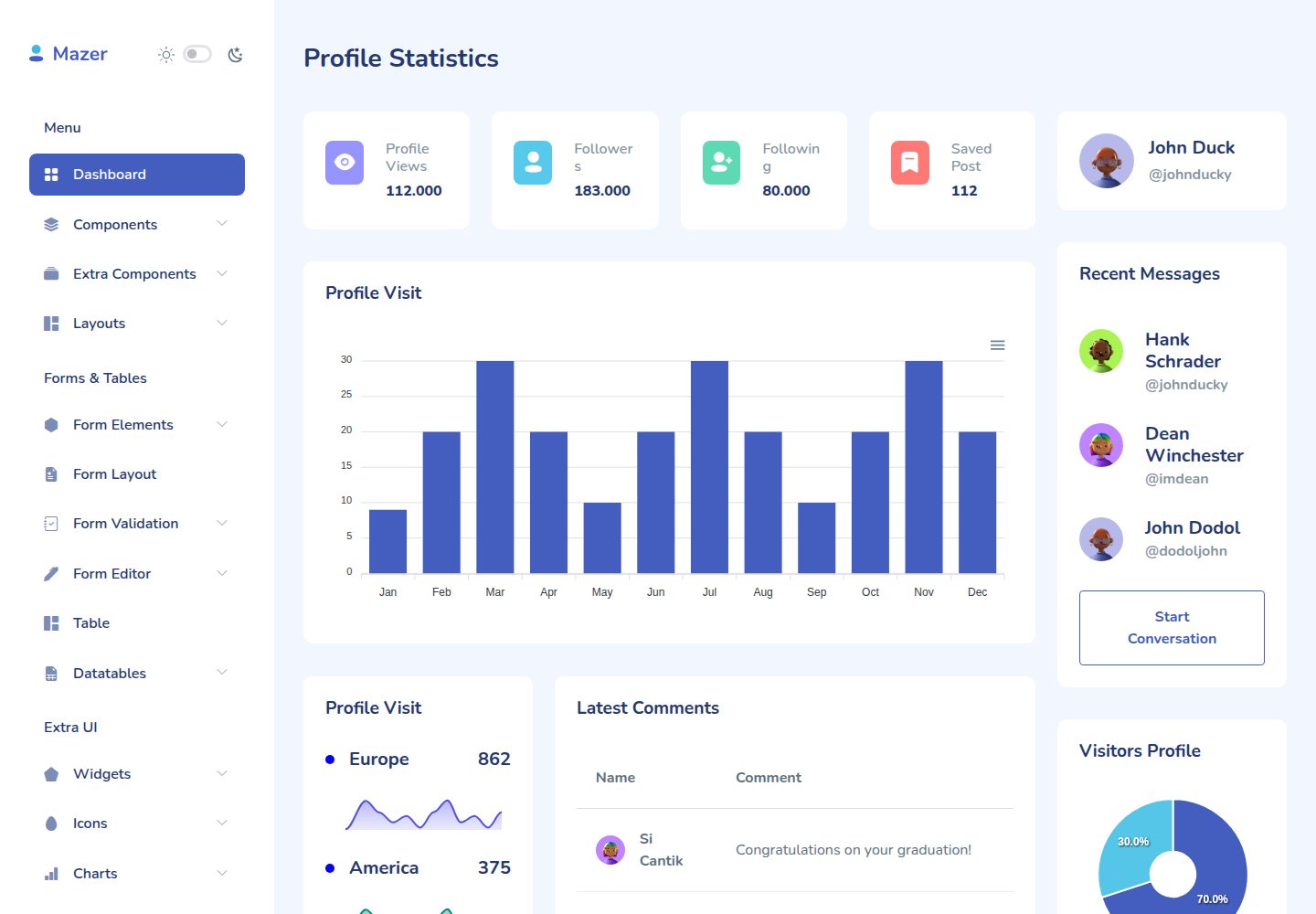
看看你的网站会是什么样
浏览真实页面截图,比较内容排版与手机效果。点击下方缩略图切换,放大查看整页细节。
全部页面与视图 2
截图用于了解视觉与布局,交互效果请以实际项目为准。
采集于 2026-10-04查看来源
值得关注的模板亮点
从已有项目资料中,快速了解它的特点。
内置 Mazer 2.0.3 后台模板,基于 Bootstrap 5 且不依赖 jQuery
提供 is_active Twig 过滤器与函数,按当前路由动态标记导航高亮
支持为登录/认证页、错误页等单独加载不同 CSS/SCSS 文件
完整 Mazer 源文件保留在 ./_resource/mazer-src 供参考
模板详细介绍
这是一个 Symfony 6.2 的 --webapp 项目骨架,使用 symfony/webpack-encore-bundle 管理前端资源,并集成了 Mazer 2.0.3 后台模板。Mazer 是基于 Bootstrap 5、不依赖 jQuery 的 Admin Dashboard 模板,仓库中保留了完整的 Mazer 源文件于 ./_resource/mazer-src,其 assets 被复制到 ./assets/mazer,并在 ./assets/app.js 与 ./assets/styles/app.scss 中定义导入。项目包含 RootController 及路由属性,侧边栏导航位于 ./src/templates/_sidebar.html.twig。
导航高亮通过自定义 Twig 扩展实现:./srv/Twig/TwigFilterExtension.php 提供 is_active 过滤器与函数,用于根据当前路由动态添加或移除 current 与 active 类,可选 lazyCheck 参数用于复杂路由。
针对登录/认证页与错误页等需要独立 CSS 的场景,./templates/base.html.twig 中通过 base-layout 变量选择不同样式;额外的 Mazer CSS/SCSS 需在 webpack.config.js 中注册为 entrypoint,并在模板中用 encore_entry_link_tags 引用。README 提醒 app.scss、app-dark.scss 与 auth.scss 等组合可能冲突,需确保只加载所需文件。
使用前需满足 PHP 8.1+、Composer、Node.js 及 Yarn 或 npm,可选 Symfony CLI。安装流程为克隆仓库、composer install、安装 JS 依赖、构建前端资源,再通过 symfony serve 启动并访问 http://localhost:8000。该仓库采用 MIT 许可,但演示图片、字体、图标等第三方素材需单独核对许可。
HTML后台企业官网启动器
适合你的项目吗?
适用场景
- 快速搭建基于 Symfony 与 Bootstrap 5 的管理后台界面
- 在 Symfony 项目中集成 Mazer 后台模板并自定义侧边栏导航
- 为登录/认证页或错误页配置独立样式的前端资源结构
- 作为企业官网或后台系统的启动器项目进行二次开发
适合人群
- 熟悉 Symfony 与 Twig 的 PHP 开发者
- 需要 Bootstrap 5 后台模板且不希望引入 jQuery 的项目
- 希望以 webpack-encore 管理前端资源的 Symfony 项目
- 需要 MIT 许可代码基础进行二次开发的团队
上手与定制指南
结合仓库当前版本的说明,按下面的资料检查内容、配置与运行要求。
- 1
环境要求:PHP 8.1 或更高、Composer、Node.js 以及 Yarn 或 npm,可选 Symfony CLI
- 2
依次执行 composer install、yarn install(或 npm install)、yarn build(或 npm run build)
- 3
使用 symfony serve 启动开发服务器,默认访问 http://localhost:8000
- 4
新增 Mazer JS 组件需在 ./assets/app.js 中引入后重新构建
- 5
额外 CSS/SCSS 需在 webpack.config.js 中注册为 entrypoint,并在 base.html.twig 中用 encore_entry_link_tags 引用,注意避免样式组合冲突
授权与来源资料
使用条件与限制
免费使用 · 保留许可声明本次收录的是公开仓库中采用 MIT 许可的免费版本;免费范围为该版本代码,不代表外部服务或第三方素材免费。
使用时需要遵守
- 允许免费使用、修改、商用和分发该版本代码。
- 分发代码副本或实质性部分时,保留原作者版权声明和完整 MIT 许可声明。
- 代码按现状提供;担保与责任限制以原许可证及适用法律为准。
额外费用与待核对事项
- 仓库内 ./_resource/mazer-src 下的 Mazer 2.0.3 完整源文件仅用于文档参考,不应作为项目自身代码直接使用或再分发。
- 前端资源来自第三方 Mazer 模板的 assets 目录,其素材(图片、字体、图标等)许可需单独核对,MIT 代码许可不自动覆盖这些资源。
- 使用独立页面样式时存在组合限制:app.scss、app-dark.scss 与 auth.scss 等不能随意混用,必须确保只加载所需文件,否则样式会冲突。
- 新增 Mazer CSS/SCSS 文件必须先在 webpack.config.js 中注册为 entrypoint,并在模板中用 encore_entry_link_tags 引用,不能直接引入。
- 演示图片、字体、图标及其他第三方素材需按各自许可核对,不能仅凭代码的 MIT 许可判断。
- 域名、托管、数据库、支付或 AI 等外部服务可能另外收费。
查看原文依据
Permission is hereby granted, free of charge
许可证原文
Complete Mazer 2.0.3 source files are at `./_resource/mazer-src` for documentation purposes.
README 原文
Content of Mazer assets source folder `mazer-src/assets` were copied to `./assets/mazer`.
README 原文
You have to ensure that only `app.scss`and `auth.scss`are loaded and not `app-dark.scss`.
README 原文
https://github.com/jvl1v5/symfony-mazer/blob/main/LICENSEhttps://github.com/jvl1v5/symfony-mazer/blob/main/README.mdadd them as entrypoints (`.addEntry`) to the `./webpack.config.js` file
README 原文
DeepSeek 根据仓库许可证和 README 整理 ·2026-10-04。结果仅覆盖已读取资料,依赖、图片、字体及后续条款变更以各自原文为准。
项目核对记录与介绍依据
模板资料
- 来源平台
- GitHub
- 资料与维护参考分
- 资料一般 · 73 / 100
- 技术栈
- HTML
- 网站类型
- 后台 · 企业官网 · 启动器
这个分数如何计算
本站按许可资料(最高30分)、演示链接(12分)、预览图(10分)、Star数(15分)、记录的维护时间(15分)、描述完整度(8分)、功能记录(5分)和分类资料(5分)计算。它不是代码、安全或性能测试,也不是 Google 评分;有链接不代表已实测可用。
这个项目需要核对什么
- 记录的仓库更新时间
- 2022-12-30
- 截图检查日期
- 2026-10-04
已收录演示链接。请用你的内容与屏幕尺寸检查;有演示不代表表单、认证或支付已经可用。
目录记录的主要技术栈是 HTML。请通过依赖清单和锁文件核对实际版本与托管要求。这些说明基于收录资料,不代表代码审计或部署实测。
查看具体选型方法 →介绍的制作与核对状态
介绍由 AI 辅助整理目录与仓库资料。仓库作者不等于这篇介绍的审核者。
审核声明: [email protected] · 2026-10-04
查看当时使用的来源资料
SHA-256: e48d2963015c13c193c1f46c98c96ab7e243f35876846d009ff7fdeed49d0b3c
2026-10-04T02:36:05.664Z
来源文件 / 仓库
# symfony-mazer
[Symfony](https://symfony.com/) 6.2 PHP project (--webapp) boilerplate with `symfony/webpack-encore-bundle` and [Mazer Dashboard Template](https://github.com/zuramai/mazer) 2.0.3
Mazer is a Admin Dashboard Template that can help you develop faster. Made with Bootstrap 5. No jQuery dependency.
## Table of contents
- [Links](#links)
- [Requirements](#requirements)
- [Installation](#installation)
- [Documentation](#documentation)
## Links
- Mazer Demo: [zuramai.github.io/mazer/demo](https://zuramai.github.io/mazer/demo)
- Mazer Repository: [github.com/zuramai/mazer](https://github.com/zuramai/mazer)
- Symfony: [symfony.com](https://symfony.com)
- Twig BWExtension: [https://github.com/bocharsky-bw/ActiveMenuItemBundle/blob/master/src/Twig/BWExtension.php](https://github.com/bocharsky-bw/ActiveMenuItemBundle/blob/master/src/Twig/BWExtension.php)
## Requirements
- [PHP 8.1 or higher](https://www.php.net/manual/en/install.php)
- [Composer](https://getcomposer.org/download)
- [NodeJS](https://nodejs.org/en/download/) and [Yarn](https://classic.yarnpkg.com/en/) or [npm](https://docs.npmjs.com/downloading-and-installing-node-js-and-npm)
- Other Symfony requirements https://symfony.com/doc/current/setup.html#technical-requirements
- Optional: [Symfony CLI](https://symfony.com/download)
## Installation
- Download this repository or clone the repo
```
git clone https://github.com/jvl1v5/symfony-mazer.git
```
- Install PHP dependencies
```
composer install
```
- Install JS dependencies
```
yarn install
```
or
```
npm install
```
- Build packages
```
yarn build
```
or
```
npm run build
```
- Start Symfony (CLI) Dev Webserver
```
symfony serve
```
- Open `http://localhost:8000`
## Documentation
The Symfony project was build with Symfony CLI
```
symfony new symfony-mazer --webapp
```
Complete Mazer 2.0.3 source files are at `./_resource/mazer-src` for documentation purposes.
Content of Mazer assets source folder `mazer-src/assets` were copied to `./assets/mazer`.
Mazer imports are defined in `./assets/app.js` and `./assets/styles/app.scss`.
Add Mazer JS components needed to `./assets/app.js` and run `yarn build`.
### Twig Filter / Function for navigation
For dynamically adding / removing the `current` and `active` css classes in the navigation menu there is a Twig filter extension.
The file is `./srv/Twig/TwigFilterExtension.php` which ist based on https://github.com/bocharsky-bw/ActiveMenuItemBundle/blob/master/src/Twig/BWExtension.php.
There is a Twig filter `{{ 'route.name'|is_active }}` and a Twig function `{{ is_active('route.name') }}`.
The filter compares the given route name against the route of the current / active page.
The optional `lazyCheck` parameter of the Twig function `{{ is_active('route.name', true) }}` is only needed for complex routes which will be shown in an advanced boilerplate.
There is a `RootController` class with some controller methods and route attributes.
The navigation menu can be found in `./src/templates/_sidebar.html.twig`
### Separate CSS/SCSS files for layouts/pages
For some pages or base-layouts like error or login/auth pages Mazer defines different CSS files.
To get this working there is some logic in `./templates/base.html.twig`.
You have to define a `base-layout` variable in the twig templates above the `extend` command.
If you need further Mazer CSS/SCSS files (from the layouts/pages folders) which have to be referenced separately,
add them as entrypoints (`.addEntry`) to the `./webpack.config.js` file and use them in the `./templates/base.html.twig` file
with `encore_entry_link_tags`.
Please note that you only have to add CSS/SCSS files this way which can't be used with the other / default files.
E.g. if you use `./assets/mazer/scss/app.scss` and `./assets/mazer/scss/themes/dark/app-dark.scss` you can't use
`./assets/mazer/scss/pages/auth.scss` as well (some combinations break some stylings). You have to ensure that only `app.scss`and
`auth.scss`are loaded and not `app-dark.scss`. Take a look at `./templates/base.html.twig` and `./templates/bundles/TwigBundle/Exception/error404.html.twig`
to see how it works (with `error.scss` in this case) and extend the logic as needed. 看看同类模板
对比同技术栈与用途的模板,找到更适合的视觉与内容结构。

gentelella
Free admin dashboard template — vanilla JS, SCSS, Vite 8. No Bootstrap, no jQuery.
HTML · 后台

coreui-free-bootstrap-admin-template
Free Bootstrap Admin & Dashboard Template Built for AI-Assisted Development
HTML · 后台

dashboards
Responsive dashboard templates 📊✨
HTML · 后台

SB Admin 2
SB Admin 2 是 Start Bootstrap 推出的开源后台模板,基于 Bootstrap 构建,整体风格偏向经典管理界面。
HTML · 后台

Adminator-admin-dashboard
Adminator is easy to use and well design admin dashboard template with dark mode for web apps, websites, servi…
HTML · 后台

SB Admin
SB Admin 是 Start Bootstrap 推出的开源后台管理模板,基于 Bootstrap 构建,定位是简洁、实用的管理界面。
HTML · 后台