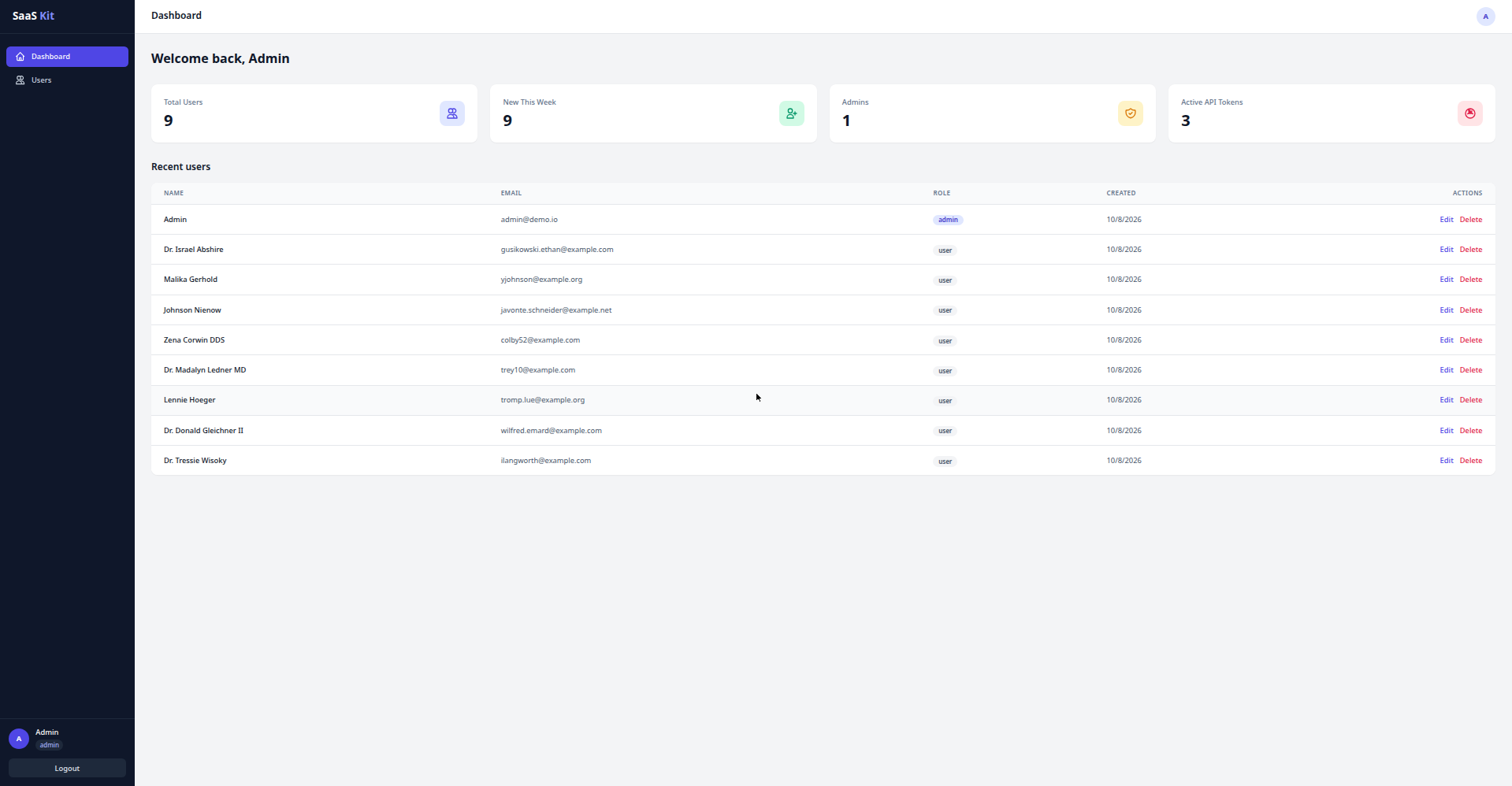
Laravel 11 API backend integrated with Sanctum token authentication, providing registration, login, logout, and current-user endpoints
LaravelReactAdmin dashboardSaaSStarter
laravel-react-saas-starter-kit — Laravel Admin dashboard Template
By kamran1272
A SaaS admin starter kit built on a Laravel 11 API and React 18, with Sanctum token authentication, role permissions, and a user management dashboard.
Explore the design
Compare the page layouts and mobile experience. Open any screenshot for a closer look.
Author preview
Author-provided preview
Preview provided in the project README.
One original preview is available. Open the full image to inspect the design.
Screenshots show visual appearance; interactive behavior may differ.
Recorded 2026-10-08View source
What stands out
A quick read of the recorded project description.
Role-based access control for admin and user via a reusable role middleware
Admin-only user CRUD endpoints with pagination, validation, and protection against deleting oneself
React 18 + Vite + Tailwind frontend with login and registration, protected routes, and a dashboard layout
Axios client automatically injects the Bearer token and logs out on 401
Includes a pre-populated SQLite demo database and feature tests covering the authentication flow
Template Details
This project is a decoupled SaaS admin starter kit. The backend is a Laravel 11 API that uses Laravel Sanctum for token authentication, with endpoints for registration, login, logout, and retrieving the current user. It enforces role-based access control for admin and user through a reusable role middleware. It provides admin-only user CRUD endpoints with pagination, validation, and protection against deleting oneself. It also includes a dashboard statistics endpoint that returns database-computed data such as total users, new users this week, admin count, and active token count. The API returns consistent JSON 401/403/404/422 responses and comes with database seeders and feature tests covering the authentication flow.
The frontend is React 18 + Vite + Tailwind CSS. It includes login and registration pages with per-field validation errors, an auth context with token persistence and automatic session restoration, protected routes and admin-only routes, a dashboard layout with a dark sidebar and top bar (including stat cards and a recent users table), and an admin user management page with modals, role management, and pagination. The Axios client automatically injects the Bearer token and logs out on 401 responses.
The repository ships with a pre-populated SQLite demo database, so the backend runs with zero configuration by default; MySQL or PostgreSQL are also supported. The frontend can be built in demo mode by setting VITE_DEMO_MODE to use an in-memory mock API, allowing click-through interaction without a backend. The project is MIT licensed, permitting free use, modification, commercial use, and distribution of this version of the code, but the starter kit itself may not be resold as a standalone product; third-party assets such as demo images, fonts, and icons require separate license verification, and external services such as domains, hosting, databases, payments, or AI may incur additional fees.
LaravelReactAdmin dashboardSaaSStarter kit
Is it right for your project?
Use Cases
- Quickly building a SaaS product admin backend that needs user authentication and role permissions
- Adding a React admin interface to an existing Laravel API project
- Using it as a reference project for learning Laravel Sanctum token authentication and React route protection
- Previewing the dashboard and user management interactions without a backend in demo mode
Suitable For
- Developers who need a Laravel + React full-stack starter template
- SaaS projects that want to reuse authentication, role permissions, and user management modules
- Learners who want to study how a decoupled admin backend is implemented
Getting started & customization
Use these recorded setup notes alongside the repository instructions for your chosen version.
- 1
The backend requires PHP 8.2+ and Composer 2.x; enter the backend directory, run composer install, copy .env.example to .env, generate the application key, and start the service
- 2
The frontend requires Node.js 18+ and npm 9+; enter the frontend directory, run npm install, copy .env.example to .env, and run the development server
- 3
The repository includes a pre-populated SQLite database, so migrations and seeding are not needed by default; run migrate:fresh --seed only when a full database reset is required
- 4
In production, remove the demo credentials hint block from the login page, point VITE_API_URL to the actual API domain, and rebuild
- 5
The backend does not include the vendor directory and the frontend does not include node_modules; after extraction, dependencies must be installed separately
License & source material
Usage conditions & limitations
Free to use · keep license noticeThis entry covers the free version from the public repository under the MIT license; the free scope is this version of the code and does not imply that external services or third-party assets are free.
Must comply with when using
- Free use, modification, commercial use, and distribution of this version of the code are permitted.
- When distributing copies or substantial portions of the code, retain the original author's copyright notice and the full MIT license notice.
- The code is provided as is; warranties and limitations of liability are governed by the original license and applicable law.
Additional costs & items to verify
- Demo images, fonts, icons, and other third-party assets must be checked against their respective licenses and cannot be judged solely by the code's MIT license.
- External services such as domains, hosting, databases, payments, or AI may incur additional fees.
- The MIT license permits personal and commercial project use, but explicitly prohibits reselling this starter kit itself as a standalone product.
View Original Text Basis
Permission is hereby granted, free of charge
Original License Text
https://github.com/kamran1272/laravel-react-saas-starter-kit/blob/main/LICENSEhttps://github.com/kamran1272/laravel-react-saas-starter-kit/blob/main/README.mdMIT — use it in personal and commercial projects. The only thing you may not do is resell this starter kit itself as a standalone product.
Original README
Compiled by DeepSeek based on repository license and README ·2026-10-08. Results only cover the materials read; dependencies, images, fonts, and subsequent term changes are subject to their respective original texts.
Project checks & description sources
Template Information
- Source platforms
- GitHub
- Documentation and maintenance reference score
- Partly documented · 73 / 100
- Technologies
- Laravel · React
- Website type
- Admin dashboard · SaaS · Starter
How this score is calculated
Our heuristic uses license records (up to 30), a demo link (12), a preview (10), stars (15), recorded maintenance (15), description completeness (8), feature records (5) and classification data (5). It is not a code, security or performance test, or a Google score. A link does not establish tested functionality.
What to verify for this project
- Repository update recorded
- 2026-10-08
- Screenshot last checked
- 2026-10-08
No demo link is recorded. Use the repository instructions to evaluate the project locally; the screenshot alone cannot establish interactive behavior.
The catalog identifies Laravel as the primary stack. Check the actual dependency manifest and lockfile for versions and hosting requirements. These notes use recorded metadata, not a code audit or a deployment test.
Use a selection guide →How this description was prepared
AI-assisted description based on catalog records and repository material. Repository authors are not automatically the reviewers of this description.
Review declaration: [email protected] · 2026-10-09
Inspect the recorded source material
SHA-256: 9c747ddff5774e7386f6e3057cdca6b93fbde0a4cb617bb6b094a007aec2fa46
2026-10-08T19:59:43.388Z
Source file / repository# Laravel + React SaaS Starter Kit A production-grade starter kit for building SaaS products: a **Laravel 11 API backend** (Sanctum token auth, role-based access, users CRUD, dashboard stats) paired with a **React 18 + Vite + Tailwind CSS frontend** (login/register, protected routes, dashboard layout, admin user management). Stop rebuilding auth for every project. Clone, install, and start building your product on day one. **[Live demo](https://kamran1272.github.io/laravel-react-saas-starter-kit/)** — sign in with `[email protected]` / `password`. The demo runs against a real Laravel API (deployed on Railway), not a mock.  --- ## Features **Backend (Laravel 11 API)** - Token authentication with Laravel Sanctum — register, login, logout, "me" endpoints - Role-based access control (`admin` / `user`) via a reusable `role` middleware - Full Users CRUD API (admin only) with pagination, validation, and self-delete protection - Dashboard stats endpoint with real database-computed metrics - JSON-first API: clean 401/403/404/422 JSON responses everywhere (no HTML error pages) - Database seeder with a demo admin + sample users - Feature tests covering the auth flow (10 passing tests included) **Frontend (React 18 + Vite + Tailwind)** - Login / Register pages with per-field validation errors - Auth context with token persistence and automatic session restore - Protected routes + admin-only routes - Dashboard layout: dark sidebar, topbar, 4 stat cards, recent-users table - Admin Users page: full CRUD with modals, role management, pagination - Axios client with Bearer token injection and 401 auto-logout --- ## Requirements | | Version | |---|---| | PHP | 8.2+ | | Composer | 2.x | | Node.js | 18+ | | npm | 9+ | | Database | SQLite (default, zero-config) or MySQL/PostgreSQL | --- ## Quick start ### 1. Backend ```bash cd backend composer install cp .env.example .env php artisan key:generate php artisan serve --port=8000 ``` The API is now live at `http://localhost:8000/api`. > **Do NOT run `php artisan migrate --seed`.** The kit ships with a pre-seeded `database/database.sqlite`, so the demo works out of the box — re-running the seeder is harmless (it only fills in missing demo data), but it won't reset anything. The only time to run `php artisan migrate:fresh --seed` is when you want a **clean reset** of the database. ### 2. Frontend ```bash cd frontend npm install cp .env.example .env # VITE_API_URL defaults to http://localhost:8000 npm run dev ``` Open `http://localhost:5173` and log in with: - **Admin:** `[email protected]` / `password` - Or register a brand-new user account (gets the `user` role automatically) > **Going to production?** Remove the "Demo credentials" hint box from the login page by deleting the `<div className="mt-6 rounded-lg bg-slate-50 px-4 py-3 ...">` block (the one rendering "Demo credentials" / `[email protected]`) in `frontend/src/pages/Login.jsx`. --- ## API reference Base URL: `http://localhost:8000/api` | Method | Endpoint | Auth | Description | |---|---|---|---| | POST | `/auth/register` | — | Register. Body: `name, email, password, password_confirmation` → 201 `{user, token}` | | POST | `/auth/login` | — | Login. Body: `email, password` → 200 `{user, token}` | | POST | `/auth/logout` | Bearer | Revokes the current token → 200 | | GET | `/auth/me` | Bearer | Current user → 200 `{user}` | | GET | `/dashboard/stats` | Bearer | `{total_users, new_users_this_week, admins_count, active_tokens}` | | GET | `/users` | Bearer + admin | Paginated users `{data, meta}` | | POST | `/users` | Bearer + admin | Create user `{name, email, password, role}` → 201 | | GET | `/users/{id}` | Bearer + admin | Single user | | PUT | `/users/{id}` | Bearer + admin | Update user → 200 | | DELETE | `/users/{id}` | Bearer + admin | Delete user → 204 (cannot delete yourself) | User object: `{id, name, email, role, email_verified_at, created_at, updated_at}` --- ## Folder map ``` saas-starter-kit/ ├── README.md ← you are here ├── LICENSE ← MIT license ├── PRODUCT-BRIEF.md ← sales-page copy + pricing suggestions ├── backend/ ← Laravel 11 API │ ├── app/ │ │ ├── Http/ │ │ │ ├── Controllers/Api/ ← AuthController, UserController, DashboardController │ │ │ ├── Middleware/ ← EnsureUserHasRole │ │ │ ├── Requests/ ← Register/Login/StoreUser/UpdateUser validation │ │ │ └── Resources/ ← UserResource (API JSON shape) │ │ └── Models/User.php │ ├── bootstrap/app.php ← middleware alias + JSON exception handling │ ├── config/cors.php ← frontend origin allowed │ ├── database/ │ │ ├── migrations/ ← users table, role column, personal_access_tokens │ │ ├── factories/ ← UserFactory │ │ ├── seeders/ ← demo admin + 8 users │ │ └── database.sqlite ← pre-seeded demo DB (reset with migrate:fresh --seed) │ ├── routes/api.php ← all 10 API routes │ ├── tests/Feature/AuthTest.php ← 10 passing tests │ ├── composer.json / composer.lock │ └── .env.example └── frontend/ ← React 18 + Vite + Tailwind ├── src/ │ ├── api/client.js ← axios instance, token + 401 handling │ ├── context/AuthContext.jsx← login/register/logout/session restore │ ├── components/ ← ProtectedRoute, Layout, StatCard, UsersTable │ └── pages/ ← Login, Register, Dashboard, Users, NotFound ├── index.html ├── tailwind.config.js / postcss.config.js / vite.config.js ├── package.json └── .env.example ← VITE_API_URL ``` --- ## Customizing - **Add a role:** add the role name to the `role` validation rule in `StoreUserRequest`/`UpdateUserRequest` and use `->middleware('role:admin,manager')` on routes. - **Add a resource:** create `Model + migration + Resource + FormRequests + Controller`, then register routes in `routes/api.php` following the `UserController` pattern. - **Change branding:** edit the sidebar logo text in `frontend/src/components/Layout.jsx` and the `<title>` in `frontend/index.html`. - **Point at production:** set `VITE_API_URL` to your API domain and rebuild (`npm run build`); set `APP_URL`/`FRONTEND_URL` in backend `.env`. ## Running tests ```bash cd backend php artisan test ``` ## Environment notes - Never commit `.env` (both apps gitignore it). Copy from `.env.example`. - The backend ships without `vendor/` — run `composer install` after extracting. - The frontend ships without `node_modules/` — run `npm install` after extracting. - CORS is pre-configured for `http://localhost:5173` via `FRONTEND_URL`. ## Demo mode (interactive preview) Build the frontend with `VITE_DEMO_MODE=true` to run it against an in-memory mock API (`frontend/src/api/demoMock.js`) — no backend needed. The preview is fully clickable: sign in with `[email protected]` / `password`, browse the dashboard, and manage the sample users. Used for the public GitHub Pages demo: ```bash cd frontend VITE_DEMO_MODE=true npm run build -- --base=/your-sub-path/ ``` The shipped product defaults to the real Laravel API (`VITE_DEMO_MODE` unset). --- ## License MIT — use it in personal and commercial projects. The only thing you may not do is resell this starter kit itself as a standalone product.
Explore similar templates
Compare previews and descriptions within the same stack and category.

sage
Sage is a WordPress starter theme maintained by Roots, using Laravel Blade components and templates, Vite builds, Tailwind CSS, and built-in block editor support.
Laravel · Starter

wave
Wave is an open-source SaaS starter kit built on Laravel and released under the MIT license.
Laravel · SaaS

coreui-free-laravel-admin-template
A free MIT-licensed Laravel admin template using CoreUI Bootstrap styles, with a sample login account and management examples for users, menus, roles, media, BREAD, and email templates.
Laravel · Admin dashboard

sneat-bootstrap-html-laravel-admin-template-free
Sneat Free is a Laravel admin template with a Bootstrap 5 frontend, MIT-licensed, offering a dashboard, multiple layouts, authentication pages, forms, and tables.
Laravel · Admin dashboard

filament-starter
A Laravel TALL stack starter template maintained by Log1x, with a preconfigured Filament admin panel and plugins including Curator, Gravatar, Exceptions, Jobs Monitor, Breezy, Peek, and Logger.
Laravel · Starter

electrik
Electrik is a Laravel SaaS starter kit installed as a Composer package, with authentication, teams, Stripe subscription billing, and the Slate 3 interface under the Electrik\ namespace rather than copied into App\.
Laravel · SaaS