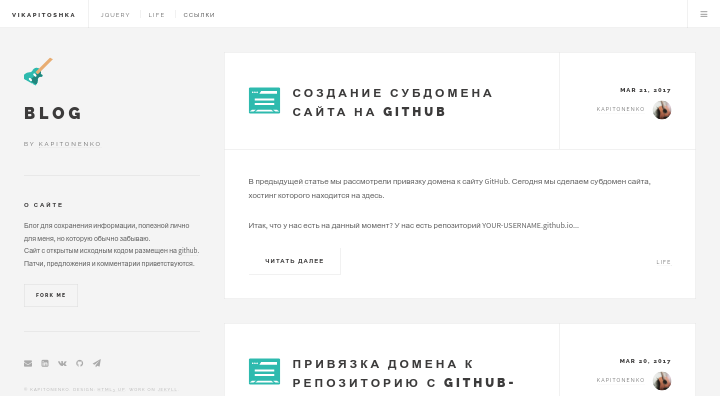
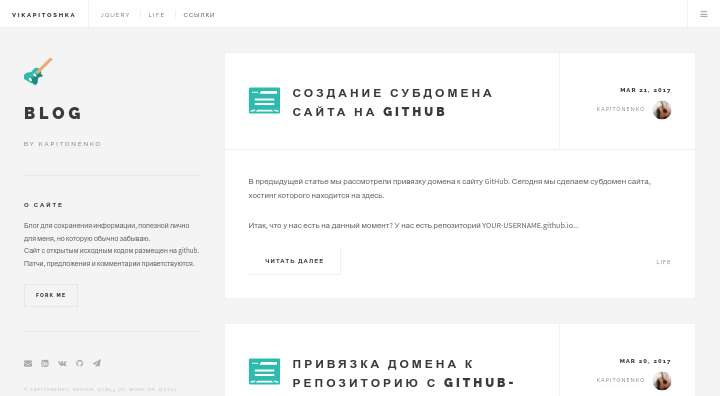
A Jekyll-based static blog theme, with design ported from HTML5 UP's Future Imperfect
JekyllBlog
future-imperfect — Jekyll Blog Template
By kaptn3
A Jekyll-based blog theme ported from HTML5 UP's Future Imperfect design, licensed under MIT, with support for categories, comments, icons, and post preview images.
Explore the design
Compare the page layouts and mobile experience. Open any screenshot for a closer look.
Author preview
Author-provided preview
Preview provided in the project README.
One original preview is available. Open the full image to inspect the design.
Screenshots show visual appearance; interactive behavior may differ.
Recorded 2026-10-02View source
What stands out
A quick read of the recorded project description.
Organizes content around categories, with category pages sharing the _includes/category.html template and menu links configured in _data/links.yml
Category icons use SVG files in the images directory with the same name as the category; post images are stored by category in subdirectories under post-img
Supports specifying a preview image in Front Matter and disabling homepage excerpt display via preview: 0
Integrates HyperComments for comments and Yandex Metrika for analytics, both provided as separate include files
Licensed under MIT; the README lists a 404 page, search, and paginator as to-do features
Template Details
Future Imperfect is a Jekyll blog theme maintained by Kapitonenko, with code hosted on GitHub; the repository contains the complete theme source and a demo site. The visual design is taken from HTML5 UP's Future Imperfect, resulting in a magazine/editorial-style blog layout.
In terms of content organization, the theme centers on categories: posts specify a single category in their Front Matter, category pages are rendered uniformly through _includes/category.html, and category links in the menu are defined in _data/links.yml. The post template is located at _drafts/template.md, with the layout fixed to post; you can set the title, date, category, icon, keywords, preview image, and whether to show the excerpt on the homepage (preview: 0 disables it). Category icons use SVG files in the images directory, and the filename must match the category name; post images are stored by category in corresponding subfolders under the post-img directory.
Functionally, the theme integrates HyperComments as its comment system, with code in _includes/comments; web analytics uses Yandex Metrika, and you can insert your own code in includes/analytics.html; each post includes an edit link pointing to GitHub; includes/donate.html provides a donation form. The README's TODO lists features not yet implemented, including a 404 page, search system, and paginator; Font Awesome 5 is complete.
Installation involves cloning the repository and running jekyll s, then visiting localhost:4000 locally. The theme is licensed under MIT, allowing free use, modification, commercial use, and distribution, but third-party assets such as demo images, fonts, and icons require separate license verification, and external services like domains and hosting may incur additional charges.
JekyllBlog
Is it right for your project?
Use Cases
- Building a personal tech blog or writing site primarily organized by category archives
- Blogs that need to edit post content directly on GitHub (each post has an edit link)
- Sites using Jekyll that want to organize posts and images by category directories
- Blog projects that wish to replace the comment, analytics, and donation components themselves
Suitable For
- Users familiar with Jekyll and Markdown who can modify Front Matter and include files themselves
- Blog authors who accept category-based content organization as the primary structure
- Developers who need theme code that can be freely modified and distributed under the MIT license
Getting started & customization
Use these recorded setup notes alongside the repository instructions for your chosen version.
- 1
After cloning the repository, enter the directory, run jekyll s to start the local server, and visit localhost:4000
- 2
Refer to _drafts/template.md for the post template; the layout is fixed to post, and the date format is yyyy-mm-dd hh:mm
- 3
To add a category page, create a folder named after the category and an index.html containing layout: default and {% include category.html %}
- 4
Category icons must be named category_name.svg and placed in the images directory; post preview images go under post-img/category_name
- 5
Comments, analytics, and donation features are located in _includes/comments, includes/analytics.html, and includes/donate.html respectively; replace them with your own service code
License & source material
Usage conditions & limitations
Free to use · keep license noticeThis entry covers the free version under the MIT license in the public repository; the free scope applies to that version's code and does not imply that external services or third-party assets are free.
Must comply with when using
- Free use, modification, commercial use, and distribution of this version's code are permitted.
- When distributing copies or substantial portions of the code, retain the original author's copyright notice and the full MIT license notice.
- The code is provided as-is; warranties and limitations of liability are governed by the original license and applicable law.
Additional costs & items to verify
- The comment feature relies on the third-party service HyperComments, requiring registration and integration of its service code; the service is relatively slow and does not support anonymous comments.
- Web analytics relies on the third-party service Yandex Metrika, requiring you to register an account and paste the analytics code into includes/analytics.html.
- The post edit link points to the GitHub repository; you must replace the repository address with your own GitHub repository for this feature to work properly.
- Each post includes a donation form by default (includes/donate.html); modify or remove it as needed before use.
- Demo images, fonts, icons, and other third-party assets require license verification according to their respective licenses; the code's MIT license alone is not sufficient to determine this.
- External services such as domains, hosting, databases, payments, or AI may incur additional charges.
View Original Text Basis
Permission is hereby granted, free of charge
Original License Text
I use [HyperComments](http://hypercomments.com) instead of other tool, Disqus, so it's slower and don't allows to anonymously send messages.
Original README
I use [Yandex Metrika](https://metrika.yandex.ru) to do web analytics, you can choose either to realize it, just paste your code in `includes/analytics.html`.
Original README
All posts can be edited by users through link: `github.com/kaptn3/future-imperfect/edit/master/{{ page.path }}`
Original README
https://github.com/kaptn3/future-imperfect/blob/master/LICENSEhttps://github.com/kaptn3/future-imperfect/blob/master/README.mdIn `includes/donate.html` you'll see form for donation, includes in every post.
Original README
Compiled by DeepSeek based on repository license and README ·2026-10-02. Results only cover the materials read; dependencies, images, fonts, and subsequent term changes are subject to their respective original texts.
Project checks & description sources
Template Information
- Source platforms
- GitHub
- Documentation and maintenance reference score
- Partly documented · 64 / 100
- Technologies
- Jekyll
- Website type
- Blog
How this score is calculated
Our heuristic uses license records (up to 30), a demo link (12), a preview (10), stars (15), recorded maintenance (15), description completeness (8), feature records (5) and classification data (5). It is not a code, security or performance test, or a Google score. A link does not establish tested functionality.
What to verify for this project
- Repository update recorded
- 2023-03-30
- Screenshot last checked
- 2026-10-02
A demo link is listed. Check it with your own content and viewport sizes; its presence does not confirm that forms, authentication or payments work.
The catalog identifies Jekyll as the primary stack. Check the actual dependency manifest and lockfile for versions and hosting requirements. These notes use recorded metadata, not a code audit or a deployment test.
Use a selection guide →How this description was prepared
AI-assisted description based on catalog records and repository material. Repository authors are not automatically the reviewers of this description.
Automatically checked against source and license rules; no manual editorial review.
Inspect the recorded source material
SHA-256: b699e70e8ba2c107b7700d26dd8d49b90332c068f4dbe8158fd8a7bc11586def
2026-10-02T10:48:24.458Z
Source file / repository# Future Imperfect Theme on Jekyll
>by [Kapitonenko](https://kaptn.ru)
<https://future-imperfect.kaptn.ru> - demo
<https://github.com/kaptn3/future-imperfect/> - repository
[](https://opensource.org/licenses/mit-license.php)
[](https://github.com/ellerbrock/open-source-badge/)
1. [Installation](#installation)
2. [Usage](#usage)
3. [Content management](#content-management)
- [Template](#template)
- [Example of post](#example-of-post)
- [Category page](#category-page)
4. [Features](#features)
- [Categories](#categories)
- [Comments](#comments)
- [Icons](#icons)
- [Post Image](#post-image)
- [Featured image](#featured-image)
- [Edit link](#edit-link)
- [Web analytics](#web-analytics)
5. [Upgrading Theme](#upgrading-theme)
6. [Thanks to the following](#thanks-to-the-following)
7. [Todo](#todo)
8. [Donate](#donate)
9. [Copyright and license](#copyright-and-license)
## Installation
1. Download, clone or fork repo `git clone [email protected]:kaptn3/blog.git`
2. Enter the folder: `cd blog/`
3. Start Jekyll server: `jekyll s`
Access, [localhost:4000](http://localhost:4000)
## Usage
If you're completely new to Jekyll, I recommend checking out the documentation at <http://jekyllrb.com> or there's a tutorial by Smashing Magazine.
If you have any questions please ask me at [GitHub Issues](https://github.com/kaptn3/future-imperfect/issues).
## Content management
### Template
Template of posts setting is in `_drafts/template.md`. `Layout` is always named `post`. `Title` is a title of post, writing in quotation marks. `Date` written in the following format: `yyyy-mm-dd hh:mm`. In `category` specifies one category. In `icon` written the name of icon (its in the folder `images`). In `tags` is possible to write multiple tags using a comma. In `image` specify the path to image preview (can not fill). And in `preview` you can write `0` to on the main page didn't show the announcement of the post.
More details about all features and setting can be view on [here](#features).
### Example of post
```
layout: post
title: "Lorem"
date: 2017-06-04 00:00
category: category_name
icon: git
keywords: tag1, tag2
image: 1.png
preview: 0
```
### Category page
If you want to add a page of category you have to create folder with name of category and file `index.html`, which should contain the following:
```
---
layout: default
title: Category1
permalink: /category1/
---
{% include category.html %}
```
You can see example in [here](https://github.com/kaptn3/future-imperfect/blob/master/category1) or [here](https://github.com/kaptn3/blog/blob/master/category2).
## Features
### Categories
In blog page, we categorize posts into several categories by url, all category pages use same template html file - `_includes/category.html`. Links of category in menu is in `_data.links.yml`.
For example: URL is `localhost:4000/category1`. In `_data.links.yml` we define this category named category1, so in `_includes/category.html` we get this URL(/category1/) and change it to my category(category1), then this page are posts about category1.
### Comments
I use [HyperComments](http://hypercomments.com) instead of other tool, Disqus, so it's slower and don't allows to anonymously send messages. Code of comment is in `_includes/comments` and it included in every post.
### Icons
For categories I use svg-icons in `images`. Еhe icon is automatically assigned to the post by its category. The icon name must be `category_name.svg`.
### Post Image
All images used in posts that are in `post-image` and its are categorized. For example, images in post of category1's category is in `post-img/category1`.
### Featured image
You can specify the preview image for post in [YAML Front Matter](http://jekyllrb.com/docs/frontmatter/). In front matter called "image" to indicate the name of the image. The picture must be located in a category folder.
For example, we write post of category_name's category. In folder `post-img/category_name` put the preview image with the title "1.png" and in front matter write: `image: 1.png`. [Example](https://github.com/kaptn3/future-imperfect/blob/master/_posts/2017-06-08-learn-git4.md).
Also, in front matter you can control the announcement of record post. By default, the announcement consists of 35 words. Writing in the front matter called "preview" the number 0, the announcement will not be displayed for this entry. [Example](https://github.com/kaptn3/blog/blob/master/_posts/2017-06-08-learn-git4.md).
### Edit link
All posts can be edited by users through link: `github.com/kaptn3/future-imperfect/edit/master/{{ page.path }}` or `github.com/kaptn3/blog/edit/master/{{ post.path }}`.
### Web analytics
I use [Yandex Metrika](https://metrika.yandex.ru) to do web analytics, you can choose either to realize it, just paste your code in `includes/analytics.html`.
## Upgrading Theme
Blog is always being improved by its users, so sometimes one may need to upgrade.
Ensure there's an upstream remote
If `git remote -v` doesn't have an upstream listed, you can do the following to add it:
`git remote add upstream https://github.com/kaptn3/future-imperfect.git`
Pull in the latest changes
`git pull upstream master`
There may be merge conflicts, so be sure to fix the files that git lists if they occur. That's it!
## Thanks to the following
[Jekyll](http://jekyllrb.com/)
[HTML5Up](https://html5up.net/)
[Font Awesome](http://fontawesome.io/icons/)
[HyperComments](http://hypercomments.com)
## TODO
- [ ] Add 404 page
- [ ] Search system
- [x] Add fontawesome 5
- [ ] Add paginator
## Donate
In `includes/donate.html` you'll see form for donation, includes in every post.
Also if this project let you enjoy your blog time, you can give me a cup of coffee :)
[Donate =)](https://money.yandex.ru/to/410013162271067/10)
## Copyright and license
The theme is taken Future Imperfect Theme from [HTML5 UP](https://html5up.net).
It is under [the MIT license](/LICENSE).
Enjoy :yum:
Explore similar templates
Compare previews and descriptions within the same stack and category.

al-folio
A Jekyll academic homepage theme for scholars and researchers, with a clean responsive design and out-of-the-box support for publication lists, project showcases, CVs, and blogs.
Jekyll · Portfolio

minimal-mistakes
Minimal Mistakes is a two-column Jekyll theme for personal sites, blogs, project documentation, or portfolios.
Jekyll · Portfolio

Beautiful Jekyll
Beautiful Jekyll is a mature, easy-to-use Jekyll blog theme maintained by Dean Attali since 2015, with over 50,000 users.
Jekyll · Blog

jekyll-TeXt-theme
A customizable Jekyll theme for personal sites, team sites, blogs, projects, and documentation.
Jekyll · Blog

startbootstrap-clean-blog-jekyll
The official Jekyll version of Start Bootstrap's Clean Blog theme, offering a blog home page, about page, contact page, and sample post pages, with a Formspree-powered contact form.
Jekyll · Blog

So Simple
A minimal reading-oriented Jekyll theme by Michael Rose for personal blogs, portfolios, and long-form reading. It offers multiple layouts, microformat markup, Disqus comments, Google Analytics, Jekyll SEO Tag, three skins, and aggregation by year, category, and tag with a grid view.
Jekyll · Blog