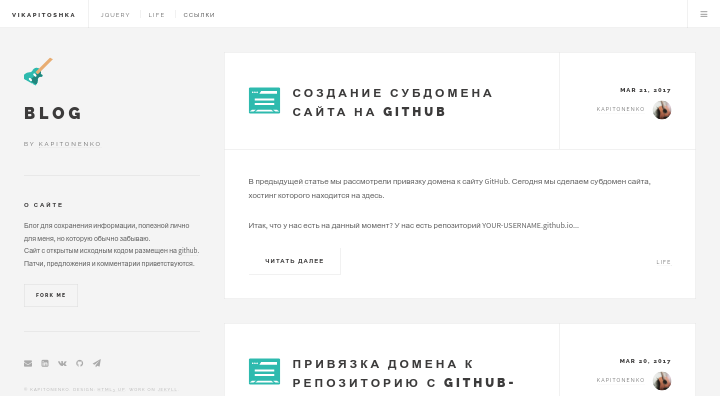
基于 Jekyll 的静态博客主题,设计移植自 HTML5 UP 的 Future Imperfect
Jekyll博客
future-imperfect — Jekyll 博客模板
作者 kaptn3
基于 Jekyll 的博客主题,移植自 HTML5 UP 的 Future Imperfect 设计,采用 MIT 许可,支持分类、评论、图标与文章预览图等配置。
看看你的网站会是什么样
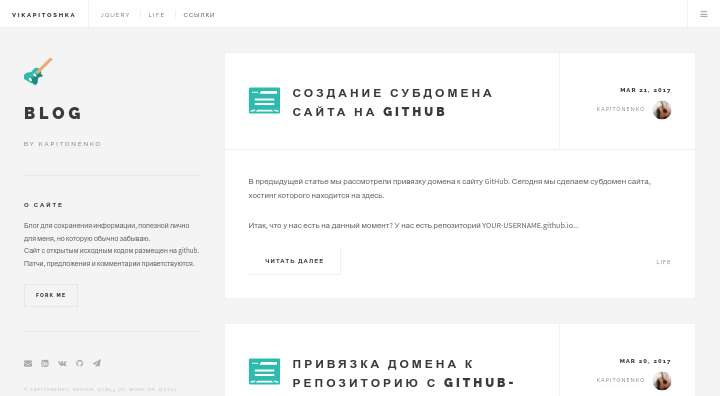
浏览真实页面截图,比较内容排版与手机效果。点击下方缩略图切换,放大查看整页细节。
目前有 1 张原始预览,可打开完整图片查看设计细节。
截图用于了解视觉与布局,交互效果请以实际项目为准。
采集于 2026-10-02查看来源
值得关注的模板亮点
从已有项目资料中,快速了解它的特点。
以分类为核心组织内容,分类页共用 _includes/category.html 模板,菜单链接在 _data/links.yml 中配置
分类图标使用 images 目录下与分类同名的 SVG 文件,文章配图按分类存放在 post-img 子目录
支持在 Front Matter 中指定预览图,并可通过 preview: 0 关闭首页摘要显示
集成 HyperComments 评论与 Yandex Metrika 统计,均以独立 include 文件形式提供
采用 MIT 许可,README 中列出 404 页面、搜索与分页器为待办功能
模板详细介绍
Future Imperfect 是一个 Jekyll 博客主题,由 Kapitonenko 维护,代码托管在 GitHub 上,仓库包含完整主题源码与演示站点。主题视觉设计取自 HTML5 UP 的 Future Imperfect,属于偏杂志/编辑风格的博客布局。
内容组织上,主题以分类为核心:文章在 Front Matter 中指定单一 category,分类页通过 _includes/category.html 统一渲染,菜单中的分类链接在 _data/links.yml 中定义。文章模板位于 _drafts/template.md,Layout 固定为 post,可设置标题、日期、分类、图标、关键词、预览图以及是否在首页显示摘要(preview: 0 关闭)。分类图标使用 images 目录下的 SVG,文件名需与分类名一致;文章配图按分类存放在 post-img 目录下的对应子文件夹。
功能方面,主题集成 HyperComments 作为评论系统,代码位于 _includes/comments;网页统计使用 Yandex Metrika,可在 includes/analytics.html 中填入自己的代码;每篇文章带有指向 GitHub 的编辑链接;includes/donate.html 提供捐赠表单。README 的 TODO 中列出了尚未实现的功能,包括 404 页面、搜索系统和分页器,Font Awesome 5 已完成。
安装方式为克隆仓库后执行 jekyll s,本地访问 localhost:4000。主题采用 MIT 许可,允许免费使用、修改、商用和分发,但演示图片、字体、图标等第三方素材需单独核对许可,域名、托管等外部服务可能另行收费。
Jekyll博客
适合你的项目吗?
适用场景
- 搭建以分类归档为主的个人技术博客或写作站点
- 需要在 GitHub 上直接编辑文章内容的博客(每篇文章带编辑链接)
- 使用 Jekyll 并希望以分类目录组织文章与配图的站点
- 希望自行替换评论、统计与捐赠组件的博客项目
适合人群
- 熟悉 Jekyll 与 Markdown、能自行修改 Front Matter 与 include 文件的使用者
- 接受以分类为主要内容组织方式的博客作者
- 需要 MIT 许可下可自由修改和分发主题代码的开发者
上手与定制指南
结合仓库当前版本的说明,按下面的资料检查内容、配置与运行要求。
- 1
克隆仓库后进入目录,执行 jekyll s 启动本地服务,访问 localhost:4000
- 2
文章模板参考 _drafts/template.md,Layout 固定为 post,日期格式为 yyyy-mm-dd hh:mm
- 3
新增分类页需创建以分类名命名的文件夹及 index.html,内容包含 layout: default 与 {% include category.html %}
- 4
分类图标需命名为 category_name.svg 并放入 images 目录,文章预览图放在 post-img/分类名 下
- 5
评论、统计与捐赠功能分别位于 _includes/comments、includes/analytics.html、includes/donate.html,需替换为自己的服务代码
授权与来源资料
使用条件与限制
免费使用 · 保留许可声明本次收录的是公开仓库中采用 MIT 许可的免费版本;免费范围为该版本代码,不代表外部服务或第三方素材免费。
使用时需要遵守
- 允许免费使用、修改、商用和分发该版本代码。
- 分发代码副本或实质性部分时,保留原作者版权声明和完整 MIT 许可声明。
- 代码按现状提供;担保与责任限制以原许可证及适用法律为准。
额外费用与待核对事项
- 评论功能依赖第三方服务 HyperComments,需注册并接入其服务代码,且该服务较慢、不支持匿名留言。
- 网页统计依赖第三方服务 Yandex Metrika,需自行注册账号并将统计代码粘贴到 includes/analytics.html。
- 文章编辑链接指向 GitHub 仓库,需将仓库地址替换为自己的 GitHub 仓库才能正常使用该功能。
- 每篇文章默认包含捐赠表单(includes/donate.html),使用前需按需修改或移除。
- 演示图片、字体、图标及其他第三方素材需按各自许可核对,不能仅凭代码的 MIT 许可判断。
- 域名、托管、数据库、支付或 AI 等外部服务可能另外收费。
查看原文依据
Permission is hereby granted, free of charge
许可证原文
I use [HyperComments](http://hypercomments.com) instead of other tool, Disqus, so it's slower and don't allows to anonymously send messages.
README 原文
I use [Yandex Metrika](https://metrika.yandex.ru) to do web analytics, you can choose either to realize it, just paste your code in `includes/analytics.html`.
README 原文
All posts can be edited by users through link: `github.com/kaptn3/future-imperfect/edit/master/{{ page.path }}`
README 原文
https://github.com/kaptn3/future-imperfect/blob/master/LICENSEhttps://github.com/kaptn3/future-imperfect/blob/master/README.mdIn `includes/donate.html` you'll see form for donation, includes in every post.
README 原文
DeepSeek 根据仓库许可证和 README 整理 ·2026-10-02。结果仅覆盖已读取资料,依赖、图片、字体及后续条款变更以各自原文为准。
项目核对记录与介绍依据
模板资料
- 来源平台
- GitHub
- 资料与维护参考分
- 资料一般 · 64 / 100
- 技术栈
- Jekyll
- 网站类型
- 博客
这个分数如何计算
本站按许可资料(最高30分)、演示链接(12分)、预览图(10分)、Star数(15分)、记录的维护时间(15分)、描述完整度(8分)、功能记录(5分)和分类资料(5分)计算。它不是代码、安全或性能测试,也不是 Google 评分;有链接不代表已实测可用。
这个项目需要核对什么
- 记录的仓库更新时间
- 2023-03-30
- 截图检查日期
- 2026-10-02
已收录演示链接。请用你的内容与屏幕尺寸检查;有演示不代表表单、认证或支付已经可用。
目录记录的主要技术栈是 Jekyll。请通过依赖清单和锁文件核对实际版本与托管要求。这些说明基于收录资料,不代表代码审计或部署实测。
查看具体选型方法 →介绍的制作与核对状态
介绍由 AI 辅助整理目录与仓库资料。仓库作者不等于这篇介绍的审核者。
已完成服务器许可规则与 AI 来源核对;未经过人工编辑审核。
查看当时使用的来源资料
SHA-256: b699e70e8ba2c107b7700d26dd8d49b90332c068f4dbe8158fd8a7bc11586def
2026-10-02T10:48:24.458Z
来源文件 / 仓库# Future Imperfect Theme on Jekyll
>by [Kapitonenko](https://kaptn.ru)
<https://future-imperfect.kaptn.ru> - demo
<https://github.com/kaptn3/future-imperfect/> - repository
[](https://opensource.org/licenses/mit-license.php)
[](https://github.com/ellerbrock/open-source-badge/)
1. [Installation](#installation)
2. [Usage](#usage)
3. [Content management](#content-management)
- [Template](#template)
- [Example of post](#example-of-post)
- [Category page](#category-page)
4. [Features](#features)
- [Categories](#categories)
- [Comments](#comments)
- [Icons](#icons)
- [Post Image](#post-image)
- [Featured image](#featured-image)
- [Edit link](#edit-link)
- [Web analytics](#web-analytics)
5. [Upgrading Theme](#upgrading-theme)
6. [Thanks to the following](#thanks-to-the-following)
7. [Todo](#todo)
8. [Donate](#donate)
9. [Copyright and license](#copyright-and-license)
## Installation
1. Download, clone or fork repo `git clone [email protected]:kaptn3/blog.git`
2. Enter the folder: `cd blog/`
3. Start Jekyll server: `jekyll s`
Access, [localhost:4000](http://localhost:4000)
## Usage
If you're completely new to Jekyll, I recommend checking out the documentation at <http://jekyllrb.com> or there's a tutorial by Smashing Magazine.
If you have any questions please ask me at [GitHub Issues](https://github.com/kaptn3/future-imperfect/issues).
## Content management
### Template
Template of posts setting is in `_drafts/template.md`. `Layout` is always named `post`. `Title` is a title of post, writing in quotation marks. `Date` written in the following format: `yyyy-mm-dd hh:mm`. In `category` specifies one category. In `icon` written the name of icon (its in the folder `images`). In `tags` is possible to write multiple tags using a comma. In `image` specify the path to image preview (can not fill). And in `preview` you can write `0` to on the main page didn't show the announcement of the post.
More details about all features and setting can be view on [here](#features).
### Example of post
```
layout: post
title: "Lorem"
date: 2017-06-04 00:00
category: category_name
icon: git
keywords: tag1, tag2
image: 1.png
preview: 0
```
### Category page
If you want to add a page of category you have to create folder with name of category and file `index.html`, which should contain the following:
```
---
layout: default
title: Category1
permalink: /category1/
---
{% include category.html %}
```
You can see example in [here](https://github.com/kaptn3/future-imperfect/blob/master/category1) or [here](https://github.com/kaptn3/blog/blob/master/category2).
## Features
### Categories
In blog page, we categorize posts into several categories by url, all category pages use same template html file - `_includes/category.html`. Links of category in menu is in `_data.links.yml`.
For example: URL is `localhost:4000/category1`. In `_data.links.yml` we define this category named category1, so in `_includes/category.html` we get this URL(/category1/) and change it to my category(category1), then this page are posts about category1.
### Comments
I use [HyperComments](http://hypercomments.com) instead of other tool, Disqus, so it's slower and don't allows to anonymously send messages. Code of comment is in `_includes/comments` and it included in every post.
### Icons
For categories I use svg-icons in `images`. Еhe icon is automatically assigned to the post by its category. The icon name must be `category_name.svg`.
### Post Image
All images used in posts that are in `post-image` and its are categorized. For example, images in post of category1's category is in `post-img/category1`.
### Featured image
You can specify the preview image for post in [YAML Front Matter](http://jekyllrb.com/docs/frontmatter/). In front matter called "image" to indicate the name of the image. The picture must be located in a category folder.
For example, we write post of category_name's category. In folder `post-img/category_name` put the preview image with the title "1.png" and in front matter write: `image: 1.png`. [Example](https://github.com/kaptn3/future-imperfect/blob/master/_posts/2017-06-08-learn-git4.md).
Also, in front matter you can control the announcement of record post. By default, the announcement consists of 35 words. Writing in the front matter called "preview" the number 0, the announcement will not be displayed for this entry. [Example](https://github.com/kaptn3/blog/blob/master/_posts/2017-06-08-learn-git4.md).
### Edit link
All posts can be edited by users through link: `github.com/kaptn3/future-imperfect/edit/master/{{ page.path }}` or `github.com/kaptn3/blog/edit/master/{{ post.path }}`.
### Web analytics
I use [Yandex Metrika](https://metrika.yandex.ru) to do web analytics, you can choose either to realize it, just paste your code in `includes/analytics.html`.
## Upgrading Theme
Blog is always being improved by its users, so sometimes one may need to upgrade.
Ensure there's an upstream remote
If `git remote -v` doesn't have an upstream listed, you can do the following to add it:
`git remote add upstream https://github.com/kaptn3/future-imperfect.git`
Pull in the latest changes
`git pull upstream master`
There may be merge conflicts, so be sure to fix the files that git lists if they occur. That's it!
## Thanks to the following
[Jekyll](http://jekyllrb.com/)
[HTML5Up](https://html5up.net/)
[Font Awesome](http://fontawesome.io/icons/)
[HyperComments](http://hypercomments.com)
## TODO
- [ ] Add 404 page
- [ ] Search system
- [x] Add fontawesome 5
- [ ] Add paginator
## Donate
In `includes/donate.html` you'll see form for donation, includes in every post.
Also if this project let you enjoy your blog time, you can give me a cup of coffee :)
[Donate =)](https://money.yandex.ru/to/410013162271067/10)
## Copyright and license
The theme is taken Future Imperfect Theme from [HTML5 UP](https://html5up.net).
It is under [the MIT license](/LICENSE).
Enjoy :yum:
看看同类模板
对比同技术栈与用途的模板,找到更适合的视觉与内容结构。

al-folio
al-folio 是一个面向学者与研究人员的 Jekyll 作品集主题,设计简洁、响应式,适合搭建个人学术主页。
Jekyll · 作品集

minimal-mistakes
:triangular_ruler: Jekyll theme for building a personal site, blog, project documentation, or portfolio.
Jekyll · 作品集

Beautiful Jekyll
Beautiful Jekyll 是一个在 Jekyll 生态中经过长期打磨的博客主题,由 Dean Attali 维护,自 2015 年起积累了超过 5 万用户。
Jekyll · 博客

jekyll-TeXt-theme
💎 🐳 A super customizable Jekyll theme for personal site, team site, blog, project, documentation, etc.
Jekyll · 博客

startbootstrap-clean-blog-jekyll
A Jekyll version of the Clean Blog theme by Start Bootstrap
Jekyll · 博客

So Simple
So Simple 是 Michael Rose 开发的 Jekyll 主题,定位清晰:为文字和图片提供一个干净、可读性强的展示框架。
Jekyll · 博客