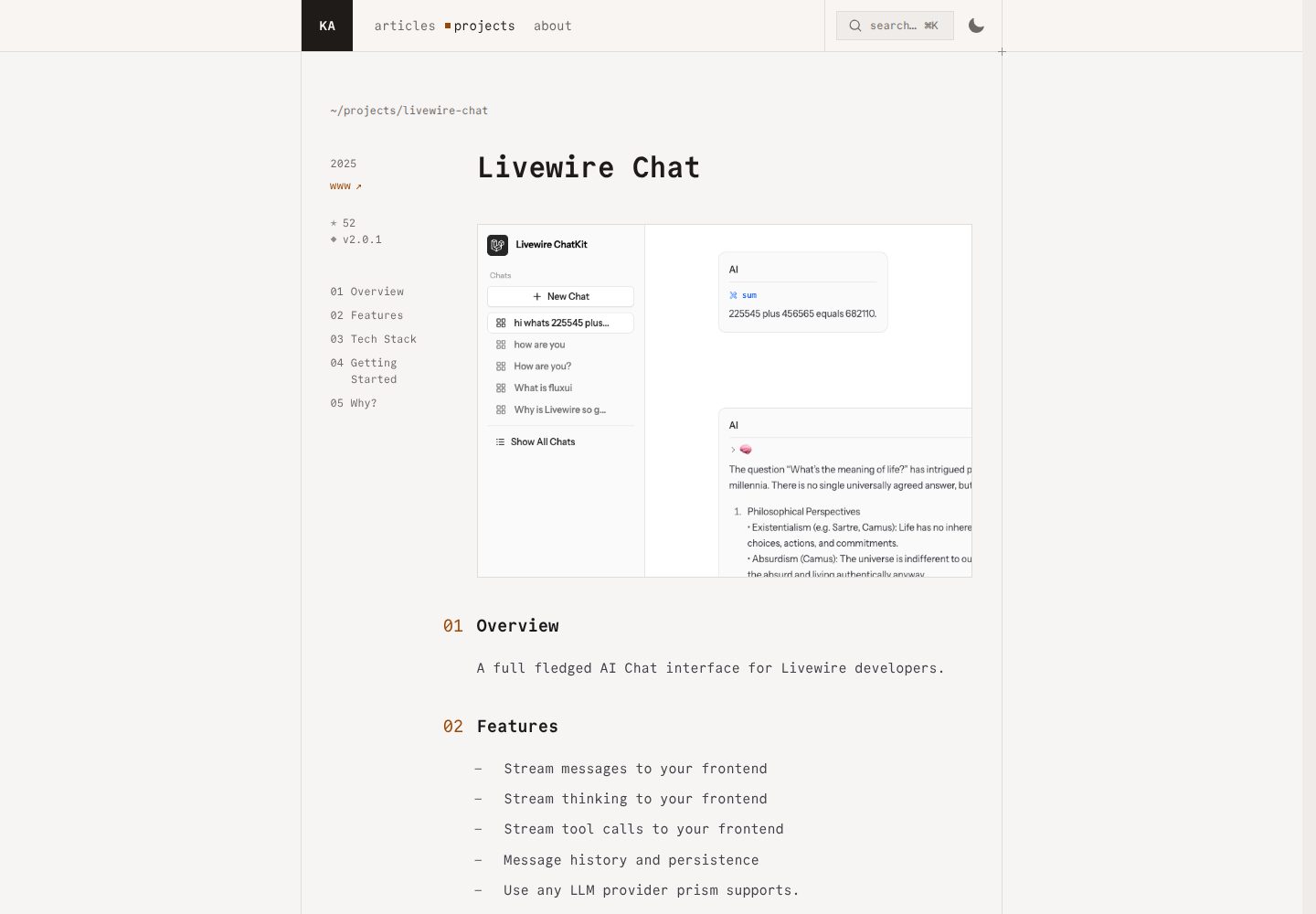
Multi-session management: create, switch between, and paginate through historical sessions
LaravelStarter
livewire-chat — Laravel Starter Template
By kauffinger
A Laravel Livewire-based LLM chat interface starter kit that integrates FluxUI and Prism, providing foundational capabilities such as multi-session management, streaming responses, and tool calling.
Explore the design
Compare the page layouts and mobile experience. Open any screenshot for a closer look.
Desktop homepage1 / 3
Desktop captureTop of page
Actual screenshot captured by the server browser.
All pages & views 3
Screenshots show visual appearance; interactive behavior may differ.
Recorded 2026-10-02View source
What stands out
A quick read of the recorded project description.
Session sharing: public or private visibility control
Select an LLM model per session
Stream messages via Prism and update the interface in real time
Built-in visualization of tool calls and results
FluxUI components paired with the TailwindCSS typography plugin
Template Details
This is a chat interface starter kit for Laravel, used to build LLM-powered conversational applications. It handles most interaction logic on the PHP side through Livewire, with minimal front-end JavaScript, and pairs FluxUI components with the TailwindCSS typography plugin to render the interface.
Functionally, it covers multi-session management: you can create, switch between, and paginate through historical sessions, support public or private sharing, and select a model individually for each session. Messages are communicated with the LLM via Prism, returned in a streaming manner, and update the interface in real time, while also supporting tool calling and display of results. The project includes models such as Chat and Message, as well as Action classes that handle user message persistence, streaming chunk updates, and final database writes, and provides a ChatPolicy for access control.
Before use, you need to configure an API key for your LLM provider yourself; by default it uses OpenAI's gpt-4o-mini, and you can also switch to providers such as Anthropic in the way Prism supports. The code is under the MIT license and can be used, modified, and distributed for free, but third-party assets such as demo images, fonts, and icons, as well as external costs such as domain, hosting, database, or LLM services, must be verified and borne separately.
LaravelStarter kit
Is it right for your project?
Use Cases
- Building an LLM conversational application for end users
- Quickly validating a chat interface and streaming interaction in a Laravel project
- A chat product prototype requiring multiple sessions, history, and sharing capabilities
- Teams that primarily use PHP and want to reduce front-end JavaScript effort
Suitable For
- Developers familiar with Laravel and Livewire
- Those who need chat interface foundation code they can modify and extend themselves
- Projects that already have an LLM provider API key and accept external service billing
Getting started & customization
Use these recorded setup notes alongside the repository instructions for your chosen version.
- 1
Install into a new application via Composer using the laravel new command with --using=kauffinger/livewire-chat-kit
- 2
After installation, run php artisan migrate, and run npm install and npm run dev (or npm run build)
- 3
Configure OPENAI_API_KEY in .env; the default model is gpt-4o-mini
- 4
To switch providers, modify the Prism call in app/Livewire/Chat.php and add the corresponding API key
- 5
Visit the /dashboard route to enter the chat interface
License & source material
Usage conditions & limitations
Free to use · keep license noticeThis entry covers the free version under the MIT license in a public repository; the free scope is the code of this version and does not mean that external services or third-party assets are free.
Must comply with when using
- You are allowed to use, modify, commercially use, and distribute the code of this version for free.
- When distributing copies or substantial portions of the code, retain the original author's copyright notice and the full MIT license notice.
- The code is provided as is; warranties and limitations of liability are governed by the original license and applicable law.
Additional costs & items to verify
- Before use, you must apply for and configure an LLM provider API key yourself (OpenAI by default), otherwise the chat function will not work; the key and usage costs are borne by the user.
- When switching to other providers such as Anthropic, you need to additionally configure the corresponding provider's API key and accept its terms of service and billing.
- It depends on the third-party Prism package and FluxUI components; these external dependencies may have their own licenses and usage conditions that must be verified independently.
- Demo images, fonts, icons, and other third-party assets must be checked against their respective licenses and cannot be judged solely by the code's MIT license.
- External services such as domain, hosting, database, payment, or AI may incur additional charges.
View Original Text Basis
Permission is hereby granted, free of charge
Original License Text
You'll need to add your API key to your `.env` file.
Original README
Remember to add the corresponding API key to your `.env` file (e.g., `ANTHROPIC_API_KEY`).
Original README
https://github.com/kauffinger/livewire-chat/blob/main/LICENSE.mdhttps://github.com/kauffinger/livewire-chat/blob/main/README.mdThis starter kit uses [Prism](https://github.com/prism-php/prism) to interact with LLMs.
Original README
Compiled by DeepSeek based on repository license and README ·2026-10-02. Results only cover the materials read; dependencies, images, fonts, and subsequent term changes are subject to their respective original texts.
Project checks & description sources
Template Information
- Source platforms
- GitHub
- Documentation and maintenance reference score
- More documented · 87 / 100
- Technologies
- Laravel
- Website type
- Starter
How this score is calculated
Our heuristic uses license records (up to 30), a demo link (12), a preview (10), stars (15), recorded maintenance (15), description completeness (8), feature records (5) and classification data (5). It is not a code, security or performance test, or a Google score. A link does not establish tested functionality.
What to verify for this project
- Repository update recorded
- 2026-02-05
- Screenshot last checked
- 2026-10-02
A demo link is listed. Check it with your own content and viewport sizes; its presence does not confirm that forms, authentication or payments work.
The catalog identifies Laravel as the primary stack. Check the actual dependency manifest and lockfile for versions and hosting requirements. These notes use recorded metadata, not a code audit or a deployment test.
Use a selection guide →How this description was prepared
AI-assisted description based on catalog records and repository material. Repository authors are not automatically the reviewers of this description.
Automatically checked against source and license rules; no manual editorial review.
Inspect the recorded source material
SHA-256: 16ace71e54075254905cc75ae399fa72ace1a084a73bf5c2e638fdfbd4b3394a
2026-10-02T14:44:17.564Z
Source file / repository# Livewire Chat Kit
[](https://packagist.org/packages/kauffinger/livewire-chat-kit)
[](https://github.com/kauffinger/livewire-chat/actions?query=workflow%3Atests+branch%3Amain)
[](https://github.com/kauffinger/livewire-chat/actions?query=workflow%3Alint+branch%3Amain)
[](https://packagist.org/packages/kauffinger/livewire-chat-kit)
A Laravel Starter Kit for building LLM-powered chat interfaces with Livewire, [FluxUI](https://fluxui.com), and [Prism](https://github.com/prism-php/prism). Jump right into the LLM party without touching (much) JavaScript, while still having a good-looking and effortlessly feeling chat interface.
This starter kit provides a clean, simple foundation for creating chat applications. It's designed to get you sending your first chat messages to an LLM instantly.
## Features
### Chat System
- **Multi-Chat Management:** Create, manage, and navigate between multiple chat conversations
- **Chat Sidebar:** Quick access to recent chats with intelligent navigation
- **Chat Sharing:** Share conversations publicly or keep them private with visibility controls
- **Model Selection:** Choose from different LLM models (GPT-4o, GPT-4o-mini, etc.) per chat
- **Persistent History:** All conversations are saved and accessible across sessions
### LLM Integration
- **Livewire-Powered:** Build dynamic interfaces with PHP.
- **Streamed Responses:** Real-time message streaming from LLMs for a smooth UX.
- **Prism Integration:** The Laravel-way of speaking to LLMs. Easy to use, test, and switch between providers (e.g., OpenAI, Anthropic).
- **Tool Support:** Built-in LLM tool calling with visual feedback and result display
### UI & Design
- **FluxUI Components:** Beautiful, pre-built UI components for a polished look and feel.
- **Minimal JavaScript:** Focus on your PHP backend.
- **TailwindCSS Styled:** Includes a TailwindCSS setup with a typography plugin for rendering markdown.
- **Real-time Updates:** Seamless UI updates using Livewire streams
## Installation
You can install this starter kit into a new Laravel application using Composer:
```bash
laravel new my-chat-app --using=kauffinger/livewire-chat-kit
```
After installation, make sure to:
1. Run migrations: `php artisan migrate`
2. Install NPM dependencies: `npm install`
3. Build assets: `npm run dev` (or `npm run build` for production)
## Getting Started
### 1. Configure LLM Provider
This starter kit uses [Prism](https://github.com/prism-php/prism) to interact with LLMs. By default, it's configured to use OpenAI's `gpt-4o-mini`. You'll need to add your API key to your `.env` file.
```env
OPENAI_API_KEY=your-openai-api-key
# OPENAI_ORGANIZATION_ID= (optional)
```
You can easily switch to other providers supported by Prism (like Anthropic) by modifying the `Chat.php` component. For example, to use Claude:
```php
// In app/Livewire/Chat.php
// ...
use Prism\Prism\Enums\Provider;
// ...
public function runChatToolLoop(): void
{
$generator = Prism::text()
->using(Provider::Anthropic, 'claude-3-opus-20240229') // Example for Claude
// ->using(Provider::OpenAI, 'gpt-4o-mini') // Default
->withSystemPrompt('You are a helpful assistant.')
->withMessages(collect($this->messages)->map->toPrism()->all())
->asStream();
// ...
}
// ...
```
Remember to add the corresponding API key to your `.env` file (e.g., `ANTHROPIC_API_KEY`).
### 2. Explore the Chat Interface
Navigate to your application's `/dashboard` route to start interacting with the chat interface. You can:
- Create new chats from the sidebar
- Switch between existing conversations
- Share chats publicly or keep them private
- Change the LLM model for each chat
- Use built-in tools (like the example sum calculator)
## Architecture
### Core Components
- **`app/Livewire/Chats/Index.php`** - Paginate over all of your chats
- **`app/Livewire/Chats/Show.php`** - Main chat component handling LLM streaming, tool calls, and message management
- **`app/Livewire/ChatSidebar.php`** - Chat navigation, history, and new chat creation
- **`app/Models/Chat.php`** - Chat model with user relationships and visibility controls
- **`app/Models/Message.php`** - Message model with tool call/result support and Prism integration
### Business Logic Layer
- **`app/Actions/`** - Clean action classes for complex operations:
- `AddNewUserMessageToChat` - Handles user message persistence
- `UpdateStreamDataFromPrismChunk` - Processes streaming LLM responses
- `PersistStreamDataToMessages` - Saves complete responses to database
- **`app/Dtos/StreamData.php`** - Type-safe data transfer object for streaming
- **`app/Policies/ChatPolicy.php`** - Authorization rules for chat access and sharing
### UI Components
- **Chat Interface:** Real-time streaming with markdown rendering
- **Tool Results Display:** Visual feedback for LLM tool executions
- **Model Selector:** Per-chat model configuration
- **Sharing Controls:** Public/private visibility management
- **Toast Notifications:** Built-in toast system for user feedback
## How it Works
### Message Flow
1. **User Input:** Message typed in chat interface and submitted
2. **Message Processing:** `AddNewUserMessageToChat` action persists user message
3. **LLM Streaming:** `runChatToolLoop()` initiates real-time streaming with Prism
4. **Stream Handling:** `UpdateStreamDataFromPrismChunk` processes each chunk (text, tool calls, results)
5. **UI Updates:** Livewire streams update the interface in real-time
6. **Persistence:** `PersistStreamDataToMessages` saves complete conversation
### Tool Integration
- **Tool Definitions:** Tools are defined in the `runChatToolLoop()` method
- **Automatic Execution:** LLM can call tools during conversation flow
- **Visual Feedback:** Tool calls and results are displayed with dedicated UI components
### Technical Implementation
- **UUID Models:** All models use UUIDs for security and scalability
- **Policy Authorization:** Fine-grained access control with `ChatPolicy`
- **Type Safety:** DTOs and strong typing throughout the application
- **Testing:** Comprehensive Pest test suite with Livewire integration
- **Code Quality:** Laravel Pint, Rector, and Prettier for consistent formatting
## Toast Notifications
The chat kit includes a built-in toast notification system for user feedback.
### Basic Setup
Add the toast container to your layout (e.g., in `resources/views/layouts/app.blade.php`):
```blade
<x-toast position="bottom-right" />
```
### Usage in Livewire Components
```php
// In your Livewire component - using named parameters
$this->dispatch('toast',
variant: 'success',
title: 'Success!',
description: 'Your changes have been saved.',
icon: 'check-circle',
duration: 3000
);
```
### Usage with Alpine.js
```blade
<button
@click="$dispatch('toast', {
variant: 'success',
title: 'Success!',
description: 'Your changes have been saved.'
})"
>
Show Success Toast
</button>
```
### Toast Options
- `variant`: 'default' | 'success' | 'error' | 'danger' | 'warning' | 'info'
- `title`: The main message
- `description`: Additional details (optional)
- `icon`: Icon name (optional, auto-set based on variant)
- `dismissible`: Whether the toast can be dismissed (default: true)
- `duration`: Auto-dismiss after milliseconds (default: 5000, use 0 to disable)
### Container Positions
- `position`: 'top-left' | 'top-center' | 'top-right' | 'bottom-left' | 'bottom-center' | 'bottom-right' (default: 'bottom-right')
## Contributing
Contributions are welcome! If you'd like to improve the Livewire Chat Kit, please feel free to:
- Report a bug.
- Suggest a new feature.
- Submit a pull request.
Please visit the [GitHub repository](https://github.com/kauffinger/livewire-chat-kit) to contribute.
## License
This project is open-sourced software licensed under the [MIT license](LICENSE.md).
Explore similar templates
Compare previews and descriptions within the same stack and category.

sage
Sage is a WordPress starter theme maintained by Roots, using Laravel Blade components and templates, Vite builds, Tailwind CSS, and built-in block editor support.
Laravel · Starter

wave
Wave is an open-source SaaS starter kit built on Laravel and released under the MIT license.
Laravel · SaaS

filament-starter
A Laravel TALL stack starter template maintained by Log1x, with a preconfigured Filament admin panel and plugins including Curator, Gravatar, Exceptions, Jobs Monitor, Breezy, Peek, and Logger.
Laravel · Starter

electrik
Electrik is a Laravel SaaS starter kit installed as a Composer package, with authentication, teams, Stripe subscription billing, and the Slate 3 interface under the Electrik\ namespace rather than copied into App\.
Laravel · SaaS

php-saas
php-saas is a Laravel-based SaaS starter positioned as an everything-included kit. It generates new projects via a global Composer command and includes authentication with two-factor, API tokens, Stripe and Paddle billing, and project, team, and organization management.
Laravel · SaaS

filament-jetstream
A Laravel starter kit that implements Jetstream-like authentication and account features using Filament's native panels and components. It includes login, registration, two-factor authentication, session management, user profiles, and optional teams and API tokens.
Laravel · Starter