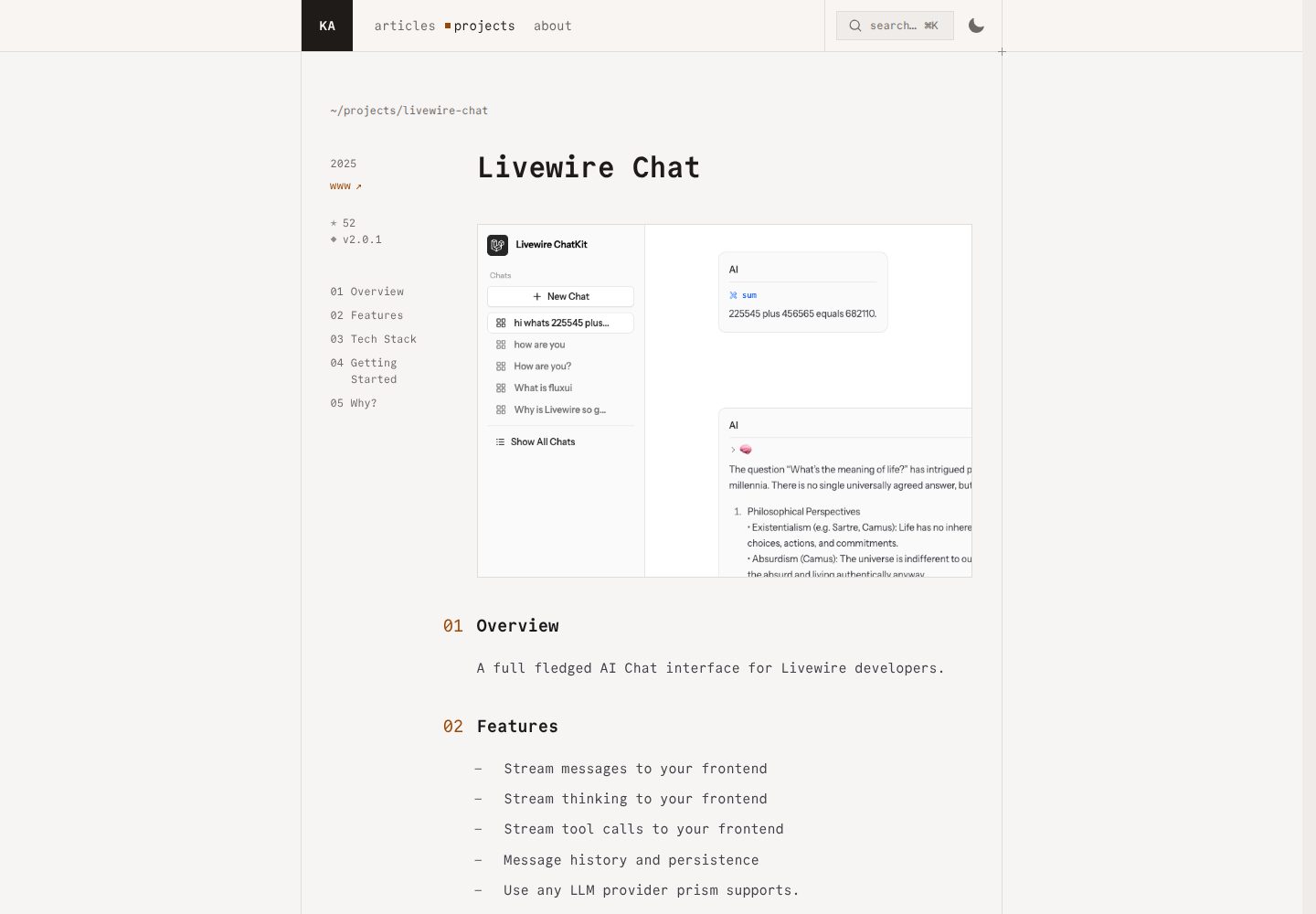
多会话管理:创建、切换、分页浏览历史会话
Laravel启动器
livewire-chat — Laravel 启动器模板
作者 kauffinger
基于 Laravel Livewire 的 LLM 聊天界面启动器,集成 FluxUI 与 Prism,提供多会话管理、流式响应和工具调用等基础能力。
看看你的网站会是什么样
浏览真实页面截图,比较内容排版与手机效果。点击下方缩略图切换,放大查看整页细节。
全部页面与视图 3
截图用于了解视觉与布局,交互效果请以实际项目为准。
采集于 2026-10-02查看来源
值得关注的模板亮点
从已有项目资料中,快速了解它的特点。
会话分享:公开或私密可见性控制
按会话选择 LLM 模型
通过 Prism 流式返回消息并实时更新界面
内置工具调用及结果的可视化展示
FluxUI 组件搭配 TailwindCSS 排版插件
模板详细介绍
这是一个面向 Laravel 的聊天界面启动器,用于搭建由 LLM 驱动的对话应用。它通过 Livewire 在 PHP 侧完成大部分交互逻辑,前端 JavaScript 用量较少,并搭配 FluxUI 组件与 TailwindCSS 排版插件来呈现界面。
功能上覆盖多会话管理:可创建、切换和分页浏览历史会话,支持公开或私密分享,并可为每个会话单独选择模型。消息通过 Prism 与 LLM 通信,以流式方式返回并实时更新界面,同时支持工具调用及结果的展示。项目包含 Chat、Message 等模型,以及处理用户消息持久化、流式分块更新和最终落库的 Action 类,并提供 ChatPolicy 做访问控制。
使用前需要自行配置 LLM 提供商的 API Key,默认使用 OpenAI 的 gpt-4o-mini,也可按 Prism 支持的方式切换到 Anthropic 等提供商。代码采用 MIT 许可,可免费使用、修改和分发,但演示图片、字体、图标等第三方素材以及域名、托管、数据库或 LLM 服务等外部费用需另行核对和承担。
Laravel启动器
适合你的项目吗?
适用场景
- 搭建面向终端用户的 LLM 对话应用
- 在 Laravel 项目中快速验证聊天界面与流式交互
- 需要多会话、历史记录与分享能力的聊天产品原型
- 以 PHP 为主、希望减少前端 JavaScript 投入的团队
适合人群
- 熟悉 Laravel 与 Livewire 的开发者
- 需要可自行修改和扩展的聊天界面基础代码
- 已具备 LLM 提供商 API Key 并接受外部服务计费的项目
上手与定制指南
结合仓库当前版本的说明,按下面的资料检查内容、配置与运行要求。
- 1
通过 Composer 以 laravel new 命令并指定 --using=kauffinger/livewire-chat-kit 安装到新应用
- 2
安装后执行 php artisan migrate,并运行 npm install 与 npm run dev(或 npm run build)
- 3
在 .env 中配置 OPENAI_API_KEY,默认模型为 gpt-4o-mini
- 4
如需切换提供商,修改 app/Livewire/Chat.php 中的 Prism 调用并添加对应 API Key
- 5
访问 /dashboard 路由进入聊天界面
授权与来源资料
使用条件与限制
免费使用 · 保留许可声明本次收录的是公开仓库中采用 MIT 许可的免费版本;免费范围为该版本代码,不代表外部服务或第三方素材免费。
使用时需要遵守
- 允许免费使用、修改、商用和分发该版本代码。
- 分发代码副本或实质性部分时,保留原作者版权声明和完整 MIT 许可声明。
- 代码按现状提供;担保与责任限制以原许可证及适用法律为准。
额外费用与待核对事项
- 使用前必须自行申请并配置 LLM 提供商的 API Key(默认 OpenAI),否则聊天功能无法工作;该密钥及调用费用由使用者自行承担。
- 切换到 Anthropic 等其他提供商时,需额外配置对应提供商的 API Key,并接受其服务条款与计费。
- 依赖第三方 Prism 包与 FluxUI 组件,这些外部依赖可能有各自的许可与使用条件,需自行核对。
- 演示图片、字体、图标及其他第三方素材需按各自许可核对,不能仅凭代码的 MIT 许可判断。
- 域名、托管、数据库、支付或 AI 等外部服务可能另外收费。
查看原文依据
Permission is hereby granted, free of charge
许可证原文
You'll need to add your API key to your `.env` file.
README 原文
Remember to add the corresponding API key to your `.env` file (e.g., `ANTHROPIC_API_KEY`).
README 原文
https://github.com/kauffinger/livewire-chat/blob/main/LICENSE.mdhttps://github.com/kauffinger/livewire-chat/blob/main/README.mdThis starter kit uses [Prism](https://github.com/prism-php/prism) to interact with LLMs.
README 原文
DeepSeek 根据仓库许可证和 README 整理 ·2026-10-02。结果仅覆盖已读取资料,依赖、图片、字体及后续条款变更以各自原文为准。
项目核对记录与介绍依据
模板资料
- 来源平台
- GitHub
- 资料与维护参考分
- 资料较完整 · 87 / 100
- 技术栈
- Laravel
- 网站类型
- 启动器
这个分数如何计算
本站按许可资料(最高30分)、演示链接(12分)、预览图(10分)、Star数(15分)、记录的维护时间(15分)、描述完整度(8分)、功能记录(5分)和分类资料(5分)计算。它不是代码、安全或性能测试,也不是 Google 评分;有链接不代表已实测可用。
这个项目需要核对什么
- 记录的仓库更新时间
- 2026-02-05
- 截图检查日期
- 2026-10-02
已收录演示链接。请用你的内容与屏幕尺寸检查;有演示不代表表单、认证或支付已经可用。
目录记录的主要技术栈是 Laravel。请通过依赖清单和锁文件核对实际版本与托管要求。这些说明基于收录资料,不代表代码审计或部署实测。
查看具体选型方法 →介绍的制作与核对状态
介绍由 AI 辅助整理目录与仓库资料。仓库作者不等于这篇介绍的审核者。
已完成服务器许可规则与 AI 来源核对;未经过人工编辑审核。
查看当时使用的来源资料
SHA-256: 16ace71e54075254905cc75ae399fa72ace1a084a73bf5c2e638fdfbd4b3394a
2026-10-02T14:44:17.564Z
来源文件 / 仓库# Livewire Chat Kit
[](https://packagist.org/packages/kauffinger/livewire-chat-kit)
[](https://github.com/kauffinger/livewire-chat/actions?query=workflow%3Atests+branch%3Amain)
[](https://github.com/kauffinger/livewire-chat/actions?query=workflow%3Alint+branch%3Amain)
[](https://packagist.org/packages/kauffinger/livewire-chat-kit)
A Laravel Starter Kit for building LLM-powered chat interfaces with Livewire, [FluxUI](https://fluxui.com), and [Prism](https://github.com/prism-php/prism). Jump right into the LLM party without touching (much) JavaScript, while still having a good-looking and effortlessly feeling chat interface.
This starter kit provides a clean, simple foundation for creating chat applications. It's designed to get you sending your first chat messages to an LLM instantly.
## Features
### Chat System
- **Multi-Chat Management:** Create, manage, and navigate between multiple chat conversations
- **Chat Sidebar:** Quick access to recent chats with intelligent navigation
- **Chat Sharing:** Share conversations publicly or keep them private with visibility controls
- **Model Selection:** Choose from different LLM models (GPT-4o, GPT-4o-mini, etc.) per chat
- **Persistent History:** All conversations are saved and accessible across sessions
### LLM Integration
- **Livewire-Powered:** Build dynamic interfaces with PHP.
- **Streamed Responses:** Real-time message streaming from LLMs for a smooth UX.
- **Prism Integration:** The Laravel-way of speaking to LLMs. Easy to use, test, and switch between providers (e.g., OpenAI, Anthropic).
- **Tool Support:** Built-in LLM tool calling with visual feedback and result display
### UI & Design
- **FluxUI Components:** Beautiful, pre-built UI components for a polished look and feel.
- **Minimal JavaScript:** Focus on your PHP backend.
- **TailwindCSS Styled:** Includes a TailwindCSS setup with a typography plugin for rendering markdown.
- **Real-time Updates:** Seamless UI updates using Livewire streams
## Installation
You can install this starter kit into a new Laravel application using Composer:
```bash
laravel new my-chat-app --using=kauffinger/livewire-chat-kit
```
After installation, make sure to:
1. Run migrations: `php artisan migrate`
2. Install NPM dependencies: `npm install`
3. Build assets: `npm run dev` (or `npm run build` for production)
## Getting Started
### 1. Configure LLM Provider
This starter kit uses [Prism](https://github.com/prism-php/prism) to interact with LLMs. By default, it's configured to use OpenAI's `gpt-4o-mini`. You'll need to add your API key to your `.env` file.
```env
OPENAI_API_KEY=your-openai-api-key
# OPENAI_ORGANIZATION_ID= (optional)
```
You can easily switch to other providers supported by Prism (like Anthropic) by modifying the `Chat.php` component. For example, to use Claude:
```php
// In app/Livewire/Chat.php
// ...
use Prism\Prism\Enums\Provider;
// ...
public function runChatToolLoop(): void
{
$generator = Prism::text()
->using(Provider::Anthropic, 'claude-3-opus-20240229') // Example for Claude
// ->using(Provider::OpenAI, 'gpt-4o-mini') // Default
->withSystemPrompt('You are a helpful assistant.')
->withMessages(collect($this->messages)->map->toPrism()->all())
->asStream();
// ...
}
// ...
```
Remember to add the corresponding API key to your `.env` file (e.g., `ANTHROPIC_API_KEY`).
### 2. Explore the Chat Interface
Navigate to your application's `/dashboard` route to start interacting with the chat interface. You can:
- Create new chats from the sidebar
- Switch between existing conversations
- Share chats publicly or keep them private
- Change the LLM model for each chat
- Use built-in tools (like the example sum calculator)
## Architecture
### Core Components
- **`app/Livewire/Chats/Index.php`** - Paginate over all of your chats
- **`app/Livewire/Chats/Show.php`** - Main chat component handling LLM streaming, tool calls, and message management
- **`app/Livewire/ChatSidebar.php`** - Chat navigation, history, and new chat creation
- **`app/Models/Chat.php`** - Chat model with user relationships and visibility controls
- **`app/Models/Message.php`** - Message model with tool call/result support and Prism integration
### Business Logic Layer
- **`app/Actions/`** - Clean action classes for complex operations:
- `AddNewUserMessageToChat` - Handles user message persistence
- `UpdateStreamDataFromPrismChunk` - Processes streaming LLM responses
- `PersistStreamDataToMessages` - Saves complete responses to database
- **`app/Dtos/StreamData.php`** - Type-safe data transfer object for streaming
- **`app/Policies/ChatPolicy.php`** - Authorization rules for chat access and sharing
### UI Components
- **Chat Interface:** Real-time streaming with markdown rendering
- **Tool Results Display:** Visual feedback for LLM tool executions
- **Model Selector:** Per-chat model configuration
- **Sharing Controls:** Public/private visibility management
- **Toast Notifications:** Built-in toast system for user feedback
## How it Works
### Message Flow
1. **User Input:** Message typed in chat interface and submitted
2. **Message Processing:** `AddNewUserMessageToChat` action persists user message
3. **LLM Streaming:** `runChatToolLoop()` initiates real-time streaming with Prism
4. **Stream Handling:** `UpdateStreamDataFromPrismChunk` processes each chunk (text, tool calls, results)
5. **UI Updates:** Livewire streams update the interface in real-time
6. **Persistence:** `PersistStreamDataToMessages` saves complete conversation
### Tool Integration
- **Tool Definitions:** Tools are defined in the `runChatToolLoop()` method
- **Automatic Execution:** LLM can call tools during conversation flow
- **Visual Feedback:** Tool calls and results are displayed with dedicated UI components
### Technical Implementation
- **UUID Models:** All models use UUIDs for security and scalability
- **Policy Authorization:** Fine-grained access control with `ChatPolicy`
- **Type Safety:** DTOs and strong typing throughout the application
- **Testing:** Comprehensive Pest test suite with Livewire integration
- **Code Quality:** Laravel Pint, Rector, and Prettier for consistent formatting
## Toast Notifications
The chat kit includes a built-in toast notification system for user feedback.
### Basic Setup
Add the toast container to your layout (e.g., in `resources/views/layouts/app.blade.php`):
```blade
<x-toast position="bottom-right" />
```
### Usage in Livewire Components
```php
// In your Livewire component - using named parameters
$this->dispatch('toast',
variant: 'success',
title: 'Success!',
description: 'Your changes have been saved.',
icon: 'check-circle',
duration: 3000
);
```
### Usage with Alpine.js
```blade
<button
@click="$dispatch('toast', {
variant: 'success',
title: 'Success!',
description: 'Your changes have been saved.'
})"
>
Show Success Toast
</button>
```
### Toast Options
- `variant`: 'default' | 'success' | 'error' | 'danger' | 'warning' | 'info'
- `title`: The main message
- `description`: Additional details (optional)
- `icon`: Icon name (optional, auto-set based on variant)
- `dismissible`: Whether the toast can be dismissed (default: true)
- `duration`: Auto-dismiss after milliseconds (default: 5000, use 0 to disable)
### Container Positions
- `position`: 'top-left' | 'top-center' | 'top-right' | 'bottom-left' | 'bottom-center' | 'bottom-right' (default: 'bottom-right')
## Contributing
Contributions are welcome! If you'd like to improve the Livewire Chat Kit, please feel free to:
- Report a bug.
- Suggest a new feature.
- Submit a pull request.
Please visit the [GitHub repository](https://github.com/kauffinger/livewire-chat-kit) to contribute.
## License
This project is open-sourced software licensed under the [MIT license](LICENSE.md).
看看同类模板
对比同技术栈与用途的模板,找到更适合的视觉与内容结构。

sage
WordPress starter theme with Laravel Blade components and templates, Tailwind CSS, and block editor support
Laravel · 启动器

wave
Wave - The Software as a Service Starter Kit, designed to help you build the SAAS of your dreams 🚀 💰
Laravel · SaaS

filament-starter
A beautiful starting point for your next TALL stack project using Filament. ⚡
Laravel · 启动器

electrik
Laravel SaaS starter kit: auth, teams, Stripe billing, and Slate 3 — Composer package for Laravel 12
Laravel · SaaS

php-saas
The everything-included starter kit for your next idea
Laravel · SaaS

filament-jetstream
A Laravel starter kit built with Filament inspired by Jetstream.
Laravel · 启动器