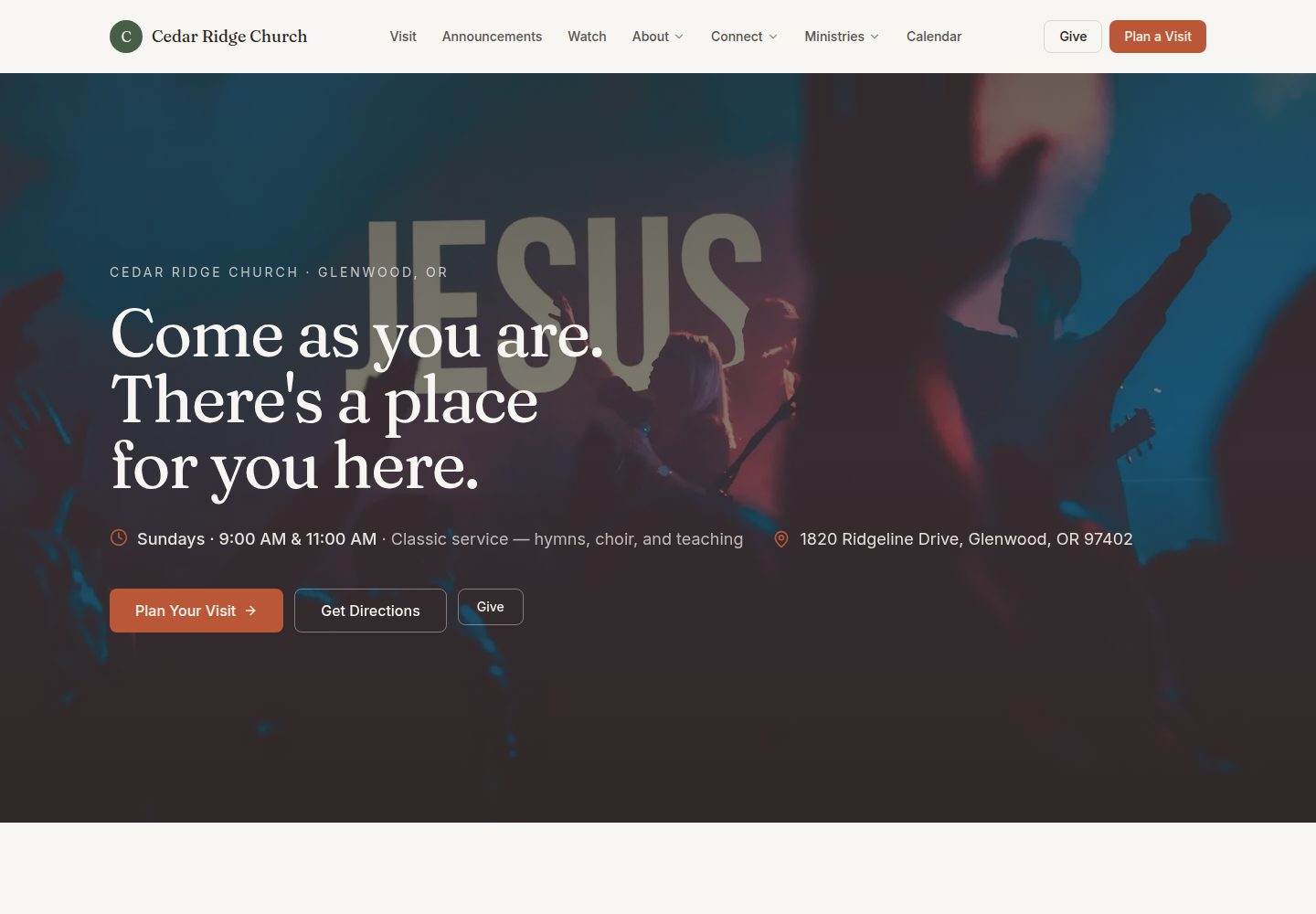
Built with Next.js and a mobile-first design, adapting to phones, tablets, and desktops
Next.jsReactCorporate Website
church-site-template — Next.js Business Template
By kbennett2000
A free, open-source website template for small churches, built on Next.js and using TinaCMS so non-technical staff can update sermons, events, service times, and other content in the browser, deployable to Vercel.
Explore the design
Compare the page layouts and mobile experience. Open any screenshot for a closer look.
Desktop homepage1 / 3
Desktop captureTop of page
Actual screenshot captured by the server browser.
All pages & views 3
Screenshots show visual appearance; interactive behavior may differ.
Recorded 2026-10-01View source
What stands out
A quick read of the recorded project description.
Integrates TinaCMS so church staff can log in with a Google account and edit content in the browser without writing code
Content is stored as Markdown and JSON in a GitHub repository, not tied to a specific platform
Includes built-in page modules for sermon archives, calendars, prayer requests, ministries, small group finders, volunteer sign-ups, giving, and more
Provides role-based documentation for editors, technical volunteers, handover recipients, and developers
Template Details
This is a website template designed for small churches. The code is MIT-licensed, and the repository is built on Next.js with TinaCMS integrated as a browser-based content editor. Church staff can update sermons, staff introductions, events, service times, and other content in the browser without touching code, and changes are published automatically. The template includes page modules for sermon archives, calendars, prayer requests, ministry pages, small group finders, volunteer sign-ups, visitation schedules, giving pages, newsletter subscriptions, and statements of faith. Content is stored as Markdown and JSON in a GitHub repository.
For usage, the repository recommends creating an independent copy via GitHub's "Use this template" button, then following the documentation for initial configuration and deployment. The first setup takes about 30 minutes of hands-on work, roughly 90 minutes total; routine maintenance takes about 10 minutes per month for dependency updates. Deployment relies on Vercel's free tier, and a custom domain is optional.
In terms of limitations, the template itself does not provide a database or server; some features such as newsletter subscriptions are only interfaces by default and require integration with third-party services. Licenses for demo images, fonts, icons, and other third-party assets must be verified separately. External hosting, domains, and other services may incur costs.
Next.jsCorporate website
Is it right for your project?
Use Cases
- A small church needs a self-maintainable official website but has no dedicated developer
- Church staff want to update sermons, events, service times, and staff introductions directly in the browser
- A technical volunteer needs to set up and deploy a low-maintenance site for the church
- Taking over a church website built by someone else and needing to understand the service composition and handover process
Suitable For
- Small churches lacking the budget to hire a professional website team
- Churches with a semi-technical volunteer responsible for initial setup and deployment
- Churches that want content to remain maintainable long-term without depending on the original builder
- Church website scenarios that require a good mobile access experience
Getting started & customization
Use these recorded setup notes alongside the repository instructions for your chosen version.
- 1
Create an independent repository copy via GitHub's "Use this template" button, then follow the documentation for initial configuration
- 2
The first setup takes about 30 minutes of hands-on work, roughly 90 minutes total, followed by about 10 minutes per month for dependency updates
- 3
Requires GitHub and Vercel accounts, both with free plans; a custom domain is optional and costs about $12 per year
- 4
Commands such as npm run setup, npm run start, npm run cms, npm run deploy, and npm run doctor can be used for configuration, local preview, CMS proxy, deployment, and troubleshooting
- 5
If Node.js is not installed, operations can be done in the browser via GitHub Codespaces
License & source material
Usage conditions & limitations
Free to use · keep license noticeThis entry covers the free version under the MIT license in the public repository; the free scope applies to that version's code and does not imply that external services or third-party assets are free.
Must comply with when using
- Free use, modification, commercial use, and distribution of this version's code are permitted.
- When distributing copies or substantial portions of the code, retain the original author's copyright notice and the full MIT license notice.
- The code is provided as-is; warranties and liability limitations are governed by the original license and applicable law.
Additional costs & items to verify
- Browser-based editing requires logging into TinaCMS with a Google account; those without a Google account cannot use this editing workflow.
- Newsletter subscriptions are only an interface by default and require integration with third-party services such as Mailchimp, Buttondown, or Brevo to actually collect subscriptions.
- Deployment relies on Vercel's free tier; exceeding traffic limits may require a paid upgrade.
- A custom domain must be purchased separately, about $12 per year, an optional external cost.
- YouTube embeds, podcast feeds, and audio downloads in sermon archives depend on external services such as YouTube, whose availability and terms are determined by third parties.
- Demo images, fonts, icons, and other third-party assets must be verified under their respective licenses; the code's MIT license alone cannot be used to judge them.
- External services such as domains, hosting, databases, payments, or AI may incur additional charges.
View Original Text Basis
Permission is hereby granted, free of charge
Original License Text
staff sign in with Google and update sermons, staff bios, events, service times, and more without ever touching code
Original README
wired for Mailchimp, Buttondown, Brevo, or similar (UI only by default)
Original README
runs on Vercel's free tier; thousands of visitors a day before you'd hit any limit
Original README
A custom domain | ~$12/year (optional)
Original README
https://github.com/kbennett2000/church-site-template/blob/main/LICENSEhttps://github.com/kbennett2000/church-site-template/blob/main/README.mdYouTube embeds, podcast feed, audio downloads
Original README
Compiled by DeepSeek based on repository license and README ·2026-10-01. Results only cover the materials read; dependencies, images, fonts, and subsequent term changes are subject to their respective original texts.
Project checks & description sources
Template Information
- Source platforms
- GitHub
- Documentation and maintenance reference score
- More documented · 83 / 100
- Technologies
- Next.js · React
- Website type
- Corporate Website
How this score is calculated
Our heuristic uses license records (up to 30), a demo link (12), a preview (10), stars (15), recorded maintenance (15), description completeness (8), feature records (5) and classification data (5). It is not a code, security or performance test, or a Google score. A link does not establish tested functionality.
What to verify for this project
- Repository update recorded
- 2026-06-22
- Screenshot last checked
- 2026-10-01
A demo link is listed. Check it with your own content and viewport sizes; its presence does not confirm that forms, authentication or payments work.
The catalog identifies Next.js as the primary stack. Check the actual dependency manifest and lockfile for versions and hosting requirements. These notes use recorded metadata, not a code audit or a deployment test.
Use a selection guide →How this description was prepared
AI-assisted description based on catalog records and repository material. Repository authors are not automatically the reviewers of this description.
Automatically checked against source and license rules; no manual editorial review.
Inspect the recorded source material
SHA-256: 06b0170e7211319bdaed3263673a808a6374db5e9940282c79554d26d574bcf9
2026-10-01T15:31:19.193Z
Source file / repository<p align="center"> <img src="docs/marketing/banner.png" alt="Church Site Template — a free, modern website for small churches, editable in the browser" width="100%" /> </p> <h1 align="center">Church Site Template</h1> <p align="center"> A free, modern, mobile-first website template for small churches.<br /> Editors update content in their browser — no developer needed long-term. </p> <p align="center"> <a href="https://church-site-template-psi.vercel.app"><strong>🌐 Live demo</strong></a> · <a href="docs/for-tech-volunteers/01-overview.md"><strong>📖 Setup guide</strong></a> · <a href="FAQ.md"><strong>❓ FAQ</strong></a> </p> <p align="center"> <a href="LICENSE"><img src="https://img.shields.io/badge/license-MIT-green.svg" alt="License: MIT" /></a> <a href="https://nextjs.org/"><img src="https://img.shields.io/badge/built%20with-Next.js%2016-black" alt="Built with Next.js 16" /></a> <a href="https://tina.io/"><img src="https://img.shields.io/badge/edited%20with-TinaCMS-0084ff" alt="Edited with TinaCMS" /></a> <a href="docs/for-developers/contributing.md"><img src="https://img.shields.io/badge/PRs-welcome-brightgreen.svg" alt="PRs welcome" /></a> </p> --- ## 🚀 Start here — Use this template **Click the green "Use this template" button at the top of this page** to create your own copy of this repo under your GitHub account. That gives your church its own independent codebase, ready to customize and deploy. > 💡 *"Use this template"* is the modern, simpler alternative to forking. You get a clean repo with no fork history — better for a long-running church website. If you prefer the classic fork-and-clone flow (e.g. for staying in sync with template updates), see [the developer notes on syncing template changes](docs/for-developers/contributing.md#keeping-a-church-instance-in-sync-with-the-template). Once you have your own copy, follow the [setup guide](docs/for-tech-volunteers/01-overview.md) — about 30 minutes of hands-on work, ~90 minutes of real elapsed time the first time you do it. --- ## Why this exists Small churches often can't afford a professional website and can't maintain a custom build over the long term — meaning they end up either with no website at all, or with a fragile DIY one that no one knows how to update once the volunteer who built it moves on. This template closes that gap: a polished, modern site that any small church can adopt for free, that a non-technical staff member can keep up to date in their browser, and that doesn't rot when the original tech volunteer leaves. --- ## What you get A complete, production-ready church website with: - **Modern, mobile-first design** — looks great on phones (where most visitors will see it) and scales up gracefully to tablets and desktops. - **A browser-based editor (TinaCMS)** — staff sign in with Google and update sermons, staff bios, events, service times, and more without ever touching code. Changes go live automatically within 2-3 minutes. - **Sermon archive** — searchable by series, speaker, scripture, or book of the Bible. YouTube embeds, podcast feed, audio downloads. - **Calendar** — recurring weekly events and one-off events with `.ics` export and RSVP. - **Prayer requests** — private-by-default form for visitors to submit prayer requests to the pastoral team. - **Ministries** — one page per ministry, with leader, meeting times, photos, and a "what to expect" list. - **Small groups finder** — filter by day, life stage, and neighborhood. - **Volunteer signups** — a "where can I serve?" page with a filterable list of roles. - **Plan-a-visit form** — captures first-time visitor info so you can welcome them by name. - **Giving page** — multiple methods (online, text-to-give, mail, in-person), tax-deductible FAQ. - **Newsletter signup** — wired for Mailchimp, Buttondown, Brevo, or similar (UI only by default). - **Beliefs page** — your doctrinal statements, anchored in Scripture. - **About / Our Story** — the human side of the church. - **SEO-ready** — generates per-page meta tags, OpenGraph cards, and structured data. - **Free hosting** — runs on Vercel's free tier; thousands of visitors a day before you'd hit any limit. - **No vendor lock-in** — content lives as plain Markdown and JSON in your GitHub repo. Move it anywhere if you ever want to. --- ## What you'll need Honest about the floor: this is not zero-effort, but it's well within reach for a "I'm the church's de facto IT person" volunteer. | What | Cost | Notes | |---|---|---| | A GitHub account | Free | [Sign up at github.com](https://github.com/signup) if you don't have one. | | ~30 min hands-on, plan ~90 min total first time | Free | Hands-on time vs. real elapsed time (installs + DNS wait) differ — see the [tech-volunteer overview](docs/for-tech-volunteers/01-overview.md) for the breakdown. | | A Vercel account | Free | Free tier is plenty for typical small-church traffic (thousands of visitors a day). | | A custom domain | ~$12/year (optional) | Like `yourchurch.org`. Optional — you can launch on a `*.vercel.app` URL first and add the domain later. | **You do NOT need:** a credit card (everything required is free), a database, a server, programming experience, or a long-term contract with anyone. After launch, the routine is about 10 minutes per month: a tech volunteer applies dependency updates. Editors handle the rest from their browser — no approval step needed. --- ## Pick your path <table> <tr> <td width="25%" valign="top"> ### 📝 I just want to edit content For church staff who keep the site updated — sermons, events, staff bios, service times. **[→ Editor guide](docs/for-editors/01-getting-started.md)** </td> <td width="25%" valign="top"> ### 🛠️ I'm setting this up for my church For the one semi-technical person at the church doing initial setup and deployment. **[→ Setup guide (~90 min first time)](docs/for-tech-volunteers/01-overview.md)** </td> <td width="25%" valign="top"> ### 🤝 I'm inheriting a site someone else built For the volunteer taking over after the original setup person moved on. Service inventory, access handoff, first 60 minutes. **[→ Successor runbook](docs/for-tech-volunteers/successor-runbook.md)** </td> <td width="25%" valign="top"> ### 💻 I'm a developer For developers customizing the template, contributing back, or maintaining a church's instance. **[→ Architecture & developer guide](docs/for-developers/architecture.md)** </td> </tr> </table> --- ## What it looks like A polished, mobile-first site your staff edit in the browser. **[🌐 Explore the live demo →](https://church-site-template-psi.vercel.app)** **The site** — a warm homepage that leads with your service times and a clear invitation to visit:  **The editor (TinaCMS)** — staff update sermons, events, and service times with no code; changes go live on their own in ~2 minutes:  **[📸 See the full gallery →](docs/screenshots/README.md)** — every page, the mobile layout, and the CMS, each with a short note. --- ## Live examples Churches that have adopted this template: > **Your church here?** After you deploy your site, send a pull request adding it to this list and your own [case study](docs/case-studies/). We'd love to feature you. See [the case-studies folder](docs/case-studies/) for submission instructions. --- ## Everyday commands Once you've cloned your copy: | Command | When to use it | | --- | --- | | `npm run setup` | First-time setup. Asks for church name, address, colors, etc. and writes them in. | | `npm run start` | Run the site on your computer to preview changes. | | `npm run cms` | Start the local CMS proxy so `/admin/` works without GitHub auth. Run in a second terminal. | | `npm run deploy` | Step-by-step walkthrough to put your site on the internet. | | `npm run doctor` | Something's broken? This tells you what. | > Don't have Node.js installed? You can do everything in your browser with [GitHub Codespaces](docs/for-tech-volunteers/03-use-this-template.md) — no install required. --- ## More - [Documentation map](docs/README.md) — every doc, one-line description - [FAQ](FAQ.md) — questions church staff and tech volunteers ask - [Glossary](GLOSSARY.md) — plain-English definitions of CMS, repository, deploy, etc. - [Case studies](docs/case-studies/) — real churches using this template - [Contributing](docs/for-developers/contributing.md) - [Code of conduct](CODE_OF_CONDUCT.md) - [Security policy](SECURITY.md) - [License](#license) --- ## License MIT. See [LICENSE](LICENSE). Use it freely, including for commercial projects — though if you're a small church, the whole point is that it should be free to you. ## Credits If your church adopts this template, we'd love to hear about it. Open a PR adding yourself to [Live examples](#live-examples) above and to [docs/case-studies/](docs/case-studies/).
Explore similar templates
Compare previews and descriptions within the same stack and category.

SaaS-Boilerplate
SaaS-Boilerplate is an open-source SaaS starter template built with Next.js App Router, React 19, TypeScript, Tailwind CSS, and Shadcn UI.
Next.js · SaaS

Next-JS-Landing-Page-Starter-Template
A free Next.js landing page starter template written in Tailwind CSS and TypeScript, featuring built-in navbar, hero, features, CTA banner, and footer sections.
Next.js · Corporate Website

next-saas-starter
A free Next.js SaaS marketing landing page template from Blazity, using static generation and styled-components with no extra UI library.
Next.js · SaaS

startup-nextjs
Startup is a free, MIT-licensed Next.js template from NextJSTemplates for SaaS startups and corporate landing pages.
Next.js · SaaS

shadcn-landing-page
A Next.js landing page template built with Shadcn, TypeScript, and Tailwind, converted from a Shadcn-Vue version. It includes sections such as Navbar, mobile Sidebar, Hero, Pricing, FAQ, and Footer, and highlights responsive design, navigation, and dark mode.
Next.js · Corporate Website

shadcn-dashboard-landing-template
An open-source admin dashboard and marketing landing page template built on shadcn/ui and Tailwind CSS, with both Vite + React and Next.js versions in one repository.
Next.js · Admin dashboard