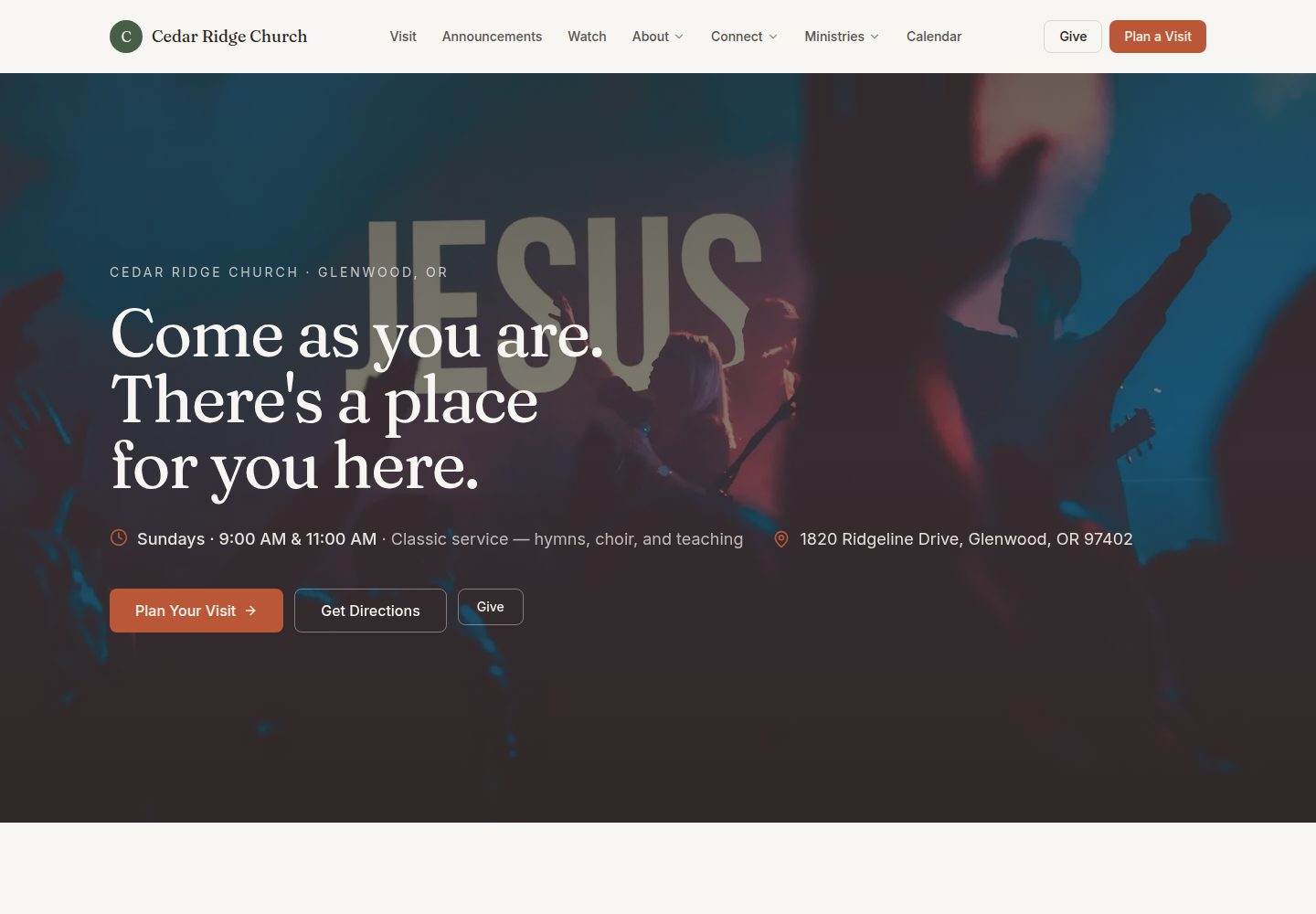
基于 Next.js 构建,采用移动优先设计,适配手机、平板和桌面端
Next.jsReact企业官网
church-site-template — Next.js 企业官网模板
作者 kbennett2000
面向小型教会的免费开源网站模板,基于 Next.js,使用 TinaCMS 让非技术人员在浏览器中更新讲道、活动与服事时间等内容,可部署到 Vercel。
看看你的网站会是什么样
浏览真实页面截图,比较内容排版与手机效果。点击下方缩略图切换,放大查看整页细节。
全部页面与视图 3
截图用于了解视觉与布局,交互效果请以实际项目为准。
采集于 2026-10-01查看来源
值得关注的模板亮点
从已有项目资料中,快速了解它的特点。
集成 TinaCMS,教会工作人员可用 Google 账号登录后在浏览器中编辑内容,无需编写代码
内容以 Markdown 和 JSON 存放在 GitHub 仓库中,不绑定特定平台
内置讲道归档、日历、祷告请求、事工、小组查找、义工报名、奉献等页面模块
提供面向编辑、技术志愿者、接手者和开发者的分角色文档
模板详细介绍
这是一个为小型教会设计的网站模板,代码采用 MIT 许可,仓库基于 Next.js,并集成 TinaCMS 作为浏览器端内容编辑器。教会工作人员无需接触代码,即可在浏览器中更新讲道、同工介绍、活动、聚会时间等内容,改动会自动发布。模板自带讲道归档、日历、祷告请求、事工页面、小组查找、义工报名、探访计划、奉献页面、通讯订阅和信仰告白等页面模块,内容以 Markdown 和 JSON 形式存放在 GitHub 仓库中。
使用方式上,仓库建议通过 GitHub 的“Use this template”按钮创建独立副本,再按文档完成初始配置与部署。首次搭建约需 30 分钟实际操作、总计约 90 分钟;日常维护约每月 10 分钟用于依赖更新。部署依赖 Vercel 免费额度,自定义域名可选。
限制方面,模板本身不提供数据库或服务器,通讯订阅等部分功能默认只有界面,需要接入第三方服务;演示图片、字体、图标等第三方素材的许可需单独核对,外部托管、域名等服务可能产生费用。
Next.js企业官网
适合你的项目吗?
适用场景
- 小型教会需要一套可自行维护的官方网站,但没有专职开发人员
- 教会工作人员希望直接在浏览器中更新讲道、活动、聚会时间和同工介绍
- 技术志愿者需要为教会搭建并部署一个低维护成本的站点
- 接手他人搭建的教会网站,需要了解服务构成与交接流程
适合人群
- 缺乏预算聘请专业建站团队的小型教会
- 有一位半技术背景志愿者负责初始搭建与部署的教会
- 希望内容长期可维护、不依赖原搭建者的教会
- 需要移动端访问体验良好的教会网站场景
上手与定制指南
结合仓库当前版本的说明,按下面的资料检查内容、配置与运行要求。
- 1
通过 GitHub 的“Use this template”按钮创建独立仓库副本,再按文档进行初始配置
- 2
首次搭建约需 30 分钟实际操作、总计约 90 分钟,之后每月约 10 分钟用于依赖更新
- 3
需要 GitHub 与 Vercel 账号,二者均有免费方案;自定义域名可选,费用约每年 12 美元
- 4
可使用 npm run setup、npm run start、npm run cms、npm run deploy、npm run doctor 等命令完成配置、本地预览、CMS 代理、部署与故障排查
- 5
未安装 Node.js 时,可通过 GitHub Codespaces 在浏览器中完成操作
授权与来源资料
使用条件与限制
免费使用 · 保留许可声明本次收录的是公开仓库中采用 MIT 许可的免费版本;免费范围为该版本代码,不代表外部服务或第三方素材免费。
使用时需要遵守
- 允许免费使用、修改、商用和分发该版本代码。
- 分发代码副本或实质性部分时,保留原作者版权声明和完整 MIT 许可声明。
- 代码按现状提供;担保与责任限制以原许可证及适用法律为准。
额外费用与待核对事项
- 浏览器端编辑需使用 Google 账号登录 TinaCMS,无 Google 账号者无法使用该编辑流程。
- 通讯订阅默认仅提供界面,需自行接入 Mailchimp、Buttondown、Brevo 等第三方服务才能实际收集订阅。
- 部署依赖 Vercel 免费额度,超出流量限制后可能需付费升级。
- 自定义域名需自行购买,约每年 12 美元,属可选的外部费用。
- 讲道归档中的 YouTube 嵌入、播客源与音频下载依赖 YouTube 等外部服务,其可用性与条款由第三方决定。
- 演示图片、字体、图标及其他第三方素材需按各自许可核对,不能仅凭代码的 MIT 许可判断。
- 域名、托管、数据库、支付或 AI 等外部服务可能另外收费。
查看原文依据
Permission is hereby granted, free of charge
许可证原文
staff sign in with Google and update sermons, staff bios, events, service times, and more without ever touching code
README 原文
wired for Mailchimp, Buttondown, Brevo, or similar (UI only by default)
README 原文
runs on Vercel's free tier; thousands of visitors a day before you'd hit any limit
README 原文
A custom domain | ~$12/year (optional)
README 原文
https://github.com/kbennett2000/church-site-template/blob/main/LICENSEhttps://github.com/kbennett2000/church-site-template/blob/main/README.mdYouTube embeds, podcast feed, audio downloads
README 原文
DeepSeek 根据仓库许可证和 README 整理 ·2026-10-01。结果仅覆盖已读取资料,依赖、图片、字体及后续条款变更以各自原文为准。
项目核对记录与介绍依据
模板资料
- 来源平台
- GitHub
- 资料与维护参考分
- 资料较完整 · 83 / 100
- 技术栈
- Next.js · React
- 网站类型
- 企业官网
这个分数如何计算
本站按许可资料(最高30分)、演示链接(12分)、预览图(10分)、Star数(15分)、记录的维护时间(15分)、描述完整度(8分)、功能记录(5分)和分类资料(5分)计算。它不是代码、安全或性能测试,也不是 Google 评分;有链接不代表已实测可用。
这个项目需要核对什么
- 记录的仓库更新时间
- 2026-06-22
- 截图检查日期
- 2026-10-01
已收录演示链接。请用你的内容与屏幕尺寸检查;有演示不代表表单、认证或支付已经可用。
目录记录的主要技术栈是 Next.js。请通过依赖清单和锁文件核对实际版本与托管要求。这些说明基于收录资料,不代表代码审计或部署实测。
查看具体选型方法 →介绍的制作与核对状态
介绍由 AI 辅助整理目录与仓库资料。仓库作者不等于这篇介绍的审核者。
已完成服务器许可规则与 AI 来源核对;未经过人工编辑审核。
查看当时使用的来源资料
SHA-256: 06b0170e7211319bdaed3263673a808a6374db5e9940282c79554d26d574bcf9
2026-10-01T15:31:19.193Z
来源文件 / 仓库<p align="center"> <img src="docs/marketing/banner.png" alt="Church Site Template — a free, modern website for small churches, editable in the browser" width="100%" /> </p> <h1 align="center">Church Site Template</h1> <p align="center"> A free, modern, mobile-first website template for small churches.<br /> Editors update content in their browser — no developer needed long-term. </p> <p align="center"> <a href="https://church-site-template-psi.vercel.app"><strong>🌐 Live demo</strong></a> · <a href="docs/for-tech-volunteers/01-overview.md"><strong>📖 Setup guide</strong></a> · <a href="FAQ.md"><strong>❓ FAQ</strong></a> </p> <p align="center"> <a href="LICENSE"><img src="https://img.shields.io/badge/license-MIT-green.svg" alt="License: MIT" /></a> <a href="https://nextjs.org/"><img src="https://img.shields.io/badge/built%20with-Next.js%2016-black" alt="Built with Next.js 16" /></a> <a href="https://tina.io/"><img src="https://img.shields.io/badge/edited%20with-TinaCMS-0084ff" alt="Edited with TinaCMS" /></a> <a href="docs/for-developers/contributing.md"><img src="https://img.shields.io/badge/PRs-welcome-brightgreen.svg" alt="PRs welcome" /></a> </p> --- ## 🚀 Start here — Use this template **Click the green "Use this template" button at the top of this page** to create your own copy of this repo under your GitHub account. That gives your church its own independent codebase, ready to customize and deploy. > 💡 *"Use this template"* is the modern, simpler alternative to forking. You get a clean repo with no fork history — better for a long-running church website. If you prefer the classic fork-and-clone flow (e.g. for staying in sync with template updates), see [the developer notes on syncing template changes](docs/for-developers/contributing.md#keeping-a-church-instance-in-sync-with-the-template). Once you have your own copy, follow the [setup guide](docs/for-tech-volunteers/01-overview.md) — about 30 minutes of hands-on work, ~90 minutes of real elapsed time the first time you do it. --- ## Why this exists Small churches often can't afford a professional website and can't maintain a custom build over the long term — meaning they end up either with no website at all, or with a fragile DIY one that no one knows how to update once the volunteer who built it moves on. This template closes that gap: a polished, modern site that any small church can adopt for free, that a non-technical staff member can keep up to date in their browser, and that doesn't rot when the original tech volunteer leaves. --- ## What you get A complete, production-ready church website with: - **Modern, mobile-first design** — looks great on phones (where most visitors will see it) and scales up gracefully to tablets and desktops. - **A browser-based editor (TinaCMS)** — staff sign in with Google and update sermons, staff bios, events, service times, and more without ever touching code. Changes go live automatically within 2-3 minutes. - **Sermon archive** — searchable by series, speaker, scripture, or book of the Bible. YouTube embeds, podcast feed, audio downloads. - **Calendar** — recurring weekly events and one-off events with `.ics` export and RSVP. - **Prayer requests** — private-by-default form for visitors to submit prayer requests to the pastoral team. - **Ministries** — one page per ministry, with leader, meeting times, photos, and a "what to expect" list. - **Small groups finder** — filter by day, life stage, and neighborhood. - **Volunteer signups** — a "where can I serve?" page with a filterable list of roles. - **Plan-a-visit form** — captures first-time visitor info so you can welcome them by name. - **Giving page** — multiple methods (online, text-to-give, mail, in-person), tax-deductible FAQ. - **Newsletter signup** — wired for Mailchimp, Buttondown, Brevo, or similar (UI only by default). - **Beliefs page** — your doctrinal statements, anchored in Scripture. - **About / Our Story** — the human side of the church. - **SEO-ready** — generates per-page meta tags, OpenGraph cards, and structured data. - **Free hosting** — runs on Vercel's free tier; thousands of visitors a day before you'd hit any limit. - **No vendor lock-in** — content lives as plain Markdown and JSON in your GitHub repo. Move it anywhere if you ever want to. --- ## What you'll need Honest about the floor: this is not zero-effort, but it's well within reach for a "I'm the church's de facto IT person" volunteer. | What | Cost | Notes | |---|---|---| | A GitHub account | Free | [Sign up at github.com](https://github.com/signup) if you don't have one. | | ~30 min hands-on, plan ~90 min total first time | Free | Hands-on time vs. real elapsed time (installs + DNS wait) differ — see the [tech-volunteer overview](docs/for-tech-volunteers/01-overview.md) for the breakdown. | | A Vercel account | Free | Free tier is plenty for typical small-church traffic (thousands of visitors a day). | | A custom domain | ~$12/year (optional) | Like `yourchurch.org`. Optional — you can launch on a `*.vercel.app` URL first and add the domain later. | **You do NOT need:** a credit card (everything required is free), a database, a server, programming experience, or a long-term contract with anyone. After launch, the routine is about 10 minutes per month: a tech volunteer applies dependency updates. Editors handle the rest from their browser — no approval step needed. --- ## Pick your path <table> <tr> <td width="25%" valign="top"> ### 📝 I just want to edit content For church staff who keep the site updated — sermons, events, staff bios, service times. **[→ Editor guide](docs/for-editors/01-getting-started.md)** </td> <td width="25%" valign="top"> ### 🛠️ I'm setting this up for my church For the one semi-technical person at the church doing initial setup and deployment. **[→ Setup guide (~90 min first time)](docs/for-tech-volunteers/01-overview.md)** </td> <td width="25%" valign="top"> ### 🤝 I'm inheriting a site someone else built For the volunteer taking over after the original setup person moved on. Service inventory, access handoff, first 60 minutes. **[→ Successor runbook](docs/for-tech-volunteers/successor-runbook.md)** </td> <td width="25%" valign="top"> ### 💻 I'm a developer For developers customizing the template, contributing back, or maintaining a church's instance. **[→ Architecture & developer guide](docs/for-developers/architecture.md)** </td> </tr> </table> --- ## What it looks like A polished, mobile-first site your staff edit in the browser. **[🌐 Explore the live demo →](https://church-site-template-psi.vercel.app)** **The site** — a warm homepage that leads with your service times and a clear invitation to visit:  **The editor (TinaCMS)** — staff update sermons, events, and service times with no code; changes go live on their own in ~2 minutes:  **[📸 See the full gallery →](docs/screenshots/README.md)** — every page, the mobile layout, and the CMS, each with a short note. --- ## Live examples Churches that have adopted this template: > **Your church here?** After you deploy your site, send a pull request adding it to this list and your own [case study](docs/case-studies/). We'd love to feature you. See [the case-studies folder](docs/case-studies/) for submission instructions. --- ## Everyday commands Once you've cloned your copy: | Command | When to use it | | --- | --- | | `npm run setup` | First-time setup. Asks for church name, address, colors, etc. and writes them in. | | `npm run start` | Run the site on your computer to preview changes. | | `npm run cms` | Start the local CMS proxy so `/admin/` works without GitHub auth. Run in a second terminal. | | `npm run deploy` | Step-by-step walkthrough to put your site on the internet. | | `npm run doctor` | Something's broken? This tells you what. | > Don't have Node.js installed? You can do everything in your browser with [GitHub Codespaces](docs/for-tech-volunteers/03-use-this-template.md) — no install required. --- ## More - [Documentation map](docs/README.md) — every doc, one-line description - [FAQ](FAQ.md) — questions church staff and tech volunteers ask - [Glossary](GLOSSARY.md) — plain-English definitions of CMS, repository, deploy, etc. - [Case studies](docs/case-studies/) — real churches using this template - [Contributing](docs/for-developers/contributing.md) - [Code of conduct](CODE_OF_CONDUCT.md) - [Security policy](SECURITY.md) - [License](#license) --- ## License MIT. See [LICENSE](LICENSE). Use it freely, including for commercial projects — though if you're a small church, the whole point is that it should be free to you. ## Credits If your church adopts this template, we'd love to hear about it. Open a PR adding yourself to [Live examples](#live-examples) above and to [docs/case-studies/](docs/case-studies/).
看看同类模板
对比同技术栈与用途的模板,找到更适合的视觉与内容结构。

SaaS-Boilerplate
🚀🎉📚 SaaS Boilerplate built with Next.js + Tailwind CSS + Shadcn UI + TypeScript. ⚡️ Full-stack React applic…
Next.js · SaaS

Next-JS-Landing-Page-Starter-Template
🚀 Free NextJS Landing Page Template written in Tailwind CSS 3 and TypeScript ⚡️ Made with developer experienc…
Next.js · 企业官网

next-saas-starter
⚡️ Free Next.js responsive landing page template for SaaS products made using JAMStack architecture.
Next.js · SaaS

startup-nextjs
Startup is free Next.js template for SaaS startups comes with all the essential pages, components, and section…
Next.js · SaaS

shadcn-landing-page
New design 🎉 Nextjs + Shadcn + TypeScript + Tailwind. Landing page template ease-to-use
Next.js · 企业官网

shadcn-dashboard-landing-template
Accelerate your development with a sleek, open-source admin dashboard and landing page built on Vite-React, Ne…
Next.js · 后台