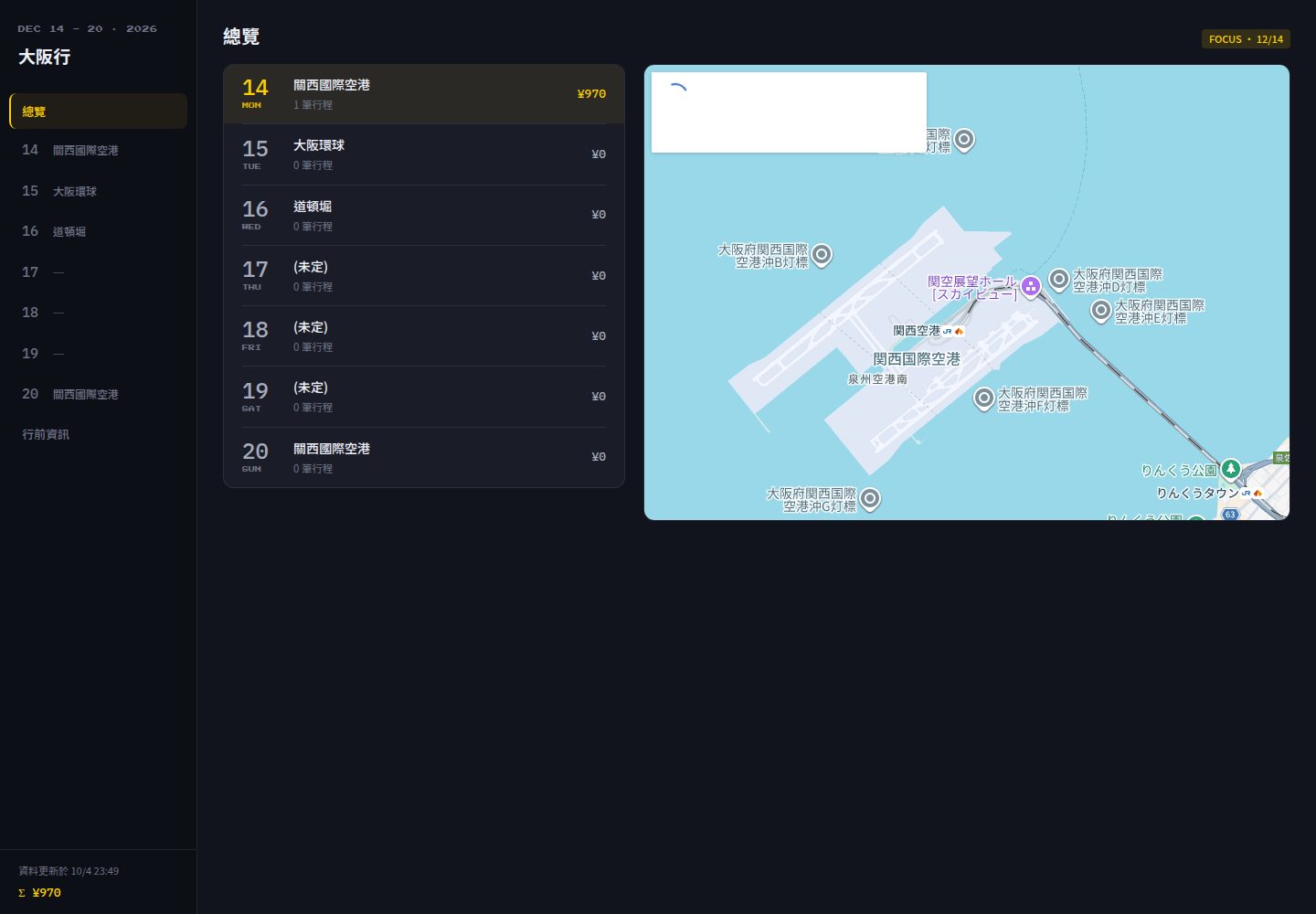
Google Sheets as the sole data source; itinerary title and dates come directly from the spreadsheet without code changes
Next.jsReactCorporate Website
trip-sheets — Next.js Business Template
By KevinShih-689
A travel itinerary PWA that uses Google Sheets as its sole data source, built as a static site deployed on GitHub Pages with no backend, database, or login.
Explore the design
Compare the page layouts and mobile experience. Open any screenshot for a closer look.
Desktop homepage1 / 2
Desktop captureTop of page
Actual screenshot captured by the server browser.
All pages & views 2
Screenshots show visual appearance; interactive behavior may differ.
Recorded 2026-10-09View source
What stands out
A quick read of the recorded project description.
Next.js output: 'export' produces a static site with data inlined at build time and zero API calls at runtime
Mobile-first interface: bottom tab bar, expandable itinerary cards, daily cost subtotals, and booking status highlights
PWA offline support with a service worker precaching all pages and assets for use in airplane mode
Build-layer filtering of sensitive fields such as PNR and booking numbers, with CI checks on build output
GitHub Actions obtains short-lived tokens via Workload Identity Federation without storing service account keys
Template Details
Trip Sheets is a mobile-first, offline-capable travel itinerary site template. It treats Google Sheets as the single source of truth: the itinerary title comes from the spreadsheet name, and dates and day counts come from existing date tabs (named in formats such as 12.14 (Mon)). At build time, data is inlined into static pages, so there are no API calls at runtime and no self-hosted database or editing interface. The site is exported as static assets via Next.js output: 'export', and a service worker precaches pages and assets for browsing in airplane mode. The project includes a retro 8-bit pixel arcade theme, with empty states, coin animations, and title fonts all drawn in CSS.
Data boundaries are handled by pure functions in the lib directory: parsing, validation, and filtering of sensitive fields (PNR and booking numbers are dropped at the fetch layer and never enter the static output), along with column-by-column header comparison to prevent data mismatches caused by renamed or moved columns. The build pipeline is driven by GitHub Actions, using Workload Identity Federation to obtain short-lived Google tokens without storing service account keys.
The template was originally built for a Japan itinerary (2026/12/14–12/19) but is designed to be reusable for other trips. Date tabs omit the year; at build time, the year is inferred from the weekday in the tab name. If the weekday does not match the date, the build fails and identifies the specific tab rather than guessing silently. Cross-year itineraries are not supported. The repository uses the MIT license; the free scope covers this version of the code, while third-party assets such as demo images, fonts, and icons require separate license verification.
Next.jsReactCorporate website
Is it right for your project?
Use Cases
- Individuals or small teams organizing multi-day itineraries before a trip and viewing them offline on a phone during travel
- Quickly publishing an existing Google Sheets itinerary as a shareable static website
- Forking the template and replacing it with your own itinerary data while reusing the same build and deployment pipeline
- Viewing itineraries by day, cost subtotals, and booking status, and locating each day's places on a map
Suitable For
- Users who are used to editing itineraries in Google Sheets and want to avoid building a database or admin backend
- Travelers who need offline access to itineraries on mobile devices
- Developers willing to complete the one-time Google Cloud and GitHub Actions setup according to the documentation
- Next.js users looking for a backend-free static itinerary site template
Getting started & customization
Use these recorded setup notes alongside the repository instructions for your chosen version.
- 1
Import doc/sheet.xlsx into Google Sheets and fill in itinerary data following the existing headers and date tab format
- 2
Complete the Google Cloud setup according to doc/setup-sop.md, including the Sheets API, a keyless service account, a Maps Embed API key, and Workload Identity Federation
- 3
Add GCP_WORKLOAD_IDENTITY_PROVIDER, GCP_SERVICE_ACCOUNT, SHEET_ID, and NEXT_PUBLIC_GMAPS_EMBED_KEY in the repository Settings → Secrets and variables → Actions
- 4
The recommended tab requires additionally enabling Places API (New) and Geocoding, and setting quota limits and budget alerts
- 5
Date tabs omit the year; the build infers the year from the weekday in the tab name. A mismatch between weekday and date causes the build to fail, and cross-year itineraries are not supported
License & source material
Usage conditions & limitations
Free to use · keep license noticeThis entry covers the free version under the MIT license in the public repository; the free scope applies to this version of the code and does not imply that external services or third-party assets are free.
Must comply with when using
- Free use, modification, commercial use, and distribution of this version of the code are permitted.
- When distributing copies or substantial portions of the code, retain the original author's copyright notice and the full MIT license notice.
- The code is provided as is; warranties and limitations of liability are governed by the original license and applicable law.
Additional costs & items to verify
- Demo images, fonts, icons, and other third-party assets require verification under their respective licenses and cannot be judged solely by the code's MIT license.
- External services such as domains, hosting, databases, payments, or AI may incur separate charges.
- Using the recommended tab requires enabling billing in the GCP project; Places API (New) and Geocoding are paid services. Although usage can remain within the free tier, a credit card must be linked to make calls.
- Store recommendation data comes from saved lists in Google Maps, which has no API; updates must be manually exported from Google Takeout and pasted back into the spreadsheet.
- Google Takeout can only export map lists you created yourself; lists shared with you by others must be exported by the list owner.
- Cross-year itineraries are not supported; date tabs do not include the year, and the build infers the year from the weekday in the tab name.
- Embedded maps require an internet connection; offline, only a striped placeholder is shown, while other content remains browsable offline.
- Updates are not real-time: after spreadsheet changes, the build must be retriggered (manual dispatch or weekly cron) for the site to reflect the latest data.
- Workload Identity attribute conditions are bound to a specific repository; after forking, you must complete Part F of the setup SOP yourself.
- The title font Press Start 2P is loaded from Google Fonts under the SIL Open Font License, separate from this project's MIT license.
View Original Text Basis
Permission is hereby granted, free of charge
Original License Text
The 推薦 tab still needs billing enabled on the GCP project — Places API (New) and Geocoding are billable services.
Original README
Store suggestions come from a Google Maps saved list, which **has no API** — so refreshing them is a manual export.
Original README
Takeout only exports lists **you** created. A list someone shared with you has to be exported by its owner.
Original README
Cross-year trips are not supported.
Original README
**Map needs network** — the embedded map won't render offline (a striped placeholder is shown); all other content works offline.
Original README
**Not real-time** — changes require a rebuild (manual dispatch, or the weekly cron as a fallback).
Original README
The Workload Identity condition is repository-scoped, so a fork needs its own Part F.
Original README
https://github.com/KevinShih-689/trip-sheets/blob/main/LICENSEhttps://github.com/KevinShih-689/trip-sheets/blob/main/README.mdThe "Press Start 2P" typeface is loaded from Google Fonts and is licensed under the [SIL Open Font License](https://openfontlicense.org/).
Original README
Compiled by DeepSeek based on repository license and README ·2026-10-09. Results only cover the materials read; dependencies, images, fonts, and subsequent term changes are subject to their respective original texts.
Project checks & description sources
Template Information
- Source platforms
- GitHub
- Documentation and maintenance reference score
- More documented · 85 / 100
- Technologies
- Next.js · React
- Website type
- Corporate Website
How this score is calculated
Our heuristic uses license records (up to 30), a demo link (12), a preview (10), stars (15), recorded maintenance (15), description completeness (8), feature records (5) and classification data (5). It is not a code, security or performance test, or a Google score. A link does not establish tested functionality.
What to verify for this project
- Repository update recorded
- 2026-09-03
- Screenshot last checked
- 2026-10-09
A demo link is listed. Check it with your own content and viewport sizes; its presence does not confirm that forms, authentication or payments work.
The catalog identifies Next.js as the primary stack. Check the actual dependency manifest and lockfile for versions and hosting requirements. These notes use recorded metadata, not a code audit or a deployment test.
Use a selection guide →How this description was prepared
AI-assisted description based on catalog records and repository material. Repository authors are not automatically the reviewers of this description.
Review declaration: [email protected] · 2026-10-10
Inspect the recorded source material
SHA-256: ec937c4b3188cbd53d547a123db55b4ac0c406fa4bb8f76cfca7d7cf90fe6f0c
2026-10-09T17:46:03.402Z
Source file / repository<div align="center">
<img src="doc/images/logo.png" alt="Trip Sheets logo" width="128" />
# Trip Sheets
<img src="https://img.shields.io/github/last-commit/KevinShih-689/trip-sheets?style=flat-square&color=2E86C1" alt="last commit" />
<img src="https://img.shields.io/github/languages/top/KevinShih-689/trip-sheets?style=flat-square&color=2E86C1" alt="top language" />
<img src="https://img.shields.io/github/languages/count/KevinShih-689/trip-sheets?style=flat-square&color=2E86C1" alt="languages count" />
<img src="https://img.shields.io/github/license/KevinShih-689/trip-sheets?style=flat-square&color=2E86C1" alt="license" />
<br />
<br />
_Built with the tools and technologies:_
<br />
<img src="https://img.shields.io/badge/Next.js-000000?style=flat-square&logo=nextdotjs&logoColor=white" alt="Next.js" />
<img src="https://img.shields.io/badge/React-20232A?style=flat-square&logo=react&logoColor=61DAFB" alt="React" />
<img src="https://img.shields.io/badge/TypeScript-3178C6?style=flat-square&logo=typescript&logoColor=white" alt="TypeScript" />
<img src="https://img.shields.io/badge/Node.js-5FA04E?style=flat-square&logo=nodedotjs&logoColor=white" alt="Node.js" />
<img src="https://img.shields.io/badge/pnpm-F69220?style=flat-square&logo=pnpm&logoColor=white" alt="pnpm" />
<br />
<img src="https://img.shields.io/badge/Chakra_UI-319795?style=flat-square&logo=chakraui&logoColor=white" alt="Chakra UI" />
<img src="https://img.shields.io/badge/Google_Sheets-34A853?style=flat-square&logo=googlesheets&logoColor=white" alt="Google Sheets API" />
<img src="https://img.shields.io/badge/Zod-3E67B1?style=flat-square&logo=zod&logoColor=white" alt="Zod" />
<img src="https://img.shields.io/badge/PWA-5A0FC8?style=flat-square&logo=pwa&logoColor=white" alt="PWA" />
<br />
<img src="https://img.shields.io/badge/Vitest-6E9F18?style=flat-square&logo=vitest&logoColor=white" alt="Vitest" />
<img src="https://img.shields.io/badge/ESLint-4B32C3?style=flat-square&logo=eslint&logoColor=white" alt="ESLint" />
<img src="https://img.shields.io/badge/GitHub_Actions-2088FF?style=flat-square&logo=githubactions&logoColor=white" alt="GitHub Actions" />
<img src="https://img.shields.io/badge/GitHub_Pages-222222?style=flat-square&logo=githubpages&logoColor=white" alt="GitHub Pages" />
</div>
<br />
<br />
> A mobile-first, offline-capable travel itinerary site that treats **Google Sheets as the only source of truth** and ships as a static PWA on GitHub Pages.
Edit your trip in a spreadsheet (from your phone or laptop), push a button, and a fast static website rebuilds itself — no database, no backend, no login. Built for a Japan trip (2026/12/14–12/19), but designed to be reused as a template for any trip.
---
### Mobile
<table align="center">
<tr>
<td align="center"><img src="./doc/images/mobile_homepage.png" alt="Mobile homepage" width="60" /></td>
</tr>
</table>
### Desktop
<table align="center">
<tr>
<td align="center"><img src="./doc/images/main_page.png" alt="Overview" width="280" /></td>
<td align="center"><img src="./doc/images/day-page.png" alt="Day page" width="280" /></td>
<td align="center"><img src="./doc/images/pre-page.png" alt="Pre-trip page" width="280" /></td>
</tr>
</table>
## Features
- **Sheets is the only data store** — no self-hosted DB, no editing UI to build. Edit on the Google Sheets mobile app.
- **Static & fast** — Next.js `output: 'export'`, zero runtime API calls; data is inlined at build time.
- **Mobile-first UI** — bottom tab bar, expandable itinerary cards, per-day cost subtotals, reservation-status highlights, embedded Google Map on the overview page.
- **Retro 8-bit theme** — an original pixel-arcade aesthetic: CSS-drawn question-block empty states, a coin splash animation, and Press Start 2P headings. All artwork is hand-drawn in CSS; no third-party sprite assets.
- **Responsive desktop shell** — single `1024px` breakpoint switches the bottom tab bar to a left sidebar with a large map (CSS-only, no JS breakpoint logic).
- **Offline (PWA)** — service worker precaches every page and asset so the whole site works in airplane mode on the road.
- **Sensitive-field filtering** — PNR and booking reference numbers are dropped at the fetch layer and never enter the static output; CI greps the build to enforce it.
- **Schema-drift protection** — header rows are compared column-by-column on every fetch; a renamed/moved column fails the build instead of silently mis-mapping data.
- **Store suggestions (推薦)** — a saved Google Maps list is resolved to coordinates at build time, then filtered in the browser by type and distance (Haversine, no runtime API call). Search from the day's area or from your current location.
- **Keyless CI** — GitHub Actions exchanges its own OIDC identity for a short-lived Google token via Workload Identity Federation. No service-account key exists to leak or rotate.
- **Zero manual file shuffling** — change the sheet, trigger a rebuild from the GitHub mobile app (or wait for the weekly cron), and the site reflects it in ~3 minutes.
## Tech Stack
| Layer | Choice |
| ---------- | -------------------------------------------------------------------- |
| Framework | Next.js 15 (App Router, `output: 'export'`) |
| Language | TypeScript 5.7 (strict), no `any` |
| UI | Chakra UI v3 + Emotion 11 |
| Data fetch | `googleapis` 144 (Sheets, read-only) + Places/Geocoding REST + Zod 3 |
| CI auth | Workload Identity Federation (no stored key) |
| Testing | Vitest 3 (data-boundary unit tests) |
| Runtime | Node 22 (`.nvmrc`), pnpm 9 |
| CI/CD | GitHub Actions → GitHub Pages |
> Versions track `package.json` — `engines.node` (`>=22`) is the single source of truth for Node; `.nvmrc` and this table follow it.
## Project Structure
```
trip-sheets/
├── .github/workflows/
│ ├── ci.yml # PR gate: format → lint → type-check → test → build → guard (no secrets)
│ ├── deploy.yml # auth → fetch → preflight → lookup → checks → build → guard → deploy
│ └── auth-check.yml # manual-only: proves federation works; never deploys
├── app/ # App Router pages
│ ├── layout.tsx # tab bar / sidebar, PWA meta
│ ├── page.tsx # overview: map + day list, auto-focus today
│ ├── day/[date]/page.tsx # per-day shell (generateStaticParams)
│ └── backlog/page.tsx # flights / rooms / USJ / bnb (filtered)
├── components/
│ ├── DayView.tsx # day shell: tab state + suggestion search state
│ ├── ItineraryPanel.tsx # 行程 tab: list + rail + anchored map
│ ├── SuggestionsPanel.tsx # 推薦 tab: store list + anchored map
│ ├── useSuggestions.ts # search state machine (type × radius × centre)
│ ├── useToasts.ts / Toasts.tsx # search-condition feedback
│ ├── AnchoredMap.tsx # the one map component both tabs share
│ └── ... # AppNav, Splash, TypeAvatarSelector, icons, ...
├── lib/ # pure + unit-tested; no IO, no React
│ ├── parse-sheet.ts # itinerary data boundary (parse + validate + filter)
│ ├── parse-stores.ts # 店家清單 boundary + build-time call planning
│ ├── suggestions.ts # type + radius filter, distance sort
│ ├── haversine.ts # great-circle distance
│ ├── store-types.ts # Google `types` → the five avatar categories
│ ├── geocode.ts # Geocoding v4 URL + response parsing
│ ├── map-anchor.ts # anchor/base-anchor → Embed iframe src
│ ├── toast.ts # toast queue rules (cap, eviction, exit)
│ └── schema.ts / types.ts # zod schemas and their inferred types
├── scripts/
│ ├── fetch-sheet.ts # IO wrapper → data/trip-data.json
│ └── fetch-stores.ts # IO wrapper → data/stores.json (+ --dry-run preflight)
├── data/
│ ├── *.json # generated by CI (gitignored)
│ └── *.sample.json # committed samples for local dev
├── public/ # manifest.json, sw.js, icons
└── next.config.ts
```
---
## Use It as Your Own Trip Tool
This repo is meant to be forked. Here's the end-to-end setup.
### 1. Prepare the Google Sheet
Import [`doc/sheet.xlsx`](doc/sheet.xlsx) into Google Sheets (Google Drive → New → File upload → open with Google Sheets), then edit your trip data in it. The file already has the required layout — a `Backlog` tab plus date tabs with the correct headers and dropdowns — so you just fill in your own itinerary.
**The sheet is the single source of truth for title and dates** (no code edit needed):
- **Trip title** comes from the **spreadsheet name** itself (rename the file in Google Sheets to rename the trip).
- **Dates & number of days** come from the **date tabs that currently exist**. Each date tab is named `M.D (週幾)` (e.g. `12.14 (一)`). Add or remove date tabs and the site renders exactly those days after the next rebuild.
- The eyebrow (`DEC 14 - 19 · 2026`) and splash label are derived automatically from the detected date range.
> Date tabs carry no year — the build infers it from the **weekday** in each tab name. If a tab's weekday doesn't match its date, the build **fails and names the tab** (it never guesses silently). Cross-year trips are not supported.
> Row counts are **not** fixed — the fetch script reads each block until the first fully-blank row, so you can add rows freely. It will error (not silently truncate) if a Backlog table overflows into the next table's header row.
### 2. Google Cloud setup (one-time, ~20 min)
Follow the detailed step-by-step guide in **[`doc/setup-sop.md`](doc/setup-sop.md)**. It covers, with exact console navigation:
| Part | What it sets up |
| ---- | ---------------------------------------------------------------------------------------------------------- |
| A–C | Project, **Google Sheets API**, a service account **with no key**, and sharing the sheet with it as Viewer |
| D | The public `NEXT_PUBLIC_GMAPS_EMBED_KEY`, restricted by HTTP referrer and to the Embed API only |
| E | **Only for the 推薦 tab** — enabling Places API (New) + Geocoding, daily quota caps, and a budget alert |
| F | **Workload Identity Federation** — the pool, provider, attribute condition, and impersonation binding |
The SOP ends by producing the five values you'll paste as GitHub Secrets in step 3.
> Part F is the part to read carefully. Its attribute condition (`assertion.repository == 'OWNER/REPO'`) is the entire security boundary — without it, any repository on GitHub can mint a token for your service account.
### 3. Fork this repo & add GitHub Secrets
Repo → **Settings → Secrets and variables → Actions**:
| Secret | Value |
| -------------------------------- | ----------------------------------------------------------------------------------------------- |
| `GCP_WORKLOAD_IDENTITY_PROVIDER` | Full resource name of the Workload Identity provider (see [setup SOP](doc/setup-sop.md) Part F) |
| `GCP_SERVICE_ACCOUNT` | Service-account email the workflow impersonates |
| `SHEET_ID` | The ID between `/d/` and `/edit` in the spreadsheet URL |
| `NEXT_PUBLIC_GMAPS_EMBED_KEY` | Maps Embed API key (restrict by HTTP referrer to your Pages domain) |
| `NEXT_PUBLIC_SHEETS_URL` | Public/edit URL of the sheet, used by the "open Google Sheets" links |
> **There is no long-lived Google credential here.** The deploy exchanges GitHub's OIDC identity for a short-lived token via Workload Identity Federation, and GCP only honours that exchange for this repository. Nothing to rotate, nothing to leak.
> The 推薦 tab still needs billing enabled on the GCP project — Places API (New) and Geocoding are billable services. Usage stays inside the free tier (lookups are cached; only new or edited rows call the API), so the actual bill is $0, but the card must be on file for the APIs to respond.
Then set **Settings → Pages → Source = GitHub Actions**.
> ⚠️ Do not create a JSON key for the service account. Federation makes it unnecessary, and a key that does not exist cannot be committed or leaked. `.gitignore` still blocks `*service-account*.json`, `*sa-key*.json`, `.env*`, and the generated `data/trip-data.json`.
### 4. Adjust the template for your trip
- `next.config.ts` — `basePath` is injected by CI as `/<repo-name>`; nothing to change unless you deploy elsewhere.
- **Title & dates need no code edit** — rename the spreadsheet and add/remove date tabs (see step 1).
- `lib/constants.ts` — only sheet-structure constants remain (the `Backlog` tab name, its fixed layout, the weekday table). Adjust only if you change the sheet's structure.
- Tab labels / branding in `components/` and `lib/theme.ts` as desired.
### 5. Deploy
Push to `main`, or run the **Deploy to GitHub Pages** workflow manually (`workflow_dispatch`) from the Actions tab or the GitHub mobile app. The site publishes to `https://<user>.github.io/<repo>/`.
### 6. Keep the 推薦 tab in sync (only if you use it)
Store suggestions come from a Google Maps saved list, which **has no API** — so refreshing them is a manual export. Whenever you add places to the list:
1. [Google Takeout](https://takeout.google.com) → **Deselect all** → tick only **Saved** (bookmark icon; _not_ "Maps" or "Maps (your places)").
2. Unzip and open `Takeout/Saved/<list name>.csv`.
3. Paste its contents — **including the header row** — into the spreadsheet's **店家清單** tab.
4. Rebuild. Rows that fail the lookup are listed in the build log; fix them with the optional **地址覆寫** column.
> Takeout exports 標題 / 筆記 / 網址 / 標籤 / 留言 — **no address**. Lookups therefore match on
> the place name plus a location bias around the trip's areas, which is usually enough because
> Takeout titles carry the branch name. Generic names are the ones that miss; adding a
> **地址覆寫** column and filling it for those rows re-queries them on the next build.
> Takeout only exports lists **you** created. A list someone shared with you has to be exported by its owner.
---
## Prerequisites
- Node 22 — use `nvm use` or `fnm use` to pick it up from `.nvmrc`
- pnpm 9
## Local Development
```bash
pnpm install
# Option A — run against the committed sample data (no GCP needed)
pnpm fetch-sheet:sample # copies data/trip-data.sample.json → data/trip-data.json
pnpm fetch-stores:sample # copies data/stores.sample.json → data/stores.json
pnpm dev
```
Sample data is the only local path: there are no credentials on your machine to
pull live data with. To refresh from the real sheet, run the **Auth check**
workflow (Actions → Auth check → Run workflow) with `mode: full` — it exercises
the same scripts in CI, where the federated credentials live.
Open http://localhost:3000.
### Scripts
| Command | Description |
| -------------------------- | ----------------------------------------------------------------------- |
| `pnpm fetch-sheet` | Enumerate date tabs + Backlog, validate, filter, write `trip-data.json` |
| `pnpm fetch-sheet:sample` | Use the committed sample data instead of a live sheet |
| `pnpm fetch-stores` | Resolve the 店家清單 tab via Places API, write `stores.json` |
| `pnpm fetch-stores:check` | Preflight — report how many billable calls a real run would make |
| `pnpm fetch-stores:sample` | Use the committed sample store data instead of a live lookup |
| `pnpm dev` | Start the Next.js dev server |
| `pnpm build` | Static export to `out/` |
| `pnpm lint` | ESLint (Next config) |
| `pnpm format` | Prettier — rewrite files in place |
| `pnpm format:check` | Prettier — fail if anything is unformatted (this is what CI runs) |
| `pnpm type-check` | `tsc --noEmit` |
| `pnpm test` | Run Vitest unit tests (data boundary) |
| `pnpm test:watch` | Vitest in watch mode |
| `pnpm test:coverage` | Vitest with a coverage report |
---
## How the Build Pipeline Works
`.github/workflows/deploy.yml` runs on `workflow_dispatch`, a weekly cron (`0 21 * * 0` UTC = Monday 05:00 Taiwan), and pushes to `main`. Any step failure aborts the deploy — a stale-but-correct site is preferred over a broken one.
The schedule is only a fallback; the normal path is a manual dispatch from the GitHub mobile app after editing the sheet. It is weekly rather than daily because that is also what bounds the store-lookup API usage.
```mermaid
sequenceDiagram
actor Dev as You / cron / push
participant GA as GitHub Actions
participant WIF as GitHub OIDC + GCP STS
participant GS as Sheets API
participant Cache as Lookup cache
participant Maps as Places + Geocoding
participant Pages as GitHub Pages
Dev->>GA: Trigger (dispatch / weekly cron / push main)
GA->>GA: checkout + pnpm install --frozen-lockfile
GA->>WIF: exchange OIDC identity for a token
Note over WIF: attribute condition rejects<br/>any other repository
WIF-->>GA: access token (~1h, no stored key)
GA->>GS: pnpm fetch-sheet
GS-->>GA: raw rows (free API)
GA->>GA: verify headers + zod parse + drop sensitive fields
Note over GA: write data/trip-data.json<br/>(fetch failure → abort, no deploy)
Cache-->>GA: restore .cache (actions/cache)
GA->>GA: pnpm fetch-stores:check — count planned billable calls
Note over GA: over MAX_PLACE_CALLS → abort<br/>before spending anything
GA->>Maps: pnpm fetch-stores — only rows the cache is missing
Maps-->>GA: name / address / coordinates / types
GA->>Cache: save immediately, so a later failure cannot discard it
GA->>GA: format:check && lint && type-check && test
GA->>GA: pnpm build → out/
GA->>GA: sensitive-field guard (grep PNR / 訂位代號 / 訂單編號)
Note over GA: match found → fail job, no deploy
GA->>Pages: upload-pages-artifact + deploy-pages
Pages-->>Dev: Site live at https://<user>.github.io/<repo>/
```
Two steps exist purely to keep the billable half honest:
- **Preflight** (`fetch-stores:check`) reads the sheet and the cache and reports, in the job summary, how many Places/Geocoding calls the real run intends to make. Over the cap, it aborts — and because it calls no billable API itself, aborting there costs nothing.
- **Saving the cache runs right after the lookup**, not at the end of the job. `actions/cache` saves in a post step, and post steps are skipped when a job fails — so a later lint failure would otherwise throw away lookups that had already been paid for.
**Auth check** (`auth-check.yml`) is the manual counterpart: it runs the same auth and fetch steps but never deploys, so federation and API permissions can be verified from a branch before anything reaches `main`. `mode: check` makes no billable call at all.
`concurrency: { group: pages, cancel-in-progress: true }` means rapid re-triggers only run the latest.
## Security Notes
- The Pages site is **public**, so PNRs and booking reference numbers are removed at the fetch layer — the parser's return types simply don't include those fields, and CI verifies the built output. Look them up in the sheet when needed.
- **No long-lived Google credential exists.** CI federates GitHub's OIDC identity for a ~1h token, and GCP accepts that exchange only from this repository. There is no key in Secrets, on a laptop, or in the repo — nothing to rotate, nothing to leak.
- The service account has **Viewer** on one spreadsheet, plus **Service Usage Consumer** on the project if you use the 推薦 tab — the minimum needed to spend that project's API quota, and nothing else.
- The Maps Embed API key is a public value by design; restrict it by **HTTP referrer** to your Pages domain. It is the only key in the whole setup.
- Cost is bounded independently of auth: per-API **daily quota caps** are the one control that actually blocks requests. Budget alerts only send email — see [`doc/setup-sop.md`](doc/setup-sop.md) Part E.
- `ci.yml` runs on pull requests **without any secrets**, using the committed sample data, so a fork PR can never reach your Google project.
## Known Limitations
- **Not real-time** — changes require a rebuild (manual dispatch, or the weekly cron as a fallback). This is the deliberate trade-off for architectural simplicity.
- **Map needs network** — the embedded map won't render offline (a striped placeholder is shown); all other content works offline.
- **Store lookups need manual refresh** — a Google Maps saved list has no API, so adding places means re-exporting from Takeout (step 6). Takeout also omits addresses, so a store with a generic name may fail to resolve; the build log names those rows.
- **Reuse** — swap `SHEET_ID` and the repo name; rename the spreadsheet and set its date tabs. The Workload Identity condition is repository-scoped, so a fork needs its own Part F. No code edit needed for a new trip; the schema stays the same.
## Documentation
- **[`doc/setup-sop.md`](doc/setup-sop.md)** — step-by-step Google Cloud setup: project, service account, Embed key, billable-API cost controls, and Workload Identity Federation (referenced by step 2 above).
- **[`doc/sheet.xlsx`](doc/sheet.xlsx)** — the blank spreadsheet template to import into Google Sheets.
- **`data/trip-data.sample.json`** / **`data/stores.sample.json`** — committed sample datasets used for local dev and CI (no Google Cloud needed).
## Contributing
Issues and PRs are welcome. See the issue templates and PR checklist under [`.github/`](.github/). In short: use the `:sample` scripts for local work (there are no credentials on a dev machine by design), make sure `pnpm format:check`, `pnpm lint`, `pnpm type-check`, `pnpm test`, and `pnpm build` pass, and never commit secrets, real PNRs / booking numbers, or personal data.
## Contributors
Thanks to everyone who has contributed to this project ✨
<a href="https://github.com/KevinShih-689/trip-sheets/graphs/contributors">
<img src="https://contrib.rocks/image?repo=KevinShih-689/trip-sheets" alt="Contributors" />
</a>
<sub>Contributor image generated with <a href="https://contrib.rocks">contrib.rocks</a>.</sub>
## License
[MIT](LICENSE) © Kevin Shih
## Disclaimer
This project is **not affiliated with, endorsed by, or associated with Nintendo** or any of its subsidiaries. The retro 8-bit look (question block, coin, pixel headings) is an **original pixel-arcade aesthetic drawn entirely in CSS** — it bundles no Nintendo sprites, artwork, or other assets. The "Press Start 2P" typeface is loaded from Google Fonts and is licensed under the [SIL Open Font License](https://openfontlicense.org/). Any place or attraction names that may appear in sample data are factual references for itinerary purposes only.
Explore similar templates
Compare previews and descriptions within the same stack and category.

SaaS-Boilerplate
SaaS-Boilerplate is an open-source SaaS starter template built with Next.js App Router, React 19, TypeScript, Tailwind CSS, and Shadcn UI.
Next.js · SaaS

Next-JS-Landing-Page-Starter-Template
A free Next.js landing page starter template written in Tailwind CSS and TypeScript, featuring built-in navbar, hero, features, CTA banner, and footer sections.
Next.js · Corporate Website

next-saas-starter
A free Next.js SaaS marketing landing page template from Blazity, using static generation and styled-components with no extra UI library.
Next.js · SaaS

startup-nextjs
Startup is a free, MIT-licensed Next.js template from NextJSTemplates for SaaS startups and corporate landing pages.
Next.js · SaaS

shadcn-landing-page
A Next.js landing page template built with Shadcn, TypeScript, and Tailwind, converted from a Shadcn-Vue version. It includes sections such as Navbar, mobile Sidebar, Hero, Pricing, FAQ, and Footer, and highlights responsive design, navigation, and dark mode.
Next.js · Corporate Website

shadcn-dashboard-landing-template
An open-source admin dashboard and marketing landing page template built on shadcn/ui and Tailwind CSS, with both Vite + React and Next.js versions in one repository.
Next.js · Admin dashboard