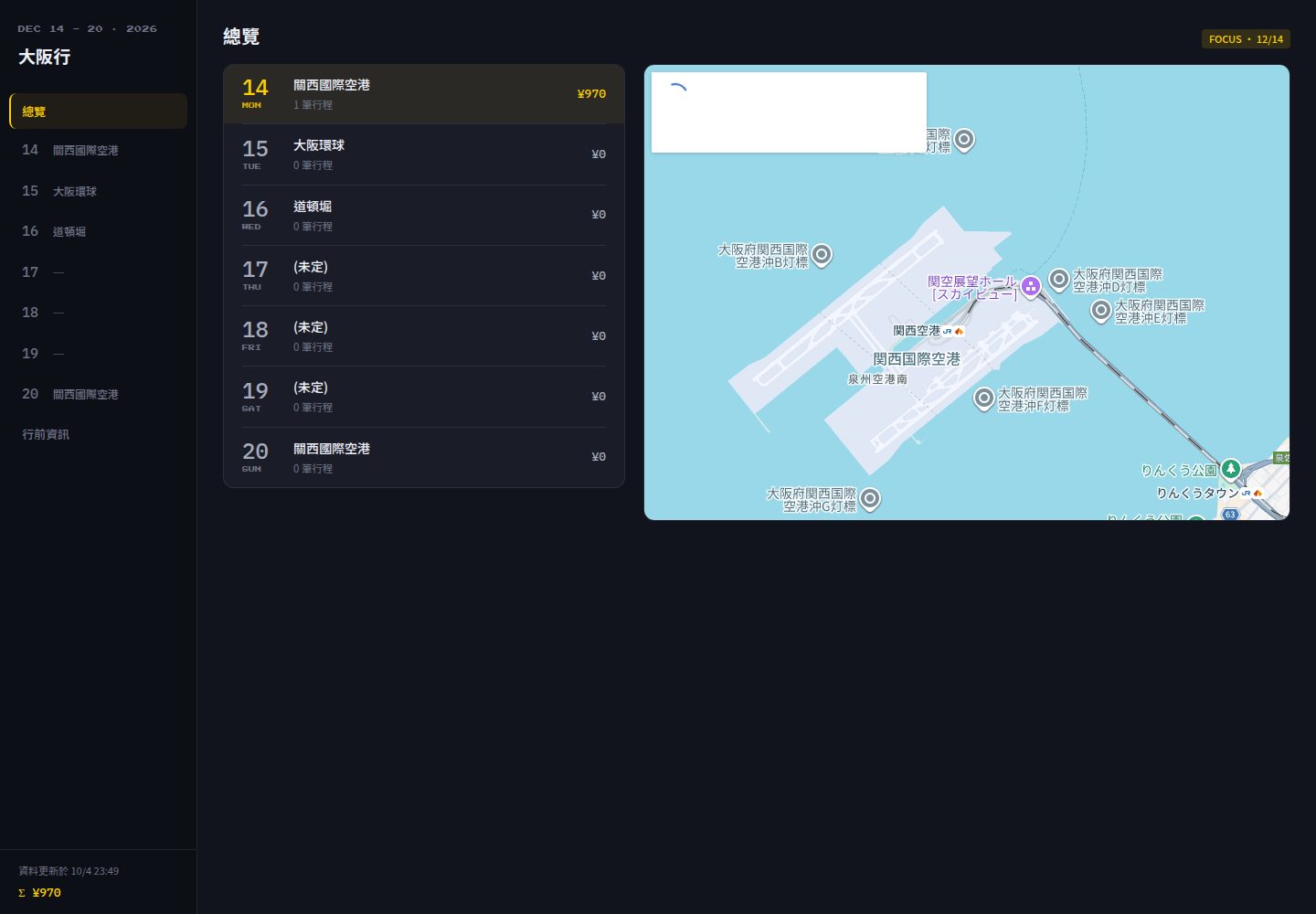
Google Sheets 作为唯一数据源,行程标题与日期直接来自电子表格,无需修改代码
Next.jsReact企业官网
trip-sheets — Next.js 企业官网模板
作者 KevinShih-689
以 Google Sheets 为唯一数据源的旅行行程 PWA,构建为静态站点部署在 GitHub Pages,无后端、无数据库、无登录。
看看你的网站会是什么样
浏览真实页面截图,比较内容排版与手机效果。点击下方缩略图切换,放大查看整页细节。
全部页面与视图 2
截图用于了解视觉与布局,交互效果请以实际项目为准。
采集于 2026-10-09查看来源
值得关注的模板亮点
从已有项目资料中,快速了解它的特点。
Next.js output: 'export' 导出静态站点,数据在构建时内联,运行时零 API 调用
移动优先界面:底部标签栏、可展开行程卡片、每日费用小计与预订状态高亮
PWA 离线支持,service worker 预缓存全部页面与资源,可在飞行模式下使用
构建层过滤 PNR 与预订编号等敏感字段,并由 CI 检查构建产物
GitHub Actions 通过 Workload Identity Federation 获取短期令牌,无需存储服务账号密钥
模板详细介绍
Trip Sheets 是一个移动优先、可离线使用的旅行行程站点模板。它把 Google Sheets 当作唯一数据源:行程标题取自电子表格名称,日期与天数取自现有的日期标签页(命名格式如 12.14 (一)),构建时把数据内联进静态页面,因此运行时没有 API 调用,也没有自建数据库或编辑界面。站点通过 Next.js 的 output: 'export' 导出为静态资源,配合 service worker 预缓存页面与资源,可在飞行模式下浏览。项目自带一套复古 8-bit 像素街机主题,空状态、金币动画与标题字体均由 CSS 绘制。
数据边界由 lib 目录下的纯函数处理:解析、校验并过滤敏感字段(PNR 与预订编号在抓取层被丢弃,不会进入静态产物),同时逐列比对表头以防止列改名或移动导致的数据错配。构建流程由 GitHub Actions 驱动,使用 Workload Identity Federation 换取短期 Google 令牌,不保存服务账号密钥。
模板最初为一段日本行程(2026/12/14–12/19)而建,但设计上可复用于其他行程。日期标签页不写年份,构建时依据标签名中的星期推断年份;若星期与日期不符,构建会失败并指出具体标签页,不会静默猜测。跨年行程不受支持。仓库采用 MIT 许可,免费范围为该版本代码,演示图片、字体、图标等第三方素材需另行核对许可。
Next.jsReact企业官网
适合你的项目吗?
适用场景
- 个人或小团队出行前整理多日行程,并在旅途中用手机离线查看
- 把已有 Google Sheets 行程表快速发布为可分享的静态网站
- 作为模板 fork 后替换为自己的行程数据,复用同一套构建与部署流程
- 需要按天查看行程、费用小计与预订状态,并在地图上定位当日地点的场景
适合人群
- 习惯用 Google Sheets 编辑行程、希望避免自建数据库与后台的用户
- 需要移动端离线访问行程的旅行者
- 愿意按文档完成 Google Cloud 与 GitHub Actions 一次性配置的开发者
- 寻找无后端静态行程站点模板的 Next.js 使用者
上手与定制指南
结合仓库当前版本的说明,按下面的资料检查内容、配置与运行要求。
- 1
将 doc/sheet.xlsx 导入 Google Sheets,按既有表头与日期标签页格式填写行程数据
- 2
按 doc/setup-sop.md 完成 Google Cloud 配置,包括 Sheets API、无密钥服务账号、Maps Embed API 密钥与 Workload Identity Federation
- 3
在仓库 Settings → Secrets and variables → Actions 中添加 GCP_WORKLOAD_IDENTITY_PROVIDER、GCP_SERVICE_ACCOUNT、SHEET_ID 与 NEXT_PUBLIC_GMAPS_EMBED_KEY
- 4
推荐标签页需要额外启用 Places API (New) 与 Geocoding,并设置配额上限与预算提醒
- 5
日期标签页不写年份,构建依据标签名中的星期推断年份;星期与日期不符会导致构建失败,跨年行程不受支持
授权与来源资料
使用条件与限制
免费使用 · 保留许可声明本次收录的是公开仓库中采用 MIT 许可的免费版本;免费范围为该版本代码,不代表外部服务或第三方素材免费。
使用时需要遵守
- 允许免费使用、修改、商用和分发该版本代码。
- 分发代码副本或实质性部分时,保留原作者版权声明和完整 MIT 许可声明。
- 代码按现状提供;担保与责任限制以原许可证及适用法律为准。
额外费用与待核对事项
- 演示图片、字体、图标及其他第三方素材需按各自许可核对,不能仅凭代码的 MIT 许可判断。
- 域名、托管、数据库、支付或 AI 等外部服务可能另外收费。
- 使用「推薦」分頁需在 GCP 專案啟用計費,Places API (New) 與 Geocoding 為付費服務;雖用量可維持在免費額度內,但必須綁定信用卡才能呼叫。
- 店家推薦資料來自 Google Maps 已儲存清單,該清單沒有 API,更新必須手動從 Google Takeout 匯出後貼回試算表。
- Google Takeout 只能匯出你自己建立的地圖清單;他人分享給你的清單必須由清單擁有者自行匯出。
- 不支援跨年行程;日期分頁不帶年份,建置時依分頁名稱中的星期推斷年份。
- 內嵌地圖需要網路連線,離線時僅顯示條紋佔位圖;其餘內容可離線瀏覽。
- 非即時更新:試算表變更後需重新觸發建置(手動 dispatch 或每週 cron),網站才會反映最新資料。
- Workload Identity 的屬性條件綁定特定倉庫,fork 後必須自行完成 setup SOP 的 Part F 設定。
- 標題字型 Press Start 2P 由 Google Fonts 載入,依 SIL Open Font License 授權,與本專案 MIT 授權分開。
查看原文依据
Permission is hereby granted, free of charge
许可证原文
The 推薦 tab still needs billing enabled on the GCP project — Places API (New) and Geocoding are billable services.
README 原文
Store suggestions come from a Google Maps saved list, which **has no API** — so refreshing them is a manual export.
README 原文
Takeout only exports lists **you** created. A list someone shared with you has to be exported by its owner.
README 原文
Cross-year trips are not supported.
README 原文
**Map needs network** — the embedded map won't render offline (a striped placeholder is shown); all other content works offline.
README 原文
**Not real-time** — changes require a rebuild (manual dispatch, or the weekly cron as a fallback).
README 原文
The Workload Identity condition is repository-scoped, so a fork needs its own Part F.
README 原文
https://github.com/KevinShih-689/trip-sheets/blob/main/LICENSEhttps://github.com/KevinShih-689/trip-sheets/blob/main/README.mdThe "Press Start 2P" typeface is loaded from Google Fonts and is licensed under the [SIL Open Font License](https://openfontlicense.org/).
README 原文
DeepSeek 根据仓库许可证和 README 整理 ·2026-10-09。结果仅覆盖已读取资料,依赖、图片、字体及后续条款变更以各自原文为准。
项目核对记录与介绍依据
模板资料
- 来源平台
- GitHub
- 资料与维护参考分
- 资料较完整 · 85 / 100
- 技术栈
- Next.js · React
- 网站类型
- 企业官网
这个分数如何计算
本站按许可资料(最高30分)、演示链接(12分)、预览图(10分)、Star数(15分)、记录的维护时间(15分)、描述完整度(8分)、功能记录(5分)和分类资料(5分)计算。它不是代码、安全或性能测试,也不是 Google 评分;有链接不代表已实测可用。
这个项目需要核对什么
- 记录的仓库更新时间
- 2026-09-03
- 截图检查日期
- 2026-10-09
已收录演示链接。请用你的内容与屏幕尺寸检查;有演示不代表表单、认证或支付已经可用。
目录记录的主要技术栈是 Next.js。请通过依赖清单和锁文件核对实际版本与托管要求。这些说明基于收录资料,不代表代码审计或部署实测。
查看具体选型方法 →介绍的制作与核对状态
介绍由 AI 辅助整理目录与仓库资料。仓库作者不等于这篇介绍的审核者。
审核声明: [email protected] · 2026-10-10
查看当时使用的来源资料
SHA-256: ec937c4b3188cbd53d547a123db55b4ac0c406fa4bb8f76cfca7d7cf90fe6f0c
2026-10-09T17:46:03.402Z
来源文件 / 仓库<div align="center">
<img src="doc/images/logo.png" alt="Trip Sheets logo" width="128" />
# Trip Sheets
<img src="https://img.shields.io/github/last-commit/KevinShih-689/trip-sheets?style=flat-square&color=2E86C1" alt="last commit" />
<img src="https://img.shields.io/github/languages/top/KevinShih-689/trip-sheets?style=flat-square&color=2E86C1" alt="top language" />
<img src="https://img.shields.io/github/languages/count/KevinShih-689/trip-sheets?style=flat-square&color=2E86C1" alt="languages count" />
<img src="https://img.shields.io/github/license/KevinShih-689/trip-sheets?style=flat-square&color=2E86C1" alt="license" />
<br />
<br />
_Built with the tools and technologies:_
<br />
<img src="https://img.shields.io/badge/Next.js-000000?style=flat-square&logo=nextdotjs&logoColor=white" alt="Next.js" />
<img src="https://img.shields.io/badge/React-20232A?style=flat-square&logo=react&logoColor=61DAFB" alt="React" />
<img src="https://img.shields.io/badge/TypeScript-3178C6?style=flat-square&logo=typescript&logoColor=white" alt="TypeScript" />
<img src="https://img.shields.io/badge/Node.js-5FA04E?style=flat-square&logo=nodedotjs&logoColor=white" alt="Node.js" />
<img src="https://img.shields.io/badge/pnpm-F69220?style=flat-square&logo=pnpm&logoColor=white" alt="pnpm" />
<br />
<img src="https://img.shields.io/badge/Chakra_UI-319795?style=flat-square&logo=chakraui&logoColor=white" alt="Chakra UI" />
<img src="https://img.shields.io/badge/Google_Sheets-34A853?style=flat-square&logo=googlesheets&logoColor=white" alt="Google Sheets API" />
<img src="https://img.shields.io/badge/Zod-3E67B1?style=flat-square&logo=zod&logoColor=white" alt="Zod" />
<img src="https://img.shields.io/badge/PWA-5A0FC8?style=flat-square&logo=pwa&logoColor=white" alt="PWA" />
<br />
<img src="https://img.shields.io/badge/Vitest-6E9F18?style=flat-square&logo=vitest&logoColor=white" alt="Vitest" />
<img src="https://img.shields.io/badge/ESLint-4B32C3?style=flat-square&logo=eslint&logoColor=white" alt="ESLint" />
<img src="https://img.shields.io/badge/GitHub_Actions-2088FF?style=flat-square&logo=githubactions&logoColor=white" alt="GitHub Actions" />
<img src="https://img.shields.io/badge/GitHub_Pages-222222?style=flat-square&logo=githubpages&logoColor=white" alt="GitHub Pages" />
</div>
<br />
<br />
> A mobile-first, offline-capable travel itinerary site that treats **Google Sheets as the only source of truth** and ships as a static PWA on GitHub Pages.
Edit your trip in a spreadsheet (from your phone or laptop), push a button, and a fast static website rebuilds itself — no database, no backend, no login. Built for a Japan trip (2026/12/14–12/19), but designed to be reused as a template for any trip.
---
### Mobile
<table align="center">
<tr>
<td align="center"><img src="./doc/images/mobile_homepage.png" alt="Mobile homepage" width="60" /></td>
</tr>
</table>
### Desktop
<table align="center">
<tr>
<td align="center"><img src="./doc/images/main_page.png" alt="Overview" width="280" /></td>
<td align="center"><img src="./doc/images/day-page.png" alt="Day page" width="280" /></td>
<td align="center"><img src="./doc/images/pre-page.png" alt="Pre-trip page" width="280" /></td>
</tr>
</table>
## Features
- **Sheets is the only data store** — no self-hosted DB, no editing UI to build. Edit on the Google Sheets mobile app.
- **Static & fast** — Next.js `output: 'export'`, zero runtime API calls; data is inlined at build time.
- **Mobile-first UI** — bottom tab bar, expandable itinerary cards, per-day cost subtotals, reservation-status highlights, embedded Google Map on the overview page.
- **Retro 8-bit theme** — an original pixel-arcade aesthetic: CSS-drawn question-block empty states, a coin splash animation, and Press Start 2P headings. All artwork is hand-drawn in CSS; no third-party sprite assets.
- **Responsive desktop shell** — single `1024px` breakpoint switches the bottom tab bar to a left sidebar with a large map (CSS-only, no JS breakpoint logic).
- **Offline (PWA)** — service worker precaches every page and asset so the whole site works in airplane mode on the road.
- **Sensitive-field filtering** — PNR and booking reference numbers are dropped at the fetch layer and never enter the static output; CI greps the build to enforce it.
- **Schema-drift protection** — header rows are compared column-by-column on every fetch; a renamed/moved column fails the build instead of silently mis-mapping data.
- **Store suggestions (推薦)** — a saved Google Maps list is resolved to coordinates at build time, then filtered in the browser by type and distance (Haversine, no runtime API call). Search from the day's area or from your current location.
- **Keyless CI** — GitHub Actions exchanges its own OIDC identity for a short-lived Google token via Workload Identity Federation. No service-account key exists to leak or rotate.
- **Zero manual file shuffling** — change the sheet, trigger a rebuild from the GitHub mobile app (or wait for the weekly cron), and the site reflects it in ~3 minutes.
## Tech Stack
| Layer | Choice |
| ---------- | -------------------------------------------------------------------- |
| Framework | Next.js 15 (App Router, `output: 'export'`) |
| Language | TypeScript 5.7 (strict), no `any` |
| UI | Chakra UI v3 + Emotion 11 |
| Data fetch | `googleapis` 144 (Sheets, read-only) + Places/Geocoding REST + Zod 3 |
| CI auth | Workload Identity Federation (no stored key) |
| Testing | Vitest 3 (data-boundary unit tests) |
| Runtime | Node 22 (`.nvmrc`), pnpm 9 |
| CI/CD | GitHub Actions → GitHub Pages |
> Versions track `package.json` — `engines.node` (`>=22`) is the single source of truth for Node; `.nvmrc` and this table follow it.
## Project Structure
```
trip-sheets/
├── .github/workflows/
│ ├── ci.yml # PR gate: format → lint → type-check → test → build → guard (no secrets)
│ ├── deploy.yml # auth → fetch → preflight → lookup → checks → build → guard → deploy
│ └── auth-check.yml # manual-only: proves federation works; never deploys
├── app/ # App Router pages
│ ├── layout.tsx # tab bar / sidebar, PWA meta
│ ├── page.tsx # overview: map + day list, auto-focus today
│ ├── day/[date]/page.tsx # per-day shell (generateStaticParams)
│ └── backlog/page.tsx # flights / rooms / USJ / bnb (filtered)
├── components/
│ ├── DayView.tsx # day shell: tab state + suggestion search state
│ ├── ItineraryPanel.tsx # 行程 tab: list + rail + anchored map
│ ├── SuggestionsPanel.tsx # 推薦 tab: store list + anchored map
│ ├── useSuggestions.ts # search state machine (type × radius × centre)
│ ├── useToasts.ts / Toasts.tsx # search-condition feedback
│ ├── AnchoredMap.tsx # the one map component both tabs share
│ └── ... # AppNav, Splash, TypeAvatarSelector, icons, ...
├── lib/ # pure + unit-tested; no IO, no React
│ ├── parse-sheet.ts # itinerary data boundary (parse + validate + filter)
│ ├── parse-stores.ts # 店家清單 boundary + build-time call planning
│ ├── suggestions.ts # type + radius filter, distance sort
│ ├── haversine.ts # great-circle distance
│ ├── store-types.ts # Google `types` → the five avatar categories
│ ├── geocode.ts # Geocoding v4 URL + response parsing
│ ├── map-anchor.ts # anchor/base-anchor → Embed iframe src
│ ├── toast.ts # toast queue rules (cap, eviction, exit)
│ └── schema.ts / types.ts # zod schemas and their inferred types
├── scripts/
│ ├── fetch-sheet.ts # IO wrapper → data/trip-data.json
│ └── fetch-stores.ts # IO wrapper → data/stores.json (+ --dry-run preflight)
├── data/
│ ├── *.json # generated by CI (gitignored)
│ └── *.sample.json # committed samples for local dev
├── public/ # manifest.json, sw.js, icons
└── next.config.ts
```
---
## Use It as Your Own Trip Tool
This repo is meant to be forked. Here's the end-to-end setup.
### 1. Prepare the Google Sheet
Import [`doc/sheet.xlsx`](doc/sheet.xlsx) into Google Sheets (Google Drive → New → File upload → open with Google Sheets), then edit your trip data in it. The file already has the required layout — a `Backlog` tab plus date tabs with the correct headers and dropdowns — so you just fill in your own itinerary.
**The sheet is the single source of truth for title and dates** (no code edit needed):
- **Trip title** comes from the **spreadsheet name** itself (rename the file in Google Sheets to rename the trip).
- **Dates & number of days** come from the **date tabs that currently exist**. Each date tab is named `M.D (週幾)` (e.g. `12.14 (一)`). Add or remove date tabs and the site renders exactly those days after the next rebuild.
- The eyebrow (`DEC 14 - 19 · 2026`) and splash label are derived automatically from the detected date range.
> Date tabs carry no year — the build infers it from the **weekday** in each tab name. If a tab's weekday doesn't match its date, the build **fails and names the tab** (it never guesses silently). Cross-year trips are not supported.
> Row counts are **not** fixed — the fetch script reads each block until the first fully-blank row, so you can add rows freely. It will error (not silently truncate) if a Backlog table overflows into the next table's header row.
### 2. Google Cloud setup (one-time, ~20 min)
Follow the detailed step-by-step guide in **[`doc/setup-sop.md`](doc/setup-sop.md)**. It covers, with exact console navigation:
| Part | What it sets up |
| ---- | ---------------------------------------------------------------------------------------------------------- |
| A–C | Project, **Google Sheets API**, a service account **with no key**, and sharing the sheet with it as Viewer |
| D | The public `NEXT_PUBLIC_GMAPS_EMBED_KEY`, restricted by HTTP referrer and to the Embed API only |
| E | **Only for the 推薦 tab** — enabling Places API (New) + Geocoding, daily quota caps, and a budget alert |
| F | **Workload Identity Federation** — the pool, provider, attribute condition, and impersonation binding |
The SOP ends by producing the five values you'll paste as GitHub Secrets in step 3.
> Part F is the part to read carefully. Its attribute condition (`assertion.repository == 'OWNER/REPO'`) is the entire security boundary — without it, any repository on GitHub can mint a token for your service account.
### 3. Fork this repo & add GitHub Secrets
Repo → **Settings → Secrets and variables → Actions**:
| Secret | Value |
| -------------------------------- | ----------------------------------------------------------------------------------------------- |
| `GCP_WORKLOAD_IDENTITY_PROVIDER` | Full resource name of the Workload Identity provider (see [setup SOP](doc/setup-sop.md) Part F) |
| `GCP_SERVICE_ACCOUNT` | Service-account email the workflow impersonates |
| `SHEET_ID` | The ID between `/d/` and `/edit` in the spreadsheet URL |
| `NEXT_PUBLIC_GMAPS_EMBED_KEY` | Maps Embed API key (restrict by HTTP referrer to your Pages domain) |
| `NEXT_PUBLIC_SHEETS_URL` | Public/edit URL of the sheet, used by the "open Google Sheets" links |
> **There is no long-lived Google credential here.** The deploy exchanges GitHub's OIDC identity for a short-lived token via Workload Identity Federation, and GCP only honours that exchange for this repository. Nothing to rotate, nothing to leak.
> The 推薦 tab still needs billing enabled on the GCP project — Places API (New) and Geocoding are billable services. Usage stays inside the free tier (lookups are cached; only new or edited rows call the API), so the actual bill is $0, but the card must be on file for the APIs to respond.
Then set **Settings → Pages → Source = GitHub Actions**.
> ⚠️ Do not create a JSON key for the service account. Federation makes it unnecessary, and a key that does not exist cannot be committed or leaked. `.gitignore` still blocks `*service-account*.json`, `*sa-key*.json`, `.env*`, and the generated `data/trip-data.json`.
### 4. Adjust the template for your trip
- `next.config.ts` — `basePath` is injected by CI as `/<repo-name>`; nothing to change unless you deploy elsewhere.
- **Title & dates need no code edit** — rename the spreadsheet and add/remove date tabs (see step 1).
- `lib/constants.ts` — only sheet-structure constants remain (the `Backlog` tab name, its fixed layout, the weekday table). Adjust only if you change the sheet's structure.
- Tab labels / branding in `components/` and `lib/theme.ts` as desired.
### 5. Deploy
Push to `main`, or run the **Deploy to GitHub Pages** workflow manually (`workflow_dispatch`) from the Actions tab or the GitHub mobile app. The site publishes to `https://<user>.github.io/<repo>/`.
### 6. Keep the 推薦 tab in sync (only if you use it)
Store suggestions come from a Google Maps saved list, which **has no API** — so refreshing them is a manual export. Whenever you add places to the list:
1. [Google Takeout](https://takeout.google.com) → **Deselect all** → tick only **Saved** (bookmark icon; _not_ "Maps" or "Maps (your places)").
2. Unzip and open `Takeout/Saved/<list name>.csv`.
3. Paste its contents — **including the header row** — into the spreadsheet's **店家清單** tab.
4. Rebuild. Rows that fail the lookup are listed in the build log; fix them with the optional **地址覆寫** column.
> Takeout exports 標題 / 筆記 / 網址 / 標籤 / 留言 — **no address**. Lookups therefore match on
> the place name plus a location bias around the trip's areas, which is usually enough because
> Takeout titles carry the branch name. Generic names are the ones that miss; adding a
> **地址覆寫** column and filling it for those rows re-queries them on the next build.
> Takeout only exports lists **you** created. A list someone shared with you has to be exported by its owner.
---
## Prerequisites
- Node 22 — use `nvm use` or `fnm use` to pick it up from `.nvmrc`
- pnpm 9
## Local Development
```bash
pnpm install
# Option A — run against the committed sample data (no GCP needed)
pnpm fetch-sheet:sample # copies data/trip-data.sample.json → data/trip-data.json
pnpm fetch-stores:sample # copies data/stores.sample.json → data/stores.json
pnpm dev
```
Sample data is the only local path: there are no credentials on your machine to
pull live data with. To refresh from the real sheet, run the **Auth check**
workflow (Actions → Auth check → Run workflow) with `mode: full` — it exercises
the same scripts in CI, where the federated credentials live.
Open http://localhost:3000.
### Scripts
| Command | Description |
| -------------------------- | ----------------------------------------------------------------------- |
| `pnpm fetch-sheet` | Enumerate date tabs + Backlog, validate, filter, write `trip-data.json` |
| `pnpm fetch-sheet:sample` | Use the committed sample data instead of a live sheet |
| `pnpm fetch-stores` | Resolve the 店家清單 tab via Places API, write `stores.json` |
| `pnpm fetch-stores:check` | Preflight — report how many billable calls a real run would make |
| `pnpm fetch-stores:sample` | Use the committed sample store data instead of a live lookup |
| `pnpm dev` | Start the Next.js dev server |
| `pnpm build` | Static export to `out/` |
| `pnpm lint` | ESLint (Next config) |
| `pnpm format` | Prettier — rewrite files in place |
| `pnpm format:check` | Prettier — fail if anything is unformatted (this is what CI runs) |
| `pnpm type-check` | `tsc --noEmit` |
| `pnpm test` | Run Vitest unit tests (data boundary) |
| `pnpm test:watch` | Vitest in watch mode |
| `pnpm test:coverage` | Vitest with a coverage report |
---
## How the Build Pipeline Works
`.github/workflows/deploy.yml` runs on `workflow_dispatch`, a weekly cron (`0 21 * * 0` UTC = Monday 05:00 Taiwan), and pushes to `main`. Any step failure aborts the deploy — a stale-but-correct site is preferred over a broken one.
The schedule is only a fallback; the normal path is a manual dispatch from the GitHub mobile app after editing the sheet. It is weekly rather than daily because that is also what bounds the store-lookup API usage.
```mermaid
sequenceDiagram
actor Dev as You / cron / push
participant GA as GitHub Actions
participant WIF as GitHub OIDC + GCP STS
participant GS as Sheets API
participant Cache as Lookup cache
participant Maps as Places + Geocoding
participant Pages as GitHub Pages
Dev->>GA: Trigger (dispatch / weekly cron / push main)
GA->>GA: checkout + pnpm install --frozen-lockfile
GA->>WIF: exchange OIDC identity for a token
Note over WIF: attribute condition rejects<br/>any other repository
WIF-->>GA: access token (~1h, no stored key)
GA->>GS: pnpm fetch-sheet
GS-->>GA: raw rows (free API)
GA->>GA: verify headers + zod parse + drop sensitive fields
Note over GA: write data/trip-data.json<br/>(fetch failure → abort, no deploy)
Cache-->>GA: restore .cache (actions/cache)
GA->>GA: pnpm fetch-stores:check — count planned billable calls
Note over GA: over MAX_PLACE_CALLS → abort<br/>before spending anything
GA->>Maps: pnpm fetch-stores — only rows the cache is missing
Maps-->>GA: name / address / coordinates / types
GA->>Cache: save immediately, so a later failure cannot discard it
GA->>GA: format:check && lint && type-check && test
GA->>GA: pnpm build → out/
GA->>GA: sensitive-field guard (grep PNR / 訂位代號 / 訂單編號)
Note over GA: match found → fail job, no deploy
GA->>Pages: upload-pages-artifact + deploy-pages
Pages-->>Dev: Site live at https://<user>.github.io/<repo>/
```
Two steps exist purely to keep the billable half honest:
- **Preflight** (`fetch-stores:check`) reads the sheet and the cache and reports, in the job summary, how many Places/Geocoding calls the real run intends to make. Over the cap, it aborts — and because it calls no billable API itself, aborting there costs nothing.
- **Saving the cache runs right after the lookup**, not at the end of the job. `actions/cache` saves in a post step, and post steps are skipped when a job fails — so a later lint failure would otherwise throw away lookups that had already been paid for.
**Auth check** (`auth-check.yml`) is the manual counterpart: it runs the same auth and fetch steps but never deploys, so federation and API permissions can be verified from a branch before anything reaches `main`. `mode: check` makes no billable call at all.
`concurrency: { group: pages, cancel-in-progress: true }` means rapid re-triggers only run the latest.
## Security Notes
- The Pages site is **public**, so PNRs and booking reference numbers are removed at the fetch layer — the parser's return types simply don't include those fields, and CI verifies the built output. Look them up in the sheet when needed.
- **No long-lived Google credential exists.** CI federates GitHub's OIDC identity for a ~1h token, and GCP accepts that exchange only from this repository. There is no key in Secrets, on a laptop, or in the repo — nothing to rotate, nothing to leak.
- The service account has **Viewer** on one spreadsheet, plus **Service Usage Consumer** on the project if you use the 推薦 tab — the minimum needed to spend that project's API quota, and nothing else.
- The Maps Embed API key is a public value by design; restrict it by **HTTP referrer** to your Pages domain. It is the only key in the whole setup.
- Cost is bounded independently of auth: per-API **daily quota caps** are the one control that actually blocks requests. Budget alerts only send email — see [`doc/setup-sop.md`](doc/setup-sop.md) Part E.
- `ci.yml` runs on pull requests **without any secrets**, using the committed sample data, so a fork PR can never reach your Google project.
## Known Limitations
- **Not real-time** — changes require a rebuild (manual dispatch, or the weekly cron as a fallback). This is the deliberate trade-off for architectural simplicity.
- **Map needs network** — the embedded map won't render offline (a striped placeholder is shown); all other content works offline.
- **Store lookups need manual refresh** — a Google Maps saved list has no API, so adding places means re-exporting from Takeout (step 6). Takeout also omits addresses, so a store with a generic name may fail to resolve; the build log names those rows.
- **Reuse** — swap `SHEET_ID` and the repo name; rename the spreadsheet and set its date tabs. The Workload Identity condition is repository-scoped, so a fork needs its own Part F. No code edit needed for a new trip; the schema stays the same.
## Documentation
- **[`doc/setup-sop.md`](doc/setup-sop.md)** — step-by-step Google Cloud setup: project, service account, Embed key, billable-API cost controls, and Workload Identity Federation (referenced by step 2 above).
- **[`doc/sheet.xlsx`](doc/sheet.xlsx)** — the blank spreadsheet template to import into Google Sheets.
- **`data/trip-data.sample.json`** / **`data/stores.sample.json`** — committed sample datasets used for local dev and CI (no Google Cloud needed).
## Contributing
Issues and PRs are welcome. See the issue templates and PR checklist under [`.github/`](.github/). In short: use the `:sample` scripts for local work (there are no credentials on a dev machine by design), make sure `pnpm format:check`, `pnpm lint`, `pnpm type-check`, `pnpm test`, and `pnpm build` pass, and never commit secrets, real PNRs / booking numbers, or personal data.
## Contributors
Thanks to everyone who has contributed to this project ✨
<a href="https://github.com/KevinShih-689/trip-sheets/graphs/contributors">
<img src="https://contrib.rocks/image?repo=KevinShih-689/trip-sheets" alt="Contributors" />
</a>
<sub>Contributor image generated with <a href="https://contrib.rocks">contrib.rocks</a>.</sub>
## License
[MIT](LICENSE) © Kevin Shih
## Disclaimer
This project is **not affiliated with, endorsed by, or associated with Nintendo** or any of its subsidiaries. The retro 8-bit look (question block, coin, pixel headings) is an **original pixel-arcade aesthetic drawn entirely in CSS** — it bundles no Nintendo sprites, artwork, or other assets. The "Press Start 2P" typeface is loaded from Google Fonts and is licensed under the [SIL Open Font License](https://openfontlicense.org/). Any place or attraction names that may appear in sample data are factual references for itinerary purposes only.
看看同类模板
对比同技术栈与用途的模板,找到更适合的视觉与内容结构。

SaaS-Boilerplate
🚀🎉📚 SaaS Boilerplate built with Next.js + Tailwind CSS + Shadcn UI + TypeScript. ⚡️ Full-stack React applic…
Next.js · SaaS

Next-JS-Landing-Page-Starter-Template
🚀 Free NextJS Landing Page Template written in Tailwind CSS 3 and TypeScript ⚡️ Made with developer experienc…
Next.js · 企业官网

next-saas-starter
⚡️ Free Next.js responsive landing page template for SaaS products made using JAMStack architecture.
Next.js · SaaS

startup-nextjs
Startup is free Next.js template for SaaS startups comes with all the essential pages, components, and section…
Next.js · SaaS

shadcn-landing-page
New design 🎉 Nextjs + Shadcn + TypeScript + Tailwind. Landing page template ease-to-use
Next.js · 企业官网

shadcn-dashboard-landing-template
Accelerate your development with a sleek, open-source admin dashboard and landing page built on Vite-React, Ne…
Next.js · 后台