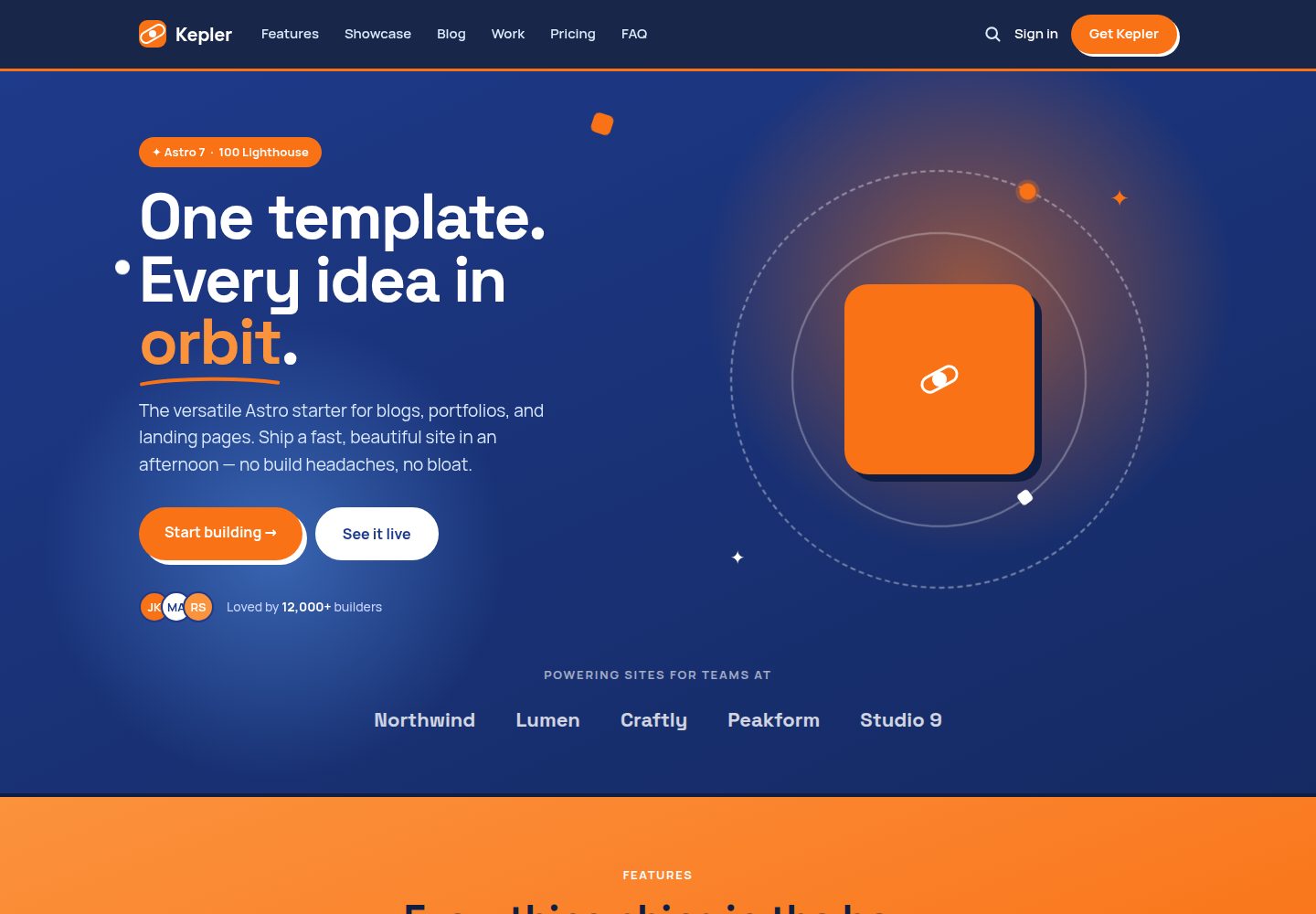
Provides landing page, blog, and portfolio presets under one design system, sharing tokens and components
AstroPortfolioBlogCorporate WebsiteStarter
astro-kepler — Astro Portfolio Template
By kpab
Kepler is a free Astro-based theme that covers three presets—blog, portfolio, and landing page—with a single navy and orange design system, and includes Pagefind full-text search and SEO configuration.
Explore the design
Compare the page layouts and mobile experience. Open any screenshot for a closer look.
Desktop homepage1 / 3
Desktop captureTop of page
Actual screenshot captured by the server browser.
All pages & views 3
Screenshots show visual appearance; interactive behavior may differ.
Recorded 2026-10-02View source
What stands out
A quick read of the recorded project description.
Blog preset supports Content Collections, Markdown/MDX, tags, pagination, reading time, drafts, and RSS
Portfolio preset provides a filterable project grid and a per-project case study layout
Pagefind client-side full-text search with a build-time static index, no backend required
Built-in SEO configuration including canonical URLs, Open Graph, Twitter cards, sitemap.xml, and RSS
Site configuration is centralized in src/site.config.ts; changing two hues recolors the whole site
Template Details
Kepler is an Astro theme published on GitHub by kpab under the MIT license, positioned as a shared template for blogs, portfolios, and landing pages. It implements the three use cases as three presets: the landing page preset includes a hero, logo strip, feature showcase, pricing (with toggle), testimonials, FAQ accordion, and CTA; the blog preset is built on Content Collections and supports Markdown/MDX, typed frontmatter, tags, pagination, reading time, drafts, and RSS; the portfolio preset provides a filterable project grid and a case study layout. All three share the same design tokens, fonts, and components, visually dominated by navy and orange with hard offset shadows and orbital graphics. On the technical side it uses Astro, Tailwind CSS @theme design tokens, TypeScript, Content Collections + MDX, with interactions handled by a small amount of vanilla script and no UI framework by default. Search is powered by Pagefind, which generates a static index after build, so it is only available in preview and production builds, not in the dev server. Site-level configuration is centralized in src/site.config.ts, while colors, fonts, shadows, and radii are defined as CSS variables in the @theme block of global.css. Content is written into src/content/blog/ and src/content/work/, with frontmatter validated by the schema in content.config.ts; field errors will cause the build to fail. The build command is pnpm build, which runs astro build and then pagefind --site dist, outputting to dist, deployable to any static host; the official demo runs on Cloudflare Pages.
AstroPortfolioBlogCorporate websiteStarter
Is it right for your project?
Use Cases
- Building a personal blog that needs tags, pagination, RSS, and full-text search
- Creating a portfolio to showcase projects and write a case study for each project
- Building a landing page for a product launch or event promotion, including a pricing toggle and FAQ
- Placing a blog, portfolio, and landing page in the same site while maintaining a consistent visual style
Suitable For
- Developers using Astro who want to manage content with Markdown/MDX
- Personal or small-team sites that need static hosting and do not rely on backend services
- Projects that accept no UI framework by default and handle minor interactions with vanilla scripts
- Site builders who want to start from a template and then replace the demo content
Getting started & customization
Use these recorded setup notes alongside the repository instructions for your chosen version.
- 1
Generate a repository via GitHub's Use this template, then run pnpm install, pnpm dev, pnpm build, and pnpm preview
- 2
First edit src/site.config.ts to set the site name, production URL, description, OGP, and social accounts, and ensure the site in astro.config.mjs uses the same URL
- 3
Replace the demo content in src/content/blog/ and src/content/work/ with your own content; frontmatter must conform to the schema in content.config.ts
- 4
Search depends on a static index generated at build time and only works in pnpm preview and production builds, not under pnpm dev
- 5
When deploying, the build command is pnpm build and the output directory is dist; third-party assets such as demo images, fonts, and icons must have their licenses checked separately
License & source material
Usage conditions & limitations
Free to use · keep license noticeThis entry covers the free version under the MIT license in the public repository; the free scope applies to that version's code and does not mean external services or third-party assets are free.
Must comply with when using
- Free use, modification, commercial use, and distribution of this version's code are permitted.
- When distributing copies or substantial portions of the code, retain the original author's copyright notice and the full MIT license notice.
- The code is provided as is; warranties and limitations of liability are governed by the original license and applicable law.
Additional costs & items to verify
- Almanac, promoted in the README, is another premium directory theme by the same author, must be purchased separately on Gumroad, and is not part of this template's free scope; this template, Kepler, itself remains free under MIT.
- Almanac requires paid acquisition through Gumroad and is an external paid upgrade unrelated to this free template; it should not be regarded as a free feature of Kepler.
- Pagefind full-text search depends on a static index generated at build time and is only available in pnpm preview and production builds, not under the pnpm dev development server.
- Deployment requires preparing your own static hosting service (the official demo uses Cloudflare Pages); hosting accounts and related costs are borne by the user.
- Demo images, fonts, icons, and other third-party assets must be checked against their respective licenses and cannot be judged solely by the code's MIT license.
- External services such as domains, hosting, databases, payments, or AI may incur separate charges.
View Original Text Basis
Permission is hereby granted, free of charge
Original License Text
a premium Astro + Cloudflare directory theme by the same author
Original README
[Get it on Gumroad →](https://kpab.gumroad.com/l/almanac)
Original README
search relies on a static index generated at build time, so it only works > in `pnpm preview` and in production — not in `pnpm dev`.
Original README
https://github.com/kpab/astro-kepler/blob/main/LICENSEhttps://github.com/kpab/astro-kepler/blob/main/README.mdDeploy the `dist/` output to any static host (the demo runs on Cloudflare Pages).
Original README
Compiled by DeepSeek based on repository license and README ·2026-10-02. Results only cover the materials read; dependencies, images, fonts, and subsequent term changes are subject to their respective original texts.
Project checks & description sources
Template Information
- Source platforms
- GitHub
- Documentation and maintenance reference score
- More documented · 92 / 100
- Technologies
- Astro
- Website type
- Portfolio · Blog · Corporate Website · Starter
How this score is calculated
Our heuristic uses license records (up to 30), a demo link (12), a preview (10), stars (15), recorded maintenance (15), description completeness (8), feature records (5) and classification data (5). It is not a code, security or performance test, or a Google score. A link does not establish tested functionality.
What to verify for this project
- Repository update recorded
- 2026-09-06
- Screenshot last checked
- 2026-10-02
A demo link is listed. Check it with your own content and viewport sizes; its presence does not confirm that forms, authentication or payments work.
The catalog identifies Astro as the primary stack. Check the actual dependency manifest and lockfile for versions and hosting requirements. These notes use recorded metadata, not a code audit or a deployment test.
Use a selection guide →How this description was prepared
AI-assisted description based on catalog records and repository material. Repository authors are not automatically the reviewers of this description.
Automatically checked against source and license rules; no manual editorial review.
Inspect the recorded source material
SHA-256: cad64231a8da605e30ef2fba41a0562017fd314c2aa36c074983365f3bbe3b3d
2026-10-02T09:52:23.455Z
Source file / repository# Kepler
A versatile [Astro 7](https://astro.build) theme for **blogs, portfolios, and landing pages** —
all driven by one cohesive design system. Navy × orange, playful-pop styling with hard
offset shadows and an orbit motif.
[](https://github.com/kpab/astro-kepler/actions/workflows/ci.yml)
[](./LICENSE)
[](https://astro.build)
**Demo:** https://astro-kepler.pages.dev

> 📇 **Building a directory or listings site?** Check out **[Almanac](https://almanac.p4ni.com)** —
> a premium Astro + Cloudflare directory theme by the same author, with full-text search,
> an admin panel, moderated submissions, and monetization built in.
## Features
- 🚀 **Astro 7 + Tailwind CSS v4 + TypeScript**
- 🛬 **Landing preset** — hero, logo strip, features, showcase, pricing (with toggle),
testimonials, FAQ accordion, and CTA
- 📝 **Blog preset** — Content Collections (Markdown/MDX), typed frontmatter, tags,
pagination, reading time, drafts, and RSS
- 🎨 **Portfolio preset** — filterable project grid and case-study layout
- 🔍 **Full-text search** — client-side, zero-backend search powered by [Pagefind](https://pagefind.app)
- 🌐 **SEO baked in** — canonical URLs, Open Graph, Twitter cards, `sitemap.xml`, RSS
- ⚡ **Zero-JS by default** — interactions are a few lines of vanilla `<script>`; no UI framework
- 🎯 **One design system** — two hues, two typefaces, and a set of tokens shared across every preset
## Presets
Three presets, one design system — same tokens, typefaces, and components throughout.
| Blog | Portfolio |
| ---- | --------- |
| [](https://astro-kepler.pages.dev/blog/) | [](https://astro-kepler.pages.dev/work/) |
| Content Collections, tags, pagination, reading time, RSS | Filterable project grid with per-project case studies |
| Article | Case study |
| ------- | ---------- |
| [](https://astro-kepler.pages.dev/blog/designing-with-navy-and-orange/) | [](https://astro-kepler.pages.dev/work/meridian-store/) |
| MDX, Shiki highlighting, prev/next navigation | Meta block, tech tags, long-form case-study body |
Full-text search (`/search`) works across posts and case studies via [Pagefind](https://pagefind.app).
## Tech stack
| Area | Choice |
| ------------- | ----------------------------------------- |
| Framework | Astro 7 (`7.x`) |
| Styling | Tailwind CSS v4 (`@theme` design tokens) |
| Language | TypeScript |
| Content | Content Collections + MDX |
| Search | Pagefind (post-build static index) |
| Interactivity | Vanilla `<script>` |
## Quick start
Click **[Use this template](https://github.com/kpab/astro-kepler/generate)** to create
your own repository from Kepler, then clone it and run:
```sh
pnpm install
pnpm dev # dev server at http://localhost:4321
pnpm build # production build to dist/ (also generates the Pagefind index)
pnpm preview # preview the production build (search works here, not in dev)
```
Then make it yours:
1. Edit **`src/site.config.ts`** — site name, production URL, description, OGP, social handles.
2. Replace the demo content in **`src/content/blog/`** and **`src/content/work/`** with your own.
3. Deploy the `dist/` output to any static host (the demo runs on Cloudflare Pages).
> **Note:** search relies on a static index generated at build time, so it only works
> in `pnpm preview` and in production — not in `pnpm dev`.
## Project structure
```
src/
├─ site.config.ts # ← edit this first: site name, URL, OGP, social
├─ content.config.ts # blog & work collection schemas (typed frontmatter)
├─ content/
│ ├─ blog/ # ← your posts (.md / .mdx)
│ └─ work/ # ← your projects (.md / .mdx, case-study body)
├─ pages/ # routing (index = landing page)
│ ├─ blog/ # list (paginated) + [slug] detail
│ ├─ tags/ # all tags + per-tag listing
│ ├─ work/ # grid (filterable) + [slug] case study
│ ├─ search.astro # Pagefind search UI
│ └─ rss.xml.ts # RSS feed
├─ layouts/ # BaseLayout, PostLayout, CaseStudyLayout
├─ components/ # Header, Footer, Seo, landing/, blog/, work/
└─ styles/global.css # Tailwind import + design tokens (@theme) + prose
docs/design/ # design handoff (source of truth — do not edit)
```
## Configuration
Everything a site owner needs to touch lives in **`src/site.config.ts`** — name, production
URL, default description, OGP image, social handles, and posts-per-page. Components read from
it, so there are no hard-coded strings to hunt down.
```ts
export const site = {
name: 'Kepler',
url: 'https://your-domain.com', // used for canonical URLs, sitemap, and RSS
description: '...',
postsPerPage: 6,
// ...
};
```
Set the same URL as `site` in `astro.config.mjs` (it imports from `site.config.ts`, so you
only edit one place).
### Design tokens
Colors, fonts, shadows, and radii are defined as CSS variables in the `@theme` block of
`src/styles/global.css`. Rebrand the whole theme by editing two hues:
```css
--color-navy: #1e3a8a; /* structure */
--color-orange: #f97316; /* accent */
```
## Writing content
Add a Markdown or MDX file to `src/content/blog/` or `src/content/work/`. Frontmatter is
validated against the schema in `content.config.ts`, so typos fail the build instead of
shipping broken pages.
**Blog post** (`src/content/blog/my-post.md`):
```yaml
---
title: 'My Post'
description: 'One sentence that would make you click.'
pubDate: 2026-07-11
tags: ['Astro', 'Tutorial']
author: 'Your Name' # optional; falls back to site.author
draft: false # true → excluded from the production build
---
```
**Project** (`src/content/work/my-project.md`):
```yaml
---
title: 'My Project'
description: 'Short summary.'
category: 'Web App' # used for the filter
tech: ['Astro', 'TypeScript']
year: 2026
role: 'Design & Frontend' # optional
url: 'https://example.com' # optional
repo: 'https://github.com/...' # optional
order: 1 # sort order (lower first)
---
```
The body of a project file becomes its case study.
## Deployment (Cloudflare Pages)
The demo deploys to Cloudflare Pages. Any static host works — just point it at the build:
- **Build command:** `pnpm build`
- **Output directory:** `dist`
`pnpm build` runs `astro build` followed by `pagefind --site dist`, so the search index
ships with your site automatically.
## More themes by kpab
- **[Almanac](https://almanac.p4ni.com)** (premium) — a directory theme on Astro + Cloudflare
Workers + D1: bm25 full-text search, admin panel, moderated submissions, and featured-listing
monetization. [Get it on Gumroad →](https://kpab.gumroad.com/l/almanac)
- [astro-haze](https://github.com/kpab/astro-haze) — glassmorphism theme for blogs, portfolios & landing pages
- [Astro Keel](https://github.com/kpab/astro-keel) — minimal, neutral portfolio + blog theme
- [Darkness](https://github.com/kpab/astro-darkness) — dark portfolio theme with a Three.js particle background
## License
[MIT](./LICENSE) — free to use, fork, and adapt.
Explore similar templates
Compare previews and descriptions within the same stack and category.

astrowind
AstroWind is a free, open-source Astro starter theme using Astro and Tailwind CSS, released under the MIT license.
Astro · Blog

astro-paper
AstroPaper is a minimal, responsive, accessible, and SEO-friendly Astro blog theme. Articles are stored as Markdown/MDX in src/content/posts/, with subdirectories affecting URLs.
Astro · Blog

fuwari
Fuwari is a static blog template built with Astro and Tailwind CSS for personal blogs. It manages posts as Markdown files in src/content/posts/, with frontmatter for title, date, description, cover, tags, categories, draft status, and language.
Astro · Blog

Firefly
Firefly is a clean personal blog theme forked from Astro and Fuwari, offering four background modes, single/double sidebar and list/grid layouts, Pagefind client-side full-text search, and a six-language UI.
Astro · Blog

astro-theme-cactus
Astro Cactus is an Astro-based blog and portfolio theme that uses Markdown/MDX content collections to manage posts, notes, and tags, with frontmatter type-checked by a schema.
Astro · Portfolio

astrofy
Astrofy is a free and open-source personal portfolio website template built with Astro and TailwindCSS, with built-in blog, CV timeline, project showcase, store, and RSS feed modules.
Astro · Portfolio