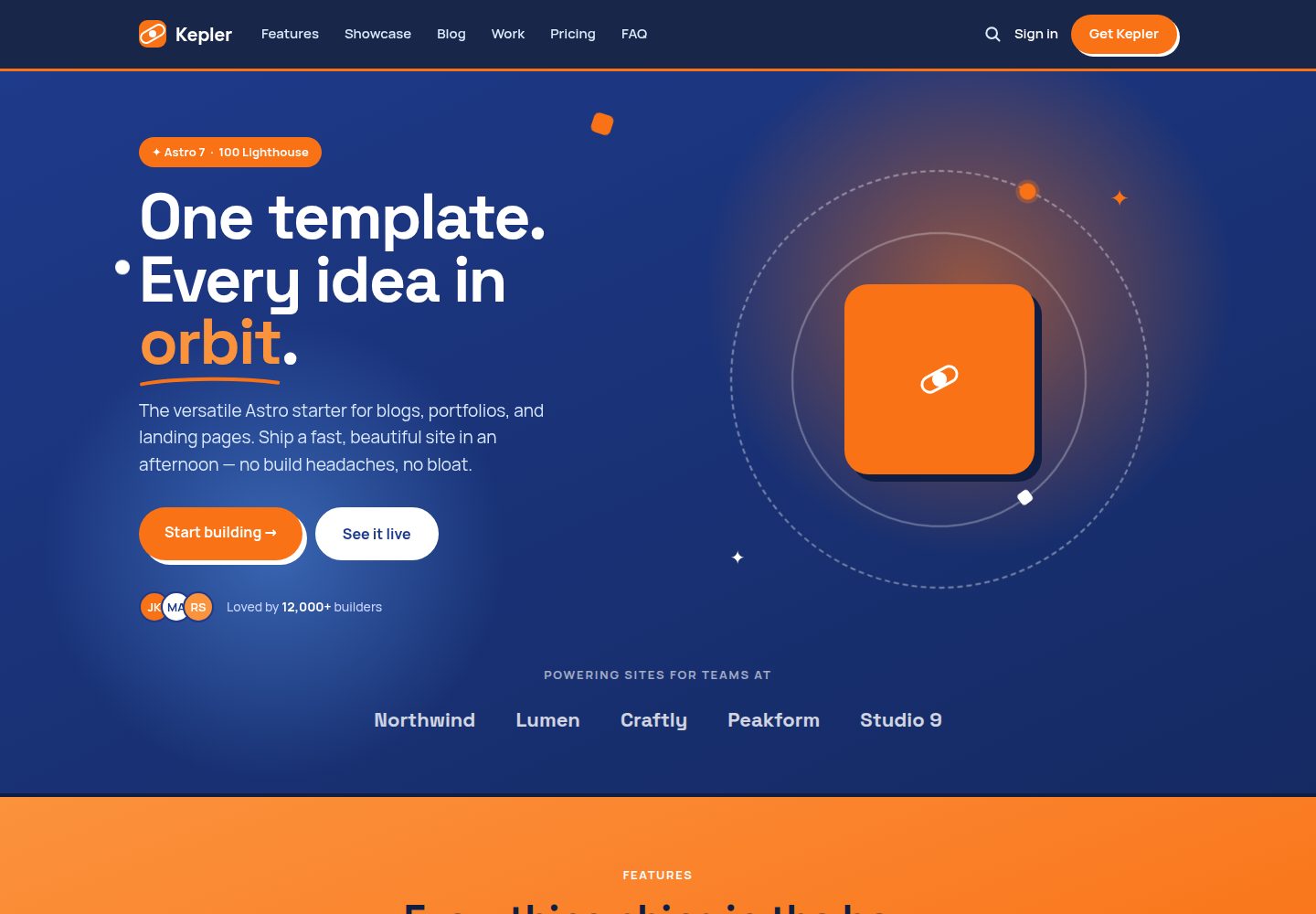
同一设计系统下提供落地页、博客、作品集三种预设,共用令牌与组件
Astro作品集博客企业官网启动器
astro-kepler — Astro 作品集模板
作者 kpab
Kepler 是一个基于 Astro 的免费主题,用同一套海军蓝与橙色设计系统覆盖博客、作品集和落地页三种预设,内置 Pagefind 全文搜索与 SEO 配置。
看看你的网站会是什么样
浏览真实页面截图,比较内容排版与手机效果。点击下方缩略图切换,放大查看整页细节。
全部页面与视图 3
截图用于了解视觉与布局,交互效果请以实际项目为准。
采集于 2026-10-02查看来源
值得关注的模板亮点
从已有项目资料中,快速了解它的特点。
博客预设支持 Content Collections、Markdown/MDX、标签、分页、阅读时长、草稿与 RSS
作品集预设提供可筛选项目网格和逐项目案例研究版式
Pagefind 客户端全文搜索,构建时生成静态索引,无需后端
内置 canonical URL、Open Graph、Twitter 卡片、sitemap.xml 和 RSS 等 SEO 配置
站点配置集中在 src/site.config.ts,改两个色相即可整体换色
模板详细介绍
Kepler 是作者 kpab 发布在 GitHub 上的 Astro 主题,采用 MIT 许可,定位为博客、作品集与落地页共用的模板。它把三种用途做成三个预设:落地页预设包含 hero、logo 条、功能展示、定价(带切换)、评价、FAQ 手风琴和 CTA;博客预设基于 Content Collections 支持 Markdown/MDX、类型化 frontmatter、标签、分页、阅读时长、草稿和 RSS;作品集预设提供可筛选的项目网格与案例研究版式。三者共用同一套设计令牌、字体和组件,视觉上以海军蓝与橙色为主,带硬偏移阴影和轨道图形。技术侧使用 Astro、Tailwind CSS 的 @theme 设计令牌、TypeScript、Content Collections + MDX,交互以少量原生 script 实现,默认不引入 UI 框架。搜索由 Pagefind 在构建后生成静态索引,因此只在预览和生产构建中可用,开发服务器中不可用。站点级配置集中在 src/site.config.ts,颜色、字体、阴影和圆角以 CSS 变量定义在 global.css 的 @theme 块中。内容写入 src/content/blog/ 与 src/content/work/,frontmatter 由 content.config.ts 中的 schema 校验,字段错误会导致构建失败。构建命令为 pnpm build,先执行 astro build 再运行 pagefind --site dist,输出到 dist,可部署到任意静态托管,官方演示运行在 Cloudflare Pages。
Astro作品集博客企业官网启动器
适合你的项目吗?
适用场景
- 搭建个人博客并需要标签、分页、RSS 与全文搜索
- 制作用于展示项目的作品集,并为每个项目写案例研究
- 制作用于产品发布或活动推广的落地页,包含定价切换与 FAQ
- 把博客、作品集和落地页放在同一站点内,保持统一视觉
适合人群
- 使用 Astro 并希望以 Markdown/MDX 管理内容的开发者
- 需要静态托管、不依赖后端服务的个人或小团队站点
- 接受默认不引入 UI 框架、以原生脚本处理少量交互的项目
- 希望从模板起步再替换演示内容的建站者
上手与定制指南
结合仓库当前版本的说明,按下面的资料检查内容、配置与运行要求。
- 1
通过 GitHub 的 Use this template 生成仓库后,执行 pnpm install、pnpm dev、pnpm build、pnpm preview
- 2
先编辑 src/site.config.ts 设置站点名称、生产 URL、描述、OGP 与社交账号,并确保 astro.config.mjs 中的 site 使用同一 URL
- 3
用自有内容替换 src/content/blog/ 与 src/content/work/ 中的演示内容,frontmatter 需符合 content.config.ts 的 schema
- 4
搜索依赖构建时生成的静态索引,只在 pnpm preview 和生产构建中生效,pnpm dev 下不可用
- 5
部署时构建命令为 pnpm build,输出目录为 dist;演示图片、字体、图标等第三方素材需单独核对许可
授权与来源资料
使用条件与限制
免费使用 · 保留许可声明本次收录的是公开仓库中采用 MIT 许可的免费版本;免费范围为该版本代码,不代表外部服务或第三方素材免费。
使用时需要遵守
- 允许免费使用、修改、商用和分发该版本代码。
- 分发代码副本或实质性部分时,保留原作者版权声明和完整 MIT 许可声明。
- 代码按现状提供;担保与责任限制以原许可证及适用法律为准。
额外费用与待核对事项
- README 中推广的 Almanac 是同一作者的另一款付费(premium)目录主题,需在 Gumroad 单独购买,不属于本模板的免费范围;本模板 Kepler 本身仍为 MIT 免费。
- Almanac 需通过 Gumroad 付费获取,属于外部付费升级项,与本免费模板无关,不应视为 Kepler 的免费功能。
- Pagefind 全文搜索依赖构建时生成的静态索引,仅在 pnpm preview 与生产构建中可用,pnpm dev 开发服务器下不可用。
- 部署需自行准备静态托管服务(官方演示使用 Cloudflare Pages),托管账号与相关费用由使用者自行承担。
- 演示图片、字体、图标及其他第三方素材需按各自许可核对,不能仅凭代码的 MIT 许可判断。
- 域名、托管、数据库、支付或 AI 等外部服务可能另外收费。
查看原文依据
Permission is hereby granted, free of charge
许可证原文
a premium Astro + Cloudflare directory theme by the same author
README 原文
[Get it on Gumroad →](https://kpab.gumroad.com/l/almanac)
README 原文
search relies on a static index generated at build time, so it only works > in `pnpm preview` and in production — not in `pnpm dev`.
README 原文
https://github.com/kpab/astro-kepler/blob/main/LICENSEhttps://github.com/kpab/astro-kepler/blob/main/README.mdDeploy the `dist/` output to any static host (the demo runs on Cloudflare Pages).
README 原文
DeepSeek 根据仓库许可证和 README 整理 ·2026-10-02。结果仅覆盖已读取资料,依赖、图片、字体及后续条款变更以各自原文为准。
项目核对记录与介绍依据
模板资料
- 来源平台
- GitHub
- 资料与维护参考分
- 资料较完整 · 92 / 100
- 技术栈
- Astro
- 网站类型
- 作品集 · 博客 · 企业官网 · 启动器
这个分数如何计算
本站按许可资料(最高30分)、演示链接(12分)、预览图(10分)、Star数(15分)、记录的维护时间(15分)、描述完整度(8分)、功能记录(5分)和分类资料(5分)计算。它不是代码、安全或性能测试,也不是 Google 评分;有链接不代表已实测可用。
这个项目需要核对什么
- 记录的仓库更新时间
- 2026-09-06
- 截图检查日期
- 2026-10-02
已收录演示链接。请用你的内容与屏幕尺寸检查;有演示不代表表单、认证或支付已经可用。
目录记录的主要技术栈是 Astro。请通过依赖清单和锁文件核对实际版本与托管要求。这些说明基于收录资料,不代表代码审计或部署实测。
查看具体选型方法 →介绍的制作与核对状态
介绍由 AI 辅助整理目录与仓库资料。仓库作者不等于这篇介绍的审核者。
已完成服务器许可规则与 AI 来源核对;未经过人工编辑审核。
查看当时使用的来源资料
SHA-256: cad64231a8da605e30ef2fba41a0562017fd314c2aa36c074983365f3bbe3b3d
2026-10-02T09:52:23.455Z
来源文件 / 仓库# Kepler
A versatile [Astro 7](https://astro.build) theme for **blogs, portfolios, and landing pages** —
all driven by one cohesive design system. Navy × orange, playful-pop styling with hard
offset shadows and an orbit motif.
[](https://github.com/kpab/astro-kepler/actions/workflows/ci.yml)
[](./LICENSE)
[](https://astro.build)
**Demo:** https://astro-kepler.pages.dev

> 📇 **Building a directory or listings site?** Check out **[Almanac](https://almanac.p4ni.com)** —
> a premium Astro + Cloudflare directory theme by the same author, with full-text search,
> an admin panel, moderated submissions, and monetization built in.
## Features
- 🚀 **Astro 7 + Tailwind CSS v4 + TypeScript**
- 🛬 **Landing preset** — hero, logo strip, features, showcase, pricing (with toggle),
testimonials, FAQ accordion, and CTA
- 📝 **Blog preset** — Content Collections (Markdown/MDX), typed frontmatter, tags,
pagination, reading time, drafts, and RSS
- 🎨 **Portfolio preset** — filterable project grid and case-study layout
- 🔍 **Full-text search** — client-side, zero-backend search powered by [Pagefind](https://pagefind.app)
- 🌐 **SEO baked in** — canonical URLs, Open Graph, Twitter cards, `sitemap.xml`, RSS
- ⚡ **Zero-JS by default** — interactions are a few lines of vanilla `<script>`; no UI framework
- 🎯 **One design system** — two hues, two typefaces, and a set of tokens shared across every preset
## Presets
Three presets, one design system — same tokens, typefaces, and components throughout.
| Blog | Portfolio |
| ---- | --------- |
| [](https://astro-kepler.pages.dev/blog/) | [](https://astro-kepler.pages.dev/work/) |
| Content Collections, tags, pagination, reading time, RSS | Filterable project grid with per-project case studies |
| Article | Case study |
| ------- | ---------- |
| [](https://astro-kepler.pages.dev/blog/designing-with-navy-and-orange/) | [](https://astro-kepler.pages.dev/work/meridian-store/) |
| MDX, Shiki highlighting, prev/next navigation | Meta block, tech tags, long-form case-study body |
Full-text search (`/search`) works across posts and case studies via [Pagefind](https://pagefind.app).
## Tech stack
| Area | Choice |
| ------------- | ----------------------------------------- |
| Framework | Astro 7 (`7.x`) |
| Styling | Tailwind CSS v4 (`@theme` design tokens) |
| Language | TypeScript |
| Content | Content Collections + MDX |
| Search | Pagefind (post-build static index) |
| Interactivity | Vanilla `<script>` |
## Quick start
Click **[Use this template](https://github.com/kpab/astro-kepler/generate)** to create
your own repository from Kepler, then clone it and run:
```sh
pnpm install
pnpm dev # dev server at http://localhost:4321
pnpm build # production build to dist/ (also generates the Pagefind index)
pnpm preview # preview the production build (search works here, not in dev)
```
Then make it yours:
1. Edit **`src/site.config.ts`** — site name, production URL, description, OGP, social handles.
2. Replace the demo content in **`src/content/blog/`** and **`src/content/work/`** with your own.
3. Deploy the `dist/` output to any static host (the demo runs on Cloudflare Pages).
> **Note:** search relies on a static index generated at build time, so it only works
> in `pnpm preview` and in production — not in `pnpm dev`.
## Project structure
```
src/
├─ site.config.ts # ← edit this first: site name, URL, OGP, social
├─ content.config.ts # blog & work collection schemas (typed frontmatter)
├─ content/
│ ├─ blog/ # ← your posts (.md / .mdx)
│ └─ work/ # ← your projects (.md / .mdx, case-study body)
├─ pages/ # routing (index = landing page)
│ ├─ blog/ # list (paginated) + [slug] detail
│ ├─ tags/ # all tags + per-tag listing
│ ├─ work/ # grid (filterable) + [slug] case study
│ ├─ search.astro # Pagefind search UI
│ └─ rss.xml.ts # RSS feed
├─ layouts/ # BaseLayout, PostLayout, CaseStudyLayout
├─ components/ # Header, Footer, Seo, landing/, blog/, work/
└─ styles/global.css # Tailwind import + design tokens (@theme) + prose
docs/design/ # design handoff (source of truth — do not edit)
```
## Configuration
Everything a site owner needs to touch lives in **`src/site.config.ts`** — name, production
URL, default description, OGP image, social handles, and posts-per-page. Components read from
it, so there are no hard-coded strings to hunt down.
```ts
export const site = {
name: 'Kepler',
url: 'https://your-domain.com', // used for canonical URLs, sitemap, and RSS
description: '...',
postsPerPage: 6,
// ...
};
```
Set the same URL as `site` in `astro.config.mjs` (it imports from `site.config.ts`, so you
only edit one place).
### Design tokens
Colors, fonts, shadows, and radii are defined as CSS variables in the `@theme` block of
`src/styles/global.css`. Rebrand the whole theme by editing two hues:
```css
--color-navy: #1e3a8a; /* structure */
--color-orange: #f97316; /* accent */
```
## Writing content
Add a Markdown or MDX file to `src/content/blog/` or `src/content/work/`. Frontmatter is
validated against the schema in `content.config.ts`, so typos fail the build instead of
shipping broken pages.
**Blog post** (`src/content/blog/my-post.md`):
```yaml
---
title: 'My Post'
description: 'One sentence that would make you click.'
pubDate: 2026-07-11
tags: ['Astro', 'Tutorial']
author: 'Your Name' # optional; falls back to site.author
draft: false # true → excluded from the production build
---
```
**Project** (`src/content/work/my-project.md`):
```yaml
---
title: 'My Project'
description: 'Short summary.'
category: 'Web App' # used for the filter
tech: ['Astro', 'TypeScript']
year: 2026
role: 'Design & Frontend' # optional
url: 'https://example.com' # optional
repo: 'https://github.com/...' # optional
order: 1 # sort order (lower first)
---
```
The body of a project file becomes its case study.
## Deployment (Cloudflare Pages)
The demo deploys to Cloudflare Pages. Any static host works — just point it at the build:
- **Build command:** `pnpm build`
- **Output directory:** `dist`
`pnpm build` runs `astro build` followed by `pagefind --site dist`, so the search index
ships with your site automatically.
## More themes by kpab
- **[Almanac](https://almanac.p4ni.com)** (premium) — a directory theme on Astro + Cloudflare
Workers + D1: bm25 full-text search, admin panel, moderated submissions, and featured-listing
monetization. [Get it on Gumroad →](https://kpab.gumroad.com/l/almanac)
- [astro-haze](https://github.com/kpab/astro-haze) — glassmorphism theme for blogs, portfolios & landing pages
- [Astro Keel](https://github.com/kpab/astro-keel) — minimal, neutral portfolio + blog theme
- [Darkness](https://github.com/kpab/astro-darkness) — dark portfolio theme with a Three.js particle background
## License
[MIT](./LICENSE) — free to use, fork, and adapt.
看看同类模板
对比同技术栈与用途的模板,找到更适合的视觉与内容结构。

astrowind
⭕️ AstroWind: A free template using Astro v7 and Tailwind CSS v4. Astro starter theme.
Astro · 博客

astro-paper
A minimal, accessible and SEO-friendly Astro blog theme.
Astro · 博客

fuwari
✨A static blog template built with Astro.
Astro · 博客

Firefly
Firefly 是一款基于 Astro 的静态博客主题,由 CuteLeaf 在 saicaca 的 Fuwari 模板基础上二次开发,主打清新美观的视觉风格。
Astro · 博客

astro-theme-cactus
A simple Astro theme. Use it to create your blog or website.
Astro · 作品集

astrofy
Astrofy is a free and open-source template for your Personal Portfolio Website built with Astro and TailwindCS…
Astro · 作品集