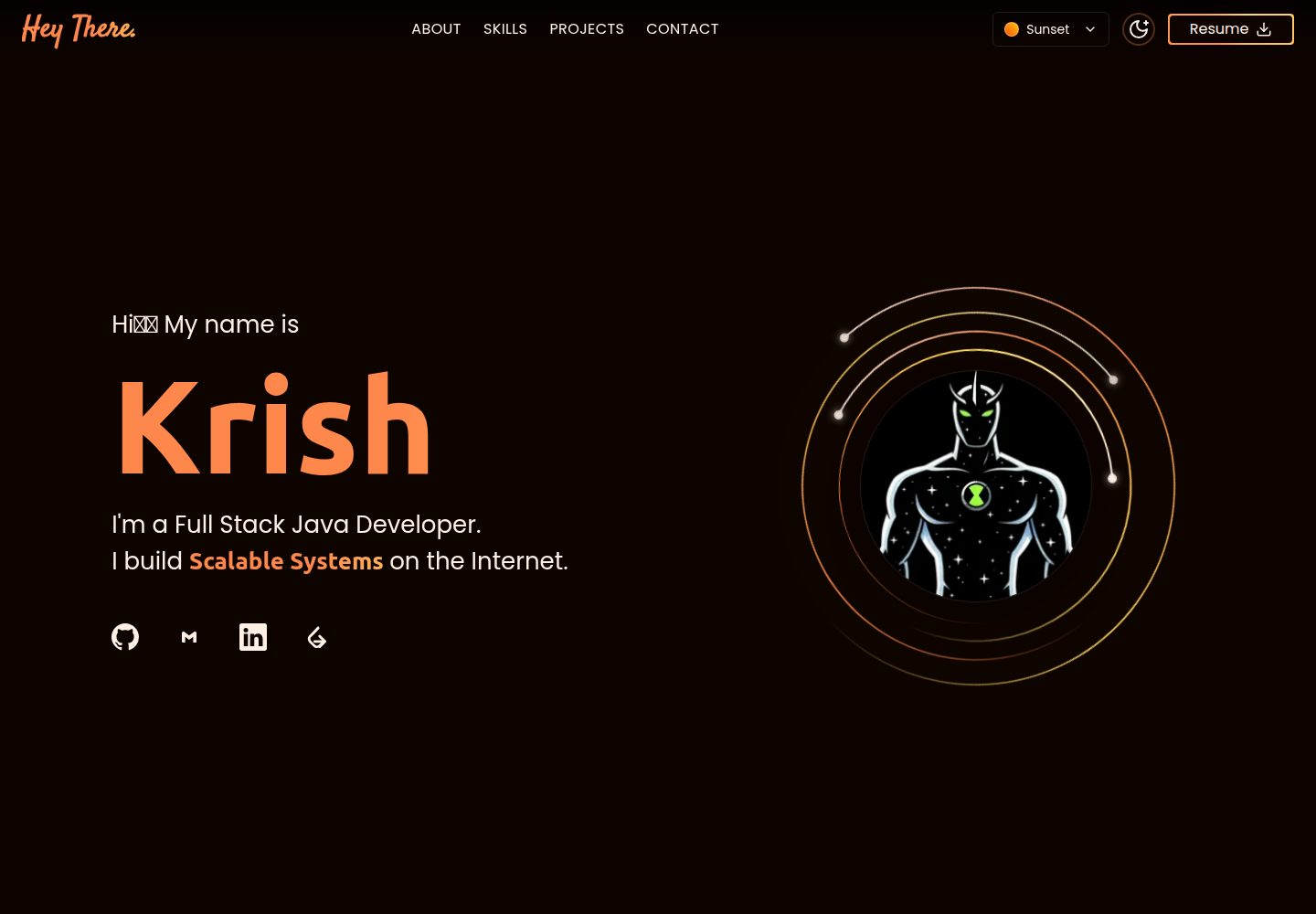
Built with a combination of Astro and React, styled with Tailwind CSS, and animated with GSAP for scroll effects
AstroReactPortfolio
portfolio (krishkantrai27) — Astro Portfolio Template
By krishkantrai27
A personal developer portfolio template built with Astro and React, including Hero, About, Skills, Projects, and Contact sections, with theme switching, GSAP scroll animations, and Netlify deployment.
Explore the design
Compare the page layouts and mobile experience. Open any screenshot for a closer look.
Desktop homepage1 / 3
Desktop captureTop of page
Actual screenshot captured by the server browser.
All pages & views 3
Screenshots show visual appearance; interactive behavior may differ.
Recorded 2026-10-10View source
What stands out
A quick read of the recorded project description.
Includes complete portfolio sections such as Hero, About, Skills, Projects, and Contact
Supports multiple color themes and light/dark mode switching
The Skills section is organized by categories such as programming languages, frontend, backend, databases, and DevOps
Provides a resume download entry and social links such as GitHub, LinkedIn, and Gmail
The README states that the deployment target is Netlify and provides development and build scripts
Template Details
This is a portfolio website template for individual developers to present their background and projects. It is built with Astro and React, styled with Tailwind CSS, and animated with GSAP. The page structure includes a Hero section, About Me, a Skills grid, a Projects showcase, and a Contact form, along with a Navbar and Footer. The Hero area provides a theme selector and social links such as GitHub, Gmail, and LinkedIn. The Skills section is organized by categories including programming languages, web frontend, backend, databases, and DevOps tools. The Projects section is used to display individual project entries. The template supports multiple color themes and light/dark mode switching, and states responsive adaptation for mobile, tablet, and desktop.
For usage, the repository provides npm install, development, and build scripts. The README states that Node.js 18+ is required, and the deployment target is Netlify. The project structure places components, data, styles, and utility functions in the components, data, styles, and utils directories under src, while static assets and the resume PDF are placed in public/assets.
Note that the projects, skills, and personal links in the repository are the author's own content and must be replaced with the user's own data when using it as a template. The licensing of third-party assets such as demo images, fonts, and icons must be checked separately. The code itself is under the MIT license.
AstroReactPortfolio
Is it right for your project?
Use Cases
- Individual developers building a portfolio website to showcase their background, skills, and project links
- A static personal homepage that needs theme switching and scroll animation effects
- A site using an Astro plus React stack and planned for deployment to Netlify
- Used as a frontend portfolio template after replacing data for job applications or freelance showcases
Suitable For
- Frontend or full-stack developers who want to quickly build a personal portfolio
- Users familiar with React and Tailwind CSS who need a ready-made page structure
- Developers who prefer static site generation and a Netlify deployment workflow
- Personal sites that need dark/light mode and multiple theme color options
Getting started & customization
Use these recorded setup notes alongside the repository instructions for your chosen version.
- 1
Requires Node.js 18+ and an npm or yarn environment
- 2
After cloning the repository, run npm install, then run npm run dev to start local development
- 3
Use npm run build for production builds
- 4
Before use, replace the skills, projects, and link data in src/data with your own content
- 5
Third-party assets such as demo images, fonts, and icons must be checked separately under their respective licenses
License & source material
Usage conditions & limitations
Free to use · keep license noticeThis entry covers the free version under the MIT license in the public repository; the free scope applies to that version's code and does not mean that external services or third-party assets are free.
Must comply with when using
- The code of this version may be used, modified, used commercially, and distributed for free.
- When distributing copies or substantial portions of the code, retain the original author's copyright notice and the complete MIT license notice.
- The code is provided as is; warranties and limitations of liability are governed by the original license and applicable law.
Additional costs & items to verify
- Demo images, fonts, icons, and other third-party assets must be checked under their respective licenses and cannot be judged solely by the code's MIT license.
- External services such as domains, hosting, databases, payments, or AI may incur separate charges.
View Original Text Basis
https://github.com/krishkantrai27/portfolio/blob/main/LICENSEhttps://github.com/krishkantrai27/portfolio/blob/main/README.mdPermission is hereby granted, free of charge
Original License Text
Compiled by DeepSeek based on repository license and README ·2026-10-10. Results only cover the materials read; dependencies, images, fonts, and subsequent term changes are subject to their respective original texts.
Project checks & description sources
Template Information
- Source platforms
- GitHub
- Documentation and maintenance reference score
- More documented · 85 / 100
- Technologies
- Astro · React
- Website type
- Portfolio
How this score is calculated
Our heuristic uses license records (up to 30), a demo link (12), a preview (10), stars (15), recorded maintenance (15), description completeness (8), feature records (5) and classification data (5). It is not a code, security or performance test, or a Google score. A link does not establish tested functionality.
What to verify for this project
- Repository update recorded
- 2026-10-10
- Screenshot last checked
- 2026-10-10
A demo link is listed. Check it with your own content and viewport sizes; its presence does not confirm that forms, authentication or payments work.
The catalog identifies Astro as the primary stack. Check the actual dependency manifest and lockfile for versions and hosting requirements. These notes use recorded metadata, not a code audit or a deployment test.
Use a selection guide →How this description was prepared
AI-assisted description based on catalog records and repository material. Repository authors are not automatically the reviewers of this description.
Review declaration: [email protected] · 2026-10-10
Inspect the recorded source material
SHA-256: 475a50b7ff03db19a451d49b9e561b0c2b9d31d2369751cce36b5bc317d81616
2026-10-10T05:03:46.450Z
Source file / repository# Portfolio 💼✨
> **Build. Ship. Connect.**
> A modern, animated developer portfolio showcasing full-stack projects, skills, and experience.
**Live:** [krishkant.netlify.app](https://krishkant.netlify.app/) · **Author:** [Krish Kant Rai](https://linkedin.com/in/krish-kant-rai-3a8734338) · [GitHub](https://github.com/krishkantrai27)
---
## 📋 Table of Contents
1. [Overview](#-overview)
2. [Sections](#-sections)
3. [Features](#-features)
4. [Technology Stack](#️-technology-stack)
5. [Getting Started](#-getting-started)
---
## 🚀 Overview
This is my personal developer portfolio — built to present who I am, what I've built, and what I can do as a **Full Stack Java Developer**. It features a dynamic hero section, theme switching, an interactive skills grid, and a project showcase, all wrapped in a smooth, animated dark-mode-first UI.
---
## 📸 Sections
### 🏠 Hero
Landing section with animated intro, role tagline, orbiting avatar graphic, theme selector, and quick links to GitHub, Gmail, LinkedIn, and dev profiles.

---
### 👤 About Me
Personal introduction covering background, specialization (backend architecture, role-based access control, database design), and DSA proficiency (300+ problems on LeetCode).

---
### 🛠️ Skills / Tech Stack
Full technology breakdown organized into categories:
| Category | Technologies |
|:---|:---|
| **Programming Languages** | Java, JavaScript, TypeScript, C |
| **Web & Frontend** | React.js, Astro, Preact.js, HTML5, CSS3, Tailwind CSS, MapLibre GL |
| **Backend Development** | Spring Boot, REST APIs, Spring Security, JWT Authentication |
| **Databases** | MySQL |
| **DevOps & Tools** | Git, GitHub, Docker, CI/CD, Maven, Postman, Swagger, Vite |
| **Libraries** | GSAP, iText 7, Java2D, Apache Commons CSV |
| **Additional Skills** | OS, OOP, DSA |

---
### 💼 Projects
Showcase of real, production-oriented projects — including an ISP network site survey tool (floor canvas, RF heatmaps) and a full-stack crop/farm management system.
---
### 📬 Contact
Direct contact form for recruiters and collaborators to reach out.
---
## ✨ Features
- 🎨 Multiple color themes (Ocean and others) with light/dark mode toggle
- 📱 Fully responsive across mobile, tablet, and desktop
- ⚡ Smooth scroll-based animations (GSAP)
- 🧩 Modular, categorized skills grid
- 📄 One-click resume download
- 🔗 Social/profile quick-links (GitHub, LinkedIn, Gmail, dev platforms)
---
## 🛠️ Technology Stack
| Layer | Technology |
|:---|:---|
| **Frontend** | React.js / Astro, Tailwind CSS |
| **Animation** | GSAP |
| **Maps** | MapLibre GL |
| **Tooling** | Vite, ESLint |
| **Deployment** | Netlify |
| **Version Control** | Git, GitHub |
### Project Structure
```
portfolio/
├── public/
│ └── assets/ # Images, icons, resume PDF
└── src/
├── components/ # Hero, About, Skills, Projects, Contact, Navbar, Footer
├── data/ # Skills, projects, and links data
├── styles/ # Global and theme styles
└── utils/ # Helpers
```
---
## 🏁 Getting Started
### Prerequisites
| Tool | Version |
|:---|:---|
| Node.js | 18+ |
| npm / yarn | Latest |
### Setup
```bash
git clone https://github.com/krishkantrai27/portfolio.git
cd portfolio
npm install
npm run dev
```
Open `http://localhost:5173` (or the port shown in terminal) to view it locally.
### Build for production
```bash
npm run build
```
---
## 📄 License
**Platform:** Portfolio — Personal Developer Website
**Author:** Krish Kant Rai
**LinkedIn:** [krish-kant-rai-3a8734338](https://linkedin.com/in/krish-kant-rai-3a8734338)
**GitHub:** [krishkantrai27](https://github.com/krishkantrai27)
---
*Made with 💻 and ☕ by Krish Kant Rai*
Explore similar templates
Compare previews and descriptions within the same stack and category.

astro-theme-cactus
Astro Cactus is an Astro-based blog and portfolio theme that uses Markdown/MDX content collections to manage posts, notes, and tags, with frontmatter type-checked by a schema.
Astro · Portfolio

astrofy
Astrofy is a free and open-source personal portfolio website template built with Astro and TailwindCSS, with built-in blog, CV timeline, project showcase, store, and RSS feed modules.
Astro · Portfolio

astro-nano
Astro Nano is a static, minimalist portfolio and blog template built with Astro, Tailwind, and TypeScript without frontend frameworks. It includes light/dark themes, animated UI, automatic sitemap and RSS feed generation, and Markdown/MDX support with component imports.
Astro · Portfolio

astro-erudite
astro-erudite is an opinionated, unstyled static blog template built with Astro and native CSS, with no UI or CSS framework and minimal dependencies.
Astro · Portfolio

astro-sphere
Astro Sphere is a static, minimalist portfolio and blog theme maintained by markhorn-dev, built mainly with Astro, Tailwind, and TypeScript, with a small amount of SolidJS for stateful components.
Astro · Portfolio

astro-micro
Astro Micro is a framework-free blog and portfolio theme for Astro, forked from Astro Nano. It adds Pagefind search and Giscus comments while retaining type safety, sitemap, RSS, Markdown and MDX support, and TailwindCSS with system, light, and dark themes.
Astro · Portfolio