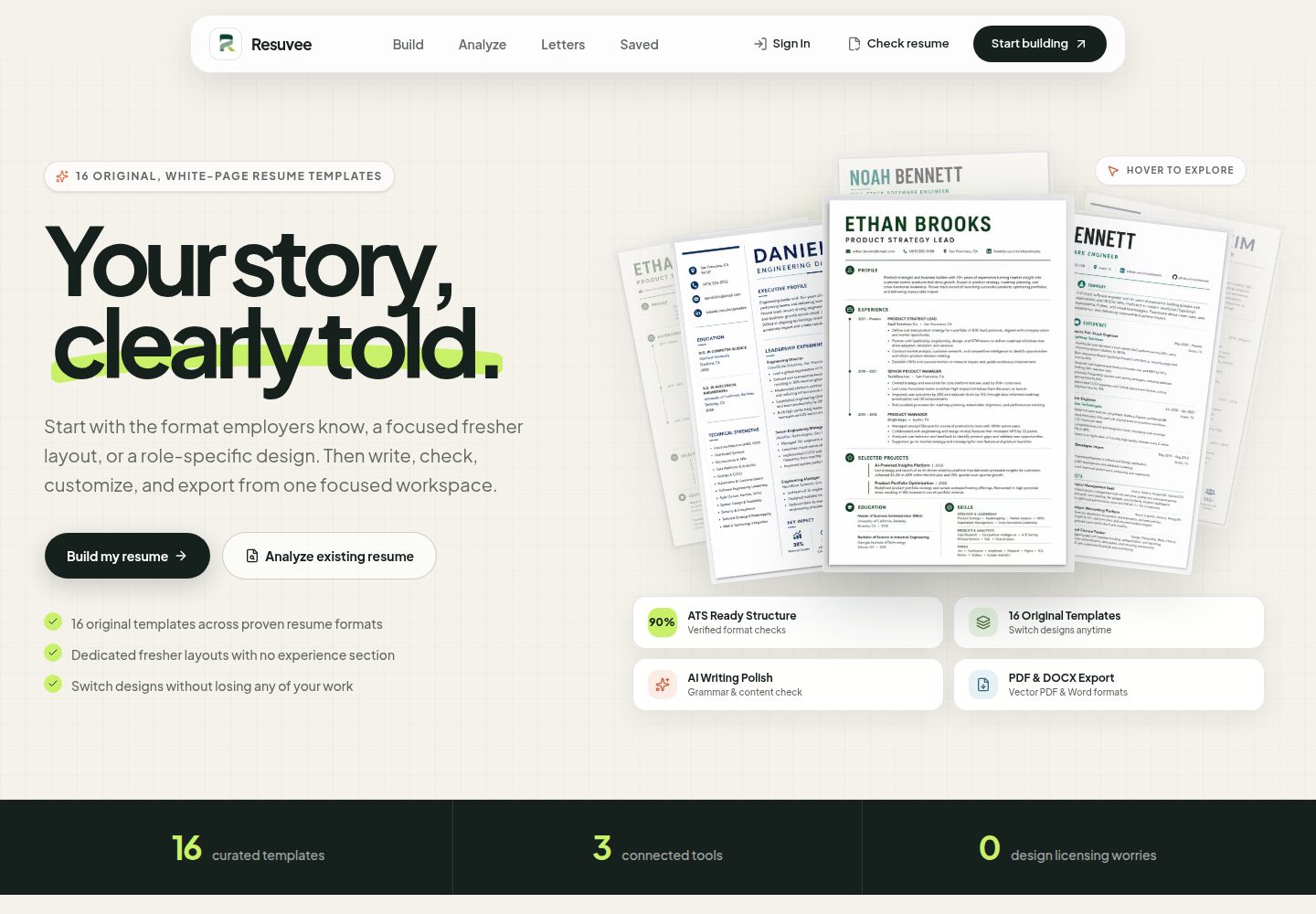
16 original templates, which the README states meet the requirements of modern ATS parsers
Next.jsReactPortfolio
resuvee — Next.js Portfolio Template
By kuldeeprajput-dev
Resuvee is a Next.js-based resume and job application document workbench that includes an interactive resume editor, ATS analysis, cover letter generation, and PDF/DOCX export, using Supabase and Groq AI.
Explore the design
Compare the page layouts and mobile experience. Open any screenshot for a closer look.
Desktop homepage1 / 2
Desktop captureTop of page
Actual screenshot captured by the server browser.
All pages & views 2
Screenshots show visual appearance; interactive behavior may differ.
Recorded 2026-10-14View source
What stands out
A quick read of the recorded project description.
Direct in-canvas editing: font size adjustment, bold/italic, alignment, and custom colors
AI writing polish: after selecting bullet points or a summary, AI enhances expression and quantified descriptions
ATS analysis: after uploading a PDF/DOCX, it provides a score, keyword gaps, strengths and weaknesses, and improvement steps
Dual persistence: IndexedDB offline drafts and Supabase cloud sync
Export vector PDF and Word DOCX with structured XML metadata
Template Details
Resuvee is a career document workbench for job seekers. The README positions it as a privacy-first resume studio that integrates interactive resume building, AI-driven ATS resume analysis, cover letter generation, and document conversion into a single application. It offers 16 templates, supports direct editing of elements on the canvas (font size, bold/italic, alignment, color), and allows uploading existing PDF/DOCX resumes to receive an ATS score, keyword gap analysis, strengths and weaknesses, and improvement suggestions.
On the technical side, the README lists Next.js App Router, React, TypeScript, Tailwind CSS, and Zustand for state management. AI inference uses the Groq Cloud SDK, PDF text extraction is done in the browser via pdfjs-dist, DOCX processing uses mammoth and jszip, and DOCX generation uses the docx library. Authentication and the database use Supabase (PostgreSQL with row-level security), offline drafts are stored in IndexedDB, and the deployment target is Vercel.
Before use, you need to set up your own Supabase project and Groq API Key and configure environment variables. The README does not describe the specific visual styles of the templates, the accuracy of AI output, the actual compatibility of exported files across different ATS systems, or provide complete production deployment steps or performance data.
Next.jsPortfolio
Is it right for your project?
Use Cases
- Write and format an ATS-friendly resume for a target job
- Upload an existing resume to check keyword coverage and ATS compatibility
- Generate a cover letter matched to a specific position
- Continue editing drafts without a network connection, then sync to the account when online
Suitable For
- Job seekers who need to quickly produce multiple resume versions
- Career changers or early-career professionals who want keyword and formatting improvement suggestions
- Users who need to manage both resumes and cover letter documents
- Developers or technical users willing to configure Supabase and Groq themselves
Getting started & customization
Use these recorded setup notes alongside the repository instructions for your chosen version.
- 1
Requires Bun 1.1+ or Node.js 20.9+; after cloning the repository, run bun install or npm install
- 2
Copy .env.example to .env.local and fill in GROQ_API_KEY, NEXT_PUBLIC_SUPABASE_URL, and NEXT_PUBLIC_SUPABASE_PUBLISHABLE_KEY
- 3
GROQ_MODEL is optional and defaults to openai/gpt-oss-120b; NEXT_PUBLIC_APP_URL is used for SEO and metadata and is optional
- 4
Run bun run dev or npm run dev and access it at http://localhost:3000
- 5
The README does not provide detailed steps for initializing the database table structure or for production deployment
License & source material
Usage conditions & limitations
Free to use · keep license noticeThis listing covers the free version under the MIT license in the public repository; the free scope is the code of that version and does not mean that external services or third-party assets are free.
Must comply with when using
- You may use, modify, commercially use, and distribute the code of this version for free.
- When distributing copies or substantial portions of the code, retain the original author's copyright notice and the complete MIT license notice.
- The code is provided as is; warranties and limitations of liability are governed by the original license and applicable law.
Additional costs & items to verify
- Demo images, fonts, icons, and other third-party assets must be checked against their respective licenses and cannot be judged solely by the code's MIT license.
- External services such as domains, hosting, databases, payments, or AI may incur separate charges.
- You need to register a Supabase account and create a project yourself for authentication and database functionality.
- You need to apply for a Groq API Key yourself; AI polish, writing checks, and ATS analysis depend on this external service.
- GROQ_API_KEY must be configured in .env.local, otherwise AI-related features are unavailable.
- NEXT_PUBLIC_SUPABASE_URL must be configured to point to your own Supabase project.
- NEXT_PUBLIC_SUPABASE_PUBLISHABLE_KEY must be configured to use client-side authentication.
View Original Text Basis
Permission is hereby granted, free of charge
Original License Text
- **Supabase Account**: Free project from [Supabase](https://supabase.com)
Original README
- **Groq API Key**: Free API key from [Groq Console](https://console.groq.com)
Original README
GROQ_API_KEY=your_groq_api_key_here
Original README
NEXT_PUBLIC_SUPABASE_URL=https://your-project.supabase.co
Original README
https://github.com/kuldeeprajput-dev/resuvee/blob/main/LICENSEhttps://github.com/kuldeeprajput-dev/resuvee/blob/main/README.mdNEXT_PUBLIC_SUPABASE_PUBLISHABLE_KEY=your_supabase_publishable_key_here
Original README
Compiled by DeepSeek based on repository license and README ·2026-10-14. Results only cover the materials read; dependencies, images, fonts, and subsequent term changes are subject to their respective original texts.
Project checks & description sources
Template Information
- Source platforms
- GitHub
- Documentation and maintenance reference score
- More documented · 83 / 100
- Technologies
- Next.js · React
- Website type
- Portfolio
How this score is calculated
Our heuristic uses license records (up to 30), a demo link (12), a preview (10), stars (15), recorded maintenance (15), description completeness (8), feature records (5) and classification data (5). It is not a code, security or performance test, or a Google score. A link does not establish tested functionality.
What to verify for this project
- Repository update recorded
- 2026-09-08
- Screenshot last checked
- 2026-10-14
A demo link is listed. Check it with your own content and viewport sizes; its presence does not confirm that forms, authentication or payments work.
The catalog identifies Next.js as the primary stack. Check the actual dependency manifest and lockfile for versions and hosting requirements. These notes use recorded metadata, not a code audit or a deployment test.
Use a selection guide →How this description was prepared
AI-assisted description based on catalog records and repository material. Repository authors are not automatically the reviewers of this description.
Review declaration: codex-user-requested-batch-review-20261015 · 2026-10-15
Inspect the recorded source material
SHA-256: f163647469721e98774e2a880bf5ad4f7725717672f8255197d2dc6d91e23cb0
2026-10-14T17:07:42.420Z
Source file / repository<div align="center"> <img src="./public/readme-mark.png" alt="Resuvee Logo" width="80" height="80" /> # Resuvee **AI-Powered ATS Resume Builder, Smart Analyzer & Career Studio** [](https://nextjs.org/) [](https://react.dev/) [](https://www.typescriptlang.org/) [](https://tailwindcss.com/) [](https://zustand.docs.pmnd.rs/) [](https://bun.sh/) <br/> [](https://supabase.com/) [](https://groq.com/) [](https://mozilla.github.io/pdf.js/) [](https://docx.js.org/) [](./LICENSE) </div> --- ## System Overview **Resuvee** is a modern, privacy-first career document studio that brings together an interactive resume builder, deep AI-powered ATS resume analyzer, smart cover letter generator, and document conversion engine. Designed for job seekers and professionals, Resuvee enables users to build ATS-optimized resumes with 16 original templates, perform granular on-canvas edits, analyze resume-to-job keyword alignment with actionable scoring, and export clean vector PDFs alongside native Microsoft Word DOCX files with embedded structured metadata. --- ## Application Video Walkthrough https://github.com/user-attachments/assets/4c557fdb-a85d-45d2-b6a7-a83df48e1239 <p align="center"> <em>Demonstration of interactive resume building, ATS compatibility scoring, AI text refinement, multi-page canvas pagination, and vector export.</em> </p> --- ## Technology Stack ### Frontend Architecture - **Framework**: Next.js 16.2.4 (App Router, Turbopack, Server Actions) - **UI Library**: React 19.2.4 - **Language**: TypeScript 5.0 (Strict Mode Enabled) - **Styling**: Tailwind CSS 4.3.3 (`@theme` design tokens, responsive typography, glassmorphic UI) - **State Management**: Zustand 5.0 (Reactive multi-step stores with IndexedDB hydration) - **Icons & Fonts**: Lucide React, Plus Jakarta Sans, Inter, Outfit, Merriweather, Playfair ### AI & Document Processing Engine - **LLM Inference**: Groq Cloud SDK (`openai/gpt-oss-120b`, Llama 3.3) for ultra-low latency text refinement and ATS scoring - **Client-Side PDF Extraction**: `pdfjs-dist` (In-browser text layer extraction with zero external upload latency) - **DOCX Processing**: `mammoth` (Word document text extraction), `jszip` (ZIP archive parsing) - **DOCX Generation**: `docx` 9.7 (Native Word document XML generator with custom structured resume metadata) - **Vector PDF Engine**: Precision print stylesheets with automated multi-page sheet pagination ### Cloud & Persistence Layer - **Authentication & Database**: Supabase (`@supabase/supabase-js`, `@supabase/ssr`, PostgreSQL with Row Level Security) - **Offline Storage**: Custom IndexedDB Key-Value Stores (`resuvee_resume_db`, `resuvee_cover_letter_db`) for zero-loss offline draft recovery - **Deployment**: Vercel Edge & Serverless Runtime ### Quality Assurance & Tooling - **Code Quality**: ESLint 9 (Flat Config), Prettier 3.9 - **Git Hooks**: Husky (Automated pre-commit linting & pre-push build verification) - **Package Manager**: Bun 1.1+ / npm --- ## Key Features - **16 Original Copyright-Safe Templates** — Built from the ground up to guarantee high visual appeal and 100% compliance with modern ATS parsers. - **Interactive Studio Canvas** — Direct on-page element selection, font sizing (`A-`/`A+`), bold/italic formatting, text alignment, and custom color wheel swatches. - **AI Smart Writing Refiner** — Highlight any bullet point or summary and instantly enhance it with AI for clarity, impact, and action-driven metrics. - **Deep ATS Compatibility Analyzer** — Upload existing PDF/DOCX resumes to receive an ATS score, keyword gap analysis, strengths, weaknesses, and step-by-step improvement fixes. - **Smart Cover Letter Studio** — Generate targeted, role-matched cover letters with customizable sections, live formatting, and cloud synchronization. - **Dual Persistence Architecture** — Work seamlessly offline with IndexedDB local backups and synchronize instantly to your Supabase account upon save. - **Multi-Page Smart Pagination** — Automatic section overflow calculation and multi-page canvas rendering to eliminate layout overlap. - **Structured DOCX & PDF Export** — Export clean vector PDFs for applications and Microsoft Word DOCX files with embedded structured XML data for seamless re-importing. --- ## Getting Started ### Prerequisites - **Bun**: `v1.1.0`+ (Recommended) or **Node.js**: `v20.9.0`+ - **Supabase Account**: Free project from [Supabase](https://supabase.com) - **Groq API Key**: Free API key from [Groq Console](https://console.groq.com) ### Installation & Setup 1. **Clone the Repository**: ```bash git clone https://github.com/kuldeeprajput-dev/resuvee.git cd resuvee ``` 2. **Install Dependencies**: ```bash bun install # or npm install ``` 3. **Configure Environment Variables**: Create a `.env.local` file from the example: ```bash cp .env.example .env.local ``` 4. **Launch Development Server**: ```bash bun run dev # or npm run dev ``` Open your browser at `http://localhost:3000`. --- ## Environment Configuration Configure your environment variables inside `.env.local`: ```env # Groq API Key (https://console.groq.com/keys) # For ATS Analysis, Writing Checks & AI Cover Letter GROQ_API_KEY=your_groq_api_key_here GROQ_MODEL=openai/gpt-oss-120b # Supabase Project URL & Publishable Key # Settings: https://supabase.com/dashboard NEXT_PUBLIC_SUPABASE_URL=https://your-project.supabase.co NEXT_PUBLIC_SUPABASE_PUBLISHABLE_KEY=your_supabase_publishable_key_here # Public App URL for SEO & Metadata NEXT_PUBLIC_APP_URL=https://resuvee.vercel.app ``` ### Key Resolution Matrix | Variable | Scope | Primary Purpose | Required | | :--- | :--- | :--- | :--- | | `GROQ_API_KEY` | Server-only | API key for high-speed AI text refinement, writing checks, and ATS analysis. | Yes | | `GROQ_MODEL` | Server-only | Model identifier for Groq LLM inference (defaults to `openai/gpt-oss-120b`). | Optional | | `NEXT_PUBLIC_SUPABASE_URL` | Public / Client | Supabase project API endpoint for authentication and database queries. | Yes | | `NEXT_PUBLIC_SUPABASE_PUBLISHABLE_KEY` | Public / Client | Anon/Publishable API key for client-side Supabase authentication. | Yes | | `NEXT_PUBLIC_APP_URL` | Public / Client | Canonical base URL used for sitemap, robots, and OpenGraph preview images. | Optional | --- ## License This project is licensed under the [MIT License](./LICENSE) - see the [`LICENSE`](./LICENSE) file for details. --- ## Support & Feedback If you find this project helpful, please consider giving it a ⭐ star on [GitHub](https://github.com/kuldeeprajput-dev/resuvee)!
Explore similar templates
Compare previews and descriptions within the same stack and category.

react-resume-template
A personal resume website template for software developers, built with Next.js, React, and TypeScript and styled with Tailwind CSS. Site content is driven by a single data file at /src/data/data.tsx, with types in dataDef.ts and images in src/images/.
Next.js · Portfolio

nxt-lnk
nxt-lnk is a Next.js-based bio link page template that manages personal information and links via BioData.js and LinksData.js, positioned as a self-hosted alternative to Linktree. It groups links by type, supports enabling/disabling individual links, and offers hexagonal or oval avatars.
Next.js · Portfolio

sylph
Sylph is a minimal portfolio and blog template built on Next.js, supporting MDX/Markdown writing, light/dark themes, and automatic OG image generation. It includes sitemap, robots.txt, metadata, and syntax highlighting, with automatic blog timestamps.
Next.js · Portfolio

sleek-portfolio
A modern, responsive portfolio template built with Next.js 15, TypeScript, Tailwind CSS, and Shadcn UI. It includes an MDX blog, project showcase, work experience timeline, and a contact form that receives messages via Telegram Bot.
Next.js · Portfolio

research-website-template
A React + Next.js template for research personal websites, aimed at PhD students and researchers. It centralizes publications, projects, and other content in src/data as arrays of objects, with optional fields automatically generating UI components.
Next.js · Portfolio

shadcn-portfolio
A developer portfolio template built with Next.js 15, shadcn/ui, Tailwind CSS, and Framer Motion, featuring an MDX blog, light and dark modes, responsive design, and SEO meta tags.
Next.js · Portfolio