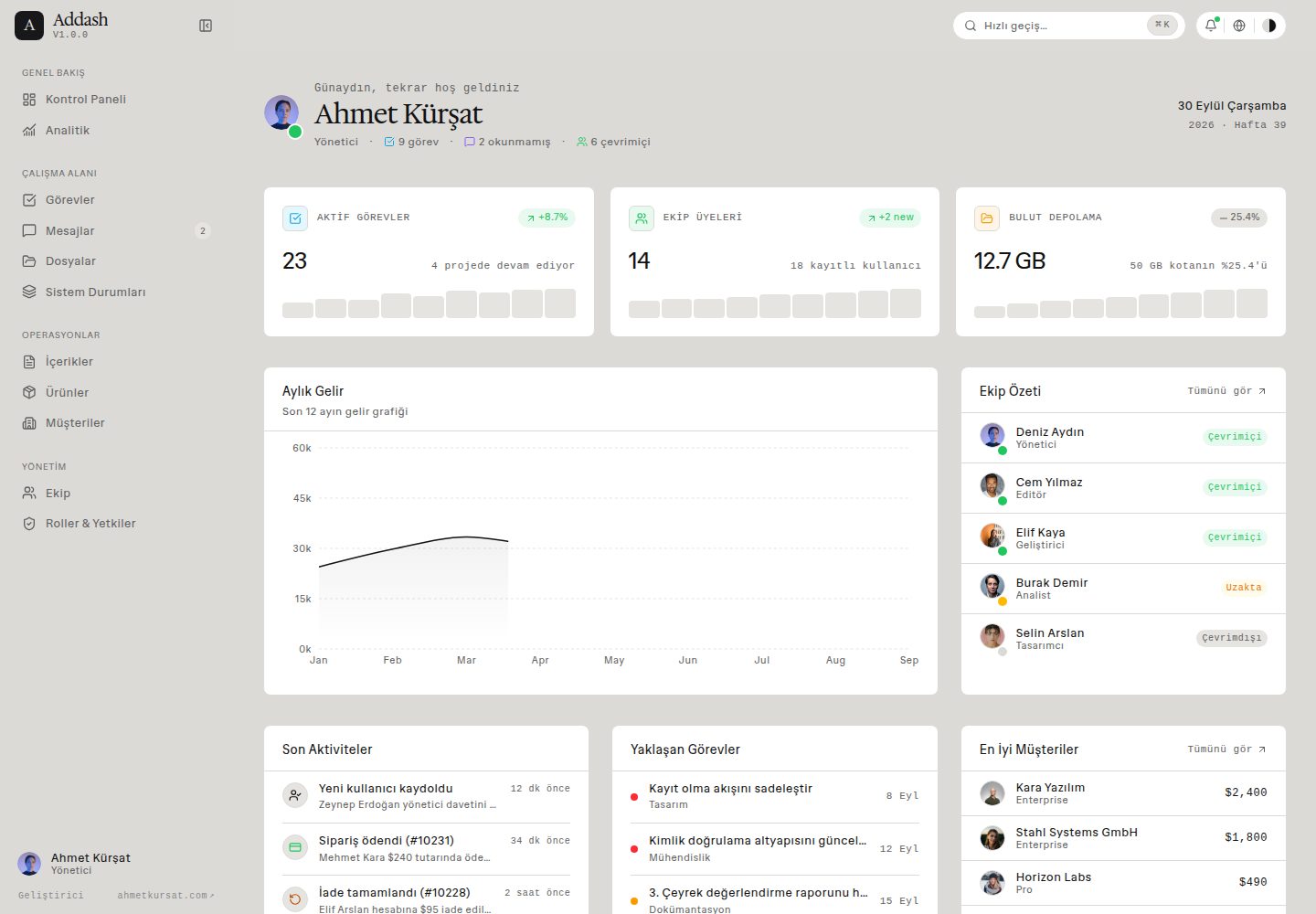
Newspaper editorial design system: 1px hairline borders, flat cards without shadows, high-contrast typography, and colors centrally managed via CSS variables
Next.jsReactAdmin dashboardStarter
addash-template — Next.js Admin dashboard Template
By kursatdemirdelen
Addash is an open-source admin dashboard starter template built with Next.js and React, using a newspaper-editorial design language. It includes 5 themes, 13 UI patterns, and type-safe bilingual i18n, released under the MIT license.
Explore the design
Compare the page layouts and mobile experience. Open any screenshot for a closer look.
Desktop homepage1 / 3
Desktop captureTop of page
Actual screenshot captured by the server browser.
All pages & views 3
Screenshots show visual appearance; interactive behavior may differ.
Recorded 2026-09-30View source
What stands out
A quick read of the recorded project description.
Five built-in themes—Warm, Dark, Ocean, Forest, and Rose. Switching only changes canvas and surface colors, while semantic status colors remain consistent
13 admin UI patterns covering dashboards, analytics, task boards, messages, files, CMS, products, CRM, users, role permissions, notifications, settings, and system state pages
Zero external dependency, type-safe i18n defaulting to Turkish and supporting English, persisted via Zustand and localStorage, switching without page reload
⌘K / Ctrl+K command palette supporting arrow-key navigation, Enter to select, ESC to close, and search for pages using Turkish or English keywords
Modular directory structure (app, components, features, config, hooks, locales, lib, store, types) with local mock data, making it easy to replace by module
Template Details
Addash is a starter template for admin interfaces, built with Next.js App Router, React, and Tailwind CSS, and published under the MIT license. Its design language leans toward newspaper editorial style: 1px hairline borders, flat cards without shadows, high-contrast typography, and semantic colors defined via CSS variables such as parchment, paper, sand, ink, smoke, charcoal, as well as moss, amber, rose, sky, and violet. The template includes five themes—Warm, Dark, Ocean, Forest, and Rose. Switching themes only changes canvas and surface colors, while semantic status colors remain unchanged.
Functionally, the template provides 13 UI patterns covering dashboards, analytics, task boards, message inboxes, file management, content CMS, product catalogs, customer CRM, user lists, role-permission matrices, notification centers, settings pages, and system state pages such as error, unauthorized, loading, empty state, and success receipts. The i18n does not rely on external libraries; it defaults to Turkish and supports English, persists via Zustand and localStorage, and switches languages without page reload. Adding a new language requires adding a dictionary file under src/locales/ that satisfies the Dictionary type. Additionally, a ⌘K / Ctrl+K command palette is provided, supporting keyboard navigation and bilingual keyword search.
The template comes with mock data and a modular directory structure (app, components, features, config, hooks, locales, lib, store, types). The README provides installation and build steps for Node.js v18.18.0 or higher and npm/pnpm/yarn. Note that the template itself does not include a backend, database, or authentication service; page data comes from local sample data. Third-party assets such as demo images, fonts, and icons need separate license verification. External services like domains, hosting, or databases may incur costs.
Next.jsReactAdminStarter
Is it right for your project?
Use Cases
- Building an admin interface prototype for a SaaS product to quickly validate layouts for dashboards, analytics charts, and data tables
- Developing internal enterprise management tools by reusing ready-made interfaces such as task boards, message inboxes, file management, and notification centers
- Building a content management or e-commerce backend by referencing UI patterns for CMS article tables, product catalogs, and inventory status displays
- Designing a CRM or customer portal using pages such as customer lists, account tiers, MRR tracking, and role-permission matrices
- When a multilingual admin is needed, extending other languages based on the existing Turkish/English dictionaries while maintaining type safety
Suitable For
- Front-end developers familiar with Next.js App Router, React, and Tailwind CSS who want to start from a ready-made admin interface
- Product or design teams that need to quickly build a visual prototype of an admin dashboard and connect their own backend API
- Projects that prefer a newspaper editorial style, low-shadow, high-contrast data interface
- Projects that need built-in language switching and theme switching without introducing additional i18n dependencies
Getting started & customization
Use these recorded setup notes alongside the repository instructions for your chosen version.
- 1
Requires Node.js v18.18.0 or higher; package managers can be npm, pnpm, or yarn
- 2
After cloning the repository, run npm install, then start the development server with npm run dev, accessible by default at http://localhost:3000
- 3
For production builds, use npm run build and npm run start
- 4
Template data comes from local sample data under src/lib/mock-data; connecting to a real backend requires replacing the data layer yourself
- 5
Third-party assets such as demo images, fonts, and icons need separate license verification; external services like domains, hosting, and databases may incur additional costs
License & source material
Usage conditions & limitations
Free to use · keep license noticeThis entry covers the free version under the MIT license in the public repository; the free scope applies to that version's code and does not imply that external services or third-party assets are free.
Must comply with when using
- You may use, modify, commercialize, and distribute the code of this version for free.
- When distributing copies or substantial portions of the code, retain the original author's copyright notice and the full MIT license notice.
- The code is provided as is; warranties and limitations of liability are governed by the original license and applicable law.
Additional costs & items to verify
- The project requires Next.js 16, React 19, and Tailwind CSS v4, and needs a correspondingly recent toolchain environment.
- The runtime requires Node.js v18.18.0 or higher.
- You must use one of npm, pnpm, or yarn as the package manager.
- The clone URL in the README is a placeholder your-username and must be replaced with the actual repository address when used.
- The default language is Turkish, and only Turkish and English are fully supported; other languages require self-extension.
- Adding a new language requires adding a dictionary file under src/locales/ that satisfies the Dictionary type definition.
- Theme switching only changes canvas and surface colors; semantic status colors remain fixed across all themes.
- The project is released under the MIT license, allowing free use, modification, and redistribution, but copyright and license notices must be retained.
- Demo images, fonts, icons, and other third-party assets need to be checked under their respective licenses and cannot be judged solely by the code's MIT license.
- External services such as domains, hosting, databases, payments, or AI may incur additional costs.
View Original Text Basis
Permission is hereby granted, free of charge
Original License Text
**Next.js 16 (Turbopack)**, **React 19** ve **Tailwind CSS v4** ile inşa edilmiş
Original README
- **Node.js**: v18.18.0 veya üzeri
Original README
- **Paket Yöneticisi**: npm, pnpm veya yarn
Original README
git clone https://github.com/your-username/addash-template.git
Original README
**Varsayılan Dil**: Türkçe (`TR`) varsayılandır; İngilizce (`EN`) tam olarak desteklenir.
Original README
Yeni bir dil eklemek için `src/locales/` altına tek bir dosya eklemek ve `Dictionary` tipini karşılamak yeterlidir.
Original README
Temalar yalnızca tuval ve yüzey renklerini değiştirir. Anlamsal durum renkleri (*Aktif = Yeşil*, *Askıda = Kırmızı* vb.) tutarlılığı korumak adına tüm temalarda sabit kalır.
Original README
https://github.com/kursatdemirdelen/addash-template/blob/main/LICENSEhttps://github.com/kursatdemirdelen/addash-template/blob/main/README.mdBu proje açık kaynaklıdır ve [MIT Lisansı](LICENSE) altında ücretsizdir.
Original README
Compiled by DeepSeek based on repository license and README ·2026-10-02. Results only cover the materials read; dependencies, images, fonts, and subsequent term changes are subject to their respective original texts.
Project checks & description sources
Template Information
- Source platforms
- GitHub
- Documentation and maintenance reference score
- More documented · 88 / 100
- Technologies
- Next.js · React
- Website type
- Admin dashboard · Starter
How this score is calculated
Our heuristic uses license records (up to 30), a demo link (12), a preview (10), stars (15), recorded maintenance (15), description completeness (8), feature records (5) and classification data (5). It is not a code, security or performance test, or a Google score. A link does not establish tested functionality.
What to verify for this project
- Repository update recorded
- 2026-09-17
- Screenshot last checked
- 2026-10-02
A demo link is listed. Check it with your own content and viewport sizes; its presence does not confirm that forms, authentication or payments work.
The catalog identifies Next.js as the primary stack. Check the actual dependency manifest and lockfile for versions and hosting requirements. These notes use recorded metadata, not a code audit or a deployment test.
Use a selection guide →How this description was prepared
AI-assisted description based on catalog records and repository material. Repository authors are not automatically the reviewers of this description.
Automatically checked against source and license rules; no manual editorial review.
Inspect the recorded source material
SHA-256: f2a86ef155364aa761b331953b3c5bb81a8ce0cd69972b239ee3c0cd91540132
2026-10-02T15:28:49.648Z
Source file / repository# Addash — Modern Yönetim Paneli Şablonu <div align="left"> <strong>🇹🇷 Türkçe (Varsayılan)</strong> · <a href="docs/README.en.md"><strong>🇬🇧 English</strong></a> · <a href="docs/ARCHITECTURE.md"><strong>🏛️ Mimari</strong></a> · <a href="docs/DESIGN.md"><strong>🎨 Tasarım</strong></a> · <a href="docs/SYSTEM-STATES.md"><strong>🚦 Sistem Durumları</strong></a> </div> <br /> <p align="center"> <img src="src/assets/1.png" alt="Addash Admin Template - Genel Bakış" width="100%" /> </p> **Next.js 16 (Turbopack)**, **React 19** ve **Tailwind CSS v4** ile inşa edilmiş; hızlı, sade, çok amaçlı açık kaynaklı yönetim paneli başlangıç şablonu (starter template). MIT lisansı ile tamamen ücretsizdir. > SaaS uygulamaları, şirket içi yönetim araçları, analitik platformları, içerik yönetim sistemleri (CMS), müşteri ilişkileri (CRM) veya müşteri portalları gibi her türlü yönetim arayüzü için en temiz ve en genişletilebilir başlangıç noktası olarak tasarlandı. --- ## 📸 Ekran Görüntüleri & Öne Çıkan Detaylar <p align="center"> <img src="src/assets/2.png" alt="Yüksek Performans & Turbopack" width="49%" /> <img src="src/assets/3.png" alt="Modern Teknoloji Altyapısı" width="49%" /> </p> <p align="center"> <img src="src/assets/4.png" alt="5 Hazır Tema Desteği" width="49%" /> <img src="src/assets/5.png" alt="Dil Desteği ve Hazır Modüller" width="49%" /> </p> <p align="center"> <img src="src/assets/6.png" alt="Hazır Sistem Durumları & Açık Kaynak" width="70%" /> </p> --- ## ✨ Özellikler & 13 Gerçekçi Arayüz Modeli Addash yalnızca tek bir gösterge paneli değil, modern yönetim panellerinde ihtiyaç duyulan tüm arayüz modellerini içerir: 1. **Kontrol Paneli (`/dashboard`)** — Operasyonel iş akışı görünümü, ekip nabzı sayaçları, mini grafikli (sparkline) özelleştirilebilir KPI kartları, aktif ekip avatarları ve son aktiviteler akışı. 2. **Analitik (`/analytics`)** — 6 metrikli yatay skorkart, çift grafik (alan gelir trendi + aylık net kâr/gider sütun grafiği) ve kâr marjı ilerleme çubuklu detaylı dönem tablosu. 3. **Görevler (`/tasks`)** — Kanban panosu modeli; kolonlar (*Yapılacak, Devam Ediyor, Tamamlandı*), öncelik etiketleri, görevli avatarları ve son teslim tarihleri. 4. **Mesajlar (`/messages`)** — Bölünmüş görünüm (split-view) gelen kutusu modeli; arama filtresi, okundu/okunmadı durumları, yıldızlı mesajlar, etiketler ve doğrudan hızlı yanıt çubuğu. 5. **Dosyalar (`/files`)** — Liste/ızgara görünüm seçeneği, kota ilerleme çubuğu, dosya tipi ikonları ve paylaşım göstergeleri içeren bulut dosya yöneticisi. 6. **İçerikler (`/posts`)** — Durum sekmeleri (*Yayında, Taslak, Zamanlandı*), kelime sayısı, okuma süresi ve yazar avatarları içeren CMS / blog tablosu. 7. **Ürünler (`/products`)** — Ürün görsel önizlemeleri, envanter doluluk çubukları ve stok durumu rozetleri içeren e-ticaret katalog modeli. 8. **Müşteriler (`/customers`)** — Hesap kademeleri (*Enterprise, Pro, Starter*), aylık gelir (MRR) takibi, durum rozetleri ve iletişim aksiyonları sunan CRM dizini. 9. **Ekip Yönetimi (`/users`)** — Arama, sıralama, durum hapları ve detay çekmeceleri içeren kullanıcı listesi tablosu. 10. **Roller & Yetkiler (`/roles`)** — Rol özet kartları ve gruplandırılmış tam RBAC (Role-Based Access Control) yetki matrisi. 11. **Bildirimler (`/notifications`)** — Zaman çizgisiyle gruplandırılmış (*Bugün, Dün, Bu Hafta*), tek tıkla okundu işaretleme ve tip rozetleri içeren bildirim merkezi. 12. **Ayarlar (`/settings`)** — Genel profil, hesap güvenlik anahtarları (passkey) ve çalışma alanını silme (danger zone) sekmeleri. 13. **Sistem Durumları & İstisnalar (`/states`)** — Editoryal hata sınırları (`error.tsx`), yetkisiz erişim ekranı (`/forbidden`), akıcı yükleme iskeletleri (`loading.tsx`), boş durum şablonları ve işlem onay makbuzu (`/success`). --- ## 🎨 Tasarım Sistemi & 5 Hazır Tema İnce 1px sınır çizgileri (hairline borders), yapay gölgelerden arındırılmış düz yüzeyler ve yüksek kontrastlı tipografi ile zenginleştirilmiş gazete / editoryal broadsheet tasarım dili: | Token | Varsayılan Renk | Anlam ve Kullanım Amacı | |---|---|---| | `parchment` | `#dbdad7` | Tuval arka planı ve 1px ince sınır çizgileri | | `paper` | `#ffffff` | Yükseltilmiş kart ve form yüzeyleri | | `sand` | `#e6e4e0` | Hover durumları, sekmeler, tablo başlıkları | | `ink` | `#121212` | Yüksek kontrastlı ana metin ve başlıklar | | `smoke` | `#616161` | İkincil etiketler, zaman damgaları, yumuşak sınırlar | | `charcoal` | `#18181b` | Koyu renkli ana buton dolguları | | `moss` | `#22c55e` | Aktif durum, başarı göstergeleri, Üye (Member) rolü | | `amber` | `#f59e0b` | Uyarılar, bekleyen durumlar, Analist (Analyst) rolü | | `rose` | `#f43f5e` | Hatalar, yüksek öncelik, tehlikeli bölge | | `sky` | `#0ea5e9` | Bilgi rozetleri, bağlantılar, Editör (Editor) rolü | | `violet` | `#8b5cf6` | Yönetici (Admin) rolü, öne çıkan etiketler, kurumsal kademe | ### 🌗 Anında Tema Değişimi Üst menüdeki palet butonuyla tek tıkla temalar arasında geçiş yapabilirsiniz: - **Warm** (Varsayılan) — Kremsi parşömen kağıdı ve koyu mürekkep tipografisi. - **Dark** — Göz yormayan, ince sınırlara sahip modern antrasit/kömür teması. - **Ocean** — Arduvaz ve deniz mavisi tonları. - **Forest** — Mat çam yeşili ve adaçayı vurguları. - **Rose** — Sıcak bordo kontrastına sahip editoryal pembe/gül tuvali. > **Semantik Güvenlik**: Temalar yalnızca tuval ve yüzey renklerini değiştirir. Anlamsal durum renkleri (*Aktif = Yeşil*, *Askıda = Kırmızı* vb.) tutarlılığı korumak adına tüm temalarda sabit kalır. --- ## 🌐 Uçtan Uca Çoklu Dil Desteği (i18n) Addash, harici kütüphane bağımlılığı olmayan, sıfır gecikmeli ve tam tip güvenliğine (type-safe) sahip bir i18n altyapısıyla gelir: - **Varsayılan Dil**: Türkçe (`TR`) varsayılandır; İngilizce (`EN`) tam olarak desteklenir. - **Üst Menü Düğmesi**: Üst bardaki dil değiştirici (`[ 🌐 TR ]` / `[ 🌐 EN ]`) ile anında dil değişimi. - **Sayfa Yenileme Gerektirmez**: Zustand store ve `localStorage` üzerinde reaktif olarak çalışır; arama, filtre ve form durumlarınızı korur. - **%100 Kapsam**: Tüm sayfalar, kırıntı menüler (breadcrumbs), tablo kolonları, durum mesajları ve form etiketleri seçilen dile dinamik olarak uyum sağlar. - **Genişletilebilir**: Yeni bir dil eklemek için `src/locales/` altına tek bir dosya eklemek ve `Dictionary` tipini karşılamak yeterlidir. --- ## 🚀 Hızlı Komut Paleti (`⌘K` / `/`) Klavyeden `⌘K` (veya Windows'ta `Ctrl+K` ya da üst bardaki "Hızlı geçiş…" kutusuna tıklayarak) erişebileceğiniz hızlı yönlendirme menüsü: - **Klavye ile Gezinme**: `↑` / `↓` ok tuşları ile gezin, `Enter` ile seç, `ESC` ile kapat. - **Türkçe ve İngilizce Arama**: Sayfalara hem Türkçe hem İngilizce anahtar kelimelerle erişebilirsiniz (*"görev"*, *"tasks"*, *"kullanıcılar"*, *"analytics"*, vb.). - **Donanım Hızlandırmalı**: GPU'yu yoran ağır arka plan bulanıklıkları yerine saf donanım ivmeli şeffaflık ile 60+ FPS hızında açılır. --- ## 📁 Proje Klasör Yapısı ``` src/ ├── app/ # Next.js 16 App Router (22 rota) │ ├── (auth)/login/ # Giriş sayfası │ └── (dashboard)/ # Yönetim paneli çalışma alanı rotaları │ ├── dashboard/ # Operasyonel genel bakış │ ├── analytics/ # Derinlemesine grafikler ve dönem tablosu │ ├── tasks/ # Kanban görev panosu │ ├── messages/ # Bölünmüş gelen kutusu │ ├── files/ # Bulut dosya yöneticisi │ ├── posts/ # İçerik ve CMS tablosu │ ├── products/ # Ürün ve stok kataloğu │ ├── customers/ # CRM müşteri dizini │ ├── users/ # Ekip üyeleri ve detay çekmecesi │ ├── roles/ # RBAC yetki matrisi │ ├── notifications/ # Bildirim merkezi │ ├── settings/ # Profil, hesap ve güvenlik ayarları │ ├── forbidden/ # 403 yetkisiz erişim görünümü │ ├── success/ # 200 işlem başarılı görünümü │ └── states/ # İnteraktif sistem durumları galerisi ├── components/ │ ├── ui/ # Temel UI bileşenleri (Button, Card, Badge, Dialog...) │ ├── layout/ # AppShell, Sidebar, Header, ThemeSwitcher, LanguageSwitcher │ ├── data-display/ # StatCard, DataTable, Metric │ ├── feedback/ # EmptyState, AccessDeniedCard, SuccessState │ └── navigation/ # NavItem, Breadcrumbs, UserMenu ├── features/ # Modüler alanlar (sayfalar, tablolar, widget'lar) ├── config/ │ ├── site.ts # Site kimliği ve varsayılan kullanıcı profili │ ├── navigation.ts # İki dilli menü yapısı │ └── roles.ts # RBAC rol ve yetki tanımları ├── hooks/ │ └── use-translation.ts # Tip güvenli çeviri hook'u ├── locales/ # Çeviri sözlükleri (tr.ts varsayılan, en.ts, types.ts) ├── lib/ │ ├── utils.ts # Sınıf birleştirme (cn) ve formatlayıcılar │ └── mock-data/ # Modüler örnek veri setleri ├── store/ │ └── app-store.ts # Zustand: menü, tema ve dil kalıcılığı (Varsayılan TR) └── types/ # Ortak TypeScript tipleri ``` --- ## 🛠️ Hızlı Başlangıç ### Ön Koşullar - **Node.js**: v18.18.0 veya üzeri - **Paket Yöneticisi**: npm, pnpm veya yarn ### Kurulum ```bash # Projeyi klonlayın git clone https://github.com/your-username/addash-template.git cd addash-template # Bağımlılıkları yükleyin npm install # Geliştirme sunucusunu başlatın (Turbopack) npm run dev ``` Tarayıcınızda [http://localhost:3000](http://localhost:3000) adresini açın. ### Canlıya Alma (Production Build) ```bash npm run build npm run start ``` --- ## 🤝 Katkıda Bulunma & Özelleştirme - Temaları özelleştirmek için `src/app/globals.css` dosyasını düzenleyin. - Yeni bir dil eklemek için `src/locales/[dil].ts` oluşturup `src/locales/index.ts` dosyasına kaydedin. - Yeni bir sayfa eklemek için `src/features/` altında yeni bir modül açıp `src/config/navigation.ts` dosyasına ekleyin. --- ## 👨💻 Yazar Özenle geliştiren: **[Ahmet Kürşat](https://ahmetkursat.com)**. --- ## 📄 Lisans Bu proje açık kaynaklıdır ve [MIT Lisansı](LICENSE) altında ücretsizdir.
Explore similar templates
Compare previews and descriptions within the same stack and category.

Next.js SaaS Starter
The official Next.js SaaS starter template, integrating email/password authentication, Stripe Checkout subscriptions, a dashboard with user/team CRUD, basic Owner/Member RBAC, and activity logging.
Next.js · SaaS

Next.js Commerce
Vercel's officially maintained Next.js App Router ecommerce starter with deep Shopify integration, offering a complete product catalog, cart, and checkout flow. Core logic is modular for swapping backends, and community provider versions exist for BigCommerce, Medusa, and Saleor.
Next.js · E-commerce

Next-js-Boilerplate
A developer-first Next.js 16 starter with Tailwind CSS 4 and TypeScript, supporting both App Router and Page Router.
Next.js · Starter

tailwind-nextjs-starter-blog
A Next.js and Tailwind CSS blog starter template using Contentlayer for Markdown/MDX, with built-in SEO, code highlighting, and tags. It targets personal technical blogs and migration from Jekyll/Hugo to React, and supports one-click Vercel deployment.
Next.js · Blog

next-forge
next-forge is a Turborepo-based Next.js template maintained by Vercel, positioned as a starting point for SaaS products.
Next.js · Starter

SaaS-Boilerplate
SaaS-Boilerplate is an open-source SaaS starter template built with Next.js App Router, React 19, TypeScript, Tailwind CSS, and Shadcn UI.
Next.js · SaaS