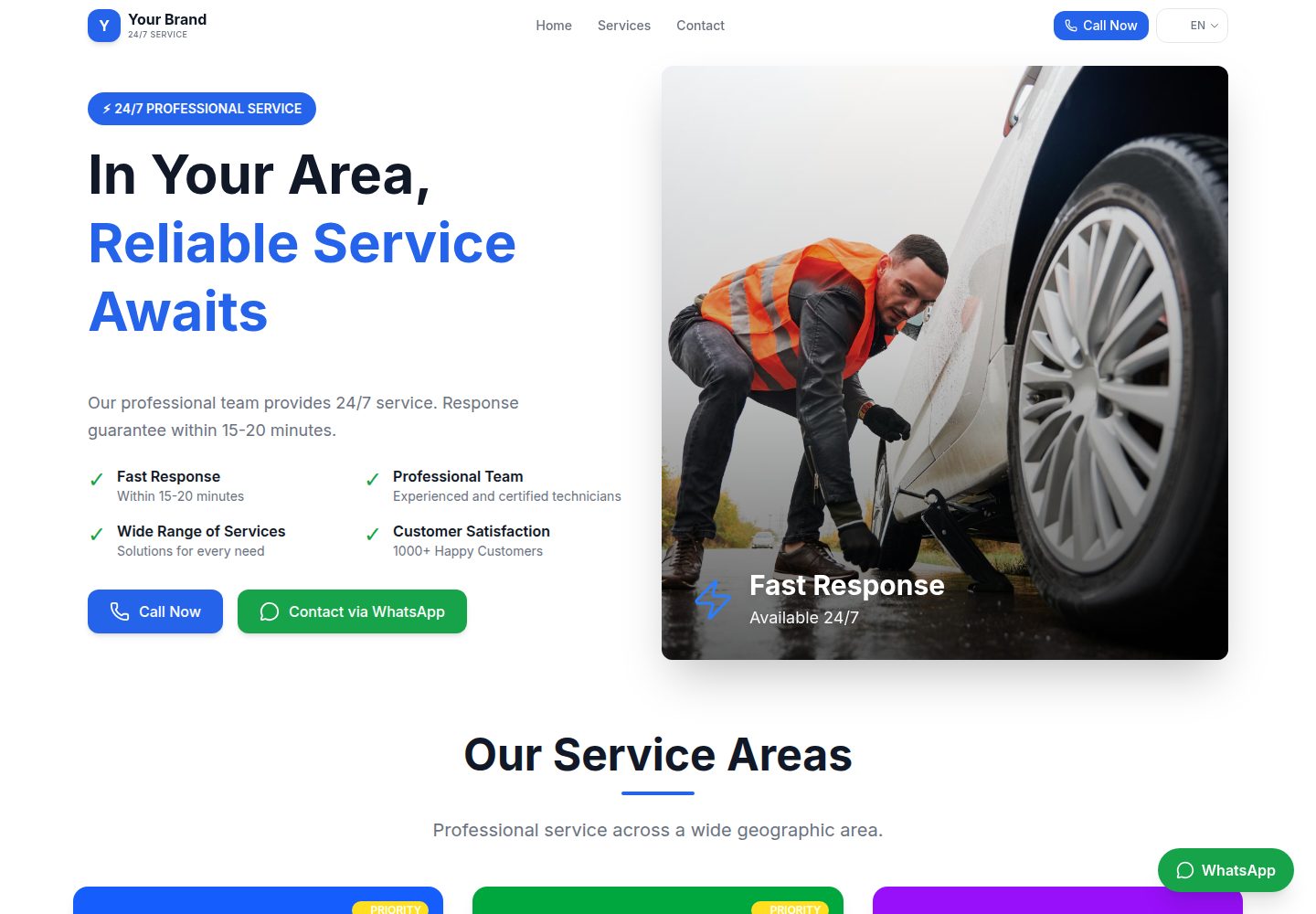
Turkish and English translations are built in; the README states languages can be extended by adding messages files and registering locales
Next.jsReactStarter
roadside-assistance-nextjs-template — Next.js Starter Template
By kursatdemirdelen
A multilingual business website template built on Next.js and next-intl. The README states it targets 24/7 service businesses such as roadside assistance and towing, and is also suitable for other business sites, with Turkish and English built in.
Explore the design
Compare the page layouts and mobile experience. Open any screenshot for a closer look.
Desktop homepage1 / 2
Desktop captureTop of page
Actual screenshot captured by the server browser.
All pages & views 2
Screenshots show visual appearance; interactive behavior may differ.
Recorded 2026-10-14View source
What stands out
A quick read of the recorded project description.
Components are organized into layers such as ui, common, layout, sections, and widgets, with usage examples for Button, SectionHeader, and CTAButtonGroup
config/site.ts, config/regions.ts, and config/whatsapp.ts centrally manage site, service region, and WhatsApp configuration
The README states it includes SEO-related configuration such as meta tags, JSON-LD, and sitemap
Provides optional environment variable integration for Google Analytics and Google Tag Manager
Provides npm run validate and npm run validate:i18n for code and translation file validation
Template Details
This is a front-end template for multilingual business websites, from the repository kursatdemirdelen/roadside-assistance-nextjs-template. The README states it provides Turkish and English by default, and additional languages can be added by creating new translation files in the messages/ directory and registering the language in the locales array in i18n/routing.ts. The template organizes components by page section, including directories such as ui, common, layout, sections, and widgets, and provides reusable component examples such as Button, SectionHeader, and CTAButtonGroup.
Configuration is centralized in the config/ directory: site.ts for site name, phone, email, colors, and SEO settings; regions.ts for defining service regions (slug, name, description, subregions); and whatsapp.ts for WhatsApp-related settings. Environment variables include the site URL, WhatsApp phone, and optional Google Analytics, Google Tag Manager, and Google site verification IDs. The README mentions that the template includes SEO-related configuration such as meta tags, JSON-LD, and sitemap, and supports a WhatsApp contact entry point.
The README does not provide runtime performance data, browser compatibility ranges, accessibility support levels, or production environment validation results for the template, nor does it describe specific deployment steps for platforms other than Vercel. The screenshots only demonstrate that desktop and mobile preview pages exist and do not constitute additional description of page functionality.
Next.jsStarter
Is it right for your project?
Use Cases
- Building a multilingual showcase site for 24/7 service businesses such as roadside assistance, towing, and emergency services
- Business websites that need Turkish and English bilingual pages and organize service descriptions by region
- Sites where site information, service regions, and contact details are adjusted centrally through config files
- Business sites that need a quick WhatsApp contact entry point and basic SEO configuration
Suitable For
- Front-end developers familiar with Next.js and TypeScript who want to build on an existing component structure
- Teams that need a multilingual business website and can maintain translation files themselves
- Businesses focused on local services such as roadside assistance and towing that need to present service coverage by region
Getting started & customization
Use these recorded setup notes alongside the repository instructions for your chosen version.
- 1
After cloning the repository, run npm install to install dependencies, copy .env.example to .env.local and fill in environment variables, then run npm run dev to start the development server
- 2
Required environment variables are NEXT_PUBLIC_SITE_URL and NEXT_PUBLIC_WHATSAPP_PHONE; optional variables include NEXT_PUBLIC_GA_ID, NEXT_PUBLIC_GTM_ID, and NEXT_PUBLIC_GOOGLE_VERIFICATION
- 3
Set the business name, phone, email, colors, and SEO in config/site.ts, define service regions in config/regions.ts, and configure WhatsApp in config/whatsapp.ts
- 4
To add a language, add a translation file in messages/, register it in the locales array in i18n/routing.ts, and validate with npm run validate:i18n
- 5
The README recommends deploying to Vercel: push to GitHub, connect to Vercel, add environment variables, and deploy; for other platforms it only states that any platform supported by Next.js can run it, without specific steps
License & source material
Usage conditions & limitations
Free to use · keep license noticeThis entry covers the free version in a public repository under the MIT license; the free scope is the code of that version and does not mean external services or third-party assets are free.
Must comply with when using
- Free use, modification, commercial use, and distribution of this version's code are permitted.
- When distributing copies or substantial portions of the code, retain the original author's copyright notice and the full MIT license notice.
- The code is provided as is; warranties and limitations of liability are governed by the original license and applicable law.
Additional costs & items to verify
- Demo images, fonts, icons, and other third-party assets must be checked against their respective licenses and cannot be judged solely by the code's MIT license.
- External services such as domains, hosting, databases, payments, or AI may incur separate charges.
- Using the WhatsApp contact feature requires configuring a WhatsApp phone number in the environment variables (NEXT_PUBLIC_WHATSAPP_PHONE).
- Enabling Google Analytics requires providing your own GA measurement ID (NEXT_PUBLIC_GA_ID), which is an optional external service configuration.
- Enabling Google Tag Manager requires providing your own GTM container ID (NEXT_PUBLIC_GTM_ID), which is an optional external service configuration.
- Using Google site verification requires providing your own verification code (NEXT_PUBLIC_GOOGLE_VERIFICATION), which is an optional external service configuration.
- Before deployment, NEXT_PUBLIC_SITE_URL must be set to the actual site address.
View Original Text Basis
Permission is hereby granted, free of charge
Original License Text
NEXT_PUBLIC_WHATSAPP_PHONE=905551234567
Original README
NEXT_PUBLIC_GA_ID=G-XXXXXXXXXX
Original README
NEXT_PUBLIC_GTM_ID=GTM-XXXXXXX
Original README
NEXT_PUBLIC_GOOGLE_VERIFICATION=your-verification-code
Original README
https://github.com/kursatdemirdelen/roadside-assistance-nextjs-template/blob/main/LICENSEhttps://github.com/kursatdemirdelen/roadside-assistance-nextjs-template/blob/main/README.mdNEXT_PUBLIC_SITE_URL=https://sitenin-adresi.com
Original README
Compiled by DeepSeek based on repository license and README ·2026-10-14. Results only cover the materials read; dependencies, images, fonts, and subsequent term changes are subject to their respective original texts.
Project checks & description sources
Template Information
- Source platforms
- GitHub
- Documentation and maintenance reference score
- More documented · 80 / 100
- Technologies
- Next.js · React
- Website type
- Starter
How this score is calculated
Our heuristic uses license records (up to 30), a demo link (12), a preview (10), stars (15), recorded maintenance (15), description completeness (8), feature records (5) and classification data (5). It is not a code, security or performance test, or a Google score. A link does not establish tested functionality.
What to verify for this project
- Repository update recorded
- 2026-01-01
- Screenshot last checked
- 2026-10-14
A demo link is listed. Check it with your own content and viewport sizes; its presence does not confirm that forms, authentication or payments work.
The catalog identifies Next.js as the primary stack. Check the actual dependency manifest and lockfile for versions and hosting requirements. These notes use recorded metadata, not a code audit or a deployment test.
Use a selection guide →How this description was prepared
AI-assisted description based on catalog records and repository material. Repository authors are not automatically the reviewers of this description.
Review declaration: codex-user-requested-batch-review-20261015 · 2026-10-15
Inspect the recorded source material
SHA-256: fe142d3f010782e0dc36be8b77505d7a8f3dc0edb832d1f7e91c64e420bfda2a
2026-10-14T15:16:54.813Z
Source file / repository# 🚀 Next.js Business Website Template
**Languages / Diller:**
- [English (README.en.md)](README.en.md) 🇬🇧
- [Türkçe (README.tr.md)](README.tr.md) 🇹🇷
---
## 📸 Screenshot'lar
### Ana Sayfa (Turkish)

### Hizmet Sayfası (English)

---
Merhaba! Bu, çok dilli işletme web siteleri için hazırladığım temiz ve modern bir Next.js şablonu. SEO dostu, hızlı ve özelleştirmesi kolay.
Hello! This is a clean and modern Next.js template I prepared for multilingual business websites. SEO-friendly, fast, and easy to customize.
Yol yardımı, çekici hizmeti, acil servis gibi 7/24 hizmet veren işletmeler için biçilmiş kaftan. Ama istersen herhangi bir işletme sitesi için de rahatlıkla kullanabilirsin.
Perfect for 24/7 service businesses like roadside assistance, towing services, emergency services. But you can easily use it for any business website.
## ✨ Özellikler
- 🌍 **Çoklu Dil Desteği** - Türkçe ve İngilizce hazır, yeni dil eklemek çok kolay
- 📱 **Tam Responsive** - Mobil, tablet, masaüstü her yerde güzel görünüyor
- 🎨 **Modüler Bileşen Mimarisi** - Temiz, bakımı kolay kod yapısı
- 🔍 **SEO Optimizasyonu** - Meta taglar, JSON-LD, sitemap hazır
- 💬 **WhatsApp Entegrasyonu** - Tek tıkla müşteri iletişimi
- 📊 **Analytics Desteği** - Google Analytics ve Tag Manager hazır
- ⚡ **Tailwind CSS v4** - Modern, hızlı stil sistemi
## 🛠️ Teknolojiler
| Teknoloji | Versiyon | Ne İçin |
|-----------|----------|---------|
| Next.js | 16 | React framework |
| TypeScript | 5 | Tip güvenliği |
| Tailwind CSS | 4 | Stil sistemi |
| next-intl | 4 | Çoklu dil |
---
## 🏁 Hızlı Başlangıç
```bash
# Repoyu klonla
git clone https://github.com/yourusername/your-repo.git
cd your-repo
# Bağımlılıkları yükle
npm install
# Ortam değişkenlerini ayarla
cp .env.example .env.local
# Geliştirme sunucusunu başlat
npm run dev
```
Tarayıcıda `http://localhost:3000` adresine git ve sitenin çalıştığını gör! 🎉
---
## 📁 Proje Yapısı
```
app/
├── components/
│ ├── ui/ # Atomik bileşenler (Button, Badge, Divider)
│ ├── common/ # Tekrar kullanılan bileşenler (SectionHeader, FeatureCard)
│ ├── layout/ # Header, Footer, Navigation
│ ├── sections/ # Sayfa bölümleri (CTABanner)
│ └── widgets/ # Yardımcı bileşenler (WhatsAppButton, LanguageSwitcher)
├── [locale]/ # Dil bazlı sayfalar
│ ├── page.tsx # Ana sayfa
│ └── [regionSlug]/ # Bölge sayfaları
config/
├── site.ts # Site ayarları
├── regions.ts # Hizmet bölgeleri
└── whatsapp.ts # WhatsApp ayarları
messages/
├── tr.json # Türkçe çeviriler
└── en.json # İngilizce çeviriler
```
---
## ⚙️ Yapılandırma
### Site Ayarları (`config/site.ts`)
İşletme adı, telefon, e-posta, renkler ve SEO ayarlarını buradan değiştir.
### Bölgeler (`config/regions.ts`)
Hizmet verdiğin bölgeleri tanımla. Her bölge için slug, isim, açıklama ve alt bölgeler ekleyebilirsin.
### Ortam Değişkenleri (`.env.local`)
```env
NEXT_PUBLIC_SITE_URL=https://sitenin-adresi.com
NEXT_PUBLIC_WHATSAPP_PHONE=905551234567
# Opsiyonel
NEXT_PUBLIC_GA_ID=G-XXXXXXXXXX
NEXT_PUBLIC_GTM_ID=GTM-XXXXXXX
NEXT_PUBLIC_GOOGLE_VERIFICATION=your-verification-code
```
---
## 🌍 Yeni Dil Ekleme
1. `messages/` klasöründe yeni bir dosya oluştur (örn: `de.json`)
2. `en.json` dosyasını kopyala ve çevirileri yap
3. `i18n/routing.ts` dosyasında `locales` dizisine yeni dili ekle
4. `npm run validate:i18n` ile kontrol et
---
## 🧩 Bileşen Kullanımı
### Button
```tsx
import { Button } from "@/components/ui";
<Button variant="primary" size="lg" icon={<Phone />}>
Hemen Ara
</Button>
```
Varyantlar: `primary`, `secondary`, `outline`, `ghost`, `dark`
### SectionHeader
```tsx
import { SectionHeader } from "@/components/common";
<SectionHeader
title="Hizmetlerimiz"
subtitle="7/24 profesyonel destek"
/>
```
### CTAButtonGroup
```tsx
import { CTAButtonGroup } from "@/components/common";
<CTAButtonGroup
phoneText="Hemen Ara"
whatsappText="WhatsApp"
/>
```
---
## 📋 Komutlar
| Komut | Ne Yapar |
|-------|----------|
| `npm run dev` | Geliştirme sunucusunu başlatır |
| `npm run build` | Prodüksiyon build'i alır |
| `npm run start` | Prodüksiyon sunucusunu başlatır |
| `npm run lint` | Kod kalitesini kontrol eder |
| `npm run validate` | Lint + i18n kontrolü yapar |
| `npm run validate:i18n` | Çeviri dosyalarını kontrol eder |
---
## 🚀 Yayınlama
### Vercel (Önerilen)
1. GitHub'a push'la
2. [Vercel](https://vercel.com)'e bağlan
3. Ortam değişkenlerini ekle
4. Deploy! 🎉
### Diğer Platformlar
Next.js'in desteklediği herhangi bir platformda çalışır: Netlify, Railway, DigitalOcean, AWS Amplify...
---
## 🤝 Katkıda Bulunma
1. Fork'la
2. Branch oluştur (`git checkout -b feature/harika-ozellik`)
3. Değişikliklerini commit'le
4. `npm run validate` ile kontrol et
5. Pull request aç
Herhangi bir sorun veya önerin varsa issue açmaktan çekinme!
---
## 📄 Lisans
MIT Lisansı - istediğin gibi kullan, değiştir, dağıt. Sadece bir yıldız bırakırsan sevinirim ⭐
---
## 💡 İpuçları
- Görselleri `public/images/` klasörüne koy
- Renkleri `app/globals.css` içindeki `@theme` bloğundan değiştir
- Yeni bileşen eklerken `components/ui/` veya `components/common/` kullan
- SEO için `config/site.ts` dosyasını doldur
---
Sorular için issue aç veya PR gönder. İyi kodlamalar! 🚀
Explore similar templates
Compare previews and descriptions within the same stack and category.

Next.js SaaS Starter
The official Next.js SaaS starter template, integrating email/password authentication, Stripe Checkout subscriptions, a dashboard with user/team CRUD, basic Owner/Member RBAC, and activity logging.
Next.js · SaaS

Next.js Commerce
Vercel's officially maintained Next.js App Router ecommerce starter with deep Shopify integration, offering a complete product catalog, cart, and checkout flow. Core logic is modular for swapping backends, and community provider versions exist for BigCommerce, Medusa, and Saleor.
Next.js · E-commerce

Next-js-Boilerplate
A developer-first Next.js 16 starter with Tailwind CSS 4 and TypeScript, supporting both App Router and Page Router.
Next.js · Starter

tailwind-nextjs-starter-blog
A Next.js and Tailwind CSS blog starter template using Contentlayer for Markdown/MDX, with built-in SEO, code highlighting, and tags. It targets personal technical blogs and migration from Jekyll/Hugo to React, and supports one-click Vercel deployment.
Next.js · Blog

next-forge
next-forge is a Turborepo-based Next.js template maintained by Vercel, positioned as a starting point for SaaS products.
Next.js · Starter

SaaS-Boilerplate
SaaS-Boilerplate is an open-source SaaS starter template built with Next.js App Router, React 19, TypeScript, Tailwind CSS, and Shadcn UI.
Next.js · SaaS