Static site generation based on Eleventy, using Nunjucks layouts and Markdown-first writing
EleventyStarter
retro-garden-eleventy-theme — Eleventy Starter Template
By kylereddoch
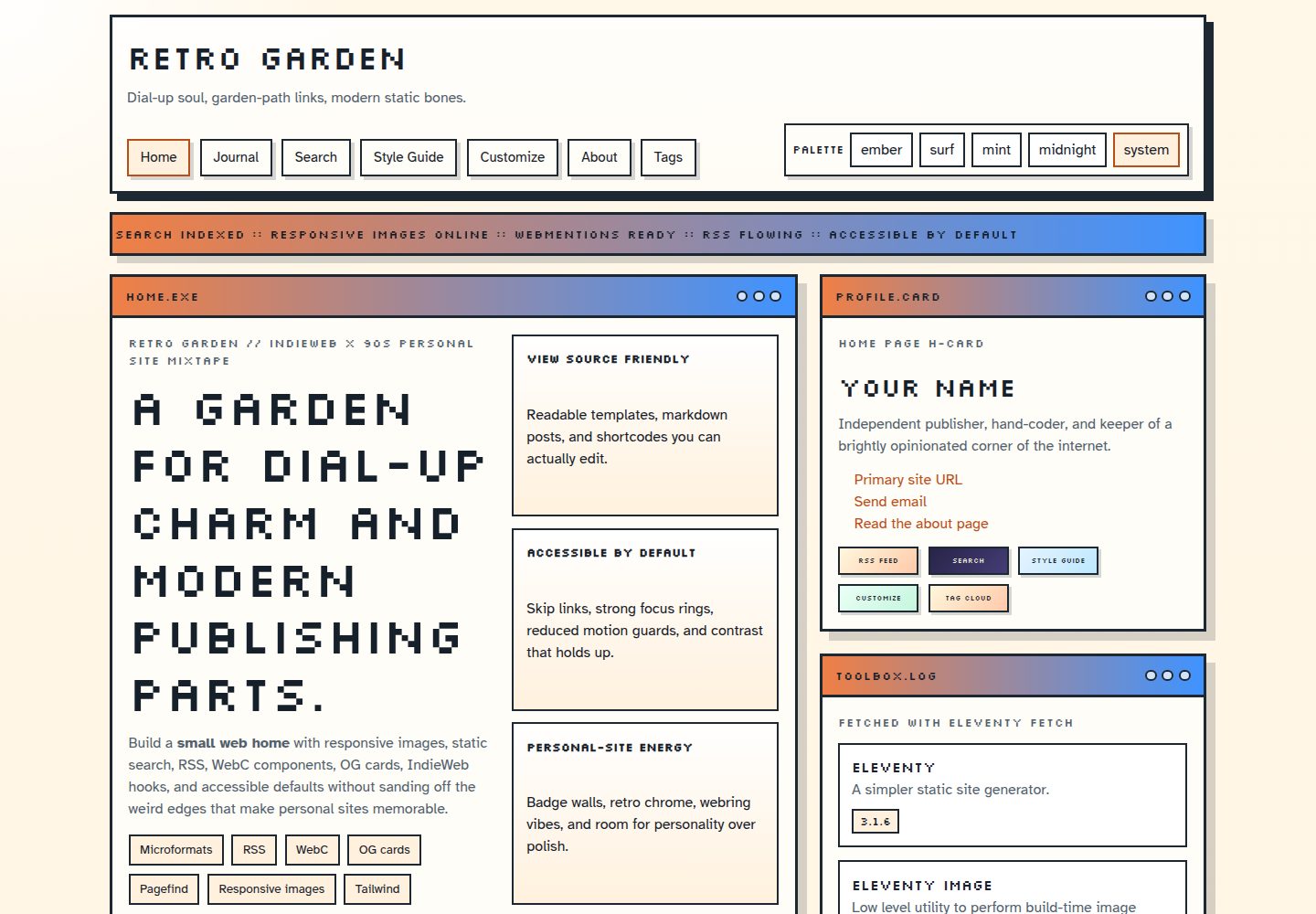
Retro Garden is an open source personal site theme built on Eleventy, combining WebC components, palette switching, RSS, OG image generation, and accessible defaults, suitable for static blogs that want to try IndieWeb publishing habits.
Explore the design
Compare the page layouts and mobile experience. Open any screenshot for a closer look.
Desktop homepage1 / 3
Desktop captureTop of page
Actual screenshot captured by the server browser.
All pages & views 3
Screenshots show visual appearance; interactive behavior may differ.
Recorded 2026-09-30View source
What stands out
A quick read of the recorded project description.
WebC components and is-land progressive enhancement, paired with Tailwind CSS and custom retro component styles
Built-in Pagefind static search, with no hosting service or search analytics required
Build-time OG image generation, with support for RSS and JSON feed, sitemap, robots, and web manifest
Palette switching for Ember, Surf, Mint, Midnight, and follow-system mode
Includes post pagination, reading time, tag archives, breadcrumbs, previous/next metadata, and article share links
Template Details
Retro Garden is an Eleventy starter for personal sites, positioned to keep early-web personality and IndieWeb publishing habits while using modern build tools. The theme primarily uses Nunjucks layouts and Markdown writing, paired with WebC components and is-land progressive enhancement, and includes built-in Pagefind static search, responsive images, pagination, RSS/JSON feed, sitemap, robots, web manifest, and a themed 404 page.
At the content level, it provides post pagination, reading time, tag archives, breadcrumbs, previous/next metadata, and article share links with copy to clipboard. Site identity, navigation, palettes, social links, and feature toggles are centralized in src/_data/site.js. The default palettes include Ember, Surf, Mint, Midnight, and a follow-system mode.
Regarding usage limitations, analytics (Tinylytics) and webmentions are disabled by default in a fresh clone and require environment variables to enable; Pagefind search runs entirely on generated static files. The theme is a static site and can be deployed to any host that can run npm run build and publish the _site/ directory. A Vercel preset file is included; Netlify, Cloudflare Pages, and GitHub Pages require setting the build command and output directory yourself. The licenses for third-party assets such as demo images, fonts, and icons must be checked separately and cannot be judged solely by the code's MIT license.
EleventyStarter
Is it right for your project?
Use Cases
- Building a personal blog or digital garden with an early-web visual style
- Adding IndieWeb author markup, rel=me, and a configurable webmention endpoint to an existing static site
- Content sites that need local static search, responsive images, and build-time OG image generation
- Publishing a static personal site on Vercel, Netlify, Cloudflare Pages, or GitHub Pages
Suitable For
- Developers familiar with Markdown and Nunjucks who want to build a personal site with Eleventy
- Personal bloggers who want to try IndieWeb publishing habits while keeping a modern build workflow
- Static site authors who need multiple palette switching, static search, and RSS output
- Users willing to configure environment variables themselves to enable analytics or webmentions
Getting started & customization
Use these recorded setup notes alongside the repository instructions for your chosen version.
- 1
After cloning the repository, run npm install, then use npm run start to preview locally
- 2
Edit site identity, author, navigation, palettes, social links, and feature toggles in src/_data/site.js
- 3
Set the SITE_URL environment variable before deployment to ensure feeds, canonical, and OG metadata use the correct domain
- 4
Analytics, webmentions, and pingback are disabled by default and must be enabled via variables such as TINYLYTICS_ID, WEBMENTION_ENDPOINT, PINGBACK_ENDPOINT, and WEBMENTION_API
- 5
Run npm run check before submitting template, style, or build-related changes to execute the build and all validation steps
License & source material
Usage conditions & limitations
Free to use · keep license noticeThis entry covers the free version under the MIT license in the public repository; the free scope is the code of that version and does not mean external services or third-party assets are free.
Must comply with when using
- You may use, modify, commercially use, and distribute the code of this version for free.
- When distributing copies or substantial portions of the code, retain the original author's copyright notice and the full MIT license notice.
- The code is provided as is; warranties and limitations of liability are governed by the original license and applicable law.
Additional costs & items to verify
- Analytics (Tinylytics) and webmentions are disabled by default in a fresh clone and require configuring environment variables (such as TINYLYTICS_ID, WEBMENTION_ENDPOINT, WEBMENTION_API) to enable.
- The optional analytics feature depends on the third-party service Tinylytics and requires a TINYLYTICS_ID environment variable; it is empty by default, and the script is not loaded if not configured.
- Webmentions require accessing an external JSON endpoint (WEBMENTION_API) at build time, which is an external service dependency; you must provide it yourself and bear the corresponding cost and availability.
- Sponsor links (GitHub Sponsors, Ko-fi, Buy Me a Coffee) are placeholders and must be replaced before publishing your own fork, otherwise they will point to the original author's sponsorship pages.
- The Vercel preset is optional; deploying to Netlify, Cloudflare Pages, or GitHub Pages requires setting the build command and output directory yourself.
- Demo images, fonts, icons, and other third-party assets must be checked against their respective licenses and cannot be judged solely by the code's MIT license.
- External services such as domains, hosting, databases, payments, or AI may incur additional charges.
View Original Text Basis
Permission is hereby granted, free of charge
Original License Text
Analytics and webmentions are off in a fresh clone.
Original README
`TINYLYTICS_ID`: enables the optional Tinylytics script; empty by default
Original README
`WEBMENTION_API`: JSON endpoint used to retrieve webmentions at build time
Original README
Replace the placeholder handles before publishing your own fork.
Original README
https://github.com/kylereddoch/retro-garden-eleventy-theme/blob/main/LICENSEhttps://github.com/kylereddoch/retro-garden-eleventy-theme/blob/main/README.md`vercel.json` is included as an optional Vercel preset for the generated `_site/` folder
Original README
Compiled by DeepSeek based on repository license and README ·2026-10-01. Results only cover the materials read; dependencies, images, fonts, and subsequent term changes are subject to their respective original texts.
Project checks & description sources
Template Information
- Source platforms
- GitHub
- Documentation and maintenance reference score
- More documented · 87 / 100
- Technologies
- Eleventy
- Website type
- Starter
How this score is calculated
Our heuristic uses license records (up to 30), a demo link (12), a preview (10), stars (15), recorded maintenance (15), description completeness (8), feature records (5) and classification data (5). It is not a code, security or performance test, or a Google score. A link does not establish tested functionality.
What to verify for this project
- Repository update recorded
- 2026-08-21
- Screenshot last checked
- 2026-10-01
A demo link is listed. Check it with your own content and viewport sizes; its presence does not confirm that forms, authentication or payments work.
The catalog identifies Eleventy as the primary stack. Check the actual dependency manifest and lockfile for versions and hosting requirements. These notes use recorded metadata, not a code audit or a deployment test.
Use a selection guide →How this description was prepared
AI-assisted description based on catalog records and repository material. Repository authors are not automatically the reviewers of this description.
Automatically checked against source and license rules; no manual editorial review.
Inspect the recorded source material
SHA-256: a56d30cfce608540d449ecdd672572519f727cbb069976a8e5708e0f715bc175
2026-10-01T14:09:16.023Z
Source file / repository# Retro Garden [](./LICENSE) [](https://www.11ty.dev/) [](https://tailwindcss.com/) [](https://pa11y.org/) [](https://www.11ty.dev/docs/deployment/) Retro Garden is an open source Eleventy theme for personal sites that want IndieWeb publishing habits and early-web personality without giving up modern tooling. It mixes WebC components, private static search, responsive images, pagination, RSS, OG image generation, optional webmentions, and accessible defaults into one hand-made starter. ## Demo - Production demo: [https://retro-garden-eleventy-theme.vercel.app](https://retro-garden-eleventy-theme.vercel.app) - Local development: <http://127.0.0.1:8080> - Release history: [CHANGELOG.md](./CHANGELOG.md) `src/_data/site.js` will use `SITE_URL` when you provide it and can also infer common preview URLs on Vercel, Netlify, and Cloudflare Pages. The production default is `https://retro-garden-eleventy-theme.vercel.app`, so swap that if you deploy under a different hostname. ## Features - Eleventy 3.1 with Windows, macOS, and Linux-friendly scripts - Eleventy Fetch for friendly remote-data caching - Eleventy Image for responsive AVIF, WebP, and original image output - Pagefind static search with no hosted service or search analytics - Build-time OG image generation - Nunjucks shortcodes and markdown-first authoring - Accessible defaults with multi-page Pa11y and HTML validation - Tailwind CSS 4 plus custom retro component styles - RSS and JSON feeds, sitemap, robots file, web manifest, and themed 404 page - Eleventy WebC components and is-land progressive enhancement - Journal pagination, read time, tag archives, breadcrumbs, and previous/next metadata - Official Eleventy syntax highlighting - Post share links with copy-to-clipboard support - Optional sidebars, share links, analytics, webmentions, and sample sections - Stronger IndieWeb author markup, `rel=me`, and configurable webmention endpoints - Ember, Surf, Mint, Midnight, and system-aware palette switching ## Quick Start ```bash git clone <your-repo-url> retro-garden cd retro-garden npm install npm run start ``` Open <http://127.0.0.1:8080> to preview the theme locally. ## Available Scripts - `npm run start` starts Eleventy in serve mode and Tailwind in watch mode - `npm run build` creates the production build in `_site/` - `npm run preview` serves an existing production build at <http://127.0.0.1:4173> - `npm run validate:html` checks generated HTML - `npm run validate:links` checks internal page and asset targets - `npm run audit:a11y` serves the build and audits representative pages with Pa11y - `npm run check` builds the theme and runs every validation step ## Configuration Start with `src/_data/site.js`. It contains the site identity, author, navigation, palettes, social links, and a `features` object for search, responsive images, social cards, breadcrumbs, post sidebars, share links, sample content, analytics, and webmentions. Supported environment variables: - `SITE_URL`: canonical production URL - `TINYLYTICS_ID`: enables the optional Tinylytics script; empty by default - `WEBMENTION_ENDPOINT`: endpoint advertised by published pages - `PINGBACK_ENDPOINT`: optional pingback endpoint - `WEBMENTION_API`: JSON endpoint used to retrieve webmentions at build time Analytics and webmentions are off in a fresh clone. Pagefind search runs entirely from the generated static files. To process a local content image, add a normal Markdown or HTML `img` element. You can set `eleventy:widths="320,640,960"` and a `sizes` attribute when the default widths are not a good fit. Remote avatars and other images that should not be processed can use `eleventy:ignore`. ## Using The Theme 1. Update the site identity in `src/_data/site.js`. 2. Replace the sample pages in `src/` and the demo posts in `src/posts/`. 3. Choose Ember, Surf, Mint, Midnight, or system-aware mode as the default palette. 4. Edit the layouts in `src/_includes/layouts/` to remove or expand theme features. 5. Update social links, sponsor links, and author metadata before publishing. ## Project Structure - `src/_data/site.js` stores the main site identity, navigation, palettes, and social links - `src/_includes/layouts/base.njk` controls the shared shell, header, footer, and metadata - `src/_includes/layouts/page.njk` renders full-width pages with an optional sidebar - `src/_includes/layouts/post.njk` renders journal posts, share links, and the author panel - `src/_includes/partials/breadcrumbs.njk` renders Eleventy Navigation breadcrumbs - `src/_includes/partials/share-links.njk` contains the reusable share section - `src/_includes/partials/webmentions.njk` renders optional reactions and replies - `src/_includes/components/*.webc` contains the reusable WebC components - `src/assets/css/theme.css` holds the design tokens and component styling - `src/search.njk` contains the Pagefind component interface - `scripts/` contains cross-platform cleanup, preview, and internal-link checks - `src/style-guide.njk` shows palettes, UI patterns, and syntax-highlight examples - `vercel.json` is included as an optional Vercel preset for the generated `_site/` folder ## Deployment Retro Garden is a static Eleventy theme, so it can be deployed anywhere that can run `npm run build` and publish the `_site/` folder. ### General setup 1. Install dependencies with `npm install` 2. Build the site with `npm run build` 3. Publish the `_site/` directory on your host 4. Set `SITE_URL` to your production domain so feeds, canonicals, and OG metadata use the correct URL ### Common hosts - Vercel: `vercel.json` is already included. Set `SITE_URL` in project environment variables. - Netlify: build command `npm run build`, publish directory `_site`, and set `SITE_URL`. - Cloudflare Pages: build command `npm run build`, output directory `_site`, and set `SITE_URL`. - GitHub Pages or any other static host: run `npm run build` in CI and publish `_site/`. Preview deployments will render cleanly on common platforms because the theme can infer several host-provided preview URLs when `SITE_URL` is not set. ## Customization Notes - Pages are full width by default and only render a sidebar when you add `sidebarTitle` and `sidebar` in front matter. - Posts include a share row after the article body and before the author panel. - The palette picker in the header uses query-string links, so you can preview each palette on any route. - Production builds generate the Pagefind index after Eleventy finishes writing pages. - Local images are transformed during the build and keep intrinsic dimensions to reduce layout movement. - The style guide and sample posts intentionally show markdown, code fences, badges, and optional layout patterns. ## Sponsor If Retro Garden helps you ship something fun, you can support its maintenance here. Replace the placeholder handles before publishing your own fork. GitHub's funding button can be configured in [.github/FUNDING.yml](./.github/FUNDING.yml). - GitHub Sponsors: [https://github.com/sponsors/kylereddoch](https://github.com/sponsors/kylereddoch) - Ko-fi: [https://ko-fi.com/kylereddoch](https://ko-fi.com/kylereddoch) - Buy Me a Coffee: [https://buymeacoffee.com/kylereddoch](https://buymeacoffee.com/kylereddoch) ## Contributing Issues and pull requests are welcome. For changes that touch templates, styles, or build behavior, please run: ```bash npm run check ``` The included GitHub Actions workflow runs the same check on Node 22 under both Ubuntu and Windows. When contributing, try to preserve the balance between readable content surfaces, playful retro chrome, and accessible defaults. ## Inspiration - [zachleat.com](https://www.zachleat.com/) - [Eleventy Excellent](https://github.com/madrilene/eleventy-excellent) - [Retroweird](https://github.com/brennanbrown/retroweird) - [11ty Indie Web Blog Starter](https://github.com/brennanbrown/11ty-Indie-Web-Blog-Starter) ## License MIT. See [LICENSE](./LICENSE).
Explore similar templates
Compare previews and descriptions within the same stack and category.

eleventy-base-blog
The officially maintained Eleventy blog starter template, MIT licensed, includes posts, tag pages, archives, an about page, a 404 page, an Atom feed, and sitemap.xml, with per-page CSS bundling, syntax highlighting, and image optimization.
Eleventy · Blog

eleventy-garden
An Eleventy-based digital garden starter template for building a personal knowledge site organized through hyperlinks. It supports Roam-style double-bracket links, backlink display, and hover cards for backlinks.
Eleventy · Starter

eleventastic
Eleventastic is an Eleventy starter kit by Max Böck, used as the base for new 11ty projects. It integrates Sass, Webpack, SVG icon sprites, critical CSS, and HTML minification into the 11ty build without external steps.
Eleventy · Starter

neat-starter
An Eleventy-based static site starter template integrating Netlify CMS, Alpine.js, and Tailwind CSS. It provides a ready-to-run example site, a one-click Netlify deploy button, and an MIT-licensed codebase.
Eleventy · Starter

Eleventy-Starter-Boilerplate
An Eleventy-based blog starter template with Tailwind CSS, Webpack, PostCSS, ESLint, and Prettier, optional Netlify CMS, and built-in SEO metadata, sitemap, and 404 page.
Eleventy · Blog

eleventy-plus-vite
A static site starter combining Eleventy and Vite, with a live-reloading development server, Vite-based production post-processing, a PostCSS pipeline with Autoprefixer and cssnano, critical CSS inlining and asynchronous CSS loading, a web font loading strategy example, fluid typography, basic dark mode, an…
Eleventy · Starter