基于 Eleventy 的静态站点生成,使用 Nunjucks 布局与 Markdown 优先写作
Eleventy启动器
retro-garden-eleventy-theme — Eleventy 启动器模板
作者 kylereddoch
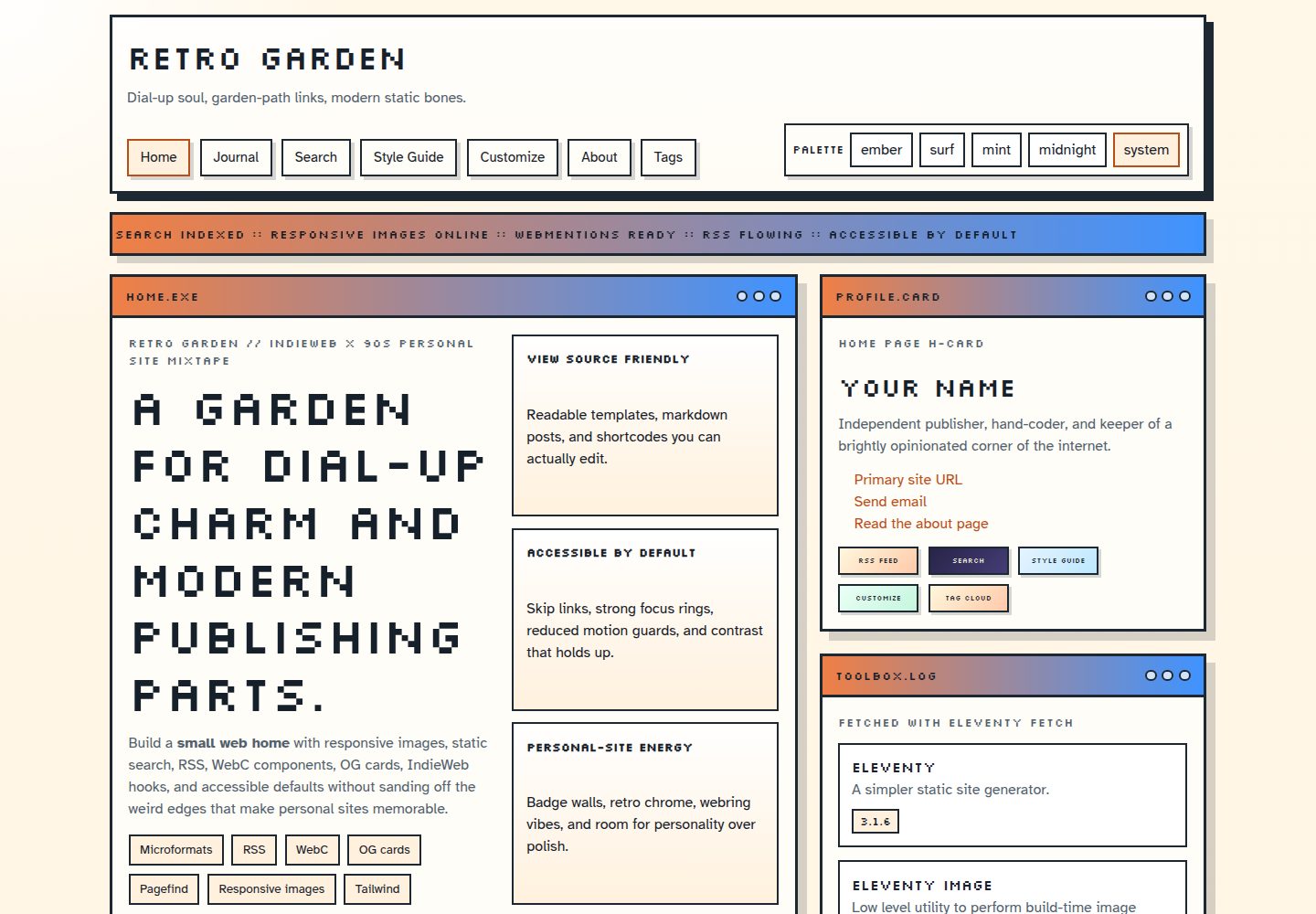
Retro Garden 是一个基于 Eleventy 的开源个人站点主题,融合 WebC 组件、调色板切换、RSS、OG 图片生成与无障碍默认配置,适合想尝试 IndieWeb 发布习惯的静态博客。
看看你的网站会是什么样
浏览真实页面截图,比较内容排版与手机效果。点击下方缩略图切换,放大查看整页细节。
全部页面与视图 3
截图用于了解视觉与布局,交互效果请以实际项目为准。
采集于 2026-09-30查看来源
值得关注的模板亮点
从已有项目资料中,快速了解它的特点。
WebC 组件与 is-land 渐进增强,配合 Tailwind CSS 及自定义复古组件样式
内置 Pagefind 静态搜索,无需托管服务或搜索分析
构建时生成 OG 图片,支持 RSS 与 JSON feed、站点地图、robots 和 web manifest
提供 Ember、Surf、Mint、Midnight 及跟随系统模式的调色板切换
包含日志分页、阅读时间、标签归档、面包屑、上下篇元数据与文章分享链接
模板详细介绍
Retro Garden 是面向个人站点的 Eleventy 启动器,定位在保留早期网页个性与 IndieWeb 发布习惯的同时使用现代构建工具。主题以 Nunjucks 布局和 Markdown 写作为主,配合 WebC 组件与 is-land 渐进增强,内置 Pagefind 静态搜索、响应式图片、分页、RSS/JSON feed、站点地图、robots、web manifest 和主题化 404 页面。
内容层面提供日志分页、阅读时间、标签归档、面包屑、上一篇/下一篇元数据,以及文章分享链接与复制到剪贴板。站点身份、导航、调色板、社交链接和功能开关集中在 src/_data/site.js,默认调色板包括 Ember、Surf、Mint、Midnight 和跟随系统模式。
使用限制方面,分析(Tinylytics)和 webmentions 在全新克隆中默认关闭,需要配置环境变量才启用;Pagefind 搜索完全基于生成的静态文件运行。主题是静态站点,可部署到任何能执行 npm run build 并发布 _site/ 目录的主机,Vercel 预设文件已包含,Netlify、Cloudflare Pages 和 GitHub Pages 需自行设置构建命令与输出目录。演示图片、字体、图标等第三方素材的许可需单独核对,不能仅凭代码的 MIT 许可判断。
Eleventy启动器
适合你的项目吗?
适用场景
- 搭建带有早期网页视觉风格的个人博客或数字花园
- 为已有静态站点引入 IndieWeb 作者标记、rel=me 与可配置的 webmention 端点
- 需要本地静态搜索、响应式图片和构建时 OG 图片生成的内容站点
- 在 Vercel、Netlify、Cloudflare Pages 或 GitHub Pages 上发布静态个人站点
适合人群
- 熟悉 Markdown 与 Nunjucks、希望使用 Eleventy 构建个人站点的开发者
- 想尝试 IndieWeb 发布习惯并保留现代构建流程的个人博主
- 需要多调色板切换、静态搜索和 RSS 输出的静态站点作者
- 愿意自行配置环境变量以启用分析或 webmentions 的用户
上手与定制指南
结合仓库当前版本的说明,按下面的资料检查内容、配置与运行要求。
- 1
克隆仓库后执行 npm install,再用 npm run start 在本地预览
- 2
在 src/_data/site.js 中修改站点身份、作者、导航、调色板、社交链接和功能开关
- 3
部署前设置 SITE_URL 环境变量,确保 feed、canonical 和 OG 元数据使用正确域名
- 4
分析、webmentions 和 pingback 默认关闭,需通过 TINYLYTICS_ID、WEBMENTION_ENDPOINT、PINGBACK_ENDPOINT、WEBMENTION_API 等变量启用
- 5
提交模板、样式或构建相关改动前运行 npm run check 执行构建与全部校验步骤
授权与来源资料
使用条件与限制
免费使用 · 保留许可声明本次收录的是公开仓库中采用 MIT 许可的免费版本;免费范围为该版本代码,不代表外部服务或第三方素材免费。
使用时需要遵守
- 允许免费使用、修改、商用和分发该版本代码。
- 分发代码副本或实质性部分时,保留原作者版权声明和完整 MIT 许可声明。
- 代码按现状提供;担保与责任限制以原许可证及适用法律为准。
额外费用与待核对事项
- 全新克隆中分析(Tinylytics)与 webmentions 默认关闭,需自行配置环境变量(如 TINYLYTICS_ID、WEBMENTION_ENDPOINT、WEBMENTION_API)才能启用。
- 可选分析功能依赖第三方服务 Tinylytics,需提供 TINYLYTICS_ID 环境变量;默认留空,不配置则不加载该脚本。
- webmentions 需在构建时访问外部 JSON 端点(WEBMENTION_API),属于外部服务依赖,需自行提供并承担相应成本与可用性。
- 赞助链接(GitHub Sponsors、Ko-fi、Buy Me a Coffee)为占位符,发布自己的分支前需替换,否则会指向原作者的赞助页面。
- Vercel 预设为可选;部署到 Netlify、Cloudflare Pages 或 GitHub Pages 需自行设置构建命令与输出目录。
- 演示图片、字体、图标及其他第三方素材需按各自许可核对,不能仅凭代码的 MIT 许可判断。
- 域名、托管、数据库、支付或 AI 等外部服务可能另外收费。
查看原文依据
Permission is hereby granted, free of charge
许可证原文
Analytics and webmentions are off in a fresh clone.
README 原文
`TINYLYTICS_ID`: enables the optional Tinylytics script; empty by default
README 原文
`WEBMENTION_API`: JSON endpoint used to retrieve webmentions at build time
README 原文
Replace the placeholder handles before publishing your own fork.
README 原文
https://github.com/kylereddoch/retro-garden-eleventy-theme/blob/main/LICENSEhttps://github.com/kylereddoch/retro-garden-eleventy-theme/blob/main/README.md`vercel.json` is included as an optional Vercel preset for the generated `_site/` folder
README 原文
DeepSeek 根据仓库许可证和 README 整理 ·2026-10-01。结果仅覆盖已读取资料,依赖、图片、字体及后续条款变更以各自原文为准。
项目核对记录与介绍依据
模板资料
- 来源平台
- GitHub
- 资料与维护参考分
- 资料较完整 · 87 / 100
- 技术栈
- Eleventy
- 网站类型
- 启动器
这个分数如何计算
本站按许可资料(最高30分)、演示链接(12分)、预览图(10分)、Star数(15分)、记录的维护时间(15分)、描述完整度(8分)、功能记录(5分)和分类资料(5分)计算。它不是代码、安全或性能测试,也不是 Google 评分;有链接不代表已实测可用。
这个项目需要核对什么
- 记录的仓库更新时间
- 2026-08-21
- 截图检查日期
- 2026-10-01
已收录演示链接。请用你的内容与屏幕尺寸检查;有演示不代表表单、认证或支付已经可用。
目录记录的主要技术栈是 Eleventy。请通过依赖清单和锁文件核对实际版本与托管要求。这些说明基于收录资料,不代表代码审计或部署实测。
查看具体选型方法 →介绍的制作与核对状态
介绍由 AI 辅助整理目录与仓库资料。仓库作者不等于这篇介绍的审核者。
已完成服务器许可规则与 AI 来源核对;未经过人工编辑审核。
查看当时使用的来源资料
SHA-256: a56d30cfce608540d449ecdd672572519f727cbb069976a8e5708e0f715bc175
2026-10-01T14:09:16.023Z
来源文件 / 仓库# Retro Garden [](./LICENSE) [](https://www.11ty.dev/) [](https://tailwindcss.com/) [](https://pa11y.org/) [](https://www.11ty.dev/docs/deployment/) Retro Garden is an open source Eleventy theme for personal sites that want IndieWeb publishing habits and early-web personality without giving up modern tooling. It mixes WebC components, private static search, responsive images, pagination, RSS, OG image generation, optional webmentions, and accessible defaults into one hand-made starter. ## Demo - Production demo: [https://retro-garden-eleventy-theme.vercel.app](https://retro-garden-eleventy-theme.vercel.app) - Local development: <http://127.0.0.1:8080> - Release history: [CHANGELOG.md](./CHANGELOG.md) `src/_data/site.js` will use `SITE_URL` when you provide it and can also infer common preview URLs on Vercel, Netlify, and Cloudflare Pages. The production default is `https://retro-garden-eleventy-theme.vercel.app`, so swap that if you deploy under a different hostname. ## Features - Eleventy 3.1 with Windows, macOS, and Linux-friendly scripts - Eleventy Fetch for friendly remote-data caching - Eleventy Image for responsive AVIF, WebP, and original image output - Pagefind static search with no hosted service or search analytics - Build-time OG image generation - Nunjucks shortcodes and markdown-first authoring - Accessible defaults with multi-page Pa11y and HTML validation - Tailwind CSS 4 plus custom retro component styles - RSS and JSON feeds, sitemap, robots file, web manifest, and themed 404 page - Eleventy WebC components and is-land progressive enhancement - Journal pagination, read time, tag archives, breadcrumbs, and previous/next metadata - Official Eleventy syntax highlighting - Post share links with copy-to-clipboard support - Optional sidebars, share links, analytics, webmentions, and sample sections - Stronger IndieWeb author markup, `rel=me`, and configurable webmention endpoints - Ember, Surf, Mint, Midnight, and system-aware palette switching ## Quick Start ```bash git clone <your-repo-url> retro-garden cd retro-garden npm install npm run start ``` Open <http://127.0.0.1:8080> to preview the theme locally. ## Available Scripts - `npm run start` starts Eleventy in serve mode and Tailwind in watch mode - `npm run build` creates the production build in `_site/` - `npm run preview` serves an existing production build at <http://127.0.0.1:4173> - `npm run validate:html` checks generated HTML - `npm run validate:links` checks internal page and asset targets - `npm run audit:a11y` serves the build and audits representative pages with Pa11y - `npm run check` builds the theme and runs every validation step ## Configuration Start with `src/_data/site.js`. It contains the site identity, author, navigation, palettes, social links, and a `features` object for search, responsive images, social cards, breadcrumbs, post sidebars, share links, sample content, analytics, and webmentions. Supported environment variables: - `SITE_URL`: canonical production URL - `TINYLYTICS_ID`: enables the optional Tinylytics script; empty by default - `WEBMENTION_ENDPOINT`: endpoint advertised by published pages - `PINGBACK_ENDPOINT`: optional pingback endpoint - `WEBMENTION_API`: JSON endpoint used to retrieve webmentions at build time Analytics and webmentions are off in a fresh clone. Pagefind search runs entirely from the generated static files. To process a local content image, add a normal Markdown or HTML `img` element. You can set `eleventy:widths="320,640,960"` and a `sizes` attribute when the default widths are not a good fit. Remote avatars and other images that should not be processed can use `eleventy:ignore`. ## Using The Theme 1. Update the site identity in `src/_data/site.js`. 2. Replace the sample pages in `src/` and the demo posts in `src/posts/`. 3. Choose Ember, Surf, Mint, Midnight, or system-aware mode as the default palette. 4. Edit the layouts in `src/_includes/layouts/` to remove or expand theme features. 5. Update social links, sponsor links, and author metadata before publishing. ## Project Structure - `src/_data/site.js` stores the main site identity, navigation, palettes, and social links - `src/_includes/layouts/base.njk` controls the shared shell, header, footer, and metadata - `src/_includes/layouts/page.njk` renders full-width pages with an optional sidebar - `src/_includes/layouts/post.njk` renders journal posts, share links, and the author panel - `src/_includes/partials/breadcrumbs.njk` renders Eleventy Navigation breadcrumbs - `src/_includes/partials/share-links.njk` contains the reusable share section - `src/_includes/partials/webmentions.njk` renders optional reactions and replies - `src/_includes/components/*.webc` contains the reusable WebC components - `src/assets/css/theme.css` holds the design tokens and component styling - `src/search.njk` contains the Pagefind component interface - `scripts/` contains cross-platform cleanup, preview, and internal-link checks - `src/style-guide.njk` shows palettes, UI patterns, and syntax-highlight examples - `vercel.json` is included as an optional Vercel preset for the generated `_site/` folder ## Deployment Retro Garden is a static Eleventy theme, so it can be deployed anywhere that can run `npm run build` and publish the `_site/` folder. ### General setup 1. Install dependencies with `npm install` 2. Build the site with `npm run build` 3. Publish the `_site/` directory on your host 4. Set `SITE_URL` to your production domain so feeds, canonicals, and OG metadata use the correct URL ### Common hosts - Vercel: `vercel.json` is already included. Set `SITE_URL` in project environment variables. - Netlify: build command `npm run build`, publish directory `_site`, and set `SITE_URL`. - Cloudflare Pages: build command `npm run build`, output directory `_site`, and set `SITE_URL`. - GitHub Pages or any other static host: run `npm run build` in CI and publish `_site/`. Preview deployments will render cleanly on common platforms because the theme can infer several host-provided preview URLs when `SITE_URL` is not set. ## Customization Notes - Pages are full width by default and only render a sidebar when you add `sidebarTitle` and `sidebar` in front matter. - Posts include a share row after the article body and before the author panel. - The palette picker in the header uses query-string links, so you can preview each palette on any route. - Production builds generate the Pagefind index after Eleventy finishes writing pages. - Local images are transformed during the build and keep intrinsic dimensions to reduce layout movement. - The style guide and sample posts intentionally show markdown, code fences, badges, and optional layout patterns. ## Sponsor If Retro Garden helps you ship something fun, you can support its maintenance here. Replace the placeholder handles before publishing your own fork. GitHub's funding button can be configured in [.github/FUNDING.yml](./.github/FUNDING.yml). - GitHub Sponsors: [https://github.com/sponsors/kylereddoch](https://github.com/sponsors/kylereddoch) - Ko-fi: [https://ko-fi.com/kylereddoch](https://ko-fi.com/kylereddoch) - Buy Me a Coffee: [https://buymeacoffee.com/kylereddoch](https://buymeacoffee.com/kylereddoch) ## Contributing Issues and pull requests are welcome. For changes that touch templates, styles, or build behavior, please run: ```bash npm run check ``` The included GitHub Actions workflow runs the same check on Node 22 under both Ubuntu and Windows. When contributing, try to preserve the balance between readable content surfaces, playful retro chrome, and accessible defaults. ## Inspiration - [zachleat.com](https://www.zachleat.com/) - [Eleventy Excellent](https://github.com/madrilene/eleventy-excellent) - [Retroweird](https://github.com/brennanbrown/retroweird) - [11ty Indie Web Blog Starter](https://github.com/brennanbrown/11ty-Indie-Web-Blog-Starter) ## License MIT. See [LICENSE](./LICENSE).
看看同类模板
对比同技术栈与用途的模板,找到更适合的视觉与内容结构。

eleventy-base-blog
A starter repository for a blog web site using the Eleventy static site generator.
Eleventy · 博客

eleventy-garden
:seedling: A starter site for building a mind garden with eleventy
Eleventy · 启动器

eleventastic
An Eleventy Starter Kit
Eleventy · 启动器

neat-starter
Starter Template for Netlify CMS, Eleventy, Alpine JS & Tailwind CSS
Eleventy · 启动器

Eleventy-Starter-Boilerplate
🚀 Eleventy Starter is production-ready with SEO-friendly for quickly starting a blog. ⚡ Built with Eleventy, …
Eleventy · 博客

eleventy-plus-vite
A clean and fast Eleventy Starter Project with Vite
Eleventy · 启动器