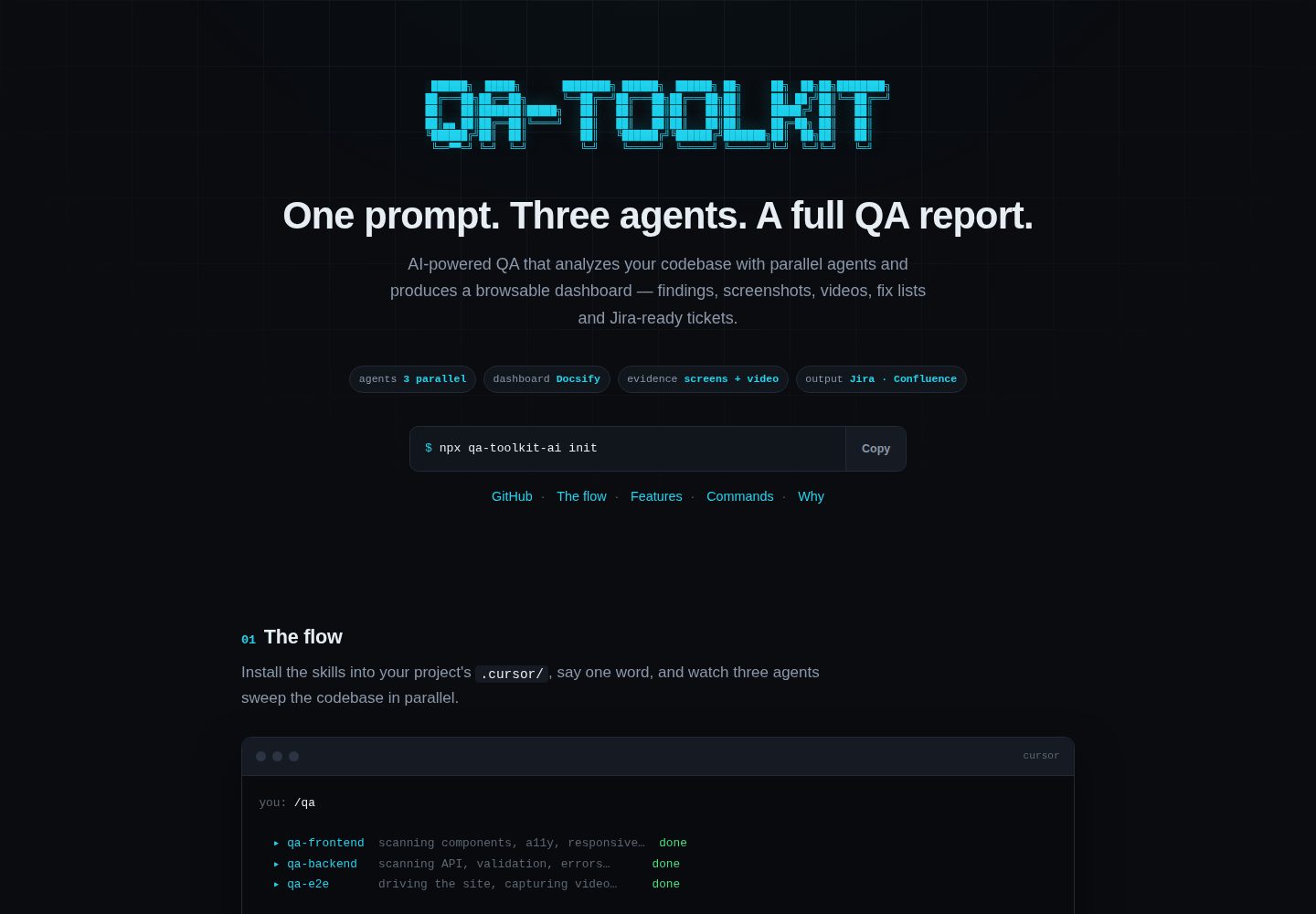
Three parallel QA agents cover frontend, backend, and E2E process analysis respectively
HTMLAdmin dashboard
qa-toolkit — HTML Admin dashboard Template
By L-ubu
A QA toolkit for Cursor that uses skills, report templates, and a Docsify dashboard to run automated frontend, backend, and E2E quality analysis on a codebase and produce browsable reports.
Explore the design
Compare the page layouts and mobile experience. Open any screenshot for a closer look.
Desktop homepage1 / 2
Desktop captureTop of page
Actual screenshot captured by the server browser.
All pages & views 2
Screenshots show visual appearance; interactive behavior may differ.
Recorded 2026-10-05View source
What stands out
A quick read of the recorded project description.
Outputs a Docsify dashboard with P0–P3 severity filtering and one-click print to PDF
Reports distinguish functional perspectives (PM/client) from technical perspectives (developer), and generate fix lists and Jira ticket formats
Collects screenshots and E2E videos at desktop, tablet, and mobile viewports, with lightbox zoom and embedded playback
Provides npx qa-toolkit-ai commands init, scaffold, serve, and share, enabling local serving or sharing via Cloudflare tunnel
Feature areas and test scenarios can be customized per project through markdown files in .cursor/qa-reference/
Template Details
QA Toolkit is a QA toolkit that runs in the Cursor environment; the repository consists mainly of skill definitions, report format rules, Docsify dashboard templates, and CLI scripts. It analyzes a codebase through three parallel QA agents (Frontend, Backend, E2E), classifies findings by severity from P0 to P3, and generates a Docsify dashboard that supports filtering by severity, screenshot lightbox viewing, and embedded video playback. Reports are split into functional reports and feature checklists for PMs/clients, and technical reports, fix lists, and Jira ticket formats for developers. Media evidence includes screenshots at desktop (1280px), tablet (768px), and mobile (375px) viewports, plus E2E videos at the three viewports. There are three installation methods: copy skills, rules, and Docsify templates into the project's .cursor/ directory via npx qa-toolkit-ai init; clone the repository and run install.sh with a specified project path; or use the repository directly as a GitHub template to copy its contents. Usage involves running commands such as /qa, /qa-frontend, /qa-backend, and /qa-e2e in Cursor; the agents analyze the codebase, generate reports, and build the dashboard under qa-output/, which can then be served locally or shared publicly via a Cloudflare tunnel. The CLI provides the init, scaffold, serve, and share subcommands. For customization, markdown files describing project feature areas, test scenarios, and Confluence structure can be placed under .cursor/qa-reference/ to help agents organize findings; the theme can also be adjusted by editing .cursor/qa-docsify-template/index.html. The repository uses the MIT license, and the code may be used, modified, commercially used, and distributed for free, but third-party assets such as demo images, fonts, and icons require separate license checks, and external services such as domains, hosting, databases, payments, or AI may incur additional charges.
HTMLBackend
Is it right for your project?
Use Cases
- Open a project in Cursor and run the /qa command to perform a round of frontend, backend, and E2E quality analysis on the codebase
- Generate plain-language functional reports and feature checklists ordered by feature area for PMs or clients
- Generate technical reports and fix lists containing code paths, file references, and remediation suggestions for developers
- Organize findings into preformatted Jira tickets, or create them via MCP
- Serve the qa-output/ dashboard locally or generate a public link via Cloudflare tunnel to share with the team
Suitable For
- Development teams using Cursor that want to organize QA processes through skills and commands
- Teams that need to output quality reports from different perspectives to both PMs/clients and developers
- Projects that want to browse screenshots, videos, and severity-classified issues centrally in a Docsify dashboard
- Projects that need to customize QA reference structures by feature area and test scenario in the codebase
Getting started & customization
Use these recorded setup notes alongside the repository instructions for your chosen version.
- 1
The recommended installation method is to run npx qa-toolkit-ai init in the project directory, copying skills, rules, and Docsify templates into the .cursor/ directory
- 2
Alternatively, clone the repository and run install.sh with a project path, or use the repository as a GitHub template to copy its contents
- 3
Before use, open the project in Cursor and trigger analysis via commands such as /qa, /qa-frontend, /qa-backend, and /qa-e2e
- 4
The dashboard is served by default with npx qa-toolkit-ai serve on port 3333, and a custom port can be passed; the share command generates a public link via Cloudflare tunnel
- 5
To organize findings per project, add markdown files under .cursor/qa-reference/ describing feature areas, test scenarios, and Confluence structure
License & source material
Usage conditions & limitations
Free to use · keep license noticeThis entry covers the free version of the public repository under the MIT license; the free scope is the code of this version and does not mean external services or third-party assets are free.
Must comply with when using
- The code of this version may be used, modified, commercially used, and distributed for free.
- When distributing copies or substantial portions of the code, retain the original author's copyright notice and the full MIT license notice.
- The code is provided as is; warranties and limitations of liability are governed by the original license and applicable law.
Additional costs & items to verify
- Demo images, fonts, icons, and other third-party assets must be checked against their respective licenses and cannot be judged solely by the code's MIT license.
- External services such as domains, hosting, databases, payments, or AI may incur additional charges.
- Using the toolkit requires opening the project in the Cursor editor and triggering analysis via commands such as /qa; the runtime environment depends on Cursor.
- Generating public share links depends on the external Cloudflare tunnel service and may involve third-party service availability and costs.
- The share command exposes the local dashboard externally through a public tunnel; using this feature depends on an external tunnel service.
- If Jira tickets are created via MCP, the corresponding MCP and Jira external services must be configured separately.
View Original Text Basis
Permission is hereby granted, free of charge
Original License Text
Open your project in Cursor and say:
Original README
Creates a **shareable public link** via Cloudflare tunnel
Original README
# Share via public tunnel npx qa-toolkit-ai share
Original README
https://github.com/L-ubu/qa-toolkit/blob/main/LICENSEhttps://github.com/L-ubu/qa-toolkit/blob/main/README.md- **Jira Tickets** — pre-formatted, ready to create via MCP or copy-paste
Original README
Compiled by DeepSeek based on repository license and README ·2026-10-05. Results only cover the materials read; dependencies, images, fonts, and subsequent term changes are subject to their respective original texts.
Project checks & description sources
Template Information
- Source platforms
- GitHub
- Documentation and maintenance reference score
- More documented · 83 / 100
- Technologies
- HTML
- Website type
- Admin dashboard
How this score is calculated
Our heuristic uses license records (up to 30), a demo link (12), a preview (10), stars (15), recorded maintenance (15), description completeness (8), feature records (5) and classification data (5). It is not a code, security or performance test, or a Google score. A link does not establish tested functionality.
What to verify for this project
- Repository update recorded
- 2026-10-05
- Screenshot last checked
- 2026-10-05
A demo link is listed. Check it with your own content and viewport sizes; its presence does not confirm that forms, authentication or payments work.
The catalog identifies HTML as the primary stack. Check the actual dependency manifest and lockfile for versions and hosting requirements. These notes use recorded metadata, not a code audit or a deployment test.
Use a selection guide →How this description was prepared
AI-assisted description based on catalog records and repository material. Repository authors are not automatically the reviewers of this description.
Review declaration: [email protected] · 2026-10-06
Inspect the recorded source material
SHA-256: 613c3887f325ff98f56c7e0135fdc81be5a251e990faf4efda7029f6a518a2b0
2026-10-05T15:52:00.630Z
Source file / repository# QA Toolkit
AI-powered QA toolkit that runs automated quality analysis on your codebase and produces a browsable dashboard with findings, screenshots, and videos.
```
___ _ _____ _ _ _ _
/ _ \ / \ |_ _|__ ___ | | | _(_) |_
| | | |/ _ \ | |/ _ \ / _ \| | |/ / | __|
| |_| / ___ \ | | (_) | (_) | | <| | |_
\__\_\_/ \_\ |_|\___/ \___/|_|_|\_\_|\__|
```
## What it does
- Runs **3 parallel QA agents** (Frontend, Backend, E2E) that analyze your codebase
- Produces a **Docsify dashboard** with all findings, organized and filterable
- Splits findings into **Functional** (for PM/client) and **Technical** (for devs)
- Generates fix lists, Jira-ready tickets, Confluence checklists
- Captures **screenshots** at desktop/tablet/mobile and **E2E videos**
- Creates a **shareable public link** via Cloudflare tunnel
## Install
### Option A: npm (recommended)
```bash
npx qa-toolkit-ai init
```
This copies the QA skills, rules, and Docsify template into your project's `.cursor/` directory.
### Option B: Clone + install script
```bash
git clone https://github.com/L-ubu/qa-toolkit.git /tmp/qa-toolkit
bash /tmp/qa-toolkit/install.sh /path/to/your/project
```
### Option C: GitHub template
Use this repo as a template and copy the contents into your project's `.cursor/`.
## Usage
### Run QA (in Cursor)
Open your project in Cursor and say:
```
/qa
```
Or be specific:
```
/qa-frontend
/qa-backend
/qa-e2e
```
The agent will:
1. Analyze your codebase (Frontend, Backend, E2E flows)
2. Generate reports with severity classification (P0–P3)
3. Build a Docsify dashboard in `qa-output/`
4. Serve it locally and create a shareable link
### CLI Commands
```bash
# Install QA skills into your project
npx qa-toolkit-ai init
# Scaffold a new qa-output/ from template
npx qa-toolkit-ai scaffold "My Project" "feature/branch"
# Serve the dashboard
npx qa-toolkit-ai serve # default port 3333
npx qa-toolkit-ai serve 4000 # custom port
# Share via public tunnel
npx qa-toolkit-ai share
```
## What you get
### For the PM / Client
- **Functional Report** — plain-language descriptions of what users see and experience
- **Functional Checklist** — checkbox list sorted by feature area for budget decisions
- **Severity filter** — toggle P0/P1/P2/P3 visibility in the dashboard
- **PDF export** — one-click print to PDF
### For Developers
- **Full Technical Report** — code paths, file references, fix suggestions
- **Frontend / Backend / E2E Reports** — detailed per-area analysis
- **Fix List** — grouped by component (Frontend → JS/React → Backend)
- **Jira Tickets** — pre-formatted, ready to create via MCP or copy-paste
### Media Evidence
- **Screenshots** at desktop (1280px), tablet (768px), mobile (375px)
- **E2E videos** at all three viewports
- **Lightbox** for screenshot zoom, inline video playback
## Project structure
```
qa-toolkit/
├── bin/cli.js # CLI tool (init, serve, share, scaffold)
├── skills/
│ ├── qa-run/SKILL.md # Orchestrator — runs all agents
│ ├── qa-frontend/SKILL.md # Frontend/UI analysis
│ ├── qa-backend/SKILL.md # Backend/API analysis
│ ├── qa-e2e/SKILL.md # E2E flow analysis
│ └── qa-merge-report/SKILL.md # Merges findings, builds dashboard
├── rules/
│ └── qa-report-format.mdc # Report format rules for Cursor
├── docsify-template/ # Reusable Docsify dashboard template
│ ├── index.html # Themed dashboard with filter + PDF
│ ├── setup-docsify.sh # Scaffold script
│ ├── README.md # Dashboard template
│ ├── _sidebar.md # Navigation template
│ ├── media.md # Screenshots/videos template
│ ├── qa-functional-report.md # Functional report template
│ └── qa-functional-checklist.md # Functional checklist template
├── install.sh # Standalone install script (no npm needed)
├── package.json
└── README.md
```
## Customisation
### Project-specific QA structure
Add a `.cursor/qa-reference/` directory with a markdown file describing your project's feature areas, test scenarios, and Confluence structure. The QA agents will use it to organise findings.
Example: `.cursor/qa-reference/my-project-structure.md`
### Docsify theme
Edit `.cursor/qa-docsify-template/index.html` to change colors, fonts, or add features. The template uses CSS custom properties for easy theming.
## License
MIT
Explore similar templates
Compare previews and descriptions within the same stack and category.

gentelella
Gentelella v4 is a free, open-source admin dashboard template maintained by Colorlib, built with vanilla JavaScript, SCSS, and Vite 8 without Bootstrap or jQuery.
HTML · Admin dashboard

coreui-free-bootstrap-admin-template
A free Bootstrap admin template maintained by CoreUI, built on CoreUI's own UI component library. It provides compiled HTML pages and Pug template source code, covering dashboards, authentication, forms, components, icons, and error pages.
HTML · Admin dashboard

dashboards
A collection of responsive dashboard HTML templates open-sourced by Keen IO, built on CSS Grid, offering multiple prebuilt admin data interface layouts.
HTML · Admin dashboard

SB Admin 2
SB Admin 2 is a classic Bootstrap admin template from Start Bootstrap, offering dashboards, charts, tables, and common management pages.
HTML · Admin dashboard

Adminator-admin-dashboard
Adminator 4 is a vanilla HTML, CSS and JavaScript admin dashboard template with a CSS-variable token design system, built-in light and dark themes, no jQuery or Bootstrap dependency, and 18 pages covering dashboards, mail, calendar, charts, forms, tables and error pages.
HTML · Admin dashboard

SB Admin
SB Admin is a lightweight, open-source Bootstrap admin template from Start Bootstrap. It offers a sidebar-and-top-bar layout with data tables, forms, and stat cards, plus responsive design.
HTML · Admin dashboard