Content driven by YAML, JSON, and Markdown, with build output as a purely static site
AstroCorporate Website
landpack — Astro Business Template
By lauroguedes
An Astro landing page template for open-source projects, with content managed in YAML, JSON, and Markdown, outputting a static site with plain CSS.
Explore the design
Compare the page layouts and mobile experience. Open any screenshot for a closer look.
Desktop homepage1 / 2
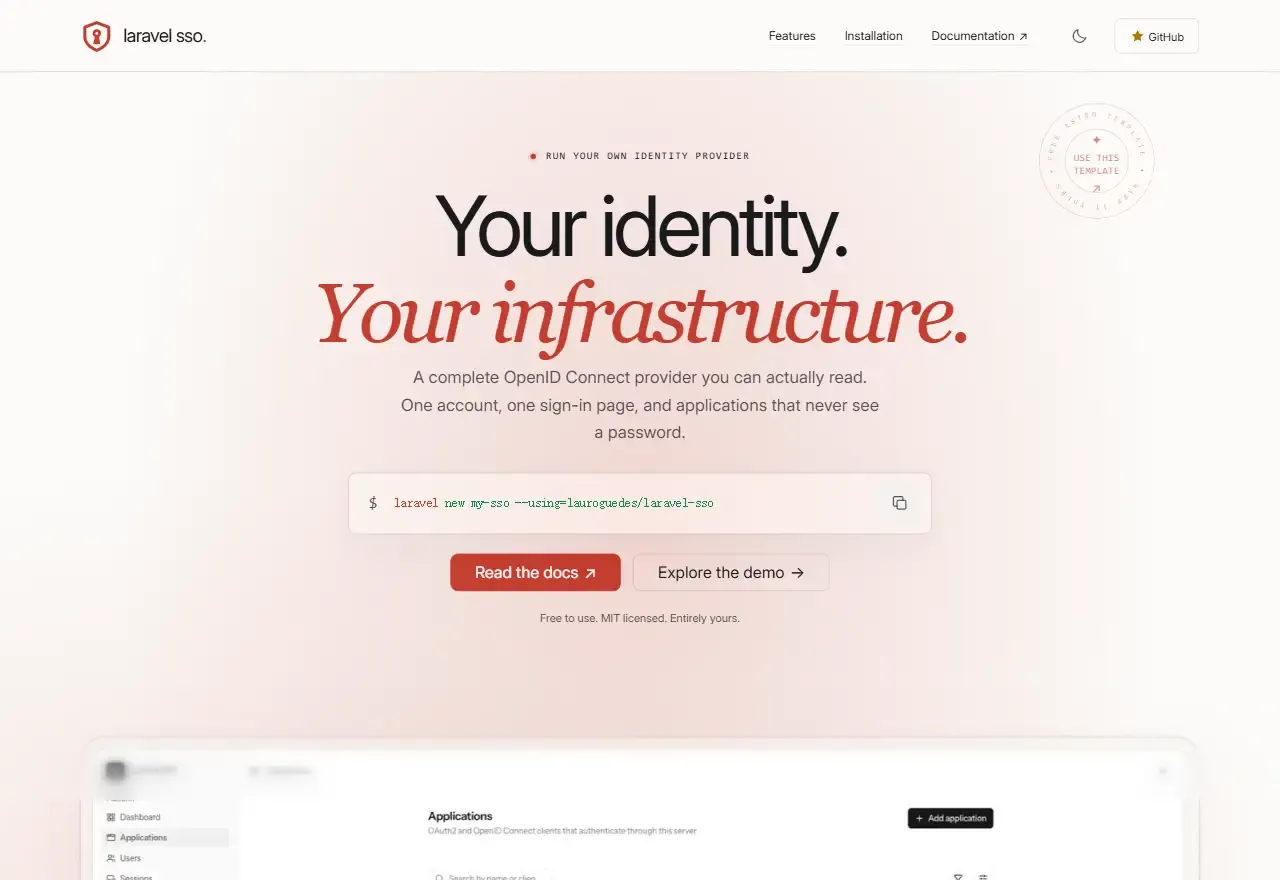
Desktop capture
The actual desktop layout captured from the demo homepage.
All pages & views 2
Screenshots show visual appearance; interactive behavior may differ.
Recorded 2026-09-27View source
What stands out
A quick read of the recorded project description.
Built-in AI customization skill and project structure description in the repository, allowing content replacement by a coding agent
Includes feature cards, installation steps, integration tabs, FAQ, and other common sections for open-source projects
Persistent light/dark theme, paired screenshots with matching syntax highlighting
Comes with sitemap, social metadata, and post-build SEO checks
Template Details
Landpack is an Astro template for building landing pages for open-source projects. It is written with the Lumos for Astro component library and native CSS, with all content stored in YAML, JSON, and Markdown, and the build result is a purely static page. The page structure follows the typical introduction path for open-source projects: a hero section, feature cards, installation steps and commands, integration tabs, FAQ, plus screenshots and author information. The repository includes a Laravel SSO as a sample project; its product description, commands, screenshots, and integration code are placeholder content to be replaced. Running the template itself does not install an identity service and does not require PHP.
A distinctive aspect is that it builds an AI customization workflow into the repository: under .agents/skills there is a local skill and a complete project structure description. By giving a project link or a brief requirements summary to a coding agent that can read local files, you can replace content, branding, images, and SEO configuration according to the instructions while keeping the page structure unchanged. Features also include a mobile navigation sidebar, a header that hides on scroll down and returns on scroll up, a persistent light/dark theme, paired screenshots with matching syntax highlighting, three hero backgrounds and three screenshot borders, copyable commands, integration tabs with shareable URLs, FAQ in Markdown format, and sitemap, social metadata, and post-build SEO checks. Interaction details cover hover, touch, and keyboard triggers for the sample SSO image, and reduced-motion is supported.
The main barriers to use are environment and content replacement: Node.js 22.12 or higher and npm 9.6.5 or higher are required, and PUBLIC_SITE_URL must be set before building; otherwise canonical links, social images, robots.txt, and the sitemap will use the example domain. The template assumes deployment at the domain root; deploying to a subdirectory requires changing Astro's base and updating root-relative paths accordingly. The sample integration code is only a documentation snippet and has not been tested for authentication implementation against real credentials; screenshots, avatars, brand icons, and logos all need to be replaced with your own assets. Before going live, it is recommended to run npm run check, npm run build, and npm run seo:check, and to check on desktop and mobile in both light and dark themes.
AstroBusiness website
Is it right for your project?
Use Cases
- Building an introductory landing page for an open-source library or tool
- A project homepage that needs static hosting without introducing a database or CMS
- Scenarios where you want to use an AI agent to batch-replace template content and branding
Suitable For
- Developers familiar with Astro or willing to edit YAML and Markdown according to the documentation
- Open-source project maintainers who need to deploy the landing page to static hosting such as Cloudflare or Vercel
- Teams that accept replacing screenshots, avatars, brand icons, and the sample project themselves
Getting started & customization
Use these recorded setup notes alongside the repository instructions for your chosen version.
- 1
Requires Node.js 22.12.0 or higher and npm 9.6.5 or higher; install with npm ci
- 2
Before building, copy .env.example and set PUBLIC_SITE_URL, replacing the default example.com
- 3
The template assumes deployment at the domain root; subdirectory deployment requires changing Astro base and updating root-relative paths
- 4
The sample integration code is a documentation snippet and has not been tested against real credentials; the sample SSO image and Laravel SSO content need to be replaced
- 5
Before going live, run npm run check, npm run build, and npm run seo:check, and check both themes and mobile
License & source material
Usage conditions & limitations
Free to use · keep license noticeThis entry covers the free MIT version in the public repository; the free scope is the code of that version and does not mean external services or third-party assets are free.
Must comply with when using
- When using, modifying, or distributing the code, retain the original author's copyright notice and the full MIT license.
- Free use, modification, and commercial use are allowed, as is distribution of the code; distribution must still include the copyright and license notice.
- The code is provided as is, without warranties; the MIT license also disclaims author and copyright-holder liability.
Additional costs & items to verify
- Demo images, fonts, icons, and other third-party assets must be checked against their respective licenses; the code's MIT license alone cannot be used to judge them.
- External services such as domains, hosting, databases, payments, or AI may incur separate charges.
View Original Text Basis
https://github.com/lauroguedes/landpack/blob/main/LICENSEhttps://github.com/lauroguedes/landpack/blob/main/README.mdPermission is hereby granted, free of charge
Original License Text
Based on the full MIT license and the repository README · 2026-09-27. Results only cover the materials read; dependencies, images, fonts, and subsequent term changes are subject to their respective original texts.
Project checks & description sources
Template Information
- Source platforms
- Astro Themes
- Documentation and maintenance reference score
- More documented · 80 / 100
- Technologies
- Astro
- Website type
- Corporate Website
How this score is calculated
Our heuristic uses license records (up to 30), a demo link (12), a preview (10), stars (15), recorded maintenance (15), description completeness (8), feature records (5) and classification data (5). It is not a code, security or performance test, or a Google score. A link does not establish tested functionality.
What to verify for this project
- Repository update recorded
- 2026-09-19
- Screenshot last checked
- 2026-09-27
A demo link is listed. Check it with your own content and viewport sizes; its presence does not confirm that forms, authentication or payments work.
The catalog identifies Astro as the primary stack. Check the actual dependency manifest and lockfile for versions and hosting requirements. These notes use recorded metadata, not a code audit or a deployment test.
Use a selection guide →How this description was prepared
AI-assisted description based on catalog records and repository material. Repository authors are not automatically the reviewers of this description.
Review declaration: Codex(本次来源核对) · 2026-09-27
Inspect the recorded source material
SHA-256: 6641e2f6d1fa413bca397d33320f464945a87af680874780739e67bbb1c54331
2026-09-27T12:09:26.697Z
Source file / repository# Landpack [](https://astro.build) [](https://lumosframework.com/docs/) [](https://nodejs.org) [](LICENSE) A customizable landing page template for open-source projects, built with **Astro, Lumos for Astro, and plain CSS**. Edit your content in YAML, JSON, and Markdown, then publish a static site. <img width="1672" height="941" alt="ChatGPT Image Sep 19, 2026, 06_18_41 PM" src="https://github.com/user-attachments/assets/aca1e4e2-27e9-4126-96f9-de5da849b4a6" /> **Prefer to skip code edits?** Give an AI coding agent your project link or brief. The included [customization skill](docs/ai-customization.md) maps the whole template so the agent can adapt content, branding, assets, and SEO while preserving its structure. Laravel SSO is the included example project. Its product descriptions, commands, screenshots, and integration examples are sample content to replace with your own. Running this template does not install an identity server or require PHP. ## Features - Prompt-based customization with a portable, repository-local AI skill and a complete project map. - Responsive layout with a mobile navigation sidebar and a header that hides on downward scroll and returns on upward scroll. - Persistent light/dark themes, paired screenshots, and matching syntax highlighting. - Three hero backgrounds and three screenshot frames, configured in YAML. - Copyable commands, integration tabs with shareable URLs, and Markdown FAQs. - Configurable hero stamp, creator credit, and a faded footer wordmark. - Hover, touch, and keyboard activation for the sample SSO diagram; reduced-motion support. - Validated content, optimized local images, local fonts, social metadata, and a sitemap. - Regenerable social card and a built-output SEO check. - Static output with no database, CMS, API token, React, or Vue required. ## Documentation - [Quick start](#quick-start) - [Customize with AI](#customize-with-ai) - [Customize your site](#customize-your-site) - [Complete customization reference](docs/customization.md) - [Project structure and extension guide](docs/architecture.md) - [Build and deploy](#build-and-deploy) - [Cloudflare and Vercel deployment](docs/deployment.md) - [SEO audit and social images](docs/seo.md) - [Troubleshooting](#troubleshooting) - [Contributing](#contributing) - [License and credits](#license-and-credits) ## Quick start Requires **Node.js 22.12.0 or newer** and **npm 9.6.5 or newer**. Use a supported Node.js release that meets those requirements. 1. Download or clone this repository. If its GitHub page offers **Use this template**, you can create your own repository with that option. 2. Open a terminal in the downloaded project directory. 3. Install the locked dependencies and start the background development server: ```sh npm ci npm run dev -- --background ``` Open the address printed by Astro, normally [localhost:4321](http://localhost:4321). Changes to content and components update the preview automatically. ```sh npm run astro -- dev status npm run astro -- dev logs npm run astro -- dev stop ``` Before your first production build, copy the environment example and set your public site URL: ```sh cp .env.example .env ``` ```dotenv PUBLIC_SITE_URL=https://your-project.dev ``` This is the landing page’s URL, independent of the featured project’s repository, documentation, and demo links. Replace the fallback `https://example.com` before publishing. ## Customize with AI Open this repository in an AI coding agent with local file access, then paste: ```text Read .agents/skills/landpack-customize/SKILL.md and adapt this template for <project link>. Use the project's own README and docs as sources. Customize the complete page, branding, images, links, and SEO while preserving its structure. Generate the social card, run the checks, and show me the local preview. ``` You can provide a written project brief instead of a link. The agent makes the edits; you review the result and supply any missing facts or assets. See the [AI customization guide](docs/ai-customization.md) for prompts, agent discovery, and what the skill covers. It works without a hosted customization service and does not deploy automatically. ## Customize your site Start with [src/content/project/main.yaml](src/content/project/main.yaml). Keep the filename `main.yaml`; the page and shared layout read that entry. | What to change | Where | | --------------------------------------------------------------- | ------------------------------------------------------------- | | Identity, hero, links, section copy, screenshots, stamp, author | [Project YAML](src/content/project/main.yaml) | | Feature cards | [Feature entries](src/content/features/) | | Installation steps and commands | [Step entries](src/content/steps/) | | Integration tabs and code examples | [Integration entries](src/content/integrations/) | | FAQ questions and Markdown answers | [FAQ entries](src/content/faq/) | | Palette, type scale, spacing, theme colors | [Design tokens](src/styles/base.css) | | Inline logo | [GraphicMark.astro](src/components/Graphic/GraphicMark.astro) | | Favicon and social image | [public/](public/) | | Social image URL, description, and dimensions | `seo` in [Project YAML](src/content/project/main.yaml) | | Site URL | `.env` or the hosting build environment | | Section order and page composition | [index.astro](src/pages/index.astro) | For a first customization: 1. Replace the example project’s identity, links, commands, and section text. 2. Replace screenshots and author photo; write useful image descriptions. 3. Choose a `background` and `preview.frame` in YAML. 4. Update the stamp link. Its included `href: "#"` is a placeholder; remove `stamp` or set `stamp.enabled: false` to hide it. 5. Edit or remove collection entries. Their `order` values control sequence. 6. Replace the logo, favicon, and light/dark palette. Run `npm run og:generate` for a matching social card, or supply your own and configure `seo`. 7. Run the checks and inspect both themes at desktop and mobile widths. The [customization reference](docs/customization.md) documents **every project field**, collection formats, image paths and crops, optional sections, typography, motion, shared UI labels, and SEO. The included diagrams are product-specific illustrations; their internal labels live in components. ## Commands | Command | Purpose | | ----------------------------- | ------------------------------------------------------- | | `npm ci` | Install exact dependencies from the lockfile | | `npm run dev -- --background` | Start local development in the background | | `npm run astro -- dev status` | Show background server status | | `npm run astro -- dev logs` | Read development logs | | `npm run astro -- dev stop` | Stop the background server | | `npm run check` | Check Astro and TypeScript diagnostics | | `npm run build` | Load/validate content and generate `dist/` | | `npm run og:generate` | Generate `public/og-image.jpg` from project content | | `npm run seo:check` | Check built metadata, social image, sitemap, and robots | | `npm run preview` | Preview the production build locally | | `npm run format` | Format the project with Prettier | Keep [package-lock.json](package-lock.json) committed. Dependency changes use `npm install`; normal fresh installs use `npm ci`. ## Build and deploy ```sh npm run check npm run build npm run seo:check npm run preview ``` Publish the generated **`dist/`** directory to a static host: | Setting | Value | | -------------------- | ------------------------------------------ | | Install command | `npm ci` | | Build command | `npm run build` | | Output directory | `dist` | | Environment variable | `PUBLIC_SITE_URL=https://your-project.dev` | No server adapter is required. Configure the production URL before building so canonical links, social images, `robots.txt`, and the sitemap use your domain. Environment changes require rebuilding. Follow the short [Cloudflare Workers or Vercel instructions](docs/deployment.md). The included [wrangler.jsonc](wrangler.jsonc) supports Cloudflare static assets; Vercel needs no additional configuration for this template. Deployment is not automatic. The [SEO guide](docs/seo.md) records the Astro documentation audit and explains social-image configuration. Run `npm run og:generate` when project text/colors change; builds use the reviewed image without regenerating it. For local checks before choosing a domain, use `npm run seo:check -- --allow-placeholder`. The normal check intentionally rejects the shipped example domain. The template assumes hosting at the domain root. For a subdirectory, set Astro’s `base` and update root-relative navigation, favicon, and social-image paths. Changing `base` alone does not update literal URLs. ## Troubleshooting | Symptom | Check | | ----------------------------------- | ---------------------------------------------------------------------------------------------- | | Unsupported Node.js version | Run `node --version` and use Node.js 22.12+ | | Content validation error | Follow the file/field in the error; compare with [the schema](src/content.config.ts) | | New schema field is ignored | Add it to the schema and wire it into a component; restart the dev server after schema changes | | Missing screenshot | Image paths are relative to `main.yaml`, not the project root | | Light screenshot does not change | Set `imageLight` alongside `image`; otherwise one asset serves both themes | | Preview jumps to integrations | Remove `?tab=…` from the URL; matching tab URLs intentionally reveal that section | | Wrong social/canonical URL | Set `PUBLIC_SITE_URL` and rebuild | | Copy button cannot access clipboard | Use HTTPS or localhost; the command remains selectable | | Port is already in use | Check `dev status` and the address printed in the logs | ## Contributing Read [LUMOS.md](LUMOS.md) before changing components. Keep changes focused and reuse existing Lumos primitives. Include the reason for a change, relevant screenshots for UI work, and the checks performed. Before submitting a pull request: - Run `npm run check`, `npm run build`, and the SEO check (allow a placeholder only for local starter validation). - For UI changes, check desktop/mobile, both themes, keyboard access, and reduced motion. - Update the schema, customization guide, and skill project map together when adding settings. - Keep generated `dist/`, `.astro/`, dependencies, and local environment files out of commits. For help, use this repository’s Issues tab when available. Include reproduction steps, Node/npm versions, and relevant error output. Upstream references: [Astro documentation](https://docs.astro.build), [Lumos for Astro](https://lumosframework.com/docs/). ## License and credits [MIT](LICENSE). Preserve the existing copyright and license notices when redistributing the template. - **Lumos for Astro:** Timothy Ricks. The starter’s license and version metadata are preserved. - **Landing page and example project:** Lauro Guedes; [Laravel SSO](https://github.com/lauroguedes/laravel-sso). - **Brand icons:** [Source and license details](src/assets/icons/brands/README.md). - **Example integrations:** Library/source links are stored beside each snippet. These excerpts are documentation examples, not an authentication implementation tested against live client credentials. Replace the included branding, portraits, and product screenshots for your own site. Changing the displayed `license` field does not change this repository’s software license.
Explore similar templates
Compare previews and descriptions within the same stack and category.

astrowind
AstroWind is a free, open-source Astro starter theme using Astro and Tailwind CSS, released under the MIT license.
Astro · Blog

astro-landing-page
An Astro + Tailwind CSS landing page example template with theme variables, dark mode, responsive layout, and Open Graph tags, under the MIT license, suitable as a starting point for single-page product, event, or corporate homepage sites.
Astro · Corporate Website

Tailcast
Tailcast is a dark-themed corporate website template built with Astro and Tailwind CSS for a fictional startup.
Astro · Corporate Website

Positivus
Positivus is an Astro and Tailwind CSS landing page theme for digital marketing agencies, maintained by manulthanura with a demo on Vercel.
Astro · Corporate Website

qwind
Qwind is a free and open-source website template built on Qwik and Tailwind CSS, featuring directory-based routing via QwikCity, a Markdown blog, dark mode, and static deployment configuration.
Astro · Tool Site

agency-landing-page-Astrojs
A single-page digital agency landing page template built with Astro and Tailwind CSS, featuring light and dark themes and a modular component directory. Suitable for static showcase pages, with MIT-licensed code and third-party assets requiring separate license verification.
Astro · Corporate Website