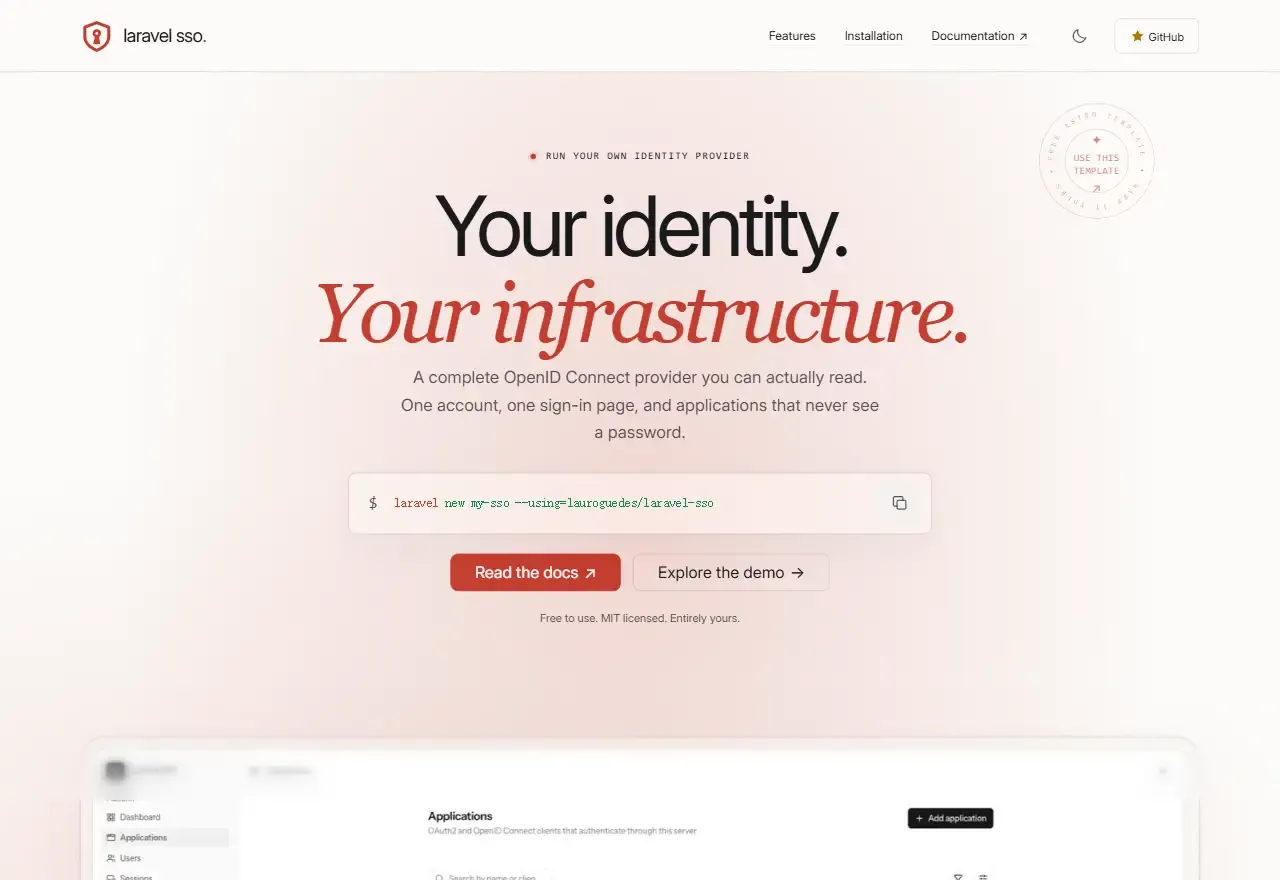
内容由 YAML、JSON、Markdown 驱动,构建输出纯静态站点
Astro企业官网
landpack — Astro 企业官网模板
作者 lauroguedes
面向开源项目的 Astro 落地页模板,内容用 YAML、JSON、Markdown 管理,纯 CSS 输出静态站点。
看看你的网站会是什么样
浏览真实页面截图,比较内容排版与手机效果。点击下方缩略图切换,放大查看整页细节。
全部页面与视图 2
截图用于了解视觉与布局,交互效果请以实际项目为准。
采集于 2026-09-27查看来源
值得关注的模板亮点
从已有项目资料中,快速了解它的特点。
仓库内置 AI 定制 skill 与项目结构说明,可由编码代理完成内容替换
包含功能卡片、安装步骤、集成标签页、FAQ 等开源项目常用区块
持久化明暗主题、成对截图与匹配的语法高亮
自带 sitemap、社交元数据与构建后 SEO 检查
模板详细介绍
Landpack 是一个给开源项目做落地页的 Astro 模板,用 Lumos for Astro 组件库加原生 CSS 写成,内容全部放在 YAML、JSON 和 Markdown 里,构建结果是纯静态页面。页面结构围绕开源项目常见的介绍路径组织:hero 区、功能卡片、安装步骤与命令、集成标签页、FAQ,再配上截图和作者信息。仓库自带一个 Laravel SSO 作为示例项目,里面的产品描述、命令、截图和集成代码都是待替换的示例内容,运行模板本身不会安装身份服务,也不需要 PHP。
比较有辨识度的是它把 AI 定制流程做进了仓库:.agents/skills 下有一个本地 skill 和完整的项目结构说明,把项目链接或需求简述交给能读取本地文件的编码代理,就可以按说明替换内容、品牌、图片和 SEO 配置,同时保持页面结构不变。功能上还包括移动端导航侧栏、向下滚动隐藏向上滚动返回的头部、持久化的明暗主题、成对截图与对应语法高亮、三种 hero 背景和三种截图边框、可复制的命令、带可分享 URL 的集成标签页、Markdown 格式的 FAQ,以及 sitemap、社交元数据和构建后的 SEO 检查。交互细节覆盖了示例 SSO 图的悬停、触摸和键盘触发,并支持 reduced-motion。
使用门槛主要在环境与内容替换上:需要 Node.js 22.12 及以上、npm 9.6.5 及以上,构建前要设置 PUBLIC_SITE_URL,否则 canonical 链接、社交图片、robots.txt 和 sitemap 会沿用示例域名。模板默认假设部署在域名根目录,放到子目录需要改 Astro 的 base 并同步更新根相对路径。示例集成代码只是文档片段,并未针对真实凭据做过认证实现测试;截图、头像、品牌图标和 logo 都需要换成自己的素材。上线前建议跑一遍 npm run check、npm run build 和 npm run seo:check,并在桌面与移动端、明暗两种主题下检查。
Astro企业官网
适合你的项目吗?
适用场景
- 为开源库或工具搭建介绍型落地页
- 需要静态托管、不引入数据库或 CMS 的项目主页
- 希望用 AI 代理批量替换模板内容与品牌的场景
适合人群
- 熟悉 Astro 或愿意按文档改 YAML、Markdown 的开发者
- 需要把落地页部署到 Cloudflare 或 Vercel 等静态托管的开源项目维护者
- 接受自行替换截图、头像、品牌图标和示例项目的团队
上手与定制指南
结合仓库当前版本的说明,按下面的资料检查内容、配置与运行要求。
- 1
需要 Node.js 22.12.0 及以上、npm 9.6.5 及以上,安装用 npm ci
- 2
构建前复制 .env.example 并设置 PUBLIC_SITE_URL,替换默认的 example.com
- 3
模板假设部署在域名根目录,子目录部署需改 Astro base 并更新根相对路径
- 4
示例集成代码为文档片段,未针对真实凭据测试;示例 SSO 图与 Laravel SSO 内容需替换
- 5
上线前运行 npm run check、npm run build、npm run seo:check,并检查两种主题与移动端
授权与来源资料
使用条件与限制
免费使用 · 保留许可声明本次收录的是公开仓库中的免费 MIT 版本;免费范围为该版本代码,不代表外部服务或第三方素材免费。
使用时需要遵守
- 使用、修改或分发代码时,保留原作者版权声明和完整 MIT 许可证。
- 允许免费使用、修改及商用,也允许分发代码;分发时仍需随附版权与许可声明。
- 代码按现状提供,作者不承诺担保或承担使用责任。
额外费用与待核对事项
- 演示图片、字体、图标及其他第三方素材需按各自许可核对,不能仅凭代码的 MIT 许可判断。
- 域名、托管、数据库、支付或 AI 等外部服务可能另外收费。
查看原文依据
https://github.com/lauroguedes/landpack/blob/main/LICENSEhttps://github.com/lauroguedes/landpack/blob/main/README.mdPermission is hereby granted, free of charge
许可证原文
依据完整 MIT 许可证与仓库 README 核对 · 2026-09-27。结果仅覆盖已读取资料,依赖、图片、字体及后续条款变更以各自原文为准。
项目核对记录与介绍依据
模板资料
- 来源平台
- Astro Themes
- 资料与维护参考分
- 资料较完整 · 80 / 100
- 技术栈
- Astro
- 网站类型
- 企业官网
这个分数如何计算
本站按许可资料(最高30分)、演示链接(12分)、预览图(10分)、Star数(15分)、记录的维护时间(15分)、描述完整度(8分)、功能记录(5分)和分类资料(5分)计算。它不是代码、安全或性能测试,也不是 Google 评分;有链接不代表已实测可用。
这个项目需要核对什么
- 记录的仓库更新时间
- 2026-09-19
- 截图检查日期
- 2026-09-27
已收录演示链接。请用你的内容与屏幕尺寸检查;有演示不代表表单、认证或支付已经可用。
目录记录的主要技术栈是 Astro。请通过依赖清单和锁文件核对实际版本与托管要求。这些说明基于收录资料,不代表代码审计或部署实测。
查看具体选型方法 →介绍的制作与核对状态
介绍由 AI 辅助整理目录与仓库资料。仓库作者不等于这篇介绍的审核者。
审核声明: Codex(本次来源核对) · 2026-09-27
查看当时使用的来源资料
SHA-256: 6641e2f6d1fa413bca397d33320f464945a87af680874780739e67bbb1c54331
2026-09-27T12:09:26.697Z
来源文件 / 仓库# Landpack [](https://astro.build) [](https://lumosframework.com/docs/) [](https://nodejs.org) [](LICENSE) A customizable landing page template for open-source projects, built with **Astro, Lumos for Astro, and plain CSS**. Edit your content in YAML, JSON, and Markdown, then publish a static site. <img width="1672" height="941" alt="ChatGPT Image Sep 19, 2026, 06_18_41 PM" src="https://github.com/user-attachments/assets/aca1e4e2-27e9-4126-96f9-de5da849b4a6" /> **Prefer to skip code edits?** Give an AI coding agent your project link or brief. The included [customization skill](docs/ai-customization.md) maps the whole template so the agent can adapt content, branding, assets, and SEO while preserving its structure. Laravel SSO is the included example project. Its product descriptions, commands, screenshots, and integration examples are sample content to replace with your own. Running this template does not install an identity server or require PHP. ## Features - Prompt-based customization with a portable, repository-local AI skill and a complete project map. - Responsive layout with a mobile navigation sidebar and a header that hides on downward scroll and returns on upward scroll. - Persistent light/dark themes, paired screenshots, and matching syntax highlighting. - Three hero backgrounds and three screenshot frames, configured in YAML. - Copyable commands, integration tabs with shareable URLs, and Markdown FAQs. - Configurable hero stamp, creator credit, and a faded footer wordmark. - Hover, touch, and keyboard activation for the sample SSO diagram; reduced-motion support. - Validated content, optimized local images, local fonts, social metadata, and a sitemap. - Regenerable social card and a built-output SEO check. - Static output with no database, CMS, API token, React, or Vue required. ## Documentation - [Quick start](#quick-start) - [Customize with AI](#customize-with-ai) - [Customize your site](#customize-your-site) - [Complete customization reference](docs/customization.md) - [Project structure and extension guide](docs/architecture.md) - [Build and deploy](#build-and-deploy) - [Cloudflare and Vercel deployment](docs/deployment.md) - [SEO audit and social images](docs/seo.md) - [Troubleshooting](#troubleshooting) - [Contributing](#contributing) - [License and credits](#license-and-credits) ## Quick start Requires **Node.js 22.12.0 or newer** and **npm 9.6.5 or newer**. Use a supported Node.js release that meets those requirements. 1. Download or clone this repository. If its GitHub page offers **Use this template**, you can create your own repository with that option. 2. Open a terminal in the downloaded project directory. 3. Install the locked dependencies and start the background development server: ```sh npm ci npm run dev -- --background ``` Open the address printed by Astro, normally [localhost:4321](http://localhost:4321). Changes to content and components update the preview automatically. ```sh npm run astro -- dev status npm run astro -- dev logs npm run astro -- dev stop ``` Before your first production build, copy the environment example and set your public site URL: ```sh cp .env.example .env ``` ```dotenv PUBLIC_SITE_URL=https://your-project.dev ``` This is the landing page’s URL, independent of the featured project’s repository, documentation, and demo links. Replace the fallback `https://example.com` before publishing. ## Customize with AI Open this repository in an AI coding agent with local file access, then paste: ```text Read .agents/skills/landpack-customize/SKILL.md and adapt this template for <project link>. Use the project's own README and docs as sources. Customize the complete page, branding, images, links, and SEO while preserving its structure. Generate the social card, run the checks, and show me the local preview. ``` You can provide a written project brief instead of a link. The agent makes the edits; you review the result and supply any missing facts or assets. See the [AI customization guide](docs/ai-customization.md) for prompts, agent discovery, and what the skill covers. It works without a hosted customization service and does not deploy automatically. ## Customize your site Start with [src/content/project/main.yaml](src/content/project/main.yaml). Keep the filename `main.yaml`; the page and shared layout read that entry. | What to change | Where | | --------------------------------------------------------------- | ------------------------------------------------------------- | | Identity, hero, links, section copy, screenshots, stamp, author | [Project YAML](src/content/project/main.yaml) | | Feature cards | [Feature entries](src/content/features/) | | Installation steps and commands | [Step entries](src/content/steps/) | | Integration tabs and code examples | [Integration entries](src/content/integrations/) | | FAQ questions and Markdown answers | [FAQ entries](src/content/faq/) | | Palette, type scale, spacing, theme colors | [Design tokens](src/styles/base.css) | | Inline logo | [GraphicMark.astro](src/components/Graphic/GraphicMark.astro) | | Favicon and social image | [public/](public/) | | Social image URL, description, and dimensions | `seo` in [Project YAML](src/content/project/main.yaml) | | Site URL | `.env` or the hosting build environment | | Section order and page composition | [index.astro](src/pages/index.astro) | For a first customization: 1. Replace the example project’s identity, links, commands, and section text. 2. Replace screenshots and author photo; write useful image descriptions. 3. Choose a `background` and `preview.frame` in YAML. 4. Update the stamp link. Its included `href: "#"` is a placeholder; remove `stamp` or set `stamp.enabled: false` to hide it. 5. Edit or remove collection entries. Their `order` values control sequence. 6. Replace the logo, favicon, and light/dark palette. Run `npm run og:generate` for a matching social card, or supply your own and configure `seo`. 7. Run the checks and inspect both themes at desktop and mobile widths. The [customization reference](docs/customization.md) documents **every project field**, collection formats, image paths and crops, optional sections, typography, motion, shared UI labels, and SEO. The included diagrams are product-specific illustrations; their internal labels live in components. ## Commands | Command | Purpose | | ----------------------------- | ------------------------------------------------------- | | `npm ci` | Install exact dependencies from the lockfile | | `npm run dev -- --background` | Start local development in the background | | `npm run astro -- dev status` | Show background server status | | `npm run astro -- dev logs` | Read development logs | | `npm run astro -- dev stop` | Stop the background server | | `npm run check` | Check Astro and TypeScript diagnostics | | `npm run build` | Load/validate content and generate `dist/` | | `npm run og:generate` | Generate `public/og-image.jpg` from project content | | `npm run seo:check` | Check built metadata, social image, sitemap, and robots | | `npm run preview` | Preview the production build locally | | `npm run format` | Format the project with Prettier | Keep [package-lock.json](package-lock.json) committed. Dependency changes use `npm install`; normal fresh installs use `npm ci`. ## Build and deploy ```sh npm run check npm run build npm run seo:check npm run preview ``` Publish the generated **`dist/`** directory to a static host: | Setting | Value | | -------------------- | ------------------------------------------ | | Install command | `npm ci` | | Build command | `npm run build` | | Output directory | `dist` | | Environment variable | `PUBLIC_SITE_URL=https://your-project.dev` | No server adapter is required. Configure the production URL before building so canonical links, social images, `robots.txt`, and the sitemap use your domain. Environment changes require rebuilding. Follow the short [Cloudflare Workers or Vercel instructions](docs/deployment.md). The included [wrangler.jsonc](wrangler.jsonc) supports Cloudflare static assets; Vercel needs no additional configuration for this template. Deployment is not automatic. The [SEO guide](docs/seo.md) records the Astro documentation audit and explains social-image configuration. Run `npm run og:generate` when project text/colors change; builds use the reviewed image without regenerating it. For local checks before choosing a domain, use `npm run seo:check -- --allow-placeholder`. The normal check intentionally rejects the shipped example domain. The template assumes hosting at the domain root. For a subdirectory, set Astro’s `base` and update root-relative navigation, favicon, and social-image paths. Changing `base` alone does not update literal URLs. ## Troubleshooting | Symptom | Check | | ----------------------------------- | ---------------------------------------------------------------------------------------------- | | Unsupported Node.js version | Run `node --version` and use Node.js 22.12+ | | Content validation error | Follow the file/field in the error; compare with [the schema](src/content.config.ts) | | New schema field is ignored | Add it to the schema and wire it into a component; restart the dev server after schema changes | | Missing screenshot | Image paths are relative to `main.yaml`, not the project root | | Light screenshot does not change | Set `imageLight` alongside `image`; otherwise one asset serves both themes | | Preview jumps to integrations | Remove `?tab=…` from the URL; matching tab URLs intentionally reveal that section | | Wrong social/canonical URL | Set `PUBLIC_SITE_URL` and rebuild | | Copy button cannot access clipboard | Use HTTPS or localhost; the command remains selectable | | Port is already in use | Check `dev status` and the address printed in the logs | ## Contributing Read [LUMOS.md](LUMOS.md) before changing components. Keep changes focused and reuse existing Lumos primitives. Include the reason for a change, relevant screenshots for UI work, and the checks performed. Before submitting a pull request: - Run `npm run check`, `npm run build`, and the SEO check (allow a placeholder only for local starter validation). - For UI changes, check desktop/mobile, both themes, keyboard access, and reduced motion. - Update the schema, customization guide, and skill project map together when adding settings. - Keep generated `dist/`, `.astro/`, dependencies, and local environment files out of commits. For help, use this repository’s Issues tab when available. Include reproduction steps, Node/npm versions, and relevant error output. Upstream references: [Astro documentation](https://docs.astro.build), [Lumos for Astro](https://lumosframework.com/docs/). ## License and credits [MIT](LICENSE). Preserve the existing copyright and license notices when redistributing the template. - **Lumos for Astro:** Timothy Ricks. The starter’s license and version metadata are preserved. - **Landing page and example project:** Lauro Guedes; [Laravel SSO](https://github.com/lauroguedes/laravel-sso). - **Brand icons:** [Source and license details](src/assets/icons/brands/README.md). - **Example integrations:** Library/source links are stored beside each snippet. These excerpts are documentation examples, not an authentication implementation tested against live client credentials. Replace the included branding, portraits, and product screenshots for your own site. Changing the displayed `license` field does not change this repository’s software license.
看看同类模板
对比同技术栈与用途的模板,找到更适合的视觉与内容结构。

astrowind
⭕️ AstroWind: A free template using Astro v7 and Tailwind CSS v4. Astro starter theme.
Astro · 博客

astro-landing-page
An Astro + Tailwind CSS Example/Template for Landing Pages
Astro · 企业官网

Tailcast
Dark-themed website template built on Astro and Tailwind CSS
Astro · 企业官网

Positivus
A stunning and versatile Astro theme designed for digital marketing agencies.
Astro · 企业官网

qwind
⭕️ Qwind: A template to make your website using Qwik + Tailwind CSS.
Astro · 工具站

agency-landing-page-Astrojs
A simple agency landing page made with astrojs and tailwindcss
Astro · 企业官网