Accessibility as the core: semantic minimal markup optimized for screen readers
HugoStarter
accessible-minimalism-hugo-theme — Hugo Starter Template
By leonstafford
A minimalist Hugo theme prioritizing accessibility, generating semantic, low-redundancy XHTML 1.0 Strict valid and HTML5-friendly markup, suitable for content-first static sites.
Explore the design
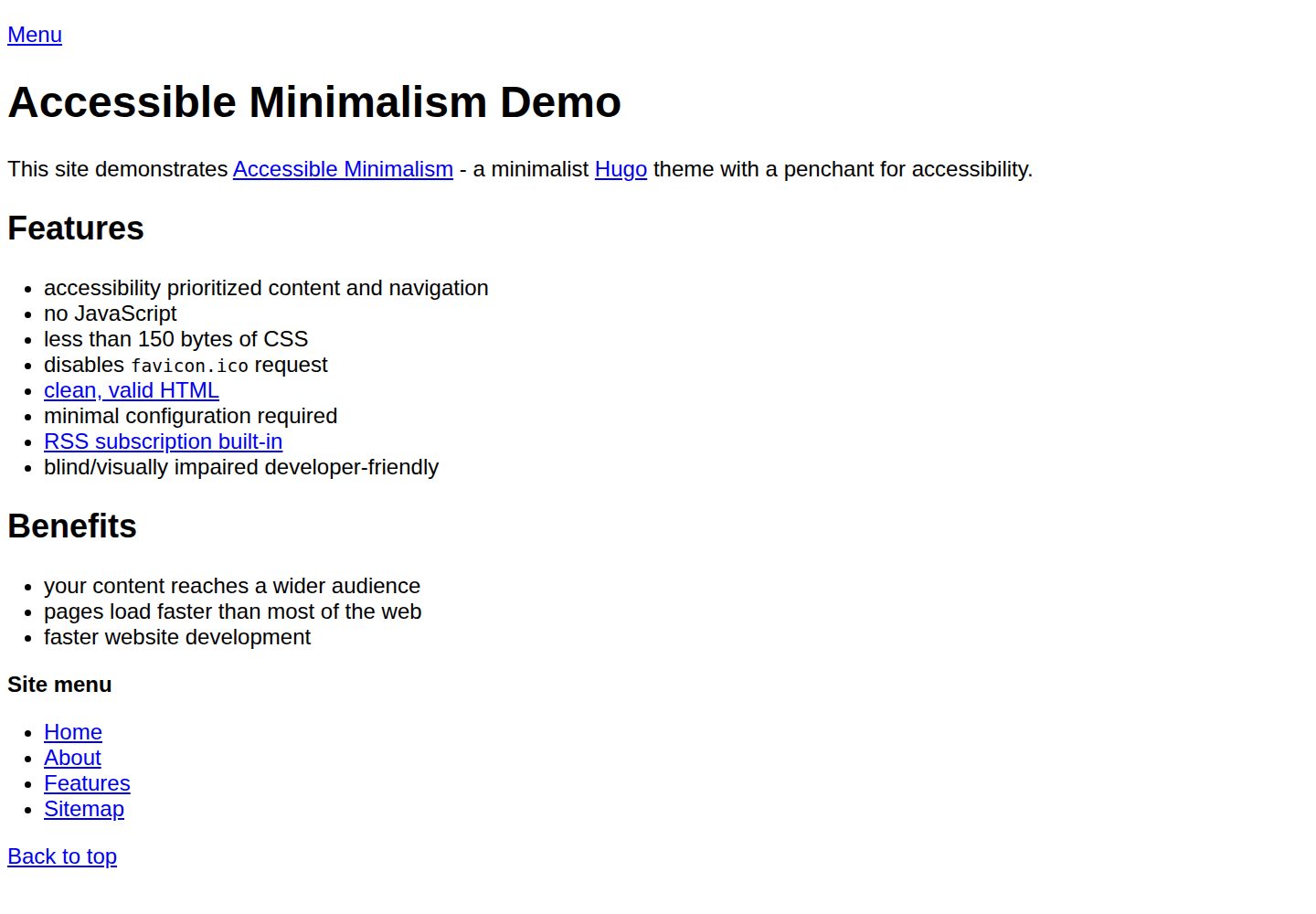
Compare the page layouts and mobile experience. Open any screenshot for a closer look.
Desktop homepage1 / 3
Desktop captureTop of page
Actual screenshot captured by the server browser.
All pages & views 3
Screenshots show visual appearance; interactive behavior may differ.
Recorded 2026-10-03View source
What stands out
A quick read of the recorded project description.
Generates XHTML 1.0 Strict valid and HTML5-friendly code
RSS feed support
Minimal Hugo configuration; start by copying exampleSite's hugo.toml
Skips redundancy such as anchor title attributes, relying on browser default high-contrast colors
Adopts a mobile-last development approach
Template Details
This theme targets scenarios where content and inclusivity come first. Its goals include: generating XHTML 1.0 Strict valid and HTML5-friendly code, reducing redundancy in generated markup, centering on semantic minimal markup readable by screen readers, providing as little additional CSS as possible for low-vision users, keeping source code readable, requiring minimal Hugo configuration, supporting RSS feeds, and explicitly prioritizing fully blind users over partially or fully sighted users, with a mobile-last development approach.
For usage, the theme is added to a Hugo site via git submodule. You need to copy hugo.toml from the repository's exampleSite directory to the site root, then run hugo server for local preview. Content structure and the main site menu are the primary adjustable items; refer to the exampleSite content directory and the menu entries in hugo.toml for correspondence.
In development decisions, the theme skips redundant content such as anchor title attributes and considers browser default colors to have sufficient contrast. Testing suggestions include the W3C validator, hugoBasicExample and the exampleSite content directory, the lynx browser, screen readers, and accessibility checking sites such as WAVE and AChecker. The roadmap includes configuration options for footer email/RSS/social links, scriptless search (GET submission to a search engine plus index generation), and multilingual site support (including Hugo's sitemapindex); these are planned rather than existing features.
HugoLauncher
Is it right for your project?
Use Cases
- Building a personal blog or documentation site focused on text content and accessibility
- Publishing content that needs clear semantic structure for screen reader and low-vision users
- Static sites that want readers to pull content on demand via RSS
- Using as a lightweight theme foundation in a Hugo project, then extending content structure and menus yourself
Suitable For
- Site authors who value content and inclusivity and do not pursue visual effects
- Developers using Hugo who are willing to manage themes via git submodule
- Site maintainers who need to validate XHTML/HTML validity and accessibility performance
- Developers who prefer minimal additional CSS and readable source code
Getting started & customization
Use these recorded setup notes alongside the repository instructions for your chosen version.
- 1
If you do not yet have a Hugo site, first install Hugo and create a project directory, then enter that directory
- 2
In the site root, run git submodule add --no-single-branch https://github.com/leonstafford/accessible-minimalism-hugo-theme themes/accessible-minimalism
- 3
Copy hugo.toml from the repository's exampleSite directory to the site root to specify the theme and basic configuration
- 4
Run hugo server and preview at the local address shown in the output (e.g., http://localhost:1313/)
- 5
Adjust content structure and the main site menu by referring to the exampleSite content directory and the menu entries in hugo.toml
License & source material
Usage conditions & limitations
Free to use · keep license noticeThis entry covers the free version under the Unlicense in the public repository; the free scope is the code of this version and does not mean external services or third-party assets are free.
Must comply with when using
- Permits free copying, modification, publication, use, compilation, sale, and distribution of this version's code, including commercial use.
- The author waives related copyright through a public domain dedication; the legal effect of this dedication depends on the applicable jurisdiction.
- The code is provided as is; warranties and limitations of liability are governed by the original license and applicable law.
Additional costs & items to verify
- Demo images, fonts, icons, and other third-party assets must be checked against their respective licenses; they cannot be judged solely by the code's Unlicense.
- External services such as domains, hosting, databases, payments, or AI may incur additional charges.
View Original Text Basis
https://github.com/leonstafford/accessible-minimalism-hugo-theme/blob/master/LICENSEhttps://github.com/leonstafford/accessible-minimalism-hugo-theme/blob/master/README.mdfor any purpose, commercial or non-commercial, and by any means
Original License Text
Compiled by DeepSeek based on repository license and README ·2026-10-03. Results only cover the materials read; dependencies, images, fonts, and subsequent term changes are subject to their respective original texts.
Project checks & description sources
Template Information
- Source platforms
- Hugo Themes
- Documentation and maintenance reference score
- More documented · 87 / 100
- Technologies
- Hugo
- Website type
- Starter
How this score is calculated
Our heuristic uses license records (up to 30), a demo link (12), a preview (10), stars (15), recorded maintenance (15), description completeness (8), feature records (5) and classification data (5). It is not a code, security or performance test, or a Google score. A link does not establish tested functionality.
What to verify for this project
- Repository update recorded
- 2026-03-29
- Screenshot last checked
- 2026-10-03
A demo link is listed. Check it with your own content and viewport sizes; its presence does not confirm that forms, authentication or payments work.
The catalog identifies Hugo as the primary stack. Check the actual dependency manifest and lockfile for versions and hosting requirements. These notes use recorded metadata, not a code audit or a deployment test.
Use a selection guide →How this description was prepared
AI-assisted description based on catalog records and repository material. Repository authors are not automatically the reviewers of this description.
Automatically checked against source and license rules; no manual editorial review.
Inspect the recorded source material
SHA-256: 8931121bda30152a43d8b1445499ea0392891176e59b70529a4b8c42f5fdc411
2026-10-03T06:45:41.099Z
Source file / repository# Accessible Minimalism Hugo Theme Minimalist Hugo theme with a penchant for accessibility [Demo site](https://accessible-minimalism.netlify.app) ## Project aims - XHTML 1.0 Strict valid and HTML 5 friendly code - minimal bloat in the generated markup - focus on accessibility - semantic, minimal markup for screen readers - minimal added CSS for partially sighted users - easy to read source code - minimal config required to get started and use in Hugo - RSS subscription support - favors fully-blind users over partially or fully sighted users - mobile-last development ## Who is this for? This aims at users who care more about content and inclusivity than dancing baby GIFs or whatever the 2020 equivalent is. The early web was great for content, unburdened by MBs of JavaScript or CSS. RSS feeds allowed users to pull your content on demand vs being forced into giving you space in their precious inbox or following your social-ills. ## Getting started 0. (if no Hugo website yet) - Install Hugo - Create new project dir (`hugo new project ~/project-dir`) - Change dir to project's (`cd ~/project-dir`) 1. In your Hugo site's root, use git's submodule functionality to keep the theme within your website's repository for easier management. `git submodule add --no-single-branch https://github.com/leonstafford/accessible-minimalism-hugo-theme themes/accessible-minimalism` *Using the https remote URI will make deployment of your website via some CI/CD, such as Netlify, easier.* *The `--no-single-branch` argument avoids some submodule trouble for me in development, you may omit it, but shouldn't cause you any issues if left in* 2. Copy the `hugo.toml` file from the exampleSite directory inside this repository to your site root: `cp themes/accessible-minimalism/exampleSite/hugo.toml .` This tells your Hugo site which theme you're using, along with other configuration options which you can adjust now or later. 3. Test your site: - run your Hugo server from project root `hugo server` - open the local website address shown in the above command's output, ie `http://localhost:1313/` 4. Proceed to develop your site content and theme - TBC steps for git workflow ## Configuration The main things you may want to adjust when using this theme are your content structure and main site menu. Copying the `content` directory from this theme's `exampleSite` directory will be a good place to start. You can compare this with the menu entries in the `hugo.toml` and it should make sense. Try making changes and see what happens. If it becomes a mess, reset both to initial states. ## Development decisions - skip redundancy such as anchor's `title` attributes - default browser colors are high contrast enough ## Screenshot [](https://github.com/leonstafford/accessible-minimalism-hugo-theme/blob/master/images/screenshot.png) ## Testing - check theme against [w3c validator](https://validator.w3.org) - check using `content` dir from [hugoBasicExample](https://github.com/gohugoio/hugoBasicExample) - check using `content` dir from `exampleSite` in this repo - check navigation and content in `lynx(1)` browser - check navigation and content in screen reader(s) - test accessibility in sites like: - [wave](https://wave.webaim.org/report#/https://accessible-minimalism.netlify.app) - [achecked](https://achecker.ca) ## Roadmap - theme options / config help for enabling footer links to email, RSS, socials - scriptless search (GET submission to engine + index generation) - multilingual site support (includine Hugo's sitemapindex) ### License [The Unlicense](https://unlicense.org) - do whatever you like with this code.
Explore similar templates
Compare previews and descriptions within the same stack and category.

hugo-xmin
hugo-xmin is an extremely minimal Hugo theme written by Yihui Xie for template beginners. HTML and CSS total about 140 lines, with no external dependencies, and it uses the MIT license.
Hugo · Starter

hugo-theme-gallery
A Hugo Extended photo gallery theme that organizes images with Page Bundles, automatically generating album lists and gallery pages with a Justified layout and PhotoSwipe lightbox.
Hugo · Starter

reveal-hugo
reveal-hugo is a Hugo theme that converts Markdown content into Reveal.js-based HTML presentations. It supports slide separation with `---`, shortcodes for fragments, slides, sections, notes, Markdown, and MathJax, and organizes content as root or section presentations with order controlled by weight.
Hugo · Starter

anatole
Anatole is a minimalistic two-column Hugo theme ported from farbox-theme-Anatole, featuring dark mode, multilingual and RTL support, and optional portfolio, comments, analytics, KaTeX, and Mermaid integrations. It suits personal blogs, portfolios, or documentation sites built with Hugo.
Hugo · Starter

hugo-theme-diary
A Hugo diary-style theme ported from the Hexo theme Journal, with a grid homepage for essays and daily notes. It supports six languages, dark mode, table-of-contents scroll positioning, reading time, code highlighting, and configurable sidebar, fonts, and colors.
Hugo · Starter

risotto
risotto is a minimalist, responsive Hugo theme inspired by terminal ricing aesthetics. It uses semantic HTML and pure CSS with no JavaScript, and its layout relies on CSS Grid for native responsiveness without manual breakpoints.
Hugo · Starter