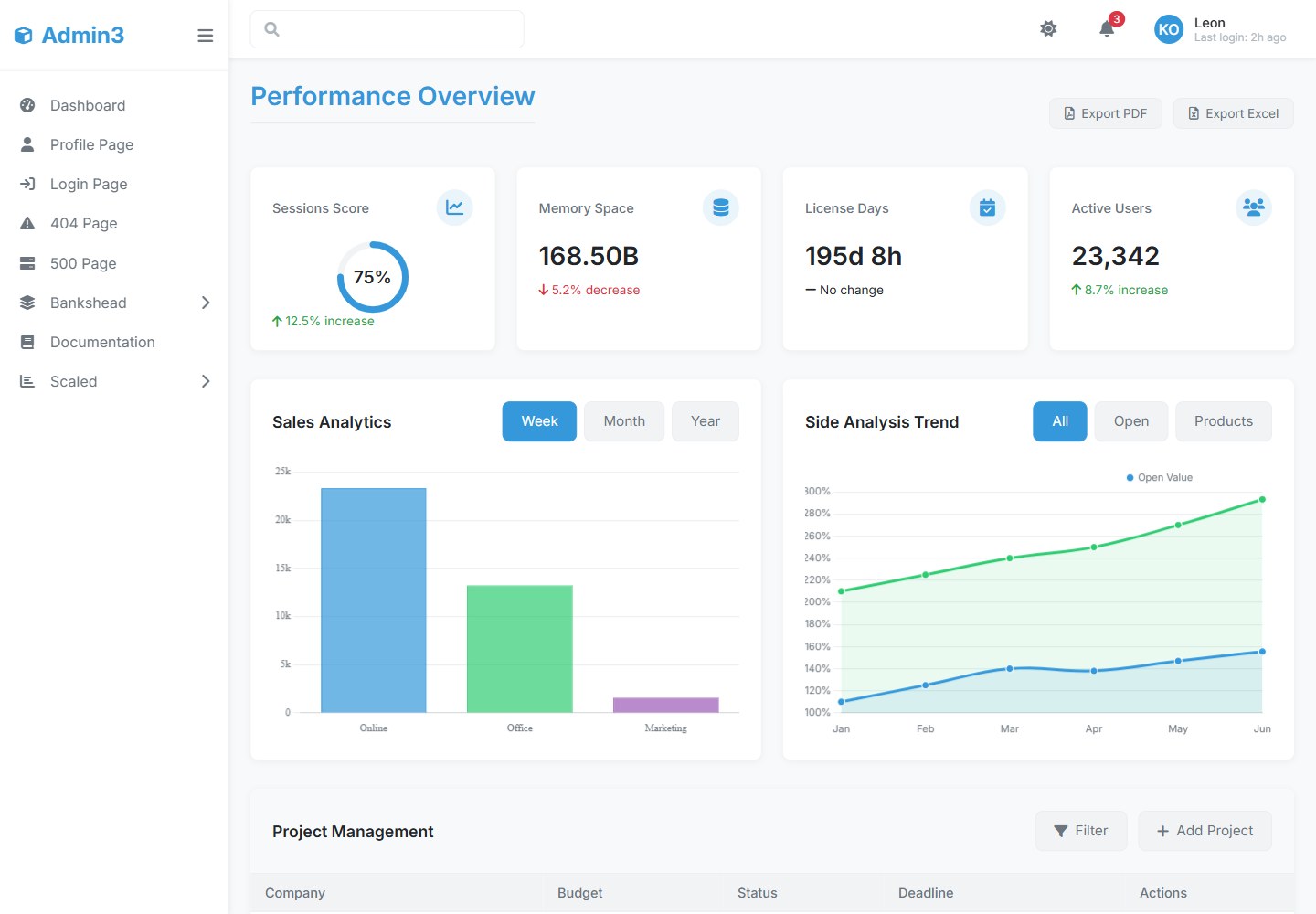
Provides preset pages including dashboard, user management, analytics, settings, and login/register
HTMLAdmin dashboard
3admin-dashboard — HTML Admin dashboard Template
By leonxlab
Admin3 is an admin dashboard template developed by LeonXlab, offering a responsive layout, light/dark theme switching, and preset pages for dashboard and user management, built on vanilla JavaScript and CSS variables with Chart.js integration.
Explore the design
Compare the page layouts and mobile experience. Open any screenshot for a closer look.
Desktop homepage1 / 2
Desktop captureTop of page
Rendered from the fixed source checkout.
All pages & views 2
Screenshots show visual appearance; interactive behavior may differ.
Recorded 2026-10-16View source
What stands out
A quick read of the recorded project description.
Built-in light/dark theme switching with system preference detection and localStorage persistence
Theming via CSS variables, allowing modification of primary colors and other variables in css/theme.css
Built with vanilla JavaScript, the README states no framework dependency, and integrates Chart.js charts
Includes reusable components such as cards, charts, forms, and tables, with tables supporting sorting, pagination, and row selection
Adds a Scouts card grid section and a standalone user profile page
Template Details
Admin3 Dashboard is an admin panel template for developers and businesses, developed by LeonXlab, used to build admin backends, CMS systems, and back-office applications. The README states it provides a clean, professional interface, including a responsive layout (desktop, tablet, mobile), light/dark theme switching, system preference detection, and theme persistence settings.
The template includes preset pages: dashboard, user management, analytics, settings, login/register, plus a Scouts section (displaying scout information in a rectangular card grid) and a standalone user profile page (with avatar, contact information, and action buttons). The frontend uses a modular component structure, CSS variables for theming, is built on vanilla JavaScript (the README states no framework dependency), and integrates Chart.js for line, bar, and pie charts. Available components include cards (stat cards, profile cards, chart cards), charts, forms (inputs, dropdown selects, checkboxes/radios), and tables (sortable columns, pagination, row selection).
The installation process requires Node.js (the README suggests v14+), npm or yarn, installing dependencies via npm install, starting the development server with npm run dev, and generating a production build with npm run build. The README mentions deploying the dist/ directory to Netlify, Vercel, AWS S3, or GitHub Pages, and also provides Docker build and run commands.
Statements in the README such as "production-ready," "performance-optimized," and "WCAG 2.1 compliant" are original claims and do not provide verifiable testing or audit evidence. The README does not document specific framework version numbers, browser compatibility testing scope, API backend implementation, or data persistence approach; the example login credentials and API call code are for demonstration purposes only.
HTMLBackend
Is it right for your project?
Use Cases
- Building an internal enterprise admin backend or operations panel
- Constructing the frontend interface for a CMS or back-office system
- Serving as a starting point for dashboard projects that need light/dark theme switching
- Reusing its card, table, and chart components in vanilla JavaScript projects
Suitable For
- Frontend developers who need a ready-made admin interface template
- Teams that want to build an admin panel on vanilla JavaScript rather than a framework
- Back-office projects that need light/dark themes and a responsive layout
Getting started & customization
Use these recorded setup notes alongside the repository instructions for your chosen version.
- 1
Requires Node.js (the README suggests v14+) and npm or yarn
- 2
After cloning the repository, run npm install or yarn install to install dependencies
- 3
Start the development server with npm run dev or yarn dev
- 4
Generate a production build with npm run build or yarn build; the README states dist/ can be deployed to Netlify, Vercel, AWS S3, or GitHub Pages
- 5
The README provides Docker build and run examples: docker build -t admin3-dashboard . and docker run -p 8080:80 admin3-dashboard
License & source material
Usage conditions & limitations
Free to use · keep license noticeThis entry covers the free version in a public repository under the MIT license; the free scope is the code of that version and does not mean external services or third-party assets are free.
Must comply with when using
- Free use, modification, commercial use, and distribution of this version's code are permitted.
- When distributing copies or substantial portions of the code, retain the original author's copyright notice and the full MIT license notice.
- The code is provided as-is; warranties and limitations of liability are governed by the original license and applicable law.
Additional costs & items to verify
- Demo images, fonts, icons, and other third-party assets must be checked against their respective licenses and cannot be judged solely by the code's MIT license.
- External services such as domains, hosting, databases, payments, or AI may incur separate charges.
- The README provides default demo login credentials ([email protected] / admin123), which are not a real authentication system.
- API integration examples call backend endpoints such as /api/auth/login; the README does not provide a backend implementation and you must integrate it yourself.
- Data fetching examples rely on endpoints such as /api/users, /api/sales, and /api/activities; the README does not document who provides these endpoints.
- The README claims WCAG 2.1 accessibility compliance but does not provide verifiable testing or audit evidence.
- The README calls itself "production-ready" but does not provide testing, audit, or deployment verification evidence.
- The README claims "performance-optimized" but does not provide benchmarks or performance data.
- Installation requires Node.js v14+; you must prepare the corresponding runtime environment yourself.
- Docker deployment requires Docker to be installed locally and the image to be built yourself.
View Original Text Basis
Permission is hereby granted, free of charge
Original License Text
2. Default login credentials (for demo):
Original README
const response = await fetch('/api/auth/login', {
Original README
fetch('/api/users'),
Original README
- Accessibility compliant (WCAG 2.1)
Original README
- 🚀 Production-ready template
Original README
- ⚡ Optimized performance
Original README
- Node.js (v14+ recommended)
Original README
https://github.com/leonxlab/3admin-dashboard/blob/main/LICENSEhttps://github.com/leonxlab/3admin-dashboard/blob/main/README.mddocker build -t admin3-dashboard .
Original README
Compiled by DeepSeek based on repository license and README ·2026-10-14. Results only cover the materials read; dependencies, images, fonts, and subsequent term changes are subject to their respective original texts.
Project checks & description sources
Template Information
- Source platforms
- GitHub
- Documentation and maintenance reference score
- Partly documented · 62 / 100
- Technologies
- HTML
- Website type
- Admin dashboard
How this score is calculated
Our heuristic uses license records (up to 30), a demo link (12), a preview (10), stars (15), recorded maintenance (15), description completeness (8), feature records (5) and classification data (5). It is not a code, security or performance test, or a Google score. A link does not establish tested functionality.
What to verify for this project
- Repository update recorded
- 2025-04-24
- Screenshot last checked
- 2026-10-16
No demo link is recorded. Use the repository instructions to evaluate the project locally; the screenshot alone cannot establish interactive behavior.
The catalog identifies HTML as the primary stack. Check the actual dependency manifest and lockfile for versions and hosting requirements. These notes use recorded metadata, not a code audit or a deployment test.
Use a selection guide →How this description was prepared
AI-assisted description based on catalog records and repository material. Repository authors are not automatically the reviewers of this description.
Review declaration: codex-user-requested-batch-review-20261017 · 2026-10-16
Inspect the recorded source material
SHA-256: b53b60326852a96b326274e4d5603e0154889cbe09bca71cee6856a626288232
2026-10-14T13:40:37.079Z
Source file / repository# Admin3 Dashboard - Documentation       ## Table of Contents 1. [Overview](#overview) 2. [Features](#features) 3. [Installation](#installation) 4. [Usage](#usage) 5. [Customization](#customization) 6. [Theme System](#theme-system) 7. [Components](#components) 8. [API Integration](#api-integration) 9. [Deployment](#deployment) 10. [Contributing](#contributing) 11. [License](#license) ## Overview Admin3 is a modern, responsive admin dashboard template developed by **LeonXlab**. Designed for developers and businesses, it provides a clean, professional interface for building admin panels, CMS systems, and back-office applications. **Key Benefits:** - 🚀 Production-ready template - 🎨 Customizable design system - 🌓 Built-in dark/light mode - 📱 Fully responsive layout - ⚡ Optimized performance ## Features ### Core Features - **Modern UI/UX Design** - Clean, minimalist interface - Responsive layout (desktop, tablet, mobile) - Accessibility compliant (WCAG 2.1) - **Theme System** - Light/dark mode toggle - System preference detection - Persistent theme settings - **Pre-built Pages** - Dashboard - User management - Analytics - Settings - Login/Register ### Technical Features - **Frontend Architecture** - Modular component structure - CSS variables for theming - Vanilla JavaScript (no framework dependency) - Chart.js integration - **Performance** - Optimized asset loading - Minimal dependencies - Efficient DOM operations ### New Features - **Scouts Section** - Display scouts in a grid layout with rectangular cards. - Each scout card contains details about the scout. - **User Profile Page** - Separate page for user profile with detailed information. - Includes profile picture, contact information, and action buttons. ## Installation ### Prerequisites - Node.js (v14+ recommended) - npm/yarn - Modern browser (Chrome, Firefox, Edge, Safari) ### Installation Steps 1. **Clone the repository** ```bash git clone https://github.com/leonxlab/admin3-dashboard.git cd admin3-dashboard ``` 2. **Install dependencies** ```bash npm install # or yarn install ``` 3. **Development server** ```bash npm run dev # or yarn dev ``` 4. **Production build** ```bash npm run build # or yarn build ``` ## Usage ### Basic Structure ``` admin3-dashboard/ ├── assets/ # Static assets ├── css/ # Stylesheets ├── js/ # JavaScript modules ├── pages/ # Application pages ├── index.html # Main entry point └── README.md # Documentation ``` ### Starting the Dashboard 1. After installation, open `index.html` in your browser 2. Default login credentials (for demo): ``` Email: [email protected] Password: admin123 ``` ### Navigation - **Sidebar**: Main navigation menu - **Topbar**: Quick actions and user menu - **Breadcrumbs**: Contextual navigation ## Customization ### Theme Colors Modify CSS variables in `css/theme.css`: ```css :root { --primary-color: #3498db; --secondary-color: #2ecc71; --danger-color: #e74c3c; /* ... */ } ``` ### Layout Configuration Edit `js/config.js`: ```javascript const config = { sidebar: { collapsedWidth: '70px', expandedWidth: '250px' }, theme: { default: 'system' // 'light' | 'dark' | 'system' } }; ``` ## Theme System ### How it Works 1. Checks for saved user preference in localStorage 2. Falls back to system preference 3. Defaults to light theme ### API ```javascript // Get current theme const currentTheme = document.documentElement.getAttribute('data-theme'); // Toggle theme document.getElementById('themeToggle').click(); // Listen for theme changes document.addEventListener('themeChanged', (e) => { console.log('Theme changed to:', e.detail.theme); }); ``` ## Components ### Available Components 1. **Cards** - Stat cards - Profile cards - Graph cards 2. **Charts** - Line charts - Bar charts - Pie charts 3. **Forms** - Input fields - Select dropdowns - Checkboxes/radios 4. **Tables** - Sortable columns - Pagination - Row selection ### Component Usage Example card implementation: ```html <div class="stat-card"> <div class="stat-header"> <span class="stat-title">Total Users</span> <div class="stat-icon"> <i class="fas fa-users"></i> </div> </div> <div class="stat-value">1,024</div> <div class="stat-trend trend-up"> <i class="fas fa-arrow-up"></i> <span>12.5% increase</span> </div> </div> ``` ## API Integration ### Authentication Example login implementation: ```javascript async function login(email, password) { const response = await fetch('/api/auth/login', { method: 'POST', headers: { 'Content-Type': 'application/json' }, body: JSON.stringify({ email, password }) }); if (!response.ok) throw new Error('Login failed'); return response.json(); } ``` ### Data Fetching Example dashboard data: ```javascript async function loadDashboardData() { const [users, sales, activities] = await Promise.all([ fetch('/api/users'), fetch('/api/sales'), fetch('/api/activities') ]); return { users: await users.json(), sales: await sales.json(), activities: await activities.json() }; } ``` ## Deployment ### Static Hosting 1. Build the project: ```bash npm run build ``` 2. Deploy the `dist/` folder to: - Netlify - Vercel - AWS S3 - GitHub Pages ### Docker Deployment 1. Build the Docker image: ```bash docker build -t admin3-dashboard . ``` 2. Run the container: ```bash docker run -p 8080:80 admin3-dashboard ``` ## Contributing We welcome contributions! Please follow these steps: 1. Fork the repository 2. Create a feature branch (`git checkout -b feature/your-feature`) 3. Commit your changes (`git commit -m 'Add some feature'`) 4. Push to the branch (`git push origin feature/your-feature`) 5. Open a Pull Request ### Coding Standards - Follow existing code style - Write meaningful commit messages - Include documentation for new features - Test your changes thoroughly --- **LeonXlab** [GitHub](https://github.com/leonxlab) | [Contact](mailto:[email protected])
Explore similar templates
Compare previews and descriptions within the same stack and category.

AdminLTE
An HTML admin dashboard built with Bootstrap 5 and vanilla JavaScript. Astro builds the documentation; React, Vue and Angular editions live in separate repositories.
HTML · Admin dashboard

gentelella
Gentelella v4 is a free, open-source admin dashboard template maintained by Colorlib, built with vanilla JavaScript, SCSS, and Vite 8 without Bootstrap or jQuery.
HTML · Admin dashboard

coreui-free-bootstrap-admin-template
A free Bootstrap admin template maintained by CoreUI, built on CoreUI's own UI component library. It provides compiled HTML pages and Pug template source code, covering dashboards, authentication, forms, components, icons, and error pages.
HTML · Admin dashboard

dashboards
A collection of responsive dashboard HTML templates open-sourced by Keen IO, built on CSS Grid, offering multiple prebuilt admin data interface layouts.
HTML · Admin dashboard

SB Admin 2
SB Admin 2 is a classic Bootstrap admin template from Start Bootstrap, offering dashboards, charts, tables, and common management pages.
HTML · Admin dashboard

Adminator-admin-dashboard
Adminator 4 is a vanilla HTML, CSS and JavaScript admin dashboard template with a CSS-variable token design system, built-in light and dark themes, no jQuery or Bootstrap dependency, and 18 pages covering dashboards, mail, calendar, charts, forms, tables and error pages.
HTML · Admin dashboard