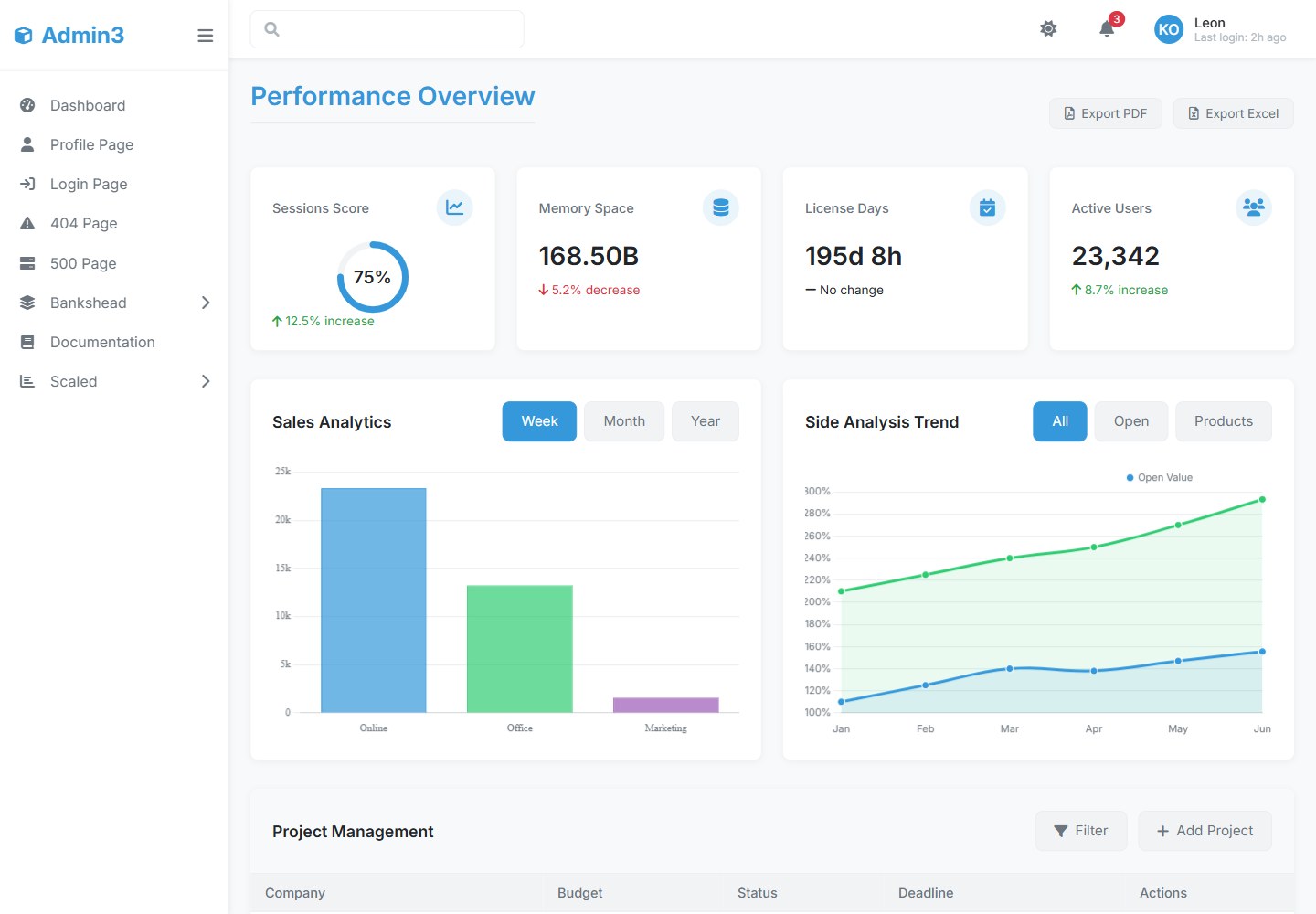
提供仪表盘、用户管理、分析、设置、登录/注册等预置页面
HTML后台
3admin-dashboard — HTML 后台模板
作者 leonxlab
Admin3 是 LeonXlab 开发的后台管理面板模板,提供响应式布局、明暗主题切换、仪表盘与用户管理等预置页面,基于原生 JavaScript 与 CSS 变量构建,并集成 Chart.js 图表。
看看你的网站会是什么样
浏览真实页面截图,比较内容排版与手机效果。点击下方缩略图切换,放大查看整页细节。
全部页面与视图 2
截图用于了解视觉与布局,交互效果请以实际项目为准。
采集于 2026-10-16查看来源
值得关注的模板亮点
从已有项目资料中,快速了解它的特点。
内置明暗主题切换,支持系统偏好检测与 localStorage 持久化
基于 CSS 变量实现主题定制,可在 css/theme.css 中修改主色等变量
使用原生 JavaScript 构建,README 称无框架依赖,并集成 Chart.js 图表
包含卡片、图表、表单、表格等可复用组件,表格支持排序、分页与行选择
新增 Scouts 卡片网格区块与独立用户资料页
模板详细介绍
Admin3 Dashboard 是一个面向开发者与企业的后台管理面板模板,由 LeonXlab 开发,用于构建管理后台、CMS 系统与后台办公应用。README 说明其提供简洁专业的界面,包含响应式布局(桌面、平板、手机)、明暗主题切换、系统偏好检测与主题持久化设置。
模板包含预置页面:仪表盘、用户管理、分析、设置、登录/注册,另有 Scouts 区块(以矩形卡片网格展示 scout 信息)和独立的用户资料页(含头像、联系信息与操作按钮)。前端采用模块化组件结构,使用 CSS 变量实现主题,基于原生 JavaScript(README 称无框架依赖),并集成 Chart.js 绘制折线图、柱状图与饼图。可用组件包括卡片(统计卡、资料卡、图表卡)、图表、表单(输入框、下拉选择、复选框/单选)与表格(可排序列、分页、行选择)。
安装流程要求 Node.js(README 建议 v14+)、npm 或 yarn,通过 npm install 安装依赖,npm run dev 启动开发服务器,npm run build 生成生产构建。README 提到可将 dist/ 目录部署到 Netlify、Vercel、AWS S3 或 GitHub Pages,也给出 Docker 构建与运行命令。
README 中的“生产就绪”“性能优化”“符合 WCAG 2.1”等表述属于原文声明,未提供可核验的测试或审计依据。README 未说明具体框架版本号、浏览器兼容性测试范围、API 后端实现或数据持久化方案;示例登录凭据与 API 调用代码仅为演示用途。
HTML后台
适合你的项目吗?
适用场景
- 搭建企业内部管理后台或运营面板
- 构建 CMS 或后台办公系统的前端界面
- 作为需要明暗主题切换的仪表盘项目起点
- 在原生 JavaScript 项目中复用其卡片、表格与图表组件
适合人群
- 需要现成后台界面模板的前端开发者
- 希望基于原生 JavaScript 而非框架搭建管理面板的团队
- 需要明暗主题与响应式布局的后台项目
上手与定制指南
结合仓库当前版本的说明,按下面的资料检查内容、配置与运行要求。
- 1
需先安装 Node.js(README 建议 v14+)以及 npm 或 yarn
- 2
克隆仓库后执行 npm install 或 yarn install 安装依赖
- 3
使用 npm run dev 或 yarn dev 启动开发服务器
- 4
使用 npm run build 或 yarn build 生成生产构建,README 称可部署 dist/ 到 Netlify、Vercel、AWS S3 或 GitHub Pages
- 5
README 提供 Docker 构建与运行示例:docker build -t admin3-dashboard . 与 docker run -p 8080:80 admin3-dashboard
授权与来源资料
使用条件与限制
免费使用 · 保留许可声明本次收录的是公开仓库中采用 MIT 许可的免费版本;免费范围为该版本代码,不代表外部服务或第三方素材免费。
使用时需要遵守
- 允许免费使用、修改、商用和分发该版本代码。
- 分发代码副本或实质性部分时,保留原作者版权声明和完整 MIT 许可声明。
- 代码按现状提供;担保与责任限制以原许可证及适用法律为准。
额外费用与待核对事项
- 演示图片、字体、图标及其他第三方素材需按各自许可核对,不能仅凭代码的 MIT 许可判断。
- 域名、托管、数据库、支付或 AI 等外部服务可能另外收费。
- README 提供的是演示用默认登录凭据([email protected] / admin123),并非真实认证系统。
- API 集成示例调用 /api/auth/login 等后端接口,README 未提供后端实现,需自行对接。
- 数据获取示例依赖 /api/users、/api/sales、/api/activities 等接口,README 未说明这些接口由谁提供。
- README 声称符合 WCAG 2.1 无障碍标准,但未提供可核验的测试或审计依据。
- README 自称“生产就绪”,但未提供测试、审计或部署验证依据。
- README 声称“性能优化”,但未提供基准测试或性能数据。
- 安装要求 Node.js v14+,需自行准备相应运行环境。
- Docker 部署需本地已安装 Docker 并自行构建镜像。
查看原文依据
Permission is hereby granted, free of charge
许可证原文
2. Default login credentials (for demo):
README 原文
const response = await fetch('/api/auth/login', {
README 原文
fetch('/api/users'),
README 原文
- Accessibility compliant (WCAG 2.1)
README 原文
- 🚀 Production-ready template
README 原文
- ⚡ Optimized performance
README 原文
- Node.js (v14+ recommended)
README 原文
https://github.com/leonxlab/3admin-dashboard/blob/main/LICENSEhttps://github.com/leonxlab/3admin-dashboard/blob/main/README.mddocker build -t admin3-dashboard .
README 原文
DeepSeek 根据仓库许可证和 README 整理 ·2026-10-14。结果仅覆盖已读取资料,依赖、图片、字体及后续条款变更以各自原文为准。
项目核对记录与介绍依据
模板资料
- 来源平台
- GitHub
- 资料与维护参考分
- 资料一般 · 62 / 100
- 技术栈
- HTML
- 网站类型
- 后台
这个分数如何计算
本站按许可资料(最高30分)、演示链接(12分)、预览图(10分)、Star数(15分)、记录的维护时间(15分)、描述完整度(8分)、功能记录(5分)和分类资料(5分)计算。它不是代码、安全或性能测试,也不是 Google 评分;有链接不代表已实测可用。
这个项目需要核对什么
- 记录的仓库更新时间
- 2025-04-24
- 截图检查日期
- 2026-10-16
目前没有记录演示链接。请依据仓库说明在本地评估;仅凭截图无法确认交互行为。
目录记录的主要技术栈是 HTML。请通过依赖清单和锁文件核对实际版本与托管要求。这些说明基于收录资料,不代表代码审计或部署实测。
查看具体选型方法 →介绍的制作与核对状态
介绍由 AI 辅助整理目录与仓库资料。仓库作者不等于这篇介绍的审核者。
审核声明: codex-user-requested-batch-review-20261017 · 2026-10-16
查看当时使用的来源资料
SHA-256: b53b60326852a96b326274e4d5603e0154889cbe09bca71cee6856a626288232
2026-10-14T13:40:37.079Z
来源文件 / 仓库# Admin3 Dashboard - Documentation       ## Table of Contents 1. [Overview](#overview) 2. [Features](#features) 3. [Installation](#installation) 4. [Usage](#usage) 5. [Customization](#customization) 6. [Theme System](#theme-system) 7. [Components](#components) 8. [API Integration](#api-integration) 9. [Deployment](#deployment) 10. [Contributing](#contributing) 11. [License](#license) ## Overview Admin3 is a modern, responsive admin dashboard template developed by **LeonXlab**. Designed for developers and businesses, it provides a clean, professional interface for building admin panels, CMS systems, and back-office applications. **Key Benefits:** - 🚀 Production-ready template - 🎨 Customizable design system - 🌓 Built-in dark/light mode - 📱 Fully responsive layout - ⚡ Optimized performance ## Features ### Core Features - **Modern UI/UX Design** - Clean, minimalist interface - Responsive layout (desktop, tablet, mobile) - Accessibility compliant (WCAG 2.1) - **Theme System** - Light/dark mode toggle - System preference detection - Persistent theme settings - **Pre-built Pages** - Dashboard - User management - Analytics - Settings - Login/Register ### Technical Features - **Frontend Architecture** - Modular component structure - CSS variables for theming - Vanilla JavaScript (no framework dependency) - Chart.js integration - **Performance** - Optimized asset loading - Minimal dependencies - Efficient DOM operations ### New Features - **Scouts Section** - Display scouts in a grid layout with rectangular cards. - Each scout card contains details about the scout. - **User Profile Page** - Separate page for user profile with detailed information. - Includes profile picture, contact information, and action buttons. ## Installation ### Prerequisites - Node.js (v14+ recommended) - npm/yarn - Modern browser (Chrome, Firefox, Edge, Safari) ### Installation Steps 1. **Clone the repository** ```bash git clone https://github.com/leonxlab/admin3-dashboard.git cd admin3-dashboard ``` 2. **Install dependencies** ```bash npm install # or yarn install ``` 3. **Development server** ```bash npm run dev # or yarn dev ``` 4. **Production build** ```bash npm run build # or yarn build ``` ## Usage ### Basic Structure ``` admin3-dashboard/ ├── assets/ # Static assets ├── css/ # Stylesheets ├── js/ # JavaScript modules ├── pages/ # Application pages ├── index.html # Main entry point └── README.md # Documentation ``` ### Starting the Dashboard 1. After installation, open `index.html` in your browser 2. Default login credentials (for demo): ``` Email: [email protected] Password: admin123 ``` ### Navigation - **Sidebar**: Main navigation menu - **Topbar**: Quick actions and user menu - **Breadcrumbs**: Contextual navigation ## Customization ### Theme Colors Modify CSS variables in `css/theme.css`: ```css :root { --primary-color: #3498db; --secondary-color: #2ecc71; --danger-color: #e74c3c; /* ... */ } ``` ### Layout Configuration Edit `js/config.js`: ```javascript const config = { sidebar: { collapsedWidth: '70px', expandedWidth: '250px' }, theme: { default: 'system' // 'light' | 'dark' | 'system' } }; ``` ## Theme System ### How it Works 1. Checks for saved user preference in localStorage 2. Falls back to system preference 3. Defaults to light theme ### API ```javascript // Get current theme const currentTheme = document.documentElement.getAttribute('data-theme'); // Toggle theme document.getElementById('themeToggle').click(); // Listen for theme changes document.addEventListener('themeChanged', (e) => { console.log('Theme changed to:', e.detail.theme); }); ``` ## Components ### Available Components 1. **Cards** - Stat cards - Profile cards - Graph cards 2. **Charts** - Line charts - Bar charts - Pie charts 3. **Forms** - Input fields - Select dropdowns - Checkboxes/radios 4. **Tables** - Sortable columns - Pagination - Row selection ### Component Usage Example card implementation: ```html <div class="stat-card"> <div class="stat-header"> <span class="stat-title">Total Users</span> <div class="stat-icon"> <i class="fas fa-users"></i> </div> </div> <div class="stat-value">1,024</div> <div class="stat-trend trend-up"> <i class="fas fa-arrow-up"></i> <span>12.5% increase</span> </div> </div> ``` ## API Integration ### Authentication Example login implementation: ```javascript async function login(email, password) { const response = await fetch('/api/auth/login', { method: 'POST', headers: { 'Content-Type': 'application/json' }, body: JSON.stringify({ email, password }) }); if (!response.ok) throw new Error('Login failed'); return response.json(); } ``` ### Data Fetching Example dashboard data: ```javascript async function loadDashboardData() { const [users, sales, activities] = await Promise.all([ fetch('/api/users'), fetch('/api/sales'), fetch('/api/activities') ]); return { users: await users.json(), sales: await sales.json(), activities: await activities.json() }; } ``` ## Deployment ### Static Hosting 1. Build the project: ```bash npm run build ``` 2. Deploy the `dist/` folder to: - Netlify - Vercel - AWS S3 - GitHub Pages ### Docker Deployment 1. Build the Docker image: ```bash docker build -t admin3-dashboard . ``` 2. Run the container: ```bash docker run -p 8080:80 admin3-dashboard ``` ## Contributing We welcome contributions! Please follow these steps: 1. Fork the repository 2. Create a feature branch (`git checkout -b feature/your-feature`) 3. Commit your changes (`git commit -m 'Add some feature'`) 4. Push to the branch (`git push origin feature/your-feature`) 5. Open a Pull Request ### Coding Standards - Follow existing code style - Write meaningful commit messages - Include documentation for new features - Test your changes thoroughly --- **LeonXlab** [GitHub](https://github.com/leonxlab) | [Contact](mailto:[email protected])
看看同类模板
对比同技术栈与用途的模板,找到更适合的视觉与内容结构。

AdminLTE
基于 HTML、Bootstrap 5 和原生 JavaScript 的管理后台模板。Astro 用于构建文档;React、Vue 与 Angular 版本分别位于其他仓库。
HTML · 后台

gentelella
Free admin dashboard template — vanilla JS, SCSS, Vite 8. No Bootstrap, no jQuery.
HTML · 后台

coreui-free-bootstrap-admin-template
Free Bootstrap Admin & Dashboard Template Built for AI-Assisted Development
HTML · 后台

dashboards
Responsive dashboard templates 📊✨
HTML · 后台

SB Admin 2
SB Admin 2 是 Start Bootstrap 推出的开源后台模板,基于 Bootstrap 构建,整体风格偏向经典管理界面。
HTML · 后台

Adminator-admin-dashboard
Adminator is easy to use and well design admin dashboard template with dark mode for web apps, websites, servi…
HTML · 后台