Single-page card-based booking flow: select service, location, barber, date, and time in sequence, with a fixed bottom CTA on mobile and a fixed summary column on desktop
Next.jsReactBlog
template-frisor — Next.js Blog Template
By letsopencals
Frisor is an open-source barbershop booking website template from letsopencals, built on Next.js and the Opencals Storefront SDK. It includes service variants, add-ons, multi-location and barber booking, customer accounts, and Stripe checkout, with a dark editorial design.
Explore the design
Compare the page layouts and mobile experience. Open any screenshot for a closer look.
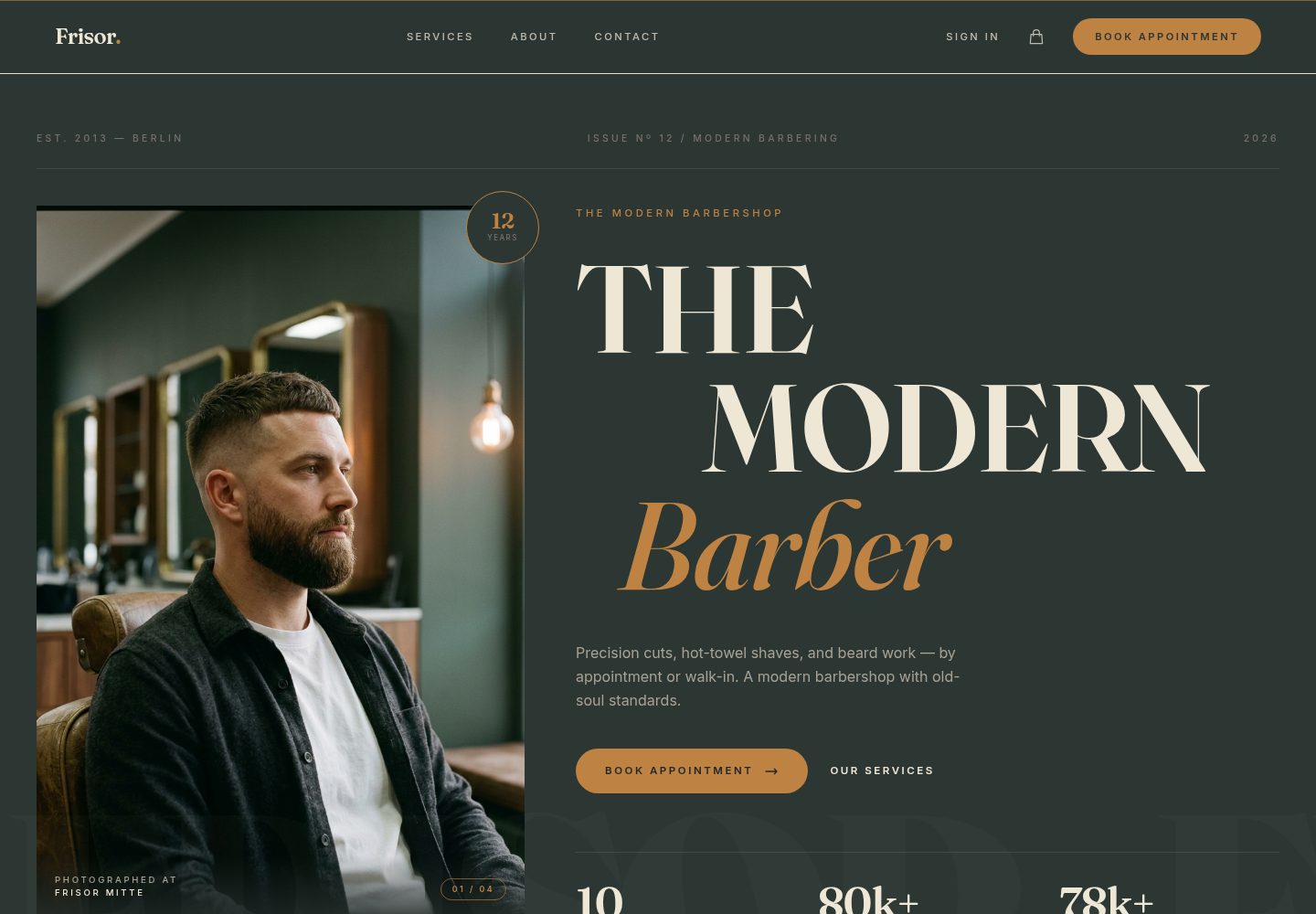
Desktop homepage1 / 3
Desktop captureTop of page
Actual screenshot captured by the server browser.
All pages & views 3
Screenshots show visual appearance; interactive behavior may differ.
Recorded 2026-10-10View source
What stands out
A quick read of the recorded project description.
Services support multiple variants, each with independent price, duration, and assigned staff
At checkout, add-ons such as hot towel, beard oil, eyebrow trim, and hair oil styling can be added, with the total updating in real time
Multi-location support: global location selector, staff filtering by location, and independent available time slots per location
Multi-step checkout integrated with Stripe Elements, supporting customer information and custom questions, with automatic sign-in after checkout
Customer accounts can view booking and order history, manage profile details, and reschedule or cancel bookings
Template Details
Frisor is an online booking website template for barbershops. The code is hosted in the GitHub repository letsopencals/template-frisor and is MIT licensed. It is built with Next.js and React, styled with Tailwind CSS, and reads store data through the Opencals Storefront SDK. To run it, you must first create an Opencals account, set up a Dev Store, choose the Barbershop / Frisor preset dataset, and generate a Storefront API key.
The template covers the common steps of a booking site: a single-page card-based booking flow (select service, location, barber, date, time, and confirm in sequence). Services can have multiple variants (for example, different haircut types, each with its own price, duration, and assigned staff). At checkout, add-ons such as hot towel, beard oil, and eyebrow trim can be added, with the total updating in real time. It supports multi-location selection and filtering staff by location. Checkout uses Stripe Elements, with customer information and custom questions completed in steps, and after checkout the customer is automatically signed in and taken to their account. Customer accounts can view booking and order history, manage profile details, and reschedule or cancel bookings. The site also includes home, services list, about, contact, and account pages, with page-level metadata, Open Graph, robots.txt, and sitemap.xml configured.
In terms of design and content, the template uses a dark editorial color scheme dominated by deep green and gold. Brand copy is centralized in lib/site-config.ts, theme color tokens are defined in app/globals.css, and images are placed in the corresponding directories under public/images by convention. The README calls it production-ready, but the repository materials do not provide information on performance, accessibility, or production environment validation, so you should evaluate it yourself before actual use. The free scope is limited to this MIT-licensed version of the code; third-party assets such as demo images, fonts, and icons must be checked against their respective licenses, and external services such as domain, hosting, database, and payment may incur separate charges.
Next.jsReactBlog
Is it right for your project?
Use Cases
- Building a branded website with online booking for a barbershop
- A chain barbershop business that needs to organize bookings by location, barber, and service variant
- Scenarios where you want to charge fees at booking via Stripe and support add-ons
- Booking-based sites where customers need to sign in themselves to view, reschedule, or cancel bookings
Suitable For
- Booking websites for barbershops or men's grooming shops
- Developers who already have an Opencals account and want to use its Storefront SDK
- Projects that accept the dark editorial design style and need to rebrand and adjust colors on top of it
- Front-end developers using the Next.js and React stack
Getting started & customization
Use these recorded setup notes alongside the repository instructions for your chosen version.
- 1
First register at app.opencals.com and create a Dev Store, choosing the Barbershop / Frisor preset dataset
- 2
Generate a Storefront API key (starting with sfk_) in the Opencals dashboard, and set AUTH_SECRET to a random string
- 3
Optionally configure NEXT_PUBLIC_STRIPE_PUBLISHABLE_KEY to enable Stripe payments; OPENCALS_API_URL and NEXT_PUBLIC_BASE_URL can also be overridden
- 4
Local development: clone the repository, run npm install, copy .env.example to .env and fill in the variables, then run npm run dev
- 5
Brand copy is centralized in lib/site-config.ts, theme colors are in app/globals.css, and images are placed in the corresponding directories under public/images according to the conventions in public/PLACEHOLDERS.md
License & source material
Usage conditions & limitations
Free to use · keep license noticeThis listing covers the free version in the public repository under the MIT license; the free scope is limited to that version of the code and does not mean external services or third-party assets are free.
Must comply with when using
- You may use, modify, commercially use, and distribute this version of the code for free.
- When distributing copies or substantial portions of the code, retain the original author's copyright notice and the full MIT license notice.
- The code is provided as is; warranties and limitations of liability are governed by the original license and applicable law.
Additional costs & items to verify
- Demo images, fonts, icons, and other third-party assets must be checked against their respective licenses; the MIT license of the code alone is not sufficient to determine this.
- External services such as domain, hosting, database, payment, or AI may incur separate charges.
- Before using the template, you must register an Opencals account and create a Dev Store; it cannot run independently of that external service.
- A Storefront API key must be generated from the Opencals dashboard to connect store data; this is a required external account and key requirement.
- OPENCALS_API_KEY is a required environment variable; without it, the application cannot run.
- AUTH_SECRET is a required environment variable used for NextAuth session encryption.
- Stripe payments are optional and require you to provide your own Stripe publishable key; third-party payment service fees may apply.
- You must select the Barbershop / Frisor preset dataset in Opencals for the template to display content consistent with the demo.
View Original Text Basis
Permission is hereby granted, free of charge
Original License Text
Sign up at **[app.opencals.com](https://app.opencals.com)** and create a **Dev Store**.
Original README
Go to your **User Account Settings** in the Opencals dashboard and generate a **Storefront API key**. You'll need this to connect the template to your store.
Original README
| `OPENCALS_API_KEY` | Yes | Storefront API key from your Opencals dashboard |
Original README
| `AUTH_SECRET` | Yes | Random string for NextAuth session encryption |
Original README
| `NEXT_PUBLIC_STRIPE_PUBLISHABLE_KEY` | No | Stripe publishable key for payment processing |
Original README
https://github.com/letsopencals/template-frisor/blob/main/LICENSEhttps://github.com/letsopencals/template-frisor/blob/main/README.mdWhen prompted for a dataset, choose the **Barbershop / Frisor** preset — this seeds your store with the barber services, staff, and locations so your template looks exactly like the demo.
Original README
Compiled by DeepSeek based on repository license and README ·2026-10-10. Results only cover the materials read; dependencies, images, fonts, and subsequent term changes are subject to their respective original texts.
Project checks & description sources
Template Information
- Source platforms
- GitHub
- Documentation and maintenance reference score
- More documented · 88 / 100
- Technologies
- Next.js · React
- Website type
- Blog
How this score is calculated
Our heuristic uses license records (up to 30), a demo link (12), a preview (10), stars (15), recorded maintenance (15), description completeness (8), feature records (5) and classification data (5). It is not a code, security or performance test, or a Google score. A link does not establish tested functionality.
What to verify for this project
- Repository update recorded
- 2026-10-09
- Screenshot last checked
- 2026-10-10
A demo link is listed. Check it with your own content and viewport sizes; its presence does not confirm that forms, authentication or payments work.
The catalog identifies Next.js as the primary stack. Check the actual dependency manifest and lockfile for versions and hosting requirements. These notes use recorded metadata, not a code audit or a deployment test.
Use a selection guide →How this description was prepared
AI-assisted description based on catalog records and repository material. Repository authors are not automatically the reviewers of this description.
Review declaration: [email protected] · 2026-10-10
Inspect the recorded source material
SHA-256: 9458cf3bf02a680955ba18ce6bd42afc68ad13ca169e993fe787cbfbe114586a
2026-10-10T01:48:29.072Z
Source file / repository# Frisor — Next.js Barbershop Booking Template
A production-ready booking website for modern barbershops. Built with **Next.js 15**, **Tailwind CSS v4**, and the **Opencals Storefront SDK**.
**[View Live Demo →](https://template-frisor-sage.vercel.app)**

Dark editorial palette (deep green + gold), mobile-first booking flow inspired by native apps, and a full storefront — services, appointments, checkout, customer accounts — wired up out of the box. MIT licensed: clone it, rebrand it, ship it.
---
## Get Started in 3 Steps
### 1. Create an Opencals account
Sign up at **[app.opencals.com](https://app.opencals.com)** and create a **Dev Store**. When prompted for a dataset, choose the **Barbershop / Frisor** preset — this seeds your store with the barber services, staff, and locations so your template looks exactly like the demo.
### 2. Get your API key
Go to your **User Account Settings** in the Opencals dashboard and generate a **Storefront API key**. You'll need this to connect the template to your store.
### 3. Deploy to Vercel
[](https://vercel.com/new/clone?repository-url=https%3A%2F%2Fgithub.com%2Fletsopencals%2Ftemplate-frisor&env=OPENCALS_API_KEY,AUTH_SECRET&envDescription=API%20key%20from%20your%20Opencals%20dashboard%20and%20a%20random%20secret%20for%20auth&project-name=frisor&repository-name=frisor)
During deployment, Vercel will ask you to set environment variables:
| Variable | Value |
|----------|-------|
| `OPENCALS_API_KEY` | Your Storefront API key (starts with `sfk_`) |
| `AUTH_SECRET` | Any random string — used for session encryption |
| `NEXT_PUBLIC_STRIPE_PUBLISHABLE_KEY` | *(optional)* Stripe publishable key for payments |
That's it. Once deployed, you'll have the same fully functional booking site as the [live demo](https://template-frisor-sage.vercel.app).
---
## The Storefront
An editorial homepage, a clear service menu, and a multi-location "shops" section — all driven by your Opencals data.


---
## What's Included
### Online Booking
A single-page, card-stack booking flow inspired by native mobile apps: pick service → location → barber → date → time → confirm. Sticky bottom CTA on mobile, sticky summary rail on desktop.

### Add-Ons at Checkout
Optional extras — hot towel finish, beard oil treatment, eyebrow trim, hair tonic & pomade style — add to the booking and update the live summary total in one transaction.
### Service Variants
Products can have multiple variants (e.g. "Classic Cut" → Standard, Scissor Cut, Skin Fade), each with their own pricing, duration, and assigned staff.
### Multi-Location Support
Global location selector, staff filtered by location, and per-location availability across all three shops.
### Checkout with Stripe
Multi-step checkout with customer info, custom questions, and secure payment via Stripe Elements. Auto-login after checkout so the customer lands in their account with the new appointment.
### Customer Accounts
Sign in, view appointments, browse order history, manage profile, and reschedule or cancel appointments.

### Mobile-First Design
Fully responsive. The booking page in particular is designed mobile-first — the iPhone booking flow shown at the top of this README is the live template, not a mockup.
### SEO Ready
Per-page metadata, Open Graph cards, robots.txt, and sitemap.xml — configured out of the box.
---
## Tech Stack
| Category | Technology |
|----------|-----------|
| Framework | Next.js 15 (App Router) |
| Styling | Tailwind CSS v4 |
| Animations | Framer Motion |
| Forms | react-hook-form + Zod |
| Payments | Stripe Elements |
| Auth | NextAuth.js v5 |
| Dates | moment-timezone |
| API | Opencals Storefront SDK |
---
## Local Development
```bash
git clone <repository-url>
cd frisor-barbershop-template
npm install
cp .env.example .env
```
Edit `.env` with your values:
```
OPENCALS_API_KEY=sfk_your_key_here
AUTH_SECRET=change_me_to_a_random_string
```
```bash
npm run dev
```
Open [http://localhost:3000](http://localhost:3000).
---
## Customization
### Branding & Content
All barbershop-specific copy is centralized in **`lib/site-config.ts`**:
- Shop name, tagline, logo wordmark
- Homepage hero text, stats, mission tiles, testimonials
- About page story, team members, values
- Contact information (address, phone, email, hours)
- Footer links and social media
Edit this single file to rebrand the entire template.
### Theme Colors
Design tokens live in **`app/globals.css`** as Tailwind v4 `@theme` properties:
```css
@theme {
--color-bg: #0F1B17; /* near-black green */
--color-surface: #1E2E29; /* card / panel green */
--color-surface-2: #2A3F3A; /* elevated panel */
--color-cream: #EFE9DA; /* warm off-white text */
--color-gold: #E8B547; /* primary CTA gold */
--font-display: 'Fraunces', 'Playfair Display', Georgia, serif;
--font-body: 'Inter', system-ui, sans-serif;
}
```
### Imagery
Drop hero, gallery, team, and service images into `public/images/{hero,gallery,team,services,about}/`. See **`public/PLACEHOLDERS.md`** for required filenames and recommended dimensions.
### Adding Pages
1. Create `app/your-page/page.tsx`
2. Add a `layout.tsx` with metadata
3. Add the link to `navLinks` in `components/layout/header.tsx`
---
## Project Structure
```
app/
page.tsx # Homepage
services/page.tsx # Service listing
booking/[slug]/page.tsx # Card-stack booking page
checkout/page.tsx # Multi-step checkout
thank-you/page.tsx # Post-checkout confirmation
about/ # About page
contact/ # Contact form + info
account/ # Customer dashboard
auth/ # Sign in, sign up, password reset
api/ # API routes proxy SDK calls server-side
components/
layout/{header,footer}.tsx # Site chrome
home/ # Hero, stats band, services, gallery, mission, testimonials, banner
booking/ # Date picker, time slots, staff/location selectors
checkout/ # Multi-step form components
cart/cart-drawer.tsx
contexts/ # cart, checkout, location, timezone
hooks/ # use-api-request, use-form-submit, use-date-formatter
lib/ # site-config, opencals (SDK), auth (NextAuth), schemas, format, utils
```
## Environment Variables
| Variable | Required | Description |
|----------|----------|-------------|
| `OPENCALS_API_KEY` | Yes | Storefront API key from your Opencals dashboard |
| `AUTH_SECRET` | Yes | Random string for NextAuth session encryption |
| `NEXT_PUBLIC_STRIPE_PUBLISHABLE_KEY` | No | Stripe publishable key for payment processing |
| `OPENCALS_API_URL` | No | Override API base URL (defaults to production) |
| `NEXT_PUBLIC_BASE_URL` | No | Public site URL (for sitemap) |
---
## Other Templates
Frisor is one of the open-source booking templates built on the Opencals Storefront SDK. Same backend, different design and vertical:
- **[HAAR](https://github.com/letsopencals/template-haar)** — a hair-salon booking template with a light, warm palette. [Live demo](https://template-haar.vercel.app)
- **[NOIR Drive](https://github.com/letsopencals/template-noir)** — a luxury car-rental template (Dubai) with multi-day booking by the day and chauffeur packages. [Live demo](https://template-noir.vercel.app)
- **[Fluently](https://github.com/letsopencals/template-fluently)** — a language-school template (New York) with group classes, live seats, private lessons and online lessons. [Live demo](https://template-fluently.vercel.app)
See all templates and the Storefront API at **[opencals.com/developers](https://opencals.com/developers)**.
## Build with AI
Prefer to let an AI agent do the heavy lifting? Install the **[Opencals Agent Skills](https://github.com/letsopencals/skills)** in Claude Code, Cursor, Codex or Gemini CLI:
- **`opencals-build-booking-site`** — scaffold, wire and deploy a template like this one
- **`opencals-storefront-api`** — ground-truth reference for the Opencals API & SDK
Docs: **[opencals.com/docs → AI Agents](https://opencals.com/docs/ai-agents/overview)**.
## License
MIT
Explore similar templates
Compare previews and descriptions within the same stack and category.

tailwind-nextjs-starter-blog
A Next.js and Tailwind CSS blog starter template using Contentlayer for Markdown/MDX, with built-in SEO, code highlighting, and tags. It targets personal technical blogs and migration from Jekyll/Hugo to React, and supports one-click Vercel deployment.
Next.js · Blog

Nextjs-tailwindcss-blog-template
A personal blog template built with Next.js and Tailwind CSS, using Velite to process Markdown content. It includes home, about, contact and article pages, with a demo site and a companion YouTube tutorial.
Next.js · Blog

Next-js-Blog-Boilerplate
A blog starter built on Next.js 12 and Tailwind CSS 3, integrating TypeScript, ESLint, Prettier, and PostCSS.
Next.js · Blog

nextjs-blog-theme
A Next.js 15 and Tailwind CSS 4.x blog starter by Netlify, designed by Bejamas, with MDX support, dark/light theme switching, and environment-variable configuration. It includes a visual setup wizard for deploying to Netlify and manages content via local .mdx files.
Next.js · Blog

blog
A personal blog forked from Timlrx's tailwind-nextjs-starter-blog, built with Next.js, React, and Tailwind CSS. Content is stored as Markdown/MDX under data/, with site, author, navigation, and project data in separate files.
Next.js · Blog

tailnext
Tailnext is a free, open-source template built on the Next.js 14 App Router and Tailwind CSS, created by the onWidget team.
Next.js · Blog