单页卡片式预约流程:依次选择服务、门店、理发师、日期与时间,移动端底部固定 CTA,桌面端固定摘要栏
Next.jsReact博客
template-frisor — Next.js 博客模板
作者 letsopencals
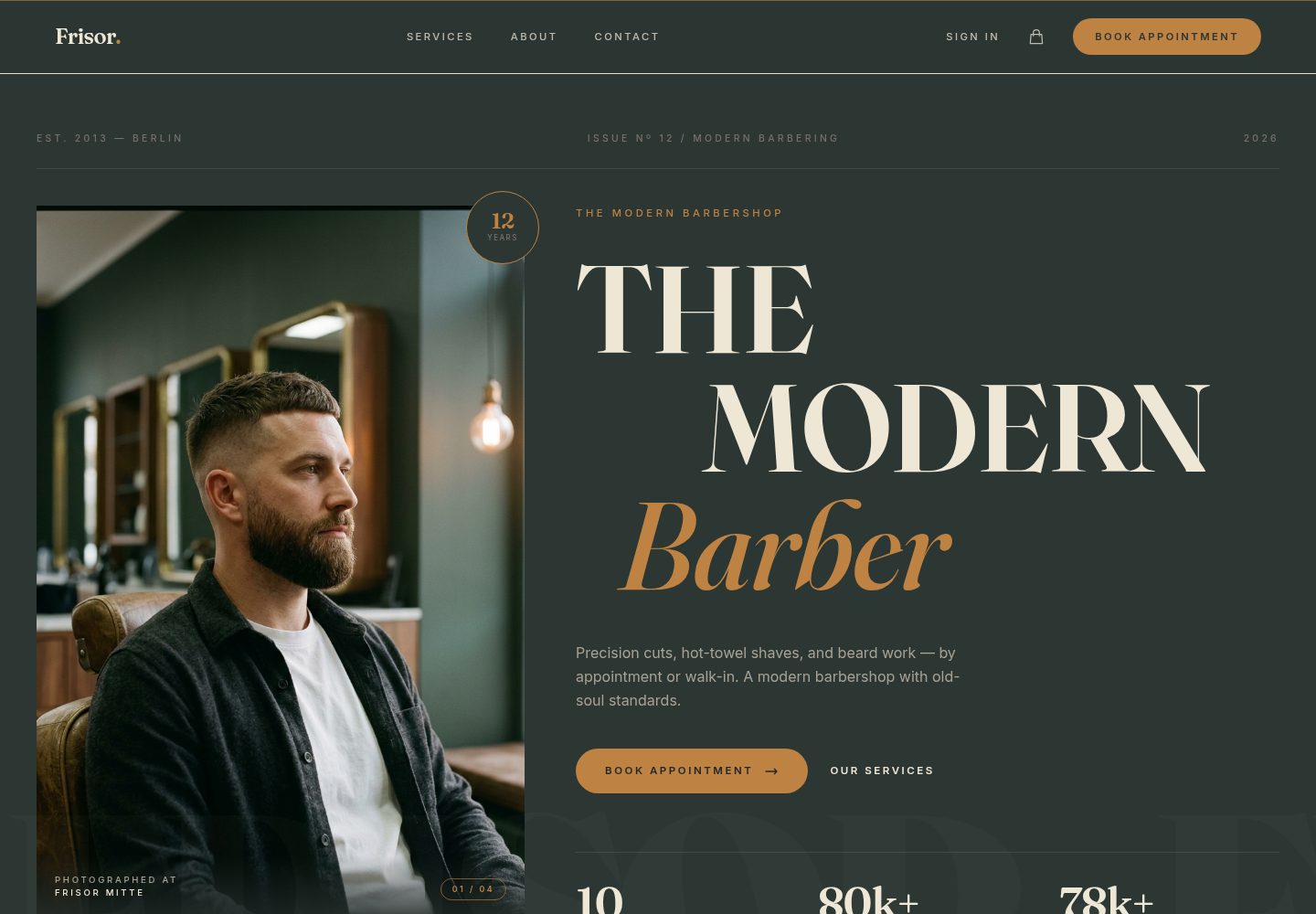
Frisor 是 letsopencals 开源的理发店预约网站模板,基于 Next.js 与 Opencals Storefront SDK,包含服务变体、加购项、多门店与理发师预约、客户账户和 Stripe 结账,采用深色编辑风格设计。
看看你的网站会是什么样
浏览真实页面截图,比较内容排版与手机效果。点击下方缩略图切换,放大查看整页细节。
全部页面与视图 3
截图用于了解视觉与布局,交互效果请以实际项目为准。
采集于 2026-10-10查看来源
值得关注的模板亮点
从已有项目资料中,快速了解它的特点。
服务支持多变体,每个变体可设置独立价格、时长与分配员工
结账时可添加热毛巾、胡须油、修眉、发油造型等加购项,并实时更新总价
支持多门店:全局门店选择器、按门店过滤员工、各门店独立可用时段
集成 Stripe Elements 的多步结账,支持客户信息与自定义问题,结账后自动登录
客户账户可查看预约与订单历史、管理资料、改期或取消预约
模板详细介绍
Frisor 是一个面向理发店的在线预约网站模板,代码托管在 GitHub 的 letsopencals/template-frisor 仓库,采用 MIT 许可。它基于 Next.js 与 React 构建,样式使用 Tailwind CSS,并通过 Opencals Storefront SDK 读取店铺数据,因此需要先在 Opencals 创建账户、建立 Dev Store 并选择 Barbershop / Frisor 预设数据集,再生成 Storefront API key 才能运行。
模板覆盖预约类站点的常见环节:单页卡片式预约流程(依次选择服务、门店、理发师、日期、时间并确认),服务可设置多个变体(如不同剪发方式,各自有价格、时长和指定员工),结账时可添加热毛巾、胡须油、修眉等加购项并实时更新总价;支持多门店选择与按门店过滤员工;结账使用 Stripe Elements,客户信息与自定义问题分步填写,结账后自动登录并进入账户。客户账户可查看预约与订单历史、管理资料、改期或取消预约。站点还包含首页、服务列表、关于、联系和账户等页面,并配置了页面级 metadata、Open Graph、robots.txt 与 sitemap.xml。
设计与内容方面,模板采用深绿与金色为主的深色编辑风格配色,品牌文案集中在 lib/site-config.ts,主题色令牌定义在 app/globals.css,图片按约定放入 public/images 下对应目录。README 称其为 production-ready,但仓库资料未提供性能、可访问性或生产环境验证的说明,实际使用前需自行评估。免费范围仅限该 MIT 版本代码,演示图片、字体、图标等第三方素材需按各自许可核对,域名、托管、数据库、支付等外部服务可能另行收费。
Next.jsReact博客
适合你的项目吗?
适用场景
- 为理发店搭建带在线预约功能的品牌官网
- 需要按门店、理发师和服务变体组织预约的连锁理发业务
- 希望通过 Stripe 在预约时收取费用并支持加购项的场景
- 需要客户自助登录查看、改期或取消预约的预约型站点
适合人群
- 理发店或男士理容门店的预约网站
- 已有 Opencals 账户并希望使用其 Storefront SDK 的开发者
- 接受深色编辑风格设计、需要在此基础上改品牌与配色的项目
- 使用 Next.js 与 React 技术栈的前端开发者
上手与定制指南
结合仓库当前版本的说明,按下面的资料检查内容、配置与运行要求。
- 1
需先在 app.opencals.com 注册并创建 Dev Store,选择 Barbershop / Frisor 预设数据集
- 2
在 Opencals 仪表盘生成 Storefront API key(以 sfk_ 开头),并设置 AUTH_SECRET 随机字符串
- 3
可选配置 NEXT_PUBLIC_STRIPE_PUBLISHABLE_KEY 以启用 Stripe 支付,另可覆盖 OPENCALS_API_URL 与 NEXT_PUBLIC_BASE_URL
- 4
本地开发:克隆仓库后执行 npm install,复制 .env.example 为 .env 并填入变量,再运行 npm run dev
- 5
品牌文案集中在 lib/site-config.ts,主题色在 app/globals.css,图片按 public/PLACEHOLDERS.md 的约定放入 public/images 对应目录
授权与来源资料
使用条件与限制
免费使用 · 保留许可声明本次收录的是公开仓库中采用 MIT 许可的免费版本;免费范围为该版本代码,不代表外部服务或第三方素材免费。
使用时需要遵守
- 允许免费使用、修改、商用和分发该版本代码。
- 分发代码副本或实质性部分时,保留原作者版权声明和完整 MIT 许可声明。
- 代码按现状提供;担保与责任限制以原许可证及适用法律为准。
额外费用与待核对事项
- 演示图片、字体、图标及其他第三方素材需按各自许可核对,不能仅凭代码的 MIT 许可判断。
- 域名、托管、数据库、支付或 AI 等外部服务可能另外收费。
- 使用模板前必须注册 Opencals 账户并创建 Dev Store,无法脱离该外部服务独立运行。
- 必须从 Opencals 仪表盘生成 Storefront API key 才能连接店铺数据,属于必需的外部账户与密钥要求。
- OPENCALS_API_KEY 为必填环境变量,缺少则无法运行。
- AUTH_SECRET 为必填环境变量,用于 NextAuth 会话加密。
- Stripe 支付为可选项,需自行提供 Stripe 发布密钥,可能涉及第三方支付服务费用。
- 需在 Opencals 中选择 Barbershop / Frisor 预设数据集,模板才能呈现与演示一致的内容。
查看原文依据
Permission is hereby granted, free of charge
许可证原文
Sign up at **[app.opencals.com](https://app.opencals.com)** and create a **Dev Store**.
README 原文
Go to your **User Account Settings** in the Opencals dashboard and generate a **Storefront API key**. You'll need this to connect the template to your store.
README 原文
| `OPENCALS_API_KEY` | Yes | Storefront API key from your Opencals dashboard |
README 原文
| `AUTH_SECRET` | Yes | Random string for NextAuth session encryption |
README 原文
| `NEXT_PUBLIC_STRIPE_PUBLISHABLE_KEY` | No | Stripe publishable key for payment processing |
README 原文
https://github.com/letsopencals/template-frisor/blob/main/LICENSEhttps://github.com/letsopencals/template-frisor/blob/main/README.mdWhen prompted for a dataset, choose the **Barbershop / Frisor** preset — this seeds your store with the barber services, staff, and locations so your template looks exactly like the demo.
README 原文
DeepSeek 根据仓库许可证和 README 整理 ·2026-10-10。结果仅覆盖已读取资料,依赖、图片、字体及后续条款变更以各自原文为准。
项目核对记录与介绍依据
模板资料
- 来源平台
- GitHub
- 资料与维护参考分
- 资料较完整 · 88 / 100
- 技术栈
- Next.js · React
- 网站类型
- 博客
这个分数如何计算
本站按许可资料(最高30分)、演示链接(12分)、预览图(10分)、Star数(15分)、记录的维护时间(15分)、描述完整度(8分)、功能记录(5分)和分类资料(5分)计算。它不是代码、安全或性能测试,也不是 Google 评分;有链接不代表已实测可用。
这个项目需要核对什么
- 记录的仓库更新时间
- 2026-10-09
- 截图检查日期
- 2026-10-10
已收录演示链接。请用你的内容与屏幕尺寸检查;有演示不代表表单、认证或支付已经可用。
目录记录的主要技术栈是 Next.js。请通过依赖清单和锁文件核对实际版本与托管要求。这些说明基于收录资料,不代表代码审计或部署实测。
查看具体选型方法 →介绍的制作与核对状态
介绍由 AI 辅助整理目录与仓库资料。仓库作者不等于这篇介绍的审核者。
审核声明: [email protected] · 2026-10-10
查看当时使用的来源资料
SHA-256: 9458cf3bf02a680955ba18ce6bd42afc68ad13ca169e993fe787cbfbe114586a
2026-10-10T01:48:29.072Z
来源文件 / 仓库# Frisor — Next.js Barbershop Booking Template
A production-ready booking website for modern barbershops. Built with **Next.js 15**, **Tailwind CSS v4**, and the **Opencals Storefront SDK**.
**[View Live Demo →](https://template-frisor-sage.vercel.app)**

Dark editorial palette (deep green + gold), mobile-first booking flow inspired by native apps, and a full storefront — services, appointments, checkout, customer accounts — wired up out of the box. MIT licensed: clone it, rebrand it, ship it.
---
## Get Started in 3 Steps
### 1. Create an Opencals account
Sign up at **[app.opencals.com](https://app.opencals.com)** and create a **Dev Store**. When prompted for a dataset, choose the **Barbershop / Frisor** preset — this seeds your store with the barber services, staff, and locations so your template looks exactly like the demo.
### 2. Get your API key
Go to your **User Account Settings** in the Opencals dashboard and generate a **Storefront API key**. You'll need this to connect the template to your store.
### 3. Deploy to Vercel
[](https://vercel.com/new/clone?repository-url=https%3A%2F%2Fgithub.com%2Fletsopencals%2Ftemplate-frisor&env=OPENCALS_API_KEY,AUTH_SECRET&envDescription=API%20key%20from%20your%20Opencals%20dashboard%20and%20a%20random%20secret%20for%20auth&project-name=frisor&repository-name=frisor)
During deployment, Vercel will ask you to set environment variables:
| Variable | Value |
|----------|-------|
| `OPENCALS_API_KEY` | Your Storefront API key (starts with `sfk_`) |
| `AUTH_SECRET` | Any random string — used for session encryption |
| `NEXT_PUBLIC_STRIPE_PUBLISHABLE_KEY` | *(optional)* Stripe publishable key for payments |
That's it. Once deployed, you'll have the same fully functional booking site as the [live demo](https://template-frisor-sage.vercel.app).
---
## The Storefront
An editorial homepage, a clear service menu, and a multi-location "shops" section — all driven by your Opencals data.


---
## What's Included
### Online Booking
A single-page, card-stack booking flow inspired by native mobile apps: pick service → location → barber → date → time → confirm. Sticky bottom CTA on mobile, sticky summary rail on desktop.

### Add-Ons at Checkout
Optional extras — hot towel finish, beard oil treatment, eyebrow trim, hair tonic & pomade style — add to the booking and update the live summary total in one transaction.
### Service Variants
Products can have multiple variants (e.g. "Classic Cut" → Standard, Scissor Cut, Skin Fade), each with their own pricing, duration, and assigned staff.
### Multi-Location Support
Global location selector, staff filtered by location, and per-location availability across all three shops.
### Checkout with Stripe
Multi-step checkout with customer info, custom questions, and secure payment via Stripe Elements. Auto-login after checkout so the customer lands in their account with the new appointment.
### Customer Accounts
Sign in, view appointments, browse order history, manage profile, and reschedule or cancel appointments.

### Mobile-First Design
Fully responsive. The booking page in particular is designed mobile-first — the iPhone booking flow shown at the top of this README is the live template, not a mockup.
### SEO Ready
Per-page metadata, Open Graph cards, robots.txt, and sitemap.xml — configured out of the box.
---
## Tech Stack
| Category | Technology |
|----------|-----------|
| Framework | Next.js 15 (App Router) |
| Styling | Tailwind CSS v4 |
| Animations | Framer Motion |
| Forms | react-hook-form + Zod |
| Payments | Stripe Elements |
| Auth | NextAuth.js v5 |
| Dates | moment-timezone |
| API | Opencals Storefront SDK |
---
## Local Development
```bash
git clone <repository-url>
cd frisor-barbershop-template
npm install
cp .env.example .env
```
Edit `.env` with your values:
```
OPENCALS_API_KEY=sfk_your_key_here
AUTH_SECRET=change_me_to_a_random_string
```
```bash
npm run dev
```
Open [http://localhost:3000](http://localhost:3000).
---
## Customization
### Branding & Content
All barbershop-specific copy is centralized in **`lib/site-config.ts`**:
- Shop name, tagline, logo wordmark
- Homepage hero text, stats, mission tiles, testimonials
- About page story, team members, values
- Contact information (address, phone, email, hours)
- Footer links and social media
Edit this single file to rebrand the entire template.
### Theme Colors
Design tokens live in **`app/globals.css`** as Tailwind v4 `@theme` properties:
```css
@theme {
--color-bg: #0F1B17; /* near-black green */
--color-surface: #1E2E29; /* card / panel green */
--color-surface-2: #2A3F3A; /* elevated panel */
--color-cream: #EFE9DA; /* warm off-white text */
--color-gold: #E8B547; /* primary CTA gold */
--font-display: 'Fraunces', 'Playfair Display', Georgia, serif;
--font-body: 'Inter', system-ui, sans-serif;
}
```
### Imagery
Drop hero, gallery, team, and service images into `public/images/{hero,gallery,team,services,about}/`. See **`public/PLACEHOLDERS.md`** for required filenames and recommended dimensions.
### Adding Pages
1. Create `app/your-page/page.tsx`
2. Add a `layout.tsx` with metadata
3. Add the link to `navLinks` in `components/layout/header.tsx`
---
## Project Structure
```
app/
page.tsx # Homepage
services/page.tsx # Service listing
booking/[slug]/page.tsx # Card-stack booking page
checkout/page.tsx # Multi-step checkout
thank-you/page.tsx # Post-checkout confirmation
about/ # About page
contact/ # Contact form + info
account/ # Customer dashboard
auth/ # Sign in, sign up, password reset
api/ # API routes proxy SDK calls server-side
components/
layout/{header,footer}.tsx # Site chrome
home/ # Hero, stats band, services, gallery, mission, testimonials, banner
booking/ # Date picker, time slots, staff/location selectors
checkout/ # Multi-step form components
cart/cart-drawer.tsx
contexts/ # cart, checkout, location, timezone
hooks/ # use-api-request, use-form-submit, use-date-formatter
lib/ # site-config, opencals (SDK), auth (NextAuth), schemas, format, utils
```
## Environment Variables
| Variable | Required | Description |
|----------|----------|-------------|
| `OPENCALS_API_KEY` | Yes | Storefront API key from your Opencals dashboard |
| `AUTH_SECRET` | Yes | Random string for NextAuth session encryption |
| `NEXT_PUBLIC_STRIPE_PUBLISHABLE_KEY` | No | Stripe publishable key for payment processing |
| `OPENCALS_API_URL` | No | Override API base URL (defaults to production) |
| `NEXT_PUBLIC_BASE_URL` | No | Public site URL (for sitemap) |
---
## Other Templates
Frisor is one of the open-source booking templates built on the Opencals Storefront SDK. Same backend, different design and vertical:
- **[HAAR](https://github.com/letsopencals/template-haar)** — a hair-salon booking template with a light, warm palette. [Live demo](https://template-haar.vercel.app)
- **[NOIR Drive](https://github.com/letsopencals/template-noir)** — a luxury car-rental template (Dubai) with multi-day booking by the day and chauffeur packages. [Live demo](https://template-noir.vercel.app)
- **[Fluently](https://github.com/letsopencals/template-fluently)** — a language-school template (New York) with group classes, live seats, private lessons and online lessons. [Live demo](https://template-fluently.vercel.app)
See all templates and the Storefront API at **[opencals.com/developers](https://opencals.com/developers)**.
## Build with AI
Prefer to let an AI agent do the heavy lifting? Install the **[Opencals Agent Skills](https://github.com/letsopencals/skills)** in Claude Code, Cursor, Codex or Gemini CLI:
- **`opencals-build-booking-site`** — scaffold, wire and deploy a template like this one
- **`opencals-storefront-api`** — ground-truth reference for the Opencals API & SDK
Docs: **[opencals.com/docs → AI Agents](https://opencals.com/docs/ai-agents/overview)**.
## License
MIT
看看同类模板
对比同技术栈与用途的模板,找到更适合的视觉与内容结构。

tailwind-nextjs-starter-blog
tailwind-nextjs-starter-blog 是一个面向个人技术博客的 Next.js 与 Tailwind CSS 启动模板,其 v2 版本基于 App Router 与 React Server Comp…
Next.js · 博客

Nextjs-tailwindcss-blog-template
⭐Build SEO optimized personal blog website with Next.js, Tailwind CSS and Contentlayer. If you want to learn t…
Next.js · 博客

Next-js-Blog-Boilerplate
Next-js-Blog-Boilerplate 是一套面向个人与技术博客的启动代码,基于 Next.js 12 与 Tailwind CSS 3 构建,同时集成了 TypeScript、ESLint、Prettier …
Next.js · 博客

nextjs-blog-theme
nextjs-blog-theme 是 Netlify 团队维护的一个博客启动模板,基于 Next.js 15(Pages Router)和 Tailwind CSS 4.x 构建,设计由 Bejamas 机构完成。
Next.js · 博客

blog
🚀 My personal blog made with Tailwind CSS and NextJS. Template from Timlrx. Feel free to fork, follow and use…
Next.js · 博客

tailnext
Tailnext 是一个基于 Next.js 14 App Router 和 Tailwind CSS 的免费开源模板,由 onWidget 团队创建并维护。
Next.js · 博客