Supports both standalone cloning and installation as an npm package
AstroHexoBlog
retypeset-odyssey — Astro Blog Template
By lifeodyssey
Retypeset Odyssey is an Astro-based trilingual blog theme with a typography-first approach, supporting MDX, Pagefind search, and YAML configuration. It can be used either as a standalone clone or installed as an npm package into a content repository.
Explore the design
Compare the page layouts and mobile experience. Open any screenshot for a closer look.
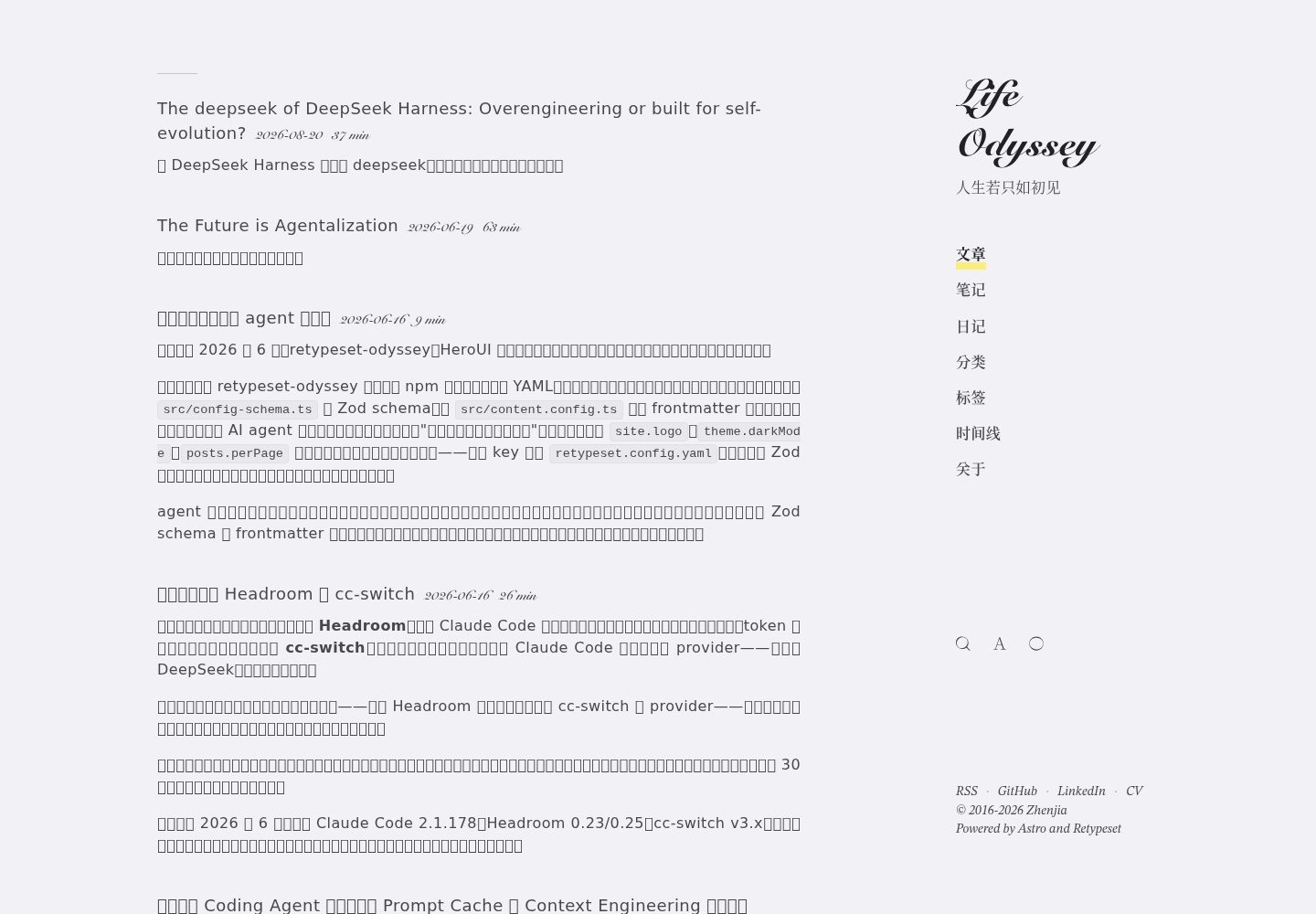
Desktop homepage1 / 3
Desktop captureTop of page
Actual screenshot captured by the server browser.
All pages & views 3
Screenshots show visual appearance; interactive behavior may differ.
Recorded 2026-10-08View source
What stands out
A quick read of the recorded project description.
Trilingual content support for Chinese, English, and Japanese, with language versions distinguished by filename suffix
Built-in SEO, Sitemap, OpenGraph cards, RSS, MDX, LaTeX, Mermaid, table of contents, and Pagefind full-text search
Folder-based content collections; new directories automatically generate list and detail pages
Provides AI_USAGE.md, Claude Skill, and build-time generated /llms.txt documentation
Includes a Hexo migration script and abbrlink validation tool
Template Details
Retypeset Odyssey is a derivative of astro-theme-retypeset. It can be used either as a standalone Astro template by cloning it directly, or installed as an npm package into a repository that only stores content. It targets personal blogs, includes three built-in content collections—posts, notes, and journals—and supports adding new folders under content/ to automatically generate list and detail pages.
The theme provides content support for Chinese, English, and Japanese, distinguishing language versions via the .en.md / .ja.md filename convention, and supports overriding taglines and collection introductions per language. Features include SEO, Sitemap, OpenGraph card generation, RSS, MDX, LaTeX, Mermaid, table of contents, light/dark mode with view transitions, and Pagefind full-text search.
When used as an npm package, the theme injects routes through YAML configuration and an Astro integration, registers UnoCSS, MDX, partytown, sitemap, pagefind, and astro-compress, and automatically sets top-level configurations such as site, base, and i18n. Configuration is validated with Zod, and unset fields fall back to default values.
The theme also includes documentation for AI agents (AI_USAGE.md, skill/SKILL.md) as well as build-time generated /llms.txt and /llms-full.txt, and comes with a migration script from Hexo and an abbrlink validation tool.
Usage limitations: the standalone HTML page feature is experimental and requires Astro 7 and Node.js 22.12.0 or higher; these pages do not automatically become collection entries or RSS items, and search and sitemap inclusion must be handled separately. The theme code is MIT licensed, but third-party assets such as demo images, fonts, and icons require separate license verification.
AstroHexoBlog
Is it right for your project?
Use Cases
- Building a personal blog that prioritizes typography and reading experience
- Maintaining a multilingual (Chinese/English/Japanese) content site
- Separating the content repository from the theme repository and reusing the theme via an npm dependency
- Migrating existing posts from Hexo while preserving abbrlink and SEO redirects
- Providing readable configuration and writing instructions for AI coding agents
Suitable For
- Personal bloggers using Astro who want to write in Markdown/MDX
- Site maintainers who need to display content in Chinese, English, and Japanese
- Developers who want to separate content from the theme and manage the theme via dependencies
- Bloggers planning to migrate from Hexo and preserve old links
Getting started & customization
Use these recorded setup notes alongside the repository instructions for your chosen version.
- 1
Standalone use: clone the repository, run pnpm install and pnpm dev, edit site settings in src/config.ts, and place posts in content/{posts,notes,journals}/.
- 2
As an npm package: install retypeset-odyssey in your own Astro project, add the astro.config.ts integration, retypeset.config.yaml, and src/content.config.ts exports.
- 3
Configuration is deeply merged from default-config.yaml and the user YAML, validated by Zod; unset fields fall back to defaults, and validation errors are reported during astro build.
- 4
Experimental standalone HTML pages require Astro 7 and Node.js 22.12.0 or higher; place pages in src/pages/ and accompanying assets in public/. They do not automatically enter collections or RSS.
- 5
When migrating from Hexo, copy scripts/migration/migrate-hexo.ts into your own repository and modify the path constants; optionally use validate-abbrlinks.ts to check whether abbrlinks are lost.
License & source material
Usage conditions & limitations
Free to use · keep license noticeThis entry covers the free version under the MIT license in the public repository; the free scope is the code of this version and does not imply that external services or third-party assets are free.
Must comply with when using
- Free use, modification, commercial use, and distribution of this version's code are permitted.
- When distributing copies or substantial portions of the code, retain the original author's copyright notice and the full MIT license notice.
- The code is provided as is; warranties and limitations of liability are governed by the original license and applicable law.
Additional costs & items to verify
- Demo images, fonts, icons, and other third-party assets must be checked under their respective licenses; they cannot be judged solely by the code's MIT license.
- External services such as domains, hosting, databases, payments, or AI may incur separate charges.
- The standalone HTML page feature (experimental) requires Astro 7 and Node.js 22.12.0 or higher; when upgrading from 0.1.23, the consumer's Astro dependency and build runtime must be updated accordingly.
- Standalone HTML pages do not automatically become collection entries or RSS items; search and sitemap inclusion must be handled separately. You can use data-pagefind-ignore to exclude them from the Pagefind index and add noindex as needed.
- JavaScript on standalone HTML pages runs under the blog's same origin without iframe isolation, so only trusted HTML reviewed by the site owner should be published.
- Reusable themes and personal pages must belong to different repositories; content must not be added by modifying an installed theme package.
- When hosting under a subpath, resource URLs must be prefixed with the configured base.
- Standalone HTML pages are still processed by Astro and subject to theme compression; they are not byte-for-byte static file hosting.
View Original Text Basis
Permission is hereby granted, free of charge
Original License Text
This release requires Astro 7 and Node.js 22.12.0 or newer; update the consumer's Astro dependency and build runtime when upgrading from 0.1.23.
Original README
These pages do not automatically become collection entries or RSS items. Search and sitemap inclusion require separate consideration: use `data-pagefind-ignore="all"` on `<body>` to exclude a demonstration's content from Pagefind, and `noindex` metadata when appropriate.
Original README
Only publish trusted HTML reviewed by the site owner: its JavaScript runs on the blog's origin without iframe isolation.
Original README
The reusable theme and personal pages remain in separate repositories; do not edit the installed theme package to add content.
Original README
Prefix asset URLs with your configured base when hosting under a subpath.
Original README
https://github.com/lifeodyssey/retypeset-odyssey/blob/master/LICENSEhttps://github.com/lifeodyssey/retypeset-odyssey/blob/master/README.mdAstro still processes these pages and the theme's compression applies; this is not byte-for-byte file hosting.
Original README
Compiled by DeepSeek based on repository license and README ·2026-10-08. Results only cover the materials read; dependencies, images, fonts, and subsequent term changes are subject to their respective original texts.
Project checks & description sources
Template Information
- Source platforms
- GitHub
- Documentation and maintenance reference score
- More documented · 88 / 100
- Technologies
- Astro · Hexo
- Website type
- Blog
How this score is calculated
Our heuristic uses license records (up to 30), a demo link (12), a preview (10), stars (15), recorded maintenance (15), description completeness (8), feature records (5) and classification data (5). It is not a code, security or performance test, or a Google score. A link does not establish tested functionality.
What to verify for this project
- Repository update recorded
- 2026-10-08
- Screenshot last checked
- 2026-10-08
A demo link is listed. Check it with your own content and viewport sizes; its presence does not confirm that forms, authentication or payments work.
The catalog identifies Astro as the primary stack. Check the actual dependency manifest and lockfile for versions and hosting requirements. These notes use recorded metadata, not a code audit or a deployment test.
Use a selection guide →How this description was prepared
AI-assisted description based on catalog records and repository material. Repository authors are not automatically the reviewers of this description.
Review declaration: [email protected] · 2026-10-08
Inspect the recorded source material
SHA-256: 9fac5ebee7c5ab0a7f4680b12936d613deb68565ad62441934d4c3b3a8e84e2d
2026-10-08T15:07:15.917Z
Source file / repository# Retypeset Odyssey
A fork of [astro-theme-retypeset](https://github.com/radishzzz/astro-theme-retypeset) — extended to work both as a standalone Astro template **and** as an installable npm package for content-only repositories.
Powering [zhenjia.dev](https://zhenjia.dev).
## What's different from upstream
This fork adds the ability to consume the theme as a dependency, so you can keep your content in a separate repository and pull the theme via `pnpm install`. The original "clone and edit" workflow still works unchanged.
| Use case | Approach |
|----------|----------|
| Personal blog, all in one repo | Fork & clone (same as upstream Retypeset) |
| Content repo + reusable theme | Install `retypeset-odyssey` as a dependency |
Other deltas from upstream: trilingual content support (zh / en / ja) with `.en.md` / `.ja.md` filename convention, tag URL encoding (so tags like `CI/CD` work), legacy Hexo `abbrlink` redirects, GitHub Actions translation pipeline.
## Features
- Built with Astro 7 and UnoCSS
- SEO, Sitemap, OpenGraph (with generated cards), RSS, MDX, LaTeX, Mermaid, TOC
- i18n with route-level language switching and per-language tagline / collection-intro overrides
- Light / Dark mode with view transitions
- Pagefind full-text search
- Responsive, typography-first layout
- Folder-based content collections — drop a new folder under `content/` and you get list + detail routes for free
- Agent-ready — ships an `AI_USAGE.md` handbook and a `skill/SKILL.md` Claude Skill, and auto-generates `/llms.txt` + `/llms-full.txt` at build time, so AI coding agents can configure and write for the theme without reading source
## Usage A — Standalone (fork & clone)
```bash
git clone https://github.com/lifeodyssey/retypeset-odyssey.git
cd retypeset-odyssey
pnpm install
pnpm dev
```
Edit `src/config.ts` for site settings. Put markdown in `content/{posts,notes,journals}/`. Build with `pnpm build`.
## Usage B — As an npm package
Set up your own minimal Astro project that consumes this theme. One install, one YAML, one line of Astro config.
```jsonc
// package.json
{
"name": "my-blog",
"type": "module",
"scripts": {
"dev": "astro dev",
"build": "astro build"
},
"dependencies": {
"astro": "^7.3.7",
"retypeset-odyssey": "^0.1.24"
}
}
```
(You can also pin to the GitHub tarball with `"retypeset-odyssey": "github:lifeodyssey/retypeset-odyssey"` if you want to track an unreleased branch.)
```ts
// astro.config.ts
import { defineConfig } from 'astro/config'
import retypeset from 'retypeset-odyssey/integration'
export default defineConfig({
integrations: [retypeset()],
})
```
```yaml
# retypeset.config.yaml — at project root. Any subset of keys; the rest fall back to defaults.
site:
title: My Blog
# `subtitle` accepts either a single string (used for all languages) or a
# per-language map. The map form is recommended for multilingual sites.
subtitle:
en: A journey through ideas
zh: 一段关于想法的旅程
ja: アイデアの旅
author: Your Name
url: https://your-domain.com
global:
locale: en
moreLocales: [] # for multilingual sites add e.g. [zh, ja]
footer:
links:
- name: RSS
url: /atom.xml
startYear: 2024
# Per-collection settings. The built-in `posts`, `notes`, `journals`
# collections are enabled by default. Set `enabled: false` to drop one.
# `intro` is an optional per-language tagline shown under the collection
# title on its list page (e.g. /notes, /journals); if you omit it the
# generic fallback from src/i18n/ui.ts is used instead.
collections:
notes:
intro:
en: My notes
zh: 我的笔记
ja: 私のノート
journals:
intro:
en: Personal diary entries
zh: 个人日记
ja: 個人的な日記
```
```ts
// src/content.config.ts
export { collections } from 'retypeset-odyssey/content-config'
```
Then put markdown directly in your repo:
```
content/
├── posts/
│ ├── article.md (zh, default)
│ ├── article.en.md (English)
│ └── article.ja.md (Japanese)
├── notes/
└── journals/
```
Build:
```bash
pnpm install
pnpm build # → dist/
```
### What the integration does
- Loads `default-config.yaml` (shipped with the package), deep-merges your `retypeset.config.yaml` on top, and validates the result with Zod. The merged config is exposed to the theme via a Vite virtual module (`virtual:retypeset/config`) — every theme file that does `import ... from '@/config'` automatically picks up your overrides without any code change on your side.
- Drives Astro's top-level config from the same YAML: `site`, `base`, `build.format`, `trailingSlash`, `prefetch`, `i18n`, and `image.domains` are all set automatically.
- Registers UnoCSS (with the theme's `uno.config.ts`), MDX, partytown, sitemap, pagefind, and astro-compress — so you do not import any of them yourself.
- Injects all theme routes (`posts/[slug]`, `tags/[tag]`, RSS, OG images, `robots.txt`, `/llms.txt`, `/llms-full.txt`, etc.) via Astro's `injectRoute` API.
- Preserves your project's `publicDir`. Theme fonts and icons are served as fallbacks in development and added to the static build before search indexing and compression. Your public files take precedence; a theme asset that collides with a generated route fails the build instead of replacing that route.
- Configures Astro 7's unified Markdown processor with the theme's remark/rehype plugins, retaining existing Markdown behavior and HTML whitespace compression.
### Standalone HTML pages (experimental)
Available in `[email protected]`. This release requires Astro 7 and Node.js 22.12.0 or newer; update the consumer's Astro dependency and build runtime when upgrading from 0.1.23.
Keep complete HTML documents in your content project's `src/pages/`, for example `src/pages/experiments/demo.html` → `/experiments/demo`. Each page can include its own CSS and JavaScript without adopting the blog layout. Astro still processes these pages and the theme's compression applies; this is not byte-for-byte file hosting.
Put companion assets in your project's `public/`, for example `public/experiments/demo.css` → `/experiments/demo.css`. Custom Astro `publicDir` settings are also respected. Prefix asset URLs with your configured base when hosting under a subpath. The reusable theme and personal pages remain in separate repositories; do not edit the installed theme package to add content.
These pages do not automatically become collection entries or RSS items. Search and sitemap inclusion require separate consideration: use `data-pagefind-ignore="all"` on `<body>` to exclude a demonstration's content from Pagefind, and `noindex` metadata when appropriate. Only publish trusted HTML reviewed by the site owner: its JavaScript runs on the blog's origin without iframe isolation.
### Configuration reference
The full schema lives in [`src/config-schema.ts`](./src/config-schema.ts) and the defaults in [`default-config.yaml`](./default-config.yaml). Top-level groups: `site`, `color`, `global`, `comment`, `seo`, `footer`, `preload`, `collections`, `poems`. Any field you do not set in your YAML falls back to the default. Validation errors surface at `astro build` time with a clear path into the YAML.
### Folder-based collections
Drop any folder under `content/` (e.g. `content/tech/`) and the integration will auto-discover it, generate `/tech` as the list page and `/tech/<slug>` as detail pages — no code change needed. Folders prefixed with `_` or `.` are ignored, so `content/_drafts/` is a natural place to stash in-progress work. Disable a folder by setting `collections.<name>.enabled: false`, and give it a per-language tagline with `collections.<name>.intro.{zh,en,ja}` just like the built-ins.
## For AI agents
The theme ships its own agent-facing docs, so an AI coding agent can configure
a site and write posts without spelunking through the source:
- **[`AI_USAGE.md`](./AI_USAGE.md)** — a word-for-word handbook: every
`retypeset.config.yaml` key and every frontmatter field (types + defaults,
taken verbatim from the Zod schema), common recipes, hard rules, and minimal
boilerplate. Feed it to any assistant.
- **[`skill/SKILL.md`](./skill/SKILL.md)** — a Claude Skill. Claude Code
auto-discovers it when you work on a retypeset site; it carries the workflow
skeleton and points back to `AI_USAGE.md` for detail. Both ship in the
package (`files` in `package.json`).
- **`/llms.txt` + `/llms-full.txt`** — generated at build time on every
consumer site (injected Astro endpoints, like `robots.txt`): a
[llmstxt.org](https://llmstxt.org)-style index of your posts, with full bodies
inlined in the `-full` variant.
These describe how to *use* the theme; they do not impose a writing voice.
## Customization
- **Site config**: edit `default-config.yaml` (standalone) or write your own `retypeset.config.yaml` next to `astro.config.ts` (package consumers). Any subset of keys is allowed; the rest fall back to the defaults.
- **About pages**: place markdown in `content/about/about-{zh|en|ja}.md` (the `lang` field in the frontmatter picks which language each file belongs to).
- **Static assets** (favicon, OG logo, fonts): standalone users edit `public/`; package consumers inherit from the installed theme.
## Migrating from Hexo
If you're coming from Hexo (or another markdown-first SSG) and want to bring your existing posts over, this theme ships with a one-off migration helper plus a 301-bridge generator for SEO.
### Quick path
1. **Start from the starter template** — [retypeset-starter](https://github.com/lifeodyssey/retypeset-starter) is a minimal consumer repo (one `package.json`, one `astro.config.ts`, one YAML). Click *Use this template* on GitHub, clone the new repo, then `pnpm install`.
2. **Bring your Hexo posts over with the migration script.** Copy `scripts/migration/migrate-hexo.ts` out of the installed theme into your own repo, edit the two source/target path constants at the top, then:
```bash
pnpm tsx scripts/migrate-hexo.ts
```
It walks every file under your Hexo `source/_posts/`, converts the frontmatter (`date` → `published`, accepts string-or-array `tags`/`categories`, preserves `abbrlink`, drops Hexo-private fields gracefully), and writes the result to `content/posts/`. Multilingual variants use the `.en.md` / `.ja.md` suffix convention.
3. **(Optional) verify abbrlinks weren't lost.** A sibling `validate-abbrlinks.ts` cross-checks every output file's `abbrlink` against the original Hexo source so you can catch silent drops.
4. **Run `pnpm dev`** and click around. If a post fails frontmatter validation, the integration's Zod schema is permissive — most Hexo frontmatter quirks are accepted — but missing `title` or unparseable `date` will surface as a clear error pointing at the file.
### Preserve your SEO
If your Hexo site was deployed under a domain you can't drop (e.g. `username.github.io`), use [`scripts/generate-redirect-pages.mjs`](https://github.com/lifeodyssey/Blog-src/blob/main/scripts/generate-redirect-pages.mjs) (in the content-repo example, not in this package) to generate a per-page 301 bridge: for every old `posts/<abbrlink>.html` URL, it emits a static HTML with `<meta http-equiv="refresh">` + `<link rel="canonical">` pointing at the new domain. Deploy the generated files to the old host and search engine weight transfers over.
### Story version
For a long-form walkthrough of why the migration was structured this way, including the trade-offs around frontmatter compatibility, SEO continuity, and `abbrlink` preservation, see [我是怎么用 AI 把博客从 Hexo 迁到 Astro 的](https://zhenjia.dev/posts/how-i-migrated-blog-with-ai-v3) (Chinese; the migration was originally documented from a non-frontend developer's perspective).
## Credits
Forked from [astro-theme-retypeset](https://github.com/radishzzz/astro-theme-retypeset) by [@radishzzz](https://github.com/radishzzz). Upstream inspirations:
- [Typography](https://github.com/moeyua/astro-theme-typography)
- [Fuwari](https://github.com/saicaca/fuwari)
- [Redefine](https://github.com/EvanNotFound/hexo-theme-redefine)
- [AstroPaper](https://github.com/satnaing/astro-paper)
- [heti](https://github.com/sivan/heti)
- [EarlySummerSerif](https://github.com/GuiWonder/EarlySummerSerif)
## License
Same as upstream: MIT (see `LICENSE`).
Explore similar templates
Compare previews and descriptions within the same stack and category.

astrowind
AstroWind is a free, open-source Astro starter theme using Astro and Tailwind CSS, released under the MIT license.
Astro · Blog

astro-paper
AstroPaper is a minimal, responsive, accessible, and SEO-friendly Astro blog theme. Articles are stored as Markdown/MDX in src/content/posts/, with subdirectories affecting URLs.
Astro · Blog

fuwari
Fuwari is a static blog template built with Astro and Tailwind CSS for personal blogs. It manages posts as Markdown files in src/content/posts/, with frontmatter for title, date, description, cover, tags, categories, draft status, and language.
Astro · Blog

Firefly
Firefly is a clean personal blog theme forked from Astro and Fuwari, offering four background modes, single/double sidebar and list/grid layouts, Pagefind client-side full-text search, and a six-language UI.
Astro · Blog

astro-theme-cactus
Astro Cactus is an Astro-based blog and portfolio theme that uses Markdown/MDX content collections to manage posts, notes, and tags, with frontmatter type-checked by a schema.
Astro · Portfolio

astrofy
Astrofy is a free and open-source personal portfolio website template built with Astro and TailwindCSS, with built-in blog, CV timeline, project showcase, store, and RSS feed modules.
Astro · Portfolio