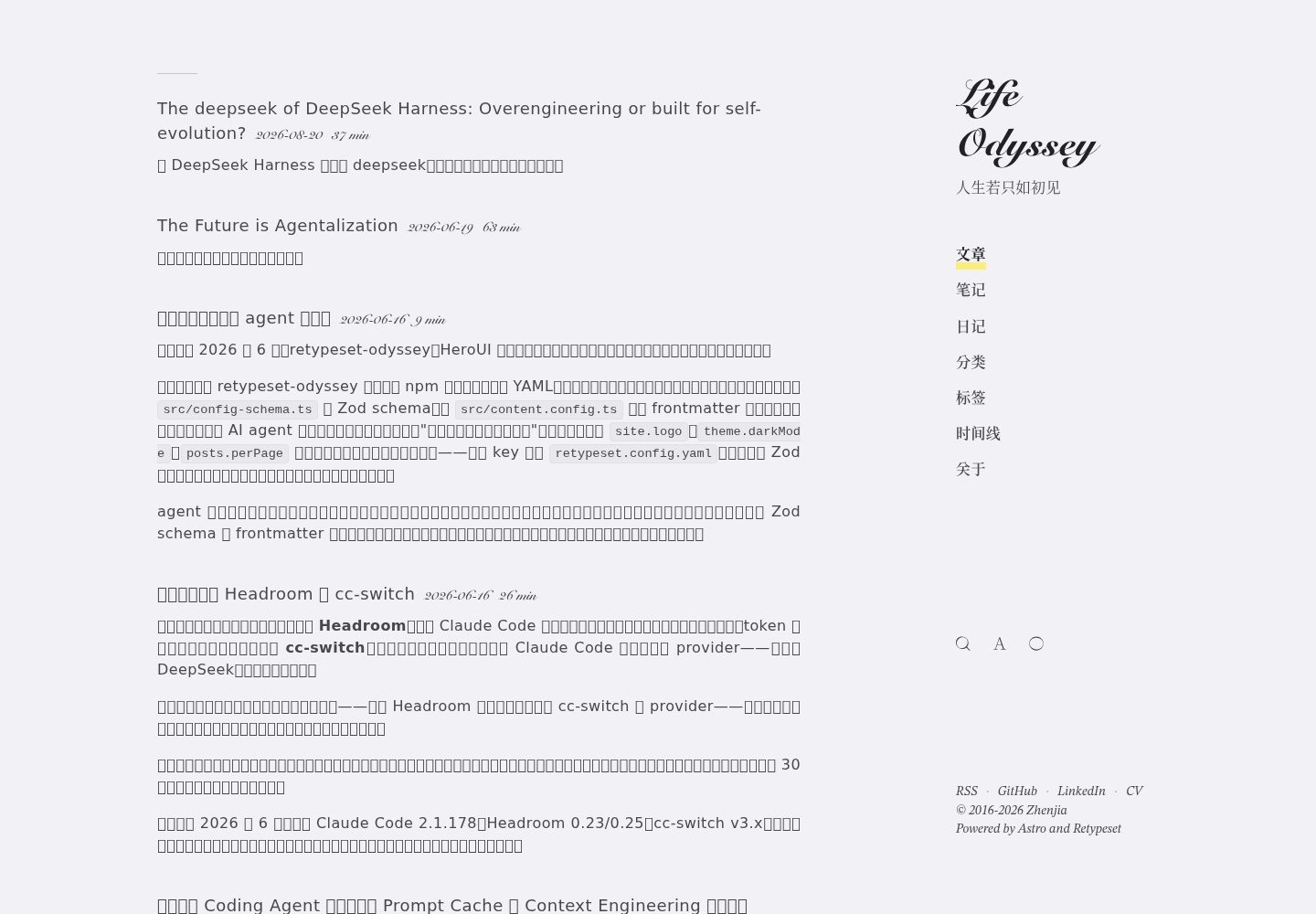
同时支持独立克隆与作为 npm 包安装两种使用方式
AstroHexo博客
retypeset-odyssey — Astro 博客模板
作者 lifeodyssey
Retypeset Odyssey 是一个基于 Astro 的三语博客主题,以排版优先,支持 MDX、Pagefind 搜索与 YAML 配置,既可独立克隆使用,也可作为 npm 包安装到内容仓库。
看看你的网站会是什么样
浏览真实页面截图,比较内容排版与手机效果。点击下方缩略图切换,放大查看整页细节。
全部页面与视图 3
截图用于了解视觉与布局,交互效果请以实际项目为准。
采集于 2026-10-08查看来源
值得关注的模板亮点
从已有项目资料中,快速了解它的特点。
中、英、日三语内容支持,通过文件名后缀区分语言版本
内置 SEO、Sitemap、OpenGraph 卡片、RSS、MDX、LaTeX、Mermaid、目录与 Pagefind 全文搜索
基于文件夹的内容集合,新增目录自动生成列表页与详情页
提供 AI_USAGE.md、Claude Skill 与构建时生成的 /llms.txt 文档
附带 Hexo 迁移脚本与 abbrlink 校验工具
模板详细介绍
Retypeset Odyssey 是 astro-theme-retypeset 的衍生版本,既可作为独立 Astro 模板直接克隆使用,也可作为 npm 包安装到仅存放内容的仓库中。它面向个人博客场景,内置 posts、notes、journals 三个内容集合,并支持在 content/ 下新增文件夹自动生成列表页与详情页。
主题提供中、英、日三语内容支持,通过 .en.md / .ja.md 文件名约定区分语言版本,并支持按语言覆盖标语与集合介绍。功能上包含 SEO、Sitemap、OpenGraph 卡片生成、RSS、MDX、LaTeX、Mermaid、目录、明暗模式与视图过渡、Pagefind 全文搜索。
作为 npm 包使用时,主题通过 YAML 配置与 Astro 集成注入路由、注册 UnoCSS、MDX、partytown、sitemap、pagefind 和 astro-compress,并自动设置 site、base、i18n 等顶层配置。配置使用 Zod 校验,未设置的字段回退到默认值。
主题还包含面向 AI 代理的文档(AI_USAGE.md、skill/SKILL.md)以及构建时生成的 /llms.txt 与 /llms-full.txt,并附带从 Hexo 迁移的脚本与 abbrlink 校验工具。
使用限制方面:独立 HTML 页面功能为实验性,要求 Astro 7 与 Node.js 22.12.0 或更高版本;这些页面不会自动成为集合条目或 RSS 项,需自行处理搜索与 sitemap 的包含关系。主题代码采用 MIT 许可,但演示图片、字体、图标等第三方素材需单独核对许可。
AstroHexo博客
适合你的项目吗?
适用场景
- 搭建以排版和阅读体验为优先的个人博客
- 维护多语言(中/英/日)内容站点
- 将内容仓库与主题仓库分离,通过 npm 依赖复用主题
- 从 Hexo 迁移已有文章并保留 abbrlink 与 SEO 跳转
- 为 AI 编码代理提供可读的配置与写作说明
适合人群
- 使用 Astro 并希望以 Markdown/MDX 写作的个人博主
- 需要中英日三语内容展示的站点维护者
- 希望内容与主题分离、通过依赖管理主题的开发者
- 计划从 Hexo 迁移并保留旧链接的博客作者
上手与定制指南
结合仓库当前版本的说明,按下面的资料检查内容、配置与运行要求。
- 1
独立使用:克隆仓库后执行 pnpm install 与 pnpm dev,站点设置编辑 src/config.ts,文章放入 content/{posts,notes,journals}/。
- 2
作为 npm 包:在自有 Astro 项目中安装 retypeset-odyssey,添加 astro.config.ts 集成、retypeset.config.yaml 与 src/content.config.ts 导出。
- 3
配置通过 default-config.yaml 与用户 YAML 深度合并,并由 Zod 校验,未设置的字段回退默认值,校验错误在 astro build 时报告。
- 4
实验性独立 HTML 页面需 Astro 7 与 Node.js 22.12.0 或更高版本,页面放在 src/pages/,配套资源放在 public/,且不会自动进入集合或 RSS。
- 5
迁移 Hexo 时复制 scripts/migration/migrate-hexo.ts 到自有仓库并修改路径常量,可选用 validate-abbrlinks.ts 校验 abbrlink 是否丢失。
授权与来源资料
使用条件与限制
免费使用 · 保留许可声明本次收录的是公开仓库中采用 MIT 许可的免费版本;免费范围为该版本代码,不代表外部服务或第三方素材免费。
使用时需要遵守
- 允许免费使用、修改、商用和分发该版本代码。
- 分发代码副本或实质性部分时,保留原作者版权声明和完整 MIT 许可声明。
- 代码按现状提供;担保与责任限制以原许可证及适用法律为准。
额外费用与待核对事项
- 演示图片、字体、图标及其他第三方素材需按各自许可核对,不能仅凭代码的 MIT 许可判断。
- 域名、托管、数据库、支付或 AI 等外部服务可能另外收费。
- 独立 HTML 页面功能(实验性)要求 Astro 7 与 Node.js 22.12.0 或更高版本;从 0.1.23 升级时需同步更新消费者的 Astro 依赖与构建运行时。
- 独立 HTML 页面不会自动成为集合条目或 RSS 项;搜索与 sitemap 收录需另行处理,可用 data-pagefind-ignore 排除 Pagefind 索引,并按需添加 noindex。
- 独立 HTML 页面的 JavaScript 在博客同源下运行且无 iframe 隔离,因此只能发布经站点所有者审核的可信 HTML。
- 可复用主题与个人页面需分属不同仓库;不得通过修改已安装的主题包来添加内容。
- 在子路径下托管时,需为资源 URL 添加所配置的 base 前缀。
- 独立 HTML 页面仍会经 Astro 处理并应用主题压缩,并非逐字节的静态文件托管。
查看原文依据
Permission is hereby granted, free of charge
许可证原文
This release requires Astro 7 and Node.js 22.12.0 or newer; update the consumer's Astro dependency and build runtime when upgrading from 0.1.23.
README 原文
These pages do not automatically become collection entries or RSS items. Search and sitemap inclusion require separate consideration: use `data-pagefind-ignore="all"` on `<body>` to exclude a demonstration's content from Pagefind, and `noindex` metadata when appropriate.
README 原文
Only publish trusted HTML reviewed by the site owner: its JavaScript runs on the blog's origin without iframe isolation.
README 原文
The reusable theme and personal pages remain in separate repositories; do not edit the installed theme package to add content.
README 原文
Prefix asset URLs with your configured base when hosting under a subpath.
README 原文
https://github.com/lifeodyssey/retypeset-odyssey/blob/master/LICENSEhttps://github.com/lifeodyssey/retypeset-odyssey/blob/master/README.mdAstro still processes these pages and the theme's compression applies; this is not byte-for-byte file hosting.
README 原文
DeepSeek 根据仓库许可证和 README 整理 ·2026-10-08。结果仅覆盖已读取资料,依赖、图片、字体及后续条款变更以各自原文为准。
项目核对记录与介绍依据
模板资料
- 来源平台
- GitHub
- 资料与维护参考分
- 资料较完整 · 88 / 100
- 技术栈
- Astro · Hexo
- 网站类型
- 博客
这个分数如何计算
本站按许可资料(最高30分)、演示链接(12分)、预览图(10分)、Star数(15分)、记录的维护时间(15分)、描述完整度(8分)、功能记录(5分)和分类资料(5分)计算。它不是代码、安全或性能测试,也不是 Google 评分;有链接不代表已实测可用。
这个项目需要核对什么
- 记录的仓库更新时间
- 2026-10-08
- 截图检查日期
- 2026-10-08
已收录演示链接。请用你的内容与屏幕尺寸检查;有演示不代表表单、认证或支付已经可用。
目录记录的主要技术栈是 Astro。请通过依赖清单和锁文件核对实际版本与托管要求。这些说明基于收录资料,不代表代码审计或部署实测。
查看具体选型方法 →介绍的制作与核对状态
介绍由 AI 辅助整理目录与仓库资料。仓库作者不等于这篇介绍的审核者。
审核声明: [email protected] · 2026-10-08
查看当时使用的来源资料
SHA-256: 9fac5ebee7c5ab0a7f4680b12936d613deb68565ad62441934d4c3b3a8e84e2d
2026-10-08T15:07:15.917Z
来源文件 / 仓库# Retypeset Odyssey
A fork of [astro-theme-retypeset](https://github.com/radishzzz/astro-theme-retypeset) — extended to work both as a standalone Astro template **and** as an installable npm package for content-only repositories.
Powering [zhenjia.dev](https://zhenjia.dev).
## What's different from upstream
This fork adds the ability to consume the theme as a dependency, so you can keep your content in a separate repository and pull the theme via `pnpm install`. The original "clone and edit" workflow still works unchanged.
| Use case | Approach |
|----------|----------|
| Personal blog, all in one repo | Fork & clone (same as upstream Retypeset) |
| Content repo + reusable theme | Install `retypeset-odyssey` as a dependency |
Other deltas from upstream: trilingual content support (zh / en / ja) with `.en.md` / `.ja.md` filename convention, tag URL encoding (so tags like `CI/CD` work), legacy Hexo `abbrlink` redirects, GitHub Actions translation pipeline.
## Features
- Built with Astro 7 and UnoCSS
- SEO, Sitemap, OpenGraph (with generated cards), RSS, MDX, LaTeX, Mermaid, TOC
- i18n with route-level language switching and per-language tagline / collection-intro overrides
- Light / Dark mode with view transitions
- Pagefind full-text search
- Responsive, typography-first layout
- Folder-based content collections — drop a new folder under `content/` and you get list + detail routes for free
- Agent-ready — ships an `AI_USAGE.md` handbook and a `skill/SKILL.md` Claude Skill, and auto-generates `/llms.txt` + `/llms-full.txt` at build time, so AI coding agents can configure and write for the theme without reading source
## Usage A — Standalone (fork & clone)
```bash
git clone https://github.com/lifeodyssey/retypeset-odyssey.git
cd retypeset-odyssey
pnpm install
pnpm dev
```
Edit `src/config.ts` for site settings. Put markdown in `content/{posts,notes,journals}/`. Build with `pnpm build`.
## Usage B — As an npm package
Set up your own minimal Astro project that consumes this theme. One install, one YAML, one line of Astro config.
```jsonc
// package.json
{
"name": "my-blog",
"type": "module",
"scripts": {
"dev": "astro dev",
"build": "astro build"
},
"dependencies": {
"astro": "^7.3.7",
"retypeset-odyssey": "^0.1.24"
}
}
```
(You can also pin to the GitHub tarball with `"retypeset-odyssey": "github:lifeodyssey/retypeset-odyssey"` if you want to track an unreleased branch.)
```ts
// astro.config.ts
import { defineConfig } from 'astro/config'
import retypeset from 'retypeset-odyssey/integration'
export default defineConfig({
integrations: [retypeset()],
})
```
```yaml
# retypeset.config.yaml — at project root. Any subset of keys; the rest fall back to defaults.
site:
title: My Blog
# `subtitle` accepts either a single string (used for all languages) or a
# per-language map. The map form is recommended for multilingual sites.
subtitle:
en: A journey through ideas
zh: 一段关于想法的旅程
ja: アイデアの旅
author: Your Name
url: https://your-domain.com
global:
locale: en
moreLocales: [] # for multilingual sites add e.g. [zh, ja]
footer:
links:
- name: RSS
url: /atom.xml
startYear: 2024
# Per-collection settings. The built-in `posts`, `notes`, `journals`
# collections are enabled by default. Set `enabled: false` to drop one.
# `intro` is an optional per-language tagline shown under the collection
# title on its list page (e.g. /notes, /journals); if you omit it the
# generic fallback from src/i18n/ui.ts is used instead.
collections:
notes:
intro:
en: My notes
zh: 我的笔记
ja: 私のノート
journals:
intro:
en: Personal diary entries
zh: 个人日记
ja: 個人的な日記
```
```ts
// src/content.config.ts
export { collections } from 'retypeset-odyssey/content-config'
```
Then put markdown directly in your repo:
```
content/
├── posts/
│ ├── article.md (zh, default)
│ ├── article.en.md (English)
│ └── article.ja.md (Japanese)
├── notes/
└── journals/
```
Build:
```bash
pnpm install
pnpm build # → dist/
```
### What the integration does
- Loads `default-config.yaml` (shipped with the package), deep-merges your `retypeset.config.yaml` on top, and validates the result with Zod. The merged config is exposed to the theme via a Vite virtual module (`virtual:retypeset/config`) — every theme file that does `import ... from '@/config'` automatically picks up your overrides without any code change on your side.
- Drives Astro's top-level config from the same YAML: `site`, `base`, `build.format`, `trailingSlash`, `prefetch`, `i18n`, and `image.domains` are all set automatically.
- Registers UnoCSS (with the theme's `uno.config.ts`), MDX, partytown, sitemap, pagefind, and astro-compress — so you do not import any of them yourself.
- Injects all theme routes (`posts/[slug]`, `tags/[tag]`, RSS, OG images, `robots.txt`, `/llms.txt`, `/llms-full.txt`, etc.) via Astro's `injectRoute` API.
- Preserves your project's `publicDir`. Theme fonts and icons are served as fallbacks in development and added to the static build before search indexing and compression. Your public files take precedence; a theme asset that collides with a generated route fails the build instead of replacing that route.
- Configures Astro 7's unified Markdown processor with the theme's remark/rehype plugins, retaining existing Markdown behavior and HTML whitespace compression.
### Standalone HTML pages (experimental)
Available in `[email protected]`. This release requires Astro 7 and Node.js 22.12.0 or newer; update the consumer's Astro dependency and build runtime when upgrading from 0.1.23.
Keep complete HTML documents in your content project's `src/pages/`, for example `src/pages/experiments/demo.html` → `/experiments/demo`. Each page can include its own CSS and JavaScript without adopting the blog layout. Astro still processes these pages and the theme's compression applies; this is not byte-for-byte file hosting.
Put companion assets in your project's `public/`, for example `public/experiments/demo.css` → `/experiments/demo.css`. Custom Astro `publicDir` settings are also respected. Prefix asset URLs with your configured base when hosting under a subpath. The reusable theme and personal pages remain in separate repositories; do not edit the installed theme package to add content.
These pages do not automatically become collection entries or RSS items. Search and sitemap inclusion require separate consideration: use `data-pagefind-ignore="all"` on `<body>` to exclude a demonstration's content from Pagefind, and `noindex` metadata when appropriate. Only publish trusted HTML reviewed by the site owner: its JavaScript runs on the blog's origin without iframe isolation.
### Configuration reference
The full schema lives in [`src/config-schema.ts`](./src/config-schema.ts) and the defaults in [`default-config.yaml`](./default-config.yaml). Top-level groups: `site`, `color`, `global`, `comment`, `seo`, `footer`, `preload`, `collections`, `poems`. Any field you do not set in your YAML falls back to the default. Validation errors surface at `astro build` time with a clear path into the YAML.
### Folder-based collections
Drop any folder under `content/` (e.g. `content/tech/`) and the integration will auto-discover it, generate `/tech` as the list page and `/tech/<slug>` as detail pages — no code change needed. Folders prefixed with `_` or `.` are ignored, so `content/_drafts/` is a natural place to stash in-progress work. Disable a folder by setting `collections.<name>.enabled: false`, and give it a per-language tagline with `collections.<name>.intro.{zh,en,ja}` just like the built-ins.
## For AI agents
The theme ships its own agent-facing docs, so an AI coding agent can configure
a site and write posts without spelunking through the source:
- **[`AI_USAGE.md`](./AI_USAGE.md)** — a word-for-word handbook: every
`retypeset.config.yaml` key and every frontmatter field (types + defaults,
taken verbatim from the Zod schema), common recipes, hard rules, and minimal
boilerplate. Feed it to any assistant.
- **[`skill/SKILL.md`](./skill/SKILL.md)** — a Claude Skill. Claude Code
auto-discovers it when you work on a retypeset site; it carries the workflow
skeleton and points back to `AI_USAGE.md` for detail. Both ship in the
package (`files` in `package.json`).
- **`/llms.txt` + `/llms-full.txt`** — generated at build time on every
consumer site (injected Astro endpoints, like `robots.txt`): a
[llmstxt.org](https://llmstxt.org)-style index of your posts, with full bodies
inlined in the `-full` variant.
These describe how to *use* the theme; they do not impose a writing voice.
## Customization
- **Site config**: edit `default-config.yaml` (standalone) or write your own `retypeset.config.yaml` next to `astro.config.ts` (package consumers). Any subset of keys is allowed; the rest fall back to the defaults.
- **About pages**: place markdown in `content/about/about-{zh|en|ja}.md` (the `lang` field in the frontmatter picks which language each file belongs to).
- **Static assets** (favicon, OG logo, fonts): standalone users edit `public/`; package consumers inherit from the installed theme.
## Migrating from Hexo
If you're coming from Hexo (or another markdown-first SSG) and want to bring your existing posts over, this theme ships with a one-off migration helper plus a 301-bridge generator for SEO.
### Quick path
1. **Start from the starter template** — [retypeset-starter](https://github.com/lifeodyssey/retypeset-starter) is a minimal consumer repo (one `package.json`, one `astro.config.ts`, one YAML). Click *Use this template* on GitHub, clone the new repo, then `pnpm install`.
2. **Bring your Hexo posts over with the migration script.** Copy `scripts/migration/migrate-hexo.ts` out of the installed theme into your own repo, edit the two source/target path constants at the top, then:
```bash
pnpm tsx scripts/migrate-hexo.ts
```
It walks every file under your Hexo `source/_posts/`, converts the frontmatter (`date` → `published`, accepts string-or-array `tags`/`categories`, preserves `abbrlink`, drops Hexo-private fields gracefully), and writes the result to `content/posts/`. Multilingual variants use the `.en.md` / `.ja.md` suffix convention.
3. **(Optional) verify abbrlinks weren't lost.** A sibling `validate-abbrlinks.ts` cross-checks every output file's `abbrlink` against the original Hexo source so you can catch silent drops.
4. **Run `pnpm dev`** and click around. If a post fails frontmatter validation, the integration's Zod schema is permissive — most Hexo frontmatter quirks are accepted — but missing `title` or unparseable `date` will surface as a clear error pointing at the file.
### Preserve your SEO
If your Hexo site was deployed under a domain you can't drop (e.g. `username.github.io`), use [`scripts/generate-redirect-pages.mjs`](https://github.com/lifeodyssey/Blog-src/blob/main/scripts/generate-redirect-pages.mjs) (in the content-repo example, not in this package) to generate a per-page 301 bridge: for every old `posts/<abbrlink>.html` URL, it emits a static HTML with `<meta http-equiv="refresh">` + `<link rel="canonical">` pointing at the new domain. Deploy the generated files to the old host and search engine weight transfers over.
### Story version
For a long-form walkthrough of why the migration was structured this way, including the trade-offs around frontmatter compatibility, SEO continuity, and `abbrlink` preservation, see [我是怎么用 AI 把博客从 Hexo 迁到 Astro 的](https://zhenjia.dev/posts/how-i-migrated-blog-with-ai-v3) (Chinese; the migration was originally documented from a non-frontend developer's perspective).
## Credits
Forked from [astro-theme-retypeset](https://github.com/radishzzz/astro-theme-retypeset) by [@radishzzz](https://github.com/radishzzz). Upstream inspirations:
- [Typography](https://github.com/moeyua/astro-theme-typography)
- [Fuwari](https://github.com/saicaca/fuwari)
- [Redefine](https://github.com/EvanNotFound/hexo-theme-redefine)
- [AstroPaper](https://github.com/satnaing/astro-paper)
- [heti](https://github.com/sivan/heti)
- [EarlySummerSerif](https://github.com/GuiWonder/EarlySummerSerif)
## License
Same as upstream: MIT (see `LICENSE`).
看看同类模板
对比同技术栈与用途的模板,找到更适合的视觉与内容结构。

astrowind
⭕️ AstroWind: A free template using Astro v7 and Tailwind CSS v4. Astro starter theme.
Astro · 博客

astro-paper
A minimal, accessible and SEO-friendly Astro blog theme.
Astro · 博客

fuwari
✨A static blog template built with Astro.
Astro · 博客

Firefly
Firefly 是一款基于 Astro 的静态博客主题,由 CuteLeaf 在 saicaca 的 Fuwari 模板基础上二次开发,主打清新美观的视觉风格。
Astro · 博客

astro-theme-cactus
A simple Astro theme. Use it to create your blog or website.
Astro · 作品集

astrofy
Astrofy is a free and open-source template for your Personal Portfolio Website built with Astro and TailwindCS…
Astro · 作品集