Provides the @cj.lim/astro-fox CLI, which can create a project with init and generate content files with the blog, log, and projects commands
AstroSolidJSBlog
astro-fox — Astro Blog Template
By LimChaeJune
astro-fox is a blog and portfolio template built on Astro and SolidJS, offering a CLI generator, Markdown/MDX content collections, Pagefind search, RSS, and light/dark theme switching.
Explore the design
Compare the page layouts and mobile experience. Open any screenshot for a closer look.
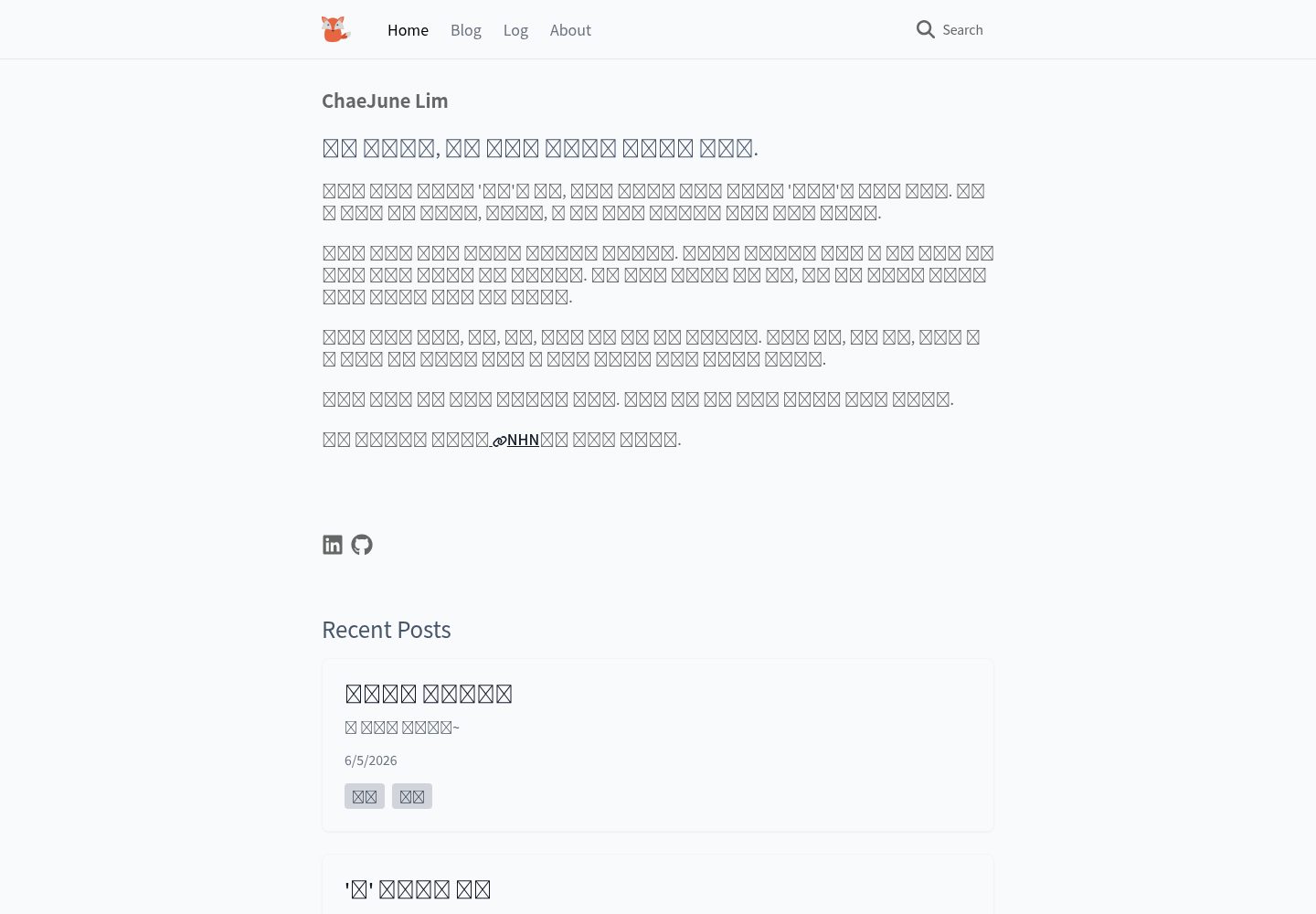
Desktop homepage1 / 3
Desktop captureTop of page
Actual screenshot captured by the server browser.
All pages & views 3
Screenshots show visual appearance; interactive behavior may differ.
Recorded 2026-10-05View source
What stands out
A quick read of the recorded project description.
Includes three built-in content collections: blog, log, and projects, with support for Markdown and MDX authoring
Integrates pagefind content search and automatically generates an RSS feed
Includes SEO-related output (meta tags, Open Graph, sitemap)
Supports system-following light/dark mode with manual switching, using TailwindCSS for theme customization
Based on Astro static site generation; the README states it can be deployed to Vercel, Netlify, or Cloudflare Pages
Template Details
astro-fox is an open-source Astro blog template by LimChaeJune, built with Astro and SolidJS and aimed at personal blogs and portfolio sites. The template includes three content collections: blog, log, and projects. Content is stored as Markdown or MDX under src/content, and frontmatter fields (title, summary, date, tags, categories, optional image, and draft flag) are defined in src/content/config.ts via the Astro Content Collections API. The page structure includes a homepage, blog list and dynamic article pages, log list and dynamic entry pages, project list and dynamic detail pages, and an about page, with dynamic routes implemented by [...slug].astro. The template ships with the CLI tool @cj.lim/astro-fox, which can run init to create a project and also provides blog, log, and projects subcommands to generate the corresponding content files with parameters. Site features include content search based on pagefind, automatically generated RSS, SEO-related output such as Open Graph and sitemap, and a light/dark mode that follows the system and supports manual switching. Styling uses TailwindCSS, with theme configuration adjusted in tailwind.config.mjs. The template is based on static site generation (SSG), and the README provides deployment instructions for Vercel, Netlify, and Cloudflare Pages. The project uses pnpm as the default package manager while also declaring support for npm and yarn, and provides scripts such as dev, build, preview, lint, and format. The README states a Lighthouse score of 100 and "Perfect Performance"; these are the author's own claims and were not independently verified in this material. The template is inspired by Astro Sphere and is licensed under MIT.
AstroSolidJSBlog
Is it right for your project?
Use Cases
- Building a personal site with a blog, log, and project showcase area
- Maintaining articles in Markdown/MDX and validating frontmatter through content collections
- A static blog that needs on-site search and RSS output
- Quickly creating new article, log, or project entries with the CLI
- Deploying to static hosting platforms such as Vercel, Netlify, or Cloudflare Pages
Suitable For
- Developers using Astro who want a complete blog structure
- Personal site authors who need to display articles, logs, and a portfolio together
- Users who prefer Markdown/MDX writing and static generation
- Those willing to customize styling and interactions with TailwindCSS and SolidJS components
Getting started & customization
Use these recorded setup notes alongside the repository instructions for your chosen version.
- 1
Install the CLI with npm install -g @cj.lim/astro-fox, then run astro-fox init my-blog to create a project
- 2
Alternatively, clone the repository directly; dependencies are installed with pnpm install by default, with npm and yarn also supported
- 3
Development and build scripts include pnpm run dev, pnpm run build, and pnpm run preview, plus lint- and format-related scripts
- 4
Change site in astro.config.mjs to the actual domain, and adjust public/favicon.svg, src/content/config.ts, and tailwind.config.mjs as needed
- 5
The README states a Lighthouse score of 100 and performance results; these are the author's own claims and were not independently verified in this material
License & source material
Usage conditions & limitations
Free to use · keep license noticeThis entry covers the free version in the public repository under the MIT license; the free scope is the code of that version and does not mean external services or third-party assets are free.
Must comply with when using
- The code of this version may be used, modified, used commercially, and distributed free of charge.
- When distributing copies or substantial portions of the code, retain the original author's copyright notice and the full MIT license notice.
- The code is provided as is; warranties and limitations of liability are governed by the original license and applicable law.
Additional costs & items to verify
- Demo images, fonts, icons, and other third-party assets must be checked against their respective licenses and cannot be judged solely by the code's MIT license.
- External services such as domains, hosting, databases, payments, or AI may incur separate charges.
View Original Text Basis
https://github.com/LimChaeJune/astro-fox/blob/master/LICENSEhttps://github.com/LimChaeJune/astro-fox/blob/master/README.mdPermission is hereby granted, free of charge
Original License Text
Compiled by DeepSeek based on repository license and README ·2026-10-05. Results only cover the materials read; dependencies, images, fonts, and subsequent term changes are subject to their respective original texts.
Project checks & description sources
Template Information
- Source platforms
- Astro Themes
- Documentation and maintenance reference score
- Partly documented · 74 / 100
- Technologies
- Astro · SolidJS
- Website type
- Blog
How this score is calculated
Our heuristic uses license records (up to 30), a demo link (12), a preview (10), stars (15), recorded maintenance (15), description completeness (8), feature records (5) and classification data (5). It is not a code, security or performance test, or a Google score. A link does not establish tested functionality.
What to verify for this project
- Repository update recorded
- 2025-05-01
- Screenshot last checked
- 2026-10-05
A demo link is listed. Check it with your own content and viewport sizes; its presence does not confirm that forms, authentication or payments work.
The catalog identifies Astro as the primary stack. Check the actual dependency manifest and lockfile for versions and hosting requirements. These notes use recorded metadata, not a code audit or a deployment test.
Use a selection guide →How this description was prepared
AI-assisted description based on catalog records and repository material. Repository authors are not automatically the reviewers of this description.
Review declaration: [email protected] · 2026-10-06
Inspect the recorded source material
SHA-256: 2e829617e6f3212caf8be9dc1b4250a32e3007b15da04c50b5dc4c37cbd0f633
2026-10-05T15:20:06.217Z
Source file / repository
# Astro Fox 🦊
[](https://opensource.org/licenses/MIT)
[](https://github.com/LimChaeJune/astro-fox/graphs/contributors)
[](https://github.com/LimChaeJune/astro-fox/pulls)
[](https://developers.google.com/web/tools/lighthouse/)
[한국어 🇰🇷](README.ko.md)
**Astro Fox** is a fast and lightweight Astro template generator for blogs and portfolios. Easily start your project with CLI tools and quickly build a personal site with blog, log, and project sections.
[](https://vercel.com/new/clone?repository-url=https://github.com/LimChaeJune/astro-fox)
[](https://app.netlify.com/start/deploy?repository=https://github.com/LimChaeJune/astro-fox)
## ✨ Features
- 🚀 **CLI Generator**: Create new projects with simple commands
- 🎯 **Perfect Performance**: Lighthouse 100/100 score
- 🔍 **SEO Optimized**: Built-in SEO best practices (meta tags, Open Graph, sitemaps)
- 🌓 **Dark/Light Mode**: Automatic detection of system theme with manual toggle
- 📱 **Responsive Design**: Optimized experience on all devices
- 🔎 **Integrated Search**: Fast content search with [pagefind](https://pagefind.app/)
- 📝 **Markdown & MDX**: Convenient content writing
- 🧩 **Modular Components**: Built with SolidJS components
- 💨 **Smooth Animations**: Appropriate transition effects
- 📊 **RSS Feed**: Automatically generated RSS feed
## ✅ Performance

Perfect Lighthouse scores across all categories: Performance, Accessibility, Best Practices, and SEO.
## 🚀 Getting Started
### Start with CLI
```bash
# Install globally with npm
npm install -g @cj.lim/astro-fox
# Create a new project
astro-fox init my-blog
# Navigate to project folder
cd my-blog
# Start development server
pnpm run dev
```
### Start with Clone
Astro Fox uses pnpm by default, but supports all major package managers (npm, yarn, pnpm).
Choose one package manager and use it consistently throughout these commands.
```bash
# Clone repository
git clone https://github.com/LimChaeJune/astro-fox
# Navigate to project folder
cd astro-fox
# Install dependencies with your preferred package manager
pnpm install
# Start development server
pnpm run dev
# Build for production
pnpm run build
```
### Available Scripts
The following scripts are available regardless of which package manager you choose:
```bash
# Start development server
pnpm run dev
# Build for production
pnpm run build
# Preview production build
pnpm run preview
# Run ESLint
pnpm run lint
# Fix ESLint issues
pnpm run lint:fix
# Format code with Prettier
pnpm run format
# Check formatting with Prettier
pnpm run format:check
```
## 📝 Project Structure
```
/
├── cli/ # CLI tools
├── public/
│ ├── fonts/ # Web fonts
│ └── js/ # Client scripts
├── src/
│ ├── app/
│ │ ├── components/ # App common components
│ │ ├── layouts/ # Layout components
│ │ └── styles/ # Global styles
│ ├── components/
│ │ ├── blog/ # Blog-related components
│ │ ├── log/ # Log-related components
│ │ ├── project/ # Project-related components
│ │ ├── common/ # Common UI components
│ │ └── about/ # About page components
│ ├── content/
│ │ ├── blog/ # Blog posts (Markdown/MDX)
│ │ ├── log/ # Log entries (Markdown/MDX)
│ │ └── projects/ # Project information (Markdown/MDX)
│ └── pages/ # Astro pages
│ ├── index.astro # Home page
│ ├── blog/ # Blog pages
│ │ ├── index.astro # Blog list page
│ │ └── [...slug].astro # Dynamic blog post page
│ ├── log/ # Log pages
│ │ ├── index.astro # Log list page
│ │ └── [...slug].astro # Dynamic log entry page
│ ├── projects/ # Project pages
│ │ ├── index.astro # Project list page
│ │ └── [...slug].astro # Dynamic project detail page
│ └── about/ # About page
│ └── index.astro # About page
└── package.json
```
### Dynamic Routes with [...slug]
The `[...slug].astro` files are used for dynamic routing in Astro:
## 📖 CLI Usage Guide
Astro Fox CLI is a tool for quickly creating and configuring new projects.
```bash
# install @cj.lim/astro-fox
npm install -g @cj.lim/astro-fox
# Create a new project
astro-fox init <project-name>
# Create a new blog post
astro-fox blog "My New Post" -d "A short description" -t "tag1,tag2"
# Create a new log entry
astro-fox log "Daily Log" -d "What I did today" -t "work,learning"
# Create a new project entry
astro-fox projects "Project Alpha" -d "Details about the project" -c "MyCompany" -s "2024-01-01" -e "2024-12-31"
# View help
astro-fox --help
# Check version
astro-fox --version
```
## 🔧 Customization
### Content Writing
All blog posts are stored in `src/content/blog` as Markdown or MDX files. Each post needs frontmatter with the following fields:
```markdown
---
title: "Post Title"
summary: "Brief description"
date: 2024-04-07
tags: ["astro", "web development"]
categories: "category"
image: "image-path" # optional
draft: true # optional
---
Content goes here...
```
The frontmatter schema is defined in `src/content/config.ts` using Astro's Content Collections API. You can check and modify the schema definitions there.
### Logs and Projects
- Logs are stored in `src/content/log`.
- Projects are stored in `src/content/projects`.
### Styling
This template uses TailwindCSS. You can customize the theme by editing `tailwind.config.mjs`.
## 🛠️ Key Configuration Files
These files should be modified to personalize your site:
### Astro Configuration - `astro.config.mjs`
```js
export default defineConfig({
site: "https://yourdomain.com", // Replace with your domain
build: {
format: "file", // build format
inlineStylesheets: "auto", // css optimization
},
});
```
### Favicon Image - `public/favicon.svg`
### Content Collection Schema - `src/content/config.ts`
### Colors, Fonts and Design Elements - `tailwind.config.mjs`
## 🚢 Deployment
Astro Fox is based on static site generation (SSG) and can be easily deployed to various hosting services:
- **Vercel**: Connect Git repository for automatic deployment
- **Netlify**: Connect Git repository or deploy with drag-and-drop
- **Cloudflare Pages**: Connect Git repository for automatic deployment
## 🙏 Acknowledgement
Theme inspired by [Astro Sphere](https://github.com/markhorn-dev/astro-sphere).
## 📜 License
MIT
Explore similar templates
Compare previews and descriptions within the same stack and category.

astrowind
AstroWind is a free, open-source Astro starter theme using Astro and Tailwind CSS, released under the MIT license.
Astro · Blog

astro-paper
AstroPaper is a minimal, responsive, accessible, and SEO-friendly Astro blog theme. Articles are stored as Markdown/MDX in src/content/posts/, with subdirectories affecting URLs.
Astro · Blog

fuwari
Fuwari is a static blog template built with Astro and Tailwind CSS for personal blogs. It manages posts as Markdown files in src/content/posts/, with frontmatter for title, date, description, cover, tags, categories, draft status, and language.
Astro · Blog

Firefly
Firefly is a clean personal blog theme forked from Astro and Fuwari, offering four background modes, single/double sidebar and list/grid layouts, Pagefind client-side full-text search, and a six-language UI.
Astro · Blog

astro-theme-cactus
Astro Cactus is an Astro-based blog and portfolio theme that uses Markdown/MDX content collections to manage posts, notes, and tags, with frontmatter type-checked by a schema.
Astro · Portfolio

astrofy
Astrofy is a free and open-source personal portfolio website template built with Astro and TailwindCSS, with built-in blog, CV timeline, project showcase, store, and RSS feed modules.
Astro · Portfolio