提供 @cj.lim/astro-fox CLI,可用 init 创建项目,并用 blog、log、projects 命令生成内容文件
AstroSolidJS博客
astro-fox — Astro 博客模板
作者 LimChaeJune
astro-fox 是一个基于 Astro 与 SolidJS 的博客与作品集模板,提供 CLI 生成器、Markdown/MDX 内容集合、Pagefind 搜索、RSS 与明暗主题切换。
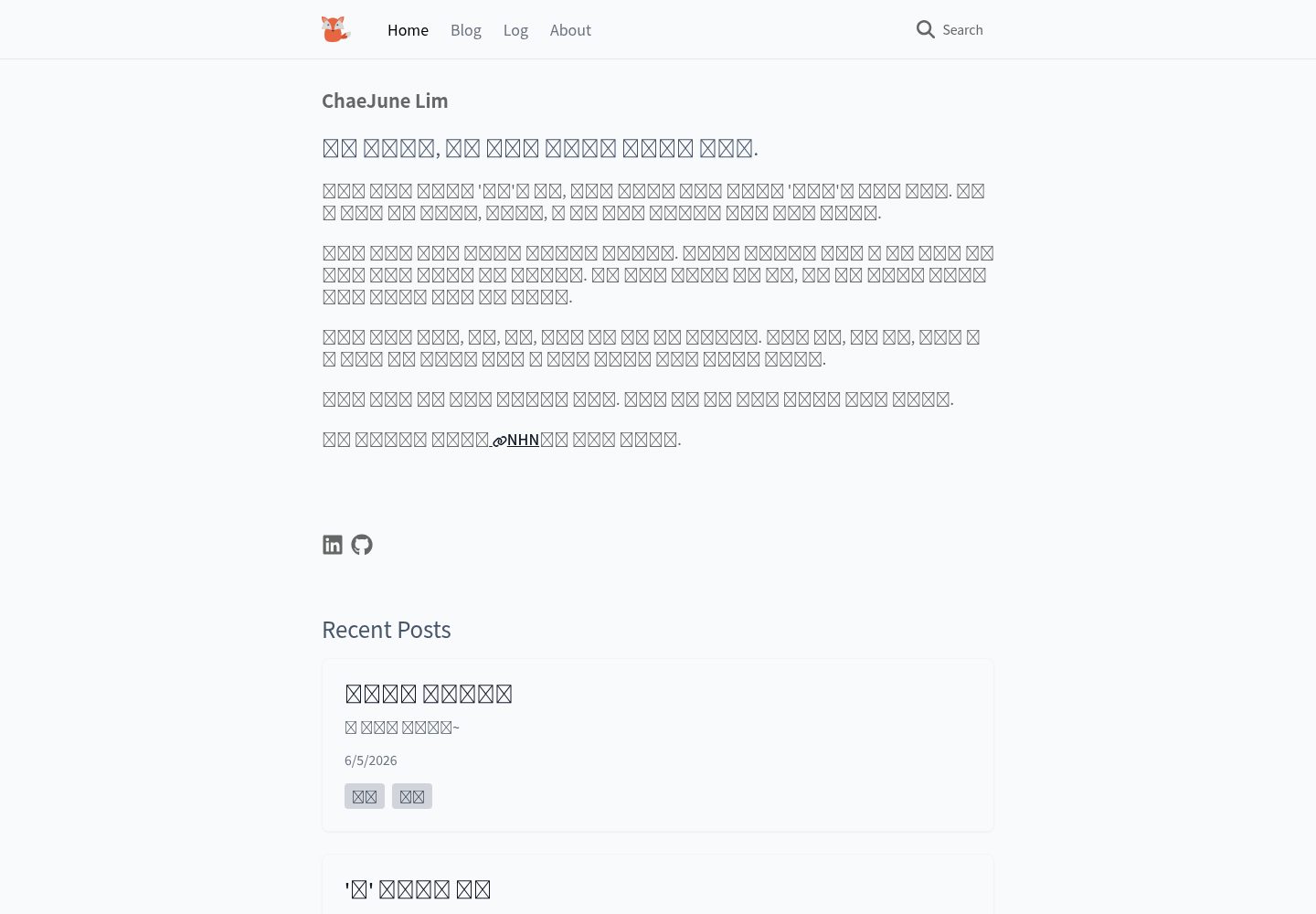
看看你的网站会是什么样
浏览真实页面截图,比较内容排版与手机效果。点击下方缩略图切换,放大查看整页细节。
全部页面与视图 3
截图用于了解视觉与布局,交互效果请以实际项目为准。
采集于 2026-10-05查看来源
值得关注的模板亮点
从已有项目资料中,快速了解它的特点。
内置 blog、log、projects 三类内容集合,支持 Markdown 与 MDX 写作
集成 pagefind 内容搜索,并自动生成 RSS 订阅源
包含 SEO 相关输出(meta 标签、Open Graph、sitemap)
支持跟随系统的明暗模式与手动切换,使用 TailwindCSS 定制主题
基于 Astro 静态站点生成,README 说明可部署到 Vercel、Netlify 或 Cloudflare Pages
模板详细介绍
astro-fox 是 LimChaeJune 开源的 Astro 博客模板,采用 Astro 与 SolidJS 构建,面向个人博客与作品集站点。模板内置 blog、log、projects 三类内容集合,内容以 Markdown 或 MDX 存放在 src/content 下,并通过 Astro Content Collections API 在 src/content/config.ts 中定义 frontmatter 字段(标题、摘要、日期、标签、分类、可选图片与草稿标记)。页面结构包含首页、博客列表与动态文章页、log 列表与动态条目页、项目列表与动态详情页以及 about 页面,动态路由由 [...slug].astro 实现。模板附带 CLI 工具 @cj.lim/astro-fox,可执行 init 创建项目,也可用 blog、log、projects 子命令按参数生成对应内容文件。站点功能包括基于 pagefind 的内容搜索、自动生成的 RSS、Open Graph 与 sitemap 等 SEO 相关输出,以及跟随系统并支持手动切换的明暗模式。样式使用 TailwindCSS,主题配置在 tailwind.config.mjs 中调整。模板基于静态站点生成(SSG),README 给出 Vercel、Netlify、Cloudflare Pages 的部署方式。项目采用 pnpm 为默认包管理器,同时声明支持 npm 与 yarn,并提供 dev、build、preview、lint、format 等脚本。README 中标注 Lighthouse 100 分与“Perfect Performance”,这些属于作者自述,未在本资料中独立验证。模板灵感来自 Astro Sphere,采用 MIT 许可。
AstroSolidJS博客
适合你的项目吗?
适用场景
- 搭建带博客、日志与项目展示区的个人站点
- 用 Markdown/MDX 维护文章并通过内容集合校验 frontmatter
- 需要站内搜索与 RSS 输出的静态博客
- 希望用 CLI 快速新建文章、日志或项目条目
- 部署到 Vercel、Netlify 或 Cloudflare Pages 等静态托管平台
适合人群
- 使用 Astro 并希望获得完整博客结构的开发者
- 需要同时展示文章、日志与作品集的个人站点作者
- 偏好 Markdown/MDX 写作与静态生成的用户
- 接受 TailwindCSS 与 SolidJS 组件进行样式和交互定制的人
上手与定制指南
结合仓库当前版本的说明,按下面的资料检查内容、配置与运行要求。
- 1
可通过 npm install -g @cj.lim/astro-fox 安装 CLI,再执行 astro-fox init my-blog 创建项目
- 2
也可直接克隆仓库,默认使用 pnpm install 安装依赖,同时支持 npm 与 yarn
- 3
开发与构建脚本包括 pnpm run dev、pnpm run build、pnpm run preview,另有 lint 与 format 相关脚本
- 4
需修改 astro.config.mjs 中的 site 为实际域名,并按需调整 public/favicon.svg、src/content/config.ts 与 tailwind.config.mjs
- 5
README 标注 Lighthouse 100 分与性能表现,属于作者自述,未在本资料中独立验证
授权与来源资料
使用条件与限制
免费使用 · 保留许可声明本次收录的是公开仓库中采用 MIT 许可的免费版本;免费范围为该版本代码,不代表外部服务或第三方素材免费。
使用时需要遵守
- 允许免费使用、修改、商用和分发该版本代码。
- 分发代码副本或实质性部分时,保留原作者版权声明和完整 MIT 许可声明。
- 代码按现状提供;担保与责任限制以原许可证及适用法律为准。
额外费用与待核对事项
- 演示图片、字体、图标及其他第三方素材需按各自许可核对,不能仅凭代码的 MIT 许可判断。
- 域名、托管、数据库、支付或 AI 等外部服务可能另外收费。
查看原文依据
https://github.com/LimChaeJune/astro-fox/blob/master/LICENSEhttps://github.com/LimChaeJune/astro-fox/blob/master/README.mdPermission is hereby granted, free of charge
许可证原文
DeepSeek 根据仓库许可证和 README 整理 ·2026-10-05。结果仅覆盖已读取资料,依赖、图片、字体及后续条款变更以各自原文为准。
项目核对记录与介绍依据
模板资料
- 来源平台
- Astro Themes
- 资料与维护参考分
- 资料一般 · 74 / 100
- 技术栈
- Astro · SolidJS
- 网站类型
- 博客
这个分数如何计算
本站按许可资料(最高30分)、演示链接(12分)、预览图(10分)、Star数(15分)、记录的维护时间(15分)、描述完整度(8分)、功能记录(5分)和分类资料(5分)计算。它不是代码、安全或性能测试,也不是 Google 评分;有链接不代表已实测可用。
这个项目需要核对什么
- 记录的仓库更新时间
- 2025-05-01
- 截图检查日期
- 2026-10-05
已收录演示链接。请用你的内容与屏幕尺寸检查;有演示不代表表单、认证或支付已经可用。
目录记录的主要技术栈是 Astro。请通过依赖清单和锁文件核对实际版本与托管要求。这些说明基于收录资料,不代表代码审计或部署实测。
查看具体选型方法 →介绍的制作与核对状态
介绍由 AI 辅助整理目录与仓库资料。仓库作者不等于这篇介绍的审核者。
审核声明: [email protected] · 2026-10-06
查看当时使用的来源资料
SHA-256: 2e829617e6f3212caf8be9dc1b4250a32e3007b15da04c50b5dc4c37cbd0f633
2026-10-05T15:20:06.217Z
来源文件 / 仓库
# Astro Fox 🦊
[](https://opensource.org/licenses/MIT)
[](https://github.com/LimChaeJune/astro-fox/graphs/contributors)
[](https://github.com/LimChaeJune/astro-fox/pulls)
[](https://developers.google.com/web/tools/lighthouse/)
[한국어 🇰🇷](README.ko.md)
**Astro Fox** is a fast and lightweight Astro template generator for blogs and portfolios. Easily start your project with CLI tools and quickly build a personal site with blog, log, and project sections.
[](https://vercel.com/new/clone?repository-url=https://github.com/LimChaeJune/astro-fox)
[](https://app.netlify.com/start/deploy?repository=https://github.com/LimChaeJune/astro-fox)
## ✨ Features
- 🚀 **CLI Generator**: Create new projects with simple commands
- 🎯 **Perfect Performance**: Lighthouse 100/100 score
- 🔍 **SEO Optimized**: Built-in SEO best practices (meta tags, Open Graph, sitemaps)
- 🌓 **Dark/Light Mode**: Automatic detection of system theme with manual toggle
- 📱 **Responsive Design**: Optimized experience on all devices
- 🔎 **Integrated Search**: Fast content search with [pagefind](https://pagefind.app/)
- 📝 **Markdown & MDX**: Convenient content writing
- 🧩 **Modular Components**: Built with SolidJS components
- 💨 **Smooth Animations**: Appropriate transition effects
- 📊 **RSS Feed**: Automatically generated RSS feed
## ✅ Performance

Perfect Lighthouse scores across all categories: Performance, Accessibility, Best Practices, and SEO.
## 🚀 Getting Started
### Start with CLI
```bash
# Install globally with npm
npm install -g @cj.lim/astro-fox
# Create a new project
astro-fox init my-blog
# Navigate to project folder
cd my-blog
# Start development server
pnpm run dev
```
### Start with Clone
Astro Fox uses pnpm by default, but supports all major package managers (npm, yarn, pnpm).
Choose one package manager and use it consistently throughout these commands.
```bash
# Clone repository
git clone https://github.com/LimChaeJune/astro-fox
# Navigate to project folder
cd astro-fox
# Install dependencies with your preferred package manager
pnpm install
# Start development server
pnpm run dev
# Build for production
pnpm run build
```
### Available Scripts
The following scripts are available regardless of which package manager you choose:
```bash
# Start development server
pnpm run dev
# Build for production
pnpm run build
# Preview production build
pnpm run preview
# Run ESLint
pnpm run lint
# Fix ESLint issues
pnpm run lint:fix
# Format code with Prettier
pnpm run format
# Check formatting with Prettier
pnpm run format:check
```
## 📝 Project Structure
```
/
├── cli/ # CLI tools
├── public/
│ ├── fonts/ # Web fonts
│ └── js/ # Client scripts
├── src/
│ ├── app/
│ │ ├── components/ # App common components
│ │ ├── layouts/ # Layout components
│ │ └── styles/ # Global styles
│ ├── components/
│ │ ├── blog/ # Blog-related components
│ │ ├── log/ # Log-related components
│ │ ├── project/ # Project-related components
│ │ ├── common/ # Common UI components
│ │ └── about/ # About page components
│ ├── content/
│ │ ├── blog/ # Blog posts (Markdown/MDX)
│ │ ├── log/ # Log entries (Markdown/MDX)
│ │ └── projects/ # Project information (Markdown/MDX)
│ └── pages/ # Astro pages
│ ├── index.astro # Home page
│ ├── blog/ # Blog pages
│ │ ├── index.astro # Blog list page
│ │ └── [...slug].astro # Dynamic blog post page
│ ├── log/ # Log pages
│ │ ├── index.astro # Log list page
│ │ └── [...slug].astro # Dynamic log entry page
│ ├── projects/ # Project pages
│ │ ├── index.astro # Project list page
│ │ └── [...slug].astro # Dynamic project detail page
│ └── about/ # About page
│ └── index.astro # About page
└── package.json
```
### Dynamic Routes with [...slug]
The `[...slug].astro` files are used for dynamic routing in Astro:
## 📖 CLI Usage Guide
Astro Fox CLI is a tool for quickly creating and configuring new projects.
```bash
# install @cj.lim/astro-fox
npm install -g @cj.lim/astro-fox
# Create a new project
astro-fox init <project-name>
# Create a new blog post
astro-fox blog "My New Post" -d "A short description" -t "tag1,tag2"
# Create a new log entry
astro-fox log "Daily Log" -d "What I did today" -t "work,learning"
# Create a new project entry
astro-fox projects "Project Alpha" -d "Details about the project" -c "MyCompany" -s "2024-01-01" -e "2024-12-31"
# View help
astro-fox --help
# Check version
astro-fox --version
```
## 🔧 Customization
### Content Writing
All blog posts are stored in `src/content/blog` as Markdown or MDX files. Each post needs frontmatter with the following fields:
```markdown
---
title: "Post Title"
summary: "Brief description"
date: 2024-04-07
tags: ["astro", "web development"]
categories: "category"
image: "image-path" # optional
draft: true # optional
---
Content goes here...
```
The frontmatter schema is defined in `src/content/config.ts` using Astro's Content Collections API. You can check and modify the schema definitions there.
### Logs and Projects
- Logs are stored in `src/content/log`.
- Projects are stored in `src/content/projects`.
### Styling
This template uses TailwindCSS. You can customize the theme by editing `tailwind.config.mjs`.
## 🛠️ Key Configuration Files
These files should be modified to personalize your site:
### Astro Configuration - `astro.config.mjs`
```js
export default defineConfig({
site: "https://yourdomain.com", // Replace with your domain
build: {
format: "file", // build format
inlineStylesheets: "auto", // css optimization
},
});
```
### Favicon Image - `public/favicon.svg`
### Content Collection Schema - `src/content/config.ts`
### Colors, Fonts and Design Elements - `tailwind.config.mjs`
## 🚢 Deployment
Astro Fox is based on static site generation (SSG) and can be easily deployed to various hosting services:
- **Vercel**: Connect Git repository for automatic deployment
- **Netlify**: Connect Git repository or deploy with drag-and-drop
- **Cloudflare Pages**: Connect Git repository for automatic deployment
## 🙏 Acknowledgement
Theme inspired by [Astro Sphere](https://github.com/markhorn-dev/astro-sphere).
## 📜 License
MIT
看看同类模板
对比同技术栈与用途的模板,找到更适合的视觉与内容结构。

astrowind
⭕️ AstroWind: A free template using Astro v7 and Tailwind CSS v4. Astro starter theme.
Astro · 博客

astro-paper
A minimal, accessible and SEO-friendly Astro blog theme.
Astro · 博客

fuwari
✨A static blog template built with Astro.
Astro · 博客

Firefly
Firefly 是一款基于 Astro 的静态博客主题,由 CuteLeaf 在 saicaca 的 Fuwari 模板基础上二次开发,主打清新美观的视觉风格。
Astro · 博客

astro-theme-cactus
A simple Astro theme. Use it to create your blog or website.
Astro · 作品集

astrofy
Astrofy is a free and open-source template for your Personal Portfolio Website built with Astro and TailwindCS…
Astro · 作品集