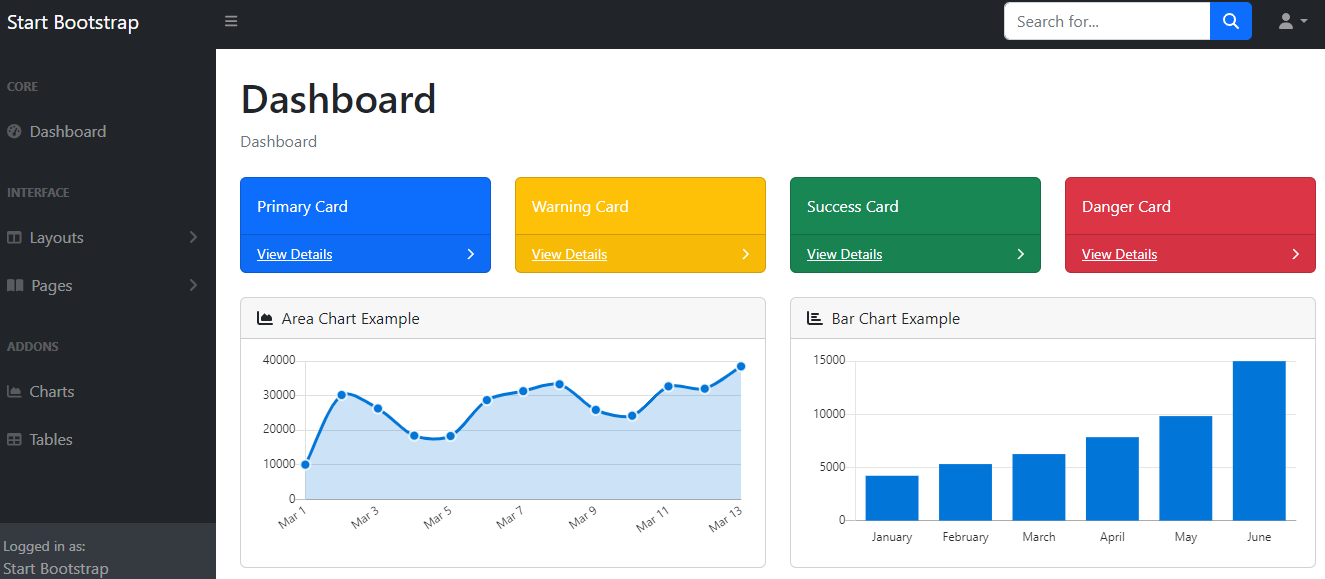
XOOPS frontend theme ported from StartBootstrap's SB Admin Bootstrap 4 template
HTMLAdmin dashboard
sbadmin4 — HTML Admin dashboard Template
By liomj
Ports StartBootstrap's SB Admin Bootstrap 4 backend template as a XOOPS CMS frontend theme, suitable for intranets, web applications, and dashboard interfaces.
Explore the design
Compare the page layouts and mobile experience. Open any screenshot for a closer look.
Author preview
Author-provided preview
Preview provided in the project README.
One original preview is available. Open the full image to inspect the design.
Screenshots show visual appearance; interactive behavior may differ.
Recorded 2026-10-05View source
What stands out
A quick read of the recorded project description.
Flexbox-based layout with fixed and static navigation options
Toggleable sidebar menu with clear state indication
SCSS theme with built-in scripts for compiling Pug and CSS
Supports the XOOPS myMenus module, falling back to default navigation when not installed
Provides custom panel styles and can be used for closed-site (intranet) scenarios
Template Details
This project ports StartBootstrap's SB Admin Bootstrap 4 backend template as a frontend theme for XOOPS CMS. The theme is based on Bootstrap 4, with minimal custom styling, uses a flexbox layout, offers fixed and static navigation options, and includes a toggleable sidebar menu with clear state indication.
The theme is written in SCSS, includes built-in scripts for compiling Pug and CSS, and provides custom panel styles. It supports the XOOPS myMenus module: after installing the module, you can create menus in the menu manager, add links in the link manager, and render the menu into the left block via block settings; if myMenus is not installed, the default navigation is displayed.
Installation involves downloading the ZIP from GitHub, extracting it, placing the theme directory into XOOPS's themes folder, and then setting sbadmin4 as the default theme in the system admin's general settings. The README also notes that the template can be used for closed-site (intranet) scenarios.
HTMLBackend
Is it right for your project?
Use Cases
- Provide a Bootstrap 4-style backend or admin interface theme for XOOPS sites
- Build interfaces for intranets (closed sites)
- Construct web application or dashboard-type pages
- Customize the left navigation menu via the myMenus module
Suitable For
- Sites using XOOPS CMS that want to change their frontend theme
- Intranet projects needing a Bootstrap 4 backend-style interface
- Dashboards requiring a toggleable sidebar and fixed/static navigation layout
- Users who have installed or are willing to install the XOOPS myMenus module to manage menus
Getting started & customization
Use these recorded setup notes alongside the repository instructions for your chosen version.
- 1
Download the ZIP from GitHub and extract it; note that nested directories may appear, so rename the subdirectory to sbadmin4
- 2
Place the sbadmin4 directory into XOOPS's themes folder (www.yoursite.com/themes/)
- 3
Set sbadmin4 as the default theme in the system admin under Preferences -> System Options -> General Settings
- 4
When using myMenus, create menus and links, and in block settings select 'Use skin from theme: Yes', display method as Assign to template, and Unique ID as sbadmin4
- 5
If the myMenus module is not installed, the theme displays the default navigation
License & source material
Usage conditions & limitations
Free to use · keep license noticeThis entry covers the free version under the MIT license in the public repository; the free scope applies to that version's code and does not imply that external services or third-party assets are free.
Must comply with when using
- Free use, modification, commercial use, and distribution of this version's code are permitted.
- When distributing copies or substantial portions of the code, retain the original author's copyright notice and the full MIT license notice.
- The code is provided as-is; warranties and liability limitations are governed by the original license and applicable law.
Additional costs & items to verify
- Demo images, fonts, icons, and other third-party assets must be checked against their respective licenses and cannot be judged solely by the code's MIT license.
- External services such as domains, hosting, databases, payments, or AI may incur additional charges.
- The theme is described as a closed-site template, primarily intended for intranet website use cases.
- Menu management functionality depends on the XOOPS myMenus module; without it, only the default navigation is available.
- Using custom menus requires installing the myMenus module first and creating menus in the menu manager.
- Without the myMenus module installed, the theme only displays the default navigation and cannot use modular menu control.
View Original Text Basis
Permission is hereby granted, free of charge
Original License Text
- Closed Site Template (For Intranet Website)
Original README
Support for XOOPS myMenus Module
Original README
If you already installed the MyMenus Module, create a menu in Menus Manager
Original README
https://github.com/liomj/sbadmin4/blob/main/LICENSEhttps://github.com/liomj/sbadmin4/blob/main/README.mdIf you do not have My Menus modules installed, the default navigation will be displayed.
Original README
Compiled by DeepSeek based on repository license and README ·2026-10-05. Results only cover the materials read; dependencies, images, fonts, and subsequent term changes are subject to their respective original texts.
Project checks & description sources
Template Information
- Source platforms
- GitHub
- Documentation and maintenance reference score
- Partly documented · 56 / 100
- Technologies
- HTML
- Website type
- Admin dashboard
How this score is calculated
Our heuristic uses license records (up to 30), a demo link (12), a preview (10), stars (15), recorded maintenance (15), description completeness (8), feature records (5) and classification data (5). It is not a code, security or performance test, or a Google score. A link does not establish tested functionality.
What to verify for this project
- Repository update recorded
- 2024-06-05
- Screenshot last checked
- 2026-10-05
No demo link is recorded. Use the repository instructions to evaluate the project locally; the screenshot alone cannot establish interactive behavior.
The catalog identifies HTML as the primary stack. Check the actual dependency manifest and lockfile for versions and hosting requirements. These notes use recorded metadata, not a code audit or a deployment test.
Use a selection guide →How this description was prepared
AI-assisted description based on catalog records and repository material. Repository authors are not automatically the reviewers of this description.
Review declaration: [email protected] · 2026-10-05
Inspect the recorded source material
SHA-256: 9fbd8adbd19569bcce3b71369851b83e8fb55ad4fdf2fb5b110557ed8145ed99
2026-10-05T01:16:59.090Z
Source file / repositorySBAdmin4 Bootstrap 4 template by [Start Bootstrap - SB Admin](https://startbootstrap.com/templates/sb-admin/) ported to work and powered with [XOOPS CMS](https://www.xoops.org/) as a frontend theme ## Features A Bootstrap 4 XOOPS Theme with minimal custom styling. Suitable theme in building intranet, web apps and dashboards - Closed Site Template (For Intranet Website) - Support for XOOPS myMenus Module - SCSS based theme with built in scripts for compiling Pug and CSS - A flexbox based layout with fixed and static navigation options - Toggleable sidebar menu with intuitive toggled states - Custom panel styling ## Installation 1. To download from GitHub, you should navigate to the top level of the project and then a green "Code" download button will be visible on the right. 2. Choose the Download ZIP option from the Code pull-down menu. That ZIP file will contain the entire theme 3. Your download may have a folder inside a folder when you uncompress the files (eg: sbadmin4-main\sbadmin4-main) 4. Rename the subfolder sbadmin4-main to sbadmin4 and move it to your XOOPS themes folder www.yoursite.com/themes/ 5. Go to System Admin->Preferences-> System Options -> General Settings, and make sbadmin4 as your Default Theme. ## Menu Control (Support for MyMenus Module) 1. If you already installed the MyMenus Module, create a menu in Menus Manager 2. Add Link to your menu in Links Manager 3. In Links Manager, use the following a. Alt Title -> Header :: If you want to add a menu header else leave it empty b. Menu Image - > fa fa-star :: You can use any of your favorite Font Awesome Icon. Leave it empty if you want to use the default defined icon 4. Activate the My menu Block 5. In the block settings, use the following: a. Use skin from theme —> Yes b. Display Method —> Assign to template c. Unique ID —> sbadmin4 d. The above is the recommended by My Menu module. After the settings, you can control the site menu using My Menu module. e. The Menu is displayed in the Left Block 6. If you do not have My Menus modules installed, the default navigation will be displayed. ## Preview [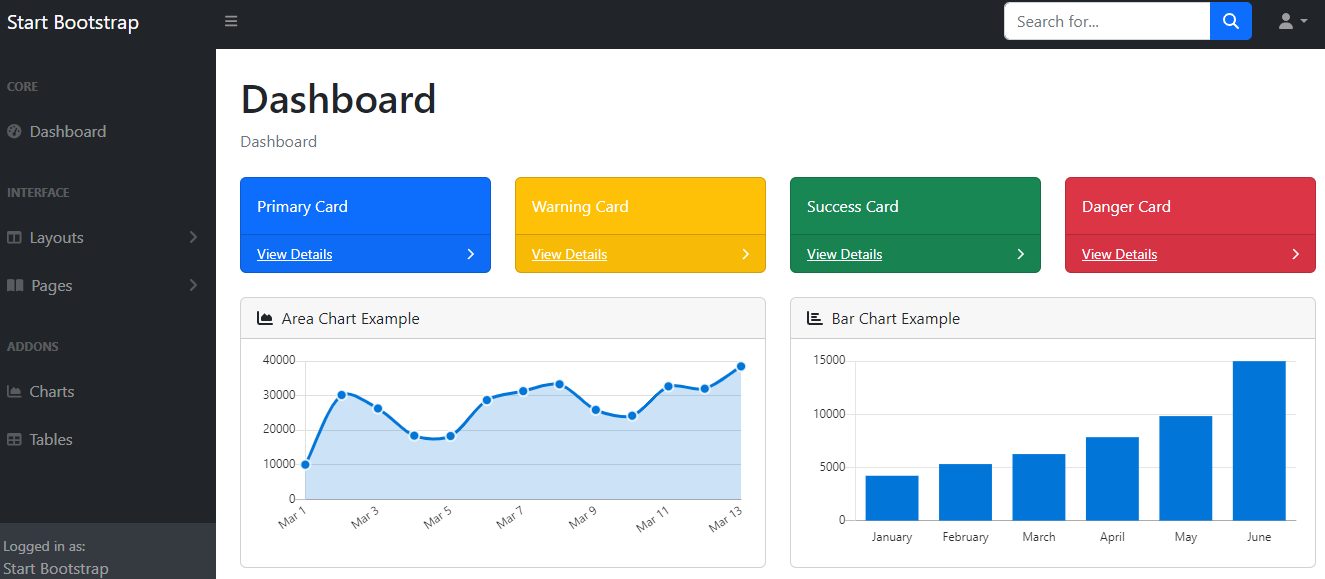](https://startbootstrap.github.io/startbootstrap-sb-admin/)
Explore similar templates
Compare previews and descriptions within the same stack and category.

gentelella
Gentelella v4 is a free, open-source admin dashboard template maintained by Colorlib, built with vanilla JavaScript, SCSS, and Vite 8 without Bootstrap or jQuery.
HTML · Admin dashboard

coreui-free-bootstrap-admin-template
A free Bootstrap admin template maintained by CoreUI, built on CoreUI's own UI component library. It provides compiled HTML pages and Pug template source code, covering dashboards, authentication, forms, components, icons, and error pages.
HTML · Admin dashboard

dashboards
A collection of responsive dashboard HTML templates open-sourced by Keen IO, built on CSS Grid, offering multiple prebuilt admin data interface layouts.
HTML · Admin dashboard

SB Admin 2
SB Admin 2 is a classic Bootstrap admin template from Start Bootstrap, offering dashboards, charts, tables, and common management pages.
HTML · Admin dashboard

Adminator-admin-dashboard
Adminator 4 is a vanilla HTML, CSS and JavaScript admin dashboard template with a CSS-variable token design system, built-in light and dark themes, no jQuery or Bootstrap dependency, and 18 pages covering dashboards, mail, calendar, charts, forms, tables and error pages.
HTML · Admin dashboard

SB Admin
SB Admin is a lightweight, open-source Bootstrap admin template from Start Bootstrap. It offers a sidebar-and-top-bar layout with data tables, forms, and stat cards, plus responsive design.
HTML · Admin dashboard