由 StartBootstrap 的 SB Admin Bootstrap 4 模板移植而来的 XOOPS 前端主题
HTML后台
sbadmin4 — HTML 后台模板
作者 liomj
将 StartBootstrap 的 SB Admin Bootstrap 4 后台模板移植为 XOOPS CMS 前端主题,适合内联网、Web 应用和仪表盘界面。
看看你的网站会是什么样
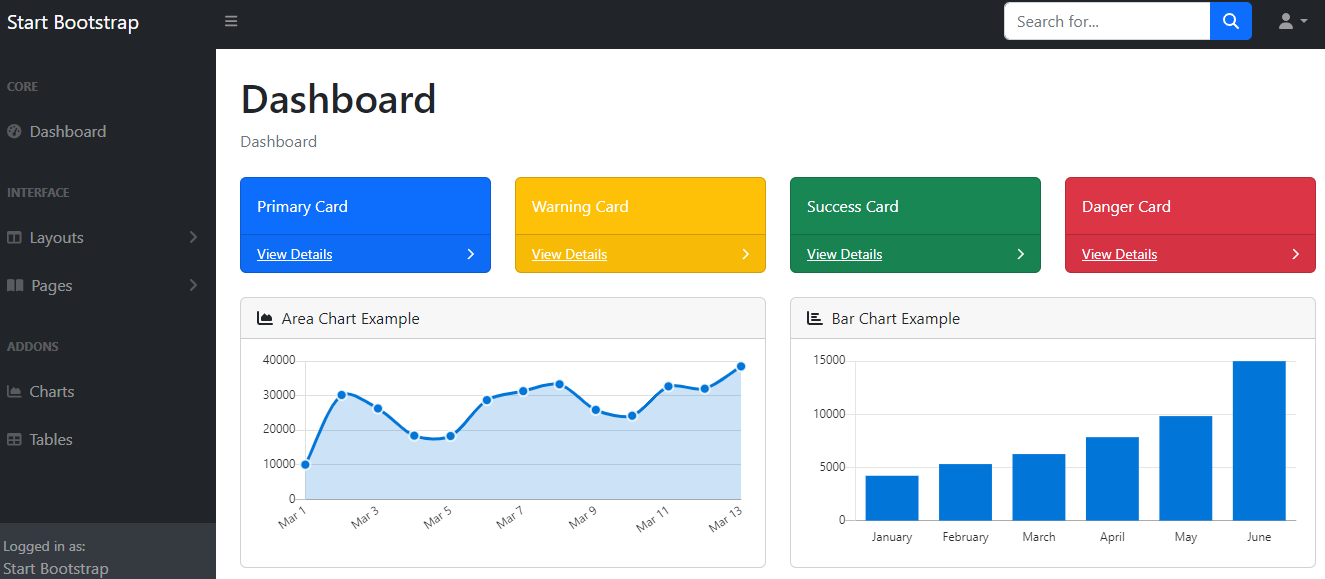
浏览真实页面截图,比较内容排版与手机效果。点击下方缩略图切换,放大查看整页细节。
目前有 1 张原始预览,可打开完整图片查看设计细节。
截图用于了解视觉与布局,交互效果请以实际项目为准。
采集于 2026-10-05查看来源
值得关注的模板亮点
从已有项目资料中,快速了解它的特点。
基于 flexbox 的布局,支持固定与静态导航选项
可切换的侧边栏菜单,切换状态直观
SCSS 主题,内置编译 Pug 与 CSS 的脚本
支持 XOOPS myMenus 模块,未安装时回退到默认导航
提供自定义面板样式,并可用于封闭站点(内联网)
模板详细介绍
该项目把 StartBootstrap 的 SB Admin Bootstrap 4 后台模板移植为 XOOPS CMS 的前端主题。主题基于 Bootstrap 4,自定义样式较少,采用 flexbox 布局,提供固定与静态两种导航方式,并带有一个可切换、状态直观的侧边栏菜单。
主题以 SCSS 编写,内置用于编译 Pug 和 CSS 的脚本,并提供自定义面板样式。它支持 XOOPS 的 myMenus 模块:安装该模块后可在菜单管理器中创建菜单、在链接管理器中添加链接,并通过区块设置把菜单渲染到左侧区块;未安装 myMenus 时则显示默认导航。
安装方式为从 GitHub 下载 ZIP、解压后将主题目录放入 XOOPS 的 themes 文件夹,再在系统后台的常规设置中把 sbadmin4 设为默认主题。README 同时说明该模板可用于封闭站点(内联网)场景。
HTML后台
适合你的项目吗?
适用场景
- 为 XOOPS 站点提供 Bootstrap 4 风格的后台或管理界面主题
- 搭建内联网(封闭站点)的界面
- 构建 Web 应用或仪表盘类页面
- 通过 myMenus 模块自定义左侧导航菜单
适合人群
- 使用 XOOPS CMS 并希望更换前端主题的站点
- 需要 Bootstrap 4 后台风格界面的内联网项目
- 需要可切换侧边栏与固定/静态导航布局的仪表盘
- 已安装或愿意安装 XOOPS myMenus 模块以管理菜单的用户
上手与定制指南
结合仓库当前版本的说明,按下面的资料检查内容、配置与运行要求。
- 1
从 GitHub 下载 ZIP 后解压,注意可能出现嵌套目录,需将子目录重命名为 sbadmin4
- 2
把 sbadmin4 目录放入 XOOPS 的 themes 文件夹(www.yoursite.com/themes/)
- 3
在系统后台的 Preferences -> System Options -> General Settings 中将 sbadmin4 设为默认主题
- 4
使用 myMenus 时需创建菜单与链接,并在区块设置中选择“Use skin from theme: Yes”、显示方式为 Assign to template、Unique ID 为 sbadmin4
- 5
未安装 myMenus 模块时,主题会显示默认导航
授权与来源资料
使用条件与限制
免费使用 · 保留许可声明本次收录的是公开仓库中采用 MIT 许可的免费版本;免费范围为该版本代码,不代表外部服务或第三方素材免费。
使用时需要遵守
- 允许免费使用、修改、商用和分发该版本代码。
- 分发代码副本或实质性部分时,保留原作者版权声明和完整 MIT 许可声明。
- 代码按现状提供;担保与责任限制以原许可证及适用法律为准。
额外费用与待核对事项
- 演示图片、字体、图标及其他第三方素材需按各自许可核对,不能仅凭代码的 MIT 许可判断。
- 域名、托管、数据库、支付或 AI 等外部服务可能另外收费。
- 该主题被描述为封闭站点模板,主要面向内联网网站使用场景。
- 菜单管理功能依赖 XOOPS 的 myMenus 模块;未安装该模块时只能使用默认导航。
- 使用自定义菜单需先安装 myMenus 模块,并在菜单管理器中创建菜单。
- 未安装 myMenus 模块时,主题仅显示默认导航,无法使用模块化菜单控制。
查看原文依据
Permission is hereby granted, free of charge
许可证原文
- Closed Site Template (For Intranet Website)
README 原文
Support for XOOPS myMenus Module
README 原文
If you already installed the MyMenus Module, create a menu in Menus Manager
README 原文
https://github.com/liomj/sbadmin4/blob/main/LICENSEhttps://github.com/liomj/sbadmin4/blob/main/README.mdIf you do not have My Menus modules installed, the default navigation will be displayed.
README 原文
DeepSeek 根据仓库许可证和 README 整理 ·2026-10-05。结果仅覆盖已读取资料,依赖、图片、字体及后续条款变更以各自原文为准。
项目核对记录与介绍依据
模板资料
- 来源平台
- GitHub
- 资料与维护参考分
- 资料一般 · 56 / 100
- 技术栈
- HTML
- 网站类型
- 后台
这个分数如何计算
本站按许可资料(最高30分)、演示链接(12分)、预览图(10分)、Star数(15分)、记录的维护时间(15分)、描述完整度(8分)、功能记录(5分)和分类资料(5分)计算。它不是代码、安全或性能测试,也不是 Google 评分;有链接不代表已实测可用。
这个项目需要核对什么
- 记录的仓库更新时间
- 2024-06-05
- 截图检查日期
- 2026-10-05
目前没有记录演示链接。请依据仓库说明在本地评估;仅凭截图无法确认交互行为。
目录记录的主要技术栈是 HTML。请通过依赖清单和锁文件核对实际版本与托管要求。这些说明基于收录资料,不代表代码审计或部署实测。
查看具体选型方法 →介绍的制作与核对状态
介绍由 AI 辅助整理目录与仓库资料。仓库作者不等于这篇介绍的审核者。
审核声明: [email protected] · 2026-10-05
查看当时使用的来源资料
SHA-256: 9fbd8adbd19569bcce3b71369851b83e8fb55ad4fdf2fb5b110557ed8145ed99
2026-10-05T01:16:59.090Z
来源文件 / 仓库SBAdmin4 Bootstrap 4 template by [Start Bootstrap - SB Admin](https://startbootstrap.com/templates/sb-admin/) ported to work and powered with [XOOPS CMS](https://www.xoops.org/) as a frontend theme ## Features A Bootstrap 4 XOOPS Theme with minimal custom styling. Suitable theme in building intranet, web apps and dashboards - Closed Site Template (For Intranet Website) - Support for XOOPS myMenus Module - SCSS based theme with built in scripts for compiling Pug and CSS - A flexbox based layout with fixed and static navigation options - Toggleable sidebar menu with intuitive toggled states - Custom panel styling ## Installation 1. To download from GitHub, you should navigate to the top level of the project and then a green "Code" download button will be visible on the right. 2. Choose the Download ZIP option from the Code pull-down menu. That ZIP file will contain the entire theme 3. Your download may have a folder inside a folder when you uncompress the files (eg: sbadmin4-main\sbadmin4-main) 4. Rename the subfolder sbadmin4-main to sbadmin4 and move it to your XOOPS themes folder www.yoursite.com/themes/ 5. Go to System Admin->Preferences-> System Options -> General Settings, and make sbadmin4 as your Default Theme. ## Menu Control (Support for MyMenus Module) 1. If you already installed the MyMenus Module, create a menu in Menus Manager 2. Add Link to your menu in Links Manager 3. In Links Manager, use the following a. Alt Title -> Header :: If you want to add a menu header else leave it empty b. Menu Image - > fa fa-star :: You can use any of your favorite Font Awesome Icon. Leave it empty if you want to use the default defined icon 4. Activate the My menu Block 5. In the block settings, use the following: a. Use skin from theme —> Yes b. Display Method —> Assign to template c. Unique ID —> sbadmin4 d. The above is the recommended by My Menu module. After the settings, you can control the site menu using My Menu module. e. The Menu is displayed in the Left Block 6. If you do not have My Menus modules installed, the default navigation will be displayed. ## Preview [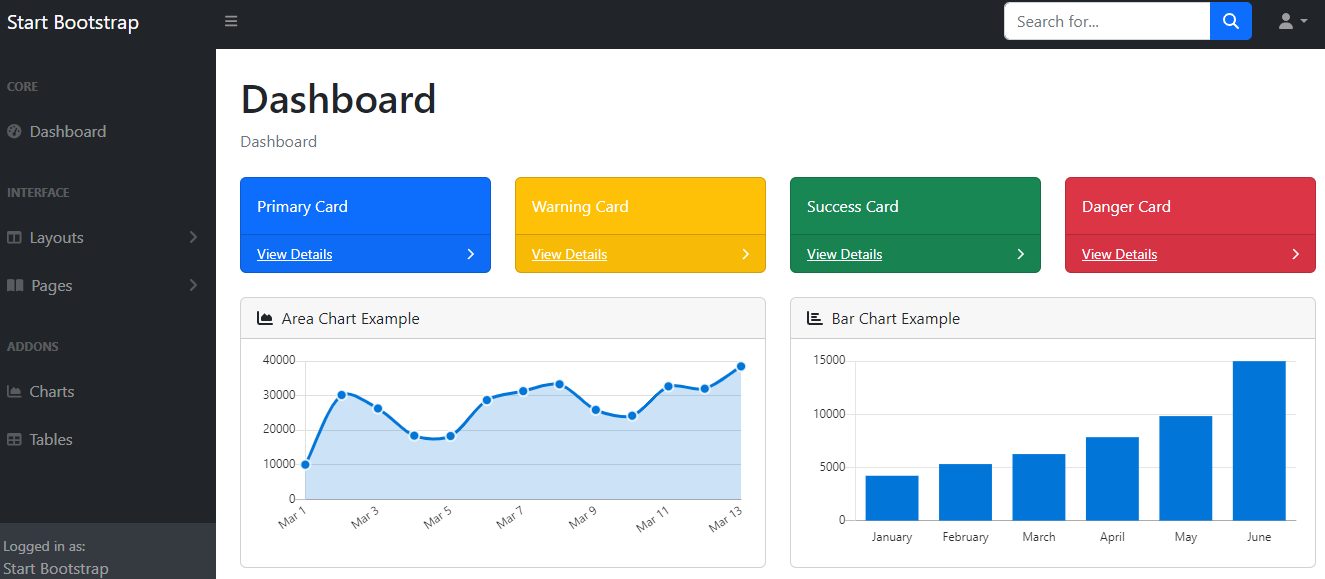](https://startbootstrap.github.io/startbootstrap-sb-admin/)
看看同类模板
对比同技术栈与用途的模板,找到更适合的视觉与内容结构。

gentelella
Free admin dashboard template — vanilla JS, SCSS, Vite 8. No Bootstrap, no jQuery.
HTML · 后台

coreui-free-bootstrap-admin-template
Free Bootstrap Admin & Dashboard Template Built for AI-Assisted Development
HTML · 后台

dashboards
Responsive dashboard templates 📊✨
HTML · 后台

SB Admin 2
SB Admin 2 是 Start Bootstrap 推出的开源后台模板,基于 Bootstrap 构建,整体风格偏向经典管理界面。
HTML · 后台

Adminator-admin-dashboard
Adminator is easy to use and well design admin dashboard template with dark mode for web apps, websites, servi…
HTML · 后台

SB Admin
SB Admin 是 Start Bootstrap 推出的开源后台管理模板,基于 Bootstrap 构建,定位是简洁、实用的管理界面。
HTML · 后台