Mobile-first responsive layout, with mirrored navigation and right-aligned typography for RTL languages such as Hebrew and Arabic
HugoBlog
hugo-mana-theme — Hugo Blog Template
By Livour
Hugo Mana is a Hugo theme for blogs, supporting responsive layouts, RTL languages, full-text search, light and dark themes, and multilingual content organization.
Explore the design
Compare the page layouts and mobile experience. Open any screenshot for a closer look.
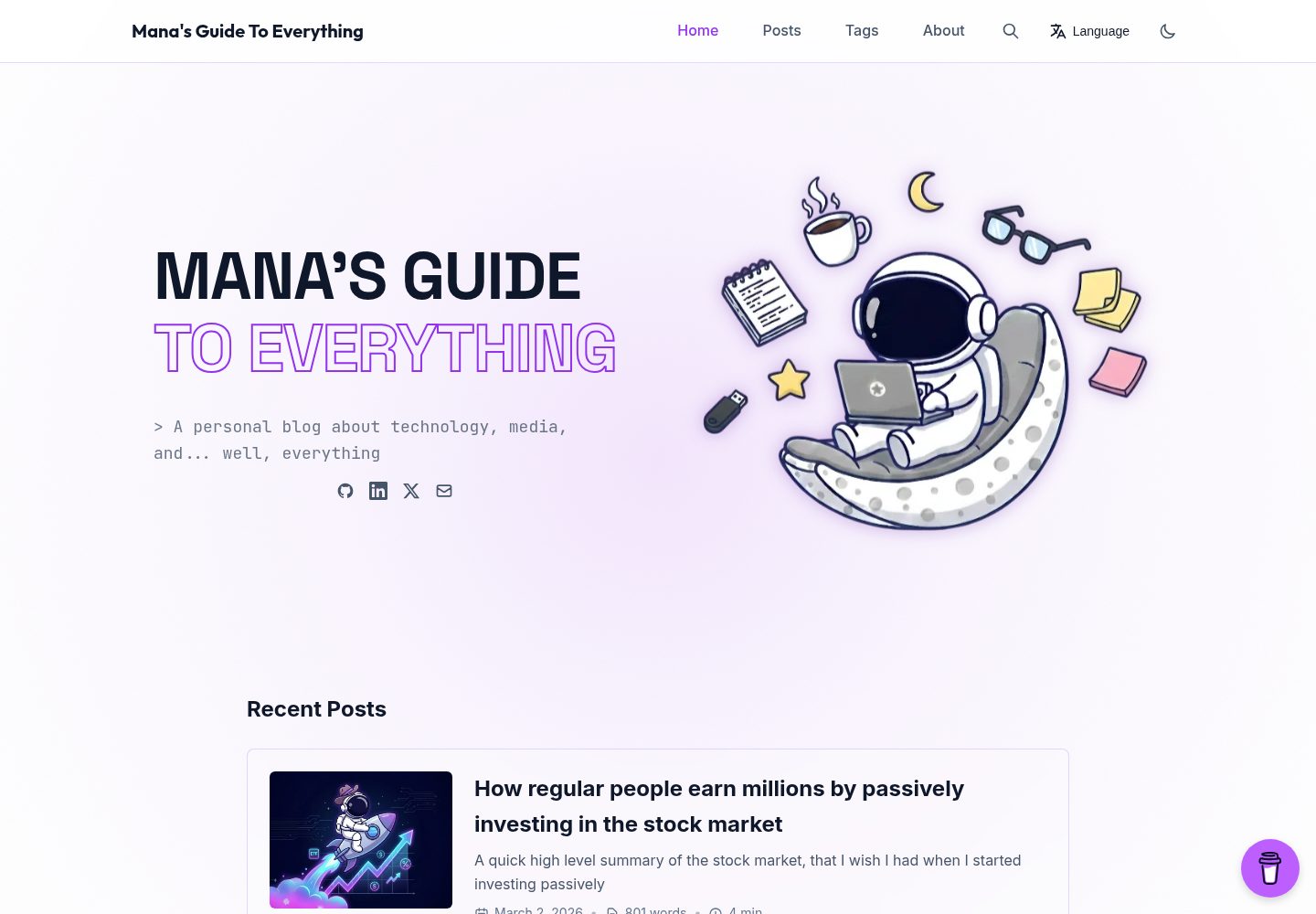
Desktop homepage1 / 3
Desktop captureTop of page
Actual screenshot captured by the server browser.
All pages & views 3
Screenshots show visual appearance; interactive behavior may differ.
Recorded 2026-09-30View source
What stands out
A quick read of the recorded project description.
Full-text search based on a JSON index, with keyboard navigation
Article table of contents highlights the current reading section; articles support filtering by tag, year, and month, plus archive pages
Blockquotes support GitHub/Obsidian-style callouts that are collapsible and have customizable titles, with icons selectable as favicon or emoji
Chroma code highlighting switches with light and dark themes, using Catppuccin color schemes by default
Supports multilingual sites, with content organized by filename or directory and a language switcher in the header
Template Details
Hugo Mana is a Hugo blog theme maintained by Livour on GitHub under the MIT license. The theme is built on a mobile-first responsive layout and also provides mirrored layouts and RTL styles for right-to-left languages such as Hebrew and Arabic.
For content and reading experience, the theme offers full-text search based on a JSON index with keyboard navigation, generates a table of contents on article pages with highlighting of the current section, supports filtering articles by tag, year, and month, and provides archive pages organized chronologically. Blockquotes support GitHub/Obsidian-style callouts (NOTE, TIP, WARNING, DANGER, etc.) that are collapsible and have customizable titles, with callout icons switchable between favicon and emoji. Code highlighting uses Chroma, defaulting to catppuccin-macchiato in dark mode and catppuccin-frappe in light mode, and can be replaced with other Chroma styles.
For site configuration, the theme supports single-language and multilingual sites, with multilingual content organized by filename or directory and a language switcher in the header; RTL languages require setting languageDirection = "rtl" in the language configuration. The theme includes built-in SEO output such as Open Graph, Twitter Cards, and structured data, and provides integrations such as a Buy Me a Coffee floating widget, Umami Analytics, and social links.
Usage limitations: The theme requires Hugo Extended 0.100.0 or later (needed for PostCSS support), is installed as a Git submodule, and requires setting theme = "mana". The search feature requires enabling JSON output for the home page. Third-party assets such as demo images, fonts, and icons must be checked separately under their respective licenses; the MIT license for the code does not cover these assets.
HugoBlog
Is it right for your project?
Use Cases
- Building a personal blog focused on article reading, requiring archives, tags, and year/month filtering
- Running an RTL site for Hebrew or Arabic readers
- Maintaining a Chinese-English or multilingual blog, requiring language switching and translation content organized by directory or filename
- Publishing articles with many code snippets, wanting code highlighting that changes with light and dark themes
- Using callouts in articles to mark notes, warnings, or examples
Suitable For
- Bloggers using Hugo who are willing to add the theme as a Git submodule
- Site maintainers needing RTL layouts or multilingual content organization
- Blogs wanting built-in full-text search, table of contents, archives, and article filtering
Getting started & customization
Use these recorded setup notes alongside the repository instructions for your chosen version.
- 1
Requires Hugo Extended 0.100.0 or later to support PostCSS
- 2
Install via git submodule add https://github.com/Livour/hugo-mana-theme.git themes/mana and set theme = "mana" in hugo.toml
- 3
To enable full-text search, add JSON output for the home page in the configuration: home = ["HTML", "JSON"]
- 4
RTL languages require setting languageDirection = "rtl" in the corresponding language configuration; multilingual sites require setting defaultContentLanguage
- 5
Callouts require enabling block and title attributes in the goldmark parser; to change code highlighting styles, regenerate CSS with hugo gen chromastyles
License & source material
Usage conditions & limitations
Free to use · keep license noticeThis entry covers the free version under the MIT license in the public repository; the free scope applies to that version's code and does not imply that external services or third-party assets are free.
Must comply with when using
- Free use, modification, commercial use, and distribution of this version's code are permitted.
- When distributing copies or substantial portions of the code, retain the original author's copyright notice and the full MIT license notice.
- The code is provided as is; warranties and limitations of liability are governed by the original license and applicable law.
Additional costs & items to verify
- Using this theme requires Hugo Extended 0.100.0 or later; standard Hugo cannot build properly due to lack of PostCSS support.
- The theme must be installed as a Git submodule into the themes/mana directory, and theme = "mana" must be set in hugo.toml.
- The full-text search feature requires enabling JSON output for the home page in the configuration (home = ["HTML", "JSON"]); otherwise search is unavailable.
- Using Umami analytics requires registering an Umami Cloud account or self-hosting Umami and filling in the websiteId, which is an external service dependency.
- The Buy Me a Coffee floating widget requires configuring your own widget id and depends on the third-party Buy Me a Coffee service.
- Adding a new language requires creating themes/mana/i18n/<lang>.toml and translating each entry; the theme only includes English and Hebrew.
- Demo images, fonts, icons, and other third-party assets must be checked under their respective licenses and cannot be judged solely by the code's MIT license.
- External services such as domains, hosting, databases, payments, or AI may incur additional charges.
View Original Text Basis
Permission is hereby granted, free of charge
Original License Text
Hugo Extended version 0.100.0 or higher (required for PostCSS support)
Original README
This theme is installed as a Git submodule.
Original README
Enable JSON output for search functionality
Original README
Sign up for an account at [Umami Cloud](https://umami.is/) or self-host Umami
Original README
[params.buyMeACoffee] enabled = true id = "yourwidgetid"
Original README
https://github.com/Livour/hugo-mana-theme/blob/main/LICENSEhttps://github.com/Livour/hugo-mana-theme/blob/main/README.mdThe theme includes `en.toml` and `he.toml` by default; add new files for additional languages.
Original README
Compiled by DeepSeek based on repository license and README ·2026-10-01. Results only cover the materials read; dependencies, images, fonts, and subsequent term changes are subject to their respective original texts.
Project checks & description sources
Template Information
- Source platforms
- GitHub
- Documentation and maintenance reference score
- More documented · 87 / 100
- Technologies
- Hugo
- Website type
- Blog
How this score is calculated
Our heuristic uses license records (up to 30), a demo link (12), a preview (10), stars (15), recorded maintenance (15), description completeness (8), feature records (5) and classification data (5). It is not a code, security or performance test, or a Google score. A link does not establish tested functionality.
What to verify for this project
- Repository update recorded
- 2026-04-22
- Screenshot last checked
- 2026-10-01
A demo link is listed. Check it with your own content and viewport sizes; its presence does not confirm that forms, authentication or payments work.
The catalog identifies Hugo as the primary stack. Check the actual dependency manifest and lockfile for versions and hosting requirements. These notes use recorded metadata, not a code audit or a deployment test.
Use a selection guide →How this description was prepared
AI-assisted description based on catalog records and repository material. Repository authors are not automatically the reviewers of this description.
Automatically checked against source and license rules; no manual editorial review.
Inspect the recorded source material
SHA-256: 63b3220bb340948e20b3a5e84796e10aafeeb6186e0ecab31837d444f8319d9f
2026-10-01T15:12:22.552Z
Source file / repository# Hugo Mana Theme
Futuristic hugo theme featuring clean aesthetics, and modern functionality and responsive design.
**[Demo](https://managuide.blog/)**
## Support
If you enjoy this theme, consider buying me a coffee! Your support helps me keep updating and improving the project.
[](https://www.buymeacoffee.com/livourmanab)
## Features
- **Fully responsive** design with mobile-first approach
- **RTL support** for Right-to-Left languages (Hebrew, Arabic, etc.) with mirrored layout
- **Full-text search** with JSON index and keyboard navigation
- **Syntax highlighting** with theme-aware Chroma (Catppuccin themes)
- **Table of Contents** with active section highlighting
- **Blockquotes and Alerts** with support for GitHub/Obsidian-style admonitions
- **Dark/Light theme** with system preference detection and manual toggle
- **Post filtering** by tags, year, and month
- **Archive pages** with chronological organization
- **SEO optimized** with Open Graph, Twitter Cards, and structured data
- **Performance optimized** with asset minification and caching
- **Integrations**: Buy Me a Coffee, Umami Analytics, social links
## Installation
This theme is installed as a Git submodule. To add it to your Hugo site:
```bash
git submodule add https://github.com/Livour/hugo-mana-theme.git themes/mana
```
Then set `theme = "mana"` in your `hugo.toml` configuration file.
## Requirements
- Hugo Extended version 0.100.0 or higher (required for PostCSS support)
## Configuration
Add the following configuration to your `hugo.toml` file. Reference `example.toml` for a complete config, or the `example-*-folder-*.toml` files for minimal configs per content layout (single/multi-folder, single/multi-language).
### Basic Configuration
```toml
[params]
description = "Your site description"
favicon = "/favicon/favicon.ico"
footerText = "Built with Hugo and Mana theme" # Optional
# Hero section title (optional - defaults to site.Title)
heroTitleLine1 = "Your Site Name" # First line of hero title
heroTitleLine2 = "Your Tagline" # Second line of hero title (optional)
```
### Avatar
Configure your avatar image (displayed on home page hero and about page). Use either `assetPath` (project asset) or `url` (external URL):
```toml
[params.avatar]
[params.avatar.home]
assetPath = "images/transparent-logo.png"
[params.avatar.about]
assetPath = "images/logo.png"
```
### Social Links
Add your social media links:
```toml
[params.social]
github = "https://github.com/yourusername"
gitlab = "https://gitlab.com/yourusername"
linkedin = "https://www.linkedin.com/in/yourprofile"
twitter = "yourusername"
email = "[email protected]"
```
### Buy Me a Coffee Widget
Enable the Buy Me a Coffee floating widget:
```toml
[params.buyMeACoffee]
enabled = true
id = "yourwidgetid"
message = "" # Optional message
color = "#BD5FFF" # Widget color
position = "Right" # "Left" or "Right"
x_margin = "18" # Horizontal margin in pixels
y_margin = "18" # Vertical margin in pixels
```
**Note:** The widget description text is configured per language in i18n files (`buyMeACoffeeDescription` in `en.toml`, `he.toml`, etc.).
### Menu Configuration
Configure your site navigation menu.
**Single-language sites:** Use root-level `[[menus.main]]`:
```toml
[[menus.main]]
name = 'Home'
pageRef = '/'
weight = 10
[[menus.main]]
name = 'Posts'
pageRef = '/posts'
weight = 20
[[menus.main]]
name = 'Tags'
pageRef = '/tags'
weight = 30
[[menus.main]]
name = 'About'
url = '/about/'
weight = 40
```
**Multilingual sites:** Define menus per language in `[[languages.<lang>.menus.main]]` (see [Multilingual Configuration](#multilingual-configuration)).
### Pagination
The theme includes pagination for the posts listing page (Sorted by date).
Configure the number of posts per page:
```toml
[pagination]
pageSize = 10 # Number of posts per page (default: 10)
```
The pagination controls include:
- **First/Last page links** - Jump to the beginning or end
- **Previous/Next links** - Navigate sequentially
- **Page numbers** - Direct navigation to specific pages
- **Current page indicator** - Shows which page you're on
- **Page information** - Displays total posts and pages
Pagination automatically appears when you have more posts than the configured `pageSize`. The controls are designed
### Table of Contents
Enable table of contents for posts:
```toml
[markup]
[markup.tableOfContents]
startLevel = 1
endLevel = 6
ordered = false
```
### Blockquotes and Alerts
The theme includes support for styled blockquotes and GitHub/Obsidian-style alerts (admonitions). To enable this feature, add the following configuration:
```toml
[markup]
[markup.goldmark]
[markup.goldmark.parser]
# Enable block-level attributes for blockquotes
[markup.goldmark.parser.attribute]
block = true
title = true
```
#### Usage
**Regular blockquote:**
```markdown
> This is a regular blockquote with some text.
```
**Simple alert/admonition:**
```markdown
> [!TIP]
> This is a helpful tip for your readers.
```
**Collapsible alert with custom title:**
```markdown
> [!WARNING]+ Custom Warning Title
> This is a collapsible warning that can be expanded/collapsed.
```
#### Supported Alert Types
The theme supports the following alert types:
- `NOTE` / `INFO` - Informational content
- `TIP` - Helpful tips and suggestions
- `IMPORTANT` - Important information
- `WARNING` / `CAUTION` - Warnings and cautions
- `SUCCESS` - Success messages
- `QUESTION` - Questions or prompts
- `DANGER` - Critical warnings
- `BUG` - Bug reports or known issues
- `EXAMPLE` - Example content
#### Collapsible Alerts
Use `+` or `-` after the alert type to make it collapsible:
- `[!TIP]+` - Collapsed by default (click to expand)
- `[!TIP]-` - Expanded by default (click to collapse)
You can also add a custom title:
```markdown
> [!NOTE]+ My Custom Title
> This alert has a custom title instead of the default "Note".
```
The syntax is compatible with GitHub Flavored Markdown, Obsidian, and Typora.
#### Admonition Display Style
Choose between favicon icons or emoji for alert headers:
```toml
[params.admonitions]
alertStyle = "favicon" # "favicon" (default) or "emoji"
```
### Code Syntax Highlighting
The theme supports theme-aware syntax highlighting using Chroma. By default, it uses Catppuccin themes:
- **Dark mode**: `catppuccin-macchiato`
- **Light mode**: `catppuccin-frappe`
Configure the themes in your `hugo.toml`:
```toml
[markup]
[markup.highlight]
codeFences = true
guessSyntax = true
noClasses = false
style = "catppuccin-macchiato" # Default style
[params]
[params.codeHighlight]
darkTheme = "catppuccin-macchiato" # Theme for dark mode
lightTheme = "catppuccin-frappe" # Theme for light mode
```
#### Generating Syntax Highlighting CSS
To generate the CSS files for syntax highlighting, run these commands in your project root:
```bash
# Generate dark theme CSS
hugo gen chromastyles --style=catppuccin-macchiato > themes/mana/assets/css/syntax-dark.css
# Generate light theme CSS
hugo gen chromastyles --style=catppuccin-frappe > themes/mana/assets/css/syntax-light.css
```
**Note**: These CSS files are already included in the theme. You only need to regenerate them if you want to use different Chroma styles. You can use any valid Chroma style name (e.g., `github`, `monokai`, `dracula`, etc.).
### Search Index
Enable JSON output for search functionality:
```toml
[outputs]
home = ["HTML", "JSON"]
```
### Multilingual Configuration
The theme supports multiple languages with a language switcher in the header.
**Required:** Set `defaultContentLanguage = "en"` (or your preferred default) in your config for multilingual sites to work correctly.
**Add a language:** Add a `[languages.<lang>]` block and create `themes/mana/i18n/<lang>.toml` with translated strings. Copy from `en.toml` and translate each key. The theme includes `en.toml` and `he.toml` by default; add new files for additional languages.
**Remove a language:** Delete the `[languages.<lang>]` block. With only one language, the switcher is hidden.
**Content layout:** The theme supports both approaches from [Hugo's multilingual docs](https://gohugo.io/content-management/multilingual/):
| Approach | Config | Content layout |
|----------|--------|----------------|
| **Translation by filename** | `[languages]` blocks, **omit contentDir** | `content/posts/post.md` + `content/posts/post.es.md` (same directory) |
| **Translation by directory** | `contentDir = "content/en"` etc. per language | `content/en/posts/post.md` + `content/es/posts/post.md` (separate dirs) |
**Example configs:** Use the example that matches your setup:
| File | Use when |
|------|----------|
| `example-single-folder-single-lang.toml` | Single language, all content in `content/` |
| `example-single-folder-multilang.toml` | Multiple languages, translation by filename |
| `example-multi-folder-single-lang.toml` | Single language, content in `content/en/` |
| `example-multi-folder-multilang.toml` | Multiple languages, translation by directory |
| `example.toml` | Full reference (multi-folder, multi-language) |
**RTL (Right-to-Left) support:** For Hebrew, Arabic, or other RTL languages, set `languageDirection = "rtl"` in the language block. The theme automatically applies:
- Mirrored navigation and layout
- Right-aligned text and proper text flow
- Mobile menu sliding from the right
- RTL-specific styles for filters, search, tables of contents, and post metadata
**Buy Me a Coffee description:** Add `buyMeACoffeeDescription` to each language's i18n file instead of config.
**Linking pages with different basenames:** Use `translationKey` in front matter to link pages that don't share the same filename or path. See [Hugo's bypassing default linking](https://gohugo.io/content-management/multilingual/#bypassing-default-linking).
Example minimal config for translation by filename (English + Spanish, no contentDir):
```toml
defaultContentLanguage = "en"
[languages.en]
languageCode = "en-US"
languageName = "English"
languageDirection = "ltr"
weight = 1
title = "Your Site Title"
# No contentDir - all languages use content/
[languages.en.params]
heroTitleLine1 = "YOUR SITE NAME"
heroTitleLine2 = "YOUR TAGLINE"
[[languages.en.menus.main]]
name = "Home"
pageRef = "/"
weight = 10
# ... other menu items
[languages.es]
languageCode = "es-ES"
languageName = "Español"
languageDirection = "ltr"
weight = 2
title = "Tu sitio"
# No contentDir
[languages.es.params]
heroTitleLine1 = "NOMBRE DE TU SITIO"
heroTitleLine2 = "TU ESLOGAN"
[[languages.es.menus.main]]
name = "Inicio"
pageRef = "/"
weight = 10
# ... other menu items
```
Example minimal config for translation by directory (English + Hebrew, RTL):
```toml
defaultContentLanguage = "en"
[languages.en]
languageCode = "en-US"
languageName = "English"
languageDirection = "ltr"
contentDir = "content/en"
weight = 1
title = "Your Site Title"
[languages.en.params]
description = "Your site description"
author = "Your Name"
heroTitleLine1 = "YOUR SITE NAME"
heroTitleLine2 = "YOUR TAGLINE"
custom404Message = "Sorry, the page you are looking for could not be found."
footerText = "Built with Hugo and Mana theme"
[[languages.en.menus.main]]
name = "Home"
pageRef = "/"
weight = 10
# ... other menu items
[languages.he]
languageCode = "he-IL"
languageName = "עברית"
languageDirection = "rtl"
contentDir = "content/he"
weight = 2
title = "Your Site Title"
[languages.he.params]
description = "Your site description"
author = "Your Name"
heroTitleLine1 = "YOUR SITE NAME"
heroTitleLine2 = "YOUR TAGLINE"
custom404Message = "Sorry, the page you are looking for could not be found."
footerText = "Built with Hugo and Mana theme"
[[languages.he.menus.main]]
name = "בית"
pageRef = "/"
weight = 10
# ... other menu items (see example.toml for full reference)
```
See `example.toml` for a complete reference, or the `example-*-folder-*.toml` files for minimal configs per setup.
### 404 Page Configuration
Customize the 404 error page message per language in `[languages.<lang>.params]`:
```toml
[languages.en.params]
custom404Message = "Sorry, the page you are looking for could not be found. I guess I don't have a guide for <em>everything</em>"
```
The 404 page uses the same hero section styling as your home page, providing a consistent user experience.
### Umami Analytics
The theme supports Umami Analytics for privacy-friendly page tracking:
```toml
[params]
[params.umami]
# Set your Umami website ID for page tracking
websiteId = "your-umami-website-id"
```
To use Umami:
1. Sign up for an account at [Umami Cloud](https://umami.is/) or self-host Umami
2. Create a website in your Umami dashboard
3. Copy your website ID and add it to your configuration
The Umami script will be automatically included in your site's `<head>` section.
## Post Frontmatter
The theme supports standard Hugo frontmatter. For post images, add an `image` parameter:
```markdown
---
title: "Your Post Title"
date: 2024-01-01
tags: ["tag1", "tag2"]
image: "/images/your-image.png"
---
```
## Pages
The theme includes layouts for:
- **Home page** - Displays mini about section and recent posts
- **Posts listing** - Shows all posts with filtering
- **Single post** - Individual post view with metadata and table of contents
- **Tags page** - Tag cloud view
- **Individual tag page** - Posts grouped by year for each tag
- **About page** - About page with avatar and social links
- **404 page** - Custom error page with hero section styling
## License
MIT
Explore similar templates
Compare previews and descriptions within the same stack and category.

hugo-PaperMod
A fast, clean, responsive Hugo theme for blogs and lightweight portfolios, with three layout modes (Regular, Home-Info, Profile), automatic and manual light/dark themes, Fuse.js client-side search, multilingual support, and built-in Open Graph, Twitter Cards, and Schema.org data.
Hugo · Portfolio

LoveIt
LoveIt is a clean, elegant, and feature-rich Hugo blog theme derived from LeaveIt and KeepIt, MIT-licensed. It offers light/dark modes, responsive layout, multilingual support, and search via Lunr.js or Algolia.
Hugo · Blog

hugo-coder
hugo-coder is a minimalist Hugo blog theme maintained by luizdepra under the MIT license. It provides a clean, text-focused blog appearance, configuration documentation in the docs directory, and a complete exampleSite with hugo.toml.
Hugo · Blog

blowfish
Blowfish is a Hugo personal website and blog theme built with Tailwind CSS 4, focused on lightness, simplicity, and content-first presentation.
Hugo · Blog

hugo-paper
hugo-paper is a simple, clean, and customizable Hugo blog theme configured through config.toml or hugo.toml.
Hugo · Blog

hextra
Hextra is a Hugo theme for documentation and blog sites, built on Hugo and Tailwind CSS with design referencing Nextra.
Hugo · Documentation