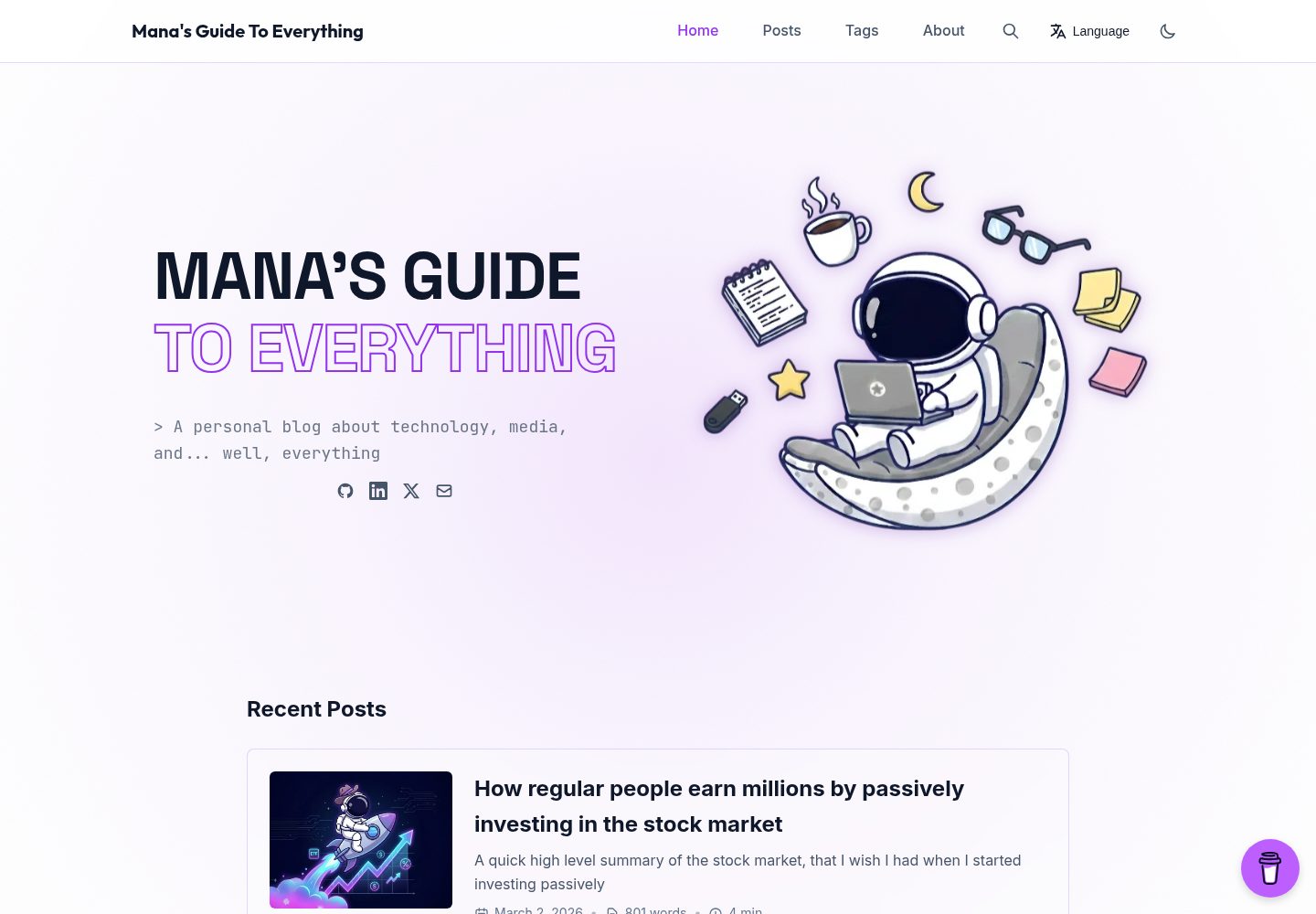
移动优先的响应式布局,并为希伯来语、阿拉伯语等 RTL 语言提供镜像导航与右对齐排版
Hugo博客
hugo-mana-theme — Hugo 博客模板
作者 Livour
Hugo Mana 是一款面向博客的 Hugo 主题,支持响应式布局、RTL 语言、全文搜索、明暗主题与多语言内容组织。
看看你的网站会是什么样
浏览真实页面截图,比较内容排版与手机效果。点击下方缩略图切换,放大查看整页细节。
全部页面与视图 3
截图用于了解视觉与布局,交互效果请以实际项目为准。
采集于 2026-09-30查看来源
值得关注的模板亮点
从已有项目资料中,快速了解它的特点。
基于 JSON 索引的全文搜索,支持键盘导航
文章目录可高亮当前阅读章节,文章支持按标签、年份、月份筛选与归档页
引用块支持 GitHub/Obsidian 风格提示块,可折叠、可自定义标题,图标可选 favicon 或 emoji
Chroma 代码高亮随明暗主题切换,默认使用 Catppuccin 配色
支持多语言站点,可按文件名或按目录组织内容,页头提供语言切换器
模板详细介绍
Hugo Mana 是 Livour 在 GitHub 上维护的 Hugo 博客主题,采用 MIT 许可。主题以移动优先的响应式布局为基础,同时为希伯来语、阿拉伯语等从右到左语言提供镜像布局与 RTL 样式。
内容与阅读体验方面,主题提供基于 JSON 索引的全文搜索并支持键盘导航,文章页可生成目录并高亮当前章节,支持按标签、年份和月份筛选文章,以及按时间顺序组织的归档页。引用块支持 GitHub/Obsidian 风格的提示块(NOTE、TIP、WARNING、DANGER 等),可折叠并自定义标题,提示图标可在 favicon 与 emoji 之间切换。代码高亮使用 Chroma,默认在深色模式使用 catppuccin-macchiato、浅色模式使用 catppuccin-frappe,可自行替换为其他 Chroma 样式。
站点配置方面,主题支持单语言与多语言站点,多语言可按文件名或按目录组织内容,页头提供语言切换器;RTL 语言需在语言配置中设置 languageDirection = "rtl"。主题内置 Open Graph、Twitter Cards 与结构化数据等 SEO 输出,并提供 Buy Me a Coffee 浮动组件、Umami Analytics 和社交链接等集成项。
使用限制:主题要求 Hugo Extended 0.100.0 或更高版本(PostCSS 支持所需),以 Git submodule 方式安装并设置 theme = "mana"。搜索功能需要为首页启用 JSON 输出。演示图片、字体、图标等第三方素材需按各自许可单独核对,代码的 MIT 许可不覆盖这些素材。
Hugo博客
适合你的项目吗?
适用场景
- 搭建以文章阅读为主的个人博客,需要归档、标签与年份月份筛选
- 运营面向希伯来语或阿拉伯语读者的 RTL 站点
- 维护中英或多语言博客,需要语言切换与按目录/文件名组织翻译内容
- 发布含大量代码片段的文章,希望代码高亮随明暗主题变化
- 在文章中用提示块标注注意事项、警告或示例
适合人群
- 使用 Hugo 并愿意以 Git submodule 方式引入主题的博客作者
- 需要 RTL 布局或多语言内容组织的站点维护者
- 希望自带全文搜索、目录、归档与文章筛选功能的博客
上手与定制指南
结合仓库当前版本的说明,按下面的资料检查内容、配置与运行要求。
- 1
需要 Hugo Extended 0.100.0 或更高版本,以支持 PostCSS
- 2
通过 git submodule add https://github.com/Livour/hugo-mana-theme.git themes/mana 安装,并在 hugo.toml 中设置 theme = "mana"
- 3
启用全文搜索需在配置中为首页添加 JSON 输出:home = ["HTML", "JSON"]
- 4
RTL 语言需在对应语言配置中设置 languageDirection = "rtl",多语言站点需设置 defaultContentLanguage
- 5
提示块需在 goldmark 解析器中启用 block 与 title 属性;更换代码高亮样式需用 hugo gen chromastyles 重新生成 CSS
授权与来源资料
使用条件与限制
免费使用 · 保留许可声明本次收录的是公开仓库中采用 MIT 许可的免费版本;免费范围为该版本代码,不代表外部服务或第三方素材免费。
使用时需要遵守
- 允许免费使用、修改、商用和分发该版本代码。
- 分发代码副本或实质性部分时,保留原作者版权声明和完整 MIT 许可声明。
- 代码按现状提供;担保与责任限制以原许可证及适用法律为准。
额外费用与待核对事项
- 使用该主题需安装 Hugo Extended 0.100.0 或更高版本,普通版 Hugo 因缺少 PostCSS 支持无法正常构建。
- 主题需以 Git submodule 方式安装到 themes/mana 目录,并在 hugo.toml 中设置 theme = "mana"。
- 全文搜索功能需在配置中为首页启用 JSON 输出(home = ["HTML", "JSON"]),否则搜索不可用。
- 使用 Umami 统计需自行注册 Umami Cloud 账号或自建 Umami 服务,并填入 websiteId,属于外部服务依赖。
- Buy Me a Coffee 浮动组件需配置自己的 widget id,依赖第三方 Buy Me a Coffee 服务。
- 新增语言需自行创建 themes/mana/i18n/<lang>.toml 并逐项翻译,主题仅内置英文与希伯来文。
- 演示图片、字体、图标及其他第三方素材需按各自许可核对,不能仅凭代码的 MIT 许可判断。
- 域名、托管、数据库、支付或 AI 等外部服务可能另外收费。
查看原文依据
Permission is hereby granted, free of charge
许可证原文
Hugo Extended version 0.100.0 or higher (required for PostCSS support)
README 原文
This theme is installed as a Git submodule.
README 原文
Enable JSON output for search functionality
README 原文
Sign up for an account at [Umami Cloud](https://umami.is/) or self-host Umami
README 原文
[params.buyMeACoffee] enabled = true id = "yourwidgetid"
README 原文
https://github.com/Livour/hugo-mana-theme/blob/main/LICENSEhttps://github.com/Livour/hugo-mana-theme/blob/main/README.mdThe theme includes `en.toml` and `he.toml` by default; add new files for additional languages.
README 原文
DeepSeek 根据仓库许可证和 README 整理 ·2026-10-01。结果仅覆盖已读取资料,依赖、图片、字体及后续条款变更以各自原文为准。
项目核对记录与介绍依据
模板资料
- 来源平台
- GitHub
- 资料与维护参考分
- 资料较完整 · 87 / 100
- 技术栈
- Hugo
- 网站类型
- 博客
这个分数如何计算
本站按许可资料(最高30分)、演示链接(12分)、预览图(10分)、Star数(15分)、记录的维护时间(15分)、描述完整度(8分)、功能记录(5分)和分类资料(5分)计算。它不是代码、安全或性能测试,也不是 Google 评分;有链接不代表已实测可用。
这个项目需要核对什么
- 记录的仓库更新时间
- 2026-04-22
- 截图检查日期
- 2026-10-01
已收录演示链接。请用你的内容与屏幕尺寸检查;有演示不代表表单、认证或支付已经可用。
目录记录的主要技术栈是 Hugo。请通过依赖清单和锁文件核对实际版本与托管要求。这些说明基于收录资料,不代表代码审计或部署实测。
查看具体选型方法 →介绍的制作与核对状态
介绍由 AI 辅助整理目录与仓库资料。仓库作者不等于这篇介绍的审核者。
已完成服务器许可规则与 AI 来源核对;未经过人工编辑审核。
查看当时使用的来源资料
SHA-256: 63b3220bb340948e20b3a5e84796e10aafeeb6186e0ecab31837d444f8319d9f
2026-10-01T15:12:22.552Z
来源文件 / 仓库# Hugo Mana Theme
Futuristic hugo theme featuring clean aesthetics, and modern functionality and responsive design.
**[Demo](https://managuide.blog/)**
## Support
If you enjoy this theme, consider buying me a coffee! Your support helps me keep updating and improving the project.
[](https://www.buymeacoffee.com/livourmanab)
## Features
- **Fully responsive** design with mobile-first approach
- **RTL support** for Right-to-Left languages (Hebrew, Arabic, etc.) with mirrored layout
- **Full-text search** with JSON index and keyboard navigation
- **Syntax highlighting** with theme-aware Chroma (Catppuccin themes)
- **Table of Contents** with active section highlighting
- **Blockquotes and Alerts** with support for GitHub/Obsidian-style admonitions
- **Dark/Light theme** with system preference detection and manual toggle
- **Post filtering** by tags, year, and month
- **Archive pages** with chronological organization
- **SEO optimized** with Open Graph, Twitter Cards, and structured data
- **Performance optimized** with asset minification and caching
- **Integrations**: Buy Me a Coffee, Umami Analytics, social links
## Installation
This theme is installed as a Git submodule. To add it to your Hugo site:
```bash
git submodule add https://github.com/Livour/hugo-mana-theme.git themes/mana
```
Then set `theme = "mana"` in your `hugo.toml` configuration file.
## Requirements
- Hugo Extended version 0.100.0 or higher (required for PostCSS support)
## Configuration
Add the following configuration to your `hugo.toml` file. Reference `example.toml` for a complete config, or the `example-*-folder-*.toml` files for minimal configs per content layout (single/multi-folder, single/multi-language).
### Basic Configuration
```toml
[params]
description = "Your site description"
favicon = "/favicon/favicon.ico"
footerText = "Built with Hugo and Mana theme" # Optional
# Hero section title (optional - defaults to site.Title)
heroTitleLine1 = "Your Site Name" # First line of hero title
heroTitleLine2 = "Your Tagline" # Second line of hero title (optional)
```
### Avatar
Configure your avatar image (displayed on home page hero and about page). Use either `assetPath` (project asset) or `url` (external URL):
```toml
[params.avatar]
[params.avatar.home]
assetPath = "images/transparent-logo.png"
[params.avatar.about]
assetPath = "images/logo.png"
```
### Social Links
Add your social media links:
```toml
[params.social]
github = "https://github.com/yourusername"
gitlab = "https://gitlab.com/yourusername"
linkedin = "https://www.linkedin.com/in/yourprofile"
twitter = "yourusername"
email = "[email protected]"
```
### Buy Me a Coffee Widget
Enable the Buy Me a Coffee floating widget:
```toml
[params.buyMeACoffee]
enabled = true
id = "yourwidgetid"
message = "" # Optional message
color = "#BD5FFF" # Widget color
position = "Right" # "Left" or "Right"
x_margin = "18" # Horizontal margin in pixels
y_margin = "18" # Vertical margin in pixels
```
**Note:** The widget description text is configured per language in i18n files (`buyMeACoffeeDescription` in `en.toml`, `he.toml`, etc.).
### Menu Configuration
Configure your site navigation menu.
**Single-language sites:** Use root-level `[[menus.main]]`:
```toml
[[menus.main]]
name = 'Home'
pageRef = '/'
weight = 10
[[menus.main]]
name = 'Posts'
pageRef = '/posts'
weight = 20
[[menus.main]]
name = 'Tags'
pageRef = '/tags'
weight = 30
[[menus.main]]
name = 'About'
url = '/about/'
weight = 40
```
**Multilingual sites:** Define menus per language in `[[languages.<lang>.menus.main]]` (see [Multilingual Configuration](#multilingual-configuration)).
### Pagination
The theme includes pagination for the posts listing page (Sorted by date).
Configure the number of posts per page:
```toml
[pagination]
pageSize = 10 # Number of posts per page (default: 10)
```
The pagination controls include:
- **First/Last page links** - Jump to the beginning or end
- **Previous/Next links** - Navigate sequentially
- **Page numbers** - Direct navigation to specific pages
- **Current page indicator** - Shows which page you're on
- **Page information** - Displays total posts and pages
Pagination automatically appears when you have more posts than the configured `pageSize`. The controls are designed
### Table of Contents
Enable table of contents for posts:
```toml
[markup]
[markup.tableOfContents]
startLevel = 1
endLevel = 6
ordered = false
```
### Blockquotes and Alerts
The theme includes support for styled blockquotes and GitHub/Obsidian-style alerts (admonitions). To enable this feature, add the following configuration:
```toml
[markup]
[markup.goldmark]
[markup.goldmark.parser]
# Enable block-level attributes for blockquotes
[markup.goldmark.parser.attribute]
block = true
title = true
```
#### Usage
**Regular blockquote:**
```markdown
> This is a regular blockquote with some text.
```
**Simple alert/admonition:**
```markdown
> [!TIP]
> This is a helpful tip for your readers.
```
**Collapsible alert with custom title:**
```markdown
> [!WARNING]+ Custom Warning Title
> This is a collapsible warning that can be expanded/collapsed.
```
#### Supported Alert Types
The theme supports the following alert types:
- `NOTE` / `INFO` - Informational content
- `TIP` - Helpful tips and suggestions
- `IMPORTANT` - Important information
- `WARNING` / `CAUTION` - Warnings and cautions
- `SUCCESS` - Success messages
- `QUESTION` - Questions or prompts
- `DANGER` - Critical warnings
- `BUG` - Bug reports or known issues
- `EXAMPLE` - Example content
#### Collapsible Alerts
Use `+` or `-` after the alert type to make it collapsible:
- `[!TIP]+` - Collapsed by default (click to expand)
- `[!TIP]-` - Expanded by default (click to collapse)
You can also add a custom title:
```markdown
> [!NOTE]+ My Custom Title
> This alert has a custom title instead of the default "Note".
```
The syntax is compatible with GitHub Flavored Markdown, Obsidian, and Typora.
#### Admonition Display Style
Choose between favicon icons or emoji for alert headers:
```toml
[params.admonitions]
alertStyle = "favicon" # "favicon" (default) or "emoji"
```
### Code Syntax Highlighting
The theme supports theme-aware syntax highlighting using Chroma. By default, it uses Catppuccin themes:
- **Dark mode**: `catppuccin-macchiato`
- **Light mode**: `catppuccin-frappe`
Configure the themes in your `hugo.toml`:
```toml
[markup]
[markup.highlight]
codeFences = true
guessSyntax = true
noClasses = false
style = "catppuccin-macchiato" # Default style
[params]
[params.codeHighlight]
darkTheme = "catppuccin-macchiato" # Theme for dark mode
lightTheme = "catppuccin-frappe" # Theme for light mode
```
#### Generating Syntax Highlighting CSS
To generate the CSS files for syntax highlighting, run these commands in your project root:
```bash
# Generate dark theme CSS
hugo gen chromastyles --style=catppuccin-macchiato > themes/mana/assets/css/syntax-dark.css
# Generate light theme CSS
hugo gen chromastyles --style=catppuccin-frappe > themes/mana/assets/css/syntax-light.css
```
**Note**: These CSS files are already included in the theme. You only need to regenerate them if you want to use different Chroma styles. You can use any valid Chroma style name (e.g., `github`, `monokai`, `dracula`, etc.).
### Search Index
Enable JSON output for search functionality:
```toml
[outputs]
home = ["HTML", "JSON"]
```
### Multilingual Configuration
The theme supports multiple languages with a language switcher in the header.
**Required:** Set `defaultContentLanguage = "en"` (or your preferred default) in your config for multilingual sites to work correctly.
**Add a language:** Add a `[languages.<lang>]` block and create `themes/mana/i18n/<lang>.toml` with translated strings. Copy from `en.toml` and translate each key. The theme includes `en.toml` and `he.toml` by default; add new files for additional languages.
**Remove a language:** Delete the `[languages.<lang>]` block. With only one language, the switcher is hidden.
**Content layout:** The theme supports both approaches from [Hugo's multilingual docs](https://gohugo.io/content-management/multilingual/):
| Approach | Config | Content layout |
|----------|--------|----------------|
| **Translation by filename** | `[languages]` blocks, **omit contentDir** | `content/posts/post.md` + `content/posts/post.es.md` (same directory) |
| **Translation by directory** | `contentDir = "content/en"` etc. per language | `content/en/posts/post.md` + `content/es/posts/post.md` (separate dirs) |
**Example configs:** Use the example that matches your setup:
| File | Use when |
|------|----------|
| `example-single-folder-single-lang.toml` | Single language, all content in `content/` |
| `example-single-folder-multilang.toml` | Multiple languages, translation by filename |
| `example-multi-folder-single-lang.toml` | Single language, content in `content/en/` |
| `example-multi-folder-multilang.toml` | Multiple languages, translation by directory |
| `example.toml` | Full reference (multi-folder, multi-language) |
**RTL (Right-to-Left) support:** For Hebrew, Arabic, or other RTL languages, set `languageDirection = "rtl"` in the language block. The theme automatically applies:
- Mirrored navigation and layout
- Right-aligned text and proper text flow
- Mobile menu sliding from the right
- RTL-specific styles for filters, search, tables of contents, and post metadata
**Buy Me a Coffee description:** Add `buyMeACoffeeDescription` to each language's i18n file instead of config.
**Linking pages with different basenames:** Use `translationKey` in front matter to link pages that don't share the same filename or path. See [Hugo's bypassing default linking](https://gohugo.io/content-management/multilingual/#bypassing-default-linking).
Example minimal config for translation by filename (English + Spanish, no contentDir):
```toml
defaultContentLanguage = "en"
[languages.en]
languageCode = "en-US"
languageName = "English"
languageDirection = "ltr"
weight = 1
title = "Your Site Title"
# No contentDir - all languages use content/
[languages.en.params]
heroTitleLine1 = "YOUR SITE NAME"
heroTitleLine2 = "YOUR TAGLINE"
[[languages.en.menus.main]]
name = "Home"
pageRef = "/"
weight = 10
# ... other menu items
[languages.es]
languageCode = "es-ES"
languageName = "Español"
languageDirection = "ltr"
weight = 2
title = "Tu sitio"
# No contentDir
[languages.es.params]
heroTitleLine1 = "NOMBRE DE TU SITIO"
heroTitleLine2 = "TU ESLOGAN"
[[languages.es.menus.main]]
name = "Inicio"
pageRef = "/"
weight = 10
# ... other menu items
```
Example minimal config for translation by directory (English + Hebrew, RTL):
```toml
defaultContentLanguage = "en"
[languages.en]
languageCode = "en-US"
languageName = "English"
languageDirection = "ltr"
contentDir = "content/en"
weight = 1
title = "Your Site Title"
[languages.en.params]
description = "Your site description"
author = "Your Name"
heroTitleLine1 = "YOUR SITE NAME"
heroTitleLine2 = "YOUR TAGLINE"
custom404Message = "Sorry, the page you are looking for could not be found."
footerText = "Built with Hugo and Mana theme"
[[languages.en.menus.main]]
name = "Home"
pageRef = "/"
weight = 10
# ... other menu items
[languages.he]
languageCode = "he-IL"
languageName = "עברית"
languageDirection = "rtl"
contentDir = "content/he"
weight = 2
title = "Your Site Title"
[languages.he.params]
description = "Your site description"
author = "Your Name"
heroTitleLine1 = "YOUR SITE NAME"
heroTitleLine2 = "YOUR TAGLINE"
custom404Message = "Sorry, the page you are looking for could not be found."
footerText = "Built with Hugo and Mana theme"
[[languages.he.menus.main]]
name = "בית"
pageRef = "/"
weight = 10
# ... other menu items (see example.toml for full reference)
```
See `example.toml` for a complete reference, or the `example-*-folder-*.toml` files for minimal configs per setup.
### 404 Page Configuration
Customize the 404 error page message per language in `[languages.<lang>.params]`:
```toml
[languages.en.params]
custom404Message = "Sorry, the page you are looking for could not be found. I guess I don't have a guide for <em>everything</em>"
```
The 404 page uses the same hero section styling as your home page, providing a consistent user experience.
### Umami Analytics
The theme supports Umami Analytics for privacy-friendly page tracking:
```toml
[params]
[params.umami]
# Set your Umami website ID for page tracking
websiteId = "your-umami-website-id"
```
To use Umami:
1. Sign up for an account at [Umami Cloud](https://umami.is/) or self-host Umami
2. Create a website in your Umami dashboard
3. Copy your website ID and add it to your configuration
The Umami script will be automatically included in your site's `<head>` section.
## Post Frontmatter
The theme supports standard Hugo frontmatter. For post images, add an `image` parameter:
```markdown
---
title: "Your Post Title"
date: 2024-01-01
tags: ["tag1", "tag2"]
image: "/images/your-image.png"
---
```
## Pages
The theme includes layouts for:
- **Home page** - Displays mini about section and recent posts
- **Posts listing** - Shows all posts with filtering
- **Single post** - Individual post view with metadata and table of contents
- **Tags page** - Tag cloud view
- **Individual tag page** - Posts grouped by year for each tag
- **About page** - About page with avatar and social links
- **404 page** - Custom error page with hero section styling
## License
MIT
看看同类模板
对比同技术栈与用途的模板,找到更适合的视觉与内容结构。

hugo-PaperMod
PaperMod 是 Hugo 生态里知名度较高的主题之一,定位很明确:给博客和轻量作品集站点提供一套干净、响应式的阅读界面。
Hugo · 作品集

LoveIt
❤️A clean, elegant but advanced blog theme for Hugo 一个简洁、优雅且高效的 Hugo 主题
Hugo · 博客

hugo-coder
A minimalist blog theme for hugo.
Hugo · 博客

blowfish
Personal Website & Blog Theme for Hugo
Hugo · 博客

hugo-paper
🪺 A simple, clean, customizable Hugo theme
Hugo · 博客

hextra
Hextra 是一个 Hugo 主题,定位在文档站与博客之间:既提供侧边栏导航、目录、面包屑、分页这类文档站结构,也能承载博客内容。
Hugo · 文档