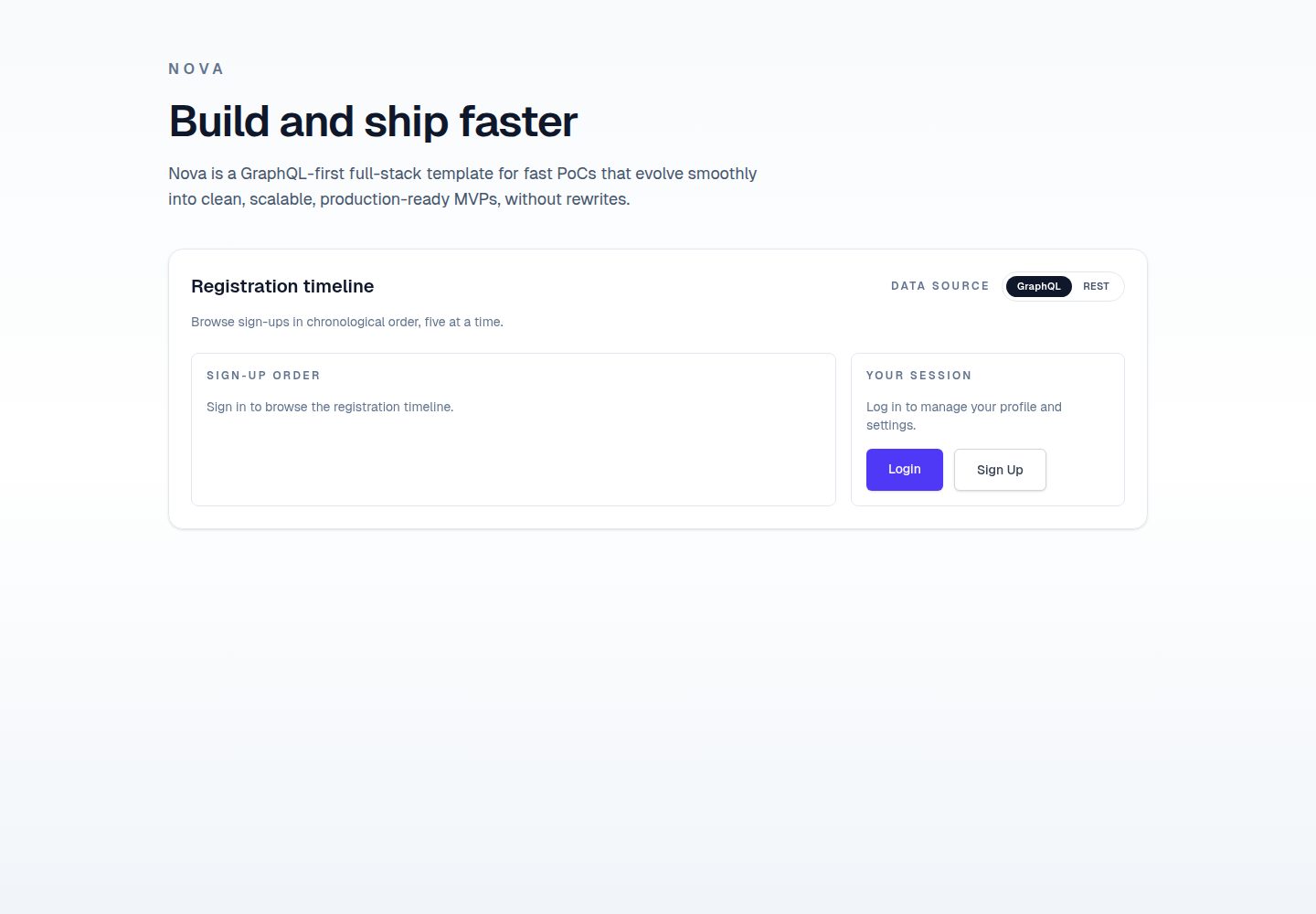
Full-stack template: Python (Litestar) backend and TypeScript (Next.js) frontend connected via GraphQL and REST
Next.jsReactCorporate Website
nova — Next.js Business Template
By lmiguelvargasf
Nova is a full-stack application template with a Python (Litestar) backend and a TypeScript (Next.js) frontend, connected via GraphQL and REST, and including an optional SwiftUI iOS client, suitable for hackathons and rapid prototyping.
Explore the design
Compare the page layouts and mobile experience. Open any screenshot for a closer look.
Desktop homepage1 / 2
Desktop captureTop of page
Actual screenshot captured by the server browser.
All pages & views 2
Screenshots show visual appearance; interactive behavior may differ.
Recorded 2026-10-14View source
What stands out
A quick read of the recorded project description.
Optional SwiftUI iOS client, located in the ios directory
Integrates PostgreSQL, Redis, Celery, and Flower for data storage, message broker, asynchronous tasks, and monitoring
Provides scripted installation (setup.sh) and manual installation steps, using Task to run development tasks
Includes an AI/LLM coding rules system, supporting agents such as VS Code + GitHub Copilot
Uses GitHub Actions for CI/CD, including PR validation and testing
Template Details
Nova is a full-stack application template designed to provide a starting point for hackathons and rapid prototyping, and is designed to evolve smoothly from proof of concept to minimum viable product. The backend is based on the Python Litestar framework, uses Advanced Alchemy for asynchronous SQLAlchemy integration and migrations, provides GraphQL and REST APIs, relies on PostgreSQL as the database, Redis as the message broker, Celery for asynchronous tasks, and includes Flower monitoring. The frontend is based on TypeScript Next.js, uses Tailwind CSS for styling, and is configured with tools such as Storybook, Vitest, Playwright, and Biome. In addition, the project provides an optional SwiftUI iOS client in the ios directory. The project uses tools such as Docker Desktop, mise, Task, and pre-commit for environment management and task automation. The README provides detailed scripted installation and manual installation steps, as well as explanations of development tasks and CI/CD workflows. For production deployment, the README mentions a recommended approach: the frontend deployed on Vercel, and the backend and database deployed on Render, but specific details need to refer to docs/deployment.md. The project uses the MIT license.
Next.jsCorporate Website
Is it right for your project?
Use Cases
- Rapidly building full-stack application prototypes for hackathon projects
- Backend development that needs to provide both GraphQL and REST APIs
- Cross-platform application development that includes an iOS client
- Applications that use Celery to handle asynchronous tasks and scheduled tasks
- Teams that want to evolve smoothly from proof of concept to MVP
Suitable For
- Developers participating in hackathons
- Teams that need rapid prototyping
- Full-stack developers, especially those familiar with Python and TypeScript
- Developers who want to use a modern toolchain (such as Litestar, Next.js, Celery)
Getting started & customization
Use these recorded setup notes alongside the repository instructions for your chosen version.
- 1
It is recommended to run ./setup.sh for scripted installation; if permissions are insufficient, first execute chmod +x setup.sh
- 2
Manual installation requires installing mise, the project toolchain, and pre-commit hooks in sequence, and copying the environment variable file
- 3
Use Task commands to start services: task backend:dev, task worker:dev, task beat:dev, task frontend:dev, optionally task flower:dev
- 4
Default service ports: frontend 3000, backend health check 8000/health, admin interface 8000/admin, GraphQL endpoint 8000/graphql, Flower monitoring 5555
- 5
For production deployment, the recommended approach is frontend on Vercel, backend and database on Render; see docs/deployment.md for details
License & source material
Usage conditions & limitations
Free to use · keep license noticeThis entry covers the free version in the public repository under the MIT license; the free scope is the code of this version and does not mean that external services or third-party assets are free.
Must comply with when using
- Allows free use, modification, commercial use, and distribution of this version of the code.
- When distributing copies or substantial portions of the code, retain the original author's copyright notice and the complete MIT license notice.
- The code is provided as is; warranties and limitations of liability are governed by the original license and applicable law.
Additional costs & items to verify
- Demo images, fonts, icons, and other third-party assets need to be checked against their respective licenses and cannot be judged solely by the code's MIT license.
- External services such as domains, hosting, databases, payments, or AI may incur additional charges.
- Docker Desktop must be installed to run the local development environment.
- To develop the iOS client, Xcode must be installed.
- During manual installation, the mise tool needs to be downloaded and installed from mise.run.
- Production deployment recommends external hosting services such as Vercel and Render, which may incur costs.
View Original Text Basis
Permission is hereby granted, free of charge
Original License Text
- **[Docker Desktop][]**
Original README
- **[Xcode][]** (for iOS development)
Original README
curl https://mise.run | sh
Original README
https://github.com/lmiguelvargasf/nova/blob/main/LICENSEhttps://github.com/lmiguelvargasf/nova/blob/main/README.mdThis template has been deployed successfully with the **frontend on Vercel** and
Original README
Compiled by DeepSeek based on repository license and README ·2026-10-14. Results only cover the materials read; dependencies, images, fonts, and subsequent term changes are subject to their respective original texts.
Project checks & description sources
Template Information
- Source platforms
- GitHub
- Documentation and maintenance reference score
- More documented · 83 / 100
- Technologies
- Next.js · React
- Website type
- Corporate Website
How this score is calculated
Our heuristic uses license records (up to 30), a demo link (12), a preview (10), stars (15), recorded maintenance (15), description completeness (8), feature records (5) and classification data (5). It is not a code, security or performance test, or a Google score. A link does not establish tested functionality.
What to verify for this project
- Repository update recorded
- 2026-04-13
- Screenshot last checked
- 2026-10-14
A demo link is listed. Check it with your own content and viewport sizes; its presence does not confirm that forms, authentication or payments work.
The catalog identifies Next.js as the primary stack. Check the actual dependency manifest and lockfile for versions and hosting requirements. These notes use recorded metadata, not a code audit or a deployment test.
Use a selection guide →How this description was prepared
AI-assisted description based on catalog records and repository material. Repository authors are not automatically the reviewers of this description.
Review declaration: codex-user-requested-batch-review-20261015 · 2026-10-15
Inspect the recorded source material
SHA-256: 1a29bac357ae898d8f9d0aabdcc37f806e18540dce669508710359decef34373
2026-10-14T14:53:02.634Z
Source file / repository# Nova 🌟













A full-stack application template with a Python (Litestar) backend and a
TypeScript (Next.js) frontend, connected via GraphQL and REST, plus an optional
SwiftUI iOS client. Ideal for hackathons and rapid prototyping, designed to
smoothly evolve from a PoC into an MVP.
## 📚 Table of Contents
- [Nova 🌟](#nova-)
- [📚 Table of Contents](#-table-of-contents)
- [🛠️ Tech Stack](#️-tech-stack)
- [Backend](#backend)
- [Frontend](#frontend)
- [Tooling](#tooling)
- [Mobile (iOS)](#mobile-ios)
- [🚀 Getting Started](#-getting-started)
- [Prerequisites](#prerequisites)
- [Scripted setup (recommended)](#scripted-setup-recommended)
- [Step-by-step setup (manual)](#step-by-step-setup-manual)
- [Local environment](#local-environment)
- [Start services](#start-services)
- [💻 Developer Experience](#-developer-experience)
- [📱 iOS App](#-ios-app)
- [📏 Rules System](#-rules-system)
- [🌐 Production Deployment](#-production-deployment)
- [⚙️ Development Tasks](#️-development-tasks)
- [🔄 CI/CD Workflows](#-cicd-workflows)
- [📦 Releases](#-releases)
- [📄 License](#-license)
## 🛠️ Tech Stack
### Backend
- **[Python][]** – Core programming language for backend.
- **[Litestar][]** – High-performance ASGI framework for modern Python web apps.
- **[Advanced Alchemy][]** – SQLAlchemy integration (async) + migrations tooling.
- **[GraphQL][]** – API query language for flexible data fetching.
- **[REST][]** – Resource-oriented APIs over HTTP with JSON.
- **[PostgreSQL][]** – Advanced open-source relational database known for reliability.
- **[Redis][]** – In-memory data store for message brokering.
- **[Celery][]** – Distributed task queue for handling asynchronous background jobs.
- **[Flower][]** – Real-time monitoring for Celery workers.
- **[uv][]** – Ultra-fast Python package and project manager.
- **[ruff][]** – Extremely fast Python linter and code formatter.
- **[ty][]** – Fast, type-safe Python type checker.
### Frontend
- **[TypeScript][]** – Core programming language for frontend.
- **[Next.js][]** – React framework for production-ready applications.
- **[Tailwind CSS][]** – Utility-first CSS framework for rapid UI development.
- **[pnpm][]** – Fast, disk space efficient package manager.
- **[Storybook][]** – Tool for building UI components and pages in isolation.
- **[Vitest][]** – Next generation testing framework.
- **[Playwright][]** – Reliable end-to-end testing for modern web apps.
- **[Biome][]** – Fast formatter and linter for JavaScript/TypeScript projects.
### Tooling
- **[Docker Desktop][]** – Provides Docker Engine and Docker Compose.
- **[mise][]** – Manages tool versions.
- **[Task][]** – Task runner designed for modern workflows.
- **[pre-commit][]** – Manages and runs automated Git hooks.
### Mobile (iOS)
- **[Swift][]** – Primary language for the iOS client.
- **[SwiftUI][]** – UI framework for modern iOS interfaces.
- **[Xcode][]** – IDE and simulator for iOS development.
## 🚀 Getting Started
### Prerequisites
- **[Docker Desktop][]**
- **[Xcode][]** (for iOS development)
### Scripted setup (recommended)
Run the setup script to install dependencies and configure the environment:
```bash
./setup.sh
```
> **Note:** if you get _permission denied_, run `chmod +x setup.sh` then retry `./setup.sh`.
After it finishes, start services in separate terminals:
```bash
task backend:dev
task worker:dev
task beat:dev
task frontend:dev
```
Optionally, monitoring:
```bash
task flower:dev
```
### Step-by-step setup (manual)
#### Local environment
1. Verify Docker is available:
```bash
docker --version
docker compose version
docker info
```
1. Install mise:
```bash
curl https://mise.run | sh
```
If this fails, see the official [install docs][mise-install].
1. Install the project toolchain:
```bash
mise install -y
```
1. Install pre-commit hooks:
```bash
pre-commit install
```
1. Copy the example environment files:
```bash
cp .env.example .env
cp backend/.env.example backend/.env
cp frontend/.env.local.example frontend/.env.local
```
#### Start services
1. Pull database image:
```bash
task infra:pull
```
1. Start database service:
```bash
task db:up
```
1. Install backend dependencies:
```bash
task backend:install
```
1. Install frontend dependencies:
```bash
task frontend:install
```
1. Start backend:
```bash
task backend:dev
```
1. Create an initial admin user:
```bash
task backend:create-admin-user
```
1. Generate frontend code based on the backend API:
```bash
task frontend:codegen
```
1. Start frontend:
```bash
task frontend:dev
```
1. Start background worker:
```bash
task worker:dev
```
1. Start periodic task scheduler:
```bash
task beat:dev
```
1. Start monitoring (optional):
```bash
task flower:up
```
The services will be available at:
- [Frontend Application](http://localhost:3000)
- [Backend Health Check](http://localhost:8000/health)
- [Admin UI](http://localhost:8000/admin)
- [GraphQL Endpoint (GraphiQL)](http://localhost:8000/graphql)
- [Flower Monitoring](http://localhost:5555)
## 💻 Developer Experience
This project is pre-configured for **VS Code** (or any fork like **Cursor** or
**Windsurf**) to provide a seamless development experience:
- **Type Checking**: Since we use `ty`, the `"python.languageServer"` setting is
set to `"None"` in [`.vscode/settings.json`](.vscode/settings.json). This
avoids running two language servers simultaneously when the Python extension
is enabled (see [official ty configuration][ty-editors]).
## 📱 iOS App
An iOS starter app lives in the [ios](ios) directory.
1. Open [ios/ios.xcodeproj](ios/ios.xcodeproj) in Xcode.
2. Select a simulator or device.
3. Run the app from Xcode.
Key entry points:
- [ios/ios/iosApp.swift](ios/ios/iosApp.swift)
- [ios/ios/ContentView.swift](ios/ios/ContentView.swift)
## 📏 Rules System
This project uses a canonical rule system to manage AI/LLM coding rules, first
oriented to VS Code + GitHub Copilot (and compatible agents like Cursor or
Antigravity).
- Always-on standards live in [`.github/instructions/`](.github/instructions/).
- Task-specific workflows live in [`.github/skills/`](.github/skills/).
- Prompt files (workflow entry points) live in
[`.github/prompts/`](.github/prompts/).
### AI Rules Hierarchy
- Canonical rules are defined in [`.github/instructions/`](.github/instructions/).
- [`AGENTS.md`](AGENTS.md) provides a cross-agent routing layer that delegates to
those canonical files.
- [`backend/AGENTS.md`](backend/AGENTS.md) provides backend-local scoping while
still delegating to the canonical instruction files.
- [`frontend/AGENTS.md`](frontend/AGENTS.md) provides frontend-local scoping while
still delegating to the canonical instruction files.
- [`ios/AGENTS.md`](ios/AGENTS.md) provides iOS-local scoping while still
delegating to the canonical instruction files.
## 🌐 Production Deployment
This is an opinionated deployment recommendation that has worked well in
production, but you are free to deploy this template using any providers or
infrastructure that fit your needs.
This template has been deployed successfully with the **frontend on Vercel** and
the **backend + database on Render**.
See full deployment details in [`docs/deployment.md`](docs/deployment.md).
## ⚙️ Development Tasks
This project uses [Task][] to simplify common development workflows. The main
`Taskfile.yml` in the project root provides commands for:
- Managing the Docker environment (for example, building, starting, or stopping
services).
- Running development tasks within the `backend` and `frontend` services (such
as linting, formatting, or testing).
- Managing background workers (Celery worker and beat).
- Inspecting worktree-specific infrastructure settings with `task infra:env`.
- Cleaning local git branches while preserving `main` with
`task git:branches:clean:local`.
- Running full-stack validation with `task validate`.
To list all available tasks, run:
```bash
task --list
```
## 🔄 CI/CD Workflows
This project uses GitHub Actions for continuous integration and validation:
- **PR Validation**: Enforce PR title conventions and limit PR size.
- **CI Workflow**: Run tests and linting on both frontend and backend.
For detailed information about our CI/CD workflows, see the
[workflows documentation](.github/workflows/README.md).
## 📦 Releases
All versioned changes are documented on the [GitHub Releases][releases] page.
## 📄 License
This project is licensed under the [MIT License](./LICENSE).
[advanced alchemy]: https://docs.advanced-alchemy.litestar.dev/
[biome]: https://biomejs.dev/
[celery]: https://docs.celeryq.dev/
[docker desktop]: https://www.docker.com/products/docker-desktop/
[flower]: https://flower.readthedocs.io/
[graphql]: https://graphql.org/
[litestar]: https://litestar.dev/
[mise]: https://mise.jdx.dev/
[mise-install]: https://mise.jdx.dev/getting-started.html
[next.js]: https://nextjs.org/
[playwright]: https://playwright.dev/
[pnpm]: https://pnpm.io/
[postgresql]: https://www.postgresql.org/
[pre-commit]: https://pre-commit.com/
[python]: https://www.python.org/
[redis]: https://redis.io/
[releases]: https://github.com/lmiguelvargasf/nova/releases
[rest]: https://restfulapi.net/
[ruff]: https://docs.astral.sh/ruff/
[storybook]: https://storybook.js.org/
[swift]: https://www.swift.org/
[swiftui]: https://developer.apple.com/swiftui/
[tailwind css]: https://tailwindcss.com/
[task]: https://taskfile.dev/
[ty]: https://docs.astral.sh/ty/
[ty-editors]: https://docs.astral.sh/ty/editors/
[typescript]: https://www.typescriptlang.org/
[uv]: https://docs.astral.sh/uv/
[vitest]: https://vitest.dev/
[xcode]: https://developer.apple.com/xcode/
Explore similar templates
Compare previews and descriptions within the same stack and category.

SaaS-Boilerplate
SaaS-Boilerplate is an open-source SaaS starter template built with Next.js App Router, React 19, TypeScript, Tailwind CSS, and Shadcn UI.
Next.js · SaaS

Next-JS-Landing-Page-Starter-Template
A free Next.js landing page starter template written in Tailwind CSS and TypeScript, featuring built-in navbar, hero, features, CTA banner, and footer sections.
Next.js · Corporate Website

next-saas-starter
A free Next.js SaaS marketing landing page template from Blazity, using static generation and styled-components with no extra UI library.
Next.js · SaaS

startup-nextjs
Startup is a free, MIT-licensed Next.js template from NextJSTemplates for SaaS startups and corporate landing pages.
Next.js · SaaS

shadcn-landing-page
A Next.js landing page template built with Shadcn, TypeScript, and Tailwind, converted from a Shadcn-Vue version. It includes sections such as Navbar, mobile Sidebar, Hero, Pricing, FAQ, and Footer, and highlights responsive design, navigation, and dark mode.
Next.js · Corporate Website

shadcn-dashboard-landing-template
An open-source admin dashboard and marketing landing page template built on shadcn/ui and Tailwind CSS, with both Vite + React and Next.js versions in one repository.
Next.js · Admin dashboard