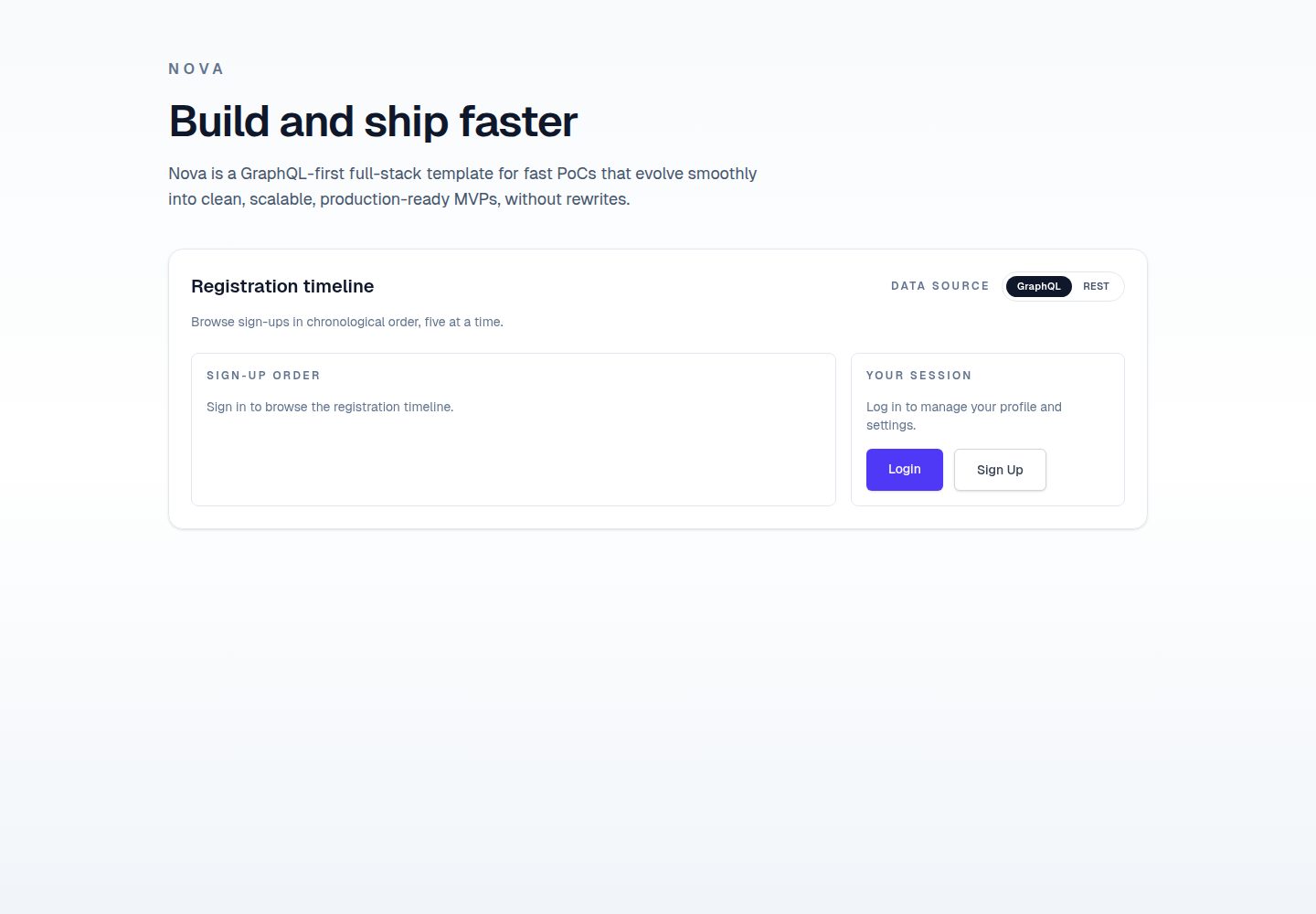
全栈模板:Python (Litestar) 后端与 TypeScript (Next.js) 前端通过 GraphQL 和 REST 连接
Next.jsReact企业官网
nova — Next.js 企业官网模板
作者 lmiguelvargasf
Nova 是一个全栈应用模板,后端使用 Python (Litestar),前端使用 TypeScript (Next.js),通过 GraphQL 和 REST 连接,并包含可选的 SwiftUI iOS 客户端,适合黑客松和快速原型开发。
看看你的网站会是什么样
浏览真实页面截图,比较内容排版与手机效果。点击下方缩略图切换,放大查看整页细节。
全部页面与视图 2
截图用于了解视觉与布局,交互效果请以实际项目为准。
采集于 2026-10-14查看来源
值得关注的模板亮点
从已有项目资料中,快速了解它的特点。
可选 SwiftUI iOS 客户端,位于 ios 目录
集成 PostgreSQL、Redis、Celery 和 Flower 用于数据存储、消息代理、异步任务和监控
提供脚本化安装 (setup.sh) 和手动安装步骤,使用 Task 运行开发任务
包含 AI/LLM 编码规则系统,支持 VS Code + GitHub Copilot 等代理
使用 GitHub Actions 进行 CI/CD,包括 PR 验证和测试
模板详细介绍
Nova 是一个全栈应用模板,旨在为黑客松和快速原型开发提供起点,并设计为可从概念验证平滑演进到最小可行产品。后端基于 Python 的 Litestar 框架,使用 Advanced Alchemy 进行异步 SQLAlchemy 集成和迁移,提供 GraphQL 和 REST API,依赖 PostgreSQL 作为数据库、Redis 作为消息代理、Celery 处理异步任务,并包含 Flower 监控。前端基于 TypeScript 的 Next.js,使用 Tailwind CSS 进行样式设计,并配置了 Storybook、Vitest、Playwright 和 Biome 等工具。此外,项目在 ios 目录下提供了一个可选的 SwiftUI iOS 客户端。项目使用 Docker Desktop、mise、Task 和 pre-commit 等工具进行环境管理和任务自动化。README 提供了详细的脚本化安装和手动安装步骤,以及开发任务和 CI/CD 工作流的说明。生产部署方面,README 提到了一种推荐方案:前端部署在 Vercel,后端和数据库部署在 Render,但具体细节需参考 docs/deployment.md。项目采用 MIT 许可证。
Next.js企业官网
适合你的项目吗?
适用场景
- 黑客松项目快速搭建全栈应用原型
- 需要同时提供 GraphQL 和 REST API 的后端开发
- 包含 iOS 客户端的跨平台应用开发
- 使用 Celery 处理异步任务和定时任务的应用
- 希望从概念验证平滑演进到 MVP 的团队
适合人群
- 参加黑客松的开发者
- 需要快速原型设计的团队
- 全栈开发者,尤其是熟悉 Python 和 TypeScript 的
- 希望使用现代工具链(如 Litestar、Next.js、Celery)的开发者
上手与定制指南
结合仓库当前版本的说明,按下面的资料检查内容、配置与运行要求。
- 1
推荐运行 ./setup.sh 进行脚本化安装,若权限不足需先执行 chmod +x setup.sh
- 2
手动安装需依次安装 mise、项目工具链、pre-commit 钩子,并复制环境变量文件
- 3
使用 Task 命令启动服务:task backend:dev、task worker:dev、task beat:dev、task frontend:dev,可选 task flower:dev
- 4
服务默认端口:前端 3000,后端健康检查 8000/health,管理界面 8000/admin,GraphQL 端点 8000/graphql,Flower 监控 5555
- 5
生产部署推荐前端 Vercel、后端和数据库 Render,详见 docs/deployment.md
授权与来源资料
使用条件与限制
免费使用 · 保留许可声明本次收录的是公开仓库中采用 MIT 许可的免费版本;免费范围为该版本代码,不代表外部服务或第三方素材免费。
使用时需要遵守
- 允许免费使用、修改、商用和分发该版本代码。
- 分发代码副本或实质性部分时,保留原作者版权声明和完整 MIT 许可声明。
- 代码按现状提供;担保与责任限制以原许可证及适用法律为准。
额外费用与待核对事项
- 演示图片、字体、图标及其他第三方素材需按各自许可核对,不能仅凭代码的 MIT 许可判断。
- 域名、托管、数据库、支付或 AI 等外部服务可能另外收费。
- 需要安装 Docker Desktop 才能运行本地开发环境。
- 如需开发 iOS 客户端,需要安装 Xcode。
- 手动安装时需要从 mise.run 下载并安装 mise 工具。
- 生产部署推荐使用 Vercel 和 Render 等外部托管服务,可能产生费用。
查看原文依据
Permission is hereby granted, free of charge
许可证原文
- **[Docker Desktop][]**
README 原文
- **[Xcode][]** (for iOS development)
README 原文
curl https://mise.run | sh
README 原文
https://github.com/lmiguelvargasf/nova/blob/main/LICENSEhttps://github.com/lmiguelvargasf/nova/blob/main/README.mdThis template has been deployed successfully with the **frontend on Vercel** and
README 原文
DeepSeek 根据仓库许可证和 README 整理 ·2026-10-14。结果仅覆盖已读取资料,依赖、图片、字体及后续条款变更以各自原文为准。
项目核对记录与介绍依据
模板资料
- 来源平台
- GitHub
- 资料与维护参考分
- 资料较完整 · 83 / 100
- 技术栈
- Next.js · React
- 网站类型
- 企业官网
这个分数如何计算
本站按许可资料(最高30分)、演示链接(12分)、预览图(10分)、Star数(15分)、记录的维护时间(15分)、描述完整度(8分)、功能记录(5分)和分类资料(5分)计算。它不是代码、安全或性能测试,也不是 Google 评分;有链接不代表已实测可用。
这个项目需要核对什么
- 记录的仓库更新时间
- 2026-04-13
- 截图检查日期
- 2026-10-14
已收录演示链接。请用你的内容与屏幕尺寸检查;有演示不代表表单、认证或支付已经可用。
目录记录的主要技术栈是 Next.js。请通过依赖清单和锁文件核对实际版本与托管要求。这些说明基于收录资料,不代表代码审计或部署实测。
查看具体选型方法 →介绍的制作与核对状态
介绍由 AI 辅助整理目录与仓库资料。仓库作者不等于这篇介绍的审核者。
审核声明: codex-user-requested-batch-review-20261015 · 2026-10-15
查看当时使用的来源资料
SHA-256: 1a29bac357ae898d8f9d0aabdcc37f806e18540dce669508710359decef34373
2026-10-14T14:53:02.634Z
来源文件 / 仓库# Nova 🌟













A full-stack application template with a Python (Litestar) backend and a
TypeScript (Next.js) frontend, connected via GraphQL and REST, plus an optional
SwiftUI iOS client. Ideal for hackathons and rapid prototyping, designed to
smoothly evolve from a PoC into an MVP.
## 📚 Table of Contents
- [Nova 🌟](#nova-)
- [📚 Table of Contents](#-table-of-contents)
- [🛠️ Tech Stack](#️-tech-stack)
- [Backend](#backend)
- [Frontend](#frontend)
- [Tooling](#tooling)
- [Mobile (iOS)](#mobile-ios)
- [🚀 Getting Started](#-getting-started)
- [Prerequisites](#prerequisites)
- [Scripted setup (recommended)](#scripted-setup-recommended)
- [Step-by-step setup (manual)](#step-by-step-setup-manual)
- [Local environment](#local-environment)
- [Start services](#start-services)
- [💻 Developer Experience](#-developer-experience)
- [📱 iOS App](#-ios-app)
- [📏 Rules System](#-rules-system)
- [🌐 Production Deployment](#-production-deployment)
- [⚙️ Development Tasks](#️-development-tasks)
- [🔄 CI/CD Workflows](#-cicd-workflows)
- [📦 Releases](#-releases)
- [📄 License](#-license)
## 🛠️ Tech Stack
### Backend
- **[Python][]** – Core programming language for backend.
- **[Litestar][]** – High-performance ASGI framework for modern Python web apps.
- **[Advanced Alchemy][]** – SQLAlchemy integration (async) + migrations tooling.
- **[GraphQL][]** – API query language for flexible data fetching.
- **[REST][]** – Resource-oriented APIs over HTTP with JSON.
- **[PostgreSQL][]** – Advanced open-source relational database known for reliability.
- **[Redis][]** – In-memory data store for message brokering.
- **[Celery][]** – Distributed task queue for handling asynchronous background jobs.
- **[Flower][]** – Real-time monitoring for Celery workers.
- **[uv][]** – Ultra-fast Python package and project manager.
- **[ruff][]** – Extremely fast Python linter and code formatter.
- **[ty][]** – Fast, type-safe Python type checker.
### Frontend
- **[TypeScript][]** – Core programming language for frontend.
- **[Next.js][]** – React framework for production-ready applications.
- **[Tailwind CSS][]** – Utility-first CSS framework for rapid UI development.
- **[pnpm][]** – Fast, disk space efficient package manager.
- **[Storybook][]** – Tool for building UI components and pages in isolation.
- **[Vitest][]** – Next generation testing framework.
- **[Playwright][]** – Reliable end-to-end testing for modern web apps.
- **[Biome][]** – Fast formatter and linter for JavaScript/TypeScript projects.
### Tooling
- **[Docker Desktop][]** – Provides Docker Engine and Docker Compose.
- **[mise][]** – Manages tool versions.
- **[Task][]** – Task runner designed for modern workflows.
- **[pre-commit][]** – Manages and runs automated Git hooks.
### Mobile (iOS)
- **[Swift][]** – Primary language for the iOS client.
- **[SwiftUI][]** – UI framework for modern iOS interfaces.
- **[Xcode][]** – IDE and simulator for iOS development.
## 🚀 Getting Started
### Prerequisites
- **[Docker Desktop][]**
- **[Xcode][]** (for iOS development)
### Scripted setup (recommended)
Run the setup script to install dependencies and configure the environment:
```bash
./setup.sh
```
> **Note:** if you get _permission denied_, run `chmod +x setup.sh` then retry `./setup.sh`.
After it finishes, start services in separate terminals:
```bash
task backend:dev
task worker:dev
task beat:dev
task frontend:dev
```
Optionally, monitoring:
```bash
task flower:dev
```
### Step-by-step setup (manual)
#### Local environment
1. Verify Docker is available:
```bash
docker --version
docker compose version
docker info
```
1. Install mise:
```bash
curl https://mise.run | sh
```
If this fails, see the official [install docs][mise-install].
1. Install the project toolchain:
```bash
mise install -y
```
1. Install pre-commit hooks:
```bash
pre-commit install
```
1. Copy the example environment files:
```bash
cp .env.example .env
cp backend/.env.example backend/.env
cp frontend/.env.local.example frontend/.env.local
```
#### Start services
1. Pull database image:
```bash
task infra:pull
```
1. Start database service:
```bash
task db:up
```
1. Install backend dependencies:
```bash
task backend:install
```
1. Install frontend dependencies:
```bash
task frontend:install
```
1. Start backend:
```bash
task backend:dev
```
1. Create an initial admin user:
```bash
task backend:create-admin-user
```
1. Generate frontend code based on the backend API:
```bash
task frontend:codegen
```
1. Start frontend:
```bash
task frontend:dev
```
1. Start background worker:
```bash
task worker:dev
```
1. Start periodic task scheduler:
```bash
task beat:dev
```
1. Start monitoring (optional):
```bash
task flower:up
```
The services will be available at:
- [Frontend Application](http://localhost:3000)
- [Backend Health Check](http://localhost:8000/health)
- [Admin UI](http://localhost:8000/admin)
- [GraphQL Endpoint (GraphiQL)](http://localhost:8000/graphql)
- [Flower Monitoring](http://localhost:5555)
## 💻 Developer Experience
This project is pre-configured for **VS Code** (or any fork like **Cursor** or
**Windsurf**) to provide a seamless development experience:
- **Type Checking**: Since we use `ty`, the `"python.languageServer"` setting is
set to `"None"` in [`.vscode/settings.json`](.vscode/settings.json). This
avoids running two language servers simultaneously when the Python extension
is enabled (see [official ty configuration][ty-editors]).
## 📱 iOS App
An iOS starter app lives in the [ios](ios) directory.
1. Open [ios/ios.xcodeproj](ios/ios.xcodeproj) in Xcode.
2. Select a simulator or device.
3. Run the app from Xcode.
Key entry points:
- [ios/ios/iosApp.swift](ios/ios/iosApp.swift)
- [ios/ios/ContentView.swift](ios/ios/ContentView.swift)
## 📏 Rules System
This project uses a canonical rule system to manage AI/LLM coding rules, first
oriented to VS Code + GitHub Copilot (and compatible agents like Cursor or
Antigravity).
- Always-on standards live in [`.github/instructions/`](.github/instructions/).
- Task-specific workflows live in [`.github/skills/`](.github/skills/).
- Prompt files (workflow entry points) live in
[`.github/prompts/`](.github/prompts/).
### AI Rules Hierarchy
- Canonical rules are defined in [`.github/instructions/`](.github/instructions/).
- [`AGENTS.md`](AGENTS.md) provides a cross-agent routing layer that delegates to
those canonical files.
- [`backend/AGENTS.md`](backend/AGENTS.md) provides backend-local scoping while
still delegating to the canonical instruction files.
- [`frontend/AGENTS.md`](frontend/AGENTS.md) provides frontend-local scoping while
still delegating to the canonical instruction files.
- [`ios/AGENTS.md`](ios/AGENTS.md) provides iOS-local scoping while still
delegating to the canonical instruction files.
## 🌐 Production Deployment
This is an opinionated deployment recommendation that has worked well in
production, but you are free to deploy this template using any providers or
infrastructure that fit your needs.
This template has been deployed successfully with the **frontend on Vercel** and
the **backend + database on Render**.
See full deployment details in [`docs/deployment.md`](docs/deployment.md).
## ⚙️ Development Tasks
This project uses [Task][] to simplify common development workflows. The main
`Taskfile.yml` in the project root provides commands for:
- Managing the Docker environment (for example, building, starting, or stopping
services).
- Running development tasks within the `backend` and `frontend` services (such
as linting, formatting, or testing).
- Managing background workers (Celery worker and beat).
- Inspecting worktree-specific infrastructure settings with `task infra:env`.
- Cleaning local git branches while preserving `main` with
`task git:branches:clean:local`.
- Running full-stack validation with `task validate`.
To list all available tasks, run:
```bash
task --list
```
## 🔄 CI/CD Workflows
This project uses GitHub Actions for continuous integration and validation:
- **PR Validation**: Enforce PR title conventions and limit PR size.
- **CI Workflow**: Run tests and linting on both frontend and backend.
For detailed information about our CI/CD workflows, see the
[workflows documentation](.github/workflows/README.md).
## 📦 Releases
All versioned changes are documented on the [GitHub Releases][releases] page.
## 📄 License
This project is licensed under the [MIT License](./LICENSE).
[advanced alchemy]: https://docs.advanced-alchemy.litestar.dev/
[biome]: https://biomejs.dev/
[celery]: https://docs.celeryq.dev/
[docker desktop]: https://www.docker.com/products/docker-desktop/
[flower]: https://flower.readthedocs.io/
[graphql]: https://graphql.org/
[litestar]: https://litestar.dev/
[mise]: https://mise.jdx.dev/
[mise-install]: https://mise.jdx.dev/getting-started.html
[next.js]: https://nextjs.org/
[playwright]: https://playwright.dev/
[pnpm]: https://pnpm.io/
[postgresql]: https://www.postgresql.org/
[pre-commit]: https://pre-commit.com/
[python]: https://www.python.org/
[redis]: https://redis.io/
[releases]: https://github.com/lmiguelvargasf/nova/releases
[rest]: https://restfulapi.net/
[ruff]: https://docs.astral.sh/ruff/
[storybook]: https://storybook.js.org/
[swift]: https://www.swift.org/
[swiftui]: https://developer.apple.com/swiftui/
[tailwind css]: https://tailwindcss.com/
[task]: https://taskfile.dev/
[ty]: https://docs.astral.sh/ty/
[ty-editors]: https://docs.astral.sh/ty/editors/
[typescript]: https://www.typescriptlang.org/
[uv]: https://docs.astral.sh/uv/
[vitest]: https://vitest.dev/
[xcode]: https://developer.apple.com/xcode/
看看同类模板
对比同技术栈与用途的模板,找到更适合的视觉与内容结构。

SaaS-Boilerplate
🚀🎉📚 SaaS Boilerplate built with Next.js + Tailwind CSS + Shadcn UI + TypeScript. ⚡️ Full-stack React applic…
Next.js · SaaS

Next-JS-Landing-Page-Starter-Template
🚀 Free NextJS Landing Page Template written in Tailwind CSS 3 and TypeScript ⚡️ Made with developer experienc…
Next.js · 企业官网

next-saas-starter
⚡️ Free Next.js responsive landing page template for SaaS products made using JAMStack architecture.
Next.js · SaaS

startup-nextjs
Startup is free Next.js template for SaaS startups comes with all the essential pages, components, and section…
Next.js · SaaS

shadcn-landing-page
New design 🎉 Nextjs + Shadcn + TypeScript + Tailwind. Landing page template ease-to-use
Next.js · 企业官网

shadcn-dashboard-landing-template
Accelerate your development with a sleek, open-source admin dashboard and landing page built on Vite-React, Ne…
Next.js · 后台