A static blog theme built with Astro and Svelte, adopting Material 3 Expressive design
AstroSvelteBlog
Shirone — Astro Blog Template
By LyraVoid
Shirone is a static personal blog theme built with Astro and Svelte, adopting Material 3 Expressive design, supporting Markdown/MDX long-form writing and various personal collection pages.
Explore the design
Compare the page layouts and mobile experience. Open any screenshot for a closer look.
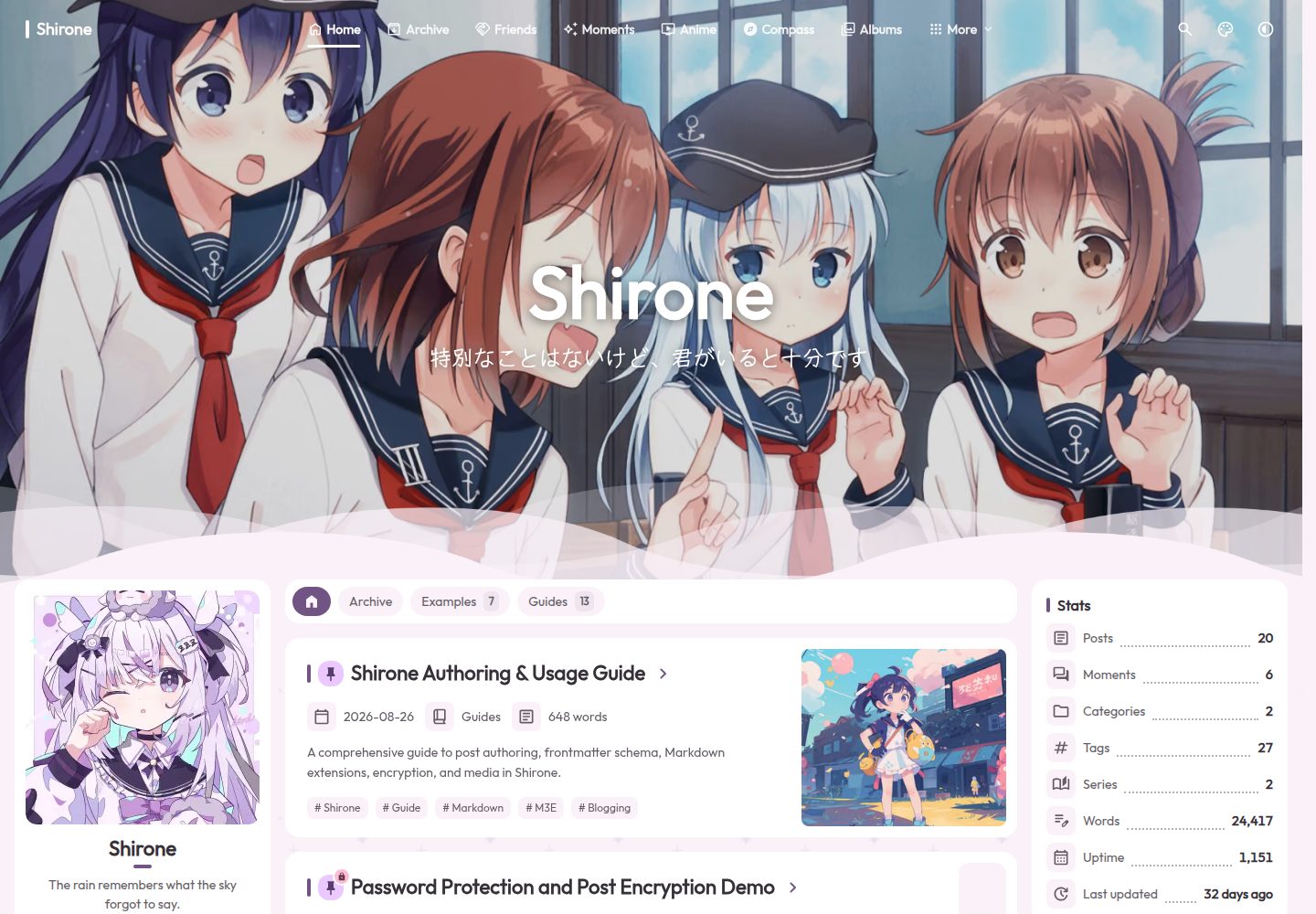
Desktop homepage1 / 3
Desktop captureTop of page
Actual screenshot captured by the server browser.
All pages & views 3
Screenshots show visual appearance; interactive behavior may differ.
Recorded 2026-09-30View source
What stands out
A quick read of the recorded project description.
Supports Markdown and MDX, including math formulas, Mermaid, callouts, enhanced code blocks, and image galleries
Built-in Pagefind full-text search, RSS, and sitemap output
Provides article table of contents, related posts, sharing, encryption, and optional comments
Includes pages for archives, categories, tags, friends, moments, anime, albums, projects, skills, devices, games, series, and timelines
Supports light and dark themes, banner or solid-color backgrounds, optional textures, and single-sidebar or dual-sidebar layouts
Template Details
Shirone is a static site theme for personal blogs, built with Astro and Svelte and adopting the Material 3 Expressive design system. It suits long-form writing and also provides personal collection pages such as moments, albums, anime, friends, projects, skills, devices, games, series, and timelines. Content is written in Markdown or MDX, with support for math formulas, Mermaid diagrams, callouts, enhanced code blocks, and image galleries. The theme includes Pagefind full-text search, RSS, and sitemap, and offers article table of contents, related posts, sharing, encryption, and optional comments. The interface supports light and dark themes, banner or solid-color backgrounds, optional textures, and visitor display preferences, with configurable single-sidebar or dual-sidebar layouts. Navigation uses Swup for page transitions while keeping the shell persistent, and also supports reduced motion. The theme provides ten interface languages and outputs to a static dist directory, deployable to Vercel, Netlify, GitHub Pages, or any static hosting service. Before use, note: the theme requires Node.js 22.12 or newer and pnpm 9.x; the repository is MIT-licensed, but third-party assets such as demo images, fonts, and icons require separate license verification; optional integrations like comments, music, and anime may depend on external services once enabled.
AstroSvelteBlog
Is it right for your project?
Use Cases
- Building a personal blog focused on long-form writing
- Organizing personal collections such as anime lists, albums, games, devices, or timelines
- Static content sites that need full-text search, RSS, and sitemap
- Authors who want to write in Markdown or MDX with support for math formulas and diagrams
- Deploying to static hosting services such as Vercel, Netlify, or GitHub Pages
Suitable For
- Front-end developers familiar with Node.js and pnpm
- Personal bloggers who prefer static site generation and Markdown/MDX writing
- Sites that need multilingual interfaces and light/dark theme switching
- Users who want to install the theme as an npm package rather than maintaining the theme repository directly
Getting started & customization
Use these recorded setup notes alongside the repository instructions for your chosen version.
- 1
Requires Node.js 22.12 or newer, and pnpm 9.x.
- 2
After cloning the repository, run corepack enable, pnpm install, and pnpm dev; the default development address is http://localhost:4321.
- 3
You can also initialize a blog in an empty directory via npx shirones init, installing the theme as an npm package.
- 4
Site configuration is located in the src/config/ directory; modify files such as siteConfig.ts, profileConfig.ts, and navBarConfig.ts as needed.
- 5
Before deployment, set site and base in siteConfig.ts; the build command is pnpm build, and the output directory is dist.
License & source material
Usage conditions & limitations
Free to use · keep license noticeThis entry covers the free version under the MIT license in the public repository; the free scope is the code of this version and does not mean external services or third-party assets are free.
Must comply with when using
- Permits free use, modification, commercial use, and distribution of this version's code.
- When distributing copies or substantial portions of the code, retain the original author's copyright notice and the full MIT license notice.
- The code is provided as is; warranties and limitations of liability are governed by the original license and applicable law.
Additional costs & items to verify
- Using this theme requires Node.js 22.12 or newer; environments below this version cannot run it.
- Requires the pnpm 9.x package manager; the repository pins [email protected].
- Comments are optional and, once enabled, depend on external services such as Twikoo or Giscus.
- Music is optional and, once enabled, may depend on external music services such as Meting.
- The anime page is optional and, once enabled, may depend on external data sources such as Bangumi or Bilibili.
- Demo images, fonts, icons, and other third-party assets must be checked against their respective licenses and cannot be judged solely by the code's MIT license.
- External services such as domains, hosting, databases, payments, or AI may incur additional charges.
View Original Text Basis
Permission is hereby granted, free of charge
Original License Text
Node.js](https://nodejs.org/) 22.12 or newer
Original README
pnpm](https://pnpm.io/) 9.x (the repository pins `[email protected]`)
Original README
Optional comments via Twikoo or Giscus
Original README
Optional local, custom, Meting, or mixed music source
Original README
https://github.com/LyraVoid/Shirone/blob/main/LICENSEhttps://github.com/LyraVoid/Shirone/blob/main/README.mdAnime page and local/Bangumi/Bilibili snapshot source
Original README
Compiled by DeepSeek based on repository license and README ·2026-10-01. Results only cover the materials read; dependencies, images, fonts, and subsequent term changes are subject to their respective original texts.
Project checks & description sources
Template Information
- Source platforms
- GitHub
- Documentation and maintenance reference score
- More documented · 96 / 100
- Technologies
- Astro · Svelte
- Website type
- Blog
How this score is calculated
Our heuristic uses license records (up to 30), a demo link (12), a preview (10), stars (15), recorded maintenance (15), description completeness (8), feature records (5) and classification data (5). It is not a code, security or performance test, or a Google score. A link does not establish tested functionality.
What to verify for this project
- Repository update recorded
- 2026-09-29
- Screenshot last checked
- 2026-10-01
A demo link is listed. Check it with your own content and viewport sizes; its presence does not confirm that forms, authentication or payments work.
The catalog identifies Astro as the primary stack. Check the actual dependency manifest and lockfile for versions and hosting requirements. These notes use recorded metadata, not a code audit or a deployment test.
Use a selection guide →How this description was prepared
AI-assisted description based on catalog records and repository material. Repository authors are not automatically the reviewers of this description.
Automatically checked against source and license rules; no manual editorial review.
Inspect the recorded source material
SHA-256: dde261919a0130268b267de334f75e64b7a79e1b7db7ccec8d3d866268715a86
2026-10-01T15:03:56.495Z
Source file / repository<div align="center">
<img src="./public/logo/icon.webp" width="88" height="88" alt="Shirone logo" />
# Shirone
**An expressive, anime-inspired blog theme built on Material 3 Expressive.**
A calm reading space for long-form writing, personal collections, and the small details that make a site feel like yours.
[Live demo](https://shirone.mysqil.com/) · [Documentation](https://docs.shirone.mysqil.com/) · [Report an issue](https://github.com/LyraVoid/Shirone/issues)
[English](./README.md) · [简体中文](./README.zh-CN.md) · [繁體中文](./README.zh-TW.md) · [日本語](./README.ja.md)



[](./LICENSE)
</div>
> [!IMPORTANT]
> **Start with the [online documentation](https://docs.shirone.mysqil.com/).** It is the primary guide for setup, configuration, content workflows, and deployment.
## Start Here
The [online documentation](https://docs.shirone.mysqil.com/) is the main entry point for setup, configuration, content workflows, and deployment. This repository contains the theme source. If tracking it is more maintenance than you want, install the [`shirones` npm package](#use-the-npm-package) instead: your blog stays one small repository and theme updates arrive with `pnpm add shirones@latest`. Use [Shirone-Content](https://github.com/LyraVoid/Shirone-Content) when you would rather keep personal content in a separate repository.
## Verified In Practice
The current reference run scores 100 for Performance, Accessibility, Best Practices, and SEO, with all three agentic browsing checks passing. The detailed performance metrics also reach 100 in this run; results can vary with hosting, content, and network conditions.


<table>
<tr>
<td align="center"><strong>Chromatic Spell</strong><br><sub>Dynamic HCT palettes that respond to light, mood, and choice.</sub></td>
<td align="center"><strong>Seamless Passage</strong><br><sub>Swup navigation keeps the surrounding world gently in motion.</sub></td>
</tr>
<tr>
<td align="center"><strong>Story Grimoire</strong><br><sub>Markdown, MDX, math, diagrams, code, and images in one writing flow.</sub></td>
<td align="center"><strong>Quiet by Design</strong><br><sub>SSR-first, accessible, and truly weightless when features are disabled.</sub></td>
</tr>
</table>
## ✦ A Small Spell for Every Story
Shirone is a static personal blog theme built with Astro 7, Svelte 5, Tailwind CSS 4, and Stylus. Its magic is not a layer of spectacle: it lives in colors that shift with light and mood, pages that turn without breaking the atmosphere, and small details that make a personal corner of the web feel alive.
Behind that softness is a token-driven Material 3 Expressive component system. Content is rendered server-side, while Swup provides smooth in-site navigation and keeps the surrounding application shell alive between pages.
The theme is designed for long-form writing as well as personal collections such as moments, albums, anime lists, friends, projects, skills, devices, games, series, and timelines.
## ✦ Inside the Grimoire
- Dynamic HCT color palettes with Material 3 and Material 3 Expressive specifications
- Light and dark themes, banner and solid backgrounds, optional textures, and visitor display preferences
- Responsive layouts with configurable single or dual sidebars
- Smooth Swup navigation with a persistent shell, route progress, and reduced-motion support
- Markdown and MDX content with math, Mermaid, admonitions, enhanced code blocks, and image galleries
- Full-text search powered by Pagefind, plus RSS and sitemap output
- Article table of contents, related posts, sharing, encryption, and optional comments
- Dedicated pages for archives, categories, tags, friends, moments, anime, albums, projects, skills, devices, games, series, and timelines
- Ten built-in interface locales
- SSR-first output, keyboard-friendly interactions, and accessibility testing
- Optional integrations follow a zero-burden rule: when disabled, they add no external requests, DOM, layout shift, or main-bundle code
## ✦ AI Skills
Shirone ships with [agent skills](./.agents/skills/README.md) in `.agents/skills/`. AI coding assistants that support the Agent Skills standard (Claude Code, Codex, ZCode, and others) discover them automatically after you clone the repository — developer-oriented skills guide theme development, while user-oriented skills help you write posts, use the custom Markdown syntaxes, and configure your site. To package the same skills as one installable Codex plugin, run `pnpm.cmd skills:package -- --zip`.
## Quick Start
If keeping up with theme updates is a chore, or you would rather not maintain a
separate theme repository at all, use the npm package instead — see
[Use the npm package](#use-the-npm-package). It keeps your blog in one small
repository and updates the theme with `pnpm add shirones@latest`.
### Requirements
- [Node.js](https://nodejs.org/) 22.12 or newer
- [pnpm](https://pnpm.io/) 9.x (the repository pins `[email protected]`)
### Run locally
```bash
git clone https://github.com/LyraVoid/Shirone.git
cd Shirone
corepack enable
pnpm install
pnpm dev
```
Open `http://localhost:4321` in your browser.
On Windows PowerShell installations where script execution is restricted, use `pnpm.cmd` and `npx.cmd` instead.
### Use the npm package
Prefer not to clone the theme? Install it as the `shirones` npm package and
scaffold a blog from an empty folder — no Astro starter and no manual installs:
```bash
mkdir my-blog
cd my-blog
npx shirones init # writes package.json, installs astro + the theme + peers
pnpm dev
```
`init` creates `astro.config.mjs`, the typed configuration under `shirones/`,
example content and static assets; `src/components/` and `src/layouts/` still
work for overriding theme components. Re-run `npx shirones init` anytime to
check for drift — it reports without changing anything. Run `npx shirones
init --update` to restore missing files, or `--force` to re-scaffold from the
template. See the [shirones wiki](https://github.com/yCENzh/shirones/wiki),
[npm package mode](./docs/npm-package-mode.md) and the
[shirones repository](https://github.com/yCENzh/shirones) for details.
### Customize your site
1. Set the canonical URL, title, language, theme, banner, and display options in `src/config/siteConfig.ts`.
2. Update the profile and navigation in `src/config/profileConfig.ts` and `src/config/navBarConfig.ts`.
3. Review the feature-specific files in `src/config/`; their inline comments document defaults and supported values.
4. Replace the sample posts, personal data, and media under `src/content/`, `src/data/`, and `public/`.
5. Create a post with `pnpm new-post <filename>`, then edit it under `src/content/posts/`.
See [`src/config/README.md`](./src/config/README.md) for the complete configuration contract.
## Official Companion Repositories
Shirone keeps theme source, personal site content, and npm publishing responsibilities separate. These official repositories serve different workflows:
| Repository | Use it for | What it contains |
| --- | --- | --- |
| [Shirone-Content](https://github.com/LyraVoid/Shirone-Content) | Running a blog in the external-content, dual-repository mode | A content template for posts, moments, data, media, and `config/*.yaml` overlays. Fork or clone it into your own repository, normally private, then point this theme repository at it. See the [content-separation guide](./docs/content-separation/README.md). |
| [shirones](https://github.com/yCENzh/shirones) | Maintaining and publishing the `shirones` npm package | The manual build-and-publish pipeline. It pulls this repository at build time and deliberately contains no theme source; regular blog users install `shirones` rather than working in this repository. See [npm package mode](./docs/npm-package-mode.md). |
## Main Configuration
| File | Purpose |
| --- | --- |
| `src/config/siteConfig.ts` | Site URL, identity, locale, dynamic color, banner, texture, TOC, and display settings |
| `src/config/profileConfig.ts` | Author profile and social links |
| `src/config/navBarConfig.ts` | Main navigation |
| `src/config/sidebarConfig.ts` | Sidebar layout, widgets, and page filters |
| `src/config/postListConfig.ts` | Pagination and list/grid presentation |
| `src/config/articleConfig.ts` | Update notice, related posts, and article sharing |
| `src/config/commentConfig.ts` | Optional comments via Twikoo or Giscus |
| `src/config/musicConfig.ts` | Optional local, custom, Meting, or mixed music source |
| `src/config/animeConfig.ts` | Anime page and local/Bangumi/Bilibili snapshot source |
## Writing a Post
Posts live in `src/content/posts/` and may be Markdown or MDX. A minimal frontmatter block looks like this:
```yaml
---
title: My First Post
published: 2026-08-26
description: A short summary shown in post lists and metadata.
image: ./cover.webp
tags: [Astro, Notes]
category: Writing
draft: false
---
```
Frequently used optional fields include `updated`, `pinned`, `comment`, `lang`, `encrypted`, `password`, `passwordHint`, and `hideHomeContent`. Images may be remote URLs, absolute paths from `public/`, or paths relative to the post file.
## Commands
| Command | Action |
| --- | --- |
| `pnpm dev` | Start the development server |
| `pnpm new-post <filename>` | Create a new post |
| `pnpm format` | Format source files with Biome (mandatory before commit) |
| `pnpm check` | Run Astro diagnostics |
| `pnpm type-check` | Run TypeScript checks |
| `pnpm check:manifest` | Validate the component manifest |
| `pnpm test` | Run the Playwright test suite |
| `pnpm build` | Build the site and Pagefind index into `dist/` |
| `pnpm preview` | Preview the production build |
| `pnpm lighthouse` | Run the desktop production audit |
## Deployment
Shirone produces a static `dist/` directory and can be deployed to Vercel, Netlify, GitHub Pages, or any static hosting service.
Before deploying, update `site` and `base` in `src/config/siteConfig.ts` (or in your content repository's `config/site.yaml`):
- If deployed to a domain root (e.g., `https://example.com/` or a custom domain), keep `base` as `"/"`.
- If deployed to a subpath directory (such as GitHub Pages repository URL `https://username.github.io/Shirone/`), set `base` to the subpath (e.g. `"/Shirone"` or `"/Shirone/"`), and set `site` to `https://username.github.io`. The build pipeline and internal assets will adapt automatically.
Then run:
```bash
pnpm install --frozen-lockfile
pnpm check
pnpm type-check
pnpm check:manifest
pnpm build
```
Use `pnpm build` as the build command and `dist` as the output directory. More details are available in [`INDEX.md`](./INDEX.md).
## Documentation
- [shirones wiki](https://github.com/yCENzh/shirones/wiki) - the user-facing guide: installation, configuration, content, component overrides, the CLI and troubleshooting
- [`src/config/README.md`](./src/config/README.md) - configuration reference
- [`docs/m3e-standard.md`](./docs/m3e-standard.md) - design tokens and component standard
- [`docs/atomic-structure.md`](./docs/atomic-structure.md) - component layers and dependency rules
- [`docs/markdown-extensions.md`](./docs/markdown-extensions.md) - Markdown plugin, styling, cache, and testing contracts
- [`docs/markdown-on-demand-loading.md`](./docs/markdown-on-demand-loading.md) - content-driven Markdown asset loading and Swup lifecycle
- [`docs/sidebar-system.md`](./docs/sidebar-system.md) - sidebar orchestration and Swup synchronization
- [`docs/on-demand-loading.md`](./docs/on-demand-loading.md) - zero-burden optional features
- [`docs/font-system.md`](./docs/font-system.md) - font configuration and production subsetting
- [`docs/npm-package-mode.md`](./docs/npm-package-mode.md) - how the theme also runs as an npm package, and the override system
- [`docs/packaging-contract.md`](./docs/packaging-contract.md) - rules new theme code must follow to keep working when installed from npm
## Contributing
Issues and pull requests are welcome. For substantial features or visual changes, please open an issue or discussion first. Read [`CONTRIBUTING.md`](./CONTRIBUTING.md) and the repository rules before submitting code. Always format your changes with `pnpm format` before committing, keep each pull request focused, and use Conventional Commits.
## Acknowledgements
Shirone began as a refactor of [Fuwari](https://github.com/saicaca/fuwari) by [saicaca](https://github.com/saicaca). Its current M3E design system, component architecture, page modules, and orchestration are developed as Shirone. Thanks to the Fuwari project and its contributors for the original foundation.
## Contributors
Every contribution adds a new line to Shirone's spellbook. Thank you to everyone who helps this little world grow.
<div align="center">
<a href="https://github.com/LyraVoid/Shirone/graphs/contributors">
<img src="https://contrib.rocks/image?repo=LyraVoid/Shirone" alt="Shirone contributors" />
</a>
</div>
## Star Trail
<div align="center">
<a href="https://star-history.com/#LyraVoid/Shirone&Date">
<picture>
<source media="(prefers-color-scheme: dark)" srcset="https://api.star-history.com/svg?repos=LyraVoid/Shirone&type=Date&theme=dark" />
<source media="(prefers-color-scheme: light)" srcset="https://api.star-history.com/svg?repos=LyraVoid/Shirone&type=Date" />
<img alt="Shirone Star History chart" src="https://api.star-history.com/svg?repos=LyraVoid/Shirone&type=Date" />
</picture>
</a>
<p><sub>Each star is a spark that helps Shirone shine a little farther.</sub></p>
</div>
## License
Shirone is released under the [MIT License](./LICENSE). The repository retains the original copyright notice required by that license.
Explore similar templates
Compare previews and descriptions within the same stack and category.

astrowind
AstroWind is a free, open-source Astro starter theme using Astro and Tailwind CSS, released under the MIT license.
Astro · Blog

astro-paper
AstroPaper is a minimal, responsive, accessible, and SEO-friendly Astro blog theme. Articles are stored as Markdown/MDX in src/content/posts/, with subdirectories affecting URLs.
Astro · Blog

fuwari
Fuwari is a static blog template built with Astro and Tailwind CSS for personal blogs. It manages posts as Markdown files in src/content/posts/, with frontmatter for title, date, description, cover, tags, categories, draft status, and language.
Astro · Blog

Firefly
Firefly is a clean personal blog theme forked from Astro and Fuwari, offering four background modes, single/double sidebar and list/grid layouts, Pagefind client-side full-text search, and a six-language UI.
Astro · Blog

astro-theme-cactus
Astro Cactus is an Astro-based blog and portfolio theme that uses Markdown/MDX content collections to manage posts, notes, and tags, with frontmatter type-checked by a schema.
Astro · Portfolio

astrofy
Astrofy is a free and open-source personal portfolio website template built with Astro and TailwindCSS, with built-in blog, CV timeline, project showcase, store, and RSS feed modules.
Astro · Portfolio