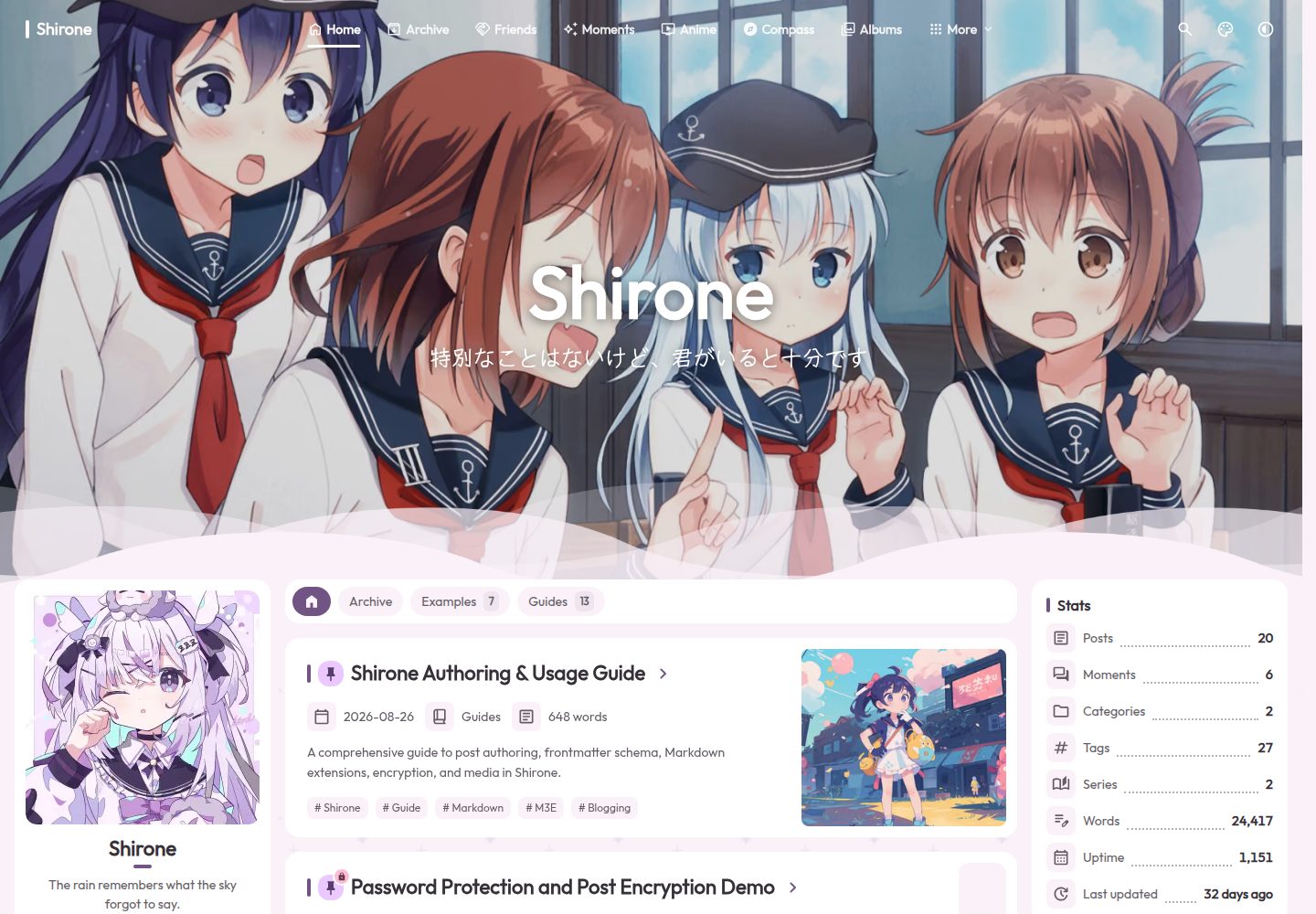
基于 Astro 与 Svelte 构建的静态博客主题,采用 Material 3 Expressive 设计
AstroSvelte博客
Shirone — Astro 博客模板
作者 LyraVoid
Shirone 是一个基于 Astro 与 Svelte 的静态个人博客主题,采用 Material 3 Expressive 设计,支持 Markdown/MDX 长文写作与多种个人收藏页面。
看看你的网站会是什么样
浏览真实页面截图,比较内容排版与手机效果。点击下方缩略图切换,放大查看整页细节。
全部页面与视图 3
截图用于了解视觉与布局,交互效果请以实际项目为准。
采集于 2026-09-30查看来源
值得关注的模板亮点
从已有项目资料中,快速了解它的特点。
支持 Markdown 与 MDX,包含数学公式、Mermaid、提示块、增强代码块和图片画廊
内置 Pagefind 全文搜索、RSS 与站点地图输出
提供文章目录、相关文章、分享、加密和可选评论功能
包含归档、分类、标签、友链、动态、番剧、相册、项目、技能、设备、游戏、系列、时间线等页面
支持明暗主题、横幅或纯色背景、可选纹理以及单侧栏或双侧栏布局
模板详细介绍
Shirone 是一个面向个人博客的静态站点主题,使用 Astro 与 Svelte 构建,采用 Material 3 Expressive 设计体系。它适合长文写作,也提供 moments、albums、anime、friends、projects、skills、devices、games、series、timelines 等个人收藏页面。内容以 Markdown 或 MDX 编写,支持数学公式、Mermaid 图表、提示块、增强代码块和图片画廊。主题内置 Pagefind 全文搜索、RSS 与站点地图,并提供文章目录、相关文章、分享、加密和可选评论。界面支持明暗主题、横幅或纯色背景、可选纹理以及访客显示偏好,布局可配置单侧栏或双侧栏。导航使用 Swup 实现页面切换并保持外壳持续存在,同时支持减少动态效果。主题提供十种界面语言,输出为静态 dist 目录,可部署到 Vercel、Netlify、GitHub Pages 或任意静态托管服务。使用前需注意:主题要求 Node.js 22.12 或更新版本以及 pnpm 9.x;仓库采用 MIT 许可,但演示图片、字体、图标等第三方素材需单独核对许可;评论、音乐、番剧等可选集成在启用后可能依赖外部服务。
AstroSvelte博客
适合你的项目吗?
适用场景
- 搭建以长文写作为主的个人博客
- 整理个人收藏,如番剧列表、相册、游戏、设备或时间线
- 需要全文搜索、RSS 和站点地图的静态内容站点
- 希望使用 Markdown 或 MDX 写作并支持数学公式与图表的作者
- 部署到 Vercel、Netlify、GitHub Pages 等静态托管服务
适合人群
- 熟悉 Node.js 与 pnpm 的前端开发者
- 偏好静态站点生成与 Markdown/MDX 写作的个人博主
- 需要多语言界面和明暗主题切换的站点
- 希望将主题作为 npm 包安装而非直接维护主题仓库的用户
上手与定制指南
结合仓库当前版本的说明,按下面的资料检查内容、配置与运行要求。
- 1
需要 Node.js 22.12 或更新版本,以及 pnpm 9.x。
- 2
克隆仓库后运行 corepack enable、pnpm install 和 pnpm dev,默认开发地址为 http://localhost:4321。
- 3
也可通过 npx shirones init 在空目录中初始化博客,主题以 npm 包形式安装。
- 4
站点配置位于 src/config/ 目录,需按需修改 siteConfig.ts、profileConfig.ts、navBarConfig.ts 等文件。
- 5
部署前需在 siteConfig.ts 中设置 site 与 base,构建命令为 pnpm build,输出目录为 dist。
授权与来源资料
使用条件与限制
免费使用 · 保留许可声明本次收录的是公开仓库中采用 MIT 许可的免费版本;免费范围为该版本代码,不代表外部服务或第三方素材免费。
使用时需要遵守
- 允许免费使用、修改、商用和分发该版本代码。
- 分发代码副本或实质性部分时,保留原作者版权声明和完整 MIT 许可声明。
- 代码按现状提供;担保与责任限制以原许可证及适用法律为准。
额外费用与待核对事项
- 使用该主题需要 Node.js 22.12 或更新版本,低于此版本的环境无法运行。
- 需要 pnpm 9.x 包管理器,仓库固定使用 [email protected]。
- 评论功能为可选,启用后依赖 Twikoo 或 Giscus 等外部服务。
- 音乐功能为可选,启用后可能依赖 Meting 等外部音乐服务。
- 番剧页面为可选,启用后可能依赖 Bangumi 或 Bilibili 等外部数据源。
- 演示图片、字体、图标及其他第三方素材需按各自许可核对,不能仅凭代码的 MIT 许可判断。
- 域名、托管、数据库、支付或 AI 等外部服务可能另外收费。
查看原文依据
Permission is hereby granted, free of charge
许可证原文
Node.js](https://nodejs.org/) 22.12 or newer
README 原文
pnpm](https://pnpm.io/) 9.x (the repository pins `[email protected]`)
README 原文
Optional comments via Twikoo or Giscus
README 原文
Optional local, custom, Meting, or mixed music source
README 原文
https://github.com/LyraVoid/Shirone/blob/main/LICENSEhttps://github.com/LyraVoid/Shirone/blob/main/README.mdAnime page and local/Bangumi/Bilibili snapshot source
README 原文
DeepSeek 根据仓库许可证和 README 整理 ·2026-10-01。结果仅覆盖已读取资料,依赖、图片、字体及后续条款变更以各自原文为准。
项目核对记录与介绍依据
模板资料
- 来源平台
- GitHub
- 资料与维护参考分
- 资料较完整 · 96 / 100
- 技术栈
- Astro · Svelte
- 网站类型
- 博客
这个分数如何计算
本站按许可资料(最高30分)、演示链接(12分)、预览图(10分)、Star数(15分)、记录的维护时间(15分)、描述完整度(8分)、功能记录(5分)和分类资料(5分)计算。它不是代码、安全或性能测试,也不是 Google 评分;有链接不代表已实测可用。
这个项目需要核对什么
- 记录的仓库更新时间
- 2026-09-29
- 截图检查日期
- 2026-10-01
已收录演示链接。请用你的内容与屏幕尺寸检查;有演示不代表表单、认证或支付已经可用。
目录记录的主要技术栈是 Astro。请通过依赖清单和锁文件核对实际版本与托管要求。这些说明基于收录资料,不代表代码审计或部署实测。
查看具体选型方法 →介绍的制作与核对状态
介绍由 AI 辅助整理目录与仓库资料。仓库作者不等于这篇介绍的审核者。
已完成服务器许可规则与 AI 来源核对;未经过人工编辑审核。
查看当时使用的来源资料
SHA-256: dde261919a0130268b267de334f75e64b7a79e1b7db7ccec8d3d866268715a86
2026-10-01T15:03:56.495Z
来源文件 / 仓库<div align="center">
<img src="./public/logo/icon.webp" width="88" height="88" alt="Shirone logo" />
# Shirone
**An expressive, anime-inspired blog theme built on Material 3 Expressive.**
A calm reading space for long-form writing, personal collections, and the small details that make a site feel like yours.
[Live demo](https://shirone.mysqil.com/) · [Documentation](https://docs.shirone.mysqil.com/) · [Report an issue](https://github.com/LyraVoid/Shirone/issues)
[English](./README.md) · [简体中文](./README.zh-CN.md) · [繁體中文](./README.zh-TW.md) · [日本語](./README.ja.md)



[](./LICENSE)
</div>
> [!IMPORTANT]
> **Start with the [online documentation](https://docs.shirone.mysqil.com/).** It is the primary guide for setup, configuration, content workflows, and deployment.
## Start Here
The [online documentation](https://docs.shirone.mysqil.com/) is the main entry point for setup, configuration, content workflows, and deployment. This repository contains the theme source. If tracking it is more maintenance than you want, install the [`shirones` npm package](#use-the-npm-package) instead: your blog stays one small repository and theme updates arrive with `pnpm add shirones@latest`. Use [Shirone-Content](https://github.com/LyraVoid/Shirone-Content) when you would rather keep personal content in a separate repository.
## Verified In Practice
The current reference run scores 100 for Performance, Accessibility, Best Practices, and SEO, with all three agentic browsing checks passing. The detailed performance metrics also reach 100 in this run; results can vary with hosting, content, and network conditions.


<table>
<tr>
<td align="center"><strong>Chromatic Spell</strong><br><sub>Dynamic HCT palettes that respond to light, mood, and choice.</sub></td>
<td align="center"><strong>Seamless Passage</strong><br><sub>Swup navigation keeps the surrounding world gently in motion.</sub></td>
</tr>
<tr>
<td align="center"><strong>Story Grimoire</strong><br><sub>Markdown, MDX, math, diagrams, code, and images in one writing flow.</sub></td>
<td align="center"><strong>Quiet by Design</strong><br><sub>SSR-first, accessible, and truly weightless when features are disabled.</sub></td>
</tr>
</table>
## ✦ A Small Spell for Every Story
Shirone is a static personal blog theme built with Astro 7, Svelte 5, Tailwind CSS 4, and Stylus. Its magic is not a layer of spectacle: it lives in colors that shift with light and mood, pages that turn without breaking the atmosphere, and small details that make a personal corner of the web feel alive.
Behind that softness is a token-driven Material 3 Expressive component system. Content is rendered server-side, while Swup provides smooth in-site navigation and keeps the surrounding application shell alive between pages.
The theme is designed for long-form writing as well as personal collections such as moments, albums, anime lists, friends, projects, skills, devices, games, series, and timelines.
## ✦ Inside the Grimoire
- Dynamic HCT color palettes with Material 3 and Material 3 Expressive specifications
- Light and dark themes, banner and solid backgrounds, optional textures, and visitor display preferences
- Responsive layouts with configurable single or dual sidebars
- Smooth Swup navigation with a persistent shell, route progress, and reduced-motion support
- Markdown and MDX content with math, Mermaid, admonitions, enhanced code blocks, and image galleries
- Full-text search powered by Pagefind, plus RSS and sitemap output
- Article table of contents, related posts, sharing, encryption, and optional comments
- Dedicated pages for archives, categories, tags, friends, moments, anime, albums, projects, skills, devices, games, series, and timelines
- Ten built-in interface locales
- SSR-first output, keyboard-friendly interactions, and accessibility testing
- Optional integrations follow a zero-burden rule: when disabled, they add no external requests, DOM, layout shift, or main-bundle code
## ✦ AI Skills
Shirone ships with [agent skills](./.agents/skills/README.md) in `.agents/skills/`. AI coding assistants that support the Agent Skills standard (Claude Code, Codex, ZCode, and others) discover them automatically after you clone the repository — developer-oriented skills guide theme development, while user-oriented skills help you write posts, use the custom Markdown syntaxes, and configure your site. To package the same skills as one installable Codex plugin, run `pnpm.cmd skills:package -- --zip`.
## Quick Start
If keeping up with theme updates is a chore, or you would rather not maintain a
separate theme repository at all, use the npm package instead — see
[Use the npm package](#use-the-npm-package). It keeps your blog in one small
repository and updates the theme with `pnpm add shirones@latest`.
### Requirements
- [Node.js](https://nodejs.org/) 22.12 or newer
- [pnpm](https://pnpm.io/) 9.x (the repository pins `[email protected]`)
### Run locally
```bash
git clone https://github.com/LyraVoid/Shirone.git
cd Shirone
corepack enable
pnpm install
pnpm dev
```
Open `http://localhost:4321` in your browser.
On Windows PowerShell installations where script execution is restricted, use `pnpm.cmd` and `npx.cmd` instead.
### Use the npm package
Prefer not to clone the theme? Install it as the `shirones` npm package and
scaffold a blog from an empty folder — no Astro starter and no manual installs:
```bash
mkdir my-blog
cd my-blog
npx shirones init # writes package.json, installs astro + the theme + peers
pnpm dev
```
`init` creates `astro.config.mjs`, the typed configuration under `shirones/`,
example content and static assets; `src/components/` and `src/layouts/` still
work for overriding theme components. Re-run `npx shirones init` anytime to
check for drift — it reports without changing anything. Run `npx shirones
init --update` to restore missing files, or `--force` to re-scaffold from the
template. See the [shirones wiki](https://github.com/yCENzh/shirones/wiki),
[npm package mode](./docs/npm-package-mode.md) and the
[shirones repository](https://github.com/yCENzh/shirones) for details.
### Customize your site
1. Set the canonical URL, title, language, theme, banner, and display options in `src/config/siteConfig.ts`.
2. Update the profile and navigation in `src/config/profileConfig.ts` and `src/config/navBarConfig.ts`.
3. Review the feature-specific files in `src/config/`; their inline comments document defaults and supported values.
4. Replace the sample posts, personal data, and media under `src/content/`, `src/data/`, and `public/`.
5. Create a post with `pnpm new-post <filename>`, then edit it under `src/content/posts/`.
See [`src/config/README.md`](./src/config/README.md) for the complete configuration contract.
## Official Companion Repositories
Shirone keeps theme source, personal site content, and npm publishing responsibilities separate. These official repositories serve different workflows:
| Repository | Use it for | What it contains |
| --- | --- | --- |
| [Shirone-Content](https://github.com/LyraVoid/Shirone-Content) | Running a blog in the external-content, dual-repository mode | A content template for posts, moments, data, media, and `config/*.yaml` overlays. Fork or clone it into your own repository, normally private, then point this theme repository at it. See the [content-separation guide](./docs/content-separation/README.md). |
| [shirones](https://github.com/yCENzh/shirones) | Maintaining and publishing the `shirones` npm package | The manual build-and-publish pipeline. It pulls this repository at build time and deliberately contains no theme source; regular blog users install `shirones` rather than working in this repository. See [npm package mode](./docs/npm-package-mode.md). |
## Main Configuration
| File | Purpose |
| --- | --- |
| `src/config/siteConfig.ts` | Site URL, identity, locale, dynamic color, banner, texture, TOC, and display settings |
| `src/config/profileConfig.ts` | Author profile and social links |
| `src/config/navBarConfig.ts` | Main navigation |
| `src/config/sidebarConfig.ts` | Sidebar layout, widgets, and page filters |
| `src/config/postListConfig.ts` | Pagination and list/grid presentation |
| `src/config/articleConfig.ts` | Update notice, related posts, and article sharing |
| `src/config/commentConfig.ts` | Optional comments via Twikoo or Giscus |
| `src/config/musicConfig.ts` | Optional local, custom, Meting, or mixed music source |
| `src/config/animeConfig.ts` | Anime page and local/Bangumi/Bilibili snapshot source |
## Writing a Post
Posts live in `src/content/posts/` and may be Markdown or MDX. A minimal frontmatter block looks like this:
```yaml
---
title: My First Post
published: 2026-08-26
description: A short summary shown in post lists and metadata.
image: ./cover.webp
tags: [Astro, Notes]
category: Writing
draft: false
---
```
Frequently used optional fields include `updated`, `pinned`, `comment`, `lang`, `encrypted`, `password`, `passwordHint`, and `hideHomeContent`. Images may be remote URLs, absolute paths from `public/`, or paths relative to the post file.
## Commands
| Command | Action |
| --- | --- |
| `pnpm dev` | Start the development server |
| `pnpm new-post <filename>` | Create a new post |
| `pnpm format` | Format source files with Biome (mandatory before commit) |
| `pnpm check` | Run Astro diagnostics |
| `pnpm type-check` | Run TypeScript checks |
| `pnpm check:manifest` | Validate the component manifest |
| `pnpm test` | Run the Playwright test suite |
| `pnpm build` | Build the site and Pagefind index into `dist/` |
| `pnpm preview` | Preview the production build |
| `pnpm lighthouse` | Run the desktop production audit |
## Deployment
Shirone produces a static `dist/` directory and can be deployed to Vercel, Netlify, GitHub Pages, or any static hosting service.
Before deploying, update `site` and `base` in `src/config/siteConfig.ts` (or in your content repository's `config/site.yaml`):
- If deployed to a domain root (e.g., `https://example.com/` or a custom domain), keep `base` as `"/"`.
- If deployed to a subpath directory (such as GitHub Pages repository URL `https://username.github.io/Shirone/`), set `base` to the subpath (e.g. `"/Shirone"` or `"/Shirone/"`), and set `site` to `https://username.github.io`. The build pipeline and internal assets will adapt automatically.
Then run:
```bash
pnpm install --frozen-lockfile
pnpm check
pnpm type-check
pnpm check:manifest
pnpm build
```
Use `pnpm build` as the build command and `dist` as the output directory. More details are available in [`INDEX.md`](./INDEX.md).
## Documentation
- [shirones wiki](https://github.com/yCENzh/shirones/wiki) - the user-facing guide: installation, configuration, content, component overrides, the CLI and troubleshooting
- [`src/config/README.md`](./src/config/README.md) - configuration reference
- [`docs/m3e-standard.md`](./docs/m3e-standard.md) - design tokens and component standard
- [`docs/atomic-structure.md`](./docs/atomic-structure.md) - component layers and dependency rules
- [`docs/markdown-extensions.md`](./docs/markdown-extensions.md) - Markdown plugin, styling, cache, and testing contracts
- [`docs/markdown-on-demand-loading.md`](./docs/markdown-on-demand-loading.md) - content-driven Markdown asset loading and Swup lifecycle
- [`docs/sidebar-system.md`](./docs/sidebar-system.md) - sidebar orchestration and Swup synchronization
- [`docs/on-demand-loading.md`](./docs/on-demand-loading.md) - zero-burden optional features
- [`docs/font-system.md`](./docs/font-system.md) - font configuration and production subsetting
- [`docs/npm-package-mode.md`](./docs/npm-package-mode.md) - how the theme also runs as an npm package, and the override system
- [`docs/packaging-contract.md`](./docs/packaging-contract.md) - rules new theme code must follow to keep working when installed from npm
## Contributing
Issues and pull requests are welcome. For substantial features or visual changes, please open an issue or discussion first. Read [`CONTRIBUTING.md`](./CONTRIBUTING.md) and the repository rules before submitting code. Always format your changes with `pnpm format` before committing, keep each pull request focused, and use Conventional Commits.
## Acknowledgements
Shirone began as a refactor of [Fuwari](https://github.com/saicaca/fuwari) by [saicaca](https://github.com/saicaca). Its current M3E design system, component architecture, page modules, and orchestration are developed as Shirone. Thanks to the Fuwari project and its contributors for the original foundation.
## Contributors
Every contribution adds a new line to Shirone's spellbook. Thank you to everyone who helps this little world grow.
<div align="center">
<a href="https://github.com/LyraVoid/Shirone/graphs/contributors">
<img src="https://contrib.rocks/image?repo=LyraVoid/Shirone" alt="Shirone contributors" />
</a>
</div>
## Star Trail
<div align="center">
<a href="https://star-history.com/#LyraVoid/Shirone&Date">
<picture>
<source media="(prefers-color-scheme: dark)" srcset="https://api.star-history.com/svg?repos=LyraVoid/Shirone&type=Date&theme=dark" />
<source media="(prefers-color-scheme: light)" srcset="https://api.star-history.com/svg?repos=LyraVoid/Shirone&type=Date" />
<img alt="Shirone Star History chart" src="https://api.star-history.com/svg?repos=LyraVoid/Shirone&type=Date" />
</picture>
</a>
<p><sub>Each star is a spark that helps Shirone shine a little farther.</sub></p>
</div>
## License
Shirone is released under the [MIT License](./LICENSE). The repository retains the original copyright notice required by that license.
看看同类模板
对比同技术栈与用途的模板,找到更适合的视觉与内容结构。

astrowind
⭕️ AstroWind: A free template using Astro v7 and Tailwind CSS v4. Astro starter theme.
Astro · 博客

astro-paper
A minimal, accessible and SEO-friendly Astro blog theme.
Astro · 博客

fuwari
✨A static blog template built with Astro.
Astro · 博客

Firefly
Firefly 是一款基于 Astro 的静态博客主题,由 CuteLeaf 在 saicaca 的 Fuwari 模板基础上二次开发,主打清新美观的视觉风格。
Astro · 博客

astro-theme-cactus
A simple Astro theme. Use it to create your blog or website.
Astro · 作品集

astrofy
Astrofy is a free and open-source template for your Personal Portfolio Website built with Astro and TailwindCS…
Astro · 作品集