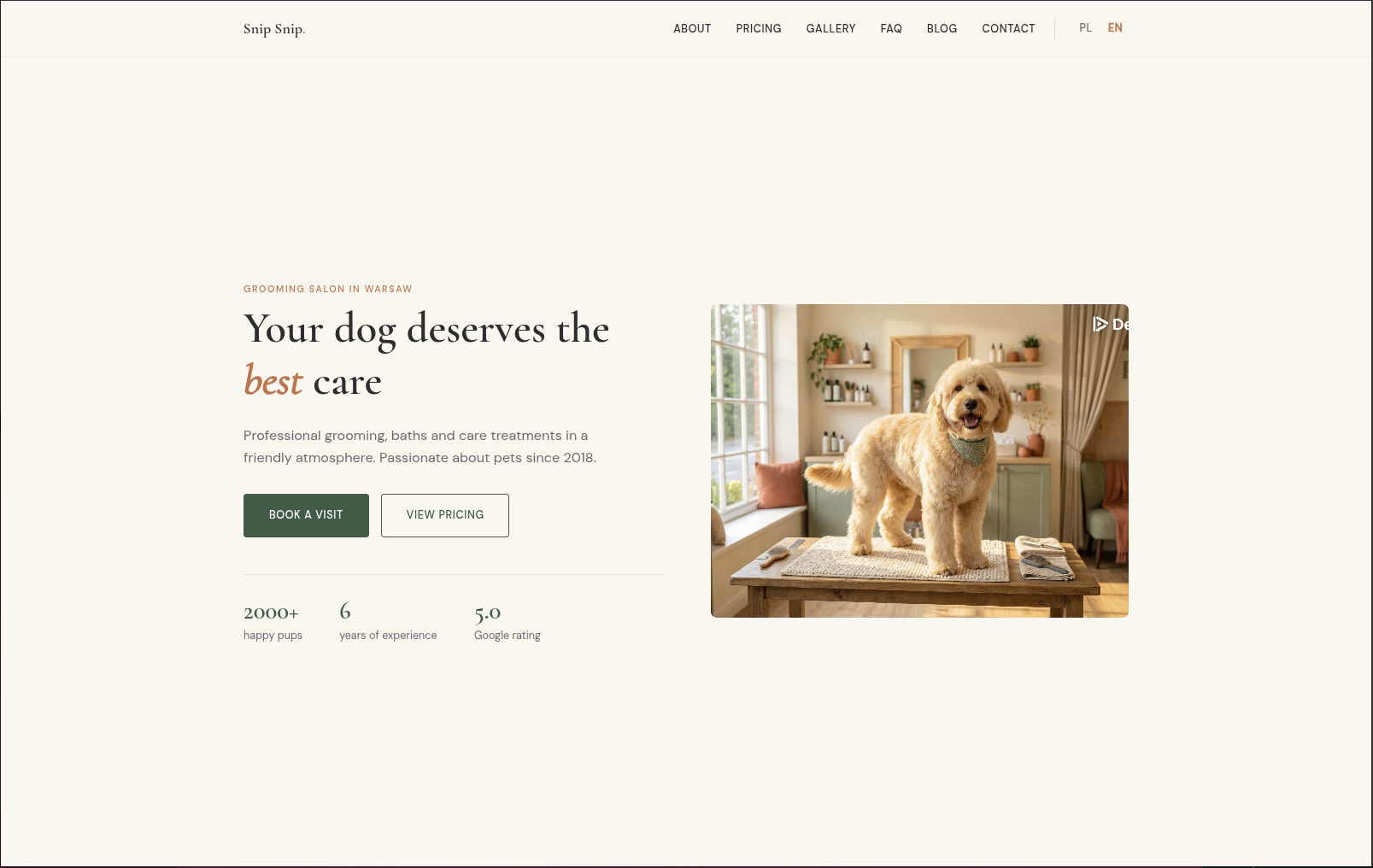
Hugo theme for local service businesses, with the README listing applicable scenarios such as barbering, beauty, massage, and pet grooming
HTMLStarter
localcraft — HTML Starter Template
By maciejkosiarski
Localcraft is a Hugo theme for small local service businesses such as barbershops, beauty salons, massage studios, and pet grooming. It organizes content using HTML and YAML data files and features a warm, minimalist design.
Explore the design
Compare the page layouts and mobile experience. Open any screenshot for a closer look.
Author preview
Author-provided previewTop of page
Preview provided in the project README.
One original preview is available. Open the full image to inspect the design.
Screenshots show visual appearance; interactive behavior may differ.
Recorded 2026-10-03View source
What stands out
A quick read of the recorded project description.
Manage services, testimonials, team, FAQ, pricing, and opening hours through YAML files under data/{lang}/
Homepage sections are configured in the front matter of content/_index.md, including hero, services, testimonials, blog-preview, and cta-banner
Built-in page layouts for about, pricing, gallery (before-and-after comparisons and lightbox), FAQ, location (Leaflet map and opening hours), and blog
Supports multilingual i18n with built-in English and Polish translation files, and outputs JSON-LD, Open Graph, and Twitter Cards
Images are processed through Hugo's pipeline into WebP and multiple responsive sizes, with support for srcset, sizes, and lazy loading
Template Details
Localcraft is an open-source Hugo theme published on Hugo Themes, positioned as a showcase website for small local service businesses. The README explicitly lists its intended users: barbers, beauty salons, massage studios, pet grooming, and similar businesses. The theme uses YAML data files (services, testimonials, team, faq, pricing, opening_hours) to drive content such as service lists, customer testimonials, team information, frequently asked questions, price lists, and opening hours. The homepage is assembled from sections configured in front matter (hero, services, testimonials, blog-preview, cta-banner). Built-in page types include home, about, pricing, gallery (before-and-after comparisons and lightbox), FAQ, location (map and opening hours), and blog. The theme supports multiple languages (the i18n directory contains English and Polish) and integrates SEO output such as JSON-LD, Open Graph, and Twitter Cards.
There are clear prerequisites for use: Hugo 0.123.0 or higher is required (the extended version is recommended), and installation can be done via Git submodules, Hugo Modules, or direct download. Image optimization relies on Hugo's image processing pipeline, requiring content images that need optimization to be placed under assets/images/, while static/images/ is only for images that should not be processed (such as logos, favicons, and QR codes). Maps use Leaflet.js, with support for button text read from i18n files. Colors are overridden via CSS variables and params.colors, and custom styles can be placed in assets/css/custom.css.
Regarding licensing, the repository uses the MIT license, allowing free use, modification, commercial use, and distribution of this version of the code, provided that the copyright notice and license notice are retained when distributing. Third-party assets such as demo images, fonts, and icons require separate license verification, and external services such as domains and hosting may incur additional charges.
HTMLLauncher
Is it right for your project?
Use Cases
- Build a showcase website for local service businesses such as barbershops, beauty salons, massage studios, or pet grooming
- Single-location sites that need to organize content by service items, price lists, opening hours, and team information
- Maintain services, testimonials, and FAQs using YAML data files instead of duplicating pages
- Local business websites that need modules such as gallery before-and-after comparisons, Leaflet location maps, and a blog
- Multilingual (e.g., English and Polish) service sites targeting local customers
Suitable For
- Developers or site maintainers who use Hugo and are familiar with YAML configuration and front matter
- Small local service businesses such as barbershops, beauty salons, massage studios, and pet grooming
- Local service websites that need multilingual output and structured data (JSON-LD)
- Projects willing to place content images in assets/images/ as required by the theme to enable image optimization
Getting started & customization
Use these recorded setup notes alongside the repository instructions for your chosen version.
- 1
Requires Hugo 0.123.0 or higher; the README recommends the extended version
- 2
Installation options include Git submodules, Hugo Modules, or direct download into themes/localcraft
- 3
Set theme: localcraft in hugo.yaml, and configure parameters such as languages, params.business, params.logo, and params.footer
- 4
Create data files such as services.yaml, testimonials.yaml, team.yaml, faq.yaml, pricing.yaml, and opening_hours.yaml under data/{lang}/
- 5
Place content images that need optimization in assets/images/, and images that should not be processed (logo, favicon, QR code) in static/images/
License & source material
Usage conditions & limitations
Free to use · keep license noticeThis entry covers the free version under the MIT license in the public repository; the free scope applies to this version of the code and does not imply that external services or third-party assets are free.
Must comply with when using
- Free use, modification, commercial use, and distribution of this version of the code are permitted.
- When distributing copies or substantial portions of the code, retain the original author's copyright notice and the complete MIT license notice.
- The code is provided as is; warranties and limitations of liability are governed by the original license and applicable law.
Additional costs & items to verify
- Using Google Tag Manager analytics requires providing your own GTM container ID; this is a third-party external service and may involve account and compliance costs.
- The location map relies on the third-party Leaflet.js library; in actual deployment, you must verify its license and the availability of external tile services.
- The floating support button points to external donation platforms such as Buy Me a Coffee / Ko-fi by default; you must configure the account link yourself.
- Requires Hugo 0.123.0 or higher, with the extended version recommended; the site cannot be built if the environment does not meet these requirements.
- To enable image optimization, content images must be placed under assets/images/; static/images/ is only for images that are not processed.
- Demo images, fonts, icons, and other third-party assets must be checked against their respective licenses; the code's MIT license alone is not sufficient to determine this.
- External services such as domains, hosting, databases, payments, or AI may incur additional charges.
View Original Text Basis
Permission is hereby granted, free of charge
Original License Text
Google Tag Manager with GDPR cookie consent
Original README
Leaflet.js integration for location maps
Original README
Add a floating "Buy Me a Coffee" style button to encourage visitors to support your project
Original README
Hugo **0.123.0** or higher (extended version recommended)
Original README
https://github.com/maciejkosiarski/localcraft/blob/master/LICENSEhttps://github.com/maciejkosiarski/localcraft/blob/master/README.mdUse `assets/images/` for content images** that should be optimized
Original README
Compiled by DeepSeek based on repository license and README ·2026-10-03. Results only cover the materials read; dependencies, images, fonts, and subsequent term changes are subject to their respective original texts.
Project checks & description sources
Template Information
- Source platforms
- Hugo Themes
- Documentation and maintenance reference score
- Partly documented · 63 / 100
- Technologies
- HTML
- Website type
- Starter
How this score is calculated
Our heuristic uses license records (up to 30), a demo link (12), a preview (10), stars (15), recorded maintenance (15), description completeness (8), feature records (5) and classification data (5). It is not a code, security or performance test, or a Google score. A link does not establish tested functionality.
What to verify for this project
- Repository update recorded
- 2026-07-23
- Screenshot last checked
- 2026-10-03
No demo link is recorded. Use the repository instructions to evaluate the project locally; the screenshot alone cannot establish interactive behavior.
The catalog identifies HTML as the primary stack. Check the actual dependency manifest and lockfile for versions and hosting requirements. These notes use recorded metadata, not a code audit or a deployment test.
Use a selection guide →How this description was prepared
AI-assisted description based on catalog records and repository material. Repository authors are not automatically the reviewers of this description.
Review declaration: [email protected] · 2026-10-04
Inspect the recorded source material
SHA-256: 1913ad526476872adc2e8c5d7052823e26cd0ffd9ea261e990e72450ae17019a
2026-10-03T13:45:39.086Z
Source file / repository# Localcraft
A Hugo theme for small local service businesses — hairdressers, beauty salons, massage parlors, pet groomers, and more.
[](https://github.com/maciejkosiarski/localcraft/releases)
[](https://maciejkosiarski.github.io/localcraft/)
[](https://buymeacoffee.com/maciejkosiarski)
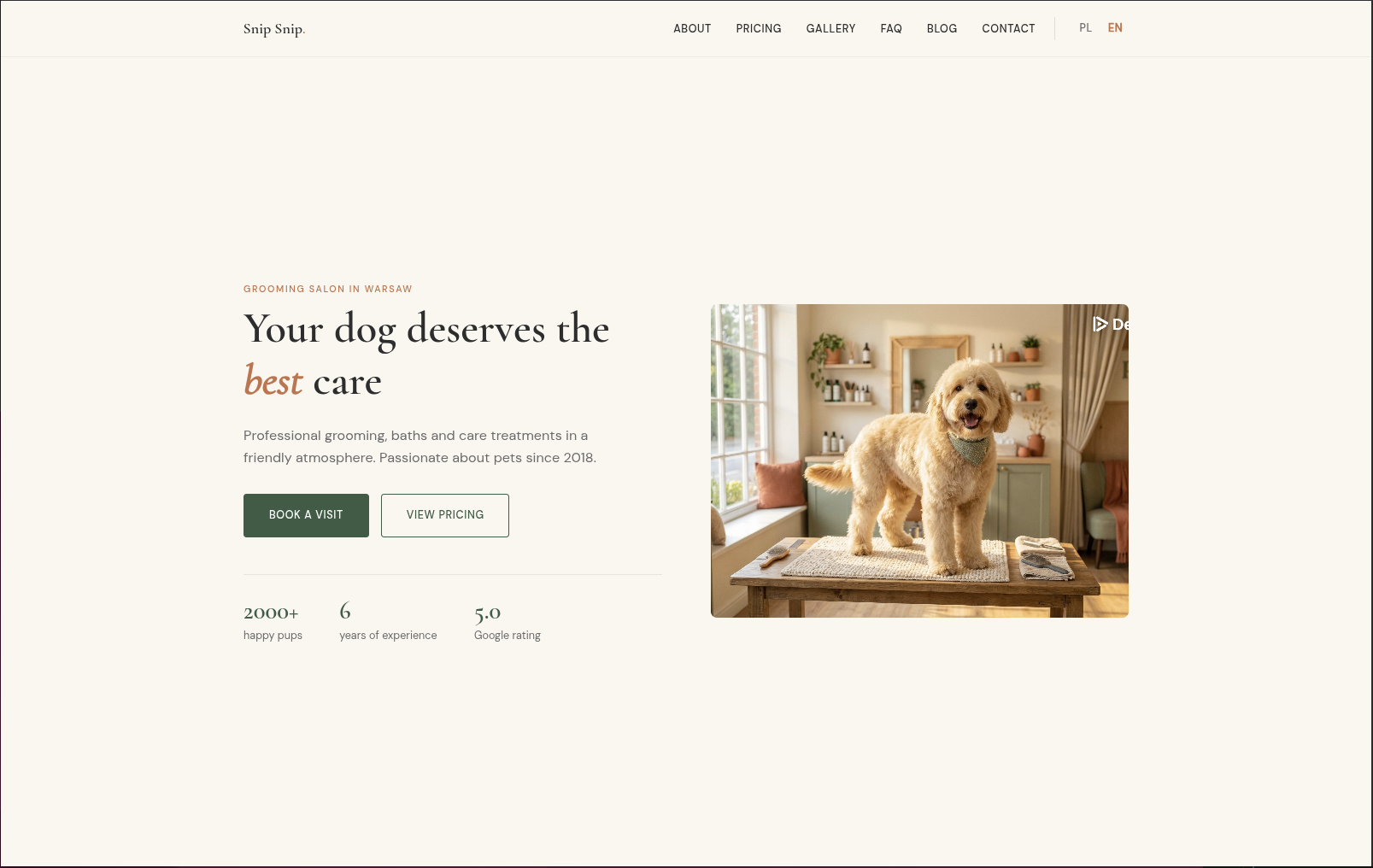
## Features
- Organic warm minimalism design
- Fully responsive (mobile-first)
- Multi-language support (i18n)
- SEO optimized (JSON-LD, Open Graph, Twitter Cards)
- **Automatic image optimization** (WebP, responsive images, lazy loading)
- Google Tag Manager with GDPR cookie consent
- No JavaScript frameworks — vanilla JS only
- Leaflet.js integration for location maps
- Before/after image slider for galleries
- Configurable sections via front matter
## Requirements
- Hugo **0.123.0** or higher (extended version recommended)
## Installation
### Option 1: Git Submodule
```bash
git submodule add https://github.com/maciejkosiarski/localcraft.git themes/localcraft
```
### Option 2: Hugo Modules
Add to your `hugo.yaml`:
```yaml
module:
imports:
- path: github.com/maciejkosiarski/localcraft
```
Then run:
```bash
hugo mod get -u
```
### Option 3: Download
Download the theme and extract it to `themes/localcraft`.
## Configuration
Add to your `hugo.yaml`:
```yaml
theme: localcraft
languages:
en:
languageName: English
languageCode: en-US
contentDir: content/en
title: "Your Business Name"
weight: 1
params:
logo:
name: "Your Business"
dot: true # adds decorative dot after name
business:
name: "Your Business Name"
type: "HairSalon" # Schema.org type: HairSalon, BeautySalon, DaySpa, PetGroomer, HealthAndBeautyBusiness
phone: "+1 234 567 890"
email: "[email protected]"
street: "123 Main Street"
city: "New York"
postalCode: "10001"
country: "US"
lat: 40.7128
lng: -74.0060
start_year: 2020
og_image: "/images/og-default.jpg"
footer:
description: "Your tagline here"
social:
- name: "Facebook"
url: "https://facebook.com/yourbusiness"
- name: "Instagram"
url: "https://instagram.com/yourbusiness"
```
## Data Files
The theme uses YAML data files for dynamic content. Create these in your `data/{lang}/` directory:
### `data/en/services.yaml`
```yaml
- name: "Haircut"
description: "Professional haircut service"
price: "$30"
icon: "scissors"
- name: "Styling"
description: "Hair styling and treatment"
price: "$50"
icon: "hand"
```
### `data/en/testimonials.yaml`
```yaml
- name: "Jane Doe"
rating: 5
quote: "Amazing service! Highly recommended."
detail: "Regular customer"
```
### `data/en/team.yaml`
```yaml
- name: "John Smith"
role: "Senior Stylist"
bio: "10 years of experience..."
image: "/images/team/john.jpg"
```
### `data/en/faq.yaml`
```yaml
- question: "Do I need an appointment?"
answer: "Yes, we recommend booking in advance."
- question: "What payment methods do you accept?"
answer: "Cash, credit cards, and mobile payments."
```
### `data/en/pricing.yaml`
```yaml
categories:
- name: "Haircuts"
services:
- name: "Men's Haircut"
description: "30 min"
price: "$25"
- name: "Women's Haircut"
description: "45 min"
price: "$40"
```
### `data/en/opening_hours.yaml`
```yaml
- day: "Monday"
open: "09:00"
close: "18:00"
- day: "Tuesday"
open: "09:00"
close: "18:00"
# ... etc
- day: "Sunday"
closed: true
```
## Homepage Sections
Configure sections in `content/_index.md`:
```yaml
---
title: "Home"
sections:
- type: hero
heading: "Welcome to Our Salon"
heading_italic: "Salon"
description: "Professional service since 2020"
image: "/images/hero.jpg"
imageFit: "resize" # optional, default: "resize"
imageAspectRatio: "" # optional, only used with "fill"
cta_primary:
text: "Book Now"
url: "/contact/"
cta_secondary:
text: "See Pricing"
url: "/pricing/"
stats:
- value: "500+"
label: "Happy Clients"
- value: "5"
label: "Years Experience"
- type: services
heading: "Our Services"
description: "What we offer"
data_source: "services"
- type: testimonials
heading: "What Our Clients Say"
data_source: "testimonials"
- type: blog-preview
heading: "From Our Blog"
- type: cta-banner
heading: "Ready to Book?"
description: "Call us today"
phone: "+1 234 567 890"
---
```
## Available Page Types
- **Homepage** (`layouts/index.html`) — Section-based landing page
- **About** (`layouts/about/single.html`) — Team and values
- **Pricing** (`layouts/pricing/section.html`) — Filterable price list
- **Gallery** (`layouts/gallery/list.html`) — Before/after image grid with lightbox
- **FAQ** (`layouts/faq/section.html`) — Accordion with JSON-LD
- **Location** (`layouts/location/single.html`) — Map with opening hours
- **Blog** (`layouts/blog/`) — List and single post layouts
## Image Optimization
The theme includes automatic image optimization with responsive images and modern formats.
### How It Works
All images referenced in templates are automatically processed through Hugo's image pipeline:
- **WebP conversion** — Modern format with ~95% size reduction
- **Multiple sizes** — Responsive variants for different screens (400px, 800px, 1200px, 1600px)
- **srcset & sizes** — Browser selects optimal image based on viewport
- **Lazy loading** — Off-screen images load on demand
- **Fallback** — Original format for browsers without WebP support
### Configuration
Customize image processing globally in `hugo.yaml`:
```yaml
params:
images:
quality: 80 # Image quality (1-100), default: 80
widths: [400, 800, 1200, 1600] # Responsive image widths, default: [400, 800, 1200, 1600]
lazy_loading: true # Enable lazy loading by default, default: true
```
**Quality recommendations:**
- **60-70** — Content-heavy blogs (prioritize file size)
- **80** — Balanced (default, recommended)
- **90-95** — Portfolio/galleries (prioritize quality)
**Widths recommendations:**
- Default `[400, 800, 1200, 1600]` works for most sites
- Add `2000` or `2400` for large hero images on high-DPI displays
- Remove smaller sizes if targeting desktop-only audiences
### Image Placement
**Use `assets/images/` for content images** that should be optimized:
```
assets/
└── images/
├── hero.jpg
├── blog/
│ ├── post-1.jpg
│ └── post-2.jpg
└── team/
└── member.jpg
```
**Use `static/images/` only for** images that shouldn't be processed (logos, favicons, QR codes).
### Adding Images to Content
#### Blog Posts
```yaml
---
title: "My Blog Post"
image: "/images/blog/post-image.jpg"
imageFit: "fill" # optional, default: "fill"
imageAspectRatio: "16:10" # optional, default: "16:10"
---
```
#### Hero Section
```yaml
sections:
- type: hero
heading: "Welcome"
image: "/images/hero.jpg"
imageFit: "resize" # optional, default: "resize"
imageAspectRatio: "" # optional, only used with "fill"
```
#### Gallery (Before/After)
```yaml
---
title: "Transformation Example"
category: "Haircut"
image_before: "/images/gallery/before.jpg"
image_after: "/images/gallery/after.jpg"
imageFit: "resize" # optional, default: "resize"
imageAspectRatio: "" # optional, only used with "fill"
---
```
#### Team Members
```yaml
# data/en/team.yaml
- name: "John Smith"
role: "Senior Stylist"
image: "/images/team/john.jpg"
imageFit: "resize" # optional, default: "resize"
imageAspectRatio: "" # optional, only used with "fill"
```
#### Location Page
```yaml
---
title: "Our Location"
image: "/images/outside.jpg"
imageFit: "fill" # optional, default: "resize"
imageAspectRatio: "3:2" # optional, only used with "fill"
---
```
### Image Fit & Aspect Ratio
Control how images are cropped per page via front matter:
| Parameter | Values | Default (cards) | Default (standalone) |
|-----------|--------|-----------------|----------------------|
| `imageFit` | `resize`, `fill` | `fill` | `resize` |
| `imageAspectRatio` | e.g. `16:10`, `4:3`, `3:2` | `16:10` | `""` |
- **`resize`** — scales to fit within the container, preserves original proportions (no cropping)
- **`fill`** — smart-crops to fill the container at the given aspect ratio
**Cards** (blog list, taxonomy, blog-preview, related posts, credentials) default to `fill` for consistent grid heights. **Standalone images** (hero, location, gallery, team) default to `resize` to avoid cropping.
```yaml
# Example: override card cropping for a specific post
---
title: "My Post"
image: "/images/post.jpg"
imageFit: "resize"
---
```
### Recommended Image Sizes
For optimal performance, upload images in these dimensions:
| Component | Recommended Size | Aspect Ratio |
|-----------|-----------------|--------------|
| Hero image | 1200×900px | 4:3 |
| Blog featured image | 1600×1000px | 16:10 |
| Blog card/preview | 800×500px | 16:10 |
| Gallery before/after | 1200×900px | 4:3 |
| Team member photo | 800×1000px | 4:5 |
| OG image (social) | 1200×630px | 1.91:1 |
### Performance Results
Example optimization for a typical blog image:
- **Original:** 2.5 MB JPEG (1920×1200)
- **WebP 1600px:** 145 KB (94% reduction)
- **WebP 800px:** 42 KB (98% reduction)
- **Total load time:** <200ms (with lazy loading)
## Internationalization (i18n)
The theme supports multiple languages. Translation files are in `i18n/`:
- `i18n/en.yaml` — English
- `i18n/pl.yaml` — Polish
Add your own translations by creating `i18n/{lang}.yaml` in your site.
## Design System
### Default Colors (CSS Variables)
```css
--cream: #FAF7F0; /* Background */
--green: #3B5C45; /* Primary */
--terra: #C4714A; /* Accent */
--text: #2D2D2D; /* Text */
```
### Custom Colors
Override the default color scheme in your `hugo.yaml`:
```yaml
params:
colors:
primary: "#3B5C45" # Main brand color (buttons, links)
primary_light: "#4A7257"
primary_pale: "#E8F0EA"
accent: "#C4714A" # Secondary accent (CTAs, highlights)
accent_dark: "#B5633D"
accent_pale: "#F5E6E0"
background: "#FAF7F0" # Page background
text: "#2D2D2D" # Main text color
text_muted: "#6B6B6B" # Secondary text
```
All colors are optional — only specify the ones you want to override.
### Custom CSS
To add your own styles or override theme styles, create a file `assets/css/custom.css` in your project root:
```css
/* assets/css/custom.css */
/* Override existing styles */
.hero h1 {
font-size: 3.5rem;
}
/* Add custom styles */
.my-custom-section {
background: var(--green-pale);
padding: 4rem 0;
}
/* Override CSS variables */
:root {
--green: #2ecc71;
}
```
The custom CSS file is loaded **last** in the CSS cascade, ensuring your styles take precedence over theme defaults. It's automatically minified and bundled with other theme styles for optimal performance.
### Fonts
- **Headings:** Cormorant Garamond
- **Body:** DM Sans
## Floating Support Button
Add a floating "Buy Me a Coffee" style button to encourage visitors to support your project:
```yaml
params:
support_button:
enabled: true
url: "https://buymeacoffee.com/username"
qr_image: "/images/bmc-qr.png" # optional
```
Text content is loaded from i18n files (`support_title`, `support_description`, `support_button`). You can override these in your site's i18n files or set custom values directly in config:
```yaml
params:
support_button:
enabled: true
url: "https://ko-fi.com/username"
title: "Support My Work"
description: "Help me create more content!"
button_text: "Donate on Ko-fi"
```
## Announcement Banner
Display a dismissible notification bar at the top of every page — useful for promotions, price updates, or temporary notices.
```yaml
params:
announcement:
enabled: true
type: info # info (green) | warning (orange) | success (bright green) | alert (red)
date_from: "2026-05-01" # optional: show only from this date
date_until: "2026-05-31" # optional: hide after this date (omit = show forever)
messages:
pl:
text: "Zmienił się cennik! Zapoznaj się z nowymi cenami."
link_text: "Zobacz cennik" # optional
link_url: "/pl/cennik/" # optional
en:
text: "Our price list has been updated. Check the new prices!"
link_text: "See pricing"
link_url: "/en/pricing/"
```
Each language shows the banner **only if its `text` field is set**. To hide the banner for a specific language, omit or comment out its `text`. To hide it for all languages at once, set `enabled: false`.
## Analytics (Google Tag Manager)
The theme includes built-in support for Google Tag Manager with GDPR-compliant cookie consent.
### Configuration
Add your GTM container ID in `hugo.yaml`:
```yaml
params:
gtm:
id: "GTM-XXXXXXX"
```
### How It Works
1. **Cookie consent banner** appears on first visit
2. **GTM loads only after user accepts** cookies
3. **Consent is stored** for 365 days
4. **dataLayer events** are pushed for GTM triggers:
- `consent_update` event with `analytics_consent: "granted"` or `"denied"`
### GTM Configuration (Recommended)
To respect user consent in GTM:
1. Create a **Data Layer Variable** named `analytics_consent`
2. Create a **Trigger** for Custom Event `consent_update` where `analytics_consent equals granted`
3. Configure your GA4 tag to fire on:
- "Initialization - All Pages" (for users who already consented)
- Your consent trigger (for new consent)
### Customizing Consent Text
Edit the i18n files (`i18n/en.yaml`, `i18n/pl.yaml`):
```yaml
cookie_message: "Your custom consent message here."
cookie_accept: "Accept"
cookie_decline: "Decline"
```
## Development
Run the example site:
```bash
cd exampleSite
hugo server
```
## Support
If you find this theme useful, consider supporting its development:
[](https://buymeacoffee.com/maciejkosiarski)
## Showcase
Sites using Localcraft:
- [donpiesko.pl](https://donpiesko.pl) — grooming salon, Lublin
## License
MIT License — see [LICENSE](LICENSE) for details.
## Credits
Created by [Maciej Kosiarski](https://github.com/maciejkosiarski)
Explore similar templates
Compare previews and descriptions within the same stack and category.

startbootstrap-simple-sidebar
A Bootstrap off-canvas sidebar navigation HTML starter template from Start Bootstrap. It provides directly editable HTML and CSS in the dist directory, while the source uses Pug, SCSS, and JavaScript with npm build scripts for live preview and compilation.
HTML · Starter

adminkit
AdminKit is a free, MIT-licensed HTML admin and dashboard template built on Bootstrap 5. The free version includes 15 demo pages, 1 plugin, and 1 color scheme, with hundreds of UI components, forms, tables, charts, and icons.
HTML · Admin dashboard

Landing-Page
A general-purpose landing page HTML template maintained by Tailwind Toolbox, written in pure HTML and loading the complete Tailwind CSS via CDN.
HTML · Corporate Website

light-bootstrap-dashboard
Light Bootstrap Dashboard is a free, MIT-licensed admin dashboard template from Creative Tim, built on Bootstrap with a responsive static HTML structure.
HTML · Admin dashboard

sing-app
Sing App Lite is a free, open-source admin dashboard template from Flatlogic, built with Bootstrap 4.5 and SCSS. It provides a responsive layout, dashboard examples, typography, tables, notifications, basic charts, icons, maps, and a hover sidebar, along with styled Bootstrap components.
HTML · Admin dashboard

startbootstrap-modern-business
Modern Business is a multipurpose Bootstrap full-site HTML template from Start Bootstrap with 17 standalone pages covering home, about, services, portfolio, pricing, blog, FAQ, and contact.
HTML · Starter