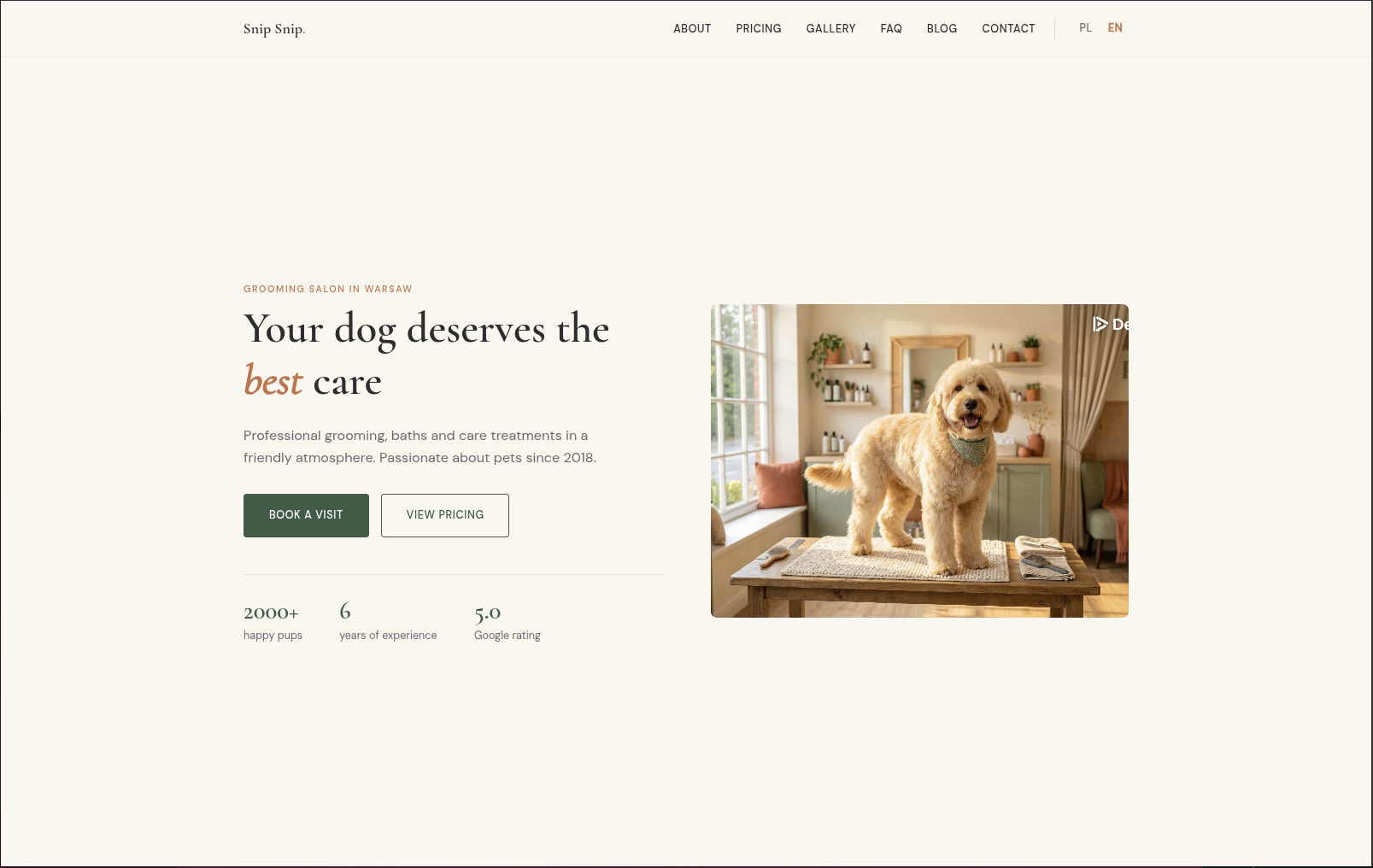
面向本地服务商家的 Hugo 主题,README 列出理发、美容、按摩、宠物美容等适用场景
HTML启动器
localcraft — HTML 启动器模板
作者 maciejkosiarski
Localcraft 是一个面向本地小型服务商家(理发店、美容院、按摩店、宠物美容等)的 Hugo 主题,使用 HTML 与 YAML 数据文件组织内容,采用暖色极简设计。
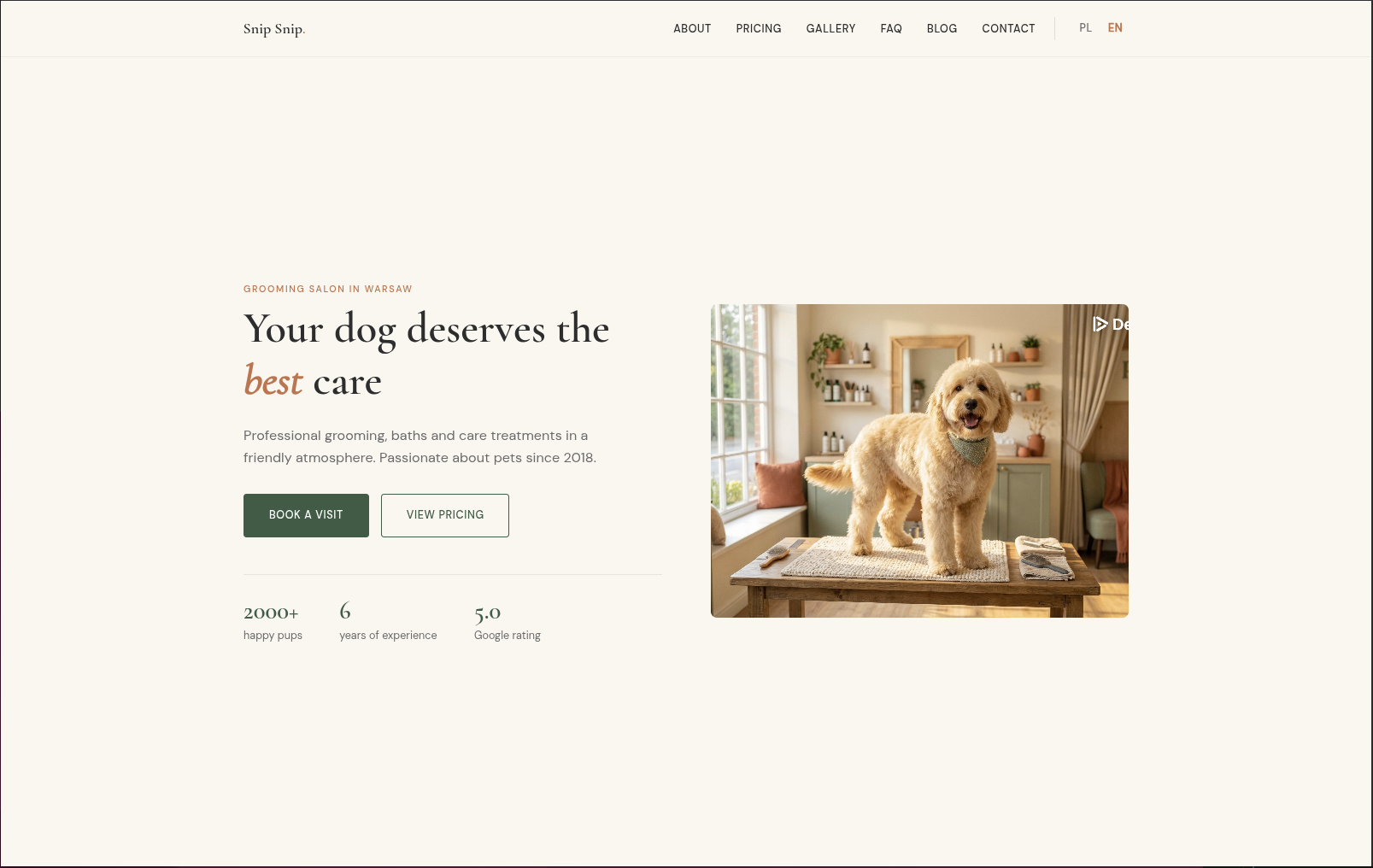
看看你的网站会是什么样
浏览真实页面截图,比较内容排版与手机效果。点击下方缩略图切换,放大查看整页细节。
目前有 1 张原始预览,可打开完整图片查看设计细节。
截图用于了解视觉与布局,交互效果请以实际项目为准。
采集于 2026-10-03查看来源
值得关注的模板亮点
从已有项目资料中,快速了解它的特点。
通过 data/{lang}/ 下的 YAML 文件管理服务、评价、团队、FAQ、价目表和营业时间
首页区块由 content/_index.md 的 front matter 配置,包含 hero、services、testimonials、blog-preview、cta-banner
内置关于、价目表、图库(前后对比与灯箱)、FAQ、位置(Leaflet 地图与营业时间)、博客等页面布局
支持多语言 i18n,自带英语与波兰语翻译文件,并输出 JSON-LD、Open Graph、Twitter Cards
图片经 Hugo 管线处理为 WebP 与多尺寸响应式图片,支持 srcset、sizes 与懒加载
模板详细介绍
Localcraft 是发布在 Hugo Themes 上的开源 Hugo 主题,定位为本地小型服务商家的展示型网站。README 明确列出适用对象:理发师、美容院、按摩店、宠物美容等。主题通过 YAML 数据文件(services、testimonials、team、faq、pricing、opening_hours)驱动服务列表、客户评价、团队、常见问题、价目表和营业时间等内容,首页由 front matter 中配置的区块(hero、services、testimonials、blog-preview、cta-banner)拼装。内置页面类型包括首页、关于、价目表、图库(前后对比与灯箱)、FAQ、位置(地图与营业时间)和博客。主题支持多语言(i18n 目录含英语与波兰语),并集成 JSON-LD、Open Graph、Twitter Cards 等 SEO 输出。
使用上有明确前提:需要 Hugo 0.123.0 或更高版本(推荐 extended 版本),可通过 Git 子模块、Hugo Modules 或直接下载安装。图片优化依赖 Hugo 的图片处理管线,要求把需要优化的内容图片放在 assets/images/ 下,static/images/ 仅用于不应处理的图片(如 logo、favicon、二维码)。地图使用 Leaflet.js,支持按钮从 i18n 文件读取文案。颜色通过 CSS 变量与 params.colors 覆盖,自定义样式可放在 assets/css/custom.css。
许可方面,仓库采用 MIT 许可,可免费使用、修改、商用和分发该版本代码,分发时需保留版权声明与许可声明;演示图片、字体、图标等第三方素材需单独核对许可,域名、托管等外部服务可能另行收费。
HTML启动器
适合你的项目吗?
适用场景
- 为理发店、美容院、按摩店或宠物美容等本地服务商家搭建展示型网站
- 需要按服务项目、价目表、营业时间和团队信息组织内容的单店站点
- 希望用 YAML 数据文件而非重复页面来维护服务、评价和常见问题
- 需要图库前后对比、Leaflet 位置地图和博客等模块的本地商家网站
- 需要多语言(如英语与波兰语)面向本地客户的服务类站点
适合人群
- 使用 Hugo 并熟悉 YAML 配置与 front matter 的开发者或站点维护者
- 本地小型服务商家,如理发店、美容院、按摩店、宠物美容等
- 需要多语言输出和结构化数据(JSON-LD)的本地服务网站
- 愿意按主题要求把内容图片放入 assets/images/ 以启用图片优化的项目
上手与定制指南
结合仓库当前版本的说明,按下面的资料检查内容、配置与运行要求。
- 1
需要 Hugo 0.123.0 或更高版本,README 推荐使用 extended 版本
- 2
安装方式可选 Git 子模块、Hugo Modules 或直接下载到 themes/localcraft
- 3
在 hugo.yaml 中设置 theme: localcraft,并配置 languages、params.business、params.logo、params.footer 等参数
- 4
在 data/{lang}/ 下创建 services.yaml、testimonials.yaml、team.yaml、faq.yaml、pricing.yaml、opening_hours.yaml 等数据文件
- 5
需要优化的内容图片放在 assets/images/,不应处理的图片(logo、favicon、二维码)放在 static/images/
授权与来源资料
使用条件与限制
免费使用 · 保留许可声明本次收录的是公开仓库中采用 MIT 许可的免费版本;免费范围为该版本代码,不代表外部服务或第三方素材免费。
使用时需要遵守
- 允许免费使用、修改、商用和分发该版本代码。
- 分发代码副本或实质性部分时,保留原作者版权声明和完整 MIT 许可声明。
- 代码按现状提供;担保与责任限制以原许可证及适用法律为准。
额外费用与待核对事项
- 使用 Google Tag Manager 分析功能需自行提供 GTM 容器 ID,属于第三方外部服务,可能涉及账号与合规成本。
- 位置地图依赖第三方 Leaflet.js 库,实际部署时需自行确认其许可与外部瓦片服务可用性。
- 浮动支持按钮默认指向 Buy Me a Coffee / Ko-fi 等外部捐赠平台,需自行配置账号链接。
- 运行需 Hugo 0.123.0 或更高版本,并推荐使用 extended 版本,环境不满足则无法构建。
- 要启用图片优化,内容图片必须放在 assets/images/ 下;static/images/ 仅用于不处理的图片。
- 演示图片、字体、图标及其他第三方素材需按各自许可核对,不能仅凭代码的 MIT 许可判断。
- 域名、托管、数据库、支付或 AI 等外部服务可能另外收费。
查看原文依据
Permission is hereby granted, free of charge
许可证原文
Google Tag Manager with GDPR cookie consent
README 原文
Leaflet.js integration for location maps
README 原文
Add a floating "Buy Me a Coffee" style button to encourage visitors to support your project
README 原文
Hugo **0.123.0** or higher (extended version recommended)
README 原文
https://github.com/maciejkosiarski/localcraft/blob/master/LICENSEhttps://github.com/maciejkosiarski/localcraft/blob/master/README.mdUse `assets/images/` for content images** that should be optimized
README 原文
DeepSeek 根据仓库许可证和 README 整理 ·2026-10-03。结果仅覆盖已读取资料,依赖、图片、字体及后续条款变更以各自原文为准。
项目核对记录与介绍依据
模板资料
- 来源平台
- Hugo Themes
- 资料与维护参考分
- 资料一般 · 63 / 100
- 技术栈
- HTML
- 网站类型
- 启动器
这个分数如何计算
本站按许可资料(最高30分)、演示链接(12分)、预览图(10分)、Star数(15分)、记录的维护时间(15分)、描述完整度(8分)、功能记录(5分)和分类资料(5分)计算。它不是代码、安全或性能测试,也不是 Google 评分;有链接不代表已实测可用。
这个项目需要核对什么
- 记录的仓库更新时间
- 2026-07-23
- 截图检查日期
- 2026-10-03
目前没有记录演示链接。请依据仓库说明在本地评估;仅凭截图无法确认交互行为。
目录记录的主要技术栈是 HTML。请通过依赖清单和锁文件核对实际版本与托管要求。这些说明基于收录资料,不代表代码审计或部署实测。
查看具体选型方法 →介绍的制作与核对状态
介绍由 AI 辅助整理目录与仓库资料。仓库作者不等于这篇介绍的审核者。
审核声明: [email protected] · 2026-10-04
查看当时使用的来源资料
SHA-256: 1913ad526476872adc2e8c5d7052823e26cd0ffd9ea261e990e72450ae17019a
2026-10-03T13:45:39.086Z
来源文件 / 仓库# Localcraft
A Hugo theme for small local service businesses — hairdressers, beauty salons, massage parlors, pet groomers, and more.
[](https://github.com/maciejkosiarski/localcraft/releases)
[](https://maciejkosiarski.github.io/localcraft/)
[](https://buymeacoffee.com/maciejkosiarski)
## Features
- Organic warm minimalism design
- Fully responsive (mobile-first)
- Multi-language support (i18n)
- SEO optimized (JSON-LD, Open Graph, Twitter Cards)
- **Automatic image optimization** (WebP, responsive images, lazy loading)
- Google Tag Manager with GDPR cookie consent
- No JavaScript frameworks — vanilla JS only
- Leaflet.js integration for location maps
- Before/after image slider for galleries
- Configurable sections via front matter
## Requirements
- Hugo **0.123.0** or higher (extended version recommended)
## Installation
### Option 1: Git Submodule
```bash
git submodule add https://github.com/maciejkosiarski/localcraft.git themes/localcraft
```
### Option 2: Hugo Modules
Add to your `hugo.yaml`:
```yaml
module:
imports:
- path: github.com/maciejkosiarski/localcraft
```
Then run:
```bash
hugo mod get -u
```
### Option 3: Download
Download the theme and extract it to `themes/localcraft`.
## Configuration
Add to your `hugo.yaml`:
```yaml
theme: localcraft
languages:
en:
languageName: English
languageCode: en-US
contentDir: content/en
title: "Your Business Name"
weight: 1
params:
logo:
name: "Your Business"
dot: true # adds decorative dot after name
business:
name: "Your Business Name"
type: "HairSalon" # Schema.org type: HairSalon, BeautySalon, DaySpa, PetGroomer, HealthAndBeautyBusiness
phone: "+1 234 567 890"
email: "[email protected]"
street: "123 Main Street"
city: "New York"
postalCode: "10001"
country: "US"
lat: 40.7128
lng: -74.0060
start_year: 2020
og_image: "/images/og-default.jpg"
footer:
description: "Your tagline here"
social:
- name: "Facebook"
url: "https://facebook.com/yourbusiness"
- name: "Instagram"
url: "https://instagram.com/yourbusiness"
```
## Data Files
The theme uses YAML data files for dynamic content. Create these in your `data/{lang}/` directory:
### `data/en/services.yaml`
```yaml
- name: "Haircut"
description: "Professional haircut service"
price: "$30"
icon: "scissors"
- name: "Styling"
description: "Hair styling and treatment"
price: "$50"
icon: "hand"
```
### `data/en/testimonials.yaml`
```yaml
- name: "Jane Doe"
rating: 5
quote: "Amazing service! Highly recommended."
detail: "Regular customer"
```
### `data/en/team.yaml`
```yaml
- name: "John Smith"
role: "Senior Stylist"
bio: "10 years of experience..."
image: "/images/team/john.jpg"
```
### `data/en/faq.yaml`
```yaml
- question: "Do I need an appointment?"
answer: "Yes, we recommend booking in advance."
- question: "What payment methods do you accept?"
answer: "Cash, credit cards, and mobile payments."
```
### `data/en/pricing.yaml`
```yaml
categories:
- name: "Haircuts"
services:
- name: "Men's Haircut"
description: "30 min"
price: "$25"
- name: "Women's Haircut"
description: "45 min"
price: "$40"
```
### `data/en/opening_hours.yaml`
```yaml
- day: "Monday"
open: "09:00"
close: "18:00"
- day: "Tuesday"
open: "09:00"
close: "18:00"
# ... etc
- day: "Sunday"
closed: true
```
## Homepage Sections
Configure sections in `content/_index.md`:
```yaml
---
title: "Home"
sections:
- type: hero
heading: "Welcome to Our Salon"
heading_italic: "Salon"
description: "Professional service since 2020"
image: "/images/hero.jpg"
imageFit: "resize" # optional, default: "resize"
imageAspectRatio: "" # optional, only used with "fill"
cta_primary:
text: "Book Now"
url: "/contact/"
cta_secondary:
text: "See Pricing"
url: "/pricing/"
stats:
- value: "500+"
label: "Happy Clients"
- value: "5"
label: "Years Experience"
- type: services
heading: "Our Services"
description: "What we offer"
data_source: "services"
- type: testimonials
heading: "What Our Clients Say"
data_source: "testimonials"
- type: blog-preview
heading: "From Our Blog"
- type: cta-banner
heading: "Ready to Book?"
description: "Call us today"
phone: "+1 234 567 890"
---
```
## Available Page Types
- **Homepage** (`layouts/index.html`) — Section-based landing page
- **About** (`layouts/about/single.html`) — Team and values
- **Pricing** (`layouts/pricing/section.html`) — Filterable price list
- **Gallery** (`layouts/gallery/list.html`) — Before/after image grid with lightbox
- **FAQ** (`layouts/faq/section.html`) — Accordion with JSON-LD
- **Location** (`layouts/location/single.html`) — Map with opening hours
- **Blog** (`layouts/blog/`) — List and single post layouts
## Image Optimization
The theme includes automatic image optimization with responsive images and modern formats.
### How It Works
All images referenced in templates are automatically processed through Hugo's image pipeline:
- **WebP conversion** — Modern format with ~95% size reduction
- **Multiple sizes** — Responsive variants for different screens (400px, 800px, 1200px, 1600px)
- **srcset & sizes** — Browser selects optimal image based on viewport
- **Lazy loading** — Off-screen images load on demand
- **Fallback** — Original format for browsers without WebP support
### Configuration
Customize image processing globally in `hugo.yaml`:
```yaml
params:
images:
quality: 80 # Image quality (1-100), default: 80
widths: [400, 800, 1200, 1600] # Responsive image widths, default: [400, 800, 1200, 1600]
lazy_loading: true # Enable lazy loading by default, default: true
```
**Quality recommendations:**
- **60-70** — Content-heavy blogs (prioritize file size)
- **80** — Balanced (default, recommended)
- **90-95** — Portfolio/galleries (prioritize quality)
**Widths recommendations:**
- Default `[400, 800, 1200, 1600]` works for most sites
- Add `2000` or `2400` for large hero images on high-DPI displays
- Remove smaller sizes if targeting desktop-only audiences
### Image Placement
**Use `assets/images/` for content images** that should be optimized:
```
assets/
└── images/
├── hero.jpg
├── blog/
│ ├── post-1.jpg
│ └── post-2.jpg
└── team/
└── member.jpg
```
**Use `static/images/` only for** images that shouldn't be processed (logos, favicons, QR codes).
### Adding Images to Content
#### Blog Posts
```yaml
---
title: "My Blog Post"
image: "/images/blog/post-image.jpg"
imageFit: "fill" # optional, default: "fill"
imageAspectRatio: "16:10" # optional, default: "16:10"
---
```
#### Hero Section
```yaml
sections:
- type: hero
heading: "Welcome"
image: "/images/hero.jpg"
imageFit: "resize" # optional, default: "resize"
imageAspectRatio: "" # optional, only used with "fill"
```
#### Gallery (Before/After)
```yaml
---
title: "Transformation Example"
category: "Haircut"
image_before: "/images/gallery/before.jpg"
image_after: "/images/gallery/after.jpg"
imageFit: "resize" # optional, default: "resize"
imageAspectRatio: "" # optional, only used with "fill"
---
```
#### Team Members
```yaml
# data/en/team.yaml
- name: "John Smith"
role: "Senior Stylist"
image: "/images/team/john.jpg"
imageFit: "resize" # optional, default: "resize"
imageAspectRatio: "" # optional, only used with "fill"
```
#### Location Page
```yaml
---
title: "Our Location"
image: "/images/outside.jpg"
imageFit: "fill" # optional, default: "resize"
imageAspectRatio: "3:2" # optional, only used with "fill"
---
```
### Image Fit & Aspect Ratio
Control how images are cropped per page via front matter:
| Parameter | Values | Default (cards) | Default (standalone) |
|-----------|--------|-----------------|----------------------|
| `imageFit` | `resize`, `fill` | `fill` | `resize` |
| `imageAspectRatio` | e.g. `16:10`, `4:3`, `3:2` | `16:10` | `""` |
- **`resize`** — scales to fit within the container, preserves original proportions (no cropping)
- **`fill`** — smart-crops to fill the container at the given aspect ratio
**Cards** (blog list, taxonomy, blog-preview, related posts, credentials) default to `fill` for consistent grid heights. **Standalone images** (hero, location, gallery, team) default to `resize` to avoid cropping.
```yaml
# Example: override card cropping for a specific post
---
title: "My Post"
image: "/images/post.jpg"
imageFit: "resize"
---
```
### Recommended Image Sizes
For optimal performance, upload images in these dimensions:
| Component | Recommended Size | Aspect Ratio |
|-----------|-----------------|--------------|
| Hero image | 1200×900px | 4:3 |
| Blog featured image | 1600×1000px | 16:10 |
| Blog card/preview | 800×500px | 16:10 |
| Gallery before/after | 1200×900px | 4:3 |
| Team member photo | 800×1000px | 4:5 |
| OG image (social) | 1200×630px | 1.91:1 |
### Performance Results
Example optimization for a typical blog image:
- **Original:** 2.5 MB JPEG (1920×1200)
- **WebP 1600px:** 145 KB (94% reduction)
- **WebP 800px:** 42 KB (98% reduction)
- **Total load time:** <200ms (with lazy loading)
## Internationalization (i18n)
The theme supports multiple languages. Translation files are in `i18n/`:
- `i18n/en.yaml` — English
- `i18n/pl.yaml` — Polish
Add your own translations by creating `i18n/{lang}.yaml` in your site.
## Design System
### Default Colors (CSS Variables)
```css
--cream: #FAF7F0; /* Background */
--green: #3B5C45; /* Primary */
--terra: #C4714A; /* Accent */
--text: #2D2D2D; /* Text */
```
### Custom Colors
Override the default color scheme in your `hugo.yaml`:
```yaml
params:
colors:
primary: "#3B5C45" # Main brand color (buttons, links)
primary_light: "#4A7257"
primary_pale: "#E8F0EA"
accent: "#C4714A" # Secondary accent (CTAs, highlights)
accent_dark: "#B5633D"
accent_pale: "#F5E6E0"
background: "#FAF7F0" # Page background
text: "#2D2D2D" # Main text color
text_muted: "#6B6B6B" # Secondary text
```
All colors are optional — only specify the ones you want to override.
### Custom CSS
To add your own styles or override theme styles, create a file `assets/css/custom.css` in your project root:
```css
/* assets/css/custom.css */
/* Override existing styles */
.hero h1 {
font-size: 3.5rem;
}
/* Add custom styles */
.my-custom-section {
background: var(--green-pale);
padding: 4rem 0;
}
/* Override CSS variables */
:root {
--green: #2ecc71;
}
```
The custom CSS file is loaded **last** in the CSS cascade, ensuring your styles take precedence over theme defaults. It's automatically minified and bundled with other theme styles for optimal performance.
### Fonts
- **Headings:** Cormorant Garamond
- **Body:** DM Sans
## Floating Support Button
Add a floating "Buy Me a Coffee" style button to encourage visitors to support your project:
```yaml
params:
support_button:
enabled: true
url: "https://buymeacoffee.com/username"
qr_image: "/images/bmc-qr.png" # optional
```
Text content is loaded from i18n files (`support_title`, `support_description`, `support_button`). You can override these in your site's i18n files or set custom values directly in config:
```yaml
params:
support_button:
enabled: true
url: "https://ko-fi.com/username"
title: "Support My Work"
description: "Help me create more content!"
button_text: "Donate on Ko-fi"
```
## Announcement Banner
Display a dismissible notification bar at the top of every page — useful for promotions, price updates, or temporary notices.
```yaml
params:
announcement:
enabled: true
type: info # info (green) | warning (orange) | success (bright green) | alert (red)
date_from: "2026-05-01" # optional: show only from this date
date_until: "2026-05-31" # optional: hide after this date (omit = show forever)
messages:
pl:
text: "Zmienił się cennik! Zapoznaj się z nowymi cenami."
link_text: "Zobacz cennik" # optional
link_url: "/pl/cennik/" # optional
en:
text: "Our price list has been updated. Check the new prices!"
link_text: "See pricing"
link_url: "/en/pricing/"
```
Each language shows the banner **only if its `text` field is set**. To hide the banner for a specific language, omit or comment out its `text`. To hide it for all languages at once, set `enabled: false`.
## Analytics (Google Tag Manager)
The theme includes built-in support for Google Tag Manager with GDPR-compliant cookie consent.
### Configuration
Add your GTM container ID in `hugo.yaml`:
```yaml
params:
gtm:
id: "GTM-XXXXXXX"
```
### How It Works
1. **Cookie consent banner** appears on first visit
2. **GTM loads only after user accepts** cookies
3. **Consent is stored** for 365 days
4. **dataLayer events** are pushed for GTM triggers:
- `consent_update` event with `analytics_consent: "granted"` or `"denied"`
### GTM Configuration (Recommended)
To respect user consent in GTM:
1. Create a **Data Layer Variable** named `analytics_consent`
2. Create a **Trigger** for Custom Event `consent_update` where `analytics_consent equals granted`
3. Configure your GA4 tag to fire on:
- "Initialization - All Pages" (for users who already consented)
- Your consent trigger (for new consent)
### Customizing Consent Text
Edit the i18n files (`i18n/en.yaml`, `i18n/pl.yaml`):
```yaml
cookie_message: "Your custom consent message here."
cookie_accept: "Accept"
cookie_decline: "Decline"
```
## Development
Run the example site:
```bash
cd exampleSite
hugo server
```
## Support
If you find this theme useful, consider supporting its development:
[](https://buymeacoffee.com/maciejkosiarski)
## Showcase
Sites using Localcraft:
- [donpiesko.pl](https://donpiesko.pl) — grooming salon, Lublin
## License
MIT License — see [LICENSE](LICENSE) for details.
## Credits
Created by [Maciej Kosiarski](https://github.com/maciejkosiarski)
看看同类模板
对比同技术栈与用途的模板,找到更适合的视觉与内容结构。

startbootstrap-simple-sidebar
An off canvas sidebar navigation Bootstrap HTML template created by Start Bootstrap
HTML · 启动器

adminkit
AdminKit is a free & open-source HTML dashboard & admin template based on Bootstrap 5
HTML · 后台

Landing-Page
Tailwind CSS Starter Template - Landing Page
HTML · 企业官网

light-bootstrap-dashboard
Light Bootstrap Dashboard is an admin dashboard template designed to be beautiful and simple.
HTML · 后台

sing-app
💥Free and open-source admin dashboard template built with Bootstrap 4.5 💥
HTML · 后台

startbootstrap-modern-business
A multipurpose Bootstrap full website template created by Start Bootstrap
HTML · 启动器