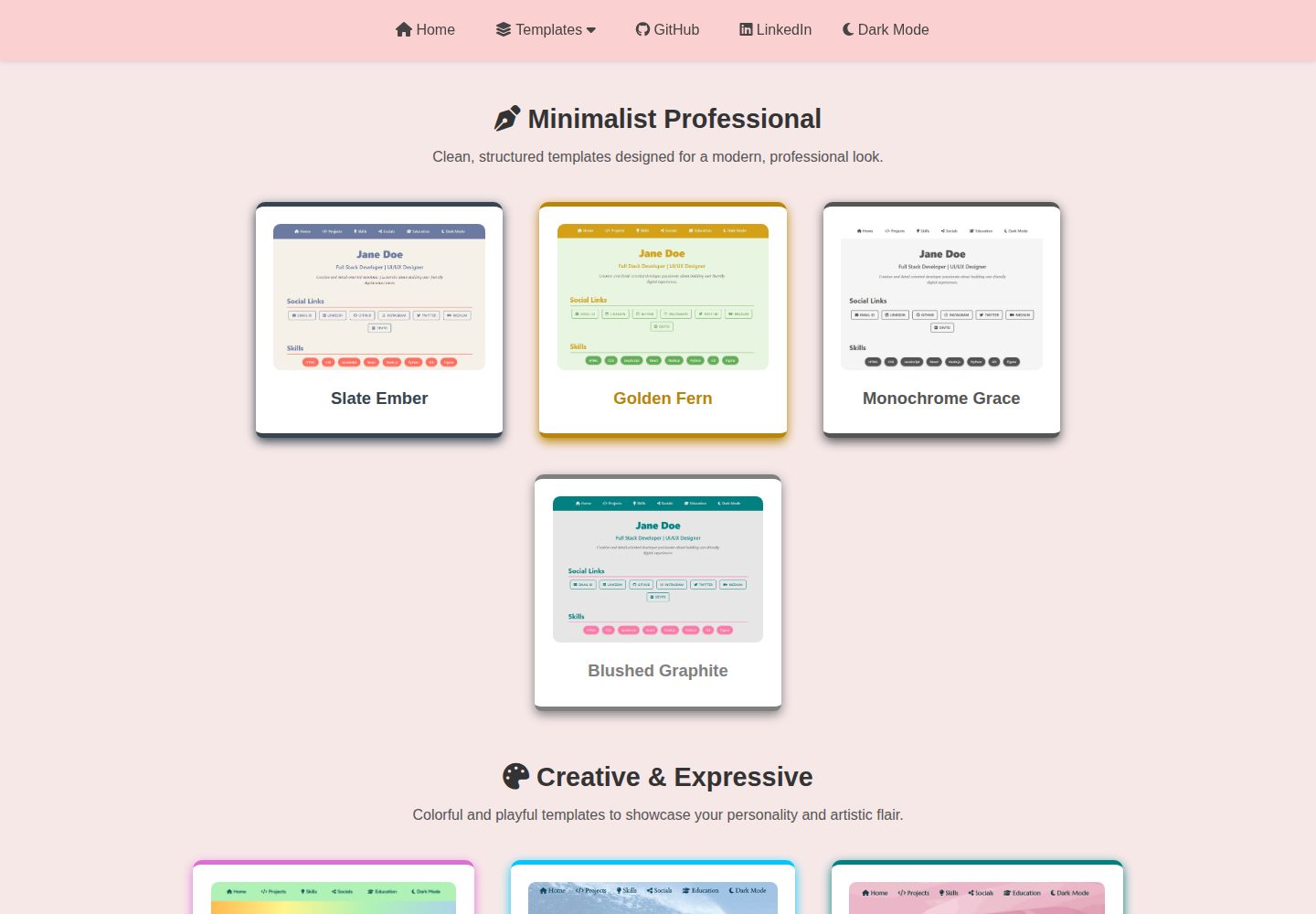
Multiple portfolio templates and themes, browsable and selectable by template/theme two-level directory
HTMLPortfolioDocumentation
Portfolio-Templates — HTML Portfolio Template
By madhurimarawat
A collection of HTML and JSON data-driven personal portfolio templates, including multiple themes, support for light and dark modes and responsive layouts, and Python scripts to assist with configuration.
Explore the design
Compare the page layouts and mobile experience. Open any screenshot for a closer look.
Desktop homepage1 / 3
Desktop captureTop of page
Actual screenshot captured by the server browser.
All pages & views 3
Screenshots show visual appearance; interactive behavior may differ.
Recorded 2026-10-02View source
What stands out
A quick read of the recorded project description.
Personal profiles and social links are centralized in JSON files, uniformly read and injected by js/index.js
Each template/theme supports light and dark mode toggling, with desktop and mobile preview images
Provides Python automation scripts and local server startup configuration to assist setup
Released under the MIT license, allowing free use, modification, commercial use, and distribution of this version of the code
Template Details
This project is a collection of portfolio templates built with HTML, where all templates share a single JSON-based data fetching mechanism. Dynamic content such as personal profiles and social links is stored centrally in user.json and social_links.json under the assets/user_data/ directory, and is uniformly read and injected into each template page by js/index.js. The repository is organized in two levels: template/theme. Each template directory may contain multiple theme folders, each with its own index.html, light and dark mode styles, and preview images; there are also standalone templates without themes that only support light/dark toggling. The repository provides Python scripts in Setup_Files for quick configuration, as well as local server startup configuration in Localhost_Setup. For usage, you can use the repository as a GitHub template to generate your own copy, modify the JSON data, and deploy via GitHub Pages or Netlify. The repository is released under the MIT license, allowing free use, modification, commercial use, and distribution of this version of the code, but third-party assets such as demo images, fonts, and icons require separate license verification, and external services such as domains and hosting may incur additional charges.
HTMLPortfolioDocumentation
Is it right for your project?
Use Cases
- Developers, designers, writers, or students creating personal portfolio pages
- Selecting color schemes and layouts from multiple themes, quickly replacing with your own content
- Batch updating personal information and links in the portfolio by modifying JSON data files
- Using the repository as a GitHub template to generate a copy, then deploying to GitHub Pages or Netlify
Suitable For
- Individuals who need to quickly build a static personal portfolio page
- Developers who want to centrally manage page data with JSON and avoid editing each page
- Projects that prefer a pure HTML/CSS/JavaScript approach without introducing front-end frameworks
- Portfolio sites that require light and dark modes and responsive layouts
Getting started & customization
Use these recorded setup notes alongside the repository instructions for your chosen version.
- 1
Edit personal profiles and social links in user.json and social_links.json under assets/user_data/, or use the Python scripts in Setup_Files to assist configuration
- 2
Page data is uniformly fetched and injected by js/index.js; after modifying JSON, ensure that this script is correctly referenced
- 3
For local preview, refer to the server startup configuration in Localhost_Setup
- 4
For deployment, you can choose GitHub Pages or Netlify; the repository README recommends generating your own copy via GitHub's Use this template
- 5
Third-party assets such as demo images, fonts, and icons must be checked according to their respective licenses and cannot be judged solely by the code's MIT license
License & source material
Usage conditions & limitations
Free to use · keep license noticeThis entry covers the free version under the MIT license in the public repository; the free scope is this version of the code and does not mean that external services or third-party assets are free.
Must comply with when using
- Free use, modification, commercial use, and distribution of this version of the code are permitted.
- When distributing copies or substantial portions of the code, retain the original author's copyright notice and the full MIT license notice.
- The code is provided as is; warranties and limitations of liability are governed by the original license and applicable law.
Additional costs & items to verify
- If you choose Vercel for deployment, you need to pre-build the site locally and then manually deploy the generated _site/ directory; Vercel does not natively support Jekyll.
- Before deploying to Netlify or Vercel, remove the permalink key from _config.yml or front matter, otherwise routing issues may occur.
- For local preview, follow the instructions in Localhost_Setup/, or host with a simple server such as Python http.server; do not open directly as files.
- Demo images, fonts, icons, and other third-party assets must be checked according to their respective licenses and cannot be judged solely by the code's MIT license.
- External services such as domains, hosting, databases, payments, or AI may incur additional charges.
View Original Text Basis
Permission is hereby granted, free of charge
Original License Text
❌ **Vercel** does **not natively support Jekyll**. To use Vercel, you’ll need to pre-build your site locally and deploy the generated `_site/` folder manually.
Original README
Just remember to remove `permalink` keys in `_config.yml` or front matter to prevent routing issues.
Original README
https://github.com/madhurimarawat/Portfolio-Templates/blob/main/LICENSEhttps://github.com/madhurimarawat/Portfolio-Templates/blob/main/README.mdUse the instructions in `Localhost_Setup/` or serve the site using a simple server like Python’s `http.server`.
Original README
Compiled by DeepSeek based on repository license and README ·2026-10-02. Results only cover the materials read; dependencies, images, fonts, and subsequent term changes are subject to their respective original texts.
Project checks & description sources
Template Information
- Source platforms
- GitHub
- Documentation and maintenance reference score
- More documented · 88 / 100
- Technologies
- HTML
- Website type
- Portfolio · Documentation
How this score is calculated
Our heuristic uses license records (up to 30), a demo link (12), a preview (10), stars (15), recorded maintenance (15), description completeness (8), feature records (5) and classification data (5). It is not a code, security or performance test, or a Google score. A link does not establish tested functionality.
What to verify for this project
- Repository update recorded
- 2026-03-14
- Screenshot last checked
- 2026-10-02
A demo link is listed. Check it with your own content and viewport sizes; its presence does not confirm that forms, authentication or payments work.
The catalog identifies HTML as the primary stack. Check the actual dependency manifest and lockfile for versions and hosting requirements. These notes use recorded metadata, not a code audit or a deployment test.
Use a selection guide →How this description was prepared
AI-assisted description based on catalog records and repository material. Repository authors are not automatically the reviewers of this description.
Automatically checked against source and license rules; no manual editorial review.
Inspect the recorded source material
SHA-256: 4341765b292ae4d4a1649903f981164b5e4ab1c3fc0d053766b167895cfb863f
2026-10-02T10:40:01.981Z
Source file / repository# 🎨 Portfolio Templates
A collection of **beautiful**, **easy-to-use**, and **professional portfolio templates** with elegant themes and responsive designs. All templates are powered by modular JSON-based data fetching and support seamless updates via Python automation scripts.
<p align="center">
<!-- Repository Size -->
<a href="https://github.com/madhurimarawat/Portfolio-Templates">
<img src="https://img.shields.io/github/repo-size/madhurimarawat/Portfolio-Templates?color=%23A8EDEA&label=Repo%20Size&labelColor=%23FF9A9E&style=for-the-badge&logo=github" alt="Repo Size">
</a>
<!-- Stars -->
<a href="https://github.com/madhurimarawat/Portfolio-Templates/stargazers">
<img src="https://img.shields.io/github/stars/madhurimarawat/Portfolio-Templates?color=%23FFB7C5&label=Stars&labelColor=%23FCA3B0&style=for-the-badge&logo=star" alt="GitHub Stars">
</a>
<!-- Forks -->
<a href="https://github.com/madhurimarawat/Portfolio-Templates/network/members">
<img src="https://img.shields.io/github/forks/madhurimarawat/Portfolio-Templates?color=%2388D8C0&label=Forks&labelColor=%2375CDB1&style=for-the-badge&logo=git" alt="GitHub Forks">
</a>
<!-- Issues (Open + Closed) -->
<a href="https://github.com/madhurimarawat/Portfolio-Templates/issues">
<img src="https://img.shields.io/github/issues/madhurimarawat/Portfolio-Templates?color=%23FFF5C3&label=Open%20Issues&labelColor=%23F9E5A4&style=for-the-badge&logo=bug" alt="GitHub Issues">
</a>
<a href="https://github.com/madhurimarawat/Portfolio-Templates/issues?q=is%3Aissue+is%3Aclosed">
<img src="https://img.shields.io/github/issues-closed/madhurimarawat/Portfolio-Templates?color=%23F1D1A1&label=Closed%20Issues&labelColor=%23FFB88D&style=for-the-badge&logo=bug" alt="Closed Issues">
</a>
<!-- Pull Requests (Open + Closed) -->
<a href="https://github.com/madhurimarawat/Portfolio-Templates/pulls">
<img src="https://img.shields.io/github/issues-pr/madhurimarawat/Portfolio-Templates?color=%23F7CAC9&label=Open%20PRs&labelColor=%23F1A7B8&style=for-the-badge&logo=git" alt="Open Pull Requests">
</a>
<a href="https://github.com/madhurimarawat/Portfolio-Templates/pulls?q=is%3Apr+is%3Aclosed">
<img src="https://img.shields.io/github/issues-pr-closed/madhurimarawat/Portfolio-Templates?color=%23D6E2E9&label=Closed%20PRs&labelColor=%23C4D4DF&style=for-the-badge&logo=git" alt="Closed Pull Requests">
</a>
<!-- Discussions -->
<a href="https://github.com/madhurimarawat/Portfolio-Templates/discussions">
<img src="https://img.shields.io/github/discussions/madhurimarawat/Portfolio-Templates?color=%23F5B7B1&label=Discussions&labelColor=%23F2A5A1&style=for-the-badge&logo=discourse" alt="GitHub Discussions">
</a>
<!-- Contributors -->
<a href="https://github.com/madhurimarawat/Portfolio-Templates/graphs/contributors">
<img src="https://img.shields.io/github/contributors/madhurimarawat/Portfolio-Templates?color=%23A8EDEA&label=Contributors&labelColor=%23FF9A9E&style=for-the-badge&logo=github" alt="GitHub Contributors">
</a>
<!-- License -->
<a href="https://github.com/madhurimarawat/Portfolio-Templates/blob/main/LICENSE">
<img src="https://img.shields.io/github/license/madhurimarawat/Portfolio-Templates?color=%23FF6B8B&label=License&labelColor=%23E65F73&style=for-the-badge&logo=open-source-initiative" alt="License">
</a>
<!-- Last Commit -->
<a href="https://github.com/madhurimarawat/Portfolio-Templates/commits/main">
<img src="https://img.shields.io/github/last-commit/madhurimarawat/Portfolio-Templates?color=%23F39C12&label=Last%20Commit&labelColor=%23D68910&style=for-the-badge&logo=github" alt="Last Commit">
</a>
<!-- GitHub Pages Deployment -->
<a href="https://github.com/madhurimarawat/Portfolio-Templates/actions/workflows/pages/pages-build-deployment">
<img src="https://github.com/madhurimarawat/Portfolio-Templates/actions/workflows/pages/pages-build-deployment/badge.svg"
alt="GitHub Pages Deployment"
style="height: 28px; vertical-align: middle;">
</a>
<!-- Watchers -->
<a href="https://github.com/madhurimarawat/Portfolio-Templates/watchers">
<img src="https://img.shields.io/github/watchers/madhurimarawat/Portfolio-Templates?color=%23F5B041&label=Watchers&labelColor=%23D68910&style=for-the-badge&logo=github" alt="GitHub Watchers">
</a>
</p>
> 💡 Whether you're a developer, designer, writer, or student, you'll find a template that fits your personal or professional needs—**fully responsive, dark mode compatible**, and highly customizable.
🔗 [**Live Demo**](https://madhurimarawat.github.io/Portfolio-Templates/)
Use this repository as a **GitHub template** to quickly create your own portfolio, simply click **[Use this template](https://github.com/madhurimarawat/Portfolio-Templates/generate)**, customize the content, and deploy your site using **GitHub Pages or Netlify**.
<div align="center">
<a href="https://madhurimarawat.github.io/Portfolio-Templates">
<img src="site-previews/website_1.png"
alt="Teal Rose Homepage Preview"
title="Click to view the Teal Rose homepage">
</a>
<a href="https://madhurimarawat.github.io/Portfolio-Templates">
<img src="site-previews/desktop_website.png"
alt="Desktop View of Teal Rose Portfolio"
title="Desktop Preview – Teal Rose Portfolio Template">
</a>
<a href="https://madhurimarawat.github.io/Portfolio-Templates">
<img src="site-previews/mobile_website.png"
alt="Mobile View of Teal Rose Portfolio"
title="Mobile Preview – Teal Rose Template">
</a>
</div>
---
## 🧩 Key Features
* 📁 **Multiple Templates & Themes**: Browse [Templates.md](Templates.md) to explore all available options.
* ⚙️ **Data-Driven**: All personal details and links are pulled from JSON files.
* 🌙 **Light & Dark Mode**: Each template supports dynamic theme switching.
* 💻 **Fully Responsive**: Mobile, tablet, and desktop views are supported out of the box.
* 🚀 **Automated Setup**: Python scripts make onboarding and updates effortless.
* 📚 **Dedicated Docs**: Each template and theme comes with its own separate documentation for easy understanding and customization.
---
## 🎨 Color Palette Highlights
(See [`css/variables.css`](css/variables.css) for full theme definitions)
```css
:root {
/* === Minimalist Professional === */
--color-slate-ember: #36454F;
--color-golden-fern: #B8860B;
--color-monochrome-grace: #555;
--color-blushed-graphite: grey;
/* === Creative & Expressive === */
--color-rainbow-spectrum: #DA70D6;
--color-blue-whisper: rgb(0, 200, 255);
--color-teal-rose: #008080;
/* === Nature-Inspired === */
--color-nature-canvas: #1ba35d;
--bg-white: #f7e8e8;
--text-grey: #444;
--text-blue: #007acc;
--header-white: #fbd0d0;
--hover-black: rgba(0, 0, 0, 0.1);
--heading-color: #333;
--light-grey: #555;
--section-fill: #fff;
--bg-grey: rgb(192, 181, 181);
--cream: #e8d6d6;
}
```
## 📱 Fully Responsive & Theme-Ready
All templates are built with responsiveness in mind and **gracefully transition between light and dark modes**, ensuring a seamless user experience across all devices.
---
## 📂 Data Structure & Automation
> [!NOTE]
> 💡 **[User Data Location](https://github.com/madhurimarawat/Portfolio-Templates/tree/main/assets/user_data)**
> All dynamic content (like social links and personal information) is managed through modular JSON files in the [`assets/user_data/`](https://github.com/madhurimarawat/Portfolio-Templates/tree/main/assets/user_data) directory:
>
> * [`social_links.json`](https://github.com/madhurimarawat/Portfolio-Templates/blob/main/assets/user_data/social_links.json)
> * [`user.json`](https://github.com/madhurimarawat/Portfolio-Templates/blob/main/assets/user_data/user.json)
>
> You can either **manually edit** these files or use the automation scripts in [`Setup_Files`](https://github.com/madhurimarawat/Portfolio-Templates/tree/main/Setup_Files) for quick setup.
🧠 **[Centralized Data Handling – `index.js`](https://github.com/madhurimarawat/Portfolio-Templates/blob/main/js/index.js)**
The [`index.js`](https://github.com/madhurimarawat/Portfolio-Templates/blob/main/js/index.js) file acts as the core fetcher and distributor of user data across all templates—keeping updates consistent and scalable.
---
## 🗂️ Directory Structure
```bash
Portfolio-Templates/
│
├── assets/ # 🧩 Global assets and resources
│ ├── user_data/ # 📄 JSON files for user data (e.g., social_links.json, user.json)
│ └── images/ # 🖼️ Icons and visual assets used across all templates
│
├── Template_Name/ # 🎨 Template folder with multiple themes (e.g., Minimalist_Professional)
│ ├── 📄 README.md # 📘 Overview of this template and its themes
│ ├── css/ # 🎨 Base CSS styles
│ │ ├── main-styles.css # 🧱 Base styles
│ │ ├── variables.css # 🎨 Theme color tokens and CSS variables
│ │ └── responsive-styles.css # 📱 Responsive media queries
│ │
│ └── Theme_Name/ # 🖌️ Individual theme folder (e.g., Slate_Ember, Golden_Fern)
│ ├── 📄 README.md # 📘 Theme-specific notes and usage
│ ├── index.html # 🏠 Theme homepage
│ ├── css/ # 🎨 Theme-specific styles
│ │ ├── index.css # ☀️ Light mode styles
│ │ └── index-dark.css # 🌙 Dark mode styles
│ └── site-previews/ # 🔍 Preview images for the theme
│ ├── website_1.png # 🖼️ Meta tag / OG image
│ ├── desktop_website.png # 🖥️ Desktop preview
│ └── mobile_website.png # 📱 Mobile preview
│
├── Template_Name/ # 🖼️ Template folder without themes (supports dark/light mode)
│ ├── 📄 README.md # 📘 Description of the standalone template
│ ├── css/ # 🎨 Base + theme styles
│ │ ├── main-styles.css # 🧱 Base styles
│ │ ├── variables.css # 🎨 Theme color tokens
│ │ ├── responsive-styles.css # 📱 Media queries
│ │ ├── index.css # ☀️ Light mode styles
│ │ └── index-dark.css # 🌙 Dark mode styles
│ ├── index.html # 🏠 Main HTML file
│ └── site-previews/ # 🔍 Preview images
│ ├── website_1.png # 🖼️ Meta tag / OG image
│ ├── desktop_website.png # 🖥️ Desktop preview
│ └── mobile_website.png # 📱 Mobile preview
│
├── js/ # ⚙️ JavaScript for all templates
│ └── index.js # 📡 Central script to fetch and inject user data
│
├── Setup_Files/ # 🛠️ Python scripts for automated setup
│ └── 📄 README.md # 📘 Instructions for using setup utilities
│
├── Localhost_Setup/ # 🌐 Local server launch configs (e.g., Jekyll)
│
├── 📄 README.md # 📘 Overview of the entire Portfolio-Templates project
├── 📄 LICENSE.md # 📜 License terms and usage permissions
├── 📄 CONTRIBUTING.md # 🧑💻 Contribution guidelines
└── 📄 Templates.md # 📚 Overview of all templates and themes
```
---
## ❓ FAQ
**Q: How do I switch between light and dark modes?**
A: It's automatic based on system settings, but you can customize the toggle using CSS/JavaScript.
**Q: How do I get started?**
**A:** Visit the `Getting_Started.md` file for setup instructions and usage steps.
**Q: How do I view all templates and themes?**
**A:** You can explore them on the website or in the project folders, each template and theme folder has a `README.md` file with preview images and theme information.
**Q: How do I see a live demo of a theme?**
**A:** Visit the live demo using this link format:
🌐 `https://madhurimarawat.github.io/Portfolio-Templates/Template_Name_Theme_Name`
> 📌 If the template has **no themes**, the format is simply:
> 🌐 `https://madhurimarawat.github.io/Portfolio-Templates/Theme_Name`
*(Replace `Template_Name` and `Theme_Name` with the actual names as per themes and templates.)*
**Q: Can I use my own fonts and color palette?**
A: Absolutely! Update the styles in `variables.css` and link to your preferred font in `main-styles.css`.
**Q: How do I test it locally?**
A: Use the instructions in `Localhost_Setup/` or serve the site using a simple server like Python’s `http.server`.
**Q: Is there any backend or database?**
A: No, it's fully static and runs directly in the browser. All data is pulled from local JSON files.
**Q: Can I deploy on Netlify or Vercel?**
A: Yes! Just remember to remove `permalink` keys in `_config.yml` or front matter to prevent routing issues.
> 🛠️ **Note:**
> - ✅ **Netlify** fully supports **Jekyll** and is ideal for deploying this project.
> - ❌ **Vercel** does **not natively support Jekyll**. To use Vercel, you’ll need to pre-build your site locally and deploy the generated `_site/` folder manually.
**Q: How can I contribute?**
**A:** You can contribute by ⭐ starring the repository and sharing it with others!
If you'd like to add a new template or theme, visit [`CONTRIBUTING.md`](CONTRIBUTING.md) for complete guidelines.
---
## 📸 Community Showcase
🔗 [Submit your usage](https://github.com/madhurimarawat/Portfolio-Templates/issues) using our [Example Usage Submission Template](https://github.com/madhurimarawat/Portfolio-Templates/blob/main/.github/ISSUE_TEMPLATE/example-usage-submission.md)! 🚀
| **Snapshot** | **Project Name** | **Description** | **Project Link** |
| --------------------------------------------------------------------------------------------------------------------------------- | ----------------- | --------------------------------------------------- | --------------------------------------------------------------------------- |
| <img src="https://raw.githubusercontent.com/madhurimarawat/Portfolio-Templates/main/site-previews/website_1.png" width="250"> | Portfolio-Templates | Showcasing Portfolio-Templates in a website layout. | [View Project](https://madhurimarawat.github.io/Portfolio-Templates/) |
| <img src="https://raw.githubusercontent.com/madhurimarawat/Portfolio-Templates/main/site-previews/Noa-Patchornik_website.png" width="250"> | Personal Portfolio | Built using the **Minimalist Professional** template with the **Slate Ember** theme. | [View Project](https://noa-patchornik.github.io/protfolio/) · by [noa-patchornik](https://github.com/noa-patchornik) |
| Add yours here! | Your Project Name | Briefly describe how you used Portfolio-Templates. | [Submit here](https://github.com/madhurimarawat/Portfolio-Templates/issues) |
---
## 👥 Contributors
All contributions are appreciated! Want to contribute? Check out:
📜 [Contribution Guidelines](https://github.com/madhurimarawat/Portfolio-Templates/blob/main/CONTRIBUTING.md) | 📩 [Issue Templates](https://github.com/madhurimarawat/Portfolio-Templates/blob/main/.github/ISSUE_TEMPLATE) | 🔄 [Pull Request Template](https://github.com/madhurimarawat/Portfolio-Templates/blob/main/.github/PULL_REQUEST_TEMPLATE.md)
<table>
<tr>
<td align="center">
<a href="https://github.com/madhurimarawat">
<img src="https://github.com/madhurimarawat.png" width="100px;" alt="Madhurima Rawat"/>
<br /><sub><b>Madhurima Rawat</b></sub>
</a>
<br />💻 Maintainer
</td>
<td align="center">
<a href="https://github.com/PoojaB24">
<img src="https://avatars.githubusercontent.com/u/118657278?v=4" width="100px;" alt="Pooja B"/>
<br /><sub><b>Pooja B</b></sub>
</a>
<br />🌌 Aurora Circuit
</td>
<td align="center">
<a href="https://github.com/username">
<img src="https://avatars.githubusercontent.com/u/87654321?v=4" width="100px;" alt="Contributor Name"/>
<br /><sub><b>Contributor Name</b></sub>
</a>
<br />🎨 New Template
</td>
</tr>
</table>
---
## Thanks for Visiting 😄
- Drop a 🌟 if you find this repository useful.<br><br>
- If you have any doubts or suggestions, feel free to reach me.<br><br>
📫 How to reach me: [](https://www.linkedin.com/in/madhurima-rawat/)
<a href ="mailto:[email protected]"><img src="https://github.com/madhurimarawat/Machine-Learning-Using-Python/assets/105432776/b6a0873a-e961-42c0-8fbf-ab65828c961a" height=35 width=30 title="Mail Illustration" alt="Mail Illustration📫" > </a><br><br>
- **Contribute and Discuss:** Feel free to open <a href= "https://github.com/madhurimarawat/Portfolio-Templates/issues">issues 🐛</a>, submit <a href = "https://github.com/madhurimarawat/Portfolio-Templates/pulls">pull requests 🛠️</a>, or start <a href = "https://github.com/madhurimarawat/Portfolio-Templates/discussions">discussions 💬</a> to help improve this repository!
Explore similar templates
Compare previews and descriptions within the same stack and category.

simplefolio
Simplefolio is a minimal single-page portfolio template for developers, built with HTML, Bootstrap, SCSS, and Parcel under the MIT license. It includes Hero, About, Projects, Contact, and Footer sections, with content edited in /src/index.html and theme colors controlled by two SCSS variables.
HTML · Portfolio

Freelancer
A bright, single-page Bootstrap portfolio template for freelancers, designers, and small studios. It includes a responsive portfolio grid with modal detail windows and an SB Forms contact form that requires an API token.
HTML · Portfolio

Resume
A single-page resume and CV template from Start Bootstrap, built on Bootstrap with a fixed sidebar and content sections.
HTML · Portfolio

Creative
A single-page marketing template by Start Bootstrap for creative agencies and product services, built on Bootstrap with SCSS, featuring a portfolio grid and call-to-action sections. It includes pre-set SB Forms markers for form integration and npm build scripts for source customization.
HTML · Corporate Website

Grayscale
A dark single-page Bootstrap template from Start Bootstrap for photography, events and brand storytelling, with a large hero and clearly separated sections.
HTML · Corporate Website

startbootstrap-stylish-portfolio
A one-page Bootstrap portfolio theme from Start Bootstrap with multiple content sections and an off-canvas navigation menu. Basic use means editing HTML/CSS under dist and opening index.html; advanced use relies on npm with Pug and SCSS build scripts.
HTML · Portfolio