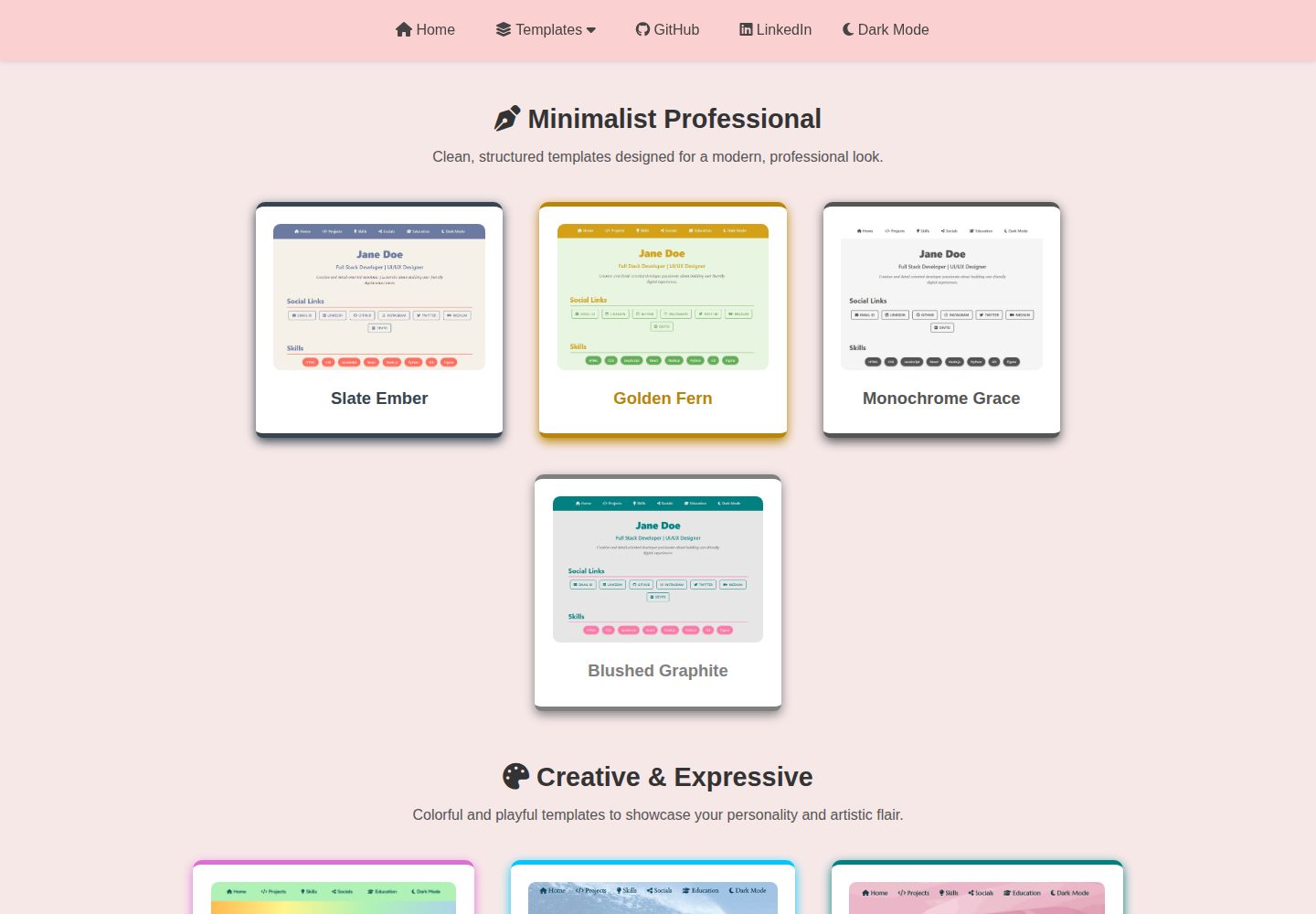
多套作品集模板与主题,可按模板/主题两级目录浏览和选用
HTML作品集文档
Portfolio-Templates — HTML 作品集模板
作者 madhurimarawat
一套基于 HTML 与 JSON 数据驱动的个人作品集模板集合,包含多套主题,支持明暗模式与响应式布局,并提供 Python 脚本辅助配置。
看看你的网站会是什么样
浏览真实页面截图,比较内容排版与手机效果。点击下方缩略图切换,放大查看整页细节。
全部页面与视图 3
截图用于了解视觉与布局,交互效果请以实际项目为准。
采集于 2026-10-02查看来源
值得关注的模板亮点
从已有项目资料中,快速了解它的特点。
个人资料与社交链接集中在 JSON 文件中,由 js/index.js 统一读取注入
每个模板/主题支持明暗模式切换,并提供桌面与移动端预览图
提供 Python 自动化脚本与本地服务器启动配置辅助搭建
以 MIT 许可发布,允许免费使用、修改、商用和分发该版本代码
模板详细介绍
该项目是一个作品集模板集合,使用 HTML 构建,所有模板共用一套基于 JSON 的数据获取机制。个人资料与社交链接等动态内容集中存放在 assets/user_data/ 目录下的 user.json 与 social_links.json 中,由 js/index.js 统一读取并注入各模板页面。仓库按“模板/主题”两级组织:每个模板目录下可包含多个主题文件夹,每个主题有独立的 index.html、明暗模式样式和预览图;也有不带主题、仅支持明暗切换的独立模板。仓库提供 Setup_Files 中的 Python 脚本用于快速配置,以及 Localhost_Setup 中的本地服务器启动配置。使用方式上,可将仓库作为 GitHub 模板生成自己的副本,修改 JSON 数据后通过 GitHub Pages 或 Netlify 部署。仓库以 MIT 许可发布,允许免费使用、修改、商用和分发该版本代码,但演示图片、字体、图标等第三方素材需单独核对许可,域名、托管等外部服务可能另行收费。
HTML作品集文档
适合你的项目吗?
适用场景
- 开发者、设计师、写作者或学生制作个人作品集页面
- 从多套主题中挑选配色与版式,快速替换为自己的内容
- 通过修改 JSON 数据文件批量更新作品集中的个人信息与链接
- 将仓库作为 GitHub 模板生成副本,再部署到 GitHub Pages 或 Netlify
适合人群
- 需要快速搭建静态个人作品集页面的个人用户
- 希望用 JSON 集中管理页面数据、避免逐页修改的开发者
- 偏好纯 HTML/CSS/JavaScript 方案、不引入前端框架的项目
- 需要明暗模式与响应式布局的作品集站点
上手与定制指南
结合仓库当前版本的说明,按下面的资料检查内容、配置与运行要求。
- 1
个人资料与社交链接在 assets/user_data/ 下的 user.json 与 social_links.json 中编辑,也可使用 Setup_Files 中的 Python 脚本辅助配置
- 2
页面数据由 js/index.js 统一获取并注入,修改 JSON 后需确保该脚本被正确引用
- 3
本地预览可参考 Localhost_Setup 中的服务器启动配置
- 4
部署可选用 GitHub Pages 或 Netlify,仓库 README 建议通过 GitHub 的 Use this template 生成自己的副本
- 5
演示图片、字体、图标等第三方素材需按各自许可核对,不能仅凭代码的 MIT 许可判断
授权与来源资料
使用条件与限制
免费使用 · 保留许可声明本次收录的是公开仓库中采用 MIT 许可的免费版本;免费范围为该版本代码,不代表外部服务或第三方素材免费。
使用时需要遵守
- 允许免费使用、修改、商用和分发该版本代码。
- 分发代码副本或实质性部分时,保留原作者版权声明和完整 MIT 许可声明。
- 代码按现状提供;担保与责任限制以原许可证及适用法律为准。
额外费用与待核对事项
- 若选择 Vercel 部署,需先在本地预构建站点,再手动部署生成的 _site/ 目录;Vercel 不原生支持 Jekyll。
- 部署到 Netlify 或 Vercel 前,需移除 _config.yml 或 front matter 中的 permalink 键,否则可能出现路由问题。
- 本地预览需按 Localhost_Setup/ 的说明操作,或使用 Python http.server 等简单服务器托管,不能直接以文件方式打开。
- 演示图片、字体、图标及其他第三方素材需按各自许可核对,不能仅凭代码的 MIT 许可判断。
- 域名、托管、数据库、支付或 AI 等外部服务可能另外收费。
查看原文依据
Permission is hereby granted, free of charge
许可证原文
❌ **Vercel** does **not natively support Jekyll**. To use Vercel, you’ll need to pre-build your site locally and deploy the generated `_site/` folder manually.
README 原文
Just remember to remove `permalink` keys in `_config.yml` or front matter to prevent routing issues.
README 原文
https://github.com/madhurimarawat/Portfolio-Templates/blob/main/LICENSEhttps://github.com/madhurimarawat/Portfolio-Templates/blob/main/README.mdUse the instructions in `Localhost_Setup/` or serve the site using a simple server like Python’s `http.server`.
README 原文
DeepSeek 根据仓库许可证和 README 整理 ·2026-10-02。结果仅覆盖已读取资料,依赖、图片、字体及后续条款变更以各自原文为准。
项目核对记录与介绍依据
模板资料
- 来源平台
- GitHub
- 资料与维护参考分
- 资料较完整 · 88 / 100
- 技术栈
- HTML
- 网站类型
- 作品集 · 文档
这个分数如何计算
本站按许可资料(最高30分)、演示链接(12分)、预览图(10分)、Star数(15分)、记录的维护时间(15分)、描述完整度(8分)、功能记录(5分)和分类资料(5分)计算。它不是代码、安全或性能测试,也不是 Google 评分;有链接不代表已实测可用。
这个项目需要核对什么
- 记录的仓库更新时间
- 2026-03-14
- 截图检查日期
- 2026-10-02
已收录演示链接。请用你的内容与屏幕尺寸检查;有演示不代表表单、认证或支付已经可用。
目录记录的主要技术栈是 HTML。请通过依赖清单和锁文件核对实际版本与托管要求。这些说明基于收录资料,不代表代码审计或部署实测。
查看具体选型方法 →介绍的制作与核对状态
介绍由 AI 辅助整理目录与仓库资料。仓库作者不等于这篇介绍的审核者。
已完成服务器许可规则与 AI 来源核对;未经过人工编辑审核。
查看当时使用的来源资料
SHA-256: 4341765b292ae4d4a1649903f981164b5e4ab1c3fc0d053766b167895cfb863f
2026-10-02T10:40:01.981Z
来源文件 / 仓库# 🎨 Portfolio Templates
A collection of **beautiful**, **easy-to-use**, and **professional portfolio templates** with elegant themes and responsive designs. All templates are powered by modular JSON-based data fetching and support seamless updates via Python automation scripts.
<p align="center">
<!-- Repository Size -->
<a href="https://github.com/madhurimarawat/Portfolio-Templates">
<img src="https://img.shields.io/github/repo-size/madhurimarawat/Portfolio-Templates?color=%23A8EDEA&label=Repo%20Size&labelColor=%23FF9A9E&style=for-the-badge&logo=github" alt="Repo Size">
</a>
<!-- Stars -->
<a href="https://github.com/madhurimarawat/Portfolio-Templates/stargazers">
<img src="https://img.shields.io/github/stars/madhurimarawat/Portfolio-Templates?color=%23FFB7C5&label=Stars&labelColor=%23FCA3B0&style=for-the-badge&logo=star" alt="GitHub Stars">
</a>
<!-- Forks -->
<a href="https://github.com/madhurimarawat/Portfolio-Templates/network/members">
<img src="https://img.shields.io/github/forks/madhurimarawat/Portfolio-Templates?color=%2388D8C0&label=Forks&labelColor=%2375CDB1&style=for-the-badge&logo=git" alt="GitHub Forks">
</a>
<!-- Issues (Open + Closed) -->
<a href="https://github.com/madhurimarawat/Portfolio-Templates/issues">
<img src="https://img.shields.io/github/issues/madhurimarawat/Portfolio-Templates?color=%23FFF5C3&label=Open%20Issues&labelColor=%23F9E5A4&style=for-the-badge&logo=bug" alt="GitHub Issues">
</a>
<a href="https://github.com/madhurimarawat/Portfolio-Templates/issues?q=is%3Aissue+is%3Aclosed">
<img src="https://img.shields.io/github/issues-closed/madhurimarawat/Portfolio-Templates?color=%23F1D1A1&label=Closed%20Issues&labelColor=%23FFB88D&style=for-the-badge&logo=bug" alt="Closed Issues">
</a>
<!-- Pull Requests (Open + Closed) -->
<a href="https://github.com/madhurimarawat/Portfolio-Templates/pulls">
<img src="https://img.shields.io/github/issues-pr/madhurimarawat/Portfolio-Templates?color=%23F7CAC9&label=Open%20PRs&labelColor=%23F1A7B8&style=for-the-badge&logo=git" alt="Open Pull Requests">
</a>
<a href="https://github.com/madhurimarawat/Portfolio-Templates/pulls?q=is%3Apr+is%3Aclosed">
<img src="https://img.shields.io/github/issues-pr-closed/madhurimarawat/Portfolio-Templates?color=%23D6E2E9&label=Closed%20PRs&labelColor=%23C4D4DF&style=for-the-badge&logo=git" alt="Closed Pull Requests">
</a>
<!-- Discussions -->
<a href="https://github.com/madhurimarawat/Portfolio-Templates/discussions">
<img src="https://img.shields.io/github/discussions/madhurimarawat/Portfolio-Templates?color=%23F5B7B1&label=Discussions&labelColor=%23F2A5A1&style=for-the-badge&logo=discourse" alt="GitHub Discussions">
</a>
<!-- Contributors -->
<a href="https://github.com/madhurimarawat/Portfolio-Templates/graphs/contributors">
<img src="https://img.shields.io/github/contributors/madhurimarawat/Portfolio-Templates?color=%23A8EDEA&label=Contributors&labelColor=%23FF9A9E&style=for-the-badge&logo=github" alt="GitHub Contributors">
</a>
<!-- License -->
<a href="https://github.com/madhurimarawat/Portfolio-Templates/blob/main/LICENSE">
<img src="https://img.shields.io/github/license/madhurimarawat/Portfolio-Templates?color=%23FF6B8B&label=License&labelColor=%23E65F73&style=for-the-badge&logo=open-source-initiative" alt="License">
</a>
<!-- Last Commit -->
<a href="https://github.com/madhurimarawat/Portfolio-Templates/commits/main">
<img src="https://img.shields.io/github/last-commit/madhurimarawat/Portfolio-Templates?color=%23F39C12&label=Last%20Commit&labelColor=%23D68910&style=for-the-badge&logo=github" alt="Last Commit">
</a>
<!-- GitHub Pages Deployment -->
<a href="https://github.com/madhurimarawat/Portfolio-Templates/actions/workflows/pages/pages-build-deployment">
<img src="https://github.com/madhurimarawat/Portfolio-Templates/actions/workflows/pages/pages-build-deployment/badge.svg"
alt="GitHub Pages Deployment"
style="height: 28px; vertical-align: middle;">
</a>
<!-- Watchers -->
<a href="https://github.com/madhurimarawat/Portfolio-Templates/watchers">
<img src="https://img.shields.io/github/watchers/madhurimarawat/Portfolio-Templates?color=%23F5B041&label=Watchers&labelColor=%23D68910&style=for-the-badge&logo=github" alt="GitHub Watchers">
</a>
</p>
> 💡 Whether you're a developer, designer, writer, or student, you'll find a template that fits your personal or professional needs—**fully responsive, dark mode compatible**, and highly customizable.
🔗 [**Live Demo**](https://madhurimarawat.github.io/Portfolio-Templates/)
Use this repository as a **GitHub template** to quickly create your own portfolio, simply click **[Use this template](https://github.com/madhurimarawat/Portfolio-Templates/generate)**, customize the content, and deploy your site using **GitHub Pages or Netlify**.
<div align="center">
<a href="https://madhurimarawat.github.io/Portfolio-Templates">
<img src="site-previews/website_1.png"
alt="Teal Rose Homepage Preview"
title="Click to view the Teal Rose homepage">
</a>
<a href="https://madhurimarawat.github.io/Portfolio-Templates">
<img src="site-previews/desktop_website.png"
alt="Desktop View of Teal Rose Portfolio"
title="Desktop Preview – Teal Rose Portfolio Template">
</a>
<a href="https://madhurimarawat.github.io/Portfolio-Templates">
<img src="site-previews/mobile_website.png"
alt="Mobile View of Teal Rose Portfolio"
title="Mobile Preview – Teal Rose Template">
</a>
</div>
---
## 🧩 Key Features
* 📁 **Multiple Templates & Themes**: Browse [Templates.md](Templates.md) to explore all available options.
* ⚙️ **Data-Driven**: All personal details and links are pulled from JSON files.
* 🌙 **Light & Dark Mode**: Each template supports dynamic theme switching.
* 💻 **Fully Responsive**: Mobile, tablet, and desktop views are supported out of the box.
* 🚀 **Automated Setup**: Python scripts make onboarding and updates effortless.
* 📚 **Dedicated Docs**: Each template and theme comes with its own separate documentation for easy understanding and customization.
---
## 🎨 Color Palette Highlights
(See [`css/variables.css`](css/variables.css) for full theme definitions)
```css
:root {
/* === Minimalist Professional === */
--color-slate-ember: #36454F;
--color-golden-fern: #B8860B;
--color-monochrome-grace: #555;
--color-blushed-graphite: grey;
/* === Creative & Expressive === */
--color-rainbow-spectrum: #DA70D6;
--color-blue-whisper: rgb(0, 200, 255);
--color-teal-rose: #008080;
/* === Nature-Inspired === */
--color-nature-canvas: #1ba35d;
--bg-white: #f7e8e8;
--text-grey: #444;
--text-blue: #007acc;
--header-white: #fbd0d0;
--hover-black: rgba(0, 0, 0, 0.1);
--heading-color: #333;
--light-grey: #555;
--section-fill: #fff;
--bg-grey: rgb(192, 181, 181);
--cream: #e8d6d6;
}
```
## 📱 Fully Responsive & Theme-Ready
All templates are built with responsiveness in mind and **gracefully transition between light and dark modes**, ensuring a seamless user experience across all devices.
---
## 📂 Data Structure & Automation
> [!NOTE]
> 💡 **[User Data Location](https://github.com/madhurimarawat/Portfolio-Templates/tree/main/assets/user_data)**
> All dynamic content (like social links and personal information) is managed through modular JSON files in the [`assets/user_data/`](https://github.com/madhurimarawat/Portfolio-Templates/tree/main/assets/user_data) directory:
>
> * [`social_links.json`](https://github.com/madhurimarawat/Portfolio-Templates/blob/main/assets/user_data/social_links.json)
> * [`user.json`](https://github.com/madhurimarawat/Portfolio-Templates/blob/main/assets/user_data/user.json)
>
> You can either **manually edit** these files or use the automation scripts in [`Setup_Files`](https://github.com/madhurimarawat/Portfolio-Templates/tree/main/Setup_Files) for quick setup.
🧠 **[Centralized Data Handling – `index.js`](https://github.com/madhurimarawat/Portfolio-Templates/blob/main/js/index.js)**
The [`index.js`](https://github.com/madhurimarawat/Portfolio-Templates/blob/main/js/index.js) file acts as the core fetcher and distributor of user data across all templates—keeping updates consistent and scalable.
---
## 🗂️ Directory Structure
```bash
Portfolio-Templates/
│
├── assets/ # 🧩 Global assets and resources
│ ├── user_data/ # 📄 JSON files for user data (e.g., social_links.json, user.json)
│ └── images/ # 🖼️ Icons and visual assets used across all templates
│
├── Template_Name/ # 🎨 Template folder with multiple themes (e.g., Minimalist_Professional)
│ ├── 📄 README.md # 📘 Overview of this template and its themes
│ ├── css/ # 🎨 Base CSS styles
│ │ ├── main-styles.css # 🧱 Base styles
│ │ ├── variables.css # 🎨 Theme color tokens and CSS variables
│ │ └── responsive-styles.css # 📱 Responsive media queries
│ │
│ └── Theme_Name/ # 🖌️ Individual theme folder (e.g., Slate_Ember, Golden_Fern)
│ ├── 📄 README.md # 📘 Theme-specific notes and usage
│ ├── index.html # 🏠 Theme homepage
│ ├── css/ # 🎨 Theme-specific styles
│ │ ├── index.css # ☀️ Light mode styles
│ │ └── index-dark.css # 🌙 Dark mode styles
│ └── site-previews/ # 🔍 Preview images for the theme
│ ├── website_1.png # 🖼️ Meta tag / OG image
│ ├── desktop_website.png # 🖥️ Desktop preview
│ └── mobile_website.png # 📱 Mobile preview
│
├── Template_Name/ # 🖼️ Template folder without themes (supports dark/light mode)
│ ├── 📄 README.md # 📘 Description of the standalone template
│ ├── css/ # 🎨 Base + theme styles
│ │ ├── main-styles.css # 🧱 Base styles
│ │ ├── variables.css # 🎨 Theme color tokens
│ │ ├── responsive-styles.css # 📱 Media queries
│ │ ├── index.css # ☀️ Light mode styles
│ │ └── index-dark.css # 🌙 Dark mode styles
│ ├── index.html # 🏠 Main HTML file
│ └── site-previews/ # 🔍 Preview images
│ ├── website_1.png # 🖼️ Meta tag / OG image
│ ├── desktop_website.png # 🖥️ Desktop preview
│ └── mobile_website.png # 📱 Mobile preview
│
├── js/ # ⚙️ JavaScript for all templates
│ └── index.js # 📡 Central script to fetch and inject user data
│
├── Setup_Files/ # 🛠️ Python scripts for automated setup
│ └── 📄 README.md # 📘 Instructions for using setup utilities
│
├── Localhost_Setup/ # 🌐 Local server launch configs (e.g., Jekyll)
│
├── 📄 README.md # 📘 Overview of the entire Portfolio-Templates project
├── 📄 LICENSE.md # 📜 License terms and usage permissions
├── 📄 CONTRIBUTING.md # 🧑💻 Contribution guidelines
└── 📄 Templates.md # 📚 Overview of all templates and themes
```
---
## ❓ FAQ
**Q: How do I switch between light and dark modes?**
A: It's automatic based on system settings, but you can customize the toggle using CSS/JavaScript.
**Q: How do I get started?**
**A:** Visit the `Getting_Started.md` file for setup instructions and usage steps.
**Q: How do I view all templates and themes?**
**A:** You can explore them on the website or in the project folders, each template and theme folder has a `README.md` file with preview images and theme information.
**Q: How do I see a live demo of a theme?**
**A:** Visit the live demo using this link format:
🌐 `https://madhurimarawat.github.io/Portfolio-Templates/Template_Name_Theme_Name`
> 📌 If the template has **no themes**, the format is simply:
> 🌐 `https://madhurimarawat.github.io/Portfolio-Templates/Theme_Name`
*(Replace `Template_Name` and `Theme_Name` with the actual names as per themes and templates.)*
**Q: Can I use my own fonts and color palette?**
A: Absolutely! Update the styles in `variables.css` and link to your preferred font in `main-styles.css`.
**Q: How do I test it locally?**
A: Use the instructions in `Localhost_Setup/` or serve the site using a simple server like Python’s `http.server`.
**Q: Is there any backend or database?**
A: No, it's fully static and runs directly in the browser. All data is pulled from local JSON files.
**Q: Can I deploy on Netlify or Vercel?**
A: Yes! Just remember to remove `permalink` keys in `_config.yml` or front matter to prevent routing issues.
> 🛠️ **Note:**
> - ✅ **Netlify** fully supports **Jekyll** and is ideal for deploying this project.
> - ❌ **Vercel** does **not natively support Jekyll**. To use Vercel, you’ll need to pre-build your site locally and deploy the generated `_site/` folder manually.
**Q: How can I contribute?**
**A:** You can contribute by ⭐ starring the repository and sharing it with others!
If you'd like to add a new template or theme, visit [`CONTRIBUTING.md`](CONTRIBUTING.md) for complete guidelines.
---
## 📸 Community Showcase
🔗 [Submit your usage](https://github.com/madhurimarawat/Portfolio-Templates/issues) using our [Example Usage Submission Template](https://github.com/madhurimarawat/Portfolio-Templates/blob/main/.github/ISSUE_TEMPLATE/example-usage-submission.md)! 🚀
| **Snapshot** | **Project Name** | **Description** | **Project Link** |
| --------------------------------------------------------------------------------------------------------------------------------- | ----------------- | --------------------------------------------------- | --------------------------------------------------------------------------- |
| <img src="https://raw.githubusercontent.com/madhurimarawat/Portfolio-Templates/main/site-previews/website_1.png" width="250"> | Portfolio-Templates | Showcasing Portfolio-Templates in a website layout. | [View Project](https://madhurimarawat.github.io/Portfolio-Templates/) |
| <img src="https://raw.githubusercontent.com/madhurimarawat/Portfolio-Templates/main/site-previews/Noa-Patchornik_website.png" width="250"> | Personal Portfolio | Built using the **Minimalist Professional** template with the **Slate Ember** theme. | [View Project](https://noa-patchornik.github.io/protfolio/) · by [noa-patchornik](https://github.com/noa-patchornik) |
| Add yours here! | Your Project Name | Briefly describe how you used Portfolio-Templates. | [Submit here](https://github.com/madhurimarawat/Portfolio-Templates/issues) |
---
## 👥 Contributors
All contributions are appreciated! Want to contribute? Check out:
📜 [Contribution Guidelines](https://github.com/madhurimarawat/Portfolio-Templates/blob/main/CONTRIBUTING.md) | 📩 [Issue Templates](https://github.com/madhurimarawat/Portfolio-Templates/blob/main/.github/ISSUE_TEMPLATE) | 🔄 [Pull Request Template](https://github.com/madhurimarawat/Portfolio-Templates/blob/main/.github/PULL_REQUEST_TEMPLATE.md)
<table>
<tr>
<td align="center">
<a href="https://github.com/madhurimarawat">
<img src="https://github.com/madhurimarawat.png" width="100px;" alt="Madhurima Rawat"/>
<br /><sub><b>Madhurima Rawat</b></sub>
</a>
<br />💻 Maintainer
</td>
<td align="center">
<a href="https://github.com/PoojaB24">
<img src="https://avatars.githubusercontent.com/u/118657278?v=4" width="100px;" alt="Pooja B"/>
<br /><sub><b>Pooja B</b></sub>
</a>
<br />🌌 Aurora Circuit
</td>
<td align="center">
<a href="https://github.com/username">
<img src="https://avatars.githubusercontent.com/u/87654321?v=4" width="100px;" alt="Contributor Name"/>
<br /><sub><b>Contributor Name</b></sub>
</a>
<br />🎨 New Template
</td>
</tr>
</table>
---
## Thanks for Visiting 😄
- Drop a 🌟 if you find this repository useful.<br><br>
- If you have any doubts or suggestions, feel free to reach me.<br><br>
📫 How to reach me: [](https://www.linkedin.com/in/madhurima-rawat/)
<a href ="mailto:[email protected]"><img src="https://github.com/madhurimarawat/Machine-Learning-Using-Python/assets/105432776/b6a0873a-e961-42c0-8fbf-ab65828c961a" height=35 width=30 title="Mail Illustration" alt="Mail Illustration📫" > </a><br><br>
- **Contribute and Discuss:** Feel free to open <a href= "https://github.com/madhurimarawat/Portfolio-Templates/issues">issues 🐛</a>, submit <a href = "https://github.com/madhurimarawat/Portfolio-Templates/pulls">pull requests 🛠️</a>, or start <a href = "https://github.com/madhurimarawat/Portfolio-Templates/discussions">discussions 💬</a> to help improve this repository!
看看同类模板
对比同技术栈与用途的模板,找到更适合的视觉与内容结构。

simplefolio
⚡️ A minimal portfolio template for Developers
HTML · 作品集

Freelancer
Freelancer 是 Start Bootstrap 出品的单页作品集模板,专为自由职业者、设计师和小型工作室设计。 页面结构清晰,包含多个内容区块、响应式作品集网格,每个作品项目配有模态窗口展示详情。
HTML · 作品集

Resume
Resume 是 Start Bootstrap 推出的简历与 CV 主题,基于 Bootstrap 构建,采用固定侧边栏加内容区块的结构。
HTML · 作品集

Creative
Creative 是 Start Bootstrap 团队维护的一款单页营销模板,定位明确:为创意机构或产品服务提供一个以作品展示和行动号召为核心的落地页。
HTML · 企业官网

Grayscale
Grayscale 是 Start Bootstrap 出品的深色系单页 HTML 模板,基于 Bootstrap 构建。 它的视觉重心放在大尺寸首屏和清晰的内容分区上,整体氛围偏暗,适合摄影、活动或品牌叙事类网站。
HTML · 企业官网

startbootstrap-stylish-portfolio
Stylish Portfolio 是 Start Bootstrap 维护的单页作品集主题,基于 Bootstrap 构建,采用多个内容区块加离屏导航菜单的结构。
HTML · 作品集